Undopia Patch

—
[
](https://modrinth.com/resourcepack/undopia-patch)
[
](https://www.curseforge.com/minecraft/texture-packs/undopia-patch)
[](https://ko-fi.com/undugt)
Undopia Patch is a Minecraft Resource Pack that aims to improve the vanilla game without fundamentally changing it. It adds a variety of features that fit perfectly into the Vanilla gameplay. The added features help to improve the game, make it more beautiful, add more variety or simply fix visual errors.
—
[](https://patch.undopia.net)
—
### This Resource Pack comes with 4 different Flavours


—
### The Default and Dark Edition require
[](https://optifine.net/)

[](https://modrinth.com/mod/entitytexturefeatures)
[](https://modrinth.com/mod/entity-model-features)
[](https://modrinth.com/mod/cit-resewn)
—
[](https://patch.undopia.net)
Don’t like some features or only want certain ones?
Then try out the Undopia Patch Customizer and create your own version.
—
[](https://patch.undopia.net/custom-downloads/)
[](https://patch.undopia.net/faq)
[](https://patch.undopia.net/terms-and-conditions)
[](https://github.com/UnduGT/undopiapatch/issues)
Undopia Old Firefly

# Undopia Old Firefly
[
](https://modrinth.com/resourcepack/undopia-old-firefly)
[
](https://www.curseforge.com/minecraft/texture-packs/undopia-old-firefly)
[](https://ko-fi.com/undugt)
Undopia Old Firefly changes the Fireflies added in 25w05a to their originally announced design from Minecraft Live 2021, which was scrapped.
Additionally, the Firefly Bushes are adjusted to match the colors.
Note: This pack is kinda experimental, I don’t know yet if I’ll continue with it, it was more of an idea that I had spontaneously to see if it was possible.
—
[](https://patch.undopia.net)
This resource pack is part of the Undopia Patch family.
—
[](https://patch.undopia.net/custom-downloads/)
[](https://patch.undopia.net/faq)
[](https://patch.undopia.net/terms-and-conditions)
[](https://github.com/UnduGT/undopiapatch/issues)
Underwater Sky

Underwater Sky is a one-of-a-kind sky resource pack that will turn your Minecraft sky into a fully animated underwater scene. This pack is meant to evoke a sense of foreboding with a hazy dark blue underwater scene. Your sky will show gorgeous lightshafts streaming through the water surface, and far below you will see beautiful water caustics moving across the ocean ravine floor.
I addition, this pack also features several unique events, such as swarms of fish appearing, that will happen from time to time.
README
### Pick the correct version
– **Java vanilla**: These versions are set to “alpha” release type. This version of the pack is not animated, and doesn’t have any unique events.
– **Bedrock**: Download from the [bedrock page](https://www.planetminecraft.com/texture-pack/underwater-sky-bedrock/). This version of the pack is not animated, and doesn’t have any unique events.
– **Java Modded**: This is the main version of the pack, and is set to “release” type. Select a version and scroll down to see the required mod(s). If more than one dependency is listed for a version, you only need one.* When multiple mods are added as a dependency, that means that the pack will work with all of them, but only one of them is needed to get the pack working. Some mods are available on different versions and mod loaders, so I added support for as many as possible for the widest possible compatibility. Version compatibility is set to the pool of all the mods combined, so what you see is possible to run with at least one of the mods. Check the compatibility table below.
– **OptiFine**: Works with all OptiFine versions, and thus also with Skyboxify.
### FYI
– *Since Skyboxify only supports the custom sky feature from OptiFine, you will need Animatica to get the sky animated, and Polytone to get custom fog colors. Therefore, these 2 mods are **only** needed when using Skyboxify. Due to a [bug](https://github.com/FoundationGames/Animatica/issues/74) in Animatica, there will be a small seam in the sky.
– To check out the many features of the pack, I’ve provided a text file in the pack that has instructions.
– If you want to disable certain featues of the pack, get [Respackopts](https://modrinth.com/mod/respackopts) and use the gizmo in the pack selection screen. Note that if you use Celestial 2.0, the in-game chat will show error messages, but you can ignore those. Alternatively, you can follow the instructions in the text file inside the pack. (this method will not cause error messages to appear)
– Celestial 2.0 requires core shaders to have smooth transitions between different sky layers, which is implemented as a pack overlay in the latest release. Since pack overlays only work from 1.20.2 and above, if you’re playing on a version below that, you need to copy the “shaders” folder from “celestial/assets/minecraft/” to “assets/minecraft/”.
### Shaders
This pack does of course work with shaders, but since each shader works differently and has different settings, you will most likely need to tweak them to get a good look.
Features


Compatibility table

If you would like to leave a comment, you can do so on the [Planet Minecraft](https://www.planetminecraft.com/texture-pack/underwater-sky/) page.
Uncontrolled Grass
grass grows on other blocks in an uncontrolled manner
these are **just textures**
need [optifine](https://optifine.net/downloads)
UltraRealism 1024x
UltraRealism 1024x – Next-Level Visuals for Minecraft
Experience Minecraft like never before with UltraRealism1024x — a high-resolution resource pack built for players who crave lifelike detail and cinematic visuals. Most of the blocks, item, and texture is crafted in stunning 1024x resolution to bring out the full beauty of your world without losing the core Minecraft experience.
🟩 Features:
Ultra-HD 1024x textures for maximum realism
Enhanced blocks, items, and environments
Ideal for shaders and cinematic builds
Compatible with most Minecraft versions
Perfect for realism enthusiasts and content creators
📦 Installation:
Download the ZIP file
Move it to your Minecraft Resource Packs folder
Enable the pack in-game
(Optional) Use with Optifine and shaders for best results (I Recommend Using Seus PTGI)
🌍 Whether you’re creating epic builds or just exploring your world, UltraRealism1024x transforms Minecraft into a breathtaking experience.
Ultra PvP
**⚔️ Ultra PvP – The Ultimate Minecraft Combat Pack 💥**
Ultra PvP is a fast, clean, and explosive 16× resource pack designed for Crystal PvP, Cart PvP, Anchor PvP, and Classic PvP. Built for visibility, speed, and combat clarity — every pixel is made for players who want to click fast and win faster.
**🔧 Features**
– ✅ 16× FPS-optimized textures – performance without compromise
– 💠 Clear End Crystals – place and break with confidence
– 🧊 Short swords – clean screens = better fights
– 🔥 Low fire & minimal particles – see every frame
– 🛡️ Custom armor and totem textures – instant feedback in battle
– 🎯 Centered crosshair – perfect aim, always
– 🛠️ Anchor and glowstone textures – made for charged plays
– 🛒 Rails, minecarts & more – ready for Cart PvP setups
**🧠 PvP Styles Supported**
– 💎 Crystal PvP
– 🕳️ Anchor PvP
– 🛒 Cart PvP
– ⚔️ General PvP (Melee, Pot, Soup, etc.)
Ultimate Spider-Verse
Ultimate Spider-Verse
=====================
### Minecraft but its in the Spider-Verse! Includes suits that you can customize, some textures that have been changed to fit the Spider-Verse style, and even custom music!
Imagine stepping into the enchanting world of Minecraft, but with a thrilling twist – it’s set within the mesmerizing Spider-Verse! Brace yourself for an adventure that transcends dimensions as you swing through the pixelated landscapes, embracing the power and agility of various Spider-Man incarnations.
In this extraordinary Resource Pack, you’ll find an array of remarkable suits at your disposal, each representing different iconic versions of the beloved web-slinger. Don the legendary red and blue suit of Peter Parker, the original Spider-Man, and experience the thrill of navigating the blocky cityscape with ease. Or perhaps you prefer the sleek black suit of the symbiote.
But the customization options don’t stop there. Dive into the intricacies of this Spider-Verse adaptation and find yourself immersed in a world where you can personalize every aspect of your character’s appearance. Tweak your suit designs, modify your mask to reflect your unique style. Whether you prefer a classic, timeless look or wish to forge your own original design, the possibilities are limitless.
**(Optifine/EMF & ETF Required for custom spiders)**
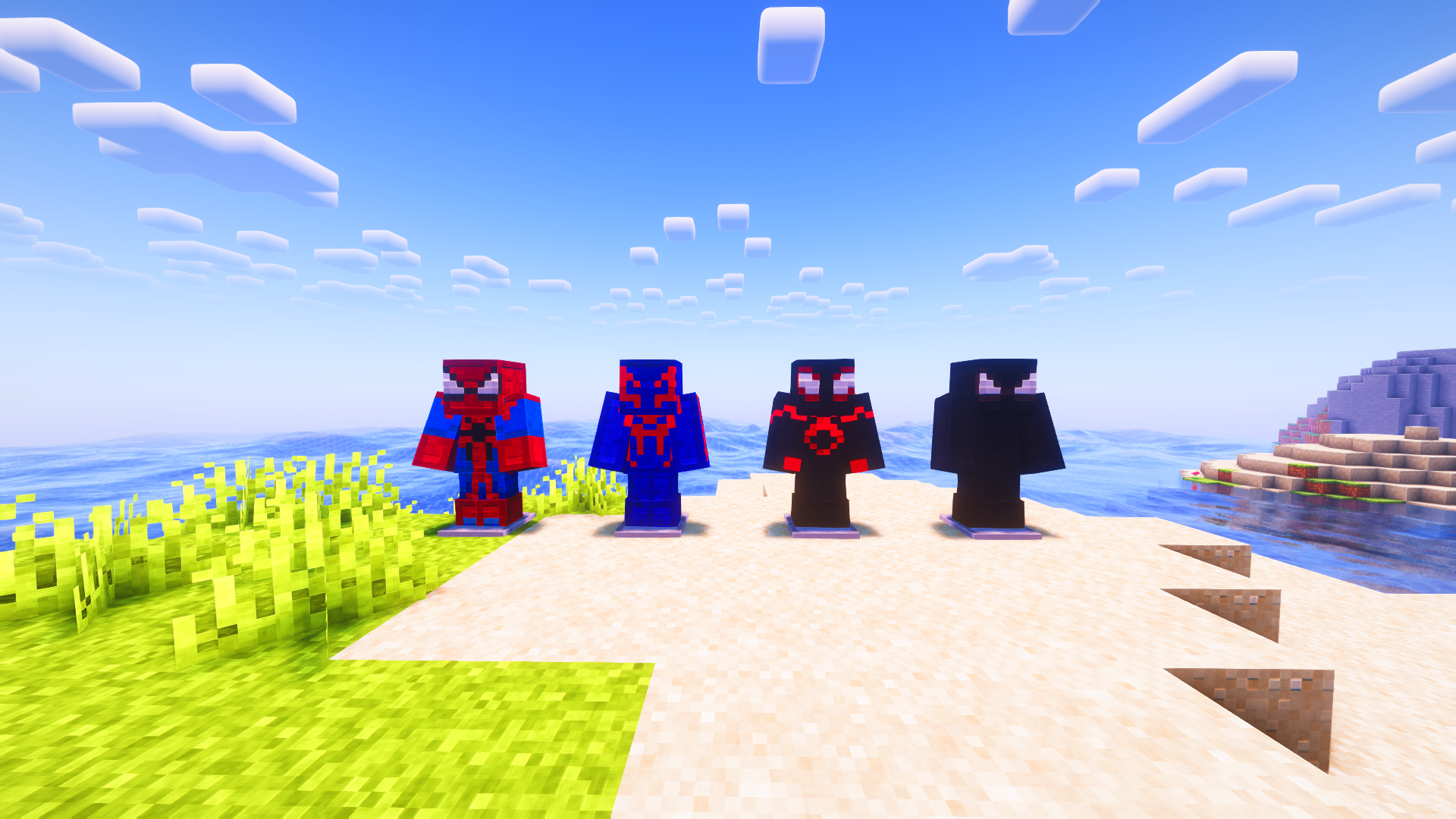
Guide (Apply on leather armor)
——————————
* **Spiderman Suit:** Use Vex armor trim
* **Miles Morales Suit:** Use Silence armor trim
* **Miguel O’Hara Suit:** Use Eye armor trim
* **Gwen Suit:** Use Rib armor trim
**(Notice: This Resource pack is in no way affiliated to the Spider-Verse films or Sony)**
Shizotoaster’s Ultimate Armor Patch
## Warning! [EMF](https://modrinth.com/mod/entity-model-features), [JsonEM](https://modrinth.com/mod/jsonem) or [EMJ](https://www.curseforge.com/minecraft/mc-mods/entity-model-json) required to work
# Overview
This resource pack changes vanilla armor model to add some features and fix some bugs. Current bugfixes and additions are:
* Z-fighting fix
* Different armor model for slim skin type
* Overlay support for chestplate model
* Improved armor arms position
# FAQ
* – Is this pack compatible with ?
– No, sorry, because it modifies both armor texture and model. However, you can find a compatibility add-on [here](https://github.com/shizotoaster/uap-addons) or [request one](https://github.com/shizotoaster/uap-addons/issues) if it’s not present
* – Can I use this in my modpacks?
– For sure! Just leave a link to this page in credits
* – Not working!!
– You need JsonEM or EMJ installed. If the issue is not fixed by installing them, dm me in discord (bhs#4531), telegram (@shizotoaster) or vk (@svtlng)
* – Make it work on 1.16/1.12/any other version lower than 1.17!!
– This pack is using model features introduced by Mojang in 1.17, backport of the pack is not possible
* – Compatible with OptiFine?
– As long as the mods are
UltimaCraft PBR

# UltimaCraft PBR
**UltimaCraft PBR** – is an extension of the [UltimaCraft resource pack](https://www.curseforge.com/minecraft/texture-packs/ultimacraft)
## Features
Optifine (with shaders):
– reflections on blocks and items
– parallax effect
– bumped texture (normal maps)
– LabPBR support
## Mod support
– [Biomes O’ Plenty](https://www.curseforge.com/minecraft/mc-mods/biomes-o-plenty)
—
_© You can use UltimaCraft PBR publicly, but you can not claim it as your property._
UltimaCraft

# UltimaCraft
*UltimaCraft* – is a vanilla styled resource pack, designed to enhance the overall look and feel of Minecraft by adding new textures, animations, and other visual effects.
## Features
Vanilla:
– custom block models (doors, trapdoors etc.)
– random block variations
– texture fixes and tweaks
– item animations
Optifine:
– connected textures
– biome depended textures
– environment improvements
– GUI tweaks
## Add-ons
### [UltimaCraft PBR add-on](https://modrinth.com/resourcepack/ultimacraft-pbr)
[](https://modrinth.com/resourcepack/ultimacraft-pbr “Ultimacraft PBR”)
—
### [UltimaCraft HR add-on](https://www.curseforge.com/minecraft/texture-packs/ultimacraft-hr)
[](https://www.curseforge.com/minecraft/texture-packs/ultimacraft-hr “Ultimacraft HR”)
—
### [UltimaCraft Enchantments add-on](https://www.curseforge.com/minecraft/texture-packs/ultimacraft-enchantments)
[](https://www.curseforge.com/minecraft/texture-packs/ultimacraft-enchantments “Ultimacraft Enchantments”)
—
### [UltimaCraft Models add-on](https://modrinth.com/resourcepack/ultimacraft-models)
[](https://modrinth.com/resourcepack/ultimacraft-models “Ultimacraft Models”)
—
### [UltimaCraft Leaf add-on](https://modrinth.com/resourcepack/ultimacraft-leaf)
[](https://modrinth.com/resourcepack/ultimacraft-leaf “Ultimacraft Leaf”)
—
### [UltimaCraft Interface add-on](https://www.curseforge.com/minecraft/texture-packs/ultimacraft-interface)
[](https://www.curseforge.com/minecraft/texture-packs/ultimacraft-interface “Ultimacraft Interface”)
## Mod support
– [Biomes O’ Plenty](https://modrinth.com/mod/biomes-o-plenty)
—
_© You can use UltimaCraft publicly, but you can not claim it as your property._