This resourcepack adds a lot new sky colors and custom fog for each biome, giving an incredible experience for Minecraft. Works with [Polytone](https://modrinth.com/mod/polytone). You can play with it in vanilla minecraft, but i recommend play it with [VJ’s STYLE](https://modrinth.com/resourcepack/vjs-style)
VividHorizons
# VividHorizons by ilb0tta (1.6.1 – 26.1.2)

⚙️ Installation guide
– Go into the **Versions** tab of this page and download the resource pack for the version that you need.
– Now put the file you just downloaded into the Minecraft’s **resourcepacks** folder, which is situated in this directory.
“`
C:UsersYOUAppDataRoaming.minecraftresourcepacks
“`
– No need to unzip or changing file structure.
– Go into Minecraft –> Options –> Go into Resource packs and apply the resource pack you’ve just put in.
## 🎁 What is the point of this pack?
This simple resource pack aims to create a better and more enjoyable experience for all Minecraft players, by changing biomes, grass and foliage (e.g. leaves) colors to make them more vivid and colorful.
Ah, and **NO MODS OR OPTIFINE NEEDED**.
## ✨ Features
– Boosted Biomes colors,
– Boosted Grass colors,
– Boosted Foliage and Dry variant colors,
– Usable with other resource pack, such as 32x ones.
– Always (or near) up to date for the latest Minecraft version!
## ❤️ Support and Questions
If you have any kind of questions or run into issues with the resource pack, don’t hesitate to leave a comment or ask a question, and I’ll be happy to help.
[Found a bug? / Report an issue. Click here.](https://github.com/ilb0tta/VividHorizons/issues)
[Have a question or suggestion? Click Here.](https://github.com/ilb0tta/VividHorizons/discussions/new/choose)
## 📖 License and more…
This pack is licensed under **ARR**, which stands for “All Rights Reserved”.
What does this mean?
This means that this work is owned by me, **ilb0tta**, and you, the user, are allowed to download and use this pack **only from official sources where it has been published by me** (such as Modrinth.com).
Any other use is **strictly prohibited**, including, but not limited to:
– Reposting or redistributing the pack;
– Modifying the pack and sharing the modified version;
– Selling any part of this work;
– Using assets from this pack in other projects.
If you have any questions or doubts feel free to contact me.
My goal is to provide the community with high-quality content that improves players’ gameplay. So please, don’t steal, copy or redistribute someone else’s work. Making something with your own hands makes you feel more confident and grateful towards yourself. ❤️
## 💎 Sponsors
### NextDNS
Browse safer with **_NextDNS_**, it automatically blocks ads, trackers, and malicious sites **before they can even load**, across all your sites, apps, devices and networks, with zero hassle.
Protect your family with **built-in parental controls** and manage everything easily from a simple, **real-time dashboard**. With **encrypted DNS servers** in multiple locations, your privacy stays secure wherever you are.
[**Create an account through this link**](https://nextdns.io/?from=up775rtn) and get **_unlimited protection on all your devices_** for **just $19.99 per year!**
### HidenCloud
Need a powerful **AMD-powered DDR5 RAM** Dedicated Minecraft Hosting platform that **doesn’t break the bank**? Check out **HidenCloud**, starting at just less than **50$/YEAR** for a good MC plan. [**Try HidenCloud now with this link**](https://dash.hidencloud.com/aff/XIBLH3) to get a **5% DISCOUNT CODE** on your entire order. (And support my projects!)
NOTE: to get the discount simply click the link, scroll down and click “**set up**” a plan, then your discount code will be **already applied at your checkout!**
TIP: you can **stack** coupons!
Thank you for supporting my projects, I truly appreciate it!,
ilb0tta.
Visually Waterlogged
# Visually Waterlogged!
### About
This pack adds a green algae layer on waterlogged blocks!
Can be useful when using top slabs as a floor or something
### This Resourcepack gives all Leaves their own distinction, depending on decayability.
—
Once you’re familiar with the pack, you’ll be able to tell if a leaf is Decaying, Placed by another player or natural – at just a glance!
Inspired by the works of [6_28318530717958](https://modrinth.com/user/6_28318530717958)
Visual Leaf Decay
# Visual Leaf Decay
This resource pack changes leaves to look dead and brown when they are decaying.
This can be useful to tell if you have removed all the logs from a tree, or just as a general aesthetic improvement.
[Click here for a bushy leaves version.](https://www.curseforge.com/minecraft/texture-packs/visual-leaf-decay/files/3841291)
[Click here for a programmer art version.](https://www.curseforge.com/minecraft/texture-packs/visual-leaf-decay/files/3841298)
how the pack works:
Terms of usage
If you use or feature this resourcepack through any medium (PMC, YouTube, Curseforge, etc.), you must credit me and link to this page and/or my profile.
If you would like to use this in your public resourcepack, please ask me first, and include credit and a link to this page both in a credits.txt in the resourcepack file and in the description.
Usage must be a modification or addition to your pack, not a repost.
If you see anyone using my content without permission, please let me know so I can sort it out 🙂
This resourcepack is licensed under [Creative Commons Attribution-NonCommercial-ShareAlike 4.0 International License](https://creativecommons.org/licenses/by-nc-sa/4.0/)
Visual Effects+ is a resource pack that overhauls Minecraft by reworking every single biome in the game, changing vanilla particles, adding a bunch of new ones, introducing dynamic and colorful fog, a new weather system, and much more.
You can add any resource pack you want and get unique experience with VFX+ resource pack!
**Shader compatibility:**
VFX+ isn’t compatible with any shader that replaces fog or turns off particles.
————————————————————————————————
### **IMPORTANT! RECOMMENDED SETTINGS!**
—
Recommended settings
### 1. Pack should be always on top!
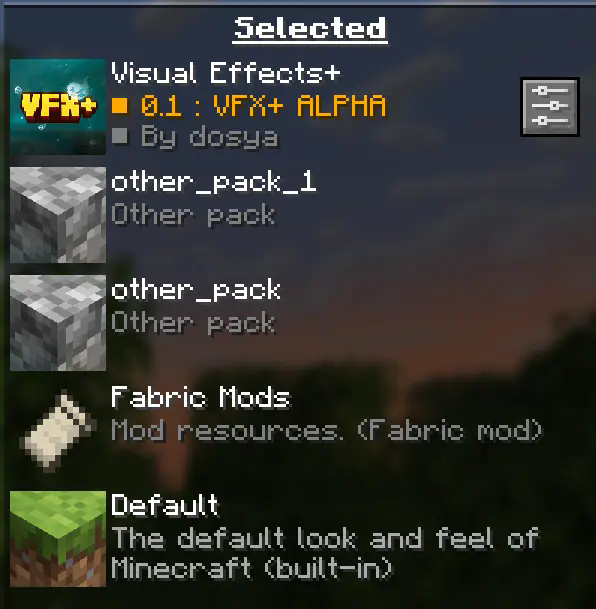
Your pack should be always on top to prevent any polytone related issues.
### 2. Turn off fog occlusion!
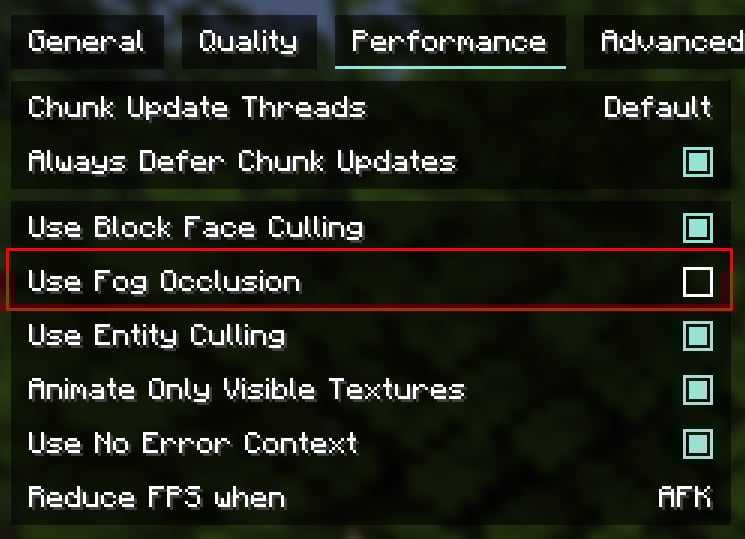
You can find this option in **”Performance”** tab.
**For low-end PC left it turned on**
**Recommended render distance is 12 – 16 chunks, but you can modify this value as you want**
————————————————————————————————
“This resource pack is in **early development** and alot of things might change by release time.
Also this pack might have bugs or any other issues. **If something went wrong you can state about it on [Visual Effects+ discord server](https://discord.gg/wcVM9VB9V6).**
————————————————————————————————
**Features:**
————————————————————————————————
**You can find more new particles and overhauled biomes by playing the game with Visual Effects+ resource pack!**
————————————————————————————————
CREDITS
[Tealover](https://modrinth.com/user/tealover) – testing, suggestions and other help.
[sapling.](https://modrinth.com/user/thesapling) – testing, suggestions and other help.
[Cubert](https://modrinth.com/user/cubert1) – helped to decide a title for a project, testing,
suggestions and other help.
[Peanut Butter Jelly](https://modrinth.com/user/JellyBorger) – testing and suggestions.
[VFX+ discord server](https://discord.gg/faJjzfG97H) – big thank you for community feedback and support.
[sapling. Mods discord server](https://discord.gg/P8pWcHwyVQ) – big thank you for community feedback and support.
[MehVahdJukaar](https://modrinth.com/user/MehVahdJukaar) – helping out with polytone.
3d Breaking X Visible Ores
This Resource pack is a combination of 2 packs, 3d breaking, and visble ores. Duh.
Here’s a video showing off the pack.
Make sure to use Continuity!
Visible Powdered Snow
This pack adds a clear outline to powdered snow, making it much easier to spot while exploring or building. No more accidentally falling into hidden patches. The border helps powdered snow stand out from regular snow without changing much.
**Subscribe to my YouTube:** https://www.youtube.com/@OasisSucksAtMc?sub_confirmation=1
Visible Powdered Snow Bocks
This texture pack will nicely outline all powdered snow blocks with a easy to see border.
—
### 🌍 Want Your Own Minecraft Server?
Running an **SMP**, playing with friends, or testing mods and plugins?
**ByteBuilders Hosting** delivers fast, reliable Minecraft servers at affordable prices.
🎁 **Get 20% OFF your server** using this affiliate link:
👉 **[Click here to get 20% off at ByteBuilders Hosting](https://billing.bytebuilders.co.za/aff/BF20)**
—
Visible Particles
### What does this do?
This resource pack retextures potion particles to be visible. This is especially useful for finding invisible entities.
### How does it work?
It changes the the texture of the effect particle to 1 large pixel.
### What versions does this support?
This resource pack works for versions 1.14 (19w06a) and up.

