Ar7hur’s Vanilla Pack
A simple vanilla style Resource Pack that improves tools, armors, entities, paintings, interfaces and more.
It changes things that could be better in Minecraft or don’t fit the style of the game, as well as fixing some errors.
Please, do not use the models and textures in your own projects without permission.
—
### FEATURES:
– The better the tool, the more detailed its texture will be, creating a progression effect.
– Armors with a new style, each one with a different helmet.
– Renaissance works replacing the default paintings.
– Improved interfaces for crafting table, furnace, chest, enchanting table, anvil and more.
– Ears for pigs, snouts for cows, combs for chickens, and many other simple details that aren’t in vanilla game.
– Random and biome-dependent mob textures. Some of them are backported from newer Minecraft versions.
– Much more!
—
### REQUIREMENTS:
OptiFine is not required. However, some things may remain unchanged if you don’t have it.
OptiFine HD U G8 or a newer version is essential to ensure everything works properly.
—
### INSPIRATIONS:
– **KhalMika**’s Tools Reimagined
– **Captain**’s Updated Zera Armor
– **Reijvi**’s Reimagined
– **Xeno**’s Colourful Containers GUI
– **Lukidon**’s Mobs Refreshed
– **Max**’s Better Mobs
– **Pablo**’s Better Paintings
– **Xisumavoid**’s Vanilla Tweaks
—
### CONTACT:

ar7hur.r
Human Era: Vanilla Military
**Please Donate To Help Support With The Pack Development, It Will Also Help Me Out Alot With My Current Situation And Some Things Going On, Thank You :)**
https://ko-fi.com/cmdrmcnuggets
**[Requires Optifine]**
**[For Fabric Users:]**
https://modrinth.com/mod/entitytexturefeatures
https://modrinth.com/mod/entity-model-features
https://modrinth.com/mod/nopackcompatcheck
https://modrinth.com/mod/cit-resewn
**[Instructions, Custom Weapons Lists, Custom Vehicle Mobs Lists, & Micro-Packs Available Inside The Pack Zip File, More Available on Human Era: Villagers & Illagers pack]**
**[HUMAN ERA: VILLAGERS & ILLAGERS IS RECOMMENDED, SEE ALSO THR GALLERY FOR INSTRUCTIONS FOR HEVI AND FA]**
This is a pack from the “Human Era” series, a series that reshapes Minecraft into something else with a more immersive and realistic way to integrate humans, and it wont be just about adding humans, but also make other mobs have a feel of something more mystique and less cartoony. I wont explain any further.
This pack is made to change the aesthetic of Human Era: Villagers & Illagers from medieval to modern tactical military, it has armed soldiers and stuff.
This pack contains Guns, Tanks, and Soldiers, and to obtain guns & vehicles, you can rename bow into weapons listed inside the pack file and it will change the appearance, from an ak47 into maybe an m4a1 or mdr rifle, and also, using nametags, you can rename the horse into 4 types of war vehicles and 5 types of colors, lists are also found inside the pack file. Example: rename bow to “Nugget MDR” or “Nugget Cheytac”, and rename horse with nametag “Green Tank”, “Desert Cruiser” or “Snow Carrier”.
**IMPORTANT INFO IN A Q&A:**
Q: Why should i use this pack when i can use alot of military mods that look and is 100% better than this one?
A: If you are playing in Servers, Realms, SMP, or Singleplayer with optimization mods, but wanna spice things up with military stuff and dont/couldnt use mods, this pack has that, but only a certain amount of content due to recent development hurdles.
Q: Why is it vanilla style?
A: It’s a long story, but it’s to match my other packs style, and also, it’s not just one of those “vanilla” styles, this pack makes it look like something Mojang would make, though i still sprinkle my own style cuz there are certain elements i dislike about how Mojang styles some aspects.
Q: How do i apply these “Micropacks”?
A: You Download “Human Era: Villagers & Illagers”, and then you open the pack file, and then go to the micropacks folder.
Q: How do I obtain vehicles and weapons?
A: Simple, you open the pack file, and go to the Custom Lists folder, the txt files should be able to guide you.
Q: What if i dont want to use this pack… respectfully?
A: I wont stop you, people have preferences, but if any of you come insulting any of my packs and how everything is better than mine, I still can’t stop you and dont plan to stop you, but may bad luck and evil spirits come down to you and your family.
However, if you are a good human being that turn down, deny, or reject, but are respectful and polite with it, God loves you and you will receive God’s blessings, you are a lovable human being.
Vanilla Mending
—
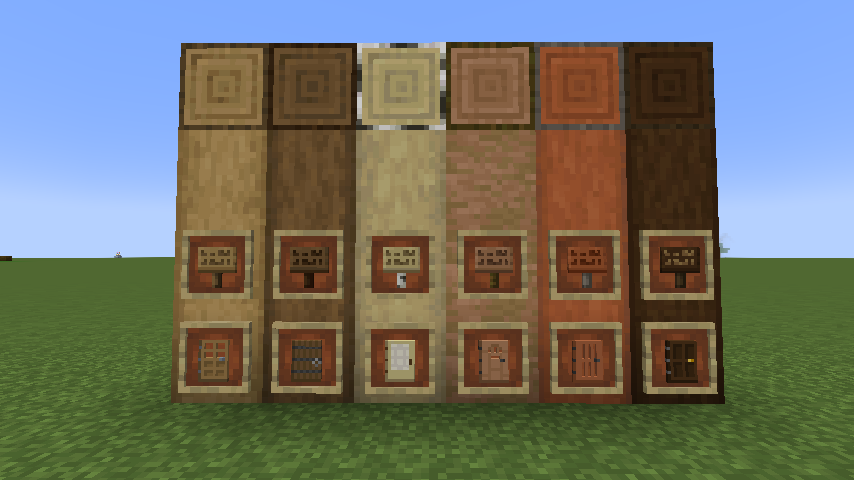
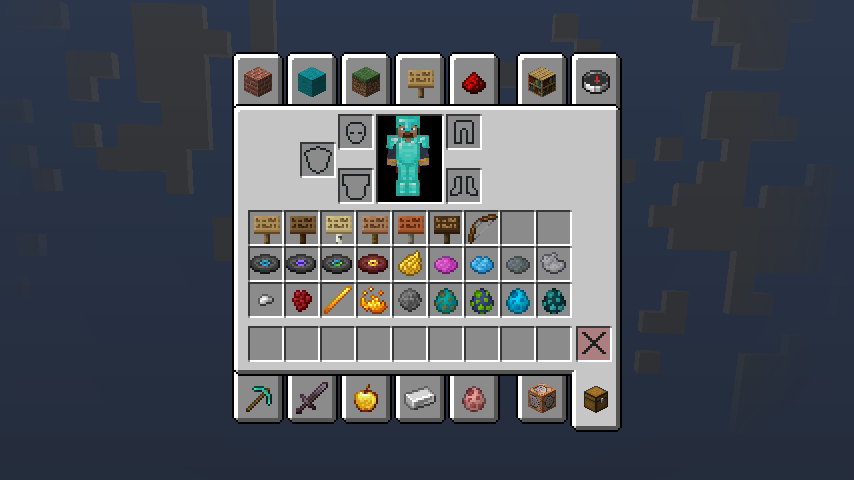
[Texture Update](https://minecraft.wiki/w/Texture_Update) has changed most of the textures in Minecraft, with some textures still remaining old and outdated though. Despite that Mojang updated many of these textures in the subsquent versions and the overall look is now much better, it’s even still an issue in the latest release (the most significant one – overworld sign items).
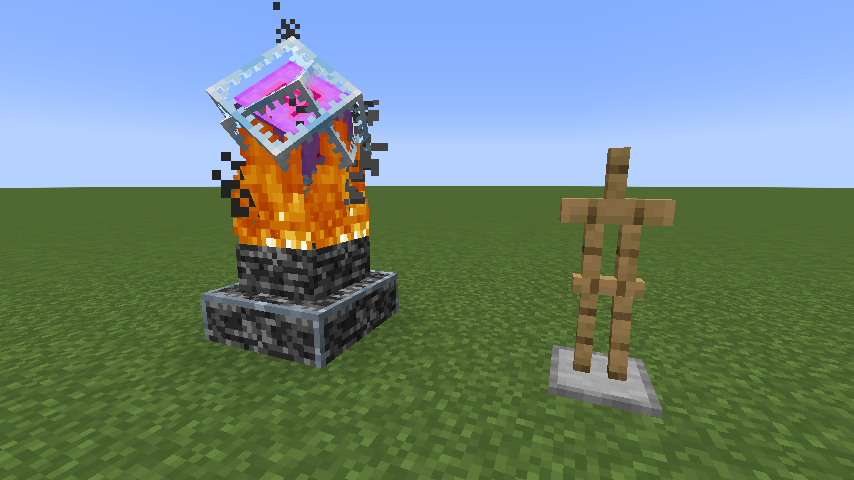
This pack aims to updating all the textures and make them consistent with each other, including Paintings and GUI. Also, this pack will fix some issues in vanilla texture, such as the bottom of the rods of Blaze ([MC-144327](https://bugs.mojang.com/browse/MC-144327)).
This pack is also available on [CurseForge](https://www.curseforge.com/minecraft/texture-packs/vanilla-mending).
Vanilla Mashup (PBR)
# Vanilla Mashup
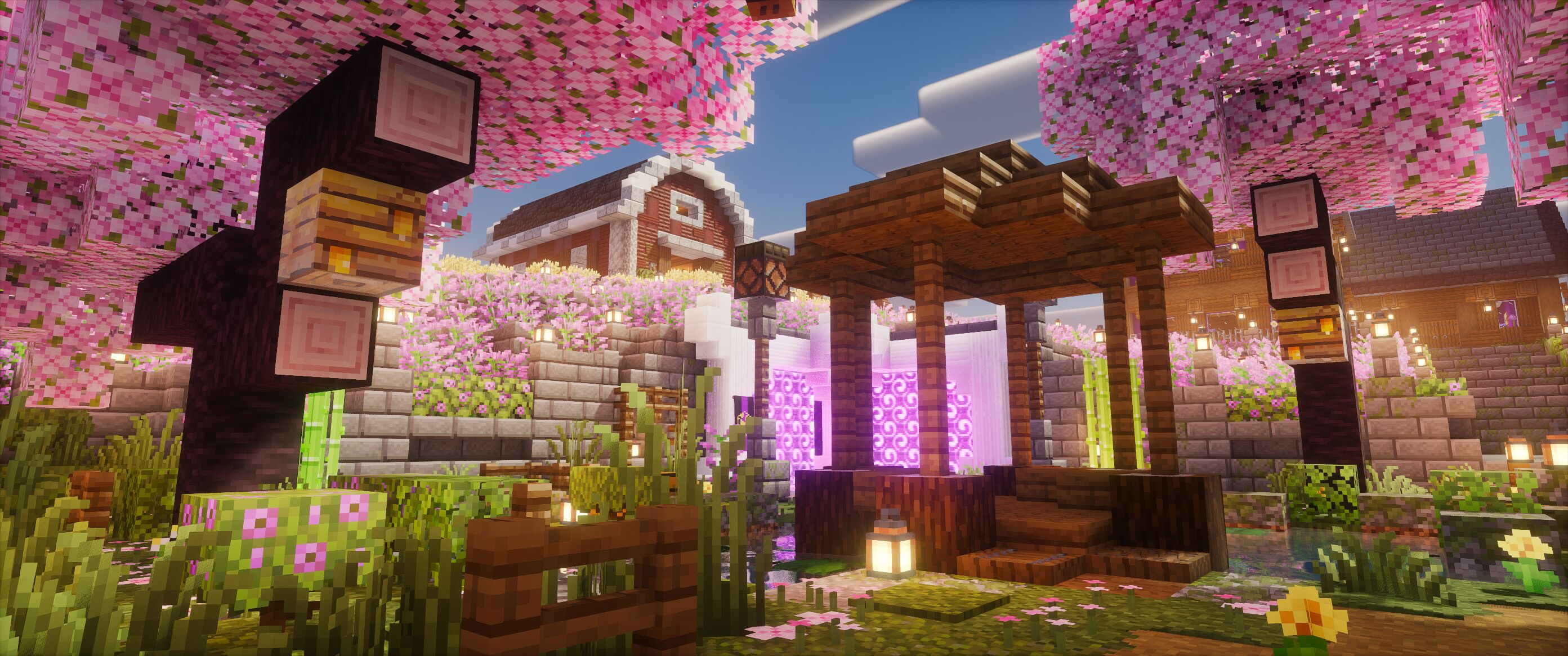
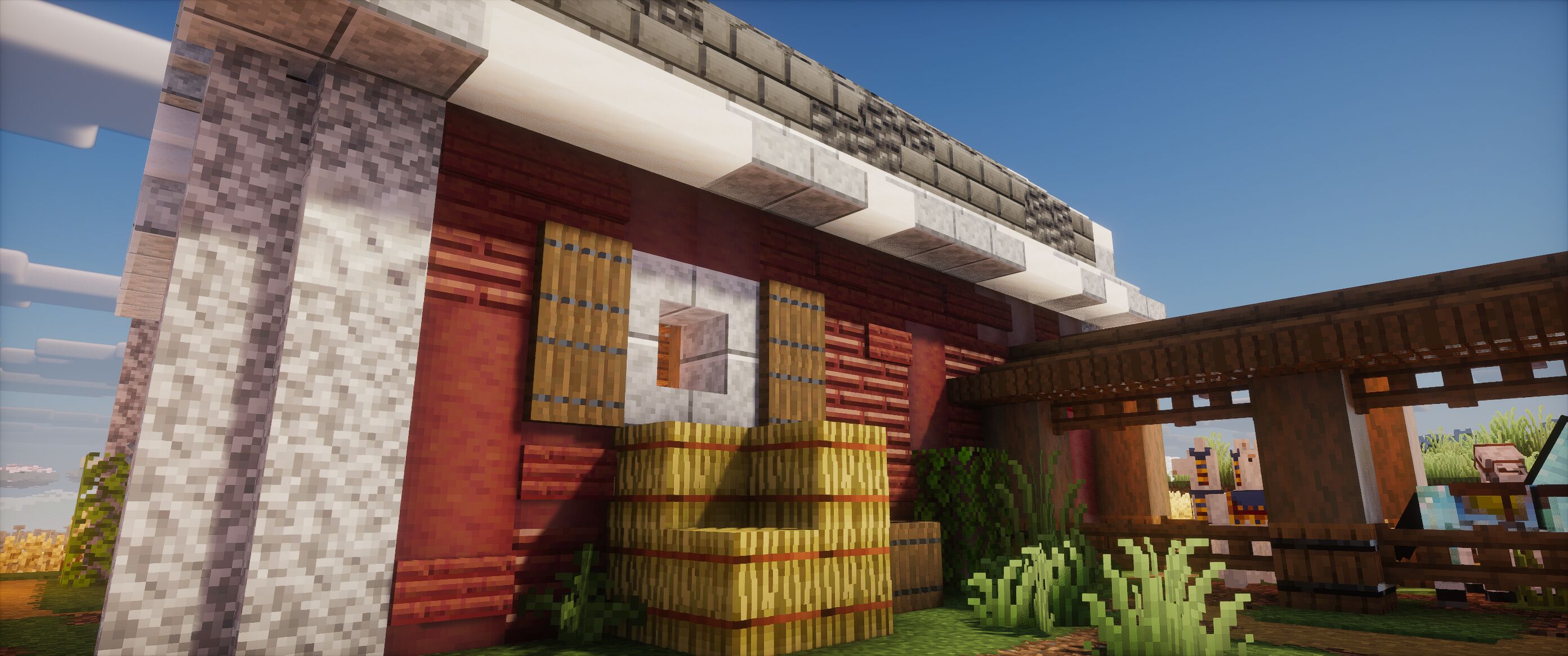
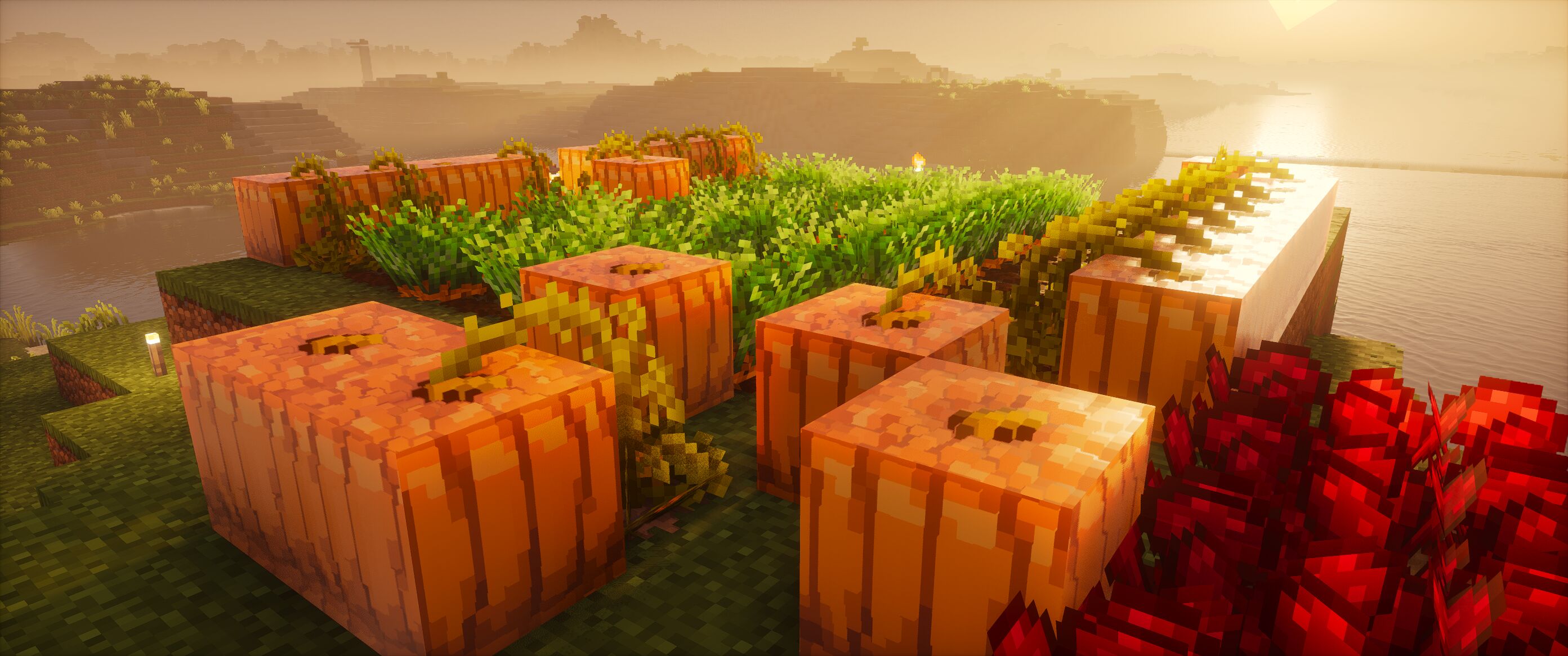
I came up with the idea for this resource pack when I downloaded [SPBR](https://modrinth.com/resourcepack/spbr) and wanted to use it with [Stay True](https://www.curseforge.com/minecraft/texture-packs/stay-true)’s connected textures and overlays. I added PBR to all the overlay textures from Stay True and combined both packs. Initially, it was for personal use, so I decided to incorporate elements from other packs that I thought complemented each other well. I continued to work on it by adding PBR textures to some of the other packs’ textures, and it turned out quite well.
**This pack requires Optifine or mods that emulate Optifine features.** It works beautifully with [Fabulously Optimized](https://modrinth.com/modpack/fabulously-optimized).
## Credits
**This pack is essentially a mix of [SPBR](https://modrinth.com/resourcepack/spbr), [Stay True](https://www.curseforge.com/minecraft/texture-packs/stay-true), and [Reimagined](https://modrinth.com/resourcepack/reimagined), along with other packs listed below:**
– [SPBR](https://modrinth.com/resourcepack/spbr) (Base PBR Textures)
– [Stay True](https://www.curseforge.com/minecraft/texture-packs/stay-true) (Overlay Textures)
– [Reimagined](https://modrinth.com/resourcepack/reimagined) (Grass, Carpet, Sounds, Items, Some Block Textures)
– [Fresh Textures](https://modrinth.com/resourcepack/fresh-textures) (Some Block Textures, Items, Font)
– [Fire Rekindled](https://modrinth.com/resourcepack/fire-rekindled) (Additional PBR Textures)
– [Fancy Crops](https://modrinth.com/resourcepack/fancy-crops/version/1.0) (Crops)
– [Detail Brush](https://modrinth.com/resourcepack/detail-brush) (Items)
– [MistaThing’s Groovy Music Discs](https://modrinth.com/resourcepack/mistathings-groovier-discs) (Discs)
– [Vanilla Tweaks](https://vanillatweaks.net/picker/resource-packs/) (Miscellaneous)
All credit for this pack goes to the respective authors of these packs. I essentially combined the best aspects of each pack, in my opinion, into a single pack. I also removed the custom menu panorama so you can use it with your favorite one.
## How to Enable/Disable PBR Textures
This pack can be used without shaders, in which case you will only see the textures without PBR effects if you prefer. (You can also use shaders without LabPBR; in fact, you need to activate it manually for most shaders. There’s a guide on how to do this on [SPBR’s page](https://modrinth.com/resourcepack/spbr)).
## Recommended Packs to Use Together
– [SPBR Glowing Ore](https://modrinth.com/resourcepack/spbr-glowingore) (Makes the ores glow)
– [Unique Dark](https://modrinth.com/resourcepack/unique-dark) (My favorite GUI resource pack to date)
– [Bushy Leaves](https://modrinth.com/resourcepack/bushy-leaves) (If you like bushy leaves, this pack is the best)
The pack icon was created by SkulkingShadow and is available [here](https://skulkingshadow.itch.io/custom-mc-icons).
Vanilla Horse Retexture
# Vanilla Horse Retexture
This resource pack fixes the white-on-white and black-on-black horse color combinations that sometimes occur in vanilla. Retexturing is one to one with no randomization (ie. every white horse with white spots will look exactly the same) to stick to a more vanilla Minecraft feel.
## Preview

## Feedback, Issues, Suggestions
Please post feedback, issues, or suggestions to [Github](https://github.com/zdwolfe/minecraft-horse-donkey-mule-retexture/issues).
Invisible Minecarts (Vanilla-Friendly)
This resourcepack aims to make invisible minecarts a possibility without relying on destructive methods that are a pain to remove.
– Unlike other methods that makes minecarts invisible, this one is **completely reversible**, meaning once you disable the resourcepack, you won’t be left with any weird artifacts like command blocks in your minecarts.
– The provided datapack is **completely optional!**, you can integrate it directly into your datapack or simply use command blocks instead.
With the provided datapack, making a minecart invisible is as simple as giving it a tag.
“`
tag @n[type=minecart] add InvisibleMinecart
“`
If you want to summon one, you can use this command instead
“`
summon minecart ~ ~ ~ {Rotation:[24F,24F],Tags:[“InvisibleMinecart”]}
“`
Without the datapack, you’ll need to manually rotate minecarts 24 degrees in each axis.
“`
rotate @n[type=minecart] 24 24
“`
This command will have to be executed every tick otherwise the minecart will return to its default rotation.
A Prior Warning: This Resourcepack does come with a few quirks.
– Limited compatibility
– This resourcepack uses custom shaders which limit compatibility with performance mods such as Sodium.
– Some visual quirks
– This resourcepack does introduce a few visual quirks that are purely visual.
Vanilla Famale Creeper
# ABOUT
This texture pack replaces the regular, familiar creeper with a fluffy female version. It is designed in a vanilla style and is perfectly suitable for normal survival. Good luck and enjoy!
# IMPORTANT
– ### **Want to use it on Bedrock Edition?**
You can port the texture pack yourself, as long as you comply with all license terms.
– ### **Pack version warning ?**
There is a high chance that resource packs will work with different versions of Minecraft without the need to change the version of the pack, unless there is a major update that breaks resource packs.
Vanilla Experience+
### Now with versioning for cleaner updates and better modpack integration.
### Bushy Leaves have been fully reworked and are now available as a [standalone pack](https://modrinth.com/resourcepack/leaves-exp).
### Configuration has been added via Respackopts mod!

Vanilla Experience+ is a carefully crafted resource pack focused on improving, refining, and fixing various aspects of Minecraft – enhancing visuals, consistency, and overall game feel while staying true to the original Vanilla style.
Check out the gallery to get a preview of most features and contents.
Fully configurable with the Respackopts mod, allowing you to easily enable, disable and customize many features of the pack to match your preferred experience.
OptiFine or ETF mod is NOT required, but it is needed for mob variants.
Feel free to report any issues, feedback, or concerns by sending me a DM on CurseForge. Please check the FAQ section first.


To see more UI icons, you need to play in one of these languages:
 English (US) English (US) |
 Polish Polish |
 German German |
 Portuguese (Brazil) Portuguese (Brazil) |
 Chinese (Simplified) Chinese (Simplified) |
 Russian Russian |
 French French |
 Spanish Spanish |
 Spanish (Mexico) Spanish (Mexico) |
|


Show
The resource pack is marked as incompatible or made for a newer Minecraft version
- If you downloaded the correct version of the resource pack for your Minecraft version, you can safely ignore this warning – everything will work properly.
The resource pack fails to load or shows an error
- Please verify that you are using the correct version of the resource pack for your Minecraft version.
Potion symbol textures are missing
- Potion symbols are only available in Minecraft 1.21.5 or newer. Older versions are not supported.
Additional UI icons are not visible
- Extra UI icons are displayed only when using one of the supported languages listed in the project description.
Additional mob textures are not showing
- Custom mob textures require either OptiFine or Entity Texture Features (ETF) to be installed.
Is this resource pack available for Bedrock Edition?
- Currently, this resource pack is available for Java Edition only.
I see duplicated hunger icons on food items
- If you are using a mod such as AppleSkin, install the Respackopts mod and enable the “No Food Icons” option to hide duplicated hunger icons.
Can I use assets from this pack in my own resource pack?
- Redistribution or reuse of assets is not allowed without my explicit permission. However, you may safely use this pack as a dependency. Private, non-public use is permitted.
Can I include this resource pack in a modpack?
- Yes, this resource pack may be included in modpacks as a dependency.

Show
- Colorful Enchanting Table Particles
- Animated Campfire Items
- Circular Sun and Moon
- Twinkling Stars
- Variated Red Mushroom Blocks
- Variated Bookshelves
- Diminising Tools (modified)
- Sticky Piston Sides
- Groovy Levers
- Visual Honey Stages
- Visual Note Block Pitch
- Lower Fire
- Lower Shield
- Translucent Pumpkin Overlay
- Dripleaf Stems Fix
- Pixel Consistent Beacon Beam
- Pumpkins Reimagined (modified)
- Chests Reimagined (only ender chest – modified)
- Reimagined (only debug stick item)
- xali’s Enhanced Biomes: River & Pond (only waterlogged rusted rails – modified)
- Stormilla (only frogspawn, dripleafs, repeater, comparator and boats items – modified)
- Animated Buckets (modified)
- Remodeled Cactus (modified)
- Phantom Elytra (modified)

Vanilla Evolved


# **About**
Vanilla Evolved is a resource pack that contains meticulously crafted custom models and textures that attempt to enhance the default look and feel of the game.
While it’s not necessary to install Optifine, this resource pack does make use of some of the Optifine features that can be achieved with either Optifine or Optifine Alternative mods.
# **Addon**
Some features have been separated from the Resource Pack for optional use, such as custom flowers and other 3D models, which you can download here.

# **Links**

# **Important**
Warning!
– the only _**official sources**_ for my projects are my Webpage([bento.me/vixel](https://bento.me/vixel)), PlanetMinecraft, Modrinth
– Any other website claiming to offer my project for download is _**not official**_ and may contain _**malicious files**_.
FAQ
– **Is there a bedrock port?**
There is _**no official bedrock port**_ of any of my projects.
– **Can i make a Bedrock port of your project ?**
You are allowed to make a bedrock port as long as you **_follow license terms_**
but beware that it won’t be considered as official port
– **Compability with fresh animations resourcepack ?**
There is currently no official support for Fresh Animations compatibility, but alternatively you can add the Fresh Animations resourcepack to the top of your resourcepack list.
This **_only_** replaces the “mob textures” with the default textures to avoid any problems.
– **Pack version warning ?**
There is a high chance that resource packs will work with different versions of Minecraft without the need to change the version of the pack, unless there is a major update that breaks resource packs, which you can report on Github.
– **Shader issue with grass/flower model ?**
To fix this, you can turn off the Waving effect in your Shaderpack settings.
### **Other Projects**


Vanilla Entity Shader Effects
# Showcase
# Overview
This resource pack allows entities to have animated shader effects baked into their texture. In many ways, it’s a vanilla-friendly version of the [Entity Texture Features](https://www.curseforge.com/minecraft/mc-mods/entity-texture-features-fabric) mod.
This pack is designed to be used in conjunction with other resource packs that add textures with animated effects. Shader data is embedded into a texture file, and when the VESE shader reads that texture file, it will display the encoded effects. Because of the nature of the encoding, texture files can have a static fallback texture that can be displayed to the user if they opt not to turn on VESE.
For example, the textures below are for a resource pack that adds _void cows_. The resource pack that adds void cows to the game shows the texture on the left if the player does not have VESE enabled, while it shows the texture on the right if it is:
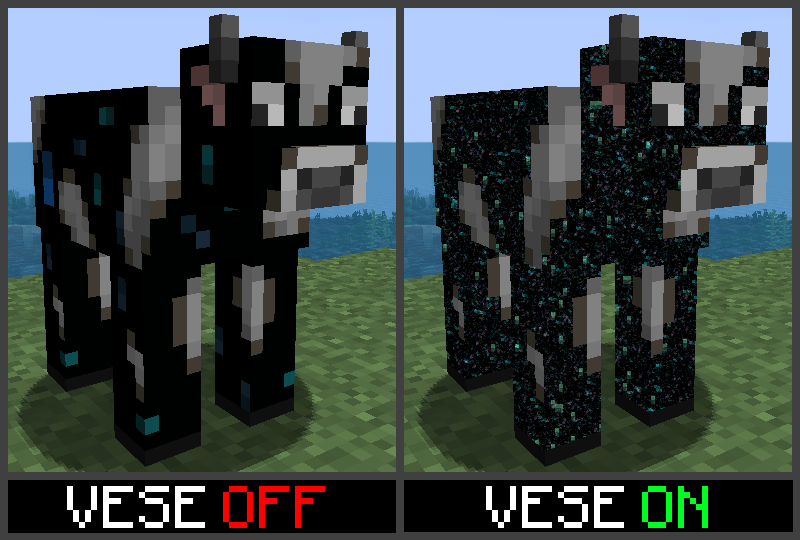
VESE also works with player skins! If you update your skin to use VESE effects, it will still render as a normal skin to other players without VESE enabled, but will show the effects to anyone who does have it enabled.
# Texture Editor Webapp
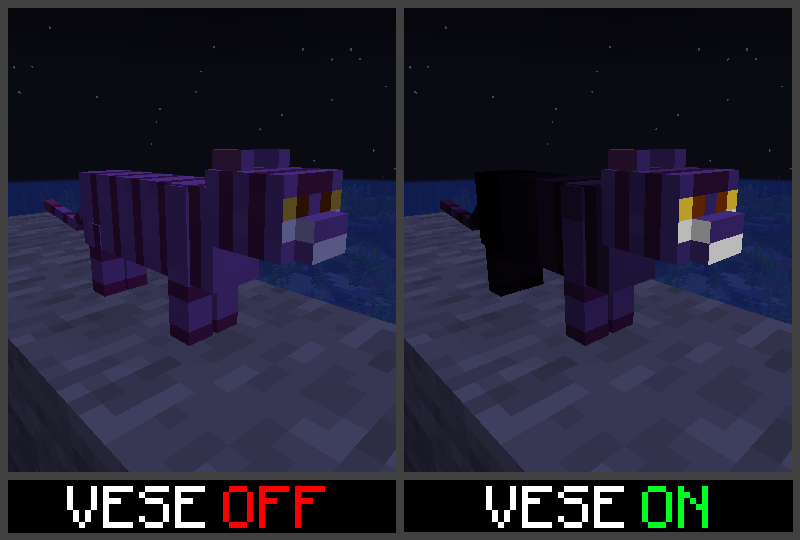
Shader effects can be added to textues with the with the [Texture Animator](https://dqwertyc.github.io/animated-entities/) webapp. To show how it works, I’ll be creating an animated Cheshire Cat texture with glowing eyes and a body that fades to black from tail to head.
To begin, upload the base texture that you want displayed to users that don’t have VESE enabled. The webapp will detect the texture size and provide a list of options for texture types. If the specific entity isn’t listed in the available options, selecte the ‘other’ option for the given texture size:
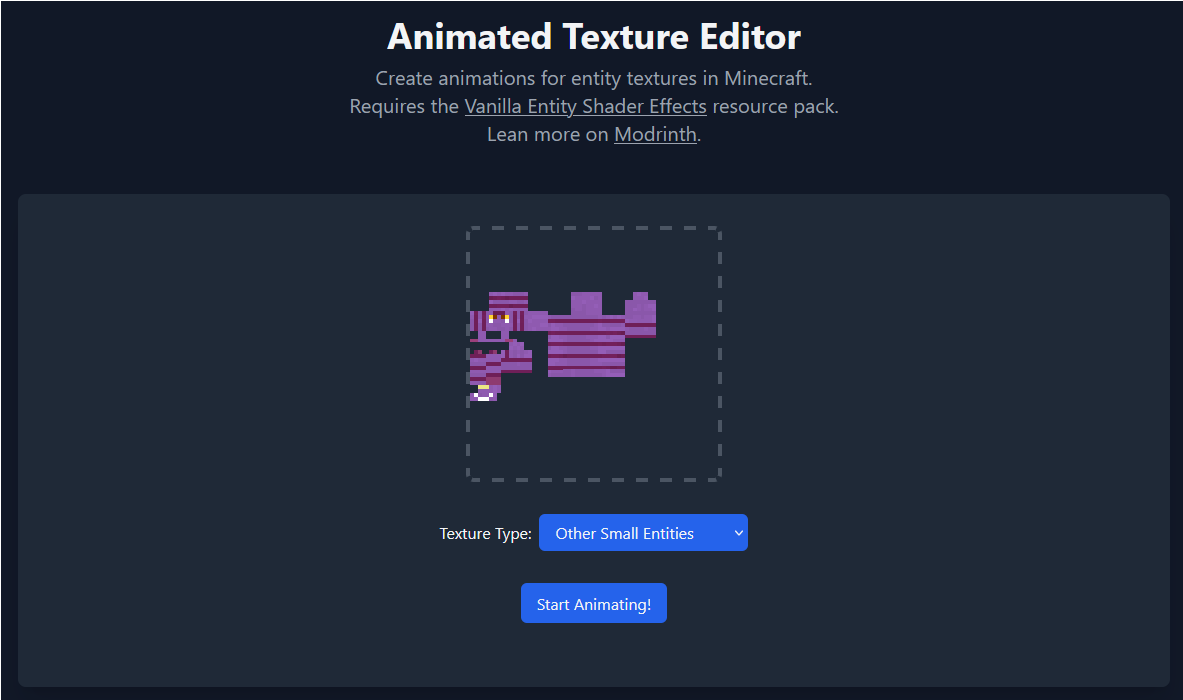
Click ‘Start Animating’ to open the editor. The editor has three main regions – the Color Palette on the left, the Program Palette on the right, and the main texture in the center.
Click a pixel in the Color Palette to edit its color. These colors can be referenced later on by programs in the Program Palette:
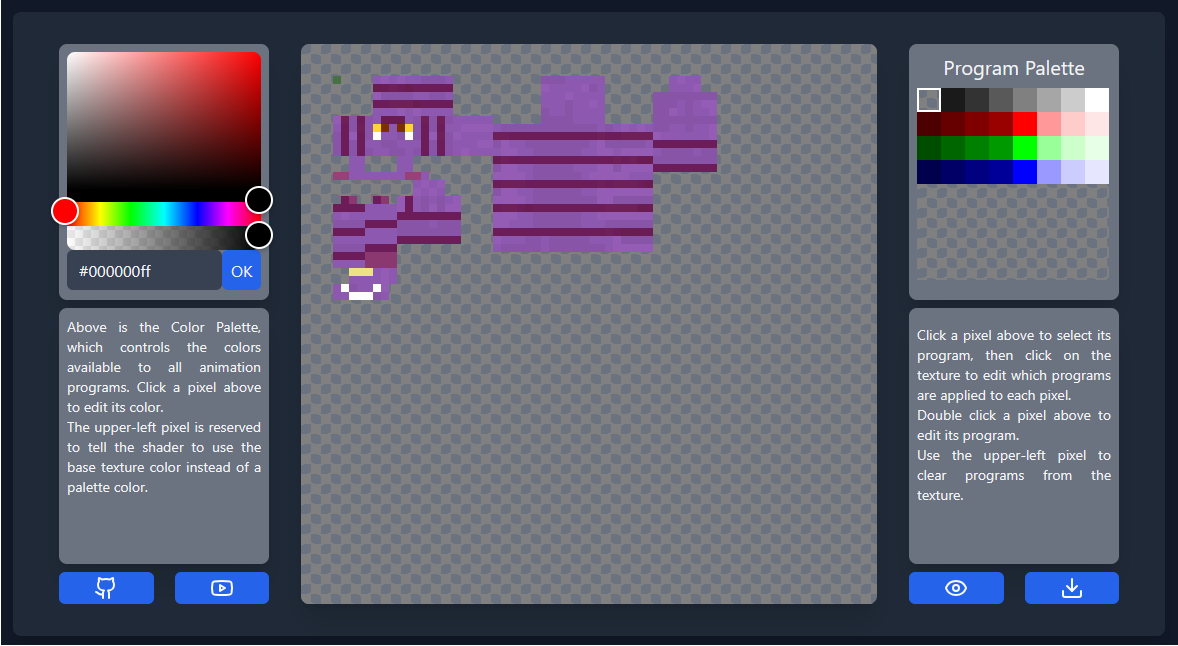
For most entities, you have access to 31 colors, though players have access to 63. As you edit the colors, you should see them appearing on the texture in an unused region. The upper left color in the palette is not editable, and tells the program to use the base color from the texture.
Double click a pixel in the Program Palette to edit its program. These programs can later be applied to any pixel in the texture. The first program we’ll create is for the glowing eyes. By selecting ‘constant’ as the program type and checking the box that says “Glow A”, we’ll create a program that does nothing but make the existing color glow:
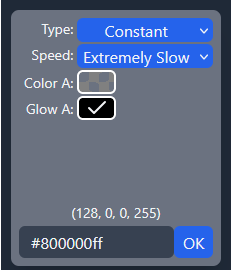
Click ‘OK’ to finalize the program, then click pixels on the main texture to apply the program. Use the upper left pixel in the program palette to clear programs from the texture.
Our second program will periodically fade between our fallback color and solid black. Double click the first program pixel on the second row. For this program, we’ll select ‘Sine Wave’ and ‘Normal Speed’, then for color B select the solid black from our color palette. Set pause to ‘3’ and leave offset at ‘0’. The resulting color code should be ‘#00016430’. Copy this value, then click ‘OK’. The preview beneath the program editor should show a grid of colors fading to and from black.
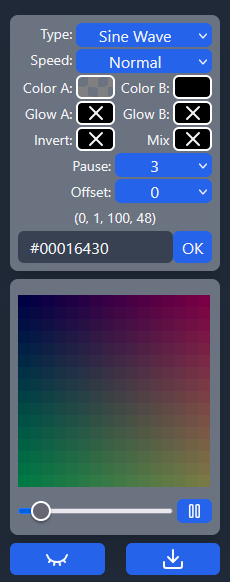
Edit the rest of the programs in the row, incrementing the offset each time. This will cause the fade on the program to start slightly later for each subsequent program.
Now, starting with the tail, add the programs to the pixels. Because of the length of the cat, we’ll apply the same program to every 4 pixels. The end result should look something like this:
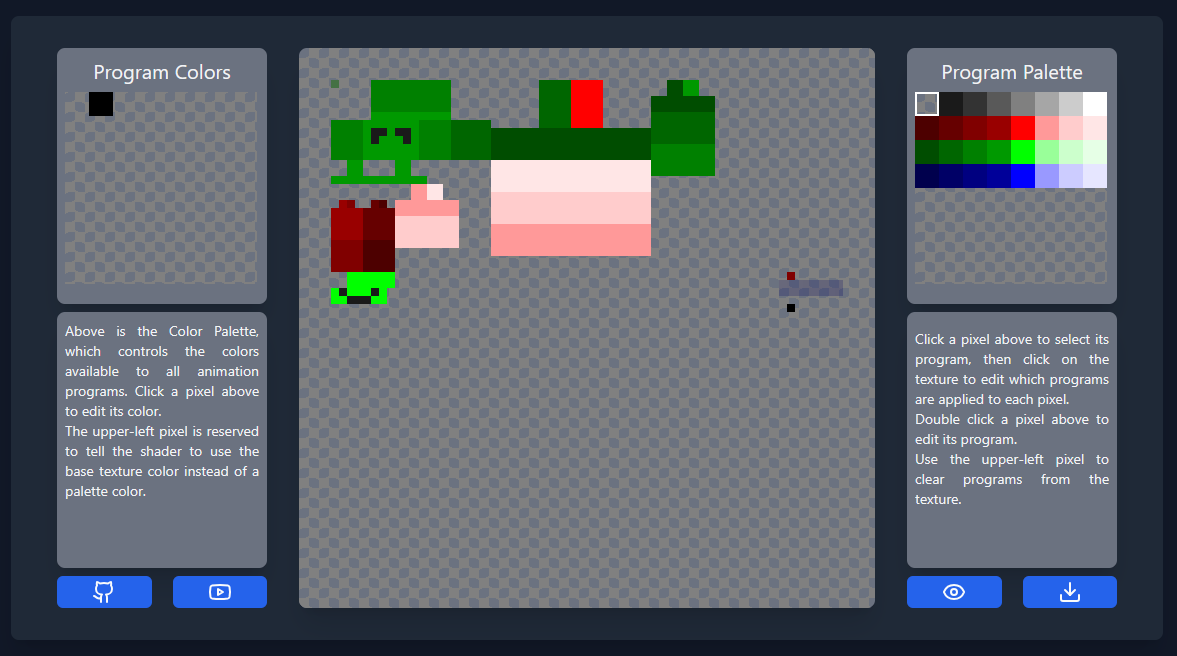
If you want, click the eye in the lower right corner to get a view of what the actual texture will look like without the program overlay. Download the texture with the download button in the lower right corner.
Loading the new texture into our world, we can see what it looks like with and without VESE enabled: