Wandering Trades
# WanderingTrades
[](https://jenkins.jpenilla.xyz/job/WanderingTrades/)
*WanderingTrades is a plugin that allows server owners to customize the trades of Wandering Traders through an easy to use in-game GUI. Also allows for creating custom traders and villagers, as well as selling Player Heads of players from your server!*
## Features
– Adds trades defined in config files to Wandering Traders.
– In-game GUI config editor
– Trade config files are located in the `plugins/WanderingTrades/trades` folder in your server.
– You may create as many trade configs as you like. If you have no configs, an example.yml config file will be created for you.
– For more info on what the options are, check out the default [config.yml](https://github.com/jpenilla/WanderingTrades/blob/v1.8.0/src/main/resources/config.yml), and the [example.yml](https://github.com/jpenilla/WanderingTrades/blob/v1.8.0/src/main/resources/trades/example.yml)
– Check out the VanillaTweaks-style [microblocks.yml](https://github.com/jpenilla/WanderingTrades/blob/v1.8.0/src/main/resources/trades/microblocks.yml) trade config (screenshots in gallery)
– Supports custom player heads, custom item lores, custom item names, enchantments, and custom NBT data.
– Supports RGB colors, gradients, and rainbows for trader and item names in 1.16+ using MiniMessage. To see how to format text for all versions refer to [this page](https://docs.adventure.kyori.net/minimessage.html#format)
– Customizable chance for each trade config to be added to Wandering Traders, with option to limit to one config per trader.
– Automatically adds trades for player heads of players from your server to Wandering Traders, with customizable head names, lore, amount, and fully customizable prices. Configure in [playerheads.yml](https://github.com/jpenilla/WanderingTrades/blob/v1.8.0/src/main/resources/playerheads.yml)
– Option to remove the original trades of Wandering Traders
– Summon custom Wandering Trader or Villager defined in config files through commands.
– Command summoned traders can be configured to have custom names above their heads in the trade config.
– Command summoned traders can refresh their trades automatically after an amount of time set in config.yml
– You can summon Traders that do not move around using the noai summon commads.
– If the value ‘invincible: true’ is in a trade config and a trader is summoned by command using that config, the trader will never despawn or take any damage from anything, except from players with the `wanderingtrades.damage` permission
– Language localization support
– Includes English (en_US), German (de_DE), Romanian (ro_RO), Russian (ru_RU), and Simplified Chinese (zh_CN) locales by default. Set the language in config.yml.
– Any text in menus or commands is translatable
– If you can speak another language and want to help translate the plugin make a Pull Request on GitHub or send me a config on Discord.
## Screenshots


See the gallery for more
## Commands and Permissions
| Command | Description | Permission |
|———|————-|————|
| `/wanderingtrades` | Base command | – |
| `/wanderingtrades edit` | Open the trade config edit GUI menu | `wanderingtrades.edit` |
| `/wanderingtrades editconfig` | Edit the config.yml in-game through a GUI menu | `wanderingtrades.edit` |
| `/wanderingtrades editplayerheads` | Edit the playerheads.yml in-game through a GUI menu | `wanderingtrades.edit` |
| `/wanderingtrades reload` | Reload the plugin configuration | `wanderingtrades.reload` |
| `/wanderingtrades list` | List available trade configurations | `wanderingtrades.list` |
| `/wanderingtrades summon` | Summons a Wandering Trader using the specified config | `wanderingtrades.summon` |
| `/wanderingtrades summonvillager` | Summons a Villager using the specified config | `wanderingtrades.summonvillager` |
Additional permissions:
– `wanderingtrades.damage`: needed to deal damage to command summoned traders with the invincible option on in their trade config.
## Plugin Compatibility
– Integration with WorldGuard
– In config.yml there is a configurable white/black list of WorldGuard regions to allow refreshing the trades of command spawned traders in.
– Supports custom items from any plugin! Simply use the in-game config editing GUI (/wt edit) and set your trades to use custom items, for example Crazy Crates keys!
Key Trade

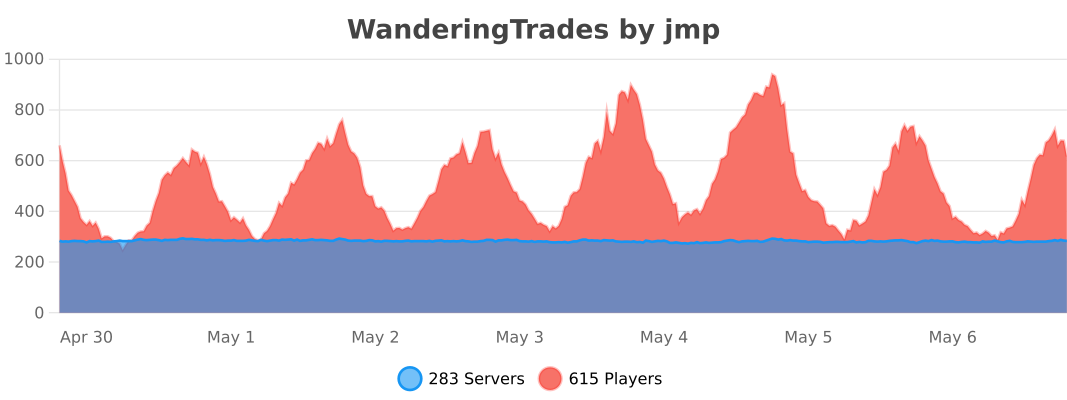
bStats
[Link](https://bstats.org/plugin/bukkit/WanderingTrades/7597)
Opt-out of anonymous stats in the global bStats config.
*Looking for other Vanilla Tweaks datapack plugins?*
VanillaTweaks Plugin
Check out [VanillaTweaks](https://www.spigotmc.org/resources/vanillatweaks.81288/) by Machine Maker! If you use their “PersistentHeads” Module, Wandering Trades and other plugins Player Heads will preserve their Name and Lore after placing and breaking!
Wandering Treasure Trader
Every Wandering Trader now sells one books with treasure enchantments, which includes Frost Walker, Mending, Soul Speed or Swift Sneak.
This datapack requires the Fabric mod [VillagerConfig](https://modrinth.com/mod/villagerconfig) to work.
Thom’s Wandering Traders
[](https://www.curseforge.com/minecraft/mc-mods/wandering-traders) [](https://modrinth.com/mod/wandering-traders/)
[](https://www.curseforge.com/minecraft/mc-mods/wandering-traders)
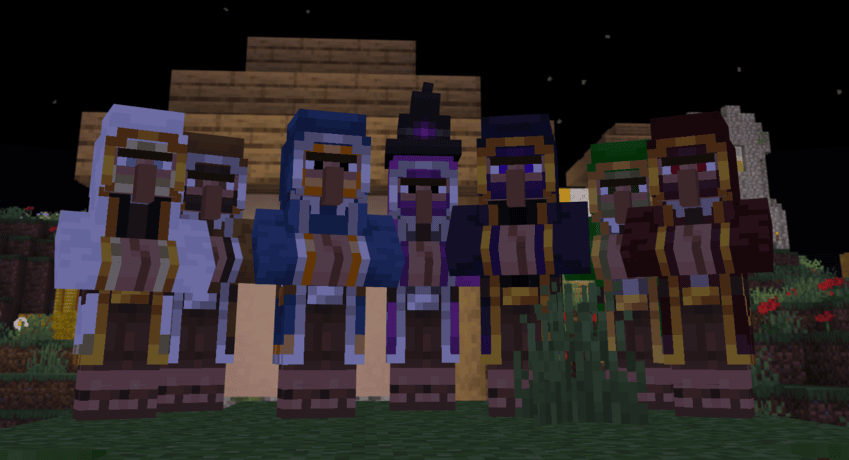
# Wandering Traders Mod
Welcome to the **Wandering Traders** mod! This mod introduces a variety of new wandering traders to Minecraft, each with unique trades and mechanics. Below is a comprehensive guide to the features and functionalities of the mod.
## Overview
The Wandering Traders mod adds the following traders:
1. **End Trader**
2. **Forest Trader**
3. **Animal Trader**
4. **Book Trader**
5. **Decoration Trader**
6. **Potion Trader**
7. **Exclusive Trader**
### End Trader
– **Functionality**: The End Trader allows players to recover lost loot (items that have been lost, destroyed, or despawned).
– **Invocation**: He can be summoned using an **End Bell**, which is a rare drop from Endermen.
– **Dynamic Pricing**: The price for recovering items is dynamic and based on the type of item lost.
– **Spawn Mechanics**:
– Does not spawn naturally and cannot be found in the End.
– Stays for **48,000 ticks** (approximately 2 Minecraft weeks) after being summoned.
– Cannot be killed; if damaged by a player, he will teleport away. If damaged by a player linked to him, he will return to the End, destroying any untraded loot.
– **Linking**: Each End Trader is linked to a single player, preventing multiple players from recovering loot with one End Bell.
### Forest Trader
– **Functionality**: Trades various seeds and saplings, including Nether saplings, as well as potatoes and carrots.
– **Spawn Location**: Appears in forests in the Overworld.
### Animal Trader
– **Functionality**: Trades animal spawn eggs.
– **Spawn Location**: Found in plains biomes.
### Book Trader
– **Functionality**: Trades enchanted books. Requires 1 book and emeralds, with dynamic pricing based on the number and level of enchantments.
– **Limitations**: Each item can only be purchased once.
– **Spawn Location**: Appears in snowy biomes, including:
– Snowy Beach
– Snowy Plains
– Snowy Slopes
– Snowy Taiga
– Frozen Peaks
### Decoration Trader
– **Functionality**: Trades decorative blocks, including colored wools, glass, bricks, terracottas, concrete, banners, paintings, and item frames.
– **Spawn Location**: Found in deserts.
### Potion Trader
– **Functionality**: Trades uncraftable potions with random effects. Potions have a longer-lasting effect (1.5 times the normal duration).
– **Spawn Location**: Appears near swamp huts.
### Exclusive Trader
– **Functionality**: Trades high-value exclusive items such as wither skulls, totems of undying, nametags, horse armor, and saddles.
– **Spawn Location**: Found in the Nether, specifically in the Crimson Forest biome.
## Lost Loot Command
The mod includes a **/lostloot** command that allows players to manage their lost loot:
– **View Lost Loot**: Players can use this command to view their lost loot.
– **Clear Lost Loot**: If you have operator (OP) permissions, you can clear lost loot for yourself or for other players.
## Configuration Options
– All trader spawns can be disabled in the configuration settings.
– Players can also configure the availability of End Bells, loot recovery, and trader despawn times (default is 48,000 ticks).
## End Trader Bell
– **Item Description**: The End Bell functions like a spawn egg. Right-clicking it will summon the End Trader and produce a bell sound.
– **Usage Restrictions**:
– The bell can only be used if there is no End Trader currently assigned to the player.
– After the End Trader leaves, players can summon him again with another bell.
– If a player attempts to use a bell while a trader is nearby, they will receive a notification indicating the presence of a trader and, if close enough, the coordinates of the trader.
## License
This mod is licensed under the LGPL. See the [LICENSE](https://github.com/ThomasMTT/wandering-traders/blob/1.20.6/LICENSE) file for details.
Wandering Trader Folia
# WanderingTrader
**Fully customize Wandering Trader trades — with native Folia support.**
A simple, lightweight plugin that lets you define exactly what the Wandering Trader sells. Perfect for custom SMP servers, skyblock, or any server where you want control over trader inventory.
## ✨ Features
⚙️ **Complete Customization** — Define any item, any price, any amount
🎲 **Weighted Trades** — Control how often each trade appears
🚀 **Folia Native** — Built for multithreaded servers from day one
📦 **Zero Dependencies** — Just drop in and configure
🔄 **Hot Reload** — Change trades without restarting
—
## 📥 Installation
1. Download the JAR file
2. Place it in your `plugins` folder
3. Restart your server
4. Edit `plugins/WanderingTrader/config.yml`
—
## 🛠️ Commands
| Command | Description |
|———|————-|
| `/wt reload` | Reload the configuration |
| `/wt list` | View all configured trades |
| `/wt info` | Show plugin settings |
**Permission:** `wanderingtrader.admin` (default: OP)
—
## ⚙️ Configuration
### Basic Settings
“`yaml
settings:
min-trades: 5 # Minimum trades per trader
max-trades: 8 # Maximum trades per trader
replace-all-trades: true # true = custom only, false = add to vanilla
“`
### Creating Trades
“`yaml
trades:
elytra_trade:
enabled: true
result:
material: ELYTRA
amount: 1
cost:
material: DIAMOND_BLOCK
amount: 16
max-uses: 1
weight: 2 # Lower weight = rarer
“`
### Enchanted Books
“`yaml
trades:
mending:
enabled: true
result:
material: ENCHANTED_BOOK
amount: 1
cost:
material: EMERALD
amount: 24
enchantments:
MENDING: 1
max-uses: 1
weight: 5
“`
—
## 🎲 How Weights Work
Each trade has a `weight` value. When a Wandering Trader spawns, trades are randomly selected based on their weights:
– Higher weight = more likely to appear
– Weight of 10 is twice as likely as weight of 5
– Set `enabled: false` to disable a trade entirely
—
## 💡 Example Use Cases
– **Custom Economy** — Sell rare items for specific currencies
– **Skyblock** — Provide unobtainable resources
– **Hardcore SMP** — Balanced alternative progression
– **RPG Servers** — Quest items and special gear
—
## 📋 Requirements
– **Server:** Paper 1.21.4+ or Folia 1.21.4+
– **Java:** 21+
—
## ❓ FAQ
**Q: Do existing traders get new trades?**
A: No, only newly spawned traders use custom trades.
**Q: Does this work on Paper?**
A: Yes! Works on both Paper and Folia.
**Q: Can I add to vanilla trades instead of replacing?**
A: Yes, set `replace-all-trades: false` in config.
—
## 🐛 Issues & Suggestions
Found a bug or have an idea? [Open an issue on GitHub!](https://github.com/Whitebrim/BrimWorld-S5-Wandering-Trader/issues/new)
Wandering Trader backport
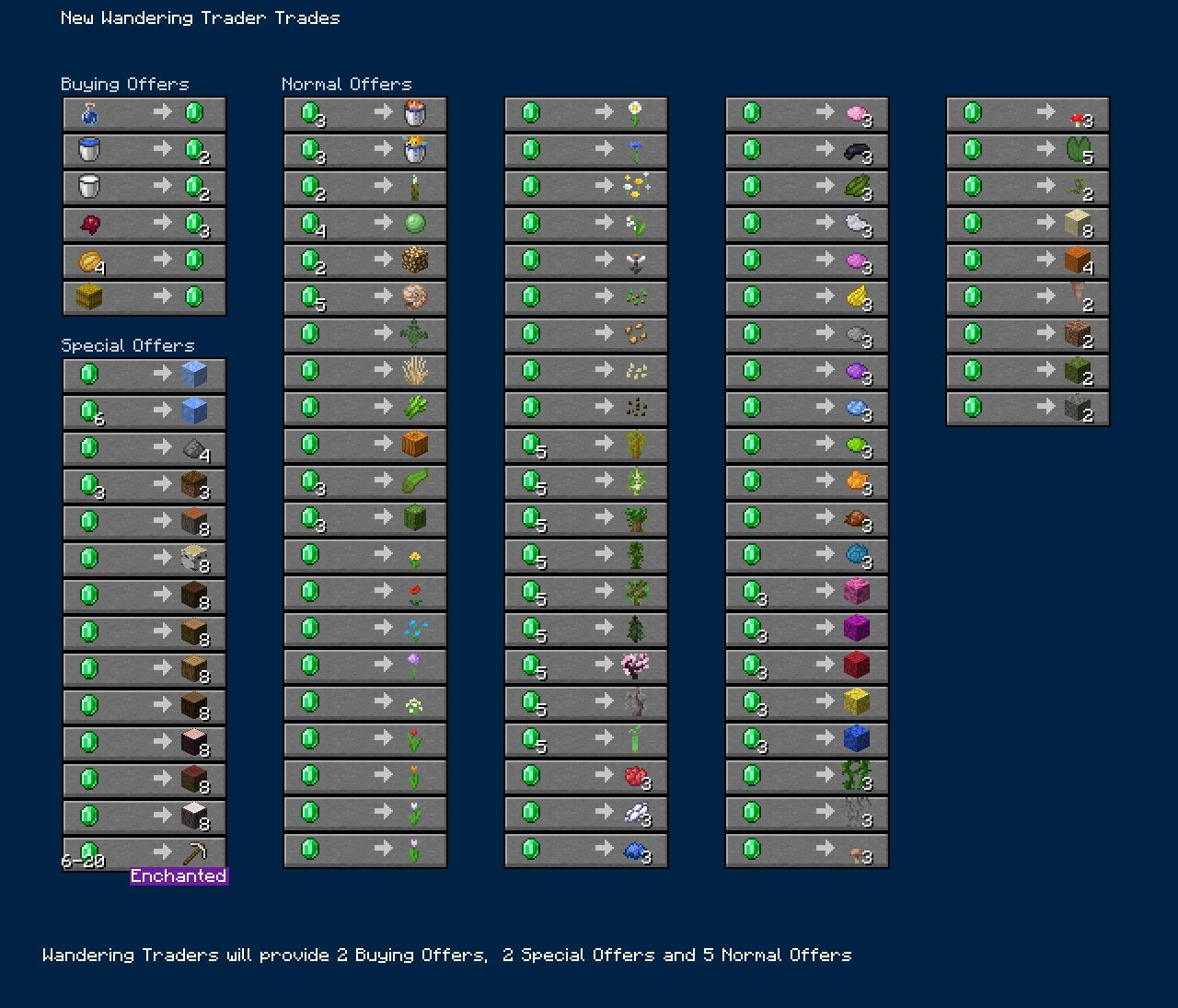
In the latest snapshot Wandering Traders were upgraded to have more trades, and buy things from the players. Today I felt like I had to post SOMETHING (Cos it’s been a while). So here’s a backport! Works perfectly fine for 1.21.4.
Below are all of the new possible trades in 1.21.5, I’ve altered the tall desert grass to instead trade normal tall grass, and wildflowers do not appear in the trades. If you want me to backport this further to a version of your choosing, just drop a comment below and I will try my best!
Wandering Settlers
A small add-on for the mod [VillagerConfig](https://modrinth.com/mod/villagerconfig) by DrexHD.
## Purpose
Due to the latest villager trade rebalance, there is a strong incentive in the game now to establish new villages in locations they don’t naturally spawn. However, there is no flexible, practical, and reliable way to transport villagers yet, especially over large distances on land.
This makes it feasible to create new villages without transporting villagers long distances.
In addition, just for regular gameplay, it is nice to have the freedom to establish base anywhere without feeling restricted by the need to stay close to a village.
## Details
Adds a new trade to the 1.20.2 Wandering Trader trades:
– Sells 0-2 villager eggs for 64 emeralds each
– If it rolls 0, it instead offers a random suspicious stew for 1 emerald.
Thematically, it is a lightweight representation of encouraging unseen members of the traders’ caravan to settle with you.
## Requirements
It requires [VillagerConfig](https://modrinth.com/mod/villagerconfig) and won’t do anything without that installed.
## Limitations
Due to how the data-driven trades work, this datapack must replace all the Wandering Trader’s trades. The other Wandering Trader’s trades are set to those in the latest version of Minecraft at the time of posting (1.20.2). They are shown [here](https://minecraft.wiki/w/Trading#Java_Edition_sales) on the wiki, in the section marked “After Villager Trade Rebalance”.
That means these changes are usually incompatible with any other datapack/mod that tries to also change Wandering Trader trades.
Thom’s Wandering Collector
[](https://github.com/ThomasMTT/wandering-collector-forge/actions/workflows/build.yml) [](https://www.curseforge.com/minecraft/mc-mods/wandering-collector-forge)
[](https://www.curseforge.com/minecraft/mc-mods/wandering-collector-forge)
# Thom’s Wandering Collector
**Thom’s Wandering Collector** is a forge mod that allows you to recover lost loot, it doesn’t matter how it was lost. Players can trade with the Wandering Trader to recover their lost items, making those hard-to-replace treasures recoverable.
## Features
– **Recover Lost Loot**: Regain any valuable items that have been lost by trading with the Wandering Trader.
– **Summon the Wandering Trader**: In any village, hold an emerald and ring the village bell to call a new Wandering Trader who may offer trades for your lost loot. The call has a cooldown and can be customized via configuration.
– **Customizable Loot Pool**: Most valuable loot will be stored by default, but you can add specific items or item tags including modded items, to customize the list of valuable items that the trader can recover. Prices for these items can also be adjusted based on your preferences.
– **Dynamic Trade Prices**: The price for recovering lost items can vary depending on the item’s type, enchantments and material. A reference base price can be customized to make everything cheaper or more expensive.
## How It Works
1. **Lost Loot Tracking**:
– When you lose items through any means (death, void, explosions, fire, etc.), the mod tracks those lost items.
– The Wandering Trader, when called in a village by ringing a emerald on a bell, will apear and offer trades which may include trades to recover your lost items. it has a cooldown on a per village basis
2. **Calling the Wandering Trader**:
– In a village, hold an emerald and ring the bell to summon the Wandering Trader.
– The trader will appear with a special trade inventory, allowing you to buy back your lost items.
– There is a configurable cooldown between trader calls to prevent overuse.
3. **Custom Loot Configuration**:
– Define specific valuable items or tags that the Wandering Trader will consider “recoverable.”
– Adjust prices for items, with additional costs for enchantments or rare materials (like netherite).
## Related Links
– **Fabric Version**: If you’re looking for a Fabric version of this mechanic, check out [Siphalor’s Wandering Collector](https://modrinth.com/mod/wandering-collector)
Wandering +
**Wandering + revamps the Wandering Trader by introducing balanced, logical trades that make encounters genuinely worthwhile. Gone are the days of random or low-value items—the Wandering Trader now offers useful resources, rare items, and region-specific goods that fit naturally into the game world. This mod brings a fresh purpose to the Wandering Trader, turning each encounter into an opportunity for strategic trading and valuable discoveries in your Minecraft adventures**.

Walls of Wheat

# Introduction
**Walls of Wheat** is a server and client mod, specifically curated for a server I am a part of. The mod is essentially two parts:
1. A client-dependent world border mod. Allowing admins to fully customize and manage borders for each player on a multiplayer server.
2. A Wheat storage GUI and trade system to get an item that can expand the world border for a set time. Designed for Wheat based currency multiplayer servers.
I bring this distinction up because the mod can be modified to purely be a client-dependent world border mod or offer helpful tools for Wheat currency servers. Though, the original intent is for the use case where both are needed. The idea is each player has their own world border that they can expand to explore the world, at the cost of farming Wheat.
# Description
**Walls of Wheat** offers three new commands to interface with the mod:
“`
/wheatborder
/worldwheatborder
/wheat
“`
`/wheatborder` and `/worldwheatborder` are **admin only** commands. They serve as setup and management for the world borders, and share almost the same set of subcommands. The main difference is that `/wheatborder` has a player selector parameter (@a, [@s](https://github.com/s), etc.), so it will modify a current player(s) border settings. `/worldwheatborder` is used to set the world’s default border settings; which are applied to all new players who join the world (so no player selector is needed). So when a world is made, an admin can run `/worldwheatborder` commands to ensure every player who joins receives the same settings. If you want each player to have their own settings, you will need to run `/wheatborder` for each player. The `/wheat` command will be covered after an explaination of the Wheat GUI.
# Border Setup
The following commands work between both `/wheatborder` and `/worldwheatborder`, the only difference being that the world variant __does not use the player selector field__. Additionally, the dimension field across all of these commands is not required. If you do not include the dimension, it will default to the dimension you are in. **This allows the borders to be unique across all dimensions, for additional customization.** Currently, only the Overworld, Nether, and End are supported.
/wheatborder …
* **set** [] – sets the border size (diameter in blocks).
* **speed** [open/close] [] – sets the default border movement speed in blocks per second. Can specify ‘open’ or ‘close’ for directional speeds.
* **center** [] – sets the center position for the border.
* **penalty** [] – sets the penalty type when outside the border. Damage, does damage. Spawn point, teleports to your spawn point. World spawn, teleports to the world spawn. Nudge and Shove apply another parameter velocity to the player when come into contact with the closing border. If the player remains outside the border, Nudge will teleport the player back to their spawn point, and Shove will deal damage.
* **damage** [] – sets the amount of damage per second dealt when outside the border. _Must have the penalty set to damage_.
* **enable** [] – enables the border (shows it).
* **disable** [] – disables the border (hides it).
* **max** [] – sets the maximum border diameter in blocks.
* **duration** [] – sets the time in seconds the border will remain open for.
* **accelerate** [] – enables or disables accelerated border closing with the specified range. Which means the border will instantly close to the range number of blocks away from the player. Allowing for slow closing speeds and large max sizes (otherwise the border would taken forever to close at a player sprint speed over 60 million blocks).
* **magnet** [] – sets the item magnet distance in blocks (0 to disable). When standing within 1-2 blocks of the border, any items that are outside the border and within the magnet distance will be teleported to you.
* **item_despawn** [] – sets despawn behavior for items outside the border.
/worldwheatborder …
* **info** [] – displays current default border settings. If dimension is not specified, shows all dimensions.
* **wheat_decay** – when true, all Wheat planted by players outside of the _closed_ border area, becomes withered. Withered Wheat crops have a 60% chance to drop up to 1 Wheat Seed and at full growth (which can only be obtained by using Bone Meal on the crop) has a 15% chance to drop 1 Wheat.
# Wheat GUI
The Wheat GUI can be opened via a keybind. You can find it in controls at the bottom of the menu, in the “Walls of Wheat” section. Pressing the keybind will open a new inventory menu, similar to the normal one. You can access your hotbar and inventory, as well as see a variety of new things:
* Designated Wheat slot (and count display)
* Ticket o’ Exploration trade slot (and price for trade)
* Time left on the open border
* And settings to toggle auto-wheat pickup, border related audio, and set the closed border boundary outline.
The Wheat slot has no cap on the number of items it can hold, so Wheat will no longer clutter your inventory. Clicking the stack with no items in your cursor will remove up to a stack from it. With Wheat in your cursor, clicking the stack will add the Wheat to it. Ticket trades will only appear when you have the necessary amount of Wheat, and are traded by clicking the item one at a time. The three settings on the left side of the gui are clickable buttons, and display their status with an icon and with a hover text element. The closed border boundary outline looks like a more transparent world border, that shows the closed position of the border when it is open. The color can be changed, or toggled off as well. Auto-Wheat pickup makes it so picking up Wheat items put them directly into your Wheat storage slot, instead of inventory slots.
`/wheat` has both **admin** and **non-admin** subcommands. The non-admin subcommands are an alternative way to access the functionality offered by the GUI. The following are the available subcommands and their fields:
### Non-Admin
/wheat …
* **add** – adds the specified amount of Wheat from your inventory to your Wheat storage slot. Must have the specified amount of Wheat, or will return an error.
* **boundary** – sets the color of the closed border boundary.
* **buy** – buys the specified count of Tickets. Must have the necessary Wheat for the purchase or it will return an error.
* **mute** – turns on or off the audio for using a Ticket and the border closing.
* **pickup** – turns on or off the auto-Wheat pickup feature.
* **pull** – takes the specified amount of Wheat out of your storage slot and adds it to your inventory. Must have the specified amount, or will return an error message.
* **status** – returns the amount of Wheat the player has stored and the next Ticket price.
### Admin
/wheat …
* **initial_price** – sets the first price to buy a Ticket.
* **price** – sets the current Ticket price for the player.
* **total** – sets the total amount of Wheat a player has.
* **fine** – removes the specified number of Wheat from the player. Can put a player in debt (negative total).
* **rate** – sets the formula used to calculate the next Ticket price after each purchase. The formula is evaluated with x representing the current Ticket price. Supported operators include:
* Basic arithmetic: +, -, *, /
* Parentheses for grouping: (, )
* Exponentiation: ^
* Functions: sqrt(), floor(), ceil(), abs(), min(), max()
* Examples:
* /wheat rate x + 10 – increases price by 10 Wheat each purchase
* /wheat rate x * 2 – doubles the price each purchase
* /wheat rate x * 1.5 – increases price by 50% each purchase
* /wheat rate x + (x * 0.25) – adds 25% of current price
* /wheat rate floor(x * 1.1) + 5 – increases by 10% plus 5, rounded down
* /wheat rate min(x * 2, 1000) – doubles price but caps at 1000
* /wheat rate x^1.2 – exponential growth rate
# Scoreboards
There are also five new scoreboard objectives that you can set, all related to the border:
“`
wallsofwheat.border_cycles
wallsofwheat.border_penalties_suffered
wallsofwheat.tickets_bought
wallsofwheat.wheat_border_timer
wallsofwheat.wheat_count
“`
# A few more things
On top of the border and Wheat GUI features, there are a few smaller additions that are mainly for flare.
* New advancements related to the border and Wheat
* New items:
* **Golden Wheat** – made with Wheat and 8 Gold Nuggets.
* **Golden Bread** – made with 3 Golden Wheat. Replenishes more saturation and grants brief Haste.
* **Golden Hay Bale** – made with 9 Golden Wheat. Negates _practically_ all fall damage when landed on.

**Join the Discord to be a part of the discussion, provide suggestions, and help report bugs!**
Wallet
# Wallet
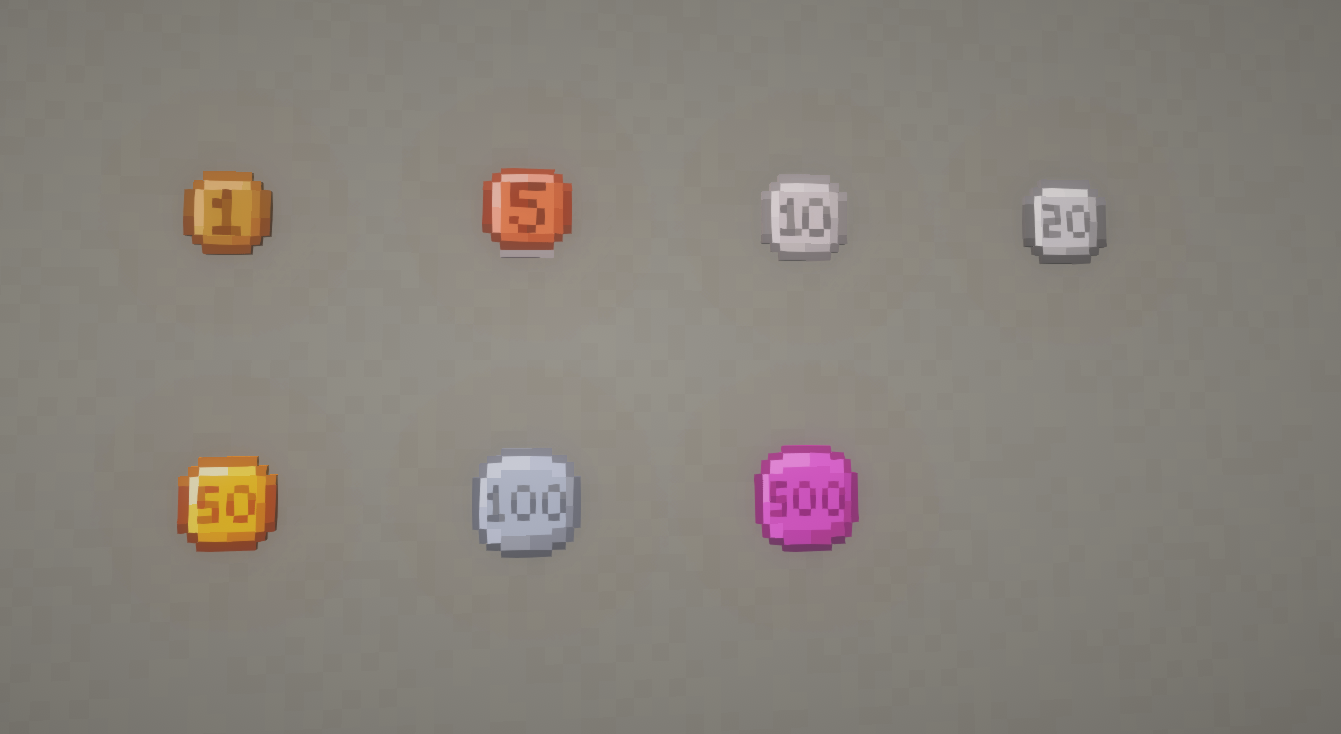
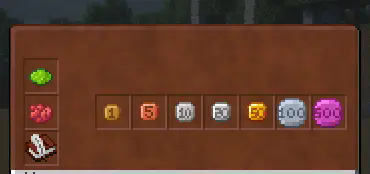
Immerse yourself in the world of Minecraft economics with the “Wallet” data pack! This economy data pack introduces currency to the system by sequentially adding 7 coin denominations: 1, 5, 10, 20, 50, 100, and 500. Players will now be able to trade using these coins to exchange goods and services. Coins can be obtained by looting villages, dungeons and other buildings.
# ⚠️Important⚠️
1. **This datapack contains a dependent resource-pack even if you install a mod , not counting the mod for version 1.21.4 , [(don’t forget to install it)](https://modrinth.com/resourcepack/walletresourcepacks)**.
## Features
– **Seven unique coins:** Each coin has its own unique design and denomination, making it easy to make transactions.
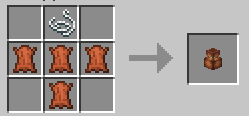
– **Wallet:** Convenient storage for your coins to help organize your wealth and manage your finances, and has an intuitive interface.
– 
– **Trade Integration:** Coins can be used to buy items from other players, making the game more dynamic and interesting.