xRewards
# ⭐ xRewards – Advanced Rewards & Token System
xRewards es un plugin ligero, optimizado y 100% configurable para gestionar recompensas diarias, semanales y mensuales en tu servidor Minecraft. Incluye sistema de tokens, protección anti-abuso, menús GUI modernos y soporte para recompensas con items, dinero, comandos y permisos temporales.
Perfecto para networks, lobbies, survival, skyblock y servidores con economía.
—
## 🚀 Características Principales
### 🎁 Sistema de Recompensas Escalonado
– **Diarias**: Dinero, tokens, items básicos.
– **Semanales**: Recompensas mejoradas + posibilidad de bonus.
– **Mensuales**: Premios premium, permisos VIP, items legendarios.
### 🔐 Anti-Abuso Inteligente
– Detección por IP para evitar multicuentas.
– Logs separados para intentos de abuso.
– Configuración flexible para LAN/familias.
### 💎 Sistema de Tokens Integrado
– Acumulables y utilizables en otras funciones del servidor.
– Comandos para administrar saldos (`/xrewards tokens `).
### 🎨 GUI 100% Personalizable
– Menús con slots, materiales, nombres y lore editables.
– Soporte para colores HEX (`&#RRGGBB`) y legacy (`&a`).
– Placeholders dinámicos: `%player%`, `%tokens%`, `%status%`, `%time_long%`.
### ⚙ Configuración Modular
“`yaml
# ___ __ _
# / _____ _ __ / _(_) __ _ ⋆✴︎˚。⋆
# / / / _ | ‘_ | |_| |/ _` | Plugin by ˖⁺‧₊˚♡˚₊‧⁺˖
# / /__| (_) | | | | _| | (_| | xPlugins
# ____/___/|_| |_|_| |_|__, |
# |___/ .yml
# Sistema de almacenamiento (YAML, SQLITE, MYSQL)
storage:
type: YAML
# MySQL (solo si utilizas la opción de type = MYSQL)
mysql:
host: localhost
port: 3306
database: xrewards
username: root
password: ”
cooldowns:
daily: 86400000
weekly: 604800000
monthly: 2592000000
anti-abuse:
# Verificar IP para detectar multicuentas (¡NO TOCAR!)
ip-check: true
# Permitir que varias cuentas en la misma IP reclamen (¡NO TOCAR!)
# (útil para familias o lan parties) (¡NO TOCAR!)
allow-multiaccount: false
# Registrar intentos de abuso en consola (¡NO TOCAR!)
log-abuse-attempts: true
# Crear archivo de log separado para abusos (¡NO TOCAR!)
create-abuse-log-file: true
“`
### 🎯 Recompensas con Múltiples Formatos
| Tipo | Soporta |
|——|———|
| 💰 Dinero | Vault compatible |
| ⭐ Tokens | Sistema interno |
| 📦 Items | Con encantamientos, nombre y lore |
| ⚡ Comandos | Ejecución automática con `%player%` |
| 🔑 Permisos | Temporales o permanentes |
### 🌈 Mensajes con Estilo
Todos los mensajes usan formato visual con bordes decorativos y colores HEX:
“`yaml
reward-claimed: |
&8&m&l————————-
&a&l✔ &r&a¡Recompensa Reclamada!
&7Has reclamado tu recompensa &e%type%&7.
&8&m&l————————-
“`
—
## 🔩 Comandos & Permisos
**Permiso principal:** `xrewards.admin`
| Comando | Descripción |
|———|————-|
| `/xrewards` | Abre el menú principal |
| `/xrewards reload` | Recarga la configuración |
| `/xrewards tokens ` | Administra tokens |
| `/xrewards force ` | Fuerza recompensa (debug) |
—
## 📥 Instalación Rápida
1. Descarga el `.jar` y colócalo en `/plugins`.
2. Reinicia el servidor.
3. Edita `config.yml` para personalizar recompensas y menús.
4. ¡Listo! Los jugadores pueden usar `/xrewards`.
> ✅ **Compatibilidad**: Spigot / Paper / Purpur 1.16.5+
> ✅ **Dependencias opcionales**: Vault (para economía)
—
💡 Tips de Configuración
– Usa `%time_long%` para mostrar cooldowns legibles (`5 días 3 horas`).
– Las recompensas con `chance: 25.0` solo se otorgan el 25% de las veces.
– Los `temp-permissions` usan duración en milisegundos (ej: `604800000` = 7 días).
– Puedes añadir múltiples items/commands por recompensa.
– Recomendable utiliza **VAULT** & **LuckPerms**
—
> Desarrollado con ❤️ por **xPlugins**
> *Configuración limpia • Rendimiento optimizado • Experiencia profesional*
XRayAlerts
# XRayAlerts
**XRayAlerts** is a plugin for Paper/Spigot servers that can alert staff members (or any player with the appropriate permission) whenever a player finds specific ores or items. It supports customizable alerts, configurable monitoring modes, and permission-based access control. The plugin is compatible with both Paper and Spigot servers running Minecraft 1.21+. Earlier versions have not been tested.
## Features
– **Configurable Alerts**: Customize the messages sent to staff when a player finds a monitored item or ore. Messages support color and formatting codes.
– **Vein Detection Mode**: Choose between two modes:
– **Block Mode**: Sends an alert for each block mined, indicating the number of items dropped.
– **Vein Mode**: Sends one alert for the entire vein when the first block in the vein is mined.
– **Permission Control**: Permissions to toggle alerts, receive alerts, and ignore alerts.
## Commands
### `/xrayalerts toggle`
Toggles the x-ray alerts on or off for the player who runs the command.
**Permission**: `xrayalerts.toggle`
**Usage**: `/xrayalerts toggle`
## Permissions
– **`xrayalerts.ignore`**: Prevents x-ray alerts from being triggered by the player.
– **`xrayalerts.receive`**: Allows the player to receive x-ray alerts.
– **`xrayalerts.toggle`**: Allows the player to toggle x-ray alerts on or off.
## Configuration
### `config.yml`
“`yaml
alert-message: “&c&lX-Ray&r &7%player% found &6x%count% %item%.”
mode: “block” # Options: “block”, “vein”
monitored-blocks:
– ANCIENT_DEBRIS
– DEEPSLATE_DIAMOND_ORE
– DEEPSLATE_EMERALD_ORE
– DEEPSLATE_GOLD_ORE
– DIAMOND_ORE
– EMERALD_ORE
– GOLD_ORE
“`
XPwithdraw
**DM ME ON DC [USER-WolfJTA] IF YOU WANT ME TO UPDATE THIS PLUGIN WITH A FEATURE YOU WANT OR TO HAVE ME MAKE A PLUGIN FOR YOU (FREEE)**
Very straightforward plugin. Allows you to do /withdrawxp to withdraw x levels. config.yml allows you to configure whether xp affect mending armor or not. Uses knowledge book as the consumable, and stacking knowledge books in your inventory can combine (add levels into one book)
XPTransactions
With the Plugin you can:
– have unlimited night vision (if you want)
– transfer experience between players
– teleport wherever you want with Exp
– send items to other players
– convert your Exp into potions
– play lotto
Commands:
| Command |
Description |
| /nightvision |
gives you night vision, if the plugin fails to do it automatically |
| /givexp |
transfers the given amount of levels to the targeted player |
| /tpe |
teleports you to the given coords for the cost of (by default) 1 level |
| /send |
sends the item(s) that you are holding in your hand to the targeted player (by default) for free |
| /lotto |
(if enabled) takes a configurable amount of levels (by default 2) to play and randomly gives you either nothing or one of the prizes configured, with the configured probabilities. Default prizes: 5 levels: 20%, 10 levels: 3%, 30 levels: 1% |
| /convert <optional amount> |
converts all (or the given amount) of your levels into a potion that you can drink to get the levels back |
Config:
| allowConversion: true |
enables or disables the convert command (Already converted bottles can still be used) |
| autoNightVision: true |
enables or disables night vision |
| ItemSendCost: 0 |
sets the cost in levels for the sending of items |
| enableExpTeleportation: true |
enables or disables the tpe command |
| ExpTeleportationCost: 1 |
sets the cost of the tpe command |
| enableExpLotto: false |
enables or disables the lotto command |
| lottoCooldown: 600 |
set the cooldown between uses of lotto in seconds |
| lottoPrizes: – ‘:‘ |
define how many levels can be won with what probability. You can have multiple prizes with different probabilities. The probabilities have to add up to less then 100%, else buggy behaviour will occur. You can use fractions of percents with a . as decimal separator. The default values are balanced to have an expected value of -0.4, so on average you lose 0.4 levels each time you’re playing. |
Contact:
If you have any questions, problems, ideas or bugs to report, you can send me an E-Mail at:
[email protected]
XpHearts by LinusYaw
This datapack adds the “XpHearts” feature.
This gives you an additional heart. 30 experience levels are required to trigger it.
/trigger ApplyHeart
This was made by @LinusYaw
https://www.youtube.com/@LinusYaw
Make sure to sub him, would be nice!
This also add a recipe for the entchanted golden apple.
(Look Galery)
Also add a custom Advantsments, which require to eat 64 Notch-Apples.
Good Luck!
XpBottle


[](https://discord.com/invite/ydn5S7FC7q)
—
– 🧪 **XP Bottle Creation**: Convert XP into bottles using the `/xpbottle` command.
– 💰 **Tax System**: Configurable tax on XP conversion to prevent abuse.
– ⏳ **Cooldown System**: Prevent command spamming with configurable cooldowns.
– 🔐 **Protected Bottles**: Bottles can be protected from dropping on death.
– 🎨 **Customizable Bottles**: Customize bottle appearance, including material, name, lore, and glow effect.
– 🔒 **Permission-Based Limits**: Different XP limits based on permissions.
– 🔊 **Sound Effects**: Play sounds on bottle creation and redemption.
– 🔧 **ItemsAdder Integration**: Support for custom items via ItemsAdder.
– 👑 **Admin Commands**: Admins can give bottles to players and reload config.
– 🌍 **Multi-Language Support**: Configurable messages.
—

| Command | Description | Permission |
| —————————————————- | ——————————————————– | ———- |
| `/xpbottle ` | Create bottles with a specified amount and XP per bottle | None |
| `/xpbottle help` | Display the help message | None |
| `/xpbottle admin reload` | Reload the configuration and messages | `xp.admin` |
| `/xpbottle admin give ` | Give a bottle to a player | `xp.admin` |
| `/xpbottle admin help` | Display the admin help message | `xp.admin` |
Aliases: `/xp`
—

| Permission | Description | Default |
| ————- | —————————— | ——- |
| `xp.default` | Allows basic use of XP bottles | true |
| `xp.resident` | Allows higher XP limits | op |
| `xp.admin` | Allows admin commands | op |
—

In bottle lore and messages:
| Placeholder | Description |
| ———– | —————————————– |
| `%exp%` | Amount of XP in the bottle |
| `%signer%` | Name of the player who created the bottle |
| `%xp%` | Player’s current XP |
| `%cost%` | Cost in XP for the action |
| `%amount%` | Number of bottles |
| `%time%` | Remaining cooldown time |
| `%player%` | Target player name |
—

The plugin uses `config.yml` for configuration:
## Preview
“`yaml
max-bottle-amount: 1000000 # Maximum bottles per command
min-bottle-amount: 50 # Minimum XP per bottle
conversion-tax: 0.05 # Tax percentage (5%)
cooldown-seconds: 10 # Cooldown in seconds
bottle:
use-itemsadder: false # Use ItemsAdder for custom items
itemsadder-id: “exp_bottle”
material: EXPERIENCE_BOTTLE
name: “#F2EC27&lʙᴏᴛᴛʟᴇ ᴅ’ᴇxᴘᴇʀɪᴇɴᴄᴇ”
lore:
– “”
– “&7xᴘ : &f%exp%”
– “&7ᴘʀᴏᴘʀɪᴇᴛᴀɪʀᴇ : &f%signer%”
– “”
– “#F2EC27ᴄʟɪᴄᴋ ᴅʀᴏɪᴛ &7| &7utiliser la bouteille”
glow: false
reject-crafting: true
reject-villager-trading: true
withdraw-sound:
sound: “ENTITY_COW_DEATH”
enabled: false
redeem-sound:
sound: “ENTITY_PLAYER_LEVELUP”
enabled: true
drop-bottle:
enabled: false
protected-bottles: true
use-perm-based-exp: false
permission:
default:
max-bottle-amount: 1000
min-bottle-amount: 50
resident:
max-bottle-amount: 5000
min-bottle-amount: 50
“`

– **ItemsAdder**: Enable custom bottle items using ItemsAdder.
– **Permissions Plugins**: Supports permission-based XP limits.
Xp-Warps
—
**XP-Warps Plugin Documentation**
*Developed by MineFlow Studios*
—
**Overview**
XP-Warps enables players to create, manage, and teleport to custom warps using XP or levels. Supports public/private warps, teleport cooldowns, and player blocking.
—
**Installation**
1. **Download** the `XP-Warps.jar` file.
2. **Place** the JAR in your server’s `plugins` folder.
3. **Start** your Minecraft server. Configuration files (`warps.yml` and `settings.yml`) will be generated automatically.
—
**Configuration**
Located in `plugins/XP-Warps/`.
– **settings.yml**
“`
tp-cooldown: “5s”
costs:
create: “20l”
set: “10l”
del: “5l”
teleport: “2l”
“`
– **warps.yml**
– Automatically managed by the plugin. Stores warp details like name, location, privacy, and blocked players.
—
**Commands**
**General Commands:**
– `/warps`
*Displays help information.*
– `/warps [password]`
*Teleports to the specified warp. Password required for private warps.*
– `/warps create [private ]`
*Creates a new warp. Optionally make it private with a password.*
– `/warps set [private ]`
*Updates warp location or privacy settings.*
– `/warps del `
*Deletes the specified warp.*
– `/warps list`
*Lists all accessible warps.*
– `/warps block `
*Blocks a player from accessing a specific warp.*
– `/warps unblock `
*Unblocks a player from a specific warp.*
– `/warps owner `
*Displays the owner of a warp or lists warps owned by a player.*
**Admin Commands:**
– `/warps tp `
*Teleports admin directly to a warp using its unique ID.*
– `/reloadwarp`
*Reloads the plugin’s configuration files.*
—
**Permissions**
| Permission Node | Description | Default Access |
|——————|—————————————-|——————-|
| `warp.admin` | Grants access to admin-level commands. | Operators/Admins |
**Setting Permissions Example (LuckPerms):**
“`
lp group admin permission set warp.admin true
“`
—
**Enjoy using XP-Warps on your Minecraft server!**
—
XP = LIFE
✨ SoulXP
SoulXP is a plugin that transforms your life force (XP) into a livelihood, serving as the core of the server’s economy.
💰 The Living Economy
Instead of gold or coins, Raw XP is your primary currency.
Utility: Use it for trading with players or stocking Vault-compatible shops.
The Flat Curve: After Level 40, the XP curve flattens. Leveling from 140 to 141 is just as easy as leveling from 45 to 46.
Soul Shards: Use /soul withdraw to create physical items. These can be traded, sold, or right-clicked to absorb the XP back.
⏳ Survival & The “Soul Take”
You are a living battery, and the server is constantly draining your energy.
The Drain: Every minute, the “Soul Take” consumes 200 Raw XP.
The Floor: You will never drop below Level 20 via the drain. This is also your starting and respawn level.
Death Penalty: Dying removes 100 levels. If your level is already low, you simply reset to the Level 20 floor.
🎭 Status & Power Tiers
Your current XP level directly dictates your physical strength and status:
🌑 Hollow (0 XP): Severe penalties, smoke particles, and a grayed-out name.
🏚️ Weakened (< Lv. 20): Inflicts Slowness, Weakness, and Mining Fatigue.
⚡ Ascended (> Lv. 60): Grants permanent Strength and Speed.
👑 Elite (> Lv. 150): Scaling buffs that cap at Strength III and +10 Bonus Hearts.
🛠️ Commands & Tools
Player Commands
/soul balance: Check your current XP wealth.
/soul pay : Transfer raw XP to another player.
/soul top: View the leaderboard of the strongest souls.
Admin Commands
/soul admin : Manage the economy.
/soul admin reload: Refresh the plugin configuration.
🧩 PlaceholderAPI Support
Display soul data in menus and scoreboards using:
%soul_balance%, %soul_raw_xp%, %soul_is_hollow%, and %soul_next_drain%.
Xp Bottles

**Unlock the ability to safely store and share your hard-earned XP with the **XP Bottles Datapack**. Never lose your experience points upon death, and easily share XP with your friends by storing it in customizable XP containers!**
## Store Your XP
With this datapack, you can store your XP in special containers like capsules, vials, and canisters. No more worrying about losing all your progress when things go wrong—store your XP and keep it safe for later use or share it with your friends.
**How It Works:**
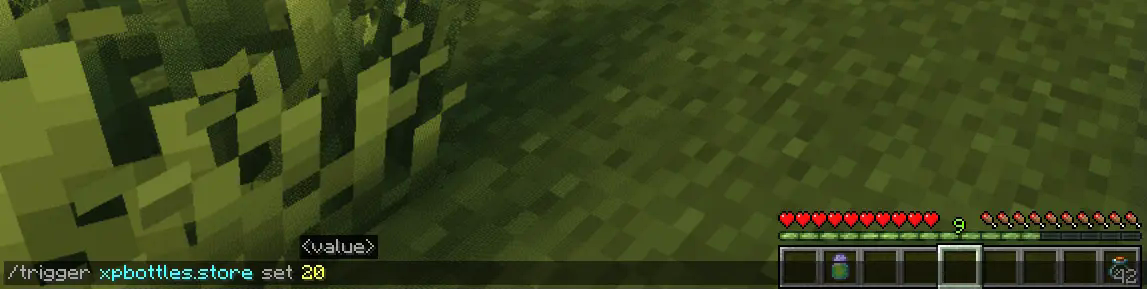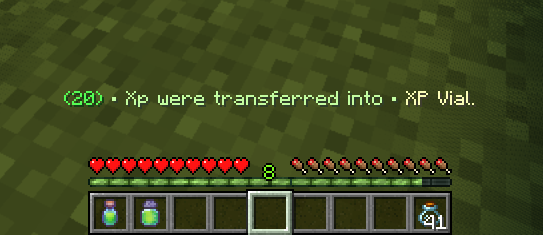
– To store your XP, simply use the command:
`/trigger xpbottles.store set `
– Make sure you have empty **Glass Bottles** in your inventory.
Depending on how much XP you’re storing, the number of glass bottles needed will vary:
– **1 Glass Bottle** for less than **40 XP**
– **2 Glass Bottles** for XP between **40** and **100 XP**
– **3 Glass Bottles** for **more than 100 XP**
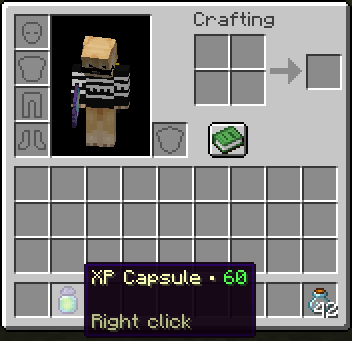
The XP will automatically be stored in the appropriate item (XP Capsule, XP Vial, or XP Canister) based on the amount.
## Retrieve Your XP
Getting your XP back is as easy as right-clicking with the XP item in your hand. Instantly reclaim the XP stored in the container and get back the glass bottles you used. No complicated commands—just a simple action to retrieve what you saved.
### Key Features:
– **XP Storage & Safety:** Protect your XP from being lost when you die by storing it in reusable containers.
– **Flexible Storage Options:** Store different amounts of XP in different-sized containers based on your needs.
– **Easy Sharing:** Share XP with other players by giving them the XP items you’ve stored.
– **Simple Commands & Actions:** No complicated setup—just easy-to-use commands and in-game mechanics.
Whether you’re stocking up for later use or looking for a way to share XP with your friends, the **XP Bottles Datapack** is a must-have addition to your Minecraft experience! Download now and take control of your XP like never before.
## Uninstalling
Ready to say goodbye to the Datapack? No problem! Simply follow these **simple steps**:
1. Access the Chat Window.
2. Enter the Uninstall Command and press Enter:
“`
/function xpbottles:uninstall
“`
3. You can now remove it safely from the Datapacks folder, every trace of the datapack has been removed.
### Additional Notes
– Compatible with all other datapacks, following the standard conventions.
– This datapack was coded using JMC
XP-Book
# 📗 XP-Vault: The Professional XP Ledger
**XP-Vault** (v1.21.11) is a high-performance, survival-integrated utility designed to bridge the gap between risk and reward. By providing a balanced “Banking” system for your experience levels, it adds a layer of strategy to your survival world while protecting your time investment from accidental deaths.
—
## ✨ Primary Features
* 🔒 **Persistent Storage:** Stored levels are linked to the player via scoreboards, meaning they persist through death and even if the book is lost or destroyed.
* 📈 **Precision increments:** Full control with buttons for **1, 3, 10, or 30** levels.
* ⚡ **Bulk Operations:** Rapidly clear your XP bar or withdraw your entire bank with **[STORE ALL]** and **[TAKE ALL]** buttons.
* 🔊 **Dynamic Feedback:** Includes high-fidelity vanilla sound effects and color-coded chat messages to confirm every transaction.
* 🛠️ **Universal Access:** Designed with the `/trigger` system, allowing **Survival players without OP/Cheats** to use the interface seamlessly.
> 
—
## 🔨 Survival Crafting & Initialization
We believe in “Vanilla+” balance. The recipe is expensive enough to feel earned, requiring 8 Bottles o’ Enchanting.
**The Recipe Pattern:**
* **Outer Ring:** 8x Experience Bottles
* **Center:** 1x Regular Book
* **Output:** 1x Knowledge Book (Auto-converts to XP-Vault upon holding)
> 
—
## 💻 Technical Documentation (For Server Admins)
XP-Vault is built for stability and zero TPS impact. It avoids “Every-Tick” heavy NBT scanning, favoring a lightweight trigger-based architecture.
### 📊 Scoreboard Management
The pack uses the following internal objectives:
* `exp_stored`: The master objective. Stores the player’s banked level count.
* `exp_current`: A temporary calculation buffer for XP bar data.
* `exp_takeX` / `exp_storeX`: Individual trigger objectives.
### 🛠️ Admin Utility Commands
* **Check a Player’s Bank:** `/scoreboard players get exp_stored`
* **Manually Set a Balance:** `/scoreboard players set exp_stored 50`
* **Add/Reward Levels:** `/scoreboard players add exp_stored 10`
* **Spawn a Vault Book:** `/function exp_book:give_book`
### 🧪 Testing Procedures
To verify the pack is working correctly after installation:
1. Run `/reload` and look for the “[Book of Experience] Datapack loaded” message.
2. Grant yourself 30 levels: `/experience add @s 30 levels`.
3. Craft or give yourself the book and click **[STORE ALL]**.
4. Run `/scoreboard players get @s exp_stored`. If it returns **30**, the system is 100% operational.
—
## 📝 Changelog v1.0.0 (v1.21.11)
* **1.21.x Component Migration:** Fully updated to the new `written_book_content` and `item_component` syntax (1.20.5+).
* **Recursion Optimization:** Rewrote the `take_all_loop` to handle massive level counts (1000+) without causing server hanging.
* **Syntax Hardening:** Replaced deprecated `clickEvent` keys with modern `click_event` formatting for 1.21.11 compatibility.
* **Auto-Conversion:** Improved the knowledge book detection logic to be more responsive.
—
## ⚖️ License & Permissions
**License:** MIT License
* ✅ **You may:** Use this in modpacks, featured on servers, and modify the code for personal use.
* ❌ **You may not:** Re-upload this to other platforms (9Minecraft, etc.) or claim it as your own creation.
* 💎 **Credit:** Mentioning “Sentrax” or linking to this Modrinth page is appreciated but only required if you redistribute modified versions.
—
## 📥 How to Install
1. Download the `XP-Vault.zip`.
2. Open your Minecraft world folder -> `datapacks`.
3. Drop the `.zip` inside.
4. Join the world and type `/reload`.
—
**Author:** Sentrax
**Compatibility:** 1.20.5, 1.20.6, 1.21, 1.21.11
**Checkout my other datapacks from [OPSIBA007](https://modrinth.com/user/OPSIBA007)**