VillagersPlus – Promenade Compatability
Small datapack to provide compatability between Promenade and VillagersPlus by adding custom trades to VillagersPlus villagers.
Small datapack to provide compatability between Promenade and VillagersPlus by adding custom trades to VillagersPlus villagers.

VillagersPlus adds new villagers, trades and unique and beautiful workstations.
Every villager outfit, house and workstation was designed with a lot of attention to detail to create an immersive experience for you.
Predefined datapacks to add new trades to VillagersPlus from other mods

🏙️ VillagerSociety

Revolutionize Your SMP’s Economy & Roleplay
Are you tired of players locking villagers in 1×1 cells? Sick of the “cure-spam” exploit ruining your economy? VillagerSociety transforms villagers from simple vending machines into living, breathing entities with needs, schedules, and standards.
Designed specifically for Survival Multiplayer (SMP) servers, this plugin adds depth, realism, and balance to villager interactions.
**✨ Key Features**
**🕒 Realistic Work Schedules**

Villagers are no longer available 24/7. They now follow a configurable schedule (Default: 9:00 AM – 5:00 PM).
– Players must visit during working hours to trade.
– Adds immersion and time-management gameplay.
– Configurable open/close times.
**🏠 Housing Standards (Anti-Trading Hall)**
Stop the abuse! Villagers will refuse to trade if their living conditions are poor.
– Space Requirements: Villagers check for open air blocks around them. No more 1×1 cells!
– Light Access: Villagers require access to light (sky or block light) to feel comfortable enough to trade.
– Encourages players to build actual villages and houses.
**🌑 The Night Market (Illegal Traders)**
When the sun goes down, the Night Market begins.
– Mysterious Spawns: A “Night Market Trader” (Wandering Trader) spawns randomly at night.
– Rare Loot: Configurable trades for rare items or high-level enchanted books.
– Risk vs. Reward: These traders are considered criminals! Iron Golems will actively hunt and attack them, adding dynamic events to your towns.
– Visuals: Traders can glow to be spotted in the dark.
**🧠 Zombie Trauma (Economy Fix)**
Fix the vanilla “Cure Exploit” without removing the mechanic entirely.
– Trauma System: If a player cures a villager too many times (configurable threshold), the villager suffers Trauma.
– Consequences: Instead of lowering prices, prices will skyrocket due to the stress of repeated zombification.
– Balances the economy by preventing infinite 1-emerald trades.
**📜 Trade Licenses**
Add RPG progression to your server.
– Optionally require players to hold a physical Trade License item in their inventory to interact with villagers.
– Great for roleplay servers or locking trading behind a quest/payment.
**⚙️ In-Game Admin GUI**

No need to dig through config files for simple changes.
– Run /vs settings to open a sleek GUI.
– Toggle modules (Housing, Night Market, Schedules, etc.) instantly.
Adjust work hours with a click.
– Disable specific professions (e.g., ban Librarians) easily.
**📸 Commands & Permissions**
Commands
– /vs settings – Open the Admin Configuration GUI.
– /vs getlicense – Spawns a Trade License item for the player.
– /vs spawnillegal – Force spawns a Night Market trader at your location.
– /vs reload – Reloads the configuration files.
Permissions
– villagersociety.admin – Access to the settings GUI.
– villagersociety.getlicense – Ability to spawn a license.
– villagersociety.spawnillegal – Ability to force spawn the illegal trader.
– villagersociety.reload – Ability to reload the plugin.
– villagersociety.bypass – Bypass work schedule restrictions.
– villagersociety.bypass.housing – Bypass housing requirements.
**📂 Configuration**
– VillagerSociety is highly configurable. You can tweak:
– Schedules: Set exact open and close times.
– Housing: Define how many air blocks are required.
– Trauma: Set the cure threshold and price multiplier.
– Night Market: Customize the items sold, prices, and currency (Emeralds, Diamonds, etc.).
– Messages: Full language file support for custom messages
**VillagerShop** is a lightweight Paper plugin that lets server admins create a custom player shop using Minecraft’s native villager trade UI — no economy plugin required.
Players open the shop with `/shop` and browse trades in a familiar, vanilla-style merchant interface. Admins manage trades in-game through intuitive chest GUIs: `/vs create` opens a trade builder where you drag items into input/output slots and confirm, and `/vs delete` opens a paginated list of all trades with one-click removal. All trades persist across restarts via YAML.
**Features:**
– Vanilla merchant GUI — no custom UI, feels completely native
– In-game trade creation and deletion — no config file editing required
– Paginated delete GUI for easy trade management
– Permission-gated admin commands (`villagershop.admin`) — LuckPerms compatible
– Smart tab completion — only shows subcommands to admins
– Physical items only — no economy plugin dependency
– Trades never lock or expire (`maxUses = unlimited`, discounts disabled)
**Commands:**
– `/shop` — open the shop (all players)
– `/vs create` — add a trade
– `/vs delete` — remove a trade
– `/vs info` — command help
**Requirements:** Paper 1.21.4+
[](https://modrinth.com/collection/rWTOiG2z)

**This datapack needs plenty of constructive feedback, whether it’s positive, mixed, or negative. Please join the Discord server and share your thoughts or suggestions!**
****
Villagers Rebalanced rebalances trades for multiple villager professions using the new data-driven villager trades system introduced in 26.1. It primarily focuses on nerfing the most powerful trades, buffing underused trades, and adding a select few new, interesting trades.
## Changes
### Definitions
**Stock** – How many times players can use a specific trade until the next restock
**Reputation discount** – A multiplier for a trade’s price based on factors like Hero of the Village, repeat customer discount, repeat customer price gouging, hurting a villager, etc…
**Stack count** – How many of the purchased item the player is given
****
–
– Removed enchanted book trade from Novice level
– Mending can no longer be obtained from librarian trades
– Adjusted Enchanted Book trade:
– Stock: 12 –> 4
– Reputation discount: 20% –> 40%
–
– Adjusted Stick trade:
– Stock: 12 –> 4
– Reputation discount: 20% –> 40%
–
– Added 8 emeralds + 1 gold ingot –> 1 golden apple at Master level
– Stock: 4
– Reputation discount: 25%
– Adjusted Golden Carrot trade:
– Stack count: 3 –> 2
– Stock: 12 –> 8
– Reputation discount: 5% –> 20%
–
– Adjusted diamond equipment trades
– Equipment no longer has any pre-applied enchantments
– Stock: 3 –> 1
– Reputation discount: 20% –> 50%
–
–
– Raw Chicken –> Emerald
– Required raw chicken: 14 –> 1
– Stock: 16 –> 8
– Reputation discount: 5% –> 15%
– Raw Porkchop –> Emerald
– Required raw porkchops: 7 –> 2
– Stock: 16 –> 8
– Reputation discount: 5% –> 15%
– XP: 2.0 –> 3.0
– Raw Rabbit –> Emerald
– Required raw rabbit: 4 –> 1
– Stock: 16 –> 6
– Reputation discount: 5% –> 10%
– XP: 2.0 –> 5.0
–
– Coal –> Emerald
– Required coal: 15 –> 16
– Reputation discount: 5% –> 10%
– XP: 2.0 –> 20.0
– Emerald –> Cooked Chicken
– Stack count: 8 –> 6
– Stock: 16 –> 12
– Reputation discount: 5% –> 10%
– XP: 5.0 –> 4.0
– Emerald –> Cooked Porkchop
– Count: 5 –> 4
– Stock: 16 –> 12
– Reputation discount: 5% –> 10%
– Price (emeralds): 1 –> 2
– XP: 5.0 –> 2.0
–
– Raw Beef –> Emerald
– Required raw beef: 10 –> 4
– Stock: 16 –> 12
– Reputation discount: 5% –> 15%
– XP: 20.0 –> 10.0
– Raw Mutton –> Emerald
– Required raw mutton: 7 –> 4
– Reputation discount: 5% –> 10%
– XP: 20.0 –> 12.0
– Level 4 (empty)
–
– Addition: butcher trade Emerald –> Steak
– Stack count: 4
– Stock: 16
– Reputation discount: 10%
– Price (emeralds): 1
– XP: 15.0
Minecraft’s villagers are more than a bit overpowered, allowing players to speed through the game’s progression and set up elaborate trading halls with nearly every item in the game available almost for free. Sometimes the easiest solution is to just remove to problem entirely.
This datapack disables the villager trading mechanic in Minecraft; instead villagers will just shake their heads sadly if you attempt to trade with them. Other village mechanics such as raids and villager crop farms are still functional. This datapack currently only affects vanilla villagers, not wandering traders or modded traders.
**Note:** Due to the way this datapack functions, removing the datapack will not recover trades from before the datapack was added; instead all villagers will get new trades.
[](https://exlinemods.com/)
Explore Exline Mods for top-notch gaming accessories and mods. Elevate your gaming experience with our high-quality products. Visit exlinemods.com now to gear up and enhance your gameplay!
[](https://discord.gg/9UVGJGyqbv)
[](https://modrinth.com/mod/villagers-drop-emeralds-on-death/versions#all-versions)

This mod will make villagers drop one emerald when they die.
That is all. 🙂
Happy hunting
# Villagers Drop Emeralds on Death Datapack
 
Villagers and wandering traders drop a single emerald on death. Inspiried by the [mod](https://www.curseforge.com/minecraft/mc-mods/villagers-drop-emeralds-on-death) of the same name, but as a minecraft datapack.
## How To Install
1) Download zip file.
2) Navigate to the datapacks folder in your minecraft world:
`%appdata%/.minecraft/saves/worldname/datapacks/`
3) Drag downloaded zip file into this folder (you don’t have to unzip it).
4) The datapack will be active next time you load your world. If not, run the /reload command.

[](https://discord.gg/z2n3qTzQY6)
[](https://www.youtube.com/@jodek)
[](https://github.com/jodeks-datapacks/villagers-buy-ender-pearls/issues)
[](https://ko-fi.com/jodek)
[](https://github.com/sponsors/Jodekq)
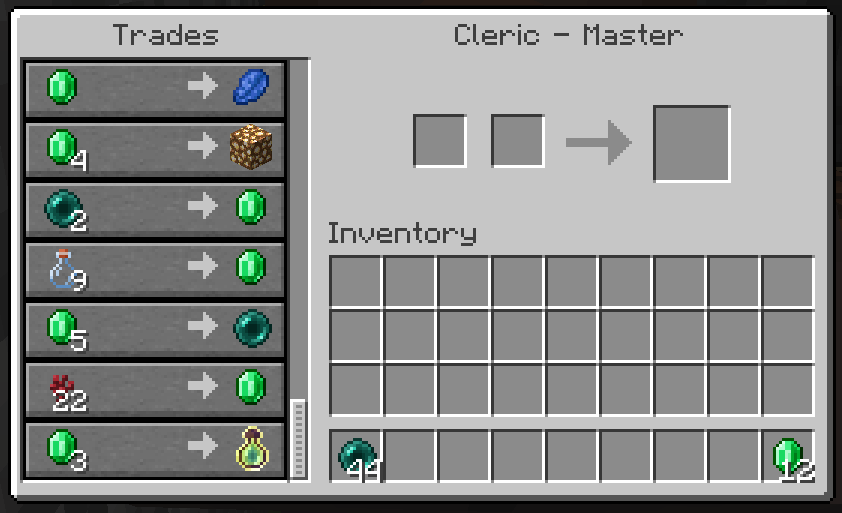
### A master cleric will now give you 1 emerald for 2 ender pearls!
## Guides

If something doesn’t work, feel free to join the [discord server](https://discord.gg/z2n3qTzQY6)
### How to install a datapack in singleplayer
1. **Open Minecraft**
Launch the game.
2. **Create a New World**
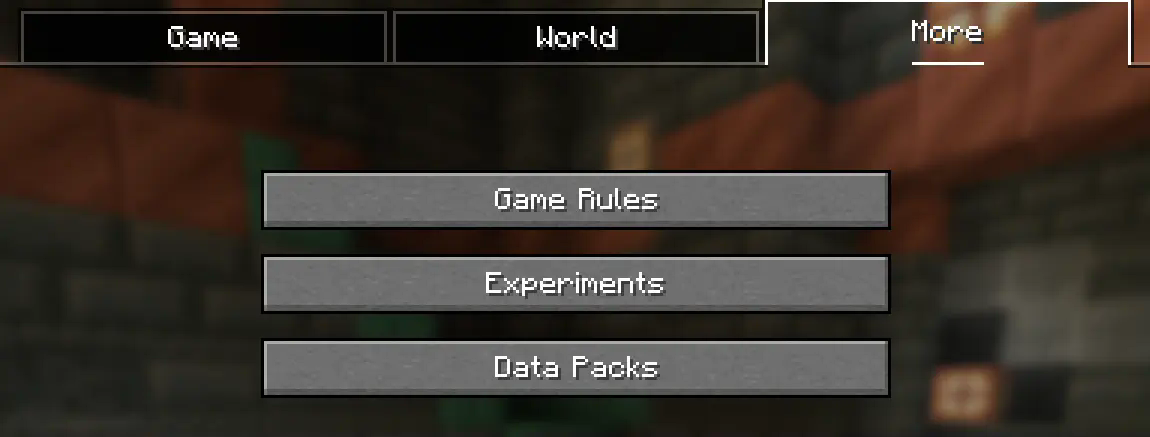
Navigate to “More” and click on **”Data Packs”**.
3. **Add the Datapack**
Drag the datapack (a `.zip` file or directory) into the Minecraft window.
– A confirmation screen will appear. Click **”Yes”**.
4. **Activate the Datapack**
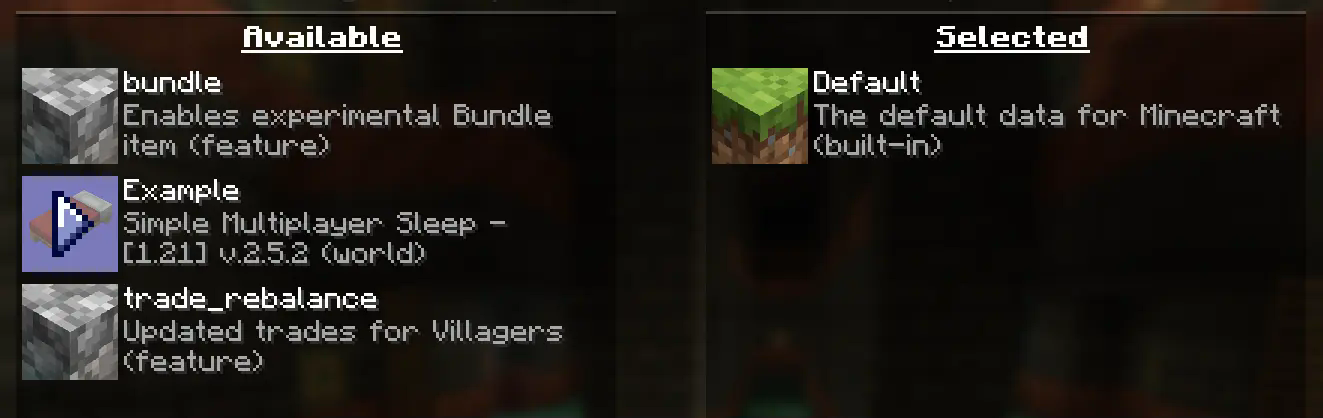
Move the datapack to the right-hand side of the screen by clicking the triangle on its icon (visible when hovering over it).
5. **Complete World Creation**
– Click **”Done”** at the bottom of the screen.
– Continue creating your world and click **”Create New World”**.
—
### ⚠️ IMPORTANT ⚠️
The datapack only works if cheats are enabled.
You can verify the datapack is active by typing:
`/datapack list enabled`
This command should list an entry named `[file/
### How to Install a Datapack in an Existing Singleplayer World
1. **Open Minecraft**
Launch the game.
2. **Select Your World**
– Choose the world you want to install the datapack for.
– Click **”Edit”**, then **”Open World Folder”**.
3. **Add the Datapack**
– Open the folder named `datapacks`.
– Place the datapack into this folder. It should be a `.zip` file or a directory.
4. **Reload the World**
– If you are in the world during installation, type `/reload` in the chat or press **F3 + T** to reload resources.
*(Make sure cheats are enabled.)*
—
### ⚠️ IMPORTANT ⚠️
The datapack only works if cheats are enabled.
You can verify the datapack is active by typing:
`/datapack list enabled`
If you encounter this issue, here is a step by step guide on how to enable Cheats/Admincommands permanently after you have already created a Minecraft world.
⚠️ **Before you begin, you should save and backup your world in case something goes wrong.**
(I will not take any responsibility for any corrupt worlds. Do this at your own risk!)
But don’t worry this works without any problems.
If you don’t want to change this permanently check out [this guide](#).
### 1. You need [NBTExplorer](https://github.com/jaquadro/NBTExplorer/releases/tag/v2.8.0-win)
> NBTExplorer is an open-source NBT editor for all common sources of NBT data. It’s mainly intended for editing Minecraft game data.
### 2. Open NBTExplorer and open your Minecraft world, where you want to enable Cheats/Admincommands.

### 3. Navigate to:
– `
– `level.dat`
– `Data`
– `allowCommands`

### 4. Click on **”Edit Tag Value”**

### 5. Change the Value from `0` to `1` and click **”OK”**

### 6. Now click on **”Save All Modified Tags”**

That’s it. You are done. You can now join your world and check if you have permission to change your `gamemode`, for example.
### Enabling Cheats Temporarily After World Creation
If you encounter this issue, here is a step-by-step guide on how to enable Cheats/Admin commands temporarily after you have already created a Minecraft world.
1. **Join Your World**
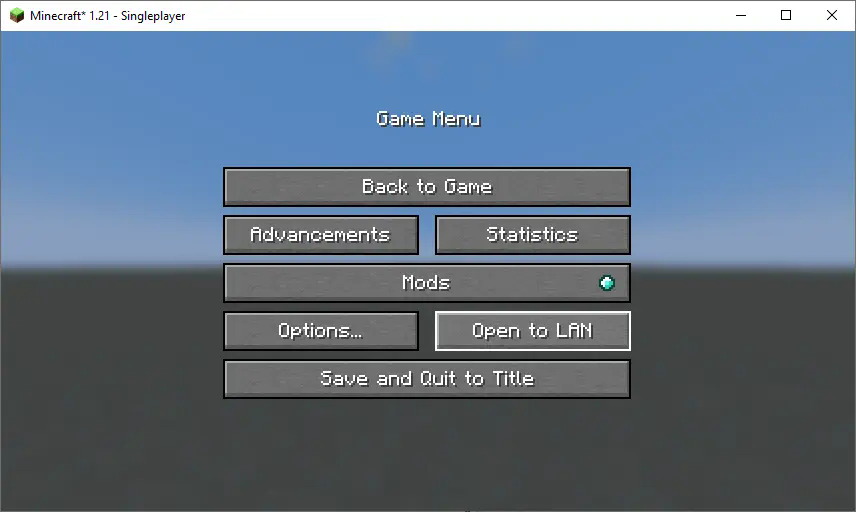
Open your single-player world and press “Escape”.
2. **Open to LAN**
Click on **”Open to LAN”**.
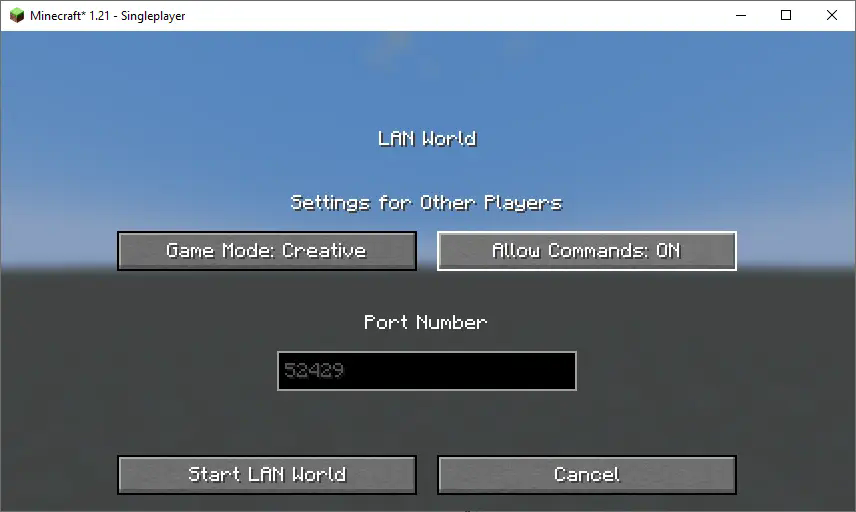
3. **Allow Commands**
Set **”Allow Commands”** to **ON**.
4. **Start LAN World**
Click **”Start LAN World”** to apply the changes.
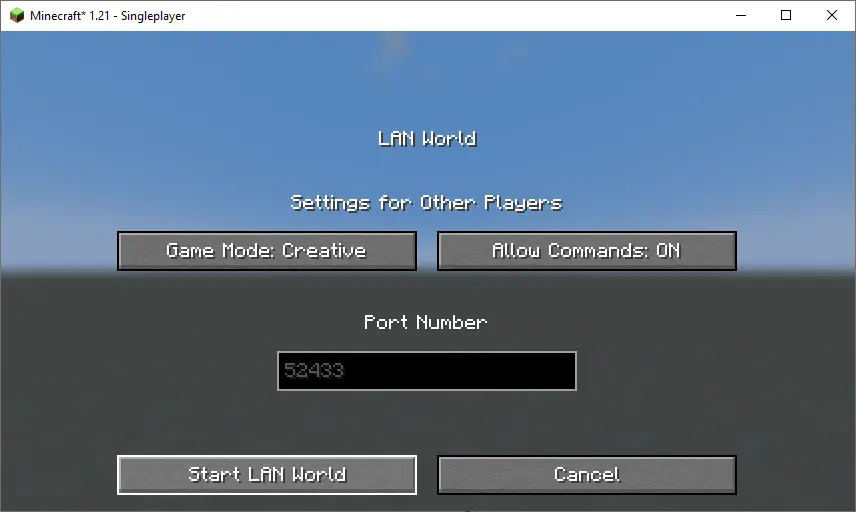
Now, you should be able to use commands like changing your gamemode. Keep in mind that this is only temporary and will need to be done every time you join the world.
### How to Install a Datapack in Multiplayer
1. **Open Your Server Folder**
Navigate to your server folder, then open the folder for the world you wish to install the datapack in (default: `world`).
2. **Add the Datapack**
– The datapack should be a `.zip` file.
– Place the datapack into a folder named `datapacks` inside the world folder.
3. **Reload the Server**
– Type `/reload` from the console or as a level 3 operator if the server was running during the installation.
### How to Uninstall a Datapack from Your Singleplayer World or Server
1. **Run the Uninstall Command**
For my datapacks, run the command:
`/function datapack_name:uninstall`
2. **Delete the Datapack**
– Delete the datapack from the folder you placed it in.
– Alternatively, you can run:
`/datapack disable [file/your data pack file/directory name]`
3. **Reload the World or Server**
After deleting or disabling the datapack, run:
`/reload`
### Step-by-Step Guide to Installing a Mod on a Minecraft Server
1. **Download the Mod**
– Make sure to download the **correct version** of the Mod that matches your server’s Minecraft version.
– **Important:** The mod file should be a `.jar` file.
2. **Ensure No Datapacks or Other Mods Conflict**
– Do not have both a datapack and a mod installed at the same time, as they may conflict.
– Only install one or the other, depending on your server’s setup.
3. **Locate the Mods Folder**
– Open your server’s root directory.
– Inside this directory, find the folder named `mods`.
– If the `mods` folder doesn’t exist, create one.
4. **Install the Mod**
– Paste the downloaded `.jar` file for the Mod into the `mods` folder.
5. **Restart the Server**
– After adding the Mod to the `mods` folder, restart your Minecraft server for the mod to be activated.
6. **Verify Mod Installation**
– Once the server has restarted, join the server and check if the Mod is working.
– You can use `/mods` or a similar command (depending on the mod) to see if the Mod has been successfully loaded.
### Additional Tips
– **Backup Your Server:** Always create a backup before installing the Mod to avoid data loss in case something goes wrong.
– **Ensure Mod Compatibility:** Check that the Mod is compatible with your Minecraft server version and any other mods you have installed.
🔄 Villager Trade Refresher 🔄
Refresh your villagers’ trades without breaking their workstations!
✅ Shift-right-click a villager to instantly reroll their trades.
🔧 Fully configurable cooldown system with persistent storage.
💾 No database needed – saves data to a simple YAML file.
🧠 Does NOT override or redesign the default villager GUI.
💡 Perfect for economy servers, SMPs, or casual play!
🛠️ Features:
⚡ Instant trade refresh using vanilla villagers — no GUI changes, no hassle.
📦 Preserves villager profession, biome, level, and name when refreshing.
⏳ Configurable cooldown (cooldown-time) to avoid abuse.
🔁 Cooldowns saved between restarts — no progress lost.
🛑 Prevents refresh spamming with cooldown warning sounds/messages.
🎵 Fun villager sound effects when refreshing trades.
🔧 Configuration Example (config.yml)
yaml
Copy
Edit
cooldown-time: 30 # Cooldown time in seconds between refreshes per player
📸 How to Use:
Approach any villager with a profession.
Hold Shift and right-click them.
Boom 💥 — trades refreshed!
A message will inform you if you’re still on cooldown.
🎯 Ideal For:
Survival and SMP servers where players want more control.
Preventing players from abusing workstation breaking.
Admins looking for a lightweight, plug-and-play trade control system.
💡 No dependencies. No bloat. Just smart features.
Developed for Minecraft 1.21.4 Spigot/Paper.
Need help? Have a feature request? Message me or open an issue on GitHub.