### Harvest entire chains of vines instantly!
Shearing one vine block automatically drops all vines below it while consuming durability. Quick, server-sided, and works with all vine types!
Combatible from fabric 1.21.10 – 26.1.2
Ver. 1.0.1 when sneaking, normal Minecraft behavior and only the vine sheared will drop
Vincent Van Gogh The Starry Night Style Paintings Pixel Art

Bring timeless art into your game with the Vincent Van Gogh The Starry Night Style Paintings Pixel Art Mod. Inspired by Van Gogh’s world-famous masterpiece The Starry Night, this mod transforms classic paintings into beautiful pixel art that perfectly blends with retro-style gameplay.
—
### How many paintings does it have?
**1.0**: 19 paintings

—
With this mod, you can decorate your world with pixel art recreations of Van Gogh’s paintings, giving every space a unique artistic touch. Whether you’re building a cozy house, a creative gallery, or just want to add a bit of culture to your world, these pixel-perfect artworks will make your creations shine.

The Starry Night pixel art paintings are carefully designed to maintain the essence of Van Gogh’s brushstrokes while adapting them to a pixelated aesthetic. This makes the mod not only visually stunning but also lightweight and compatible with many builds.
Perfect for art lovers, pixel art fans, and players who enjoy customization, this mod combines history, creativity, and style. Experience Van Gogh’s art like never before and transform your world into a living gallery of pixel art masterpieces.
VillEdit
# VillEdit – Create your own custom villagers
This Datapack was inspired by CommandGeek: https://youtu.be/MmDHKOZLkBc
## Description
VillEdit is a Datapack which allows you to create and edit your own custom villagers. You can edit the trades, profession, biome, level and even the name with a fancy menu in no time. At the end, you will get a spawn egg to spawn your custom villager anywhere in the world.
## How to use
### Spawning the editor
Place down a chest, and then use a villager spawn egg on top of it (sneak and right click the top). This will spawn a **Villager Editor**. Right click the barrel to open the menu.
### Using the editor
To use the editor, simply open the barrel and click the buttons. Each button will explain what it does when you hover over it. There are 5 appearance options:
– Cycle Profession
– Cycle Biome
– Cycle Level
– Toggle Static (NoAI)
– Toggle Glow
– Toggle Silent
– Change Custom Name
### Adding a trade
To add a trade, click the green “Add Trade” button. This opens a new menu where you can create the trades by putting items in the UI. You need at least one input item, and an output item, for it to work. You can also toggle whether you want the trade to reward any XP to the player.
### Removing trades
To remove trades, you can click the redstone to remove the last trade you added. You can also click on the redstone block twice to reset and remove all the trades.
### Saving and exiting
Once you’re done, open the editor and press Save. This will give you the spawn egg to spawn your custom villager. You can use it wherever and whenever you want, but make sure to keep the egg safe. The spawn egg will work even if the datapack is uninstalled. The spawn egg will display the villager’s data in the lore of the item (hover over it in the inventory)
To remove the editor, just break it.
Underground Coin Cache Structure for Villager Coin
Adds an Underground Coin Cache structure to world generation containing Coin Stacks from VillagerUnknown’s Villager Coin mod.
## Requirements
* VillagerUnknown’s Villager Coin mod
* VillagerUnknown’s Coin Stacks for Villager Coin mod
## Installation
1. Download the ZIP file for your desired Minecraft version.
2. Create your Minecraft World.
3. Install the ZIP file in your Minecraft World’s `datapacks` folder.
Villager Coin Loot for Graveyards & Ghosts
_This project will be deprecated in favor of the new built-in integration options._
Adds Copper, Iron, and Gold coins, from VillagerUnknown’s Villager Coin mod, to loot tables for VillagerUnknown’s Graveyards and Ghosts mod.
## Requirements
* VillagerUnknown’s Graveyards & Ghosts mod
* VillagerUnknown’s Villager Coin mod
## Installation
1. Download the ZIP file for your desired Minecraft version.
2. Create your Minecraft World.
3. Install the ZIP file in your Minecraft World’s `datapacks` folder.
Villager Coin Loot for Better Archeology
_This project will be deprecated in favor of the new built-in integration options._
Adds Copper, Iron, and Gold coins from VillagerUnknown’s Villager Coin mod to the loot tables of Pandarix’s Better Archeology mod.
## Requirements
* VillagerUnknown’s Villager Coin mod
* Pandarix’s Better Archeology mod
## Installation
1. Download the ZIP file for your desired Minecraft version.
2. Create your Minecraft World.
3. Install the ZIP file in your Minecraft World’s `datapacks` folder.
Force Gear From Villagers
# VillagerUnknown’s Force Gear From Villagers Data Pack
Forces players to purchase gear from Villagers by removing recipes for leather, stone, iron, gold, and diamond armors, weapons, and tools.
* Players can still craft Wooden tools and weapons.
* Players can still apply Netherite to Diamond tools through the smithing table.
* Players can still craft the Mace.
* Recipes are “removed” by changing the ingredients in the recipe and advancement to use Bedrock. This allows Minecraft to remove the recipe without any issues.
_This data pack has been created for, but is not dependent on, the VillagerUnknown’s Villager Coin mod._
## Installation
1. Download the ZIP file for your desired Minecraft version.
2. Create your Minecraft World.
3. Install the ZIP file in your Minecraft World’s `datapacks` folder.
VillagerTradeEdit
VillagerTradeEdit
**VillagerTradeEdit** is a Minecraft plugin that empowers players with the necessary permissions to edit the trades of villagers in-game. Through an intuitive in-game UI, users can easily and efficiently customize any villager’s trades to suit their needs.
This plugin provides similar functionality to the **Shopkeepers** plugin but stands out by allowing edits to any villager directly. Plus, it supports **Folia** for those who want enhanced compatibility.
> *”I just couldn’t wait for Shopkeepers to support Folia, so… I made one myself. its quite rough don’t expect much.”*
## Features
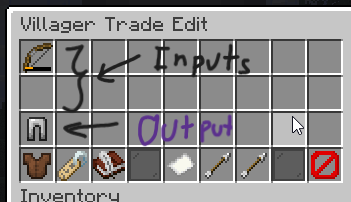
– **Easy Villager Trade Editing**: Shift-right-click on a villager to start editing.
– **In-Game UI**: Modify trades directly in-game without any hassle.
– **Unlimited-Trade**: Create as much trade as you want.
#
### Commands
– `/vte reload` — Reloads the plugin configuration file.
– `/vte summon` — Summons a static villager.
### Permissions
– `villagertradeedit.command` — Permission to use any command from the plugin.
– `villagertradeedit.open` — Permission to open the villager trade edit menu.
– `villagertradeedit.command.reload` — Permission to reload the plugin configuration file.
– `villagertradeedit.command.summon` — Permission to summon a static villager.
## Setup
1. **Download** the latest version of the **VillagerTradeEdit** plugin.
2. **Place** the downloaded `.jar` file into the `plugins` directory of your server files.
3. **Restart** your server to load the plugin.
Villager Timetable
## Summary
– Villager schedule screen
– Optional current schedule HUD
– Client side
– Vanilla+
– ModMenu compatibility
***
Updating my mods to keep working with every Minecraft update takes time. Consider donating ☕💪
***
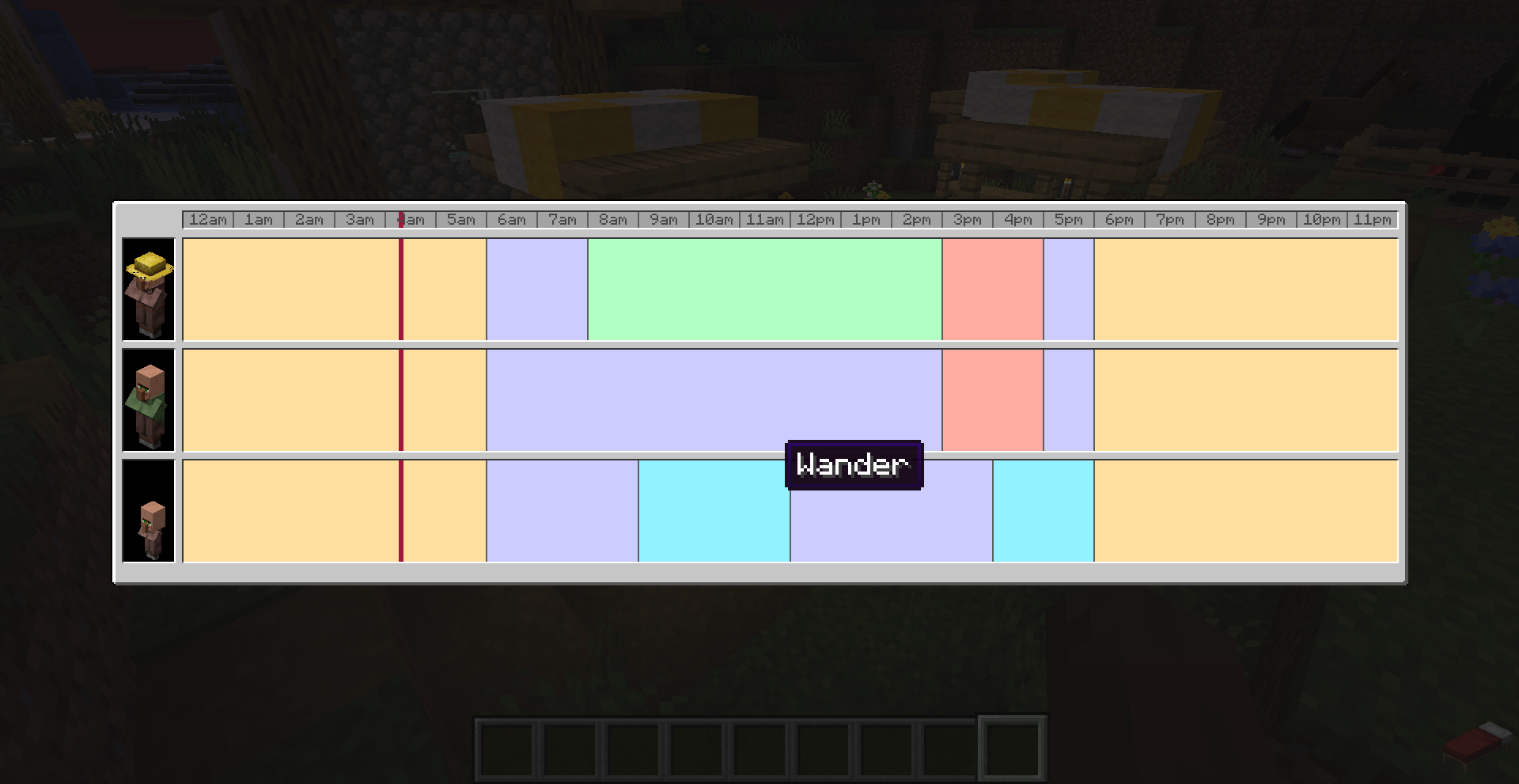
Are you always waiting at your villagers until they finally restock? Do you want to see the schedule the villagers follow? Then VillagerTimetable is the mod for you!
VillagerTimetable adds the ability to visualize the work schedules of your villagers. You can see exactly when they start to work, or go to sleep. The mod also adds an optional HUD overlay to see the current work cycle.
By default the Timetable screen is bound to the “V” key.
ModMenu is supported for changing settings.
VillagersPlus – Supplementaries Compatability
Small datapack to provide compatability between Supplementaries and VillagersPlus by adding custom trades to VillagersPlus villagers.