Zetter — Painting Mod
### Completed features:
– Simultaneous canvas edit, dynamic picture updates for all players in range;
– Dynamic canvas texture loading/unloading;
– 18 types of frames from all vanilla types of wood, all of them can be decorated with golden nameplate which will show painting name by right-clicking it;
– Golden frames have more decoration, iron bezel-less frames allow players to create huge seamless paintings by placing them one next to another;
– Frames could be easily replaced, you can take your painting off the frame and use another;
– Color code input fields (hex) and HSV sliders for color picking;
– Color blending options, classic RGB, subtractive, and realistic;
– Brush tool with smooth edges;
– Edit up to 2×2 canvases on easel;
– 16×16 paintings can be combined and placed on wall, resulting in up to 4×4 blocks paintings;
– Eyedropper, hand and zoom tool for easy navigation;
– Bucket tool;
– Save your colors in palettes, recharge palettes with paints and use them on multiple canvases;
– Hotkeys included;
– Export paintings to png files with `/zetter export` command
### Available translations:
– American English (en_US 🇺🇸) ;
– Russian (ru_RU 🇷🇺) with the help from DrHesperus;
– Portuguese (pt_PT 🇵🇹, pt_BR 🇧🇷) thanks to StuarteLitro;
– Spanish (es_ES 🇪🇸, es_AR 🇦🇷, es_HN 🇭🇳, es_MX 🇲🇽, es_PE 🇵🇪 and others) thanks to iSrNinja;
– German (de_DE 🇩🇪) thanks to OttovonBismarckderErste;
– Chinese (zn_CN 🇨🇳) thanks to cream280;
– Polish (pl_PL 🇵🇱) thanks to Vakarian89;
– Hebrew (he_IL 🇮🇱) thanks to ItamarDenkberg;
### Core values of this mod:
1. Encourage players to create own pixel artworks and use it in their creations;
2. Do not change vanilla gameplay in any way and try to be as much close to vanilla Minecraft feel as possible;
3. Drawing should be fun and simple;
4. Let power users to be power users as much as it doesn’t overcomplicate UI;
5. Server administrators should be able to easily moderate player artworks and decide what is appropriate on their server;
6. Simultaneous canvas edit is super hard to implement properly, but I will because it’s fun.
### Planned features:
1. Special admin table to check all pictures;
2. Line tool;
3. Setting to use higher resolution of canvases for higher-resolution texture packs, up to 64px on one block.
Zetter Gallery — Share Paintings
THIS MOD REQUIRES ZETTER TO WORK: https://modrinth.com/mod/zetter-painting-mod
Zetter Gallery mod adds a Painting merchant, through which you can upload and download popular paintings on Zetter Gallery website.
This is done by buying one of the Painting Merchant offered paintings or selling one of yours, making it available to other players around the world, on any server.
Terms of service for Zetter Gallery API can be found here: https://zetter.gallery/terms. You keep the rights for the painting uploaded to the Zetter Gallery
ZeroWorlds ResourсePack
## **Описание (RU)**
**ZeroWorlds ResourcePack** — ресурс-пак, разработанный специально для сервера ZeroWorlds в **Minecraft**. Он обновляет визуальный стиль игры, добавляя уникальные текстуры и целостный художественный дизайн, органично сочетающийся с атмосферой сервера.
### Особенности
– Кастомные текстуры блоков и предметов
– Единый визуальный стиль
– Оптимизированная производительность
– Улучшенная детализация и атмосфера
Ресурс-пак сохраняет читаемость и узнаваемость ванильного Minecraft, делая мир более выразительным и цельным.
### Зависимости
Для корректной работы требуются моды:
– Entity Texture Features
– Entity Model Features
– Variants-CIT
– Resource Pack Fusion
Рекомендуется для игры на сервере ZeroWorlds.
—
## **Description (EN)**
**ZeroWorlds ResourcePack** is a resource pack designed specifically for the ZeroWorlds server in **Minecraft**. It refreshes the visual style of the game with custom textures and a cohesive artistic direction that naturally fits the server’s atmosphere.
### Features
– Custom block and item textures
– Consistent visual style
– Optimized performance
– Enhanced detail and atmosphere
The pack preserves the clarity and recognizability of vanilla Minecraft while making the world more visually refined.
### Dependencies
The following mods are required for proper functionality:
– Entity Texture Features
– Entity Model Features
– Variants-CIT
– Resource Pack Fusion
Recommended for playing on the ZeroWorlds server.
ZeroVision
# **ZeroVision**
This is the very early alpha release of my pack
(since a lot of people on my discord wished for it)
In my pack i basically want to recreate everything cool i saw in resourcepacks in my own style!
Like 3D Flowers and Plants, or 3d Ores, or custom workbenches!
In my pack there is missing a lot of textures, animations, item-textures and basically the whole GUI, thats normal since this is the alpha of a work in progress resourcepack 🙂
**Note:**_You can load my pack on top of diffrent ones, if u want to have a textures for Items i didnt made so far!_ (The Resourcepack thats the highest in the list has the highest priority)
Heres some preview pictures:
3D-Ores: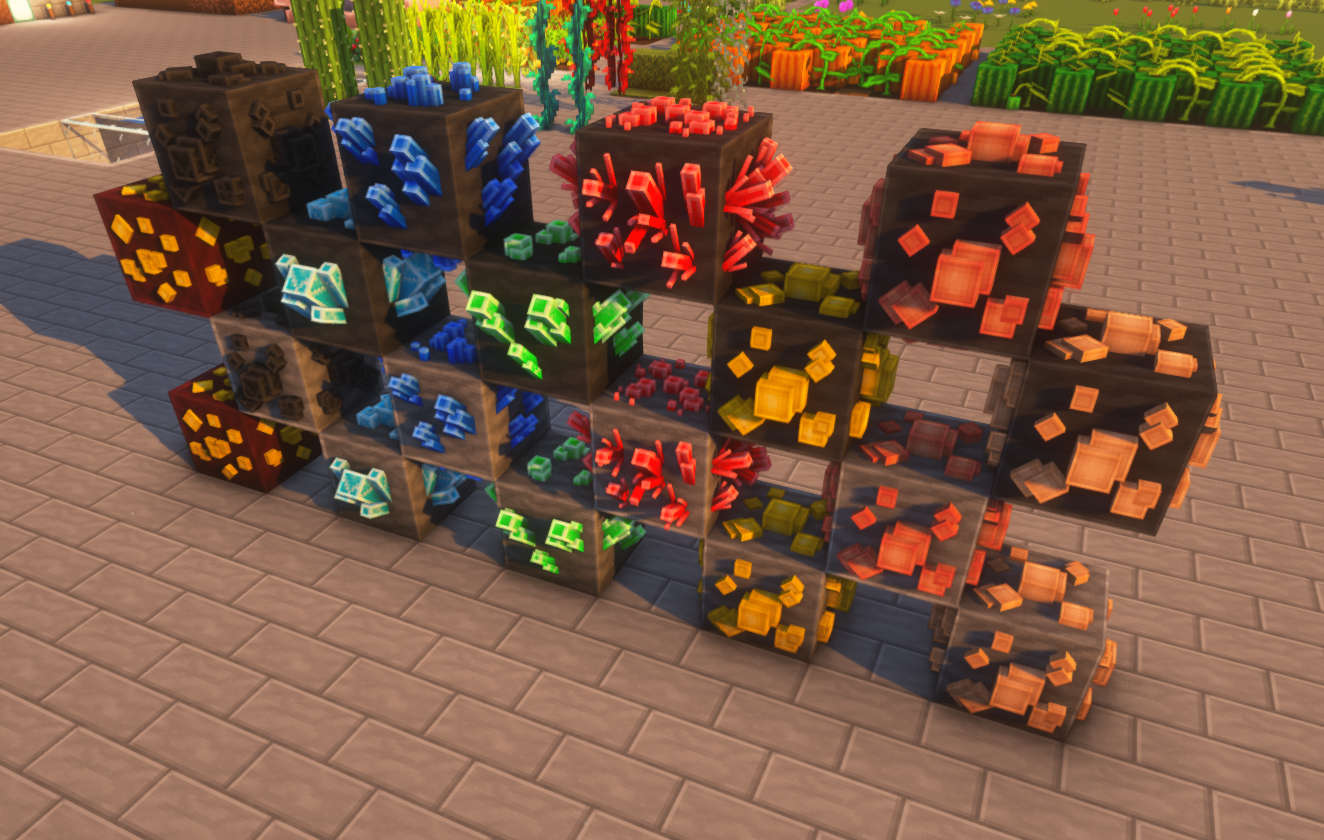
3D-Flowers: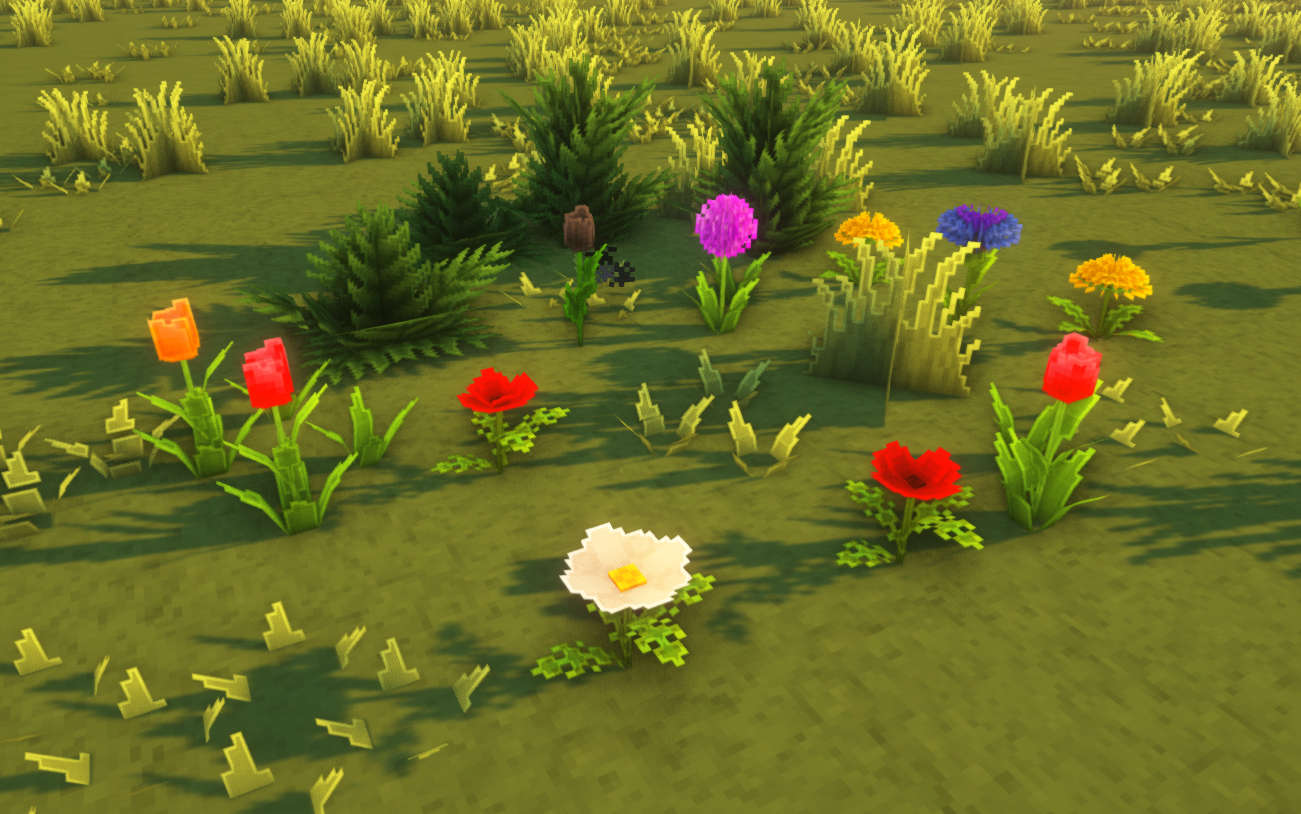
3D-Foliage: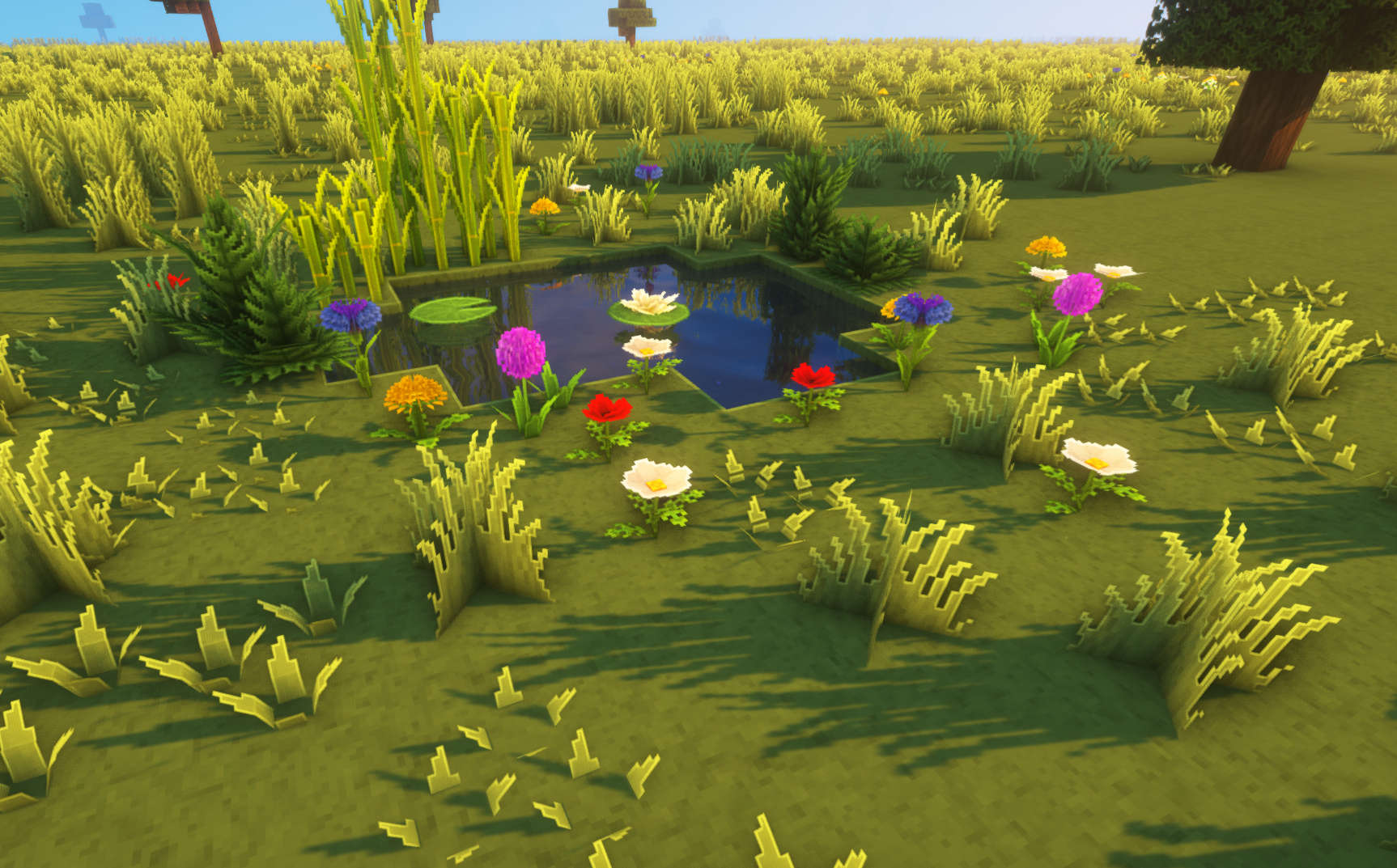
Other: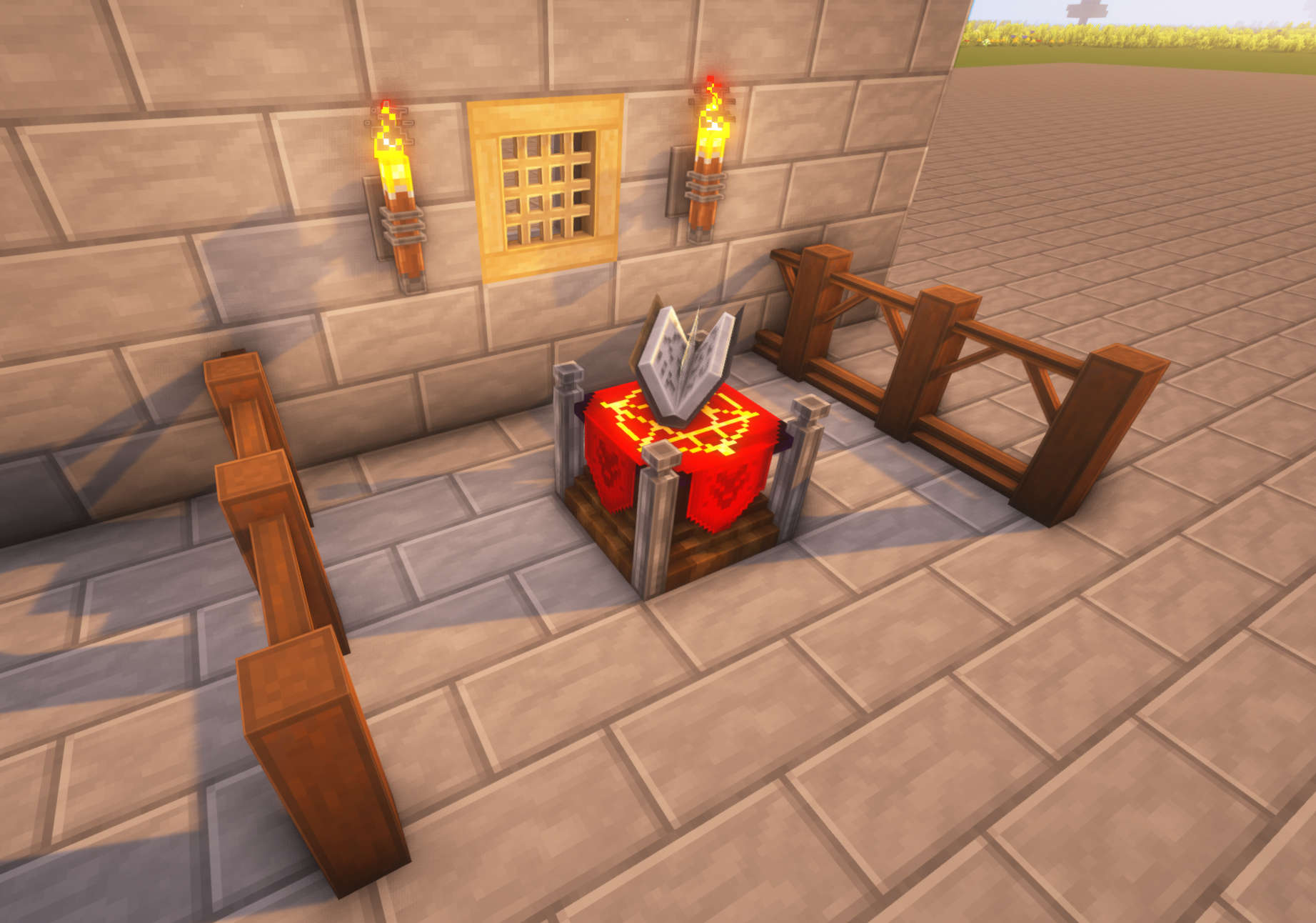
Preview: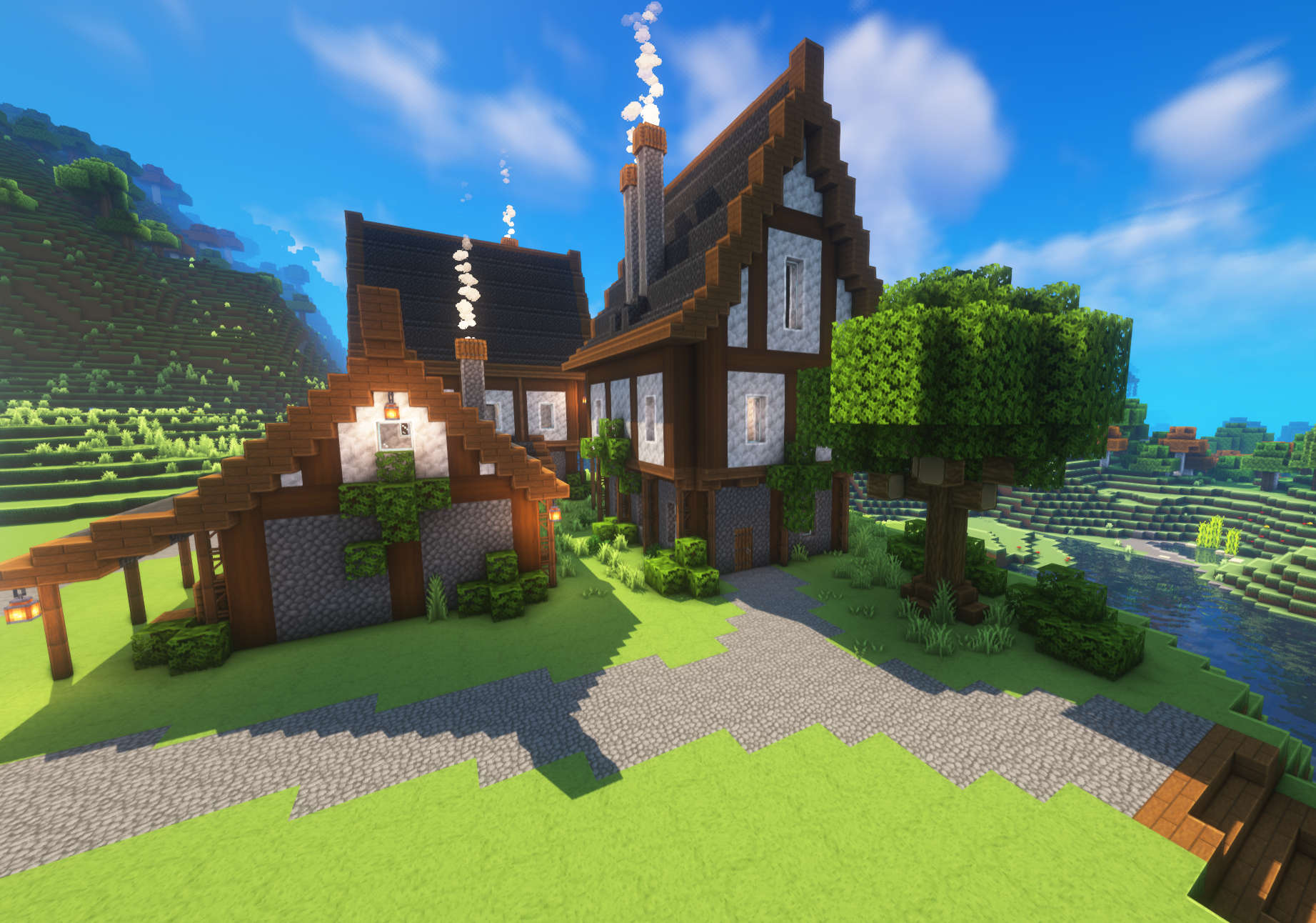
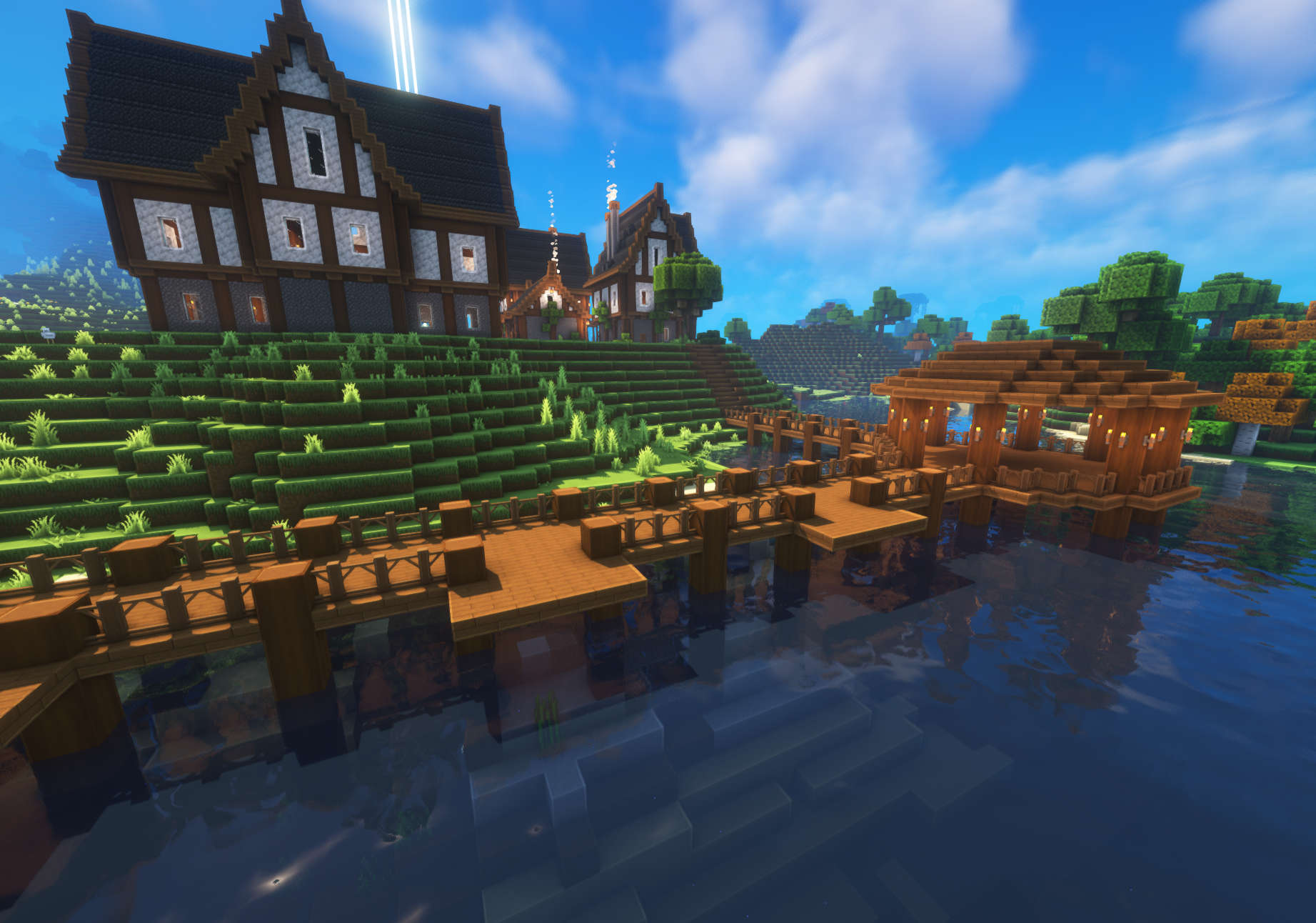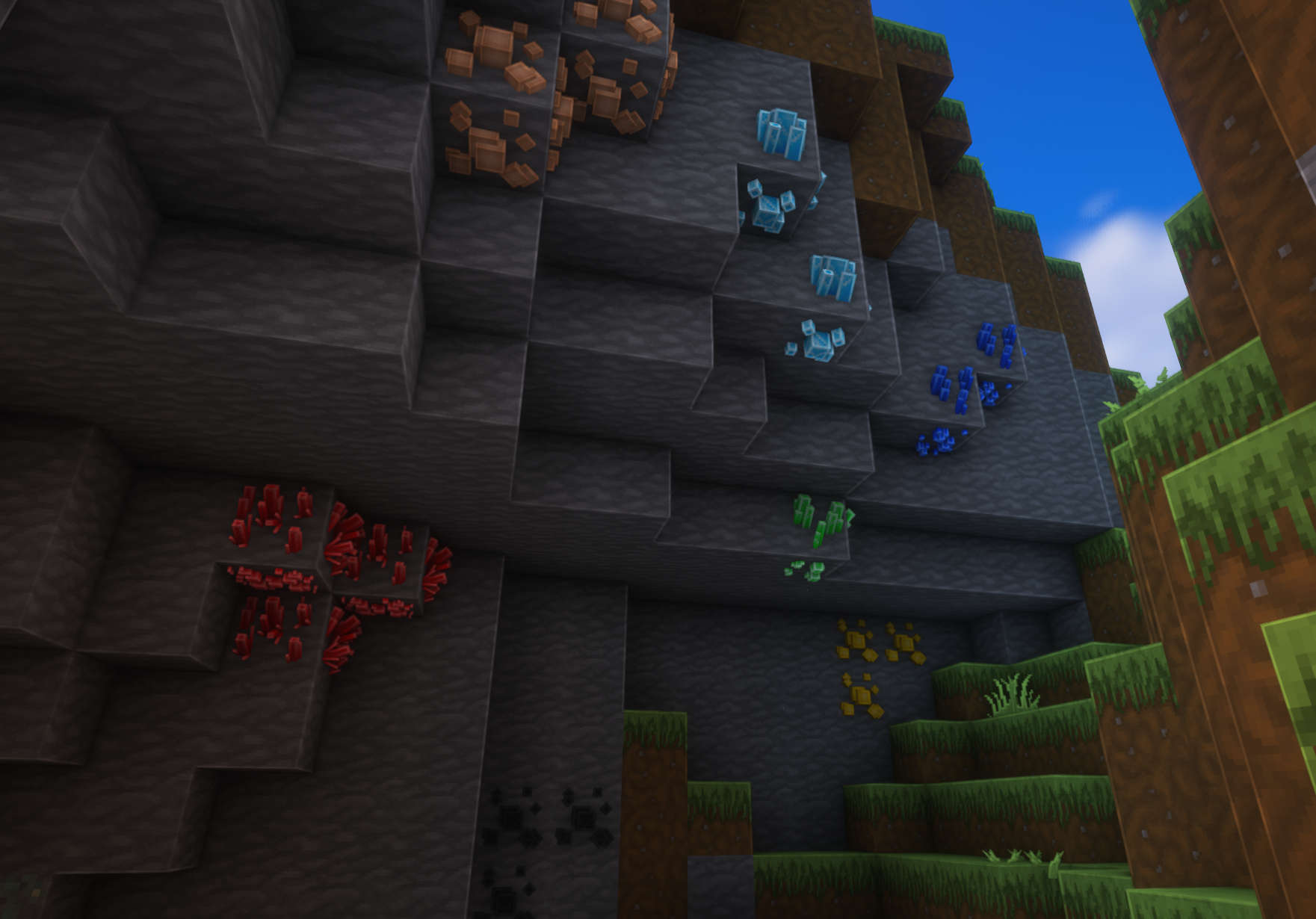
Im using Complementary Shaders in the screenshots!
ZeroTwo Totem
# ABOUT
**This texture pack replaces the totem with the character Zero Two from the anime Darling in the Franxx. The sound when using the totem has also been replaced with the phrase “Dar-ling.” If you liked the texture pack, add it to your favorites! Enjoy the game!**
# IMPORTANT
– ### **Is there a port on the Bedrock Edition?**
This texture pack is designed exclusively for Java Edition. We do not plan to release a version for Bedrock Edition.
– ### **Want to use it on Bedrock Edition?**
You can port the texture pack yourself, as long as you comply with all license terms.
– ### **Pack version warning ?**
There is a high chance that resource packs will work with different versions of Minecraft without the need to change the version of the pack, unless there is a major update that breaks resource packs.
Zerotekz’s Elytras
– compatible & tested for 1.16 – 1.20.1!
– should work for all upcoming Minecraft versions since texturepack format doesnt change!
– needs [Optifine](https://optifine.net/downloads) or [CIT-Resewn](https://www.curseforge.com/minecraft/mc-mods/cit-resewn) to work!
– if u need help join my [Discord](https://discord.gg/CdawEAH4va)!
– for more infos visit my [Website](https://www.zerotekz.net/)!
This pack includes unique Elytras!
You get them by **renaming** your elytra in an **anvil** to the designated name in the **nameslist**!
New:
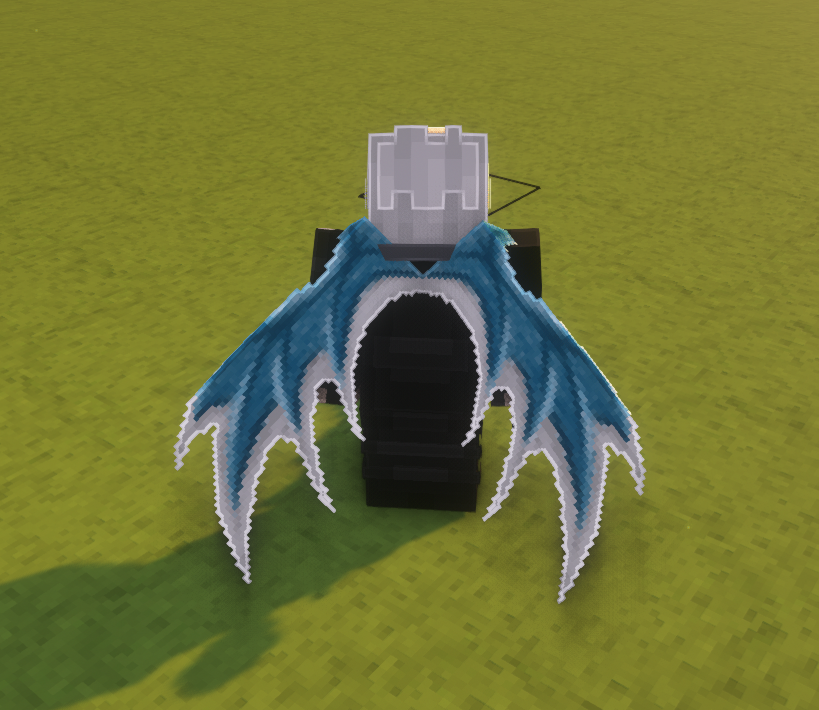
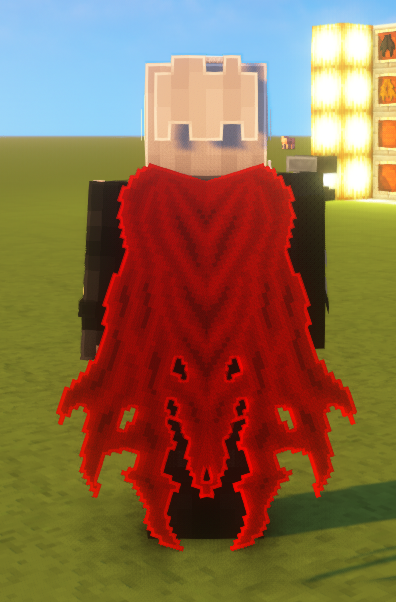
Added Icons!
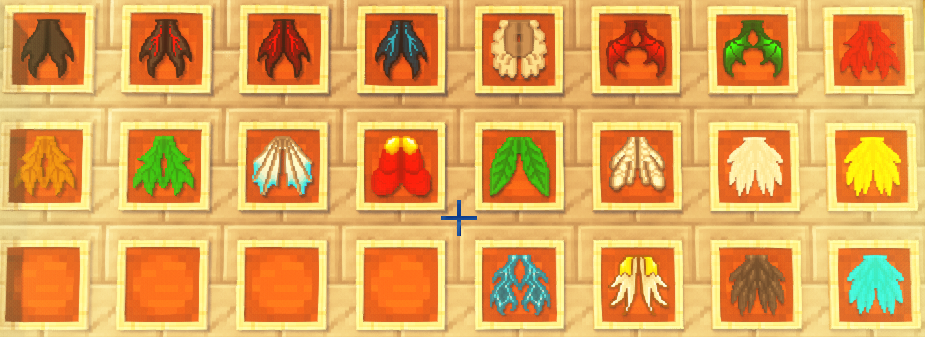
Nameslist!
New:
– White Dragon Wings
– Ripped Cape
Old:
– Angel Elytra
– Lesser Demon Elytra
– Red Demon Elytra
– Blue Demon Elytra
– True Demon Elytra
– White Wings
– Dark Wings
– Blue Wings
– Yellow Wings
– Guardian Elytra
– Leaf Elytra
– Maple Elytra
– Red Maple Elytra
– Yellow Maple Elytra
– Insect Elytra
– Red Dragon Elytra
– Green Dragon Elytra
– Jet Elytra
– Royal Elytra
– Elytra (Basic Elytra)
Zerotekz’s Blades of War 1
– compatible & tested for 1.16 – 1.20.1!
– should work for all upcoming Minecraft versions since texturepack format doesnt change!
– needs [Optifine](https://optifine.net/downloads) or [CIT-Resewn](https://www.curseforge.com/minecraft/mc-mods/cit-resewn) to work!
– if u need help join my [Discord](https://discord.gg/CdawEAH4va)!
– for more infos visit my [Website](https://www.zerotekz.net/)!
This pack includes unique weapons and shields!
You get them by **renaming** your weapon or shield or tool in an **anvil** to the designated name in the **nameslist**!
Nameslist!
Swords:
– Angelic Sword
– Demonic Sword
– Corrupted Sword
– Angelic Greatsword
– Demonic Greatsword
– Corrupted Greatsword
– Yamato (Devil May Cry 5)
– Dante’s Devilsword (Devil May Cry 5)
– Awakened Devilsword (Devil May Cry 5)
– Bloodthirst (Metal Gear Rising Muramasa)
– Blue Rose (Sword Art Online Alicization)
– Infinity (Infinity Blade)
– Katana of War
– Dagger
– Bloodvein
– Royal Slash
– Golden Splitter
– Death Bringer
– Claws
– Grim
Bows:
– Assassination (Inspired by World of Warcraft) (Bow)
– Daedric (Inspired by TESV Skyrim) (Bow)
– Light Staff
– Lightning Staff
– Fire Staff
Shields:
– Wolfshield
Tools:
– Lucky Pick (Pickaxe)
– Soft Pick (Pickaxe)
– Lumberjack (Axe)
– Spade (Shovel)
– Hoe (Hoe)
– Zippo (Flint and Steel)
Zeph’s EggHunt
# Zeph’s EggHunt
Give your player’s an activity to do this Easter! An Easter Egg hunt built for Nexo so you get real Egg Models for players to hunt. Hide eggs around your world for players to find, or let the server scatter them automatically near players as they explore. Both modes work at the same time.
## How It Works
### Event Eggs (Admin Hidden)
Use a placement wand to hide Nexo furniture eggs around your world. Every player can find and claim each egg once. Once someone collects an egg, it changes to a “claimed” look just for them.
### Random Eggs (Player Spawning)
Every few minutes, each online player has a chance of an egg popping up somewhere nearby. A chime plays when it spawns, and optional particles and ambient sounds pulse to help players track it down. If nobody grabs it, it despawns after a timeout.
### The Wand
You get a blaze rod wand via `/egghunt wand`. Right-click a block to place an egg facing your direction. Left-click to cycle tiers — there’s also a **Random** option that rolls a weighted tier each time you place. Sneak + right-click removes the nearest egg.
### Tiers and Visual Variety
Set up as many tiers as you want. Each tier can have multiple Nexo furniture IDs, so you get visual variety while sharing the same reward pool. The plugin picks one randomly when placing.
### Rewards
Rewards are just strings in the config. No nested YAML, no type declarations:
“`yaml
– “diamond 5”
– “golden_apple 1 &eShiny Apple”
– “cmd: eco give {player} 500”
“`
Equal chance per line. Want one to show up more? Add it twice.
### Action Bar
Action bar shows the collection process. Action bar shows up in the world set by the config. By default, it’s set to “event” if you plan to hide the eggs in an event world. You can change it to “world” to make the action bar show up in the main world. Collecting a random egg shows a quick one-shot confirmation. Both are configurable.
### Stats and Leaderboard
Event eggs and random eggs are tracked separately. Players can check their own stats with `/egghunt stats`, and the leaderboard shows top collectors across both modes. Top hunters are announced when the event ends.
### PlaceholderAPI
Optional — everything works without it. But if you have PlaceholderAPI, you get placeholders for player counts, event status, leaderboard positions, and more. Useful for scoreboards, tab, holograms, or whatever you’re running.
| Placeholder | What it returns |
|—|—|
| `%egghunt_collected%` | Player’s total eggs |
| `%egghunt_event_collected%` | Player’s event eggs |
| `%egghunt_random_collected%` | Player’s random eggs |
| `%egghunt_total%` | Server-wide total collected |
| `%egghunt_active%` | Whether the event is running |
| `%egghunt_rank%` | Player’s leaderboard position |
| `%egghunt_top_1_name%` | #1 collector’s name |
| `%egghunt_top_1_count%` | #1 collector’s count |
## Commands
| Command | Permission | What it does |
|—|—|—|
| `/egghunt stats` | `egghunt.stats` | Your personal stats breakdown |
| `/egghunt leaderboard` | `egghunt.leaderboard` | Top collectors |
| `/egghunt start` | `egghunt.admin` | Start the event |
| `/egghunt stop` | `egghunt.admin` | End the event, show results |
| `/egghunt wand` | `egghunt.admin` | Get the placement wand |
| `/egghunt clear [admin|player|all]` | `egghunt.admin` | Remove eggs by mode |
| `/egghunt cleanup` | `egghunt.admin` | Clean up orphaned entities |
| `/egghunt reload` | `egghunt.admin` | Reload config |
| `/egghunt status` | `egghunt.admin` | Event info at a glance |
| `/egghunt debugspawn` | `egghunt.admin` | Force-spawn a test egg nearby |
| `/egghunt reindex` | `egghunt.admin` | Re-link entity IDs after chunk issues |
## Permissions
| Permission | Default | Description |
|—|—|—|
| `egghunt.admin` | op | All admin commands |
| `egghunt.collect` | true | Collect eggs |
| `egghunt.stats` | true | View personal stats |
| `egghunt.leaderboard` | true | View leaderboard |
## Requirements
– **Paper 1.21.4+** (not Spigot — uses Paper APIs)
– **Java 21**
– **[Nexo](https://nexomc.com/)** for the egg furniture models
– **[ProtocolLib](https://www.spigotmc.org/resources/protocollib.1997/)** for per-player visuals
**Optional:** [PlaceholderAPI](https://www.spigotmc.org/resources/placeholderapi.6245/) for scoreboards, tab, holograms, etc.
## Egg Models
This plugin doesn’t include any models — you’ll need Nexo furniture items set up for your eggs. The ones we use on Cobble & Commons are from MCModels and work great out of the box:
[**Easter Egg Collection on MCModels**](https://mcmodels.net/profile/orders/c6483ef6-aaf1-48df-9fa2-9cb45986544b)
Highly recommended if you want a polished look without building your own. Just drop them into your Nexo config and match the furniture IDs in the EggHunt config.
## Try It Live
Want to see it in action before setting it up? Come check it out on **Cobble & Commons** — the server where this plugin was built and tested. We run seasonal egg hunts with both modes active.
**Server Address:** `mc.cobblecommons.com`
ZenithUI
# Preview

Zenith is a client-side Fabric mod that completely replaces Minecraft’s default title screen with a custom-designed interface.
# Loading-screen replacement.

Features
– Custom background image with an animated starfield overlay and vignette effect
– Animated typing text on the title screen
– Custom-styled buttons with a translucent dark theme and light blue hover glow
– Icon bar with quick access to Accessibility, Language, Settings, and optionally Mods (via ModMenu) and Replays (via ReplayMod)
– Consistent custom background applied across all menu screens
Zenith Skys
# 🌌 Zenith Skys | Remake Edition
**Zenith Skys** is a premium visual overhaul designed to transform your Minecraft horizon. This Remake version focuses on high-fidelity textures and atmospheric depth, providing a “cool” and immersive look for day and night.
—
### ✨ Features
* **Dynamic Day & Night:** Textures for both day and night cycles.
* **Skyboxify Support:** Fully optimized for the **Skyboxify mod** to ensure seamless sky rendering.
* **Competitive Ready:** Specifically tuned for **Bedwars** and **Skyblock** designed to look stunning without distracting you during intense PvP or building sessions.
* **Clean Remake:** Upgraded to be compatible with new Minecraft versions compared to the original version.
### 🛠️ Compatibility
To see the custom sky, you **must** use the following:
**Skyboxify Mod** – [Download here](https://modrinth.com/mod/skyboxify)
—