Wind Waker Edition Resource Pack
Explore and settle the NEW HYRULE!
The goal of this resource pack was to create (from the ground up) a Zelda-themed mash-up in the vein of, and matching the quality of the Super Mario Mash-Up that was released for the Wii U version of Minecraft. This is mainly themed after Wind Waker but there are numerous pulls from other games in the franchise.
# Compatible With These Mods (And Data Pack):
Here are the Fabric Mods needed to enable all features of the Resource Pack (Optifine should also work):
-Wind Waker Edition Data Pack (for additional paintings among other tweaks):
https://modrinth.com/datapack/wind-waker-edition-data-pack
-CIT Resewn (for the custom items)
https://modrinth.com/mod/cit-resewn/versions
-Continuity (for the connected textures) https://modrinth.com/mod/continuity
-Entity Texture Features (for the mob variants and glowing entities)
https://modrinth.com/mod/entitytexturefeatures
-Entity Model Features (for the custom entity models)
https://modrinth.com/mod/entity-model-features
-Fabric Skyboxes (Get those nice Wind Waker Clouds)
https://modrinth.com/mod/nuit
-Fabric API (dependency for certain other mods listed above)
https://modrinth.com/mod/fabric-api
If you don’t already have Fabric, here’s where you can dowload the loader:
https://fabricmc.net/
# What makes this Wind Waker Resource Pack special?
-Compatible with Minecraft 1.21.1
-Compatible with Optifine or modded Fabric (see mod list above)
-100% complete resource pack as of 1.21.1
-Designed specifically for 16×16 texture resolution by a reasonably skilled pixel artist
-Unified, Cohesive design.
-Full music replacement, including two original musical arrangements created by pixeltea.
-I tried to make it a solid resource pack even if you don’t know Zelda, so that you still enjoy it even after the initial novelty wears off.
Why is it 16×16 and not HD? A few reasons: Firstly, Nintendo’s own official “Super Mario Mash-Up” for Minecraft Wii U was only 16×16 and this pack was inspired by that one. Secondly, I think lower resolution textures mesh better and don’t look as awkward on the blocky models of Minecraft. Lastly, by making this in a 16×16 resolution I am able to broaden the scope of the pack for things like including 400+ visually distinct NPCs.
Elton’s Wind meter for PMWeather
# Intent of the addon

This mod adds equipment for measuring wind speeds in ProtoManly’s weather (https://modrinth.com/mod/protomanlys-weather). The mod currently adds:
– A Young propeller type anemometer

– A Young propeller type heavy duty anemometer (almost indestructible)

– A Davis cup type anemometer

– A Richards cup type anemometer (almost indestructible)

– A tornado probe (anchor type), with probe reading handheld monitor

– A wind sock
 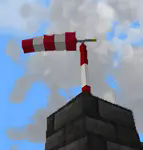
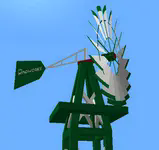
– A garden decoration small replica wind pump
– A wind turbine

– A metal wind vane
– A wind chime that emitts sounds
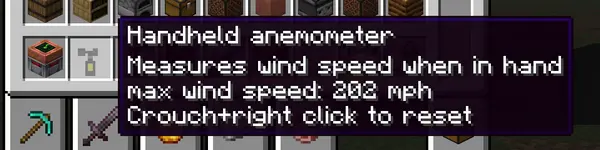
– A handheld anemometer
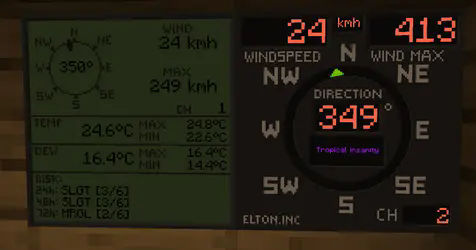
– Displays for reading wind values

The mod will not work without PM weather.
# Setting up the channels
**Pre 0.0.29**
To setup a channel on anemometers, shift+right click the anemometer. **No item should be held by either left or right hand at the time. That includes shields**
**0.0.29 and up**
To setup a channel on anemometers, press wind meter interaction key+right click the anemometer. Default interaction key is set so Shift, you can edit this key in the game’s key binds. **Setting up any other key than shift will allow you to enter anemometer channel setup even when holding items or shields in hand.**

**IMPORTANT** when you click confirm, it will say that the channel is occupied, this is because you **just** set the anemometer to that channel and it is now occupied by the anemometer you just set on it. If it says occupied before you even click confirm, that means an anemometer is already on the channel.
**After 0.0.30** When you click confirm, it will say “request sent” if the confirm was successful.
To setup a channel on display, right click the display. Anemometer and display must have same channel to communicate.
Channel 0 is non transmitting and is used for debugging. If anemometer channel could not be set, try setting it to 0 and then back to desired channel.
There are currently 100 available channels.
Right clicking anemometer will display it’s channels that server and client see. This number must always be equal. The feature now remains in the mod for debugging.
Anemometer GUI will display “Channel could not be set because placement is invalid” This is the case:
– if anemometer is placed under a block,
– if anemometer is in any other dimension than overworld,
– for about 1 sec after it’s being placed down, so immediately placing it and setting channel won’t work, just wait a sec and then enter channel setup.
## Redstone output
For setting up the redstone output, it is quite same as setting the channels. You put in the wind speed at which the display should output the redstone signal. It is not possible to set less that 4 mph due to histeresis (to prevent spam). Because the system is based on mph, other units might not be able to be set at increments of 1. This mostly applies to kmh.
Redstone output is only on wind displays.
# Useful commands
Use /windmeter commands to find out which channels are occupied, which are free or get anemometer location by channel number. Sometimes, the channels might bug out, use command clear channel [channel number] to clean up the broken channel. This will not remove the channel from anemometer itself. The anemometer locating and channel clearing command require operator permissions.
## Resetting the wind max and temperature max on display
**Pre 0.0.29**
To reset max values on display, shift+right click the display when not holding any items.
**0.0.29 and up**
To reset max values on display, wind meter interaction key+right click the display when not holding any items.
## Some gameplay info
### Block strengths
Wind strengths for anemometers are about:
– 219 mph for Young,
– 194 mph for Davis,
– 229 mph for tornado probes
– NaN mph for heavy duty Young.
– NaN mph for Richards cup anemometer
– heavy duty anemometer and Richards anemometer can be destroyed by shift-left clicking on it with any vanilla pickaxe
These will be readjusted when/if wind engine block picking gets an update
### Wind sock
Wind sock requires it’s dedicated pole to be placed on.
– wind sock tears off somewhere in between 130 – 170 mph and must be re-placed to fix it.
– the pole has a wind strength of 206 mph.
– the pole can be stacked to any height.
### Garden windmill
Garden windmill requires it’s dedicated tower to be placed on.
– windmill has furling tail brake mechanism (just for fun)
– windmill will be damaged by winds above 110 mph and must be re-placed to fix it.
– the upper tower part will permanently bend under strong winds in same direction as the winds.
– the tower pick up strength is 206 mph.
– windmill pick up strength is 164 mph.
– the tower can be stacked to any height.
### Small wind turbine
– turbine has furling tail brake mechanism and will reduce output power at extreme wind speeds
– turbine will be damaged by winds above 110 mph and must be re-placed to fix it.
– turbine pick up strength is 164 mph.
– carbon fibre turbine pick up strength is 180 mph.
– wooden wind turbine puck up strength is 154 mph.
– the power output is from below, so connect the cables there.
– Carbon fibre turbine is most efficient and has no brakes so it will output more power.
### Handheld anemometer
Handheld anemometer measures the windspeeds while in main hand. It will record and save maximum wind speeds per-item. If you have heavy tick lag, current wind speeds will vary from maximum due to maximum speeds being read from server side. The maximum speed is always the correct one and also the one that does the block destruction, so more relevant. To avoid delay and lag, the current speed is read on client side.
### Measurement units
Pre update 0.0.19t: Wind and weather display obey the PM weather config and will switch between metric or imperial based on that.
After update 0.0.19t: Wind meter uses it’s separate config to select desired wind speed and temperature units separately, allowing mixed imperial/metric.
The display will currently not record speed if not chunk loaded. Tornado passing over should make it record because the tornadoes load chunks. However, the tornado must pass over the chunk that display is in. Example: Your base has a display in the shelter and anemometer on roof. If tornado passes over your base it should record the event.
Weather display shows more data but refreshes slower and caps at 999 kmh. Due to calling the readings for risks it is not recommended to place down too many of them.
### Tornado probes
Tornado probes record atmospheric data for 5 minutes (configurable) after being placed down. They currently record max wind, max temp, min temp, max dew point and min dew point. After 5 minutes, they stop recording and reward can be dropped upon shift+right-clicking the probe if measured winds were high enough (only after it’s done recording). Breaking the probe won’t drop any items. Rewards are: iron ingots, gold ingots, diamonds, emeralds, netherite scraps and a netherite ingot. Probes drop experience based on wind speeds they measured and exposure time. Current data is shown by right-clicking the probe, maximum data is shown by interaction key+right clicking the probe.
### Probe monitor
A probe monitor can be used to right click and connect to the probe while it’s recording. It ticks in inventory, saves max wind and allows for remote wind reading. **After 0.0.30** The probe monitor can also read other anemometer channels. When in hand, right click anywhere and you will enter channel setup. If you right click on a tornado probe it will read data from that instead. If the anemometer or probe was broken or if probe stopped recording it will say no signal.

Position of data display can be changed in the config.
### Crafting
All items and blocks are craftable in survival mode. I suggest using JEI or other recipe viewers to see the recipes.
### QOL options
Versions after 0.0.19t have some configurable options.
Wind display text and numbers can be set to any color, but it has to be input as a base 10 number. Use online calculator converter to change the hexadecimal color number to base 10 number and paste that in the config. Example color 0xff6347 (16) -> 16737095 (10). You only convert the ff6347 part (without 0x or #).
Wind displays can also use dynamic colors that will change based on wind speed from blue to purple. Configuration is only available for wind display and not weather display.
The wind sock tearing off in high winds and garden windmill bending can now be turned off in config. This is server sided. The blockstrength for tornado picking up is not affected by this.
### Natural spawning
No mods currently add natural spawning.
## Some issues that might occur
– Redstone output on wind displays might get stuck
– Anemometers might disconnect (have their channel set to 0), might happen if a waypoint is placed on anemometer
– The channel list not syncing between SERVER and CLIENT
– Desynced issue can be mostly solved by quitting and rejoining the game. If the problem persists, the command for clearing up the channel must be used and anemometer reconnected. If all else fails, delete the “anemometers.dat” file in your saved world folder directory.
Do not redistribute a modified jar file.
Mod is allowed to be used in NON pay-walled modpacks.
Wilted Rose Emoji
## The wilted rose, recent emoji slang, has now been added into the world of Minecraft.
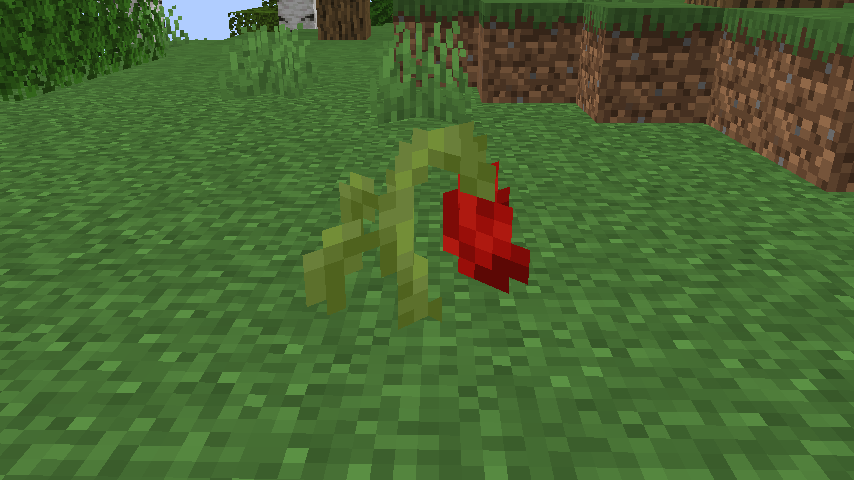
They can be found in Forests and Flower Forests. To be more specific, anything in the **wiltedrose:has_wilted_rose** biome tag.
You can craft it into red dye, and also place it into a Flower Pot.
Making a Suspicious Stew with them gives you Instant Damage.
Wilo’s 1.7 Sword Blocking

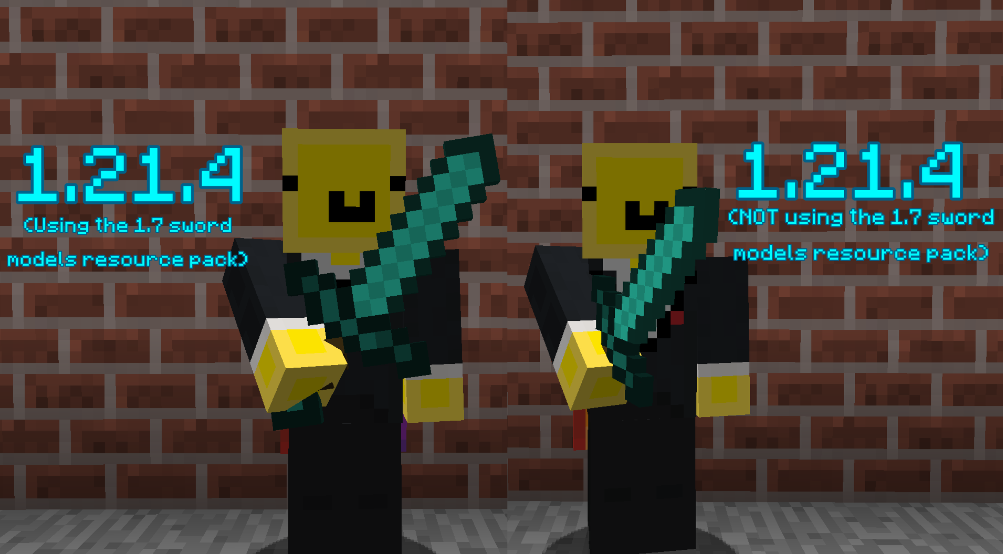
Recently there has been a lot of datapacks & plugins that have implemented/brought back pre-1.9 sword blocking mechanics! Although, by default, the game uses a model similar to 1.8’s when blocking with the sword!
This resource pack makes the sword blocking model much closer and more faithful to the model/positioning from versions 1.7 and prior!
## ⭐ NOTE
This resource pack assumes that the datapack or plugin you are using for sword-blocking uses {animation:”block”} as most do! Another version of this resource pack will likely be uploaded in the future to support sword-blocking without {animation:”block”}
##
## ⚔️ Side-by-side comparison
##
## ❤️ Socials
* Youtube channel: [[YT Link]](https://www.youtube.com/@wilozyx/videos)
* PMC page: [[PMC Link]](https://www.planetminecraft.com/member/wilozyx/)
* Discord: wilozyxx
Wild west structures
Wild west structures adds new structures to biomes like the badlands all inspired by the wild west and american frontier. Some of the structures you may come across include wagons which may contain lost supplies, tnt carts, campsites, and more!

**All structures as of v2.0**
– wagon
– tnt cart
– campsite
– wild west chruch
– badlands village
– bandit camp
– desert camp
– Swamp shack
– Badlands bandit camp
– Cow skull
– Church
**Notes**
– Neoforge port coming soon
– Anything above 1.21.8 is mostly untested, 1.21.11 crashes
– feel free to use in modpacks
– More structures to come!
Wild Vanilla – Better plants and flowers
Wild vanilla is a Minecraft resource pack that attempts to update most plants,
flowers and a few other natural elements visually.
It does this in a way that updates them to more modern looking designs that make landscapes
and gardens feel more alive, while sticking to Minecraft Vanilla’s visual style and adhering closely
to the plants’ real-life counterparts.
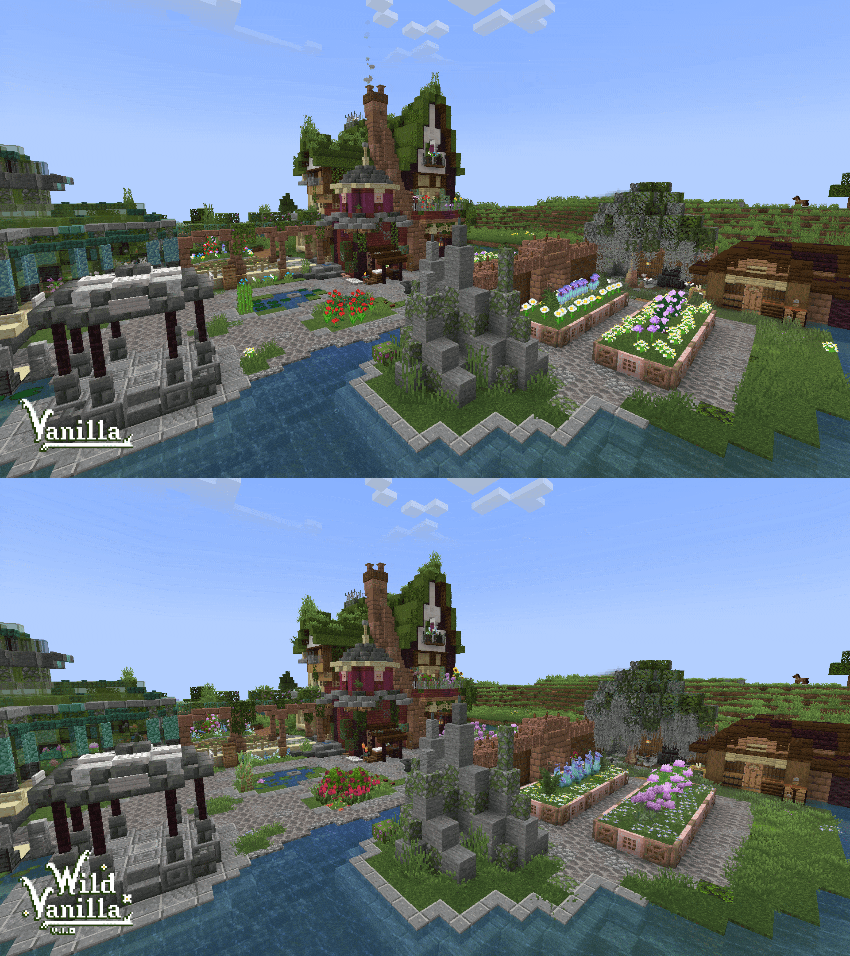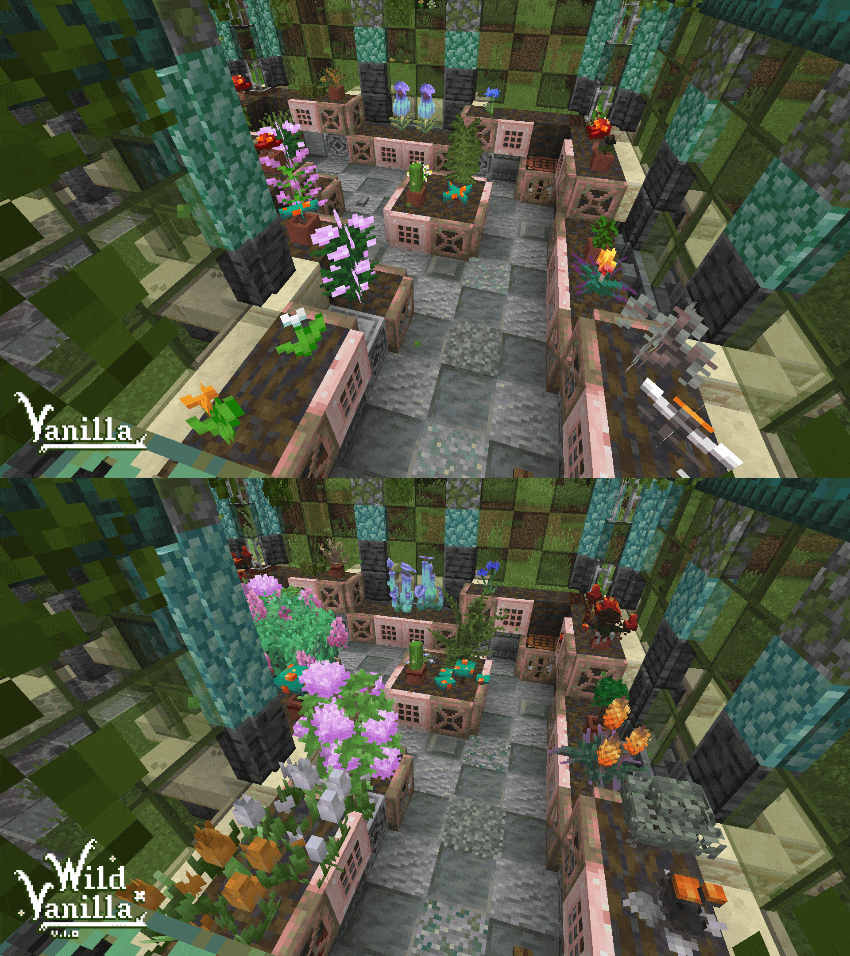
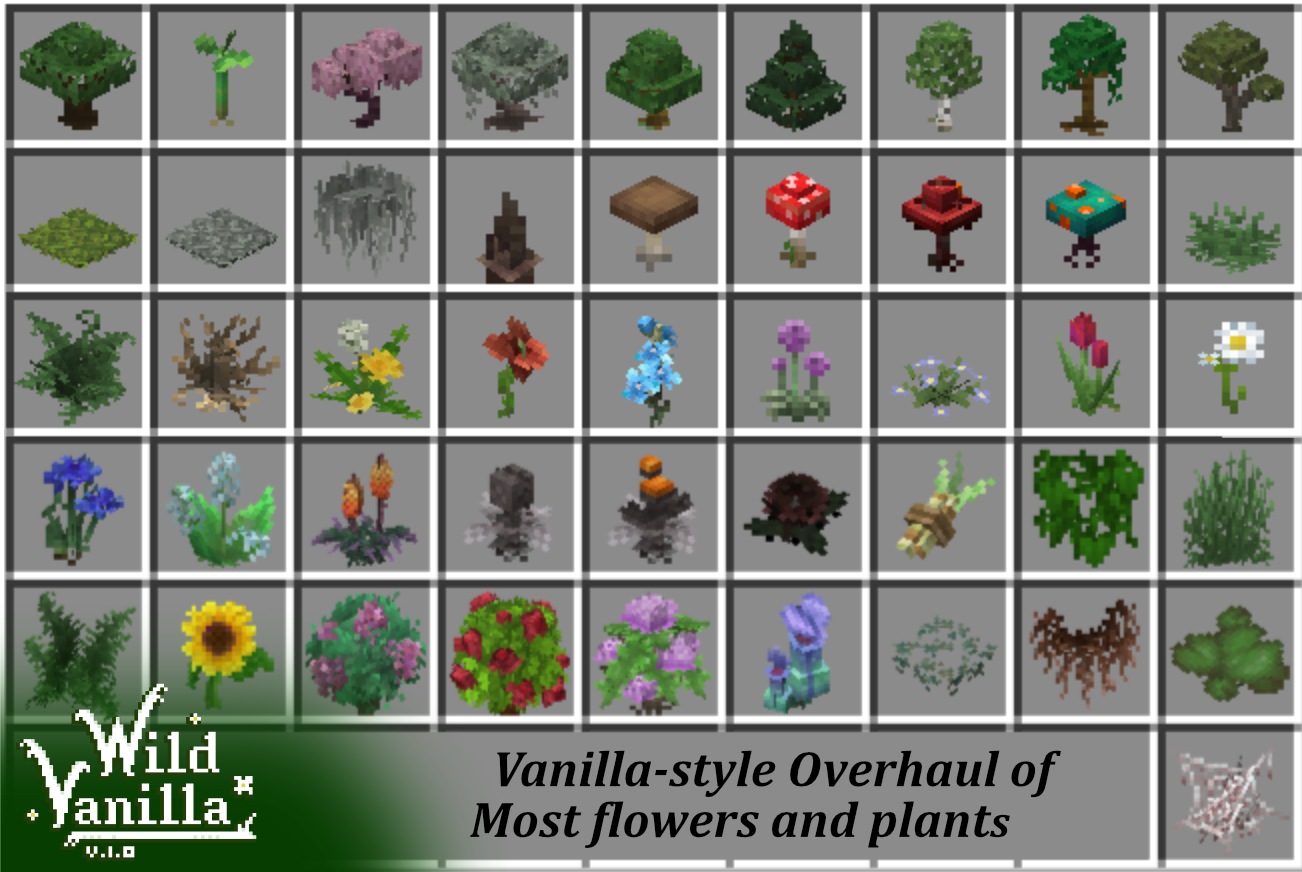
I’ve been making steady progress on the pack, and I currently intend to update the following:
– Grass and ferns, normal and tall.
– All standard flowers in the game, including 2 block tall ones.
– Dripstones, roots
– All Saplings
– All Mushrooms and Fungi
– Other foliage from older versions like Sugarcane and Vines
There’s a few principles I’m using in updating these models:
– Pixel accuracy.
I was kinda shocked to find out that all plants that use the standard cross shape in game are not
pixel accurate and stretched. I intend to fix that, and have all plants be as pixel accurate as I can,
like most of the newly added things are nowadays
– Overlap and Wild growth.*
Most of my models exceed the size of the block they’re planted on. This is to add to the feeling of
the plants growing wild, and adds a lot of visual eyecandy to the world. I also extend them downwards
into the block, adding roots that can be visible if the plant is randomly placed over an edge.
In vanilla this creates an ugly and unnatural seam between plant and air, especially prevalent in grass.
– Life-accurate.
I strive for my models to look as accurate as I can without to their real life counterparts without breaking
the vanilla look. This creates more variety and makes the plants more recognizable. Building a garden
in Minecraft has never been as interesting.
All models are made using Blockbench.
Check out blockbench: [https://www.blockbench.net](www.blockbench.net)
Some screenshots are made using Complementary Reimagined shader.
Get it here: [https://www.complementary.dev/shaders/](www.complementary.dev)
Wilds Regrown

Currently, during **alpha** only available for **creative** gameplay.
# Explore a new world
WildsReGrown is a complete world (generation) overhaul.
### Join the conversation & Get the CTM resource pack
Discord Server
## Custom world generator
The world generator produces highly detailed landscapes with alot of varying landscapes and biomes, rivers that flow from mountains to the coast and different types of cave systems. However world sizes are limited.
Use the builder to create a new world with many world types to choose from!

## Dynamic World
All Flowers, bushes and trees grow, flower, wither and die by the passage of time.

## Structures and ruins
There are multiple structure’s hidden around the world to explore and loot.

## Wide pallete of Decorative blocks
There are many decorative blocks avaible for builds.
With a wide selection of different stones, colors and finishes.
And lots of different trees, wood textures and furniture blocks, all paintable!
Make use of the radial menu (Tab) in creative to quickly select the desired shape and color of a block.

## LabPBR resource pack 64x/32x
Checkout the Discord for the PBR resource packs.
### Notes
– Incompatible with other world gen mods.
– Or other mods with vanilla features in general.
## Plays best with:
**Mod Dependencies:**
– Sodium – 0.8.2
– Fabric API
**Recommended mods:**
– Continuity
– Iris
Wildlife Expanded: Skunk
This mod adds tamable skunks to the game!
#### About the skunk:
– sweet berry bush won’t hurt it
– breedable with carrots
– tamable with sweet berries, if already tamed then it will only heal it
– can be tempted with sweet berries or with the Skunk Commanding Stick
– panics when attacked and sprays at the attacker
– child skunk will follow its parent
– follows owner after 20 blocks if tamed
– glowing eyes in the dark
– can be put on the shoulders
– scares mobs away when on the shoulder except undeads and the other tamed mobs of the player
– sprays on the attacker of the owner
– It will drop off from your shoulders when you go into water, die or if you shift + right click the ground
– nether skunk sprays fire
– nethersroom skunk sprays poison
– if skunk is named as Dreamy then give it the Dreamy skin
– can remove the spray ability on tamed skunks if a shear is used on it
– when tamed you can change its behaviour with the Skunk Commanding Stick (made with sweet berries and a stick)
– follows owner if in follow mode
– wanders around if in wander mode
– sits down if in rest mode
#### 10 variants for the skunk:
– hooded (forest)
– striped (forest)
– vanilla (forest)
– albino (snowy taiga)
– copper (craftable with 9 copper block and 1 heart of the sea, they don’t spray, but they won’t panic after getting attacked)
– ghost
– end
– endvoid (the end)
– nether (nether)
– nethersroom (warped and crimson forest)
– Dreamy skin when named as Dreamy
– copper and endvoid can attack and wield tiered weapons like swords
– leather, iron, golden and diamond armor are available too for the skunks
Suggested by oakuskunk
Artist Tenchigon
Wild Firefly
# Wild Firefly
A Minecraft mod which add Firefly, and They have many colors as Sheep does!
 Requires Cloth config API
## Firefly

– Spawn in Swamp and Mangrove Swamp.
– Firefly has every color.
– Firefly can be captured with bottles.
– Name it “jeb_” with a nametag will cause Firefly rainbow.
– **(Frogs will not eat them, of course!!)**
## Bottle of Firefly

– Obtains by use bottle on Fireflies.
– Use to release a firefly inside.
– Use on Unlit Lantern to get Colored Firefly Lantern. (yes, rainbow fireflies work.)
– Can feed frogs, but they will get poison, take 5 damage and not drop any EXP.
## Colored Firefly Lantern

– Colored Firefly Lantern has every color.
– Light level 8
– Rainbow Firefly Lantern has light level 12
## Unlit Lantern

– Unlit lantern is not produce light.
– Can be ignited and turn into other lantern blocks by list below
| Item | Lantern |
| —————– | ————— |
| Flint and Steel | Lantern |
| Items with “**lantern_ingredients**” tag | Lantern |
| Items with “**soul_ lantern_ingredients**” tag | Soul Lantern |
| Bottle of Firefly | Firefly Lantern |
## Item Tags
**lantern_ingredients**
– Torch
**soul_lantern_ingredients**
– Soul Torch
## Languages
| Language | Language Codes | Author |
|——————–|—————-|—————|
| English US | en_us | |
| Russian | ru_ru | SyberiaKey |
| Thai | th_th | FireMuffin303 |
| Simplified Chinese | zh_cn | Cccc-owo |
Wilderness
Wilderness is a datapack that focuses on adding small decorations to biomes, usually on the surface with bushes, flowers and ferns, but also in rivers, oceans and even the nether. Other than trees, most vanilla forest biomes don’t have many decorations in them. In Wilderness, biomes like forests look overgrown and feel much more wild. Wilderness still stays true to vanilla by only using logical natural blocks (no stone buttons for pebbles).
This pack uses an addition system that allows for extended compatibilty when used in vanilla, but it also has extra compatibiliy with Lithostitched. Whenever convenient, I recommend installing Lithostitched, for increased performance and more thorough world generation.
Wilderness does not change tree generation. For improved trees, check out Better Trees. Some of the images were taken with Better Trees.