Zombey Totem
A small handcrafted resource pack that changes the Totem of Undying into a 3D Zombey Model. If you have any ideas or suggestions for additional changes, please let me know
A small handcrafted resource pack that changes the Totem of Undying into a 3D Zombey Model. If you have any ideas or suggestions for additional changes, please let me know
What are the capabilities of this plugin? :
This plugin is designed to differentiate itself from other chat plugins that don’t require a dependency generator; this plugin allows you to…
1. /chattoggel
2. /msgtoggel
3. /w
4. /msg
5. admincommands
6. /zmsg reload
7. /msgalerts
**What does Chattogel do?**
You are able to deactivate the chat; for example, a player writes something in the chat, but you can’t see it. However, if you have ChatTogel enabled, you can still send messages.
**What does /msgtoggel do?**
/msgtoggel lets you toggle whether you want to receive private messages from players. I also have /msgblock in mind, but that will come later.
**What does msg or w do?**
/msg or /w is simply like the original Minecraft message. Msg is like typing in chat, but only to one person.
**What does /zmsg reload do?**
It simply reloads the configuration without having to stop the server.
**What does /msgalerts do?**
It allows you to see what players write in the message.
Has the Plugins Permission ?
Yes, of couse the permission is:
– zmsg.chat.color
– zmsg.chat.toggle
– zmsg.cooldown.bypass
– zmsg.msg.bypass
– zmsg.msg.toggle
– zmsg.msgalerts
– zmsg.reload
– zmsg.repeat.bypass
_**If you have any questions about the plugin, you can reach me at disord my username:**_
mrzitrroneog
ZithiumTags is the ultimate tag plugin for your server. Easily create tags for users and allow them to create their own custom tags with our Tag Voucher system.
This plugin is still in BETA extensive testing has gone into the plugin before release, but issues are expected please report any in our discord.
## **Features:**
– Gradient Support
– Tag Vouchers
– Players can be given tag vouchers to make custom tags that only they can use.
– Unlimited Tags
– Custom tag permissions
– Tag Colors
– Players can custom color their tags with the built-in color menu.
– Admins/Owners can also create custom colors to add as presets.
## **Images**
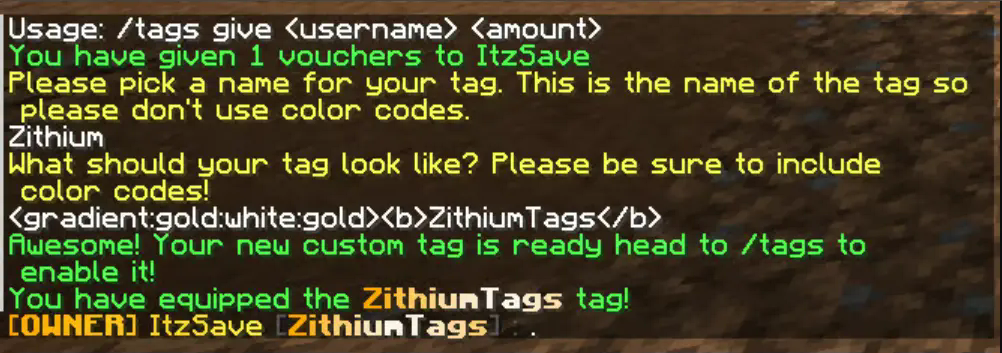
The text prompt when a user redeems a custom tag voucher.

**zir 16x** is a 1.8 texture pack with a purple cat theme! features include:
– colorful set of tools with accent colors
– cat themed effect icons + break animation
– outlined ores
– various other textures (armor, gui, etc)
note that this pack has nearly no block/item textures apart from necessary themed ones so as to layer with other packs! intended to be layered with purple themed packs

# ZInvisItemFrames
Allow players to craft and place invisible item frames. Folia-compatible invisible item frame plugin.
## Features
– Craft invisible item frames
– Customizable crafting recipe. (Can choose ANY ITEM for the recipe)
– Empty invisible frames can have a glowing outline (configurable)
– MiniMessage support for all text formatting
## Compatibility
– Paper 1.20.1 -> 1.21.4
– Folia-compatible
– Java 17+
## Dependencies
– [MCKotlin](https://modrinth.com/plugin/mckotlin)
## Crafting Recipe
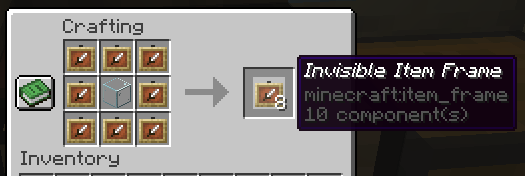
The default crafting recipe is 8 item_frame (or glow_item_frame) in a circle with one custom item in the middle.
You can change the middle-item with `/ziif item`.
You can also configure how many invisible item frames are crafted from the recipe.
## Commands
– `/ziif help` – Show help information
– `/ziif item` – Set the recipe item to the item in your hand
– `/ziif reload` – Reload the configuration
– `/ziif give
## Permissions
– `zinvisitemframes.craft.item_frame` – Allow crafting invisible item frames
– `zinvisitemframes.craft.glow_item_frame` – Allow crafting invisible glow item frames
– `zinvisitemframes.place.item_frame` – Allow placing invisible item frames
– `zinvisitemframes.place.glow_item_frame` – Allow placing invisible glow item frames
– `zinvisitemframes.admin` – Access to all plugin commands
## Installation
1. Download the latest version of ZInvisItemFrames from [Modrinth](https://modrinth.com/plugin/zInvisItemFrames/versions).
2. Download the appropriate version of MCKotlin from [Modrinth](https://modrinth.com/plugin/mckotlin)
3. Place the downloaded `.jar` files into your server’s `plugins/` folder.
4. Restart your server.
5. Configure the plugin to your liking by editing the `.yml` files in the `plugins/ZInvisItemFrames/` folder.
## Configuration
“`yaml
recipe:
item: [] # Set with `/ziif item` command
quantity: 8 # How many frames are crafted per recipe
check-permission: # Whether to check permissions for crafting/placing invis frames
craft: false
place: false
empty-frame:
glow: true # Whether empty frames should glow
visible: true # Whether empty invis frames should be visible
name:
invisible_item_frame: “
invisible_glow_item_frame: “
“`
Changes the texture of the chest and its graphical interface
Меняет текстуру сундука и его инвентарь
– EN: **Zilibobka** is a popular Russian meme, which was also stimulated during post-ironic memes in 2017 on the social network VKontakte and Tiktok. Texture pack replaces Totem of Immortality with this meme
– RU: **Zilibobka (Зилибобка)** – популярный российский мем который также был зафоршен во времена постироничных мемов в 2017 году в соц сети ВКонтакте и Тиктоке. Текстурпак заменяет тотем бессмертия на этот мем
[ALL RESOURCEPACKS COLLECTION: MEMES + STREAMERS](https://modrinth.com/collection/sfDcDGAi)
[1.21.x]ZhengSZ的奇境 版本1.0.0 “青兰道场”
[1.21.x]ZhengSZ’s Wonderland v1.0.0 “BlueOrchid”
这个作品共有1个结构、14座建筑和2种地牢。
This work consists of 1 structure, 14 buildings and 2 types of dungeons.
你可以输入以下指令快速查询这个结构的坐标。
You can enter the following instructions to quickly query the coordinates of this structure.
**/locate structure zhengsz:blue_orchid**
这是以我为名的自定义结构数据包。我想把我的作品制作成可以游玩和冒险的数据包。
This is a custom structure datapack named after me. I wanna turn my work into a datapack where people can play and go on adventures.
第一个版本,也就是这个数据包的第一个结构以“青兰”为名。
The first version, that is, the first structure of this data package is named “Blue Orchid”.
这个结构以中国的道教建筑群为灵感,并以原版游戏中的兰花为主题。
This structure is inspired by the Taoist architectural complexes in China and is themed around the orchids in the original game.
我设计了一个风格古朴,规模收敛的古典中式建筑群。
I designed a classical Chinese architectural complex with a simple and elegant style and a compact scale.
同时我还以中国的古墓为灵感,设计了他的地下地牢,也就是这个数据包的冒险要素。
At the same time, I drew inspiration from Chinese ancient tombs and designed its underground dungeon, which is the adventure element of this data package.
未来我会添加更多结构和地牢,还请多多关注。
In the future, I will add more structures and dungeons. Please subscribe if you like.
希望你玩得愉快!
Hope you have a good time!
我的视频主页:
[[bilibili.com] :” ZhengSZ想教你中式” (Project Manager)](https://space.bilibili.com/253560280)
[](https://minestrator.com/a/GROUPEZ)
zHead is a swift and intuitive plugin enabling you to access thousands of custom Minecraft skulls with distinctive designs. This user-friendly skulls plugin opens the door to creative design possibilities, significantly improving your builds’ quality and offering creative liberty to both you and your players.
Should you seek additional methods to make your builds stand out with ease, zHead is the perfect solution!
Credit: [https://minecraft-heads.com/](https://minecraft-heads.com/)
## Commands:
– **/zhead** (aliases: /head, /zhd) – `zhead.use` – Display commands
– **/zhead reload** – `zhead.reload` – Reload configuration files
– **/zhead info** – `zhead.info` – Get head information
– **/zhead give
– **/zhead search
– **/zhead random [
– **/playerhead
## Inventory Permissions:
– `zhead.miscellaneous`
– `zhead.plants`
– `zhead.monsters`
– `zhead.humanoid`
– `zhead.humans`
– `zhead.food.drinks`
– `zhead.decoration`
– `zhead.blocks`
– `zhead.animals`
– `zhead.alphabet`
– `zhead.refresh`
## Placeholders:
– **%zhead_count%** – Displays the total number of heads
– **%zhead_count_format%** – Displays the total number of heads with a format
– **%zhead_category_count_
– **%zhead_category_count_format_
**API**: [https://github.com/Maxlego08/zHead?tab=readme-ov-file#api](https://github.com/Maxlego08/zHead?tab=readme-ov-file#api)
[](https://bstats.org/plugin/bukkit/zHead/21364)
## We would like to extend our heartfelt thanks to [Minecraft-Heads.com](https://minecraft-heads.com/) for providing their API, which has been an invaluable source of all the data used in our project.
# ⚡ Zeus Blade Resource Pack
This resource pack provides the texture for the Zeus Blade.
## 🛠️ Usage
This pack is intended to be used alongside the Zues Blade Plugin (not released quite yet). Simply activate the RP to see the custom texture in-game when wielding the Blade!
### TIP:
Make sure you are using Minecraft 1.21.4 or newer for the pack to function.