White Tulips Make White Dye
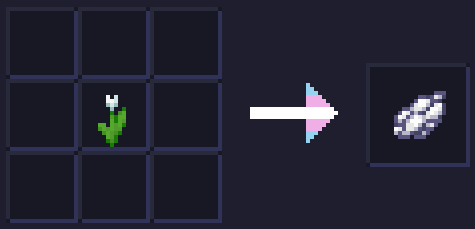
White Tulips Make White Dye replaces the recipe for making Light Gray Dye from White Tulips and crafts White Dye instead!
Mod for writers
# Mod for writers


## EN:
(sorry for my English)
### About
This minecraft mod adds you the ability to write notes, autographs and id-cards using the Item Edit plugin.
It also adds document folders in different colours, which are created using the same method as the notes, but from bundles rather than paper.
**Attention**, that all these items have their own textures you also need to install Optifine, CIT Resewn or other mod that adds MCPatcher functionality on new versions
### Credits
[**Pjero2**](https://t.me/PGCode) – code and all other
[**BowInHead**](https://t.me/BowInHead) – textures
[**_dzudzu_**](https://t.me/dtyzdtyz) – helping with some questions
## RU:
(не прощайте мне мой русский)
### Что это такое?
Это – майнкрафт мод, который добавляет вам возможность писать разные записки, оставлять автографы и даже удостоверения личности. Всё это он делает с помощью комманд такого замечательного плагина как ItemEdit.
Также он добавляет папки для документов разных цветов, что создаются также, как и записки, но используя мешочек вместо бумаги.
**Внимание!** Что бы все эти предметы имели свои собственные текстурки также требуется установить Optifine, CIT Resewn или другой мод, что добавляет функционал MCPatcher на новые версии.
### Кто работал над модом?
[**Pjero2**](https://t.me/PGCode) – люти программист и вообще это я сейчас пишу всем ку
[**BowInHead**](https://t.me/BowInHead) – люти артерша нарисовала текстурки
[**_dzudzu_**](https://t.me/dtyzdtyz) – помогал разобраться с гитхабом, модрингом и прочими приколами
What Painting I’m Looking At?
### Requires the mod Chime or Optifine CIT to work!
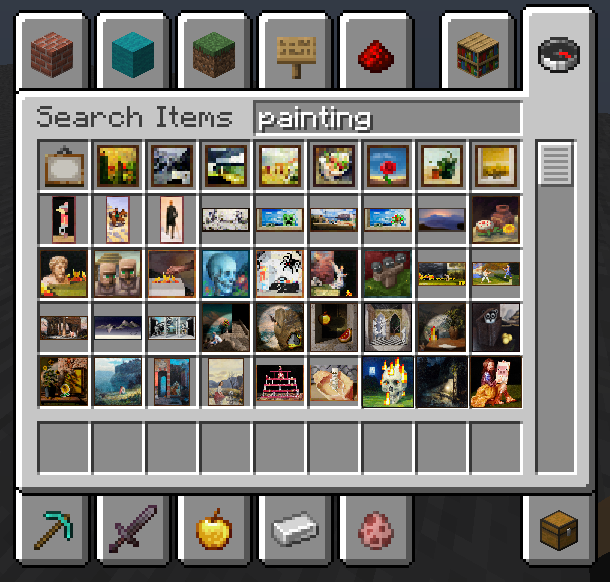
In 1.19.4 Mojang added an item for every single painting into the creative tab, but now we have a lot of item wich are the same until you hover over your mouse, and there’s a big chance that you don’t even know the name of the painting so I made a preview for every single painting!

## Supported Mods
You want your favorite mod to be supported? Suggest it on Discord!
Would

*Trees With Purpose.*
# What’s Would?
Would adds 16* new trees to color in parts of Minecraft’s overworld that need a little more love. Each tree is unique and interesting, but still feel like it’s from the same game as the vanilla ones. Trees go from just replacing placeholder oaks like in swamps and badlands to being treasures in themselves like the extinct Ginkgo and the exclusive Ebony.

Would has built-in compat for:
– Wood Good, Quark, Woodworks, and other mods that add wooden block variants.
– Dynamic Trees
– Biome mods (given they tag their biomes right)

Would replaces non-unique biome trees with:
– **Aspen** replacing tall birch in old growth birch forests.
– **Bald Cypress** replacing ‘swamp oak’ in swamps.
– **Cedar** replacing oak in wooded badlands.
– **Mahogany** replacing small jungle trees in sparse jungles.
– **Pine** replacing spruce trees in old growth pine forests.
Would also adds trees that spice up certain environments:
– Our **Azalea** has a unique woodset and generates in groves above lush caves.
– **Baobab** providing spectacle in savannas.
– **Maple** growing alongside vanilla trees in forests and cherry groves.
– **Palm** growing on beaches and near water in deserts.
– **Walnut**
– **Willow** growing over lakes.
Finally, Would adds a few rare trees as rewards:
– **Blue Spruce** being found only in the planter pot in igloos.
– **Ebony** being found very rarely in sparse jungles.

– [Kayla the Bee](https://modrinth.com/user/Kayla_the_Bee) for the mod’s textures.
– [Ordana](https://modrinth.com/user/Ordana) for code, idea, and implementation.
– [The Bobbu](https://modrinth.com/user/Bobisnotaperson) for the icon, banner, and dividers.
– [MehVahdJukaar](https://modrinth.com/user/MehVahdJukaar) for invaluable code advice.
– [eldabys](https://modrinth.com/user/eldabys5) for project management and toad wrangling.

Please include in modpacks! if you do you can talk about it on our *discord*.
#### Would is best paired with:
![[verdant_icon.png]] ![[grounded_icon.png]] ![[oxideicon_b.png]]
Worst

A simple overlay mod that shows a fake client name at the top of your screen like Wurst Client, but instead its Worst.

**DISCLAIMER: THIS IS NOT A HACK OR A HACKED CLIENT, I DO NOT PROMOTE CHEATING OR HACKING OF ANY KIND!**
Worn Armor Enchantments 3D
Texture pack that displays combinations of armor enchantments in 3D! Texture pack is inspired by [Visual Enchantments](https://modrinth.com/resourcepack/visual-enchantments) and [Traben’s 3D armor models](https://modrinth.com/resourcepack/trabens-3d-armor-models). Also, depending on the level of the protection enchantment (1-3, 4, 5-255), the color of the texture changes.
To use 3D, you should INSTALL [[EMF] Entity Model Features](https://modrinth.com/mod/entity-model-features) 2.1 +.
For texture combinations install [CIT Resewn](https://modrinth.com/mod/cit-resewn) or use OptiFine
WorldTag
# Detailed Introduction to Minecraft WorldTag Plugin

WorldTag is a lightweight identification plugin specially developed for Minecraft servers. Its core positioning is to realize the associated visualization of players’ names and their current worlds, while balancing practicality, convenience and server performance optimization. It does not rely on any redundant dependency plugins, supports the deployment of Minecraft servers of all scales, provides server administrators with an efficient and flexible world identification management solution, and enhances the interactive experience between players.
## Where can I use WorldTag?


## Detailed Explanation of Core Features
As a dedicated plugin focusing on world identification display, WorldTag abandons redundant functions and focuses on the accurate implementation of core needs. Every function is optimized and designed to balance ease of use and stability.
### 1. Automatic Mounting of Player Name World Tags
The core function of the plugin is to automatically add an identification tag corresponding to the current world before players’ names, realizing intuitive visualization of players’ locations. Whenever players switch between different worlds on the server, the tags will be updated in real time without manual operation by administrators. This allows all online players to quickly identify the current world location of target players, facilitating cross-world interaction guidance between players, helping administrators quickly locate players’ scenarios, and improving server management efficiency.
### 2. Customizable Adaptation of Tag Text and Color
The plugin supports highly flexible tag customization. Server administrators can freely configure the display text and color parameters of each world tag according to their server’s operation style and world themes (such as Survival World, Creative World, Dungeon World, etc.). Through simple configuration operations, the tag text can be accurately matched with the server’s world names. Meanwhile, color parameters can be used to distinguish different world types, enhancing the recognition of tags, making world tags not only practical but also consistent with the overall visual style of the server.
### 3. Comprehensive Fault-Tolerance Adaptation Mechanism
To ensure the stable operation of the plugin, WorldTag has built-in intelligent fault-tolerance logic with special optimization for abnormal configuration file scenarios. When the plugin reads the configuration file, if it cannot recognize the target world folder on the server (such as abnormal folder naming, path changes, missing world files, etc.), it will automatically trigger the fault-tolerance mechanism and display the corresponding world tag as [Unknown]. This design can effectively avoid plugin errors, crashes or display disorders caused by configuration abnormalities, ensuring the plugin runs normally in various complex configuration environments.
## Core Advantages of the Plugin
### Lightweight Design with Low Resource Consumption
The plugin adopts a streamlined development logic, eliminating all non-core redundant code for an extremely compact size. It occupies minimal server resources during operation and does not impose any additional burden on server performance indicators such as TPS. It supports various deployment scenarios including small private servers and large public servers, and runs smoothly even on servers with limited resource configurations.
### Zero Dependencies for Easy Deployment
WorldTag does not require the installation of any extra dependency plugins or libraries. After downloading the plugin file, you can directly put it into the server plugin directory to complete deployment, without complex configuration and debugging. This greatly reduces the deployment cost and operation difficulty for server administrators. Both novice administrators and senior operation and maintenance personnel can quickly install and enable the plugin to implement world tag functions rapidly.
## Applicable Scenarios and Summary
WorldTag is suitable for all Minecraft servers with a multi-world architecture, whether it is a comprehensive server with coexisting modes such as Survival, Creative and Adventure, or a dedicated server focusing on specific gameplay. The plugin can realize standardized display of world identifications. Its features of lightweight, zero dependencies and high fault tolerance perfectly solve the pain points of inconvenient player world positioning and unclear identification in multi-world servers, while balancing server performance and management convenience.
In conclusion, WorldTag is a “small yet sophisticated” dedicated identification plugin. Guided by core functions and based on stability, it can add practical world identification functions to the server without complex operations. It not only improves the interactive experience of players but also helps administrators optimize server management efficiency, making it an ideal auxiliary plugin for multi-world Minecraft servers.
## Where can we get WorldTag?
[](https://github.com/Hi-PolarBear/WorldTag)[](https://modrinth.com/plugin/worldtag)[](https://hangar.papermc.io/Hi-PolarBear/WorldTag)
WorldPlaceholder

This plugin outputs the information about the player’s location in the dimension through Placeholder in the Tab or game chat.
– World – green color
– World_nether – red color
– World_end – purple color
Placeholder:
“`
%worldplaceholder%
“`
“`
messages:
noPermission: “&#dc143cYou do not have sufficient permissions to perform this action!”
reloaded: “�ff7fPlugin successfully reloaded”
# It will look like &#c0c0c0◆
worldSymbol: “◆”
# Default color, used for worlds not specified below
defaultColor: “&#c0c0c0”
# You can use both HEX colors in the format &#abcdef and regular colors using &a
worlds:
world: “�ff7f”
world_nether: “&#dc143c”
world_the_end: “a2be2”
“`
In the config.yml, you can change the colors as well as the symbol.
World In a Jar
# Warning (Read This!)
**Do not use versions marked as “BlanketCon”!** These **will not** work in your world.
1.20.1 is also not supported and does not resemble the mod in its current state. That is, do not use the 1.20.1 version.
# World In a Jar
This mod squeezes entire worlds into jars for your enjoyment. Play god or go home.
You can put blocks in a jar block with a lot of room! All of your storage issues are solved!
Make little snow globes, make a cool redstone contraption; The possibilities are endless.
[](https://modfest.net/bc25)
[](https://modfest.net/bc23)
[](https://modfest.net/singularity)
## How To Use
### Mine Bedrock
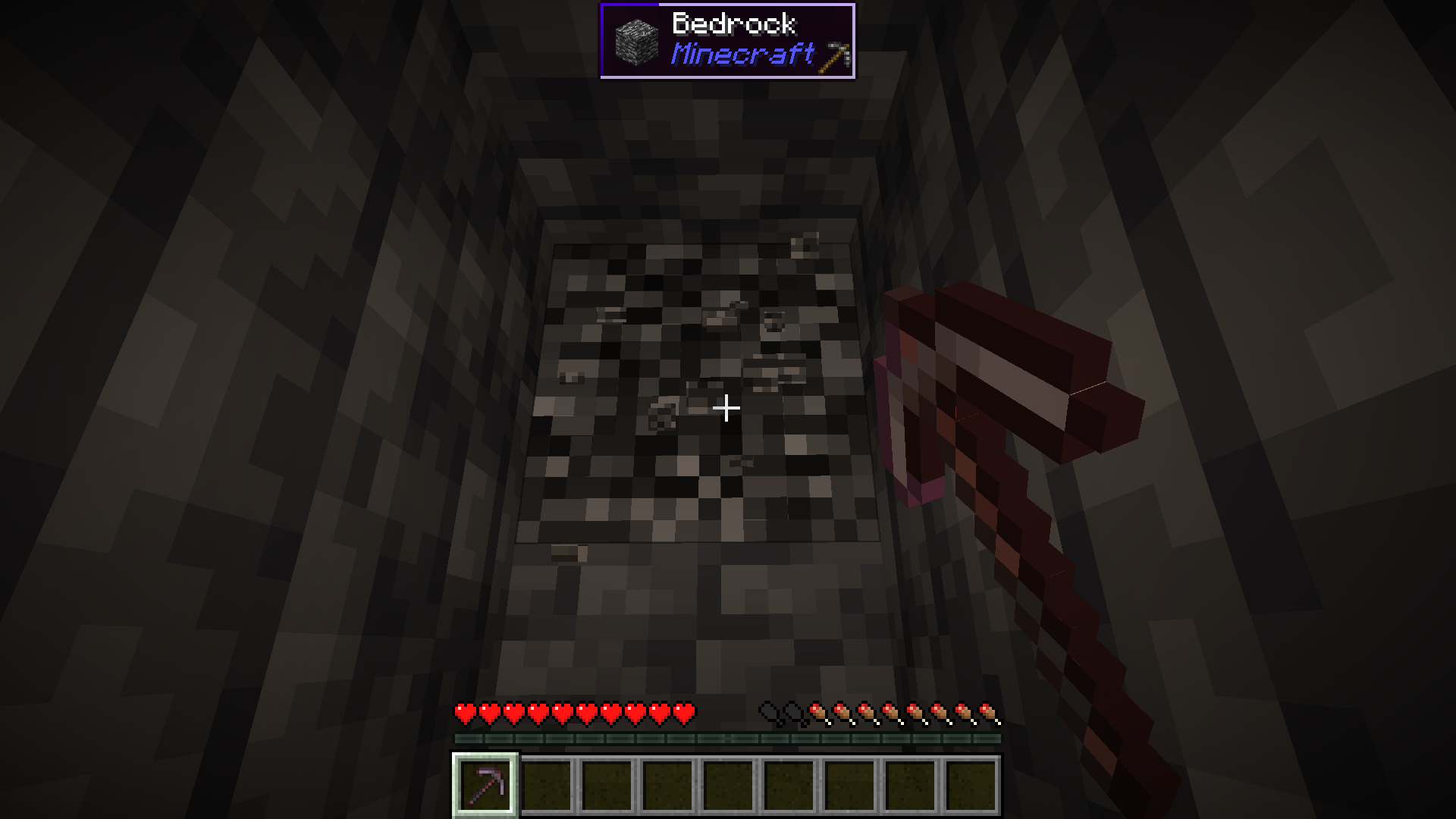
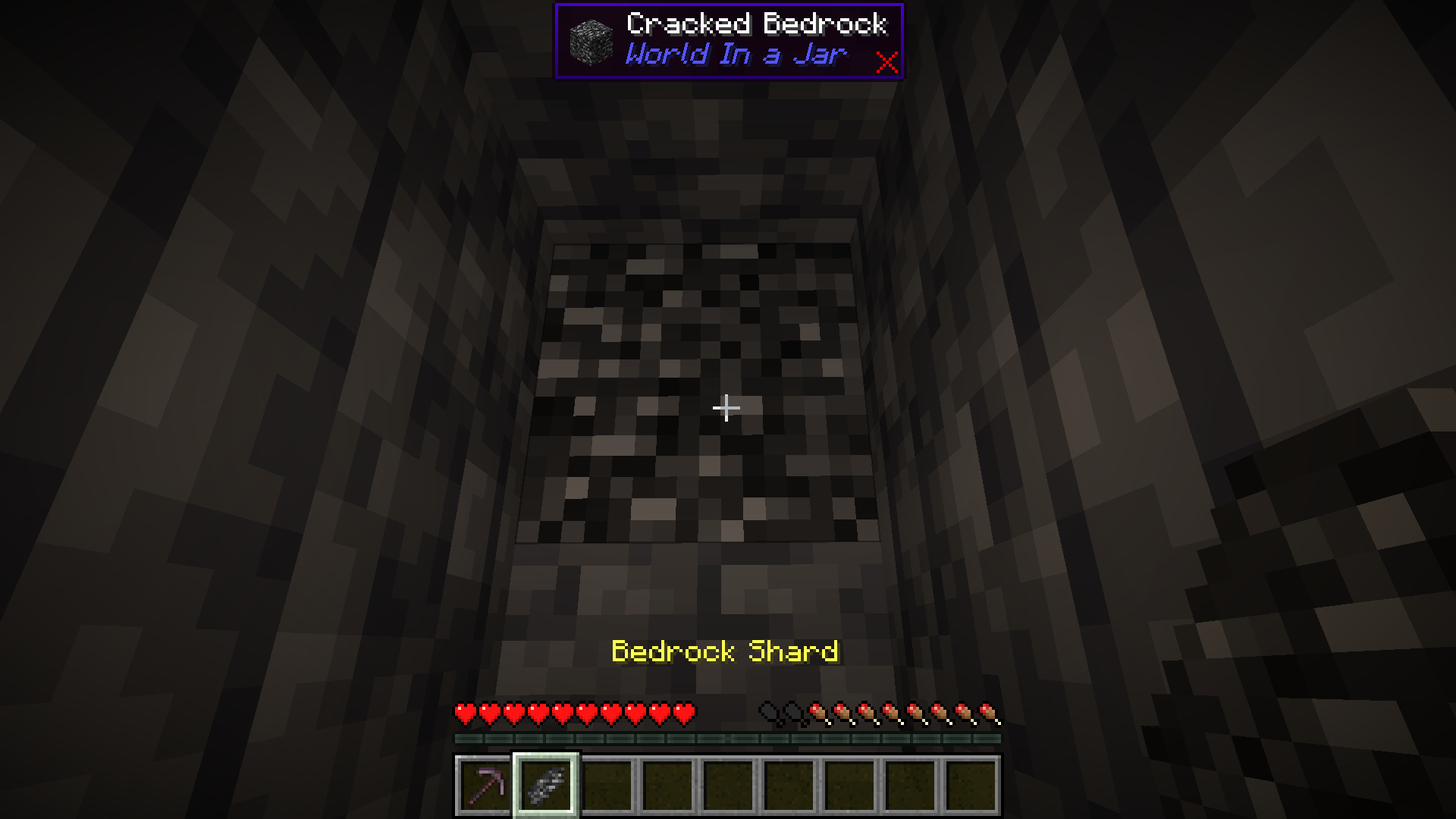
Start by mining bedrock using a Netherite Pickaxe. This may take a few tries before a shard drops.
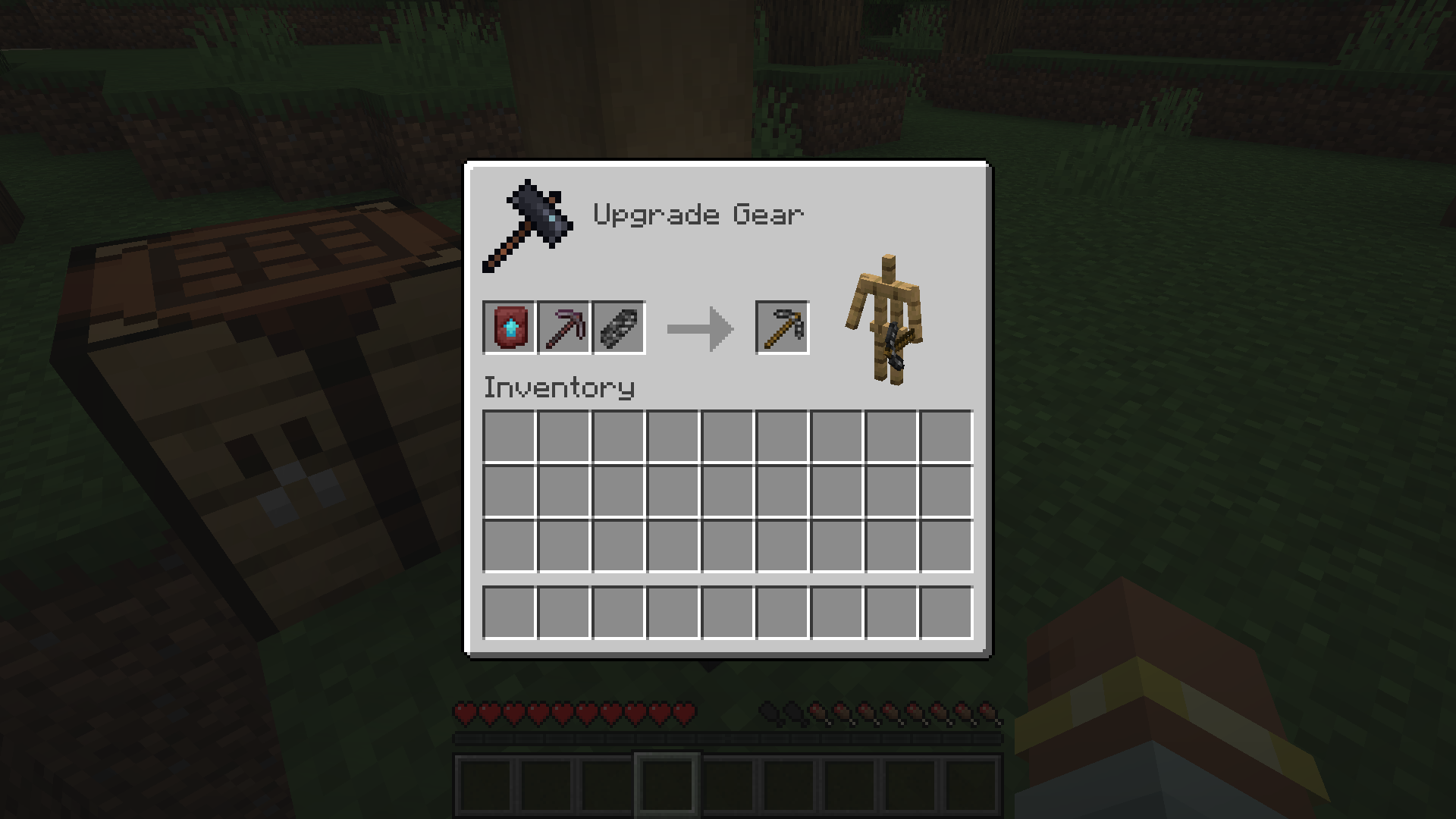
### Upgrade To a Bedrock Pickaxe
Upgrade your Netherite Pickaxe to a Bedrock Pickaxe using a Smithing Table.
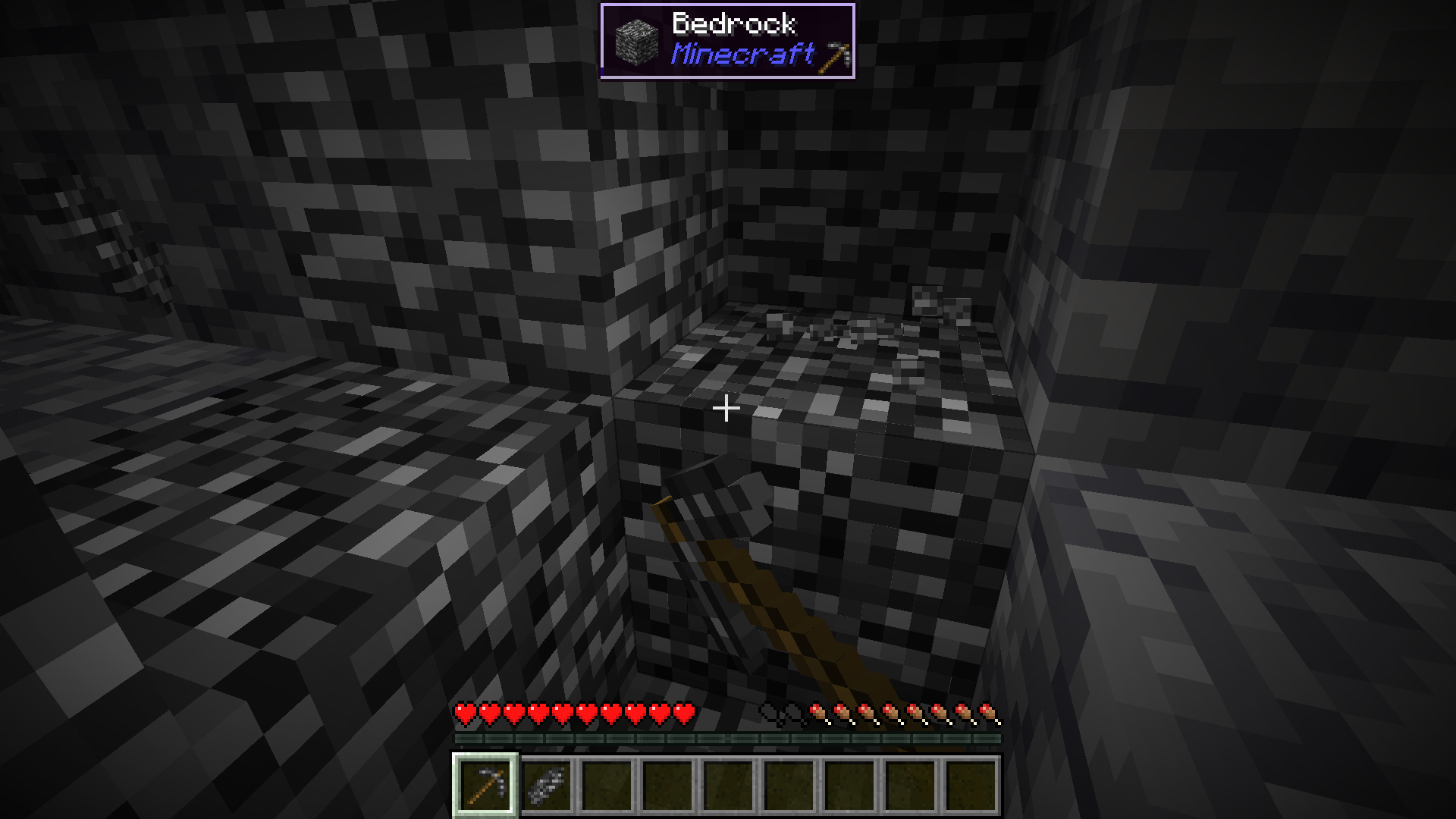
### Mine More Bedrock
Mine more Bedrock with your Bedrock Pickaxe. You will need 28 Bedrock Shards.
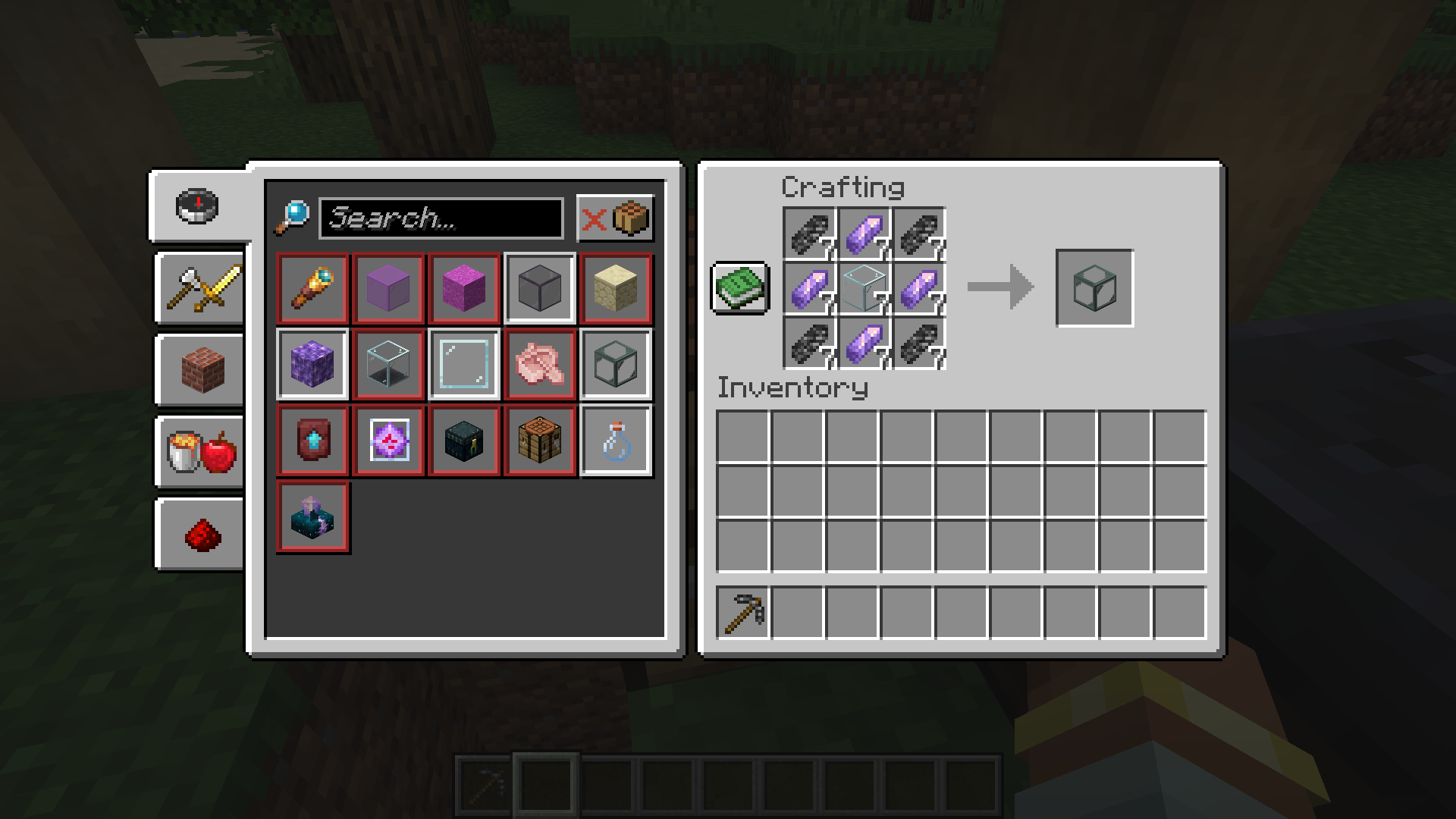
### Obtain Ingredients And Craft Reinforced Echnoplast
Obtain 7 Glass and 28 Amethyst Shards to craft 7 Reinforced Echnoplast.
### Strip Logs To Obtain Bark
Strip logs to obtain their bark. You will need 9 bark of any type.
### Craft a World Jar
Craft a World Jar using a Cork Block, Eye of Ender, and 7 Reinforced Echnoplast.
### Enter the World Jar
Place the World Jar and interact with (right-click) the jar to enter it. You can interact with the jar again to exit.
## Video Demonstration
## Permissions (Not Working)
**This does not currently work.**
The number stated after the permission ID is the minimum OP level that users will need to have the permission. This mod can also use permissions with mods compatible with Fabric Permissions API (such as LuckPerms). The permission ID and OP level are written respectively (in that order).
– `worldinajar.lock_jar` `2`
– Allows a user to lock/unlock a jar. A locked jar cannot be edited. When right-clicked, a locked jar simply teleports the player if they do not have this permission.
## FAQ
– ### Port to NeoForge? Quilt? ?
– no
– ### Port to 1.12.2? ? Update to version *X*?
– no
– ### There is a bug and I need to report it!
– Please go to [the issue tracker](https://github.com/CursedMC/world-in-a-jar/issues/new) and create a bug report.
– ### Please add *X* feature.
– yesn’t (feel free to [open an issue](https://github.com/CursedMC/world-in-a-jar/issues/new))
– ### Can I port this mod to *X*?
– Please ask for permission before doing so. I also ask that you credit the original mod and state that it is an unofficial fork, however. Forks claiming to be official will be taken down.
## Redistribution 🖍️
VulpixelMC does not sanction any redistributions not hosted on its website, GitHub, or Modrinth. Do not upload this software to any other services without due credit and links to the original file from which the redistributed software was downloaded.
You may use this software in Modpacks, given due credit and a link to download the original software.
## License
World In a Jar is licensed under `LGPL-3.0-only`. See `COPYING` and `COPYING.LESSER` for details.
WorldEdit Selection Viewer
# WorldEdit Selection Viewer
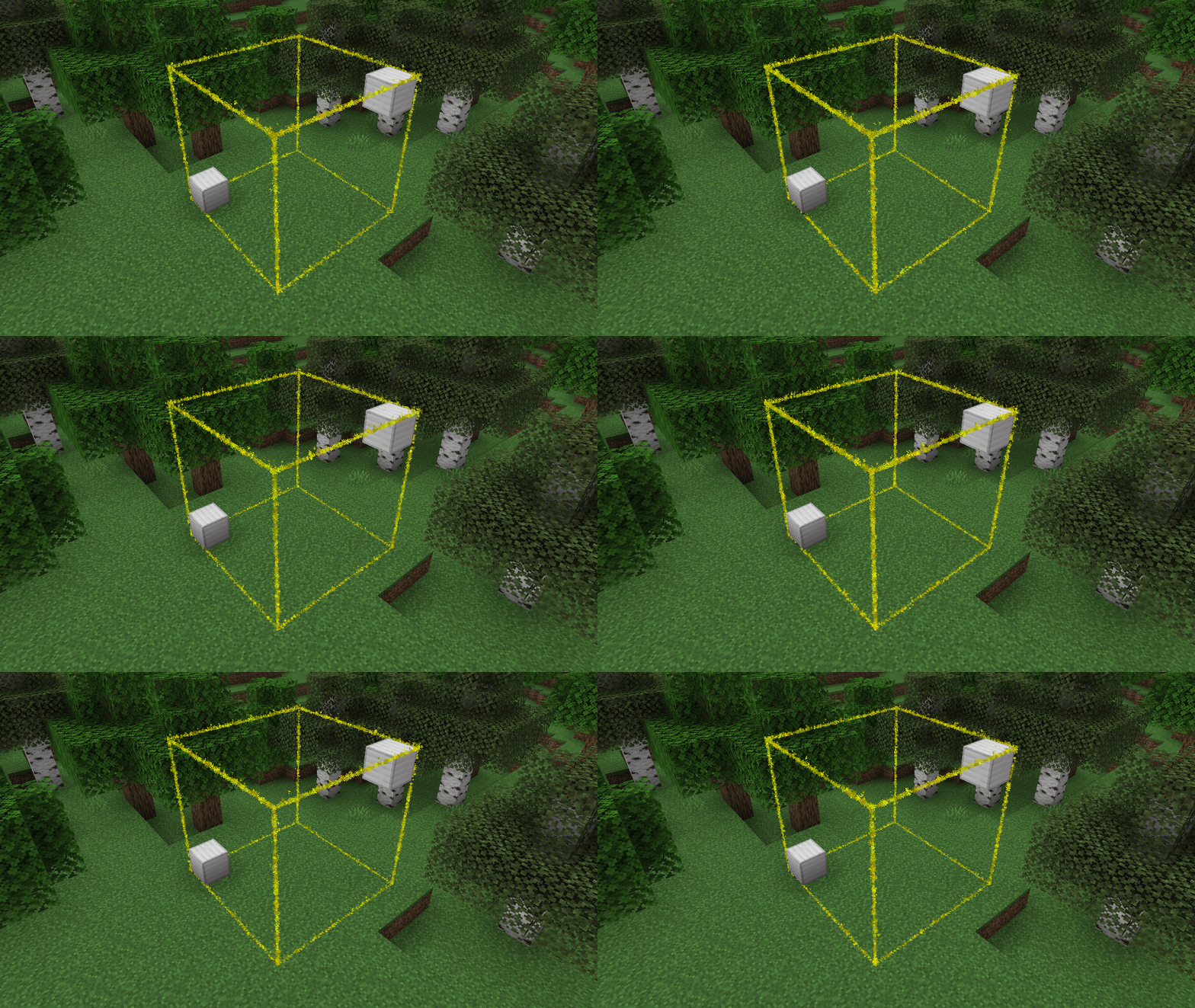
A simple plugin with no config that adds particle borders for viewing one’s
selected [WorldEdit](https://enginehub.org/worldedit) region.
_Note: While [FAWE](https://modrinth.com/plugin/fastasyncworldedit/) is not officially supported, it does seem to work_
## Setup
1. Download the jar
2. Put it into your `plugins` folder
3. Profit! — No configuration necessary!
## Commands
– `/wesv colour ` – Change the colour of the selection border
– `/wesv visibility ` – Change when the selection is visible
– `always` – Always show the selection
– `never` – Never show the selection
– `holding-tool` – Show the selection when holding the select tool (default: Wooden Axe)
## Permissions
– `worldedit-selection-viewer.view` – If the player can see the borders
– Default: Enabled for all players
– `worldedit-selection-viewer.command` – If the player can run the `/wesv` command
– Default: Enabled for all players