flow
# Flow – Reimagining Communication in Minecraft
## Elegance in Every Detail
Flow isn’t just a chat plugin. It’s a completely reimagined way of communicating in Minecraft, where every detail is meticulously crafted. Minimalist. Intuitive. Revolutionary.
### ✨ The Magic of Simplicity
– **Local Chat**
Communicate naturally with nearby players
– **Global Chat**
Add “!” at the start of your message – and the whole server will hear you
– **Smart Tooltips**
Hover for important information
– **Instant Messages**
Private communication with a single click
### 🎨 Social Features
– **Mentions**
Tag players with @username for instant notifications
– **Emojis**
Express yourself with built-in emoji support
– **Anti-Spam**
Smart protection against chat abuse
– **Chat Filter**
Keep conversations clean automatically
– **Ignore System**
Control who you interact with
### 🔧 Player Settings
– **Private Messages Control**
Enable or disable private messages
– **AFK System**
Set your status and custom AFK message
– **Personal Settings GUI**
Easy-to-use interface for all player settings
### 🎨 Limitless Customization
Customize Flow to your needs:
– Full PlaceholderAPI support
– Flexible message formats
– Interactive tooltips
– LuckPerms integration
### ⚡️ Performance
Built for speed:
– Asynchronous processing
– Optimized code
– Minimal overhead
## 🌟 Perfect for Any Server
| Server Type | Compatibility |
|————-|—————|
| Anarchy | ✓ |
| PvP | ✓ |
| Duels | ✓ |
| RPG | ✓ |
## 📝 Configuration Guide
### Basic Settings
“`yaml
# Radius for local chat in blocks
local-chat-radius: 100
# Prefix for global messages
global-chat-prefix: ‘!’
# Time format for timestamps
time-format: ‘HH:mm:ss’
“`
### Message Formats
Customize how messages appear in different chat types:
“`yaml
format:
# Local chat format
local: ‘%luckperms_prefix%%player_name% &8→ &f%message%’
# Global chat format
global: ‘&6[G] %luckperms_prefix%%player_name% &8→ &f%message%’
# Private messages format
private:
outgoing: ‘&d→ &7%recipient%&8: &f%message%’
incoming: ‘&dFrom &7%sender%&8: &f%message%’
“`
### Player Settings
Configure personal settings for each player:
“`yaml
settings:
# Default AFK message
default-afk-message: “I am currently AFK. I will respond when I return.”
# Default settings state
default-settings:
private-messages-enabled: true
afk-status: false
“`
### Messages Customization
All plugin messages can be customized in messages.yml:
“`yaml
messages:
private-messages:
disabled-sender: “&cYou have private messages disabled!”
disabled-recipient: “&cThis player has private messages disabled!”
player-afk: “&7%player% is AFK: %message%”
settings:
private-messages-enabled: “&aPrivate messages enabled!”
private-messages-disabled: “&cPrivate messages disabled!”
afk-enabled: “&aAFK status enabled!”
afk-disabled: “&cAFK status disabled!”
“`
### Hover Effects
Configure tooltips that appear when hovering over messages:
“`yaml
hover:
enabled: true
format:
– ‘&8&m ‘
– ”
– ‘ &fPlayer: &7%player_name%’
– ‘ &fRank: &7%luckperms_prefix%’
– ‘ &fPing: &7%player_ping%ms’
– ”
– ‘ &fTime: &7%time%’
– ”
– ‘ &7Click to message’
– ”
– ‘&8&m ‘
“`
### Anti-Spam Protection
Prevent chat abuse with customizable limits:
“`yaml
anti-spam:
enabled: true
cooldown: 2 # Seconds between messages
max-messages: 5 # Maximum messages
time-window: 10 # Time window in seconds
“`
### Chat Filter
Keep your chat clean with word filtering:
“`yaml
chat-filter:
enabled: true
banned-words:
– “word1”
– “word2”
“`
### Emoji System
Add expressive emojis to your chat:
“`yaml
emojis:
‘:heart:’: ‘❤’
‘:star:’: ‘⭐’
‘:smile:’: ‘☺’
‘:fire:’: ‘🔥’
‘:rainbow:’: ‘🌈’
# And many more…
“`
### Mention System
Configure how player mentions work:
“`yaml
mentions:
format: ‘§e@%player%§r’
sound:
enabled: true
type: ‘ENTITY_EXPERIENCE_ORB_PICKUP’
volume: 1.0
pitch: 1.0
title:
enabled: true
text: ‘§eMention from %player%’
“`
### Color Schemes
Define default colors for chat elements:
“`yaml
colors:
name: ‘&7’ # Player names
arrow: ‘&8’ # Arrows in format
message: ‘&f’ # Message text
“`
### PlaceholderAPI Integration
Flow supports all PlaceholderAPI expansions:
– `%luckperms_prefix%` – Player’s prefix
– `%luckperms_suffix%` – Player’s suffix
– `%player_name%` – Player’s name
– `%player_ping%` – Player’s ping
– `%player_world%` – Player’s world
### Permissions
– `flow.reload` – Access to /flowreload
– `flow.bypass.filter` – Bypass chat filter
– `flow.bypass.antispam` – Bypass anti-spam
– `flow.emojis` – Use emojis in chat
– `flow.color` – Use color codes in chat
### Color Codes
Flow supports standard Minecraft color codes:
– `&0-9, &a-f` – Colors
– `&k` – Magic
– `&l` – Bold
– `&m` – Strikethrough
– `&n` – Underline
– `&o` – Italic
– `&r` – Reset
### Tips
– Use `&` for color codes
– Test your formats in-game with /flowreload
– Keep anti-spam values balanced
– Regular expressions are supported in chat filter
– Use hover tooltips to display additional information
– Customize click actions for interactive chat
## 💫 Commands
/msg Send a private message
/r Reply to last message
/ignore Ignore/unignore a player
/flowreload Reload configuration
/settings Open settings menu
## 📦 Dependencies
**Required:**
– Paper 1.19+
– PlaceholderAPI
**Optional:**
– LuckPerms (for ranks and prefixes)
## 🚀 Installation
1. Place plugin in plugins folder
2. Install PlaceholderAPI
3. Download required expansions:
“`
/papi ecloud download luckperms
/papi reload
“`
4. Restart server
5. Configure in config.yml
—
You can find [Changelog Here](https://femboypig.github.io/flow-changelog/)
> “Flow – the future of Minecraft communication”
XercaMod
This mod adds a lot of content to the game. For detailed information, please visit this page.

The additions include:
- Food, especially fast food and desserts
- Tea!
- Unique tools and weapons with enchantments including Warhammer, Grab Hook, Knife, Scythe, etc.
- “Ender Flask” that can be filled with multiple charges of potion
- And Potion Launcher for throwable potions
- Cushions that you can sit on
- A bookshelf that works and shows how many books it holds
- Spyglass (removed in 1.17, since Mojang added it to the base game)
- Confetti and Confetti Balls
- Carved wood with cool designs
- Terracotta tiles, roof material of every color
- Rope that you can climb
- Omni chest, a global ender chest for the whole universe
- Other decorative blocks and items
Configuration
You can edit the xercamod-common.toml file in the config directory to enable/disable each feature in the mod independently.


New in 1.17.1-2.1
Omni Chest

Omni Chest is like Ender Chest, but for the whole universe. It holds a global inventory that anyone can access from anwhere in any dimension. It is everyone’s chest, and yet noone’s at the same time. Get collaborative with your server mates and use this unique logistical ability to your advantage.
Devour

There is a new combat enchantment for the Scythe! It lets you drop little hearts out of the enemy you strike, which you can pick up to replensish health! There is a chance to drop a heart at each hit depending on the Devour level, and a certain amount of heart drops at the killing blow, that again vary depending on the enchantment level.
Food
Cheese and Pizza


You can make cheese to use in recipes or eat as is. The process of making cheese is as follows:
- Craft a curdling vat as in the recipe, using copper and iron ingots.
- Pour milk into the vat.
- Wait as the protein in the milk solidifies into cheese. It should take around 1 minute on average.
- Right click on the vat to retrieve the cheese wheel, then place it on a surface.
- You can eat the cheese in pieces directly from the wheel, or slice it using a knife.

We have wheat, tomatoes, and now cheese. The logical conclusion to all of this is Pizza, of course.
You can prepare a base pizza using these three ingredients, and then either bake it as is to get a margherita pizza, or add toppings of your choosing to create the pizza of your dreams.
The ingredients you can use are sausage, mushroom, chicken, cod fish and doner. You can add up to three ingredients in total. There are 56 variations in total, so go ham with it.
Pizza is eaten in “circular” slices in a way similar to cheese.


Soda

After gulping down all the greasy foodstuff you can get your hands on, there is nothing like carbonated sugar water to wash down your throat. All of the fizzy drinks have a nice, fizzy animation.
You can use an empty glass on a bubbling soul sand to acquire sparkling water. From there, getting to a generic soda is a matter of adding sugar and a snowball to your drink.

Making cola is a little more involved, since it requires processing secret ingredients in a secret procedure:
- Craft the secret cola formula powder using warped roots, rotten flesh, spider eye and three units of sugar.
- Brew the powder into water bottles to get the extract.
- Combine the extract and two snowballs with six glasses of sparkling water to get six glasses of cola.
Drinking cola gives you a Haste effect to reward your efforts.


New Food Items
A few new cheesy and glowy food items are added. Also, the top part of ultimate burger is updated to contain cheese now. Eating glow berry cupcake and glow squid ink paella will make you glow as well.


In addition, the textures of many old food items are updated now!

Nether Carved Wood


There are now carved wood variants for nether stems, namely Crimson Stem and Warped Stem. Differing from their overworld counterparts, these blocks have netherly animations!
Rope with Pistons

Rope now acts like slime block when interacting with pistons!
Credits:
Credits to LuchadorMickey for most of the graphics (good looking ones).
Credits to chechnyacool488 for the Russian translation
Credits to junshengxie for the Chinese translation
Notes:
- Use the one for the latest Minecraft version to get all the features. Older versions may not have newer features.
Xengi’MobPlush
Due to a disagreement between team – mod will no longer receive updates
# Xengi’MobPlush
**This mod it’s simple, but cute.** We made it – and we hope you enjoy playing with it!
## 🗃️Dependencies
this mod NEEDS a [Geckolib!!!!!!!!!!](https://modrinth.com/mod/geckolib)
## 📖But what exactly does this mod add?
This mod adds a bunch of cute plush mob toys! There are a lot of them – and you probably want them all, don’t you?? Good… You have to earn them! With your skills!
## ❔How to get them?
We plannning to add **REAL guide book** (not that one waht alredy in game).
But for now I’ll give you some advice:
Guide
– TempGuideBook – buy it from the librarian
– Cow – milk one cow 1000 times
– Moobloom – feed the cow 1000 dandelions
– Mooshroom – cut her “hair”
– Brown Mooshroom – Keep Mooshroom in your inventory and get struck by lightning
– Wither Cow – defeat Wither cow (feed cow with wither rose)
– Alliumoom/Cornfloom – build monument (check guide book), place Moobloom and use Allium/CornFlower with Amethyst/Lapis block (also u can use Dandelions with Gold) ((Dont forget to click with flower on PLush))
– Snowman – let rain kill them
– Squid – paint the dog’s collar black
– Glow Squid – check guide book
– Bat – feed bat with Enchanted Golden Apple
– Blaze – broke blaze spawner
– Chicken – break the egg
– Fox – let fox kill chicken
– Snow Fox – check guide book
– Dog – tame the wolf
– Frog – destroy the eggs
– Sniffer – they will find it themselves
– Zombie – feed him golden apple
– Husk – located in the pyramid
– Drowned – kill him in nether
– Zombiefied Piglin – Hit him with lightning
– Skeleton/Stray – let them kill their own kind
– Steve – DIE
– Alex – check guide book
– Spider – kill spider with special effect
– Cave Spider – cure them with milk
– Camel –
prick them with cactus
– Creeper – let them die from the explosion
– Silverfish – SMASH THE STONE
## 👁️Can i have a look at them?
Yea – but not all! You can see them [here!](https://modrinth.com/mod/xengimobplush/gallery)
# NOTE
NOT AN OFFICIAL MINECRAFT PRODUCT.
NOT APPROVED BY OR ASSOCIATED WITH MOJANG OR MICROSOFT.
Xeluim Mod
# Xeluim Mod
⚠️ **This is a mod that is still in alpha, so there are probably many unnoticed bugs.**
The Xeluim Mod is a 1.16.5-only mod. Adding a few of the 1.19 blocks and more
This mod can fulfil your Minecraft block palettes with ease!
* * *
This is a mod that I do all by myself for Minecraft servers in 1.16.5, this allows to add a diversity of decoration blocks which most are from 1.19 like:
– Skulk blocks
– Deepslate blocks
– Copper blocks
– **Topaz blocks** – *This one is unique*
– And even more!
Squareful
SquarePattern: More square texture. Remove the ambiguity of a large number of arc pixels in the vanilla version.Including GUI no longer has rounded corners.
Texture of automatic combination but no mods are required, neither need optfine.A large number of texture combination can be achieved in the vanilla version.Almost all double slabs have unique textures.
Energy display for redstone wire. The orientation and type of these blocks can be seen on any side: dropper, dispenser, hopper, piston and sticky piston.On any surface it can be seen whether the furnace is burning or not. Note block instruments and pitch display.
XColor
###### **Update for this plugin incoming!!**
### Features
1. **Customizable Prefixes:**
– Modify the your Name as the owner want with Minimessage Format:
`/cosmetics prefix ` – MiniMessage Support
2. **Reset Options:**
– Reset customizations for name or prefix:
`/cosmetics reset`
### Benefits:
– **Enhanced Personalization:** Express yourself with unique colors, bold styles, and custom statuses.
– **Easy Reset Options:** Quickly return to default settings without hassle.
– **Role-Specific Access (Upcoming):** Admins can control access with a detailed permission system for better server management.
### Commands:
– “/cosmetics prefix “
– “/cosmetics reset“
### Permissions
– “colorstatus.command.cosmetics.reset“
– “colorstatus.command.cosmetics.prefix“
## Placeholder API
– Placeholder
– `%xcolor_cosmetics_prefix_name%`
– `%xcolor_cosmetics_prefix_text%`
### Coming SOON
– ~~Placeholder API~~
– Database for Multi-server support
– More Cosmetics
– More Commands/Commands Options
XBRGB-DyeCraft
DyeCraft brings a comprehensive RGB dyeing system to Minecraft (Fabric and Neoforge~~~~ 1.21.1), enabling players to apply millions of custom color shades to five different block types: stone, glass, concrete, terracotta, and wool. Colors are freely mixed through either an intuitive in-game GUI or by using precisely adjustable HEX, RGB, and HSB value input.
The centerpiece of the mod is the Dyeing Station, which allows players to dye up to 16 blocks per set of red, green, and blue vanilla dyes. It provides a real-time color preview and supports bulk dyeing that automatically calculates the required dye amount. A built-in undo feature allows reverting the most recent dye operations (up to five steps), making color correction straightforward.
To obtain the necessary dye materials, players can grow three types of dye flowers (red, green, blue) from seeds on farmland, harvest the plants, and craft them into standard Minecraft dyes. Dye plants can also be composted.
All dyeable blocks stack perfectly regardless of their source (crafting, breaking, or creative mode) and the mod integrates with Jade to display the current color’s HEX, RGB, and HSB values directly in the world. Full English and Chinese language support is included.
xBossBar
# xBossBar 〽️
**xBossBar** is a powerful and customizable bossbar management plugin for Minecraft servers. It allows server administrators to create, manage, and display bossbars with personalized colors, styles, titles, and per-player visibility.
### Key Features 💫
– **BossBar Management** – Create, remove, and edit bossbars with ease.
– **Custom Titles** – Set unique titles for each bossbar.
– **Colors & Styles** – Multiple colors and styles including segmented and solid bars.
– **Per-Player Bars** – Show bossbars to specific players or all players.
– **Progress Control** – Dynamically set bossbar progress in-game.
– **API Support** – Fully featured API to integrate bossbars with other plugins or custom systems.
– **User-Friendly** – Simple and clear commands for fast management.
### Useful Links 🔗
– [GitHub Repository](https://github.com/xDrygo/xBossBar) – Access the source code, latest releases, and submit **Issues** for bug reports, feature requests, or questions.
– [Wiki Documentation](https://wiki.drygo.dev/xbossbar) – Guides for commands, configuration, placeholders, and API usage.
### Support ❓
For technical issues, unexpected behavior, or enhancement suggestions, please submit an **Issue** on the [GitHub repository](https://github.com/xDrygo/xBossBar/issues). This ensures your feedback is tracked and addressed efficiently.
—
xBossBar is designed to provide a **robust, flexible, and professional bossbar management solution**, allowing Minecraft server owners to enhance gameplay with visually engaging and fully customizable bossbars.
Crosshair Bobbing
# Crosshair Bobbing
This mod will add the following effects to your crosshair:
– Bobbing animation. (only when View Bobbing is enabled)
– Shaking animation for attack mobs and destroy blocks.
– Charging animation for bow, trident and crossbow.
– Special animation for eating and drinking.

[Click *Gallery* to watch more screenshots.](https://modrinth.com/mod/xbob/gallery)
### Modloader
This mod has been written for Minecraft 1.16.2-1.20.1 with Fabric/Quilt Modloader and 1.16.3-1.20.1 with Forge Modloader.
xali’s Enchanted Books – Fix
This project is fan made and not directly related to any of xali’s works. Xali owns all the rights to “xali’s Enchanted Books”
Click the banner below to download original “xali’s Enchanted Books”.
Original file is required for this pack to operate correctly!
## What does this pack “fix”?
**If there are mods present that increase enchantments’ max levels like Apotheosis, those books would have missing textures. So, with this Apotheosis examle, there are books like “Sharpness VII”, that won’t have a custom texture without this pack. The fix makes it so any level above vanilla maximum will use the texture of max level enchantment. This pack does not include any textures that are already included in “xali’s Enchanted Books” and only adds those which are missing, so you need to install both: this fix and the original pack.**
DOWNLOAD ORIGINAL AND ADDON:
[](https://www.modrinth.com/resourcepack/xalis-enchanted-books)
[](https://modrinth.com/resourcepack/xalis-enchanted-books-addon)
**[Below 1.21.5]** Resource packs must be installed in the following order:
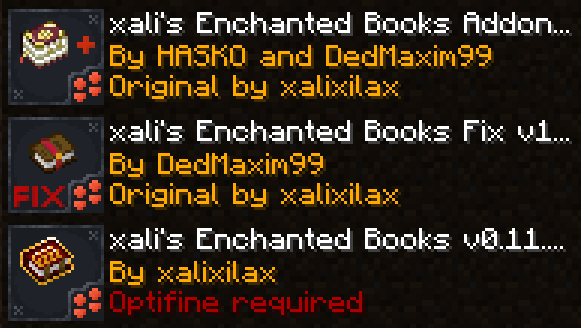
**[1.21.5+]** Starting 1.21.5, if you use xali’s Enchanted Books – Addon you DO NOT need to use this pack. The “fix” is now integrated into the Addon pack!
—
**ATTENTION!**
You are **required** to install any mod that can work with custom CIT resource packs for the pack to be able to operate: [Optifine](https://optifine.net/home), [CIT Resewn](https://modrinth.com/mod/cit-resewn), [Forge CIT](https://www.curseforge.com/minecraft/mc-mods/forge-cit), [CIT Reforged](https://www.curseforge.com/minecraft/mc-mods/cit-reforged), [[CIT] CustomItemTextures](https://modrinth.com/mod/cit), etc. The pack should work on any Minecraft version with any mentioned mods. Ignore the “Incompatible” warning.
**ATTENTION!** At the moment of writing, 04 Jul 2024, CIT Reforged has a [bug](https://github.com/Tfarcenim/CIT-Reforged/issues/16) that prevents this pack from operating! Use Optifine or try to launch Fabric version, CIT Resewn, using Sinytra Connector
—
Anybody is free to use this pack anywhere. Just do not rename the pack, please.
Contact me:
My [YouTube channel](https://www.youtube.com/channel/UCrMHx89X71br0aDlzwsLDHQ)
My [Twitch channel](https://www.twitch.tv/dedmaxim99)
My [VK page](https://vk.com/id728112150)
My [Telegram](https://t.me/DedMaxim99)