XP = LIFE
✨ SoulXP
SoulXP is a plugin that transforms your life force (XP) into a livelihood, serving as the core of the server’s economy.
💰 The Living Economy
Instead of gold or coins, Raw XP is your primary currency.
Utility: Use it for trading with players or stocking Vault-compatible shops.
The Flat Curve: After Level 40, the XP curve flattens. Leveling from 140 to 141 is just as easy as leveling from 45 to 46.
Soul Shards: Use /soul withdraw to create physical items. These can be traded, sold, or right-clicked to absorb the XP back.
⏳ Survival & The “Soul Take”
You are a living battery, and the server is constantly draining your energy.
The Drain: Every minute, the “Soul Take” consumes 200 Raw XP.
The Floor: You will never drop below Level 20 via the drain. This is also your starting and respawn level.
Death Penalty: Dying removes 100 levels. If your level is already low, you simply reset to the Level 20 floor.
🎭 Status & Power Tiers
Your current XP level directly dictates your physical strength and status:
🌑 Hollow (0 XP): Severe penalties, smoke particles, and a grayed-out name.
🏚️ Weakened (< Lv. 20): Inflicts Slowness, Weakness, and Mining Fatigue.
⚡ Ascended (> Lv. 60): Grants permanent Strength and Speed.
👑 Elite (> Lv. 150): Scaling buffs that cap at Strength III and +10 Bonus Hearts.
🛠️ Commands & Tools
Player Commands
/soul balance: Check your current XP wealth.
/soul pay : Transfer raw XP to another player.
/soul top: View the leaderboard of the strongest souls.
Admin Commands
/soul admin : Manage the economy.
/soul admin reload: Refresh the plugin configuration.
🧩 PlaceholderAPI Support
Display soul data in menus and scoreboards using:
%soul_balance%, %soul_raw_xp%, %soul_is_hollow%, and %soul_next_drain%.
XP Hearts
A texture pack that re-textures expierience orbs to be hearts!
Xmas meowl Totem of Undying
– ENG: **Meowl** (in Russian, “Myaowl” or “Myaul”) is a creature with a cat’s head and an owl’s body, sitting on a branch. Initially, it was a fun photoshop creation.
The first images of the cat owl appeared in 2013 on the Chinese platform Weibo. However, it gained popularity only in October 2025 on TikTok
– RU: **Meowl** (в рунете — «Мяовл» или «Мяул») — существо с кошачьей головой и телом совы, сидящее на ветке. Изначально — это весёлое творение фотошопа.
Первые изображения с котосовой появились в 2013 году на китайской платформе Weibo. Но популярность они обрели только в октябре 2025 года в TikTok
[Meowl Totem](https://modrinth.com/resourcepack/meowl-totem-of-undying/versions)
[ALL RESOURCEPACKS COLLECTION: MEMES + STREAMERS](https://modrinth.com/collection/sfDcDGAi)
xMinio GUI Rework
A resource pack mixing a leather theme, connected slots and golden-brass icons.
Lightly inspired by create.
Features:
– Reworked most in-game GUI’s
– Slight font adjustments
XL-mod
# !⚙️EARLY DEVELOPMENT⚙️!
### ☕ About mod
> Hello cadet!
> Lets read information about our mod!
[XL-mod documentation](https://xl-projects.github.io/xl-wiki/)
#### What adds?
Our mod adds bioms , with mods and weapons/items to fight!
As you explore the world, you will come across biomes, mobs, new structures, or even dimensions.
Like..
Like biome “Frozen forest” , there you can find new mob “The frozen wolf” , and some new items! We want to bring something unique and high-quality to each of our biomes, for example, a lot of crafting and the complexity of these crafting.
In future!
Wait for the 0.1.0-BETA relese , and explore the world with friends!
This mod is only for forge 1.20.1 , at the moment.
—
### Friendly community.
Also, in our social networks, we try to protect you from negative people who can spoil your impression of our projects, or those who would insult you in any way.
—
### ⚙️ Developers:
1. uertyk_ (manager/owner)
2. nika_eol (manager/helper/ideer)
—
### 📎 Links
[Source-code](https://github.com/XL-projects/XL-mod)
[XL-mod documentation](https://xl-projects.github.io/xl-wiki/)
[Our discord server](https://discord.gg/dP58cdu7ay)
XK’s Decoration
This is a multi-purpose decoration mod that adds more than 600 blocks, featuring a variety of themes ranging from many ancient civilizations to sci-fi punk or factories. We want our content to be rich and easy to use at the same time, so many of the blocks in the same theme can be switched seamlessly within the game.
## How to Play
Many items can be crafted in stonecutter or more simply by using “button 4” on your mouse (by default) to seamlessly switch between them in hand.
## Special thanks to the contributors:
LittleBai, ustc-zzzz, LucunJi, 3TUSK, TartaricAcid, IzzelAliz, Gu-ZT, SettingDust, a1640727878, xkball
XItemsRemover
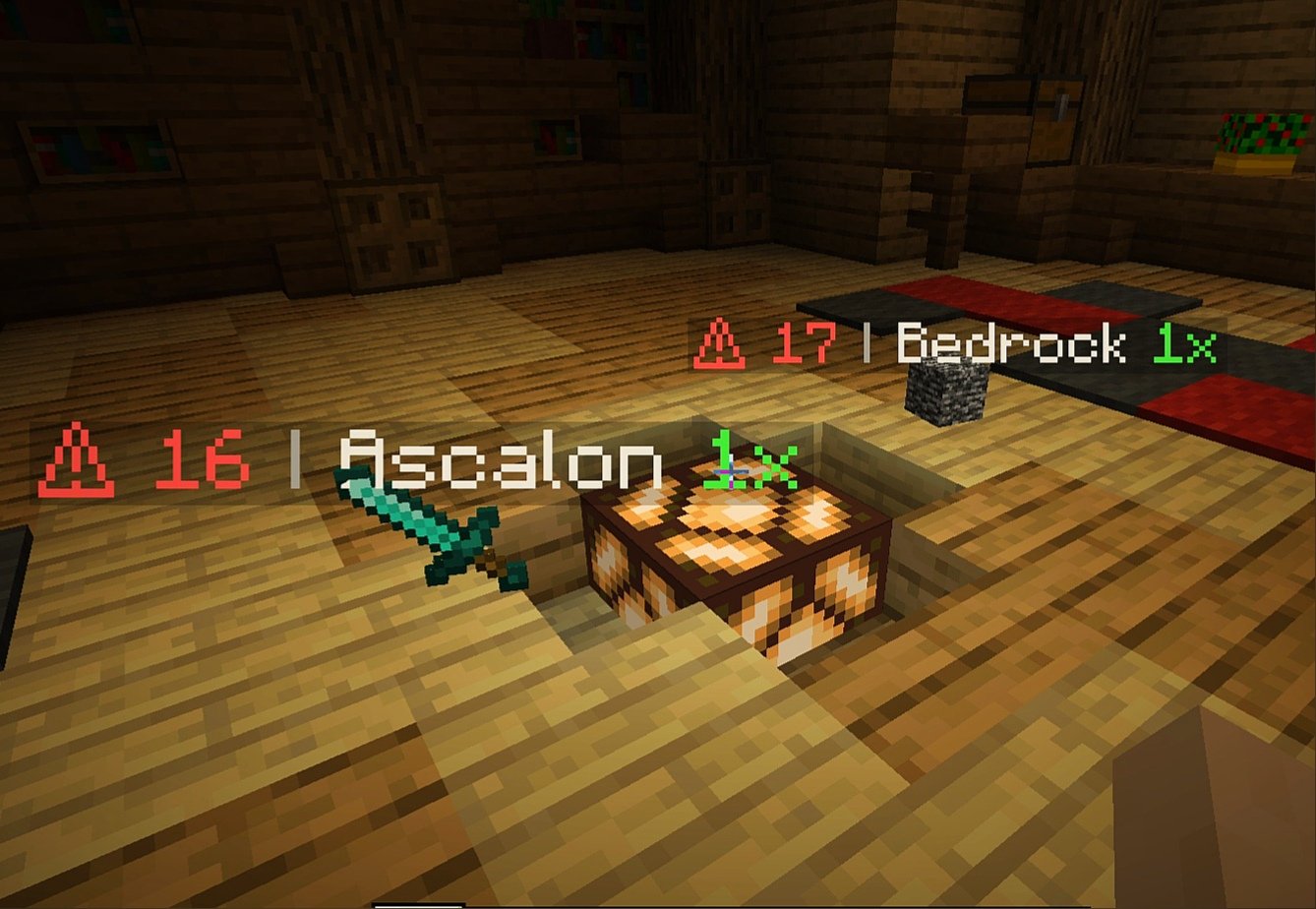
XItemsRemover – is a small plugin that automatically removes dropped items with a timer displayed on these items until they are removed. The time until deletion is configured in the plugin configuration.
IMPORTANT
If you have items with displayed name ‘AIR‘ – specify ‘api-version’ in plugin.yml with version of your server!
For example, if your server version is 1.16.5, add the following line to plugin.yml of XItemsRemover:
api-version: 1.16
### Configuration
“`
Items:
# Format:
# ‘‘: “”
# Available placeholders:
# {time} – time remaining before remove (in seconds)
# {display_name} – display name of itemstack (if empty – used localized material name}
# {amount} – itemstack amount
Display-name-formats:
‘1’: “§c⚠ {time} §7| §f{display_name} §a{amount}x”
’10’: “§c{time}”
Remove-timer:
# Timer for removing an item in seconds
Default: 30
After-player-death: 180
Async: true
# Section for specifying a unique timer or display name
# for certain materials
# Format:
# :
# : 15
# :
# :
#: false
# If you only need to edit one parameter
# (name or time) you can just delete the line with the second.
# If you need the plugin not to track a certain type of materials, then set ‘tracked: false’
Custom-materials:
COBBLESTONE:
Timer: 15
Display-name-formats:
’15’: “Cobblestone :D”
STONE:
Timer: 10
GRASS:
Display-name-formats:
’30’: “Grazz”
SAND:
Tracked: false
# Worlds in which plugin does not work
Restricted-worlds:
– “restricted_world”
“`
### Commands and permissions
Command | Permission
————- | ————-
‘**/itemsremover**’ [Alias: ‘**/ir**’] – prints all plugin commands. | items.remover.commands.help
‘**/itemsremover help**’ – prints all plugin commands. | items.remover.commands.help
‘**/itemsremover reload**’ – reloads plugin configurations. | items.remover.commands.reload
XingLuo AE2 1.21 GUIExpansion
# XingLuo_AE2_1.21_GUIExpansion

## 🔍 Overview
This resource pack ports the Applied Energistics 2 GUI and block/item textures from **Minecraft 1.21.1** to **Minecraft 1.20.1**, optimized for tech-focused modpacks.
—
## 🏗️ Dual-Pack Split (v2.7.9+)
Starting from **v2.7.9**, the resource content is split into two separate resource packs:
| Resource Pack | Scope |
| ————————————- | ———————————————————- |
| **XingLuo_AE2_1.21_GUIExpansion_AE** | AE2 core and AE2 addon GUI/texture resources |
| **XingLuo_AE2_1.21_GUIExpansion_Ext** | Minecraft vanilla and additional mod GUI/texture resources |
### Usage Recommendations
| Scenario | Recommended Configuration |
| ————————————— | ———————————————- |
| Only need AE2 visual updates | Enable `…_AE` only |
| Need vanilla and additional mod support | Enable both `…_AE` + `…_Ext` (recommended) |
| Resource pack priority (high to low) | `…_Ext` → `…_AE` |
> 💡 Both packs can be used independently or combined. When combined, Ext pack should have higher priority than AE pack.
—
## ✨ Main Features
### GUI Remake
– **Pattern Terminal Redesign** – Aligned with AE2 v12.9.4 layout
– **Button and Widget Updates** – 43 GUI elements in unified 1.21.1 style
– **Fluid Terminal Adaptation** – Pixel-perfect port of fluid interaction controls
### Block and Item Textures
– **ME Cable Channel Textures** – 16 color variants with P2P indicators
– **Inscriber Press Texture Adjustment** – Metallic look adapted for 1.20.1 lighting
– **Certus Quartz Animated Texture** – 4-frame cycle animation
—
## 📦 AE Side Supported Mods (from assets)
The following mod IDs have corresponding texture resources in the `assets` directory:
| modid | Name |
| ————————– | —————————————- |
| `advanced_ae` | AdvancedAE |
| `ae2` | Applied Energistics 2 |
| `ae2_mega_things` | AE2: Mega Things |
| `ae2_toggleable_view_cell` | AE2 Toggleable ViewCell |
| `ae2additions` | AE Additions |
| `ae2insertexportcard` | AE2 Import Export Card |
| `ae2omnicells` | AE2 OMNI Cells |
| `ae2peat` | AE2 P.E.A.T. |
| `ae2pw` | AE2 Pattern Workstation |
| `ae2things` | AE2 Things |
| `ae2wtlib` | Applied Energistics 2 Wireless Terminals |
| `aeinfinitybooster` | AEInfinityBooster |
| `appbot` | Applied Botanics |
| `appelem` | AppliedE |
| `appflux` | AppFlux |
| `appliede` | AppliedEnergistics Extend |
| `appliedsorting` | Applied Sorting |
| `appmek` | Applied Mekanistics |
| `arseng` | Ars Énergistique |
| `bigger_ae2` | Bigger AE2 |
| `expandedae` | Expanded AE |
| `expatternprovider` | Extended Pattern Provider |
| `extendedae_plus` | ExtendedAE-Plus |
| `extendedterminal` | Extended Terminal |
| `fulleng` | FullEng |
| `ifsoulsdisks` | IFSouls’ Disks |
| `infinitycells` | Infinity Cells |
| `mae2` | Modern AE2 Additions |
| `mae2a` | MAE2: Addon |
| `makeae2better` | Make AE2 Better |
| `megacells` | MEGA Cells |
> ⚠️ The table above only lists mod IDs present in the `assets` directory. It does not guarantee full texture support for all mods.
—
## 📦 Extension Side Supported Mods (from assets)
The following mod IDs have corresponding texture resources in the `assets` directory:
| modid | Name |
| ————————- | ————————- |
| `accessories` | Accessories |
| `avaritia` | Avaritia |
| `betteradvancements` | Better Advancements |
| `botanicalextramachinery` | Botanical Extra Machinery |
| `buildinggadgets2` | BuildingGadgets2 |
| `classicbar` | ClassicBar |
| `cosmeticarmorreworked` | Cosmetic Armor Reworked |
| `craftingtweaks` | Crafting Tweaks |
| `curios` | Curios API |
| `emi` | EMI |
| `extremesoundmuffler` | Extreme Sound Muffler |
| `gregiceng` | Gregic Energistics |
| `gtceu` | GregTech CEu Modern |
| `gtlcore` | GTLCore |
| `hostilenetworks` | Hostile Neural Networks |
| `invtweaks` | Inventory Tweaks |
| `laserio` | LaserIO |
| `ldlib` | LDLib |
| `merequester` | ME Requester |
| `minecraft` | Minecraft |
| `pipez` | Pipez |
| `polymorph` | Polymorph |
| `projecte` | ProjectE |
| `solarflux` | Solar Flux Reborn |
| `sophisticatedbackpacks` | Sophisticated Backpacks |
| `sophisticatedcore` | Sophisticated Core |
| `sophisticatedstorage` | Sophisticated Storage |
| `titanium` | Titanium |
| `toolbelt` | Tool Belt |
| `trashslot` | TrashSlot |
| `travelanchors` | Travel Anchors |
| `xaerobetterpvp` | Xaero’s Minimap |
| `xaeroworldmap` | Xaero’s World Map |
> ⚠️ The table above only lists mod IDs present in the `assets` directory. It does not guarantee full texture support for all mods.
—
## 👥 Contributors
| Contributor | Link |
| ———– | —————————————————- |
| _leng | [_leng](https://modrinth.com/user/_leng) |
| MHanHanBing | [MHanHanBing](https://modrinth.com/user/MHanHanBing) |
| TedXenon | [TedXenon](https://modrinth.com/user/TedXenon) |
—
## 📜 License
This resource pack is for personal learning and entertainment use only. Commercial use is prohibited.
xHeadTurns
# 💀 xHeadTurns
### Advanced Floating Heads, Holograms & Animations
[](https://discord.gg/mNdxNVx6cU)
[](https://modrinth.com/plugin/xheadturns)
[]()
—
## 📝 Overview
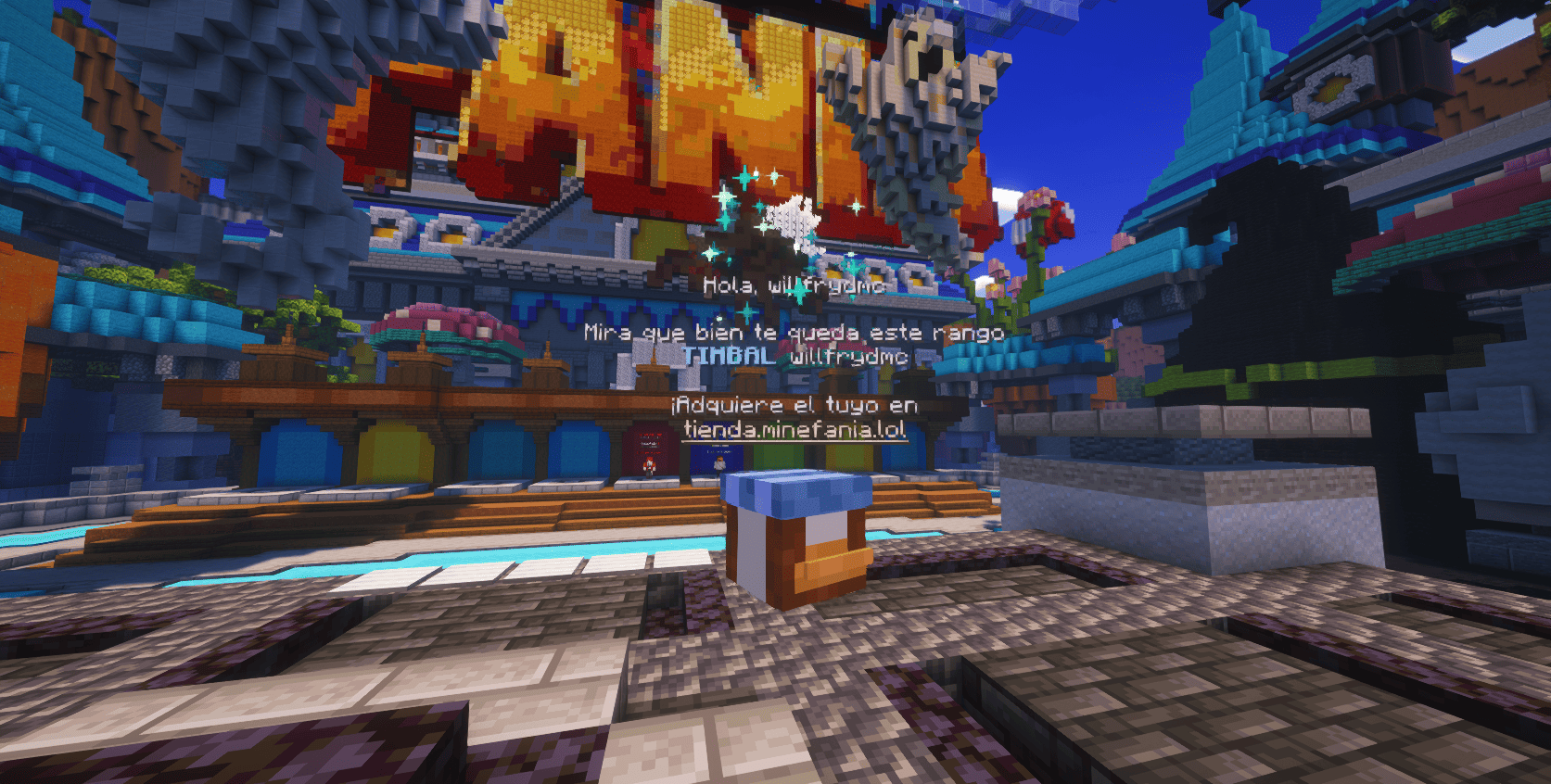
**xHeadTurns** is the ultimate solution for decorating your server lobbies, hubs, and spawn areas. Bring your server to life with fully interactive **Floating Heads** that support custom textures, real-time rotation, scaling, and dynamic holographic displays.
Now with a **Full In-Game Editor**, you can modify every property of your heads without ever touching a configuration file.
## ✨ Key Features
* **🎮 Full In-Game Editor:** Modify scale, speed, textures, and hologram lines in real-time with `/xhte`.
* **🎨 Custom Textures:** Support for **Base64** values (Minecraft-Heads) and **Player Names**.
* **🔄 Dynamic Rotation:** Fully customizable rotation speed and manual angle (Yaw/Pitch) control.
* **💬 Advanced Holograms:**
* Multi-line support with **HEX Colors** (e.g., `&#a7c7e7`).
* **PlaceholderAPI** support (updates based on the nearest player).
* Customizable backgrounds (RGB + Opacity), billboards, and shadows.
* **✨ Particle Animations:** Styles like `HELIX` and `SPHERE` with custom particle types.
* **⚡ Interactivity:** Execute **Console** or **Player** commands on click with per-head cooldowns.
* **🌍 Multi-Language:** 100% translatable (English and Spanish included).
—
## 🛠️ Commands & Permissions
| Command | Description | Permission |
| :— | :— | :— |
| `/xht help` | Shows the help menu with all commands. | `xheadturns.help` |
| `/xht list` | Opens a GUI with all active floating heads. | `xheadturns.list` |
| `/xhtc ` | Spawns a head at your target location. | `xheadturns.create` |
| `/xhtd ` | Deletes a specific floating head. | `xheadturns.delete` |
| `/xhtm ` | Moves a head to your current target location. | `xheadturns.move` |
| `/xhte ` | **Advanced Editor:** Edit any property in-game. | `xheadturns.edit` |
| `/xht reload` | Reloads configurations and head data. | `xheadturns.reload` |
—
## ⚙️ Advanced Editing Examples
Using the new **Editor System**, you can customize your heads on the fly:
“`bash
# Change the scale of a head
/xhte MyHead head scale 2.0
# Add a new line to a hologram
/xhte MyHead hologram add &fVisit our &b/store
# Change hologram background to a semi-transparent blue
/xhte MyHead hologram background 0,0,255 100
# Update head texture to a player’s skin
/xhte MyHead head texture Dream
“`
> ## 🚀 Installation
1. Download the xHeadTurns .jar.
2. Upload it to your /plugins/ folder.
3. Requirement: Ensure you have PlaceholderAPI installed for dynamic names.
– Restart the server.
> Use /xhtc to start creating your first floating heads!
> ## 🤝 Support & Community
Need help? Found a bug? Join our Discord server!
Plugin developed with ❤️ by xPlugins x WillfryDev
Copyright © 2026 xPlugins. All rights reserved.
XGlow
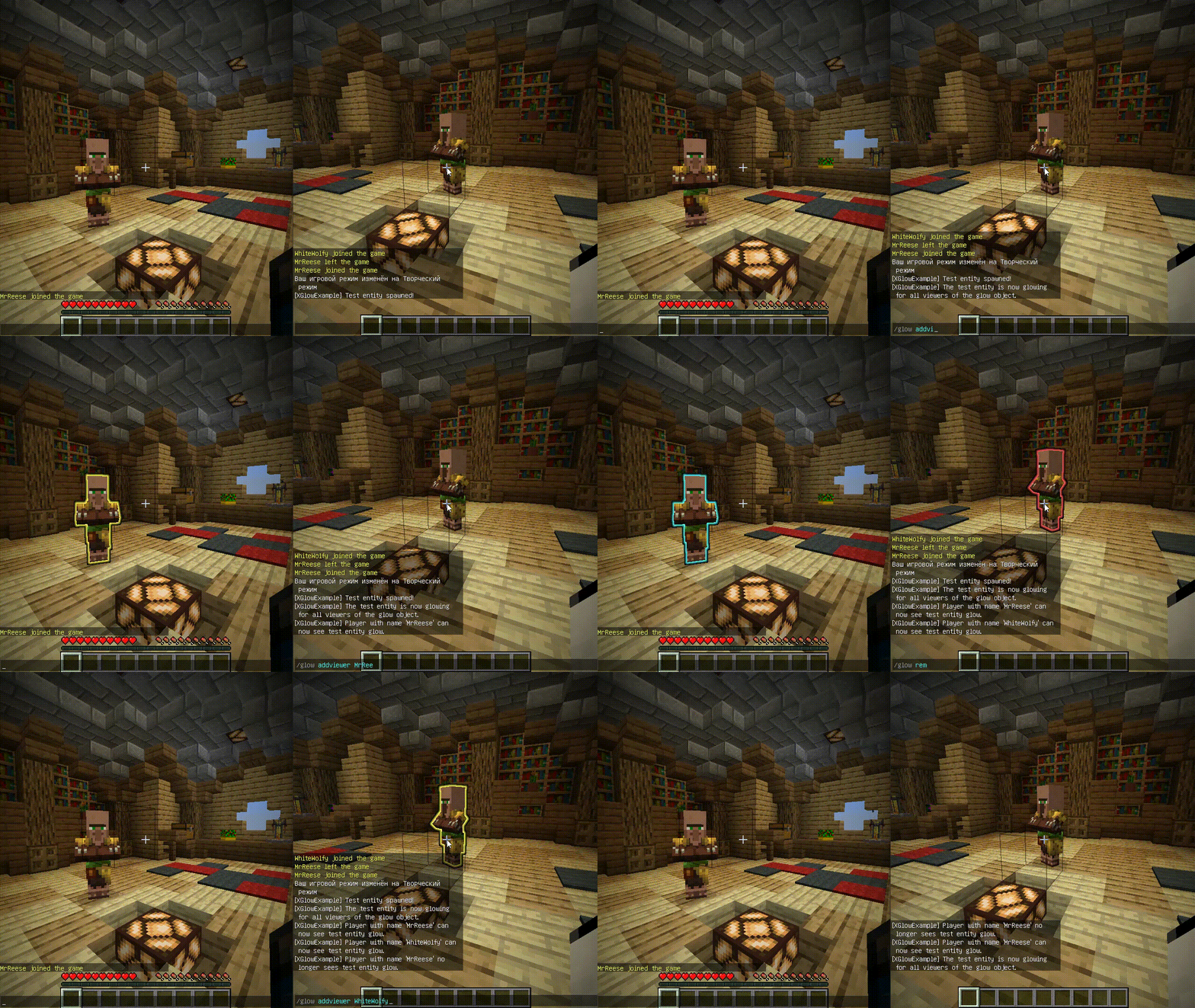
**Works with Java 8 and above.**
(I noticed that the **GlowAPI** from the **inventivetalent** has been abandoned, has not been updated for a long time, has bad reviews and bugs, as well as a rather low-quality code – so I decided to make and publish my own version of the api for the glow)
**XGlow** – is a simple, easy-to-use API to create glow on your entities. The plugin requires [ProtocolLib](https://github.com/dmulloy2/ProtocolLib) to work.
### Usage
First you need to create a Glow object:
(You can use a builder for this)
“`java
Glow glow = Glow.builder()
.сolor(ChatColor.GREEN)
.name(“test”)
.build();
“`
You can add entity to glow object holders,
to make this entity glow with glow object colors.
The glow of the entity will be seen by all viewers
which the glow object contains:
`glow.addHolders(entity);`
To remove the glow of an entity,
you can remove it from the glow object holders.
The entity’s glow will disappear for all viewers of the glow object:
`glow.removeHolders(entity);`
You can add a viewer to the glow object so that he immediately sees the glow of all holders of the glow object:
`glow.display(player);`
When the viewer is removed from the glow object,
all holders of the glow object will
no longer glow for removed viewer:
`glow.hideFrom(player);`
For more features check out XGlow wiki page on github: https://github.com/Xezard/XGlow/wiki