Willowing Origins
# **What is Willowing Origins?**
This Origin Datapack is made to give the player more variety when choosing their origin, and adds 4 new origins to the game.
## Each origin’s full list of powers can be found in the gallery of this Datapack, but currently the datapack adds these;
### **Obsidian Heart**
Tall and durable, Obsidian Hearts can walk through air like it doesnt exist and swim through lava like a human swims through water.
### **Lotling**
Able to breathe inside and outside of water, Lotlings can swim in rain and use their regeneration to do well in most fights,
### **Bloom**
Light but Powerful, Blooms can shoot charged up “Sun Beams” that not only do damage through armour, but can launch the user high in the air.
### **Moofolk**
Subversively strong, they are immune to all negative potion effects and have “Spores” that shoot out, either on command or whenever the user is hurt, effecting close entities with poison and slowness.
William Wythers’ Overhauled Overworld (Datapack)
# Purpose
Overhauled Overworld reimagines the vanilla overworld biomes, using custom sky, water, grass and vegetation colors, along with extensive custom features, to create a more immersive, atmospheric, cohesive and picturesque world. This is all done entirely without modding, and also with a focus on compatibility with other worldgen packs and mods, such as Tectonic and Reterraforged.
## What to expect
Overhauled Overworld adds many sub-variants to biomes, as well as unique and rare transition regions where various biomes meet. Trees of all shapes and sizes fill the world. Stony cliffs and scree escarpments are common in the highlands.
Ore blobs (diorite, andesite and granite) no longer pollute the clean grey of stone cliffs. Instead, these ores are found in abundance in their own allocated places. Diorite is readily available in the Flower Forest, granite in the Sunflower Plains and Birch Forest, and andesite in the Meadow and Cherry Grove.
Lava lakes and springs are no longer to be found in the surface of overworld biomes, except for the volcanic Stony Peaks and Windswept Hills biomes.
### History
William Wythers’ Overhauled Overworld was originally released on Planet Minecraft on October 9th, 2020. It gradually rose to the top of the list as the most popular worldgen datapack. It maintained that position for a while, before being outclassed by the creations of a certain silent celestial object. While it no longer holds the top spot on that list, it currently remains in third position.
From its inception, Overhauled Overworld was designed with the intention of creating a beautiful, immersive and more realistic experience without making use of modding. The pack was later repacked in mod format by Cristelknight, which has been very useful to the majority of players who prefer mods over datapacks. However the pack remains at heart a datapack.
(The mod can be found here: https://modrinth.com/mod/wwoo)
Wild Spears
_Hiya all! This is my very first datapack, that I created simply because I fell in love with new weapon from 1.21.11 – Spears._
All spears here are true melee weapons – their special abilities trigger when you hit an enemy, not by just swinging in the air. They bring a touch of magic to close combat.
-Balance note: Some spears might be a bit overpowered, but I think they’re still fun and enjoyable.
-Required Resource Pack: The datapack comes with a resource pack (included in the download) – make sure to enable it to see the custom spear models.
-Localization: English and Russian included
To remove all datapack data while keeping the spears in your inventory, run:
/function wildspears:uninstall , after that, you can remove it from datapack folder.
Datapack adds in total 17 spears. All recipes are automatically unlocked for every player when the datapack loads. If you have operator permissions, you can test all spears at once with:
/function wildspears:give_all_spears
Or you can check their abilities below, and see crafts in datapack gallery.
Bee Spear
25% chance to summon 2 angry bees that attack the target.
Cobweb Spear
33% chance to place a cobweb on the target for 2 seconds.
Disorienting Spear
Inflicts Nausea and Blindness for 3 seconds.
Dragon Breath Spear
17% chance to shoot a dragon fireball.
Enderswap Spear
75% chance to swap positions with the target.
Bonus: +10% movement speed.
Enfeebling Spear
34% chance to inflict Weakness II for 3 seconds.
Firework Spear
75% chance to summon a firework rocket that explodes instantly on the target.
Glacial Spear
Inflicts Slowness II and Mining Fatigue I for 2 seconds.
Heavy Core Spear
Enchantment: Wind Burst V (enchantment that only for Mace + above the normal maximum level).
Infernfal Spear
Shoots a fireball on attack.
Enchantment: Fire Aspect III (above the normal maximum level).
Levitation Spear
44% chance to inflict Levitation XV for 1 second.
Marking Spear
Inflicts Glowing for 8 seconds.
Ramming Spear
Enchantment: Knockback V (above normal max).
Bonuses: 50% knockback resistance, +15% movement speed.
Thunder Spear
Summons lightning: 100% chance in a thunderstorm, 50% in rain, 17% in clear weather.
Bonus: +7% movement speed.
Toxic Spear
Inflicts Poison II for 3 seconds.
Vampiric Spear
17% chance to deal 2 extra hearts of damage and heal you for 2 hearts.
Withering Spear
Inflicts Wither III for 3 seconds.
Enjoy!
Made by GDarkXwolf17
Wilds
This datapack adds another dimension (the Wilds), which can be customized by replacing the wilds.json in the dimension folder, or used as is! This dimension can be accessed via placeable structures (Eerie Spires) or commands.
# Features
– The Wilds: A strange world, neither overworld nor end nor nether, but perhaps somewhere between, as though the worlds had been shuffled together as so many cards through some cosmic mistake… or some twisted divine purpose…
– Can be accessed by teleportation commands, travelling to an Eerie Spire, or using the travel functions.
– The form of The Wilds can be customized by overwriting the dimension files to be whatever the server admins want them to be. An all-winter world, and endless desert, the nether but even worse somehow? Go for it, just don’t expect me to write your new dimension files for you!
– Eerie Spires: unsettling and unnatural towers of basalt and crystal. Any player (or mob or any other entity) who strays too close may find themselves thrown from this world into a bizarre and warped reality mirroring one’s own…
– Currently, Eerie Spires do not naturally generate, and will have to be placed into the world by administrators
– Custom teleportation functions
– “`/function wilds:travel_to_wilds“` to travel from any dimension to The Wilds
– “`/function wilds:travel_from_wilds“` to travel from The Wilds back to the Overworld
– These functions will display when you (or entities near you, unfortunately) are travelling between the Wild and other dimensions.
Wilderness
Wilderness is a datapack that focuses on adding small decorations to biomes, usually on the surface with bushes, flowers and ferns, but also in rivers, oceans and even the nether. Other than trees, most vanilla forest biomes don’t have many decorations in them. In Wilderness, biomes like forests look overgrown and feel much more wild. Wilderness still stays true to vanilla by only using logical natural blocks (no stone buttons for pebbles).
This pack uses an addition system that allows for extended compatibilty when used in vanilla, but it also has extra compatibiliy with Lithostitched. Whenever convenient, I recommend installing Lithostitched, for increased performance and more thorough world generation.
Wilderness does not change tree generation. For improved trees, check out Better Trees. Some of the images were taken with Better Trees.
Wilderness Wayfinder
# Ever wanted to find those elusive biomes?
With this Datapack you can craft a compass that will help you find them!
### VERY IMPORTANT TO KNOW:
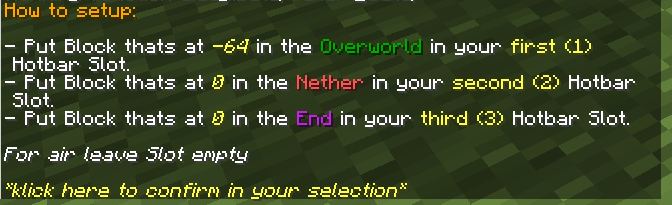
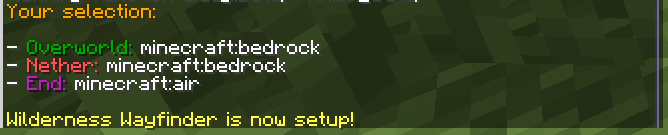
I have to use command blocks for the locate command. I have to place them in the world somewhere. Command blocks are placed at the very bottom of the world, meaning if you build there they WILL override whatever you placed and replace that with the Blocks you selected in the setup! [Always placed below you when finding new structure]
### Before you start you will have to do a quick setup:


### The Crafting recipe is unlocked when you unlock the compass:
[Any leaf type]

### To select the biome you want to look for – switch the Wayfinder into your offhand (cycles through all biomes):

### If you found the biome you’re looking for simply right-klick the Wayfinder and it will search for that biome:

### The Wayfinder will now point to the biome and will display what biome its pointing to:

**You should keep your Wayfinder selected while its searching for it to get updated!**
If the biome you’re searching for is in the wrong dimension or cant be found the Wayfinder will let you know.
**This Datapack uses the /locate command!**
If it has to search a long distance the game / server will lag!
I have done my best to keep this pack easy to use on multiplayer, but its recommended not to search for biomes at the same time.
(The pack should prevent this, but you never know ^^)
WilderNature Contract Compatibility Base
This datapack only provides the base to use other datapacks on for your specific mods. See my page for Naturalist and Wildlife compatibility.
It is not recommended to use this datapack on its own, it provides no benefit compared to just the WilderNature mod without other packs.
Wilder Terralith
# Overview
This datapack utilizes a few methods of changing biomes in Terralith (https://modrinth.com/mod/terralith) to add the Wilder Wild (https://modrinth.com/mod/wilder-wild) features. Many of them are existing tags from Wilder Wild, placed/configured features from Wilder Wild, changes to Terralith placed/configured features, and a few are custom placed/configured features using Wilder Wild blocks. As such, if you would like to delve into the pack and find out how I did things, you may need to check a few places.
With just Wilder Wild and Terralith (+ dependencies), Wilder Wild biomes do not spawn. I created this pack with the intention to not need the biomes from Wilder Wild, but not miss out on features. However, using TerraBlender (https://modrinth.com/mod/terrablender), you can get the Wilder Wild biomes to spawn. Feel free to configure as you please.
# Changes
## Surface Biomes
– Alpine Grove
– Fallen Spruce Trees
– Patches of frozen grasses
– Amethyst Canyon & Rainforest
– Hibiscus
– Butterflies (Duskwing and Marbled)
– Ancient Sands
– Scorched Sands (both Red and Normal)
– Tumbleweeds
– Arid Highlands
– Shrubs
– Packed Mud Paths
– Ashen Savanna
– Zombie Ostriches
– Packed Mud Paths
– Dead Baobabs (new feature!)
– Birch Taiga
– Shelf fungi on trees
– Fallen Birches
– Datura
– Blooming Plateau & Valley
– Carnations
– Marigolds
– Pollen
– Butterflies (every variant except Duskwing)
– Mooblooms
– Brushland
– Milkweed
– Monarch butterflies
– Bryce Canyon
– Milkweed
– Phlox
– Caldera
– Gabbro Paths (new feature!)
– Geysers
– Plankton
– Cloud Forest
– Changed leaf litter to match leaves
– Shelf fungi on trees
– Fallen logs
– Seeding Dandelions
– Datura
– Cold Shrubland
– Shelf fungi on trees
– Shrubs
– Deep Warm Ocean
– Hydrothermal Vents
– Sponge buds
– Tubeworms
– Sea anemone
– Nematocysts
– Mesoglea
– Crabs
– Jellyfish
– Desert Canyon
– Prickly pears
– Tumbleweed
– Scorched sand
– Desert Oasis
– Changed palm trees to use palm logs and fronds
– Flowering Lilypads
– Desert Spires
– Changed palm trees to use palm logs and fronds
– Forested Highlands
– Changed maple trees to use maple logs and leaves
– Shelf fungi on trees
– Auburn moss patches
– Datura
– Fractured Savanna
– Shelf fungi on trees
– Changed leaf litter to match leaves
– Shrubs
– Packed Mud Paths
– Ostriches
– Frozen Cliffs
– Fragile Ice
– Icicles
– Penguin
– Glacial Chasm
– Fragile Ice
– Icicles
– Haze Mountain
– Shelf fungi on trees
– Clovers
– Cattails
– Auburn Moss
– Fallen Spruce
– Foggier Fog (not Wilder Wild feature; just a change I made; easy enough to change)
– Highlands
– Phlox
– Shrubs
– Hot Shrubland
– Shrubs
– Shelf fungi on trees
– Packed Mud Paths
– Ice Marsh
– Cattails
– Shelf fungi on trees
– Fallen Mangrove
– Changed leaf litter to match trees
– Flowering Lilypad
– Jungle Mountains
– Hibiscus
– Clovers
– Huge Mushrooms
– Fallen Jungle trees
– Lavender Valley & Forest
– Changed leaf litter to match trees
– Shelf fungi on trees
– Milkweed
– Fallen Birches
– Pollen
– Butterflies (Marbled & Morpho Blue)
– Moobloom
– Lush Desert
– Palms
– Flowering Lilypad
– Lush Valley
– Shelf fungi on trees
– Shelf fungi on trees
– Changed leaf litter to match trees
– Fallen Spruce, Oaks, and Birches
– Seeding dandelions
– Forest rocks
– Moss Carpets
– Stone Paths
– Coarse dirt paths
– Mesoglea
– Carnations
– Jellyfish (Pearlescent & Blue)
– Moonlight Grove & Valley
– Fallen trees
– Changed leaf litter to match trees
– Pollen
– Butterfly (Morpho Blue)
– Orchid Swamp
– Added Cypress trees
– Algae
– Cattails
– Clovers
– Milkweed
– Flowering Lilypad
– Fireflies
– Red Oasis
– Notably no palm tree change
– Prickly pears
– Flowering Lilypads
– Rocky Jungle
– Hibiscus
– Shrubs
– Lantanas
– Fallen Jungle trees
– Sakura Grove
– Fallen Cherry trees
– Pollen
– Sandstone Valley
– Changed trees to palms
– Savanna Badlands & Slopes
– Shrubs
– Packed Mud Paths
– Ostriches
– Zombie Ostriches
– Shield
– Fallen trees
– Shelf fungi on trees
– Auburn Moss
– Datura
– Shrubland
– Shrubs
– Fallen Oaks
– Pasqueflowers
– Siberian Grove & Taiga
– Fallen trees
– Shelf fungi on trees
– Frozen grasses
– Tundra flowers
– Marigolds
– Snowy Cherry Grove
– Fallen Cherry trees
– Snowy Maple Forest
– Changed maple trees to maple logs and leaves
– Fallen Maples
– Frozen grasses
– Snowy Shield
– Fallen trees
– Shelf fungi on trees
– Frozen grasses
– Steppe
– Pasqueflowers
– Wildflowers
– Phlox
– Temperate Highlands
– Shelf fungi on trees
– Milkweed
– Butterflies (Clouded Yellow, Gren Hairstreak, and Monarch)
– Tropical Jungle
– Hibiscus
– Palms
– Lantanas
– Scorched replaces Spider
– Valley Clearing
– Marigolds
– Volcanic Crater & Peaks
– Gabbro Paths
– Geysers
– Scorched replaces Spider
– Warped Mesa
– Tumbleweed
– White Cliffs
– Fallen Birches
– Carnations
– Windswept Spires
– Seeding dandelions
– Wintry Forest & Lowlands
– Shelf fungi on trees
– Fallen trees
– Yellowstone
– Shelf fungi on trees
– Yosemite Cliffs
– Wildflowers
– Phlox
– Yosemite Lowlands
– Shelf fungi on trees
– Changed leaf litter to match trees
– Fallen Birches and Spruce
– Seeding dandelions
## Caves
– Frostfire Caves
– Icicles
– Fragile Ice
– Fungal Caves
– Shelf fungi
– Thermal Caves
– Scorched replaces Spiders
– Geysers
– Mantle Caves
– Gabbro
– Geysers
– Scorched replaces Spiders
– Underground Jungle
– Shelf fungi
If you encounter issues or have suggestions, please ask!
Wilder Clifftree
# Overview
This datapack simply ports some Wilder Wild features to Clifftree biomes. It’s as simple as that.
## Biome Features
– Bog
– Cypress Trees
– Cattails
– Algae
– Clovers
– Flowering Waterlilys
– Fireflies
– Coniferous Badlands
– Milkweed
– Phlox
– Fallen Spruces
– Monarch Butterflies
– Desert Cliff
– Scorched Sands
– Diorite (Snowy + normal) and Granite Shores
– Penguins
– Frozen Caves, Glacier Cliffs and Valleys
– Fragile Ice
– Icicles
– Inferno
– Gabbro
– Geysers
– Kelp Forest
– Jellyfish
– Lukewarm Caves
– Mesoglea
– Nematocyst
– Oasis
– Palms
– Flowering Waterlily
– Snowy Old Growth Taiga
– Shelf fungi
– Sparse Forest
– Shelf fungi
– Marigolds
– Fallen trees
– Stone Ocean
– Barnacles
– Sea Anenome
– Sea Whip
– Tropical Beach
– Palms
– Crabs
– Tropical River
– Crabs
– Tundra
– Tundra Flowers
– Auburn Moss
– Duskwing Butterfly
– What about Maples?
– They are added to vanilla Taiga and Snowy Taiga
WildEncounters [PT/BR] [Cobblemon]
—
🟢 WildEncounters ⚪
Este projeto é um fork do projeto (WildEncounters) para PT/BR, com a ajuda de @Jaozin.
WildEncounters no mod Cobblemon. Esta datapack traz a icônica mecânica da Relva Selvagem do Pokémon para o Minecraft, permitindo que os jogadores encontrem Pokémon selvagens aleatórios enquanto caminham pela relva!
⚙️ Como funciona 📖

Ao andar num pequeno pedaço de relva, há uma pequena chance de um Pokémon selvagem aparecer. Estes Pokémon aparecerão perto do jogador, adicionando um elemento emocionante e imprevisível à sua exploração. Personalize os tipos de Pokémon que podem aparecer e suas taxas de spawn. Quer esteja recriando uma experiência clássica de Pokémon ou adicionando um toque único ao seu mundo Minecraft, esta datapack dará vida às suas aventuras!
🕒 Comandos do WildEncounters 🛠️
- Você pode usar /function wildencounters:change_cooldown para alterar o intervalo de tempo de espera entre encontros selvagens. Para alterar o tempo, basta clicar com o botão esquerdo em + ou – para adicionar ou remover o tempo de espera. O tempo padrão é de 21 ticks ou 1 segundo em tempo real (o 1 tick extra que é adicionado é para se alguém quiser que os encontros não tenham tempo de espera, o cronômetro possa detectar se o tempo de espera foi reiniciado ou não). Esteja ciente de não alterar o tempo de espera enquanto um jogador estiver com o cronômetro em andamento ou isso pode causar bugs;
- Você pode usar /function wildencounters:reset_cooldown para redefinir o tempo de espera para o seu estado original (21 ticks ou 1 segundo). Este comando pode ser útil se o tempo de espera estiver bugado;
- Você pode usar /function wildencounters:uninstall para desinstalar a datapack. Depois de executar este comando, remova a datapack da pasta datapacks e execute /reload;
📝 Mudar Pokémon 📝
Nota Importante: Modificar datapacks pode ser desafiador para iniciantes. Prossiga com cautela! ⚠️
Para personalizar os Pokémon que aparecem, você precisará descomprimir a pasta datapack e colocá-la na sua pasta datapacks. Depois de descomprimida, navegue até o seguinte local:
WildEncountersDatapackdatacobblemonmolangrandom_spawn
Neste arquivo, você encontrará uma lista de todos os Pokémon que podem aparecer na relva.
Para alterar um Pokémon da lista, altere esta parte da função:
t.roll == 1 ? {
    q.run_command('pokespawnat ' + q.player.x + ' ' + q.player.y + ' ' + q.player.z + ' rattata lvl=' + t.random_level);
    q.player.tell('§aA wild Rattata has appeared!');
    return 1;
};
Se você quiser mudar o Pokémon para um Pikachu, você mudaria a parte da função para isto:
t.roll == 1 ? {
    q.run_command('pokespawnat ' + q.player.x + ' ' + q.player.y + ' ' + q.player.z + ' pikachu lvl=' + t.random_level);
    q.player.tell('§aA wild Pikachu has appeared!');
    return 1;
};
Se quiser alterar o nível de spawn de um Pokémon, basta alterar a parte lvl= para algo como lvl=10, removendo “+ t.random_level”. Não se esqueça de fechar o ‘ após lvl=10.
Você também pode alterar a chance de um Pokémon aparecer modificando esta linha: t.roll = math.random_integer(1, 720);. A chance de um Pokémon aparecer é de 35/720, ou cerca de 5%. Você pode alterar a chance de um Pokémon aparecer alterando o valor correto 720 para outro.
Para adicionar mais Pokémon, basta adicionar estas linhas no fincheiro spawner, com os valores corretos:
t.roll == 36 ? {
    q.run_command('pokespawnat ' + q.player.x + ' ' + q.player.y + ' ' + q.player.z + ' arceus lvl=' + t.random_level);
    q.player.tell('§aA wild Arceus has appeared!');
    return 1;
};
Se o último valor for 36, os próximos serão 37 e assim por diante.
Tem algum problema? Pode entrar no servidor de discord oficial do Cobblemon e procurar por “WildEncounters” e fazer suas perguntas lá, ou alternativamente, pode mandar-me uma mensagem no discord.


