**WoodBreaker makes chopping trees faster and cleaner while keeping the game feeling natural and balanced.**
Instead of instantly deleting everything like typical treecapitator-style packs, WoodBreaker is designed to respect the environment — removing logs and leaves while avoiding overpowered behavior.
Requirements
Minecraft Java Edition 1.21.5-26.1.*
Installation
## Singleplayer
– Open Minecraft
– Create a new world and click on “More”, “Data Packs”
– Drag the data pack into the Minecraft window
– Click “Yes” on the confirmation screen
– Move the data pack to the right-hand side of the screen by clicking the triangle on its icon
– Click “Done” and continue creating your world, then click on “Create New World”
## Multiplayer
– Download the data pack
– Open your server folder, then open the folder of the world
– Put the data pack into a folder named datapacks
– Restart your server and you can use your new datapack.
Wonderous Sky World
# Wonderous Sky World
This is a data pack that replaces world generation with custom structures designed to be floating sky island variants of normal minecraft environments. With over 30 custom structures, this data pack adds the sense of adventure back into a minecraft skyblock world.
Mario Wonder-like Standees

# Minecraft-Wonder-Like-Standees
Mario Wonder like revival!
**This aims to replicate the revival system that comes from Super Mario Bros: Wonder!**
On Death. You will turn into a ghost at the place of your death with a few seconds to get revived.
The duration is 15 seconds on death instead of the 5 seconds due to the more open-space that Minecraft is to either go to a standee (Armour Stand) or an alive player to be revived!
If the duration runs out. You will respawn at your spawnpoint.
**Config**
***(WonderStandees.Config.Ghost_Duration)***
– Global
*Sets the default duration of 15s to a specified value worth more than -1s for every player. Local takes priority over Global.*
– Local
*Sets the duration of a specified player to a specified value worth more than -1s. Takes priority over Global.*
***(WonderStandees.Config.Ping_Standees)***
– Global
*Controlled by the #Value of WonderStandees.Config.Ping_Standees. Controls if particles, leading to a nearby revival source should be emitted.*
***Showcase***
Wolf Horn – Control All Wolves – Stay Or Follow
# MxSxC1 – The Wolf Pack
## **Pack Purpose**
**Use the Wolf Horn to alternate your pack between Sit and Follow mode. Control up to 32 wolves.**
**NOTE: /function #mxwolf:load This MUST be run for the pack to work. This will also give you the manual.**
This pack introduces various features to let you control entire wolf packs including getting an entire pack (up to 32 wolves) to Sit/Stay at the same time.
It also includes weapons, items, structures and bonus items.
**The Ghost Wolf Horn – Main-Hand Horn**
– Set all players wolves to Stand/Sit at the same time with the Ghost Wolf Horn.
– Control up to 32 wolves simultaneously.
– Bonus Run Speed
– Bonus Luck
– Bonus Interaction Range
**The Wolf Shard – Off-Hand Wolf Shard**
– Bonus Armour
– Bonus Attack Speed
– **Manual – Trigger From Book
– Run most functions directly from clickable pages within the manual
**Bonuses**
– Elements From Lucky Fishing Pack (does not include dragonflies, though if you have the Lucky Fishing Pack installed will work).
## Functions (These can be run directly from clickable pages in the manual).
/function #mxwolf:load This MUST be run for the pack to work. This will also give you the manual.
/function mxwolf:man Give players the manual with clickable links
/function mxwolf:giveall Give all Wolf Pack Items
/function mxwolf:givehowlblade GIve Howling Blade
/function mxwolf:givewolfhorn Give Wolf Pack Horn (Pack Control)
/function mxwolf:givewolfshard Give Wolf Shard (Off-Hand)
/function mxwolf:killwolfpack Kill the wolf pack
/function mxwolf:mistxiii Summon Mist XIII (Pack Leader)
/function mxwolf:summonpack Summon Wolf Pack
/function mxwolf:wolfhut Summon Wolf Hut(WARNING: destroys existing blocks)
## Notes / Issues / TODO / Work In progress / Future Versions
Abstraction to control any pet type (or mob for that matter) is being worked on.
This hasn’t been fully tested on multiplayer and where 2 players are using the horn it may be glitchy or control the other players wolves. A fix is in the works for this.
Levelling up not yet implemented.
Alpha wolf (Mist XIII) is not controlled separately (yet)
Alpha wolf (Mist XIII) buffs. Not yet implemented.
Stealth mode. Not yet implemented
Setting teams not yet implemented.
Allowing for multiple teams and PVP/Co-Op not yet implemented.
Kennels not yet implemented.
Allowing for one player to control multiple wolf packs not yet impacted.
Guard mode not yet implemented.
Low health rescue not yet implemented.
Patrol mode. Not yet implemented.
Wolf Armour. Not yet implemented.
Arena Mode will come under the Arena pack and this pack combined.
**WHAT THIS IS NOT:**
This pack DOES NOT include custom wolf models, armour, collars, glowing effects, or any textures. That will be a separate pack.
This pack DOES NOT include abstraction of pets, this covers only wolves.
**Steps To Install & Update**
Drop the pack into the following folder:
C:Users[UserName]AppDataRoaming.minecraftsaves[GameSaveName]datapacksmxwolfpack
Note that our videos and screenshots use around 25 packs, some unreleased, this pack does what it says, but does not include some of the other effects, textures, music, shaders, etc…you may see.
**MxSxC1**
The Dark Is A Cold Lonely Shadow
[https://www.miscreat.co.uk/](https://www.miscreat.co.uk/)
___
We do not create mods, we create packs and data packs within Mojangs framework, which will also work on Realms.
Never install any packs, mods, or anything without fully understanding what they do, and ensuring it’s legitimate and safe! If anything requires elevation (which ours do not), think twice and verify!
wolf pack control
A simple QOL datapack that allows users to sit/unsit all of their dogs/cats at one time.
all you have to do is sneak and right click on your cat/wolf and all the surrounding of the same mob will toggle sitting/standing
sneak clicking to toggle sitting with an animals taiming item will have no effect
[demo](https://youtu.be/y-HeftUFA2E)
Wolf Horns
# Notice
This pack most likely **won’t** receive any more updates. If you want, you can download the GitHub repository and publish an updated version. It would be nice if you credit the original, but it’s not required.
# About
**Wolf Horns** is a Minecraft datapack that introduces a new enchantment, “Call of the Wild”, for goat horns, making it easier to manage large groups of tamed wolves. Once enchanted, these horns allow you to control your wolves with ease: simply use the horn to make all nearby tamed wolves stand, or hold shift while using it to command them to sit. The best part? It works perfectly in survival mode!
**WobblyHearts** is a **datapack** based on hearts management with a simple concept:
– You **lose** a **heart** on **death**, and **get one** upon eating an **Enchanted Golden Apple**.
– Once you have no more hearts, you get **banned**.
Example video
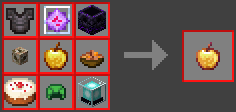
## Craft
There is a **custom craft** for the **Enchanted Golden Apple** as seen below.
> Also shown in the recipe book in-game.
## How to update
Simply **delete** the **WobblyHearts.zip** and **replace** it with the **new** one!
Wrenching My Tom Till I Create
# Wrenching My Tom Till I Create
This datapack makes all blocks from Tom’s Simple Storage wrenchable with the Create mod wrench (instantly stashing the blocks into the inventory).
Requires [Tom’s Simple Storage](https://modrinth.com/mod/toms-storage) and [Create 6+](https://modrinth.com/mod/create) to be installed.
[Tom’s Create Storage resource pack](https://modrinth.com/mod/toms-create-storage) is also recommended, but not required.
*You can’t use the rotation functionality of the Create mod wrench on the blocks (yet).*
World Loading Tweaker

World Loading Tweaker allows you to change the amount of spawn chunks used to load Minecraft terrain (worlds, dimensions, respawning, etc.) to increase the loading or quality of worlds!
Choosing a low amount of spawn chunks can drastically reduce the amount of time it takes to load a world, whilst choosing a higher amount can make it slow down, but improve the quality of spawning, like not having to see the chunks flash when they are loading.
When tested with spawn chunks set to 0, the world instantly skipped the loading box, and went straight to loading terrain, taking about 0.8 seconds to load.
When tested with spawn chunks set to 10, the world loading took about 3 seconds to load, but the amount of chunks loaded was better.
These results may vary depending on your computer, for example for some you may not notice any difference in loading times, but that is because this is made mainly for potato PCs, but loading times will still probably change even on high-end computers.
Minecraft’s default spawn chunk radius is 2, just so you know.
Please note that to notice a difference in world loading, you must have played the world at least once with the pack installed, or it will not work.
I hope you enjoy!
Commands:
/function wlt:disable
Disables the spawn chunks change and turns it back into 2 (you can still set it back whenever you want)
/function wlt:load
This doesn’t do much, as it is already used when the world loads, but it sets the spawn chunk radius to 0
/function wlt:spawnchunkschange/0
Also sets the spawn chunk radius to 0
/function wlt:spawnchunkschange/1
Sets the spawn chunk radius to 1
/function wlt:spawnchunkschange/2
Sets the spawn chunk radius to 2
/function wlt:spawnchunkschange/5
Sets the spawn chunk radius to 5
/function wlt:spawnchunkschange/10
Sets the spawn chunk radius to 10