[World Generator] Superflat++ World Generator
# Features as of Minecraft version 1.19:
* The overworld is unchanged compared to previous versions. Everything is working fine.
* The nether won’t generate many stuff if I flatten it so the best I could do was to remove the bedrock ceiling thus you can easily dig up to the flat surface of the world this way traversing the nether and getting flat surface for builds is still a viable thing.
* The end is untouched.
* Two editions: Regular, that only flattens the overworld and Plus that removes the bedrock ceiling in the nether too
# Features as of Minecraft version 1.18:
* Redone the data pack so now achieving flatness with different methods
* Now aquatic biomes spawn too!
* Jungle and desert pyramids are added back!
* Everything seem to be working in order in the overworld
* Mountainous biomes are obviously flat so there isn’t too much to them
* In plus version the nether and the end are both quite flattened, at least the top of them
* In achieving that I accidentally made the ender dragon easier to beat since there are no obsidian monoliths and crystals… Sorry?
* The nether is relatively safe to walk around but don’t go diving deep in lava while using the plus version. For some reason where there is lava lake there isn’t any bedrock. You might just… you know. Fall out of the world?
# Features up to Minecraft version 1.17.1:
* The world surface generates in only one plane, highly resembling to Mojang’s original superflat mode, except for it is not but tries to achieve it by sticking to a given height
* The world is still very ideal for both survival and creative modes for the majority of the world space is still empty as seen in the very first picture in the description
* With the exception of oceans, ocean monuments and desert pyramids everything works
* Ruined portals and stronghold still generate so you can “complete” the game if you wished so
* Two editions. One that makes the overworld superflat, the other makes the nether and the end superflat too
In the plus edition end biomes are a bit modified so chorus trees generate everywhere, giving the landscape a more dense look
[World Generator] Ocean Only Water World!
# Introduction:
So after 10 years of playing me and my friend wanted to spice up things a bit and play in an ocean only world where the whole gameplay would be different since the different available resources. We didn’t want to choose between all the available ocean biomes like frozen deep ocean or warm ocean since some of them are very different in terms of default blocks such as coral or ice.
# Changes since 1.21.5 release:
– Reverted back to stock world generation: Added back top layer of ice in most snowy/frozen biomes to make it easier for the player to navigate
– Added Underwater Potion to most village chests that grants the player 30 minutes of water breathing upon drinking
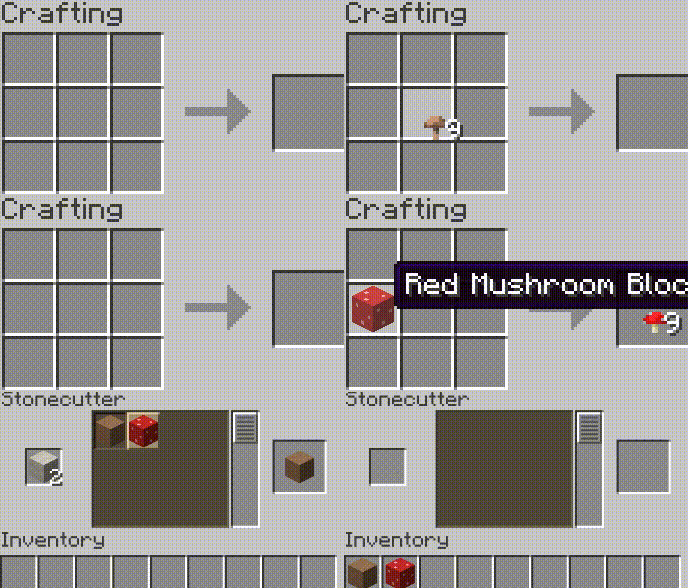
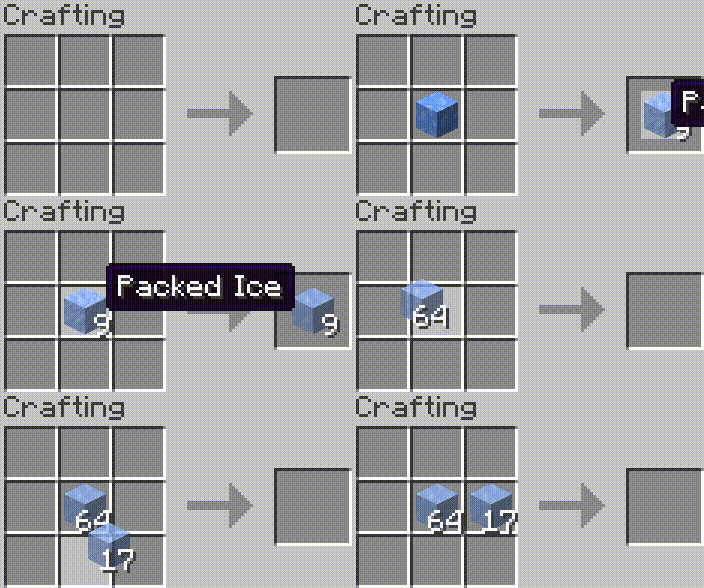
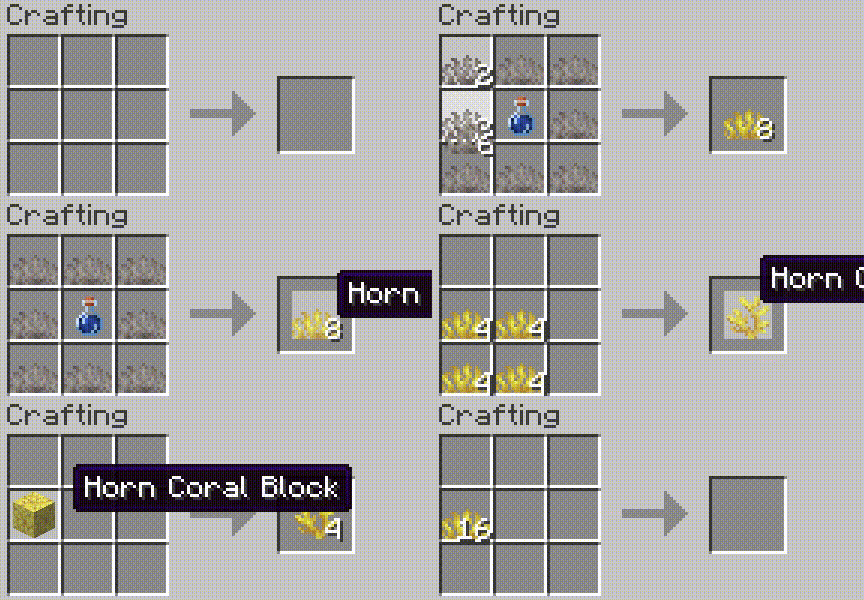
– Corals, budding amethyst, ice variants, mushroom blocks can be mined with simple tools without silk touch enchantment
– Reverse crafting ice, corals, mushroom blocks via crafting table or stonecutter is now possible
– Safe world spawn is still risky. Since I’m still horrible at coding and couldn’t come up with a fix platform generation during the first time the player spawns in the world, I’ll give you pre-tested seeds that have safe world spawn:
– Spawn on ice: 906182347964544722
– Spawn on abandoned ship: 6696165159819216322
– Spawn on a floating nether portal: 2589681248334255595
# Changes since 1.21 release:
– Set water limit to 208 as well as generated terrain.
– Most structures will generate in the world just fine, including villages, outposts, mansions, swamp huts, igloos, strongholds etc. but for some reason jungle and desert pyramids won’t?
– Dimensions were left untouched, only noise settings and the biomes were modified.
– Removed ice layer on top from all biomes to remove way too much free, flat surface from a water themed survival world to avoid too easy gameplay. I’ll add different editions for enhanced gameplay, such as modified villages, mansions and outposts to fit a water themed world.
# Changes since version 1.18 release:
Mojang/Microsoft drastically changed world generation and while there are more options for fine-tuning the vanilla gameplay they removed/altered several stuff so making custom world generators is still an unknown field. Also they’ve removed custom structure and structure start support so you cannot just tell the game to generate 10 biomes but put all sorts of structures such as villages, strongholds, mansions etc. on top of it. Meaning, structures are now hard-coded and will only generate in their respective biome. Dark oak forest->Mansion. Villages cannot generate in ocean biomes. I had to solve this issue and there weren’t many options for me. I increased sea level from 63 to 284. Telling the world to generate ocean biomes only was no longer an option for you’d be missing almost all and every structure including villages, outposts, swamp huts, buried treasures, mansions etc. Imagine it this way: The world is normal, every biome is there it’s just that they’re submerged like in the movie called Water World. According to my knowledge only desert and jungle pyramids are unable to generate this way and I’m unable to solve that. There are a few issues with this sudden increase of sea level and submerging biomes though. For some reason the player won’t care anymore if it’s a safe place to spawn or not. You can get lucky and the world will put your default spawn at an iceberg on top of the ocean or mansion, village, outposts etc. but you can also get buried in a cave suffocating or at the bottom of the sea 200 meters below… This needs fixing but at the current world generator settings I cannot do anything to fix this… So there are a few workarounds for this and I’ll talk about them in the features section.
# As of 1.18:
– Every biome generates now. They’re just submerged.
– Sea level increased from 63 to 284.
– You can play with sea level by modifying /data/minecraft/worldgen/noise_settings/overworld.json file in the data pack before generating the world and editing “sea_level”: 284″ to your desired value.
– Safe spawn in no longer an option. You can spawn on the bottom of the ocean or in a stone wall or a cave or if you’re lucky on the top of an iceberg, village, mansion, outpost etc. Thank Mojang for this.
– Most structures still spawn with the exception of desert and jungle pyramid and thankfully they’re still above the sea so you can find them relatively easily.
# Workarounds of getting default player spawn to a safe place:
– Enter the world in creative and find a safe place then use /setworldspawn command to place your default spawn to a safe location.
– Keep generating new worlds with the data pack until you get a safe spawn location. If you’re patient this could be best for you if you really don’t want to use creative mode.
# Up to 1.17.1:
– The world only generates ocean biomes such as: Ocean, Deep Ocean, Frozen Ocean, Deep Frozen Ocean, Cold Ocean, Deep Cold Ocean, Lukewarm Ocean, Deep Lukewarm Ocean, Warm Ocean, Deep Warm Ocean
– Villages as of 1.0.1 plus edition generate in their respective ocean biomes. Plains village in ocean, savannna in lukewarm, desert in warm, taiga in frozen ocean.
– The world still generates most structures (if allowed to) such as: ocean monuments, desert pyramids, villages, pillager outposts, ruined nether portals, shipwrecks, igloos
– Sadly strongholds and mansions don’t generate and I’m not good enough to make them do so
– Now that I rebuilt the data pack from scratch, not based on other sources strongholds, mansions, jungle temples, buried treasures and all sorts of villages can generate too!
– The player can set the wanted ocean depth before starting a new game by modifying sea_level line in overworld.json in the extracted zip files dataminecraftworldgennoise_settings location (default is 67 blocks. 222 is a very deep sea…
–
# Different versions:
Based the work on slicedlime Mojang developer’s vanilla worldgen and nate101thebattler’s Water World Datapack. (the old one, which you can silll download from the files. Beware, that version doesn’t generate strongholds so the end is unavailable)
Remade from scratch with the help of misode’s data pack editor.
# Older versions:
Here on Modrinth you can download the basic edition which only generates oceans with strongholds, buried treasures and ruined portals. More challenging and recommended gameplay.
There is the plus edition which generates all sorts of structures such as various villages, depending on the ocean type, mansions, jungle temples, pillager outposts, desert pyramids.
I’ve also made a resource pack that replaces the standard Minecraft overworld as well as the main menu music with more sailor like. You can download it in the files too.
World Flags




Disclaimer: The Banners are selected on how good they are able to be re-created ingame. The Selection of Flags holds no political meaning. The eventual Goal is to add every flag to this Datapack to have a collection available for everyone.
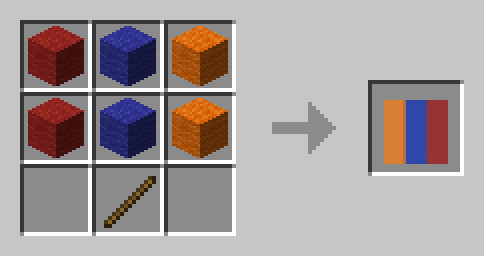
This Datapack adds more than 50 handy Recipes to quickly craft Flags of different Countries.
## 📃 List of All Recipes
Europe
### Armenia 🇦🇲
### Austria 🇦🇹
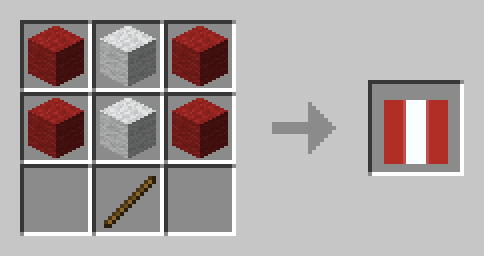
### Bulgaria 🇧🇬
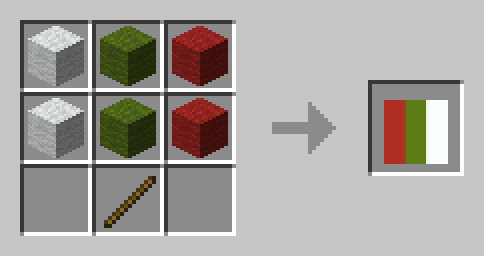
### Belarus 🇧🇾
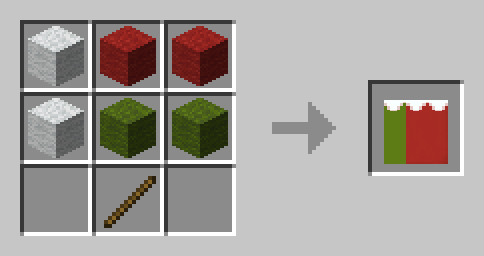
### Belgium 🇧🇪
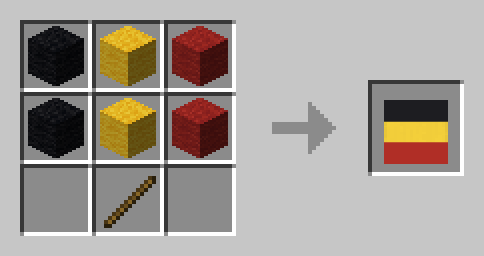
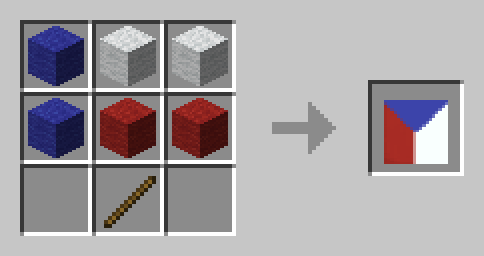
### Czechia 🇨🇿
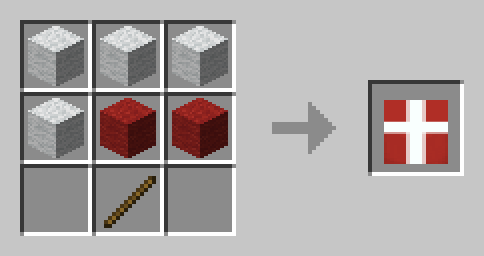
### Denmark 🇩🇰
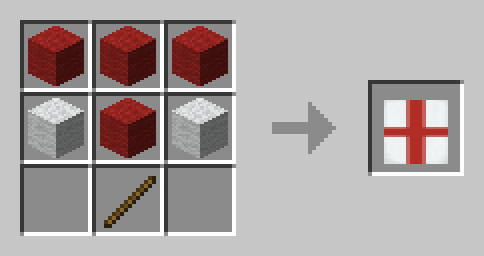
### England 🏴
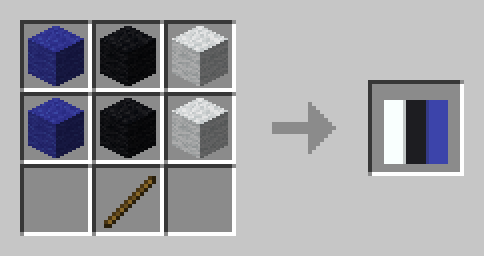
### Estonia 🇪🇪
### Finland 🇫🇮
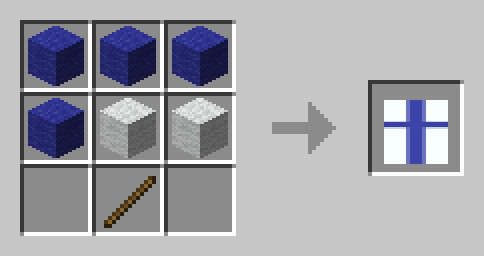
### France 🇫🇷
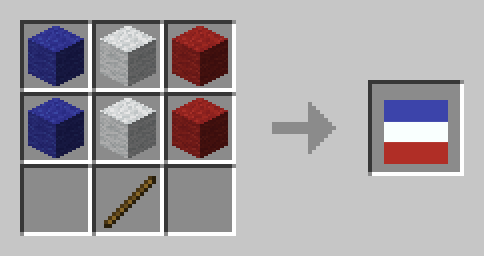
### Germany 🇩🇪
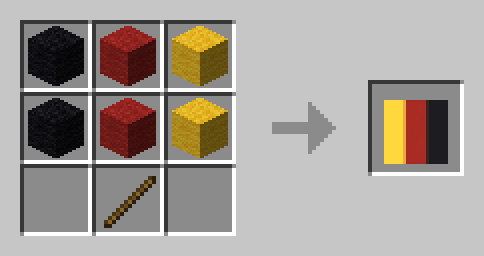
### Greece 🇬🇷
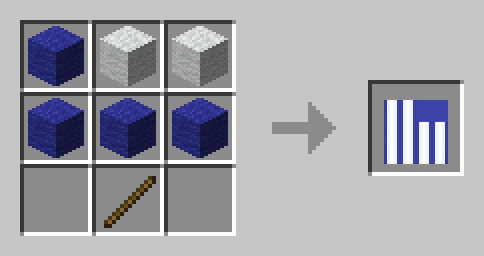
### Ireland 🇮🇪
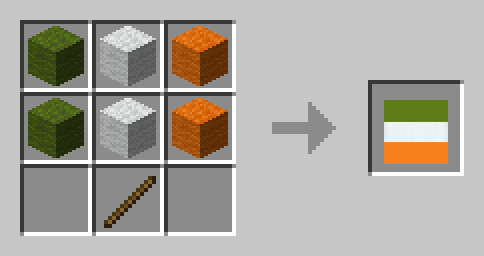
### Italy 🇮🇹
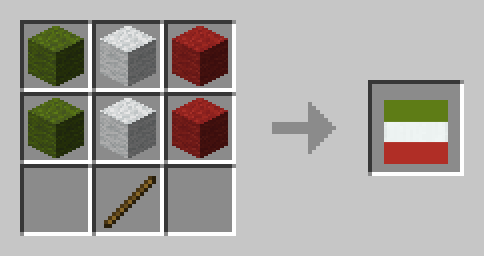
### Liechtenstein 🇱🇮
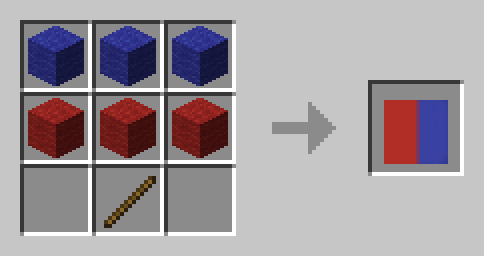
### Luxembourg 🇱🇺
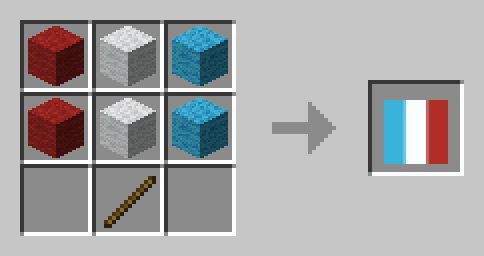
### North Macedonia 🇲🇰
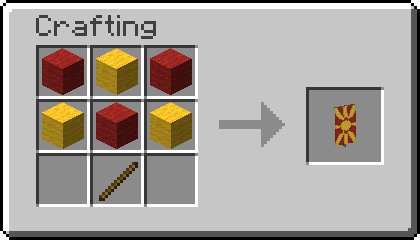
### Poland 🇵🇱
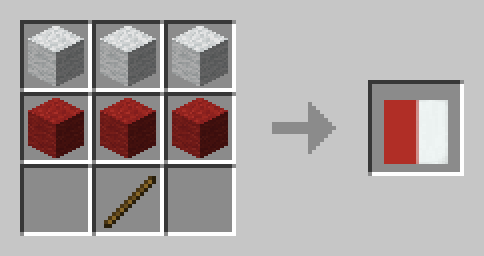
### Romania 🇷🇴
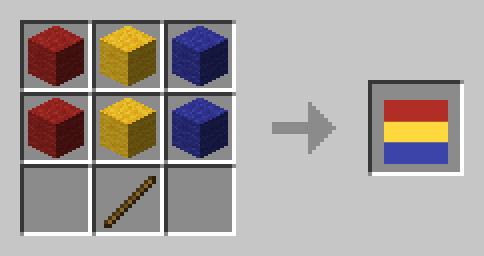
### Russia 🇷🇺
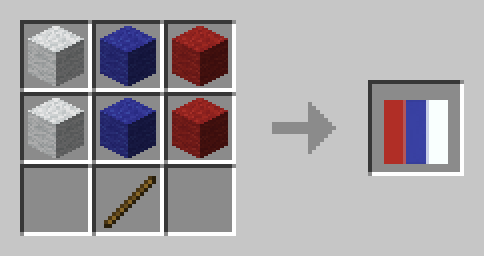
### Scotland 🏴
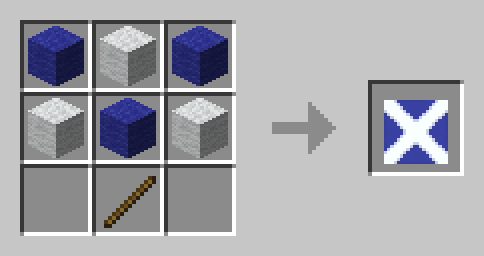
### Spain 🇪🇸
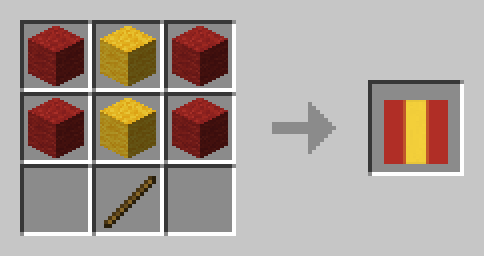
### Sweden 🇸🇪
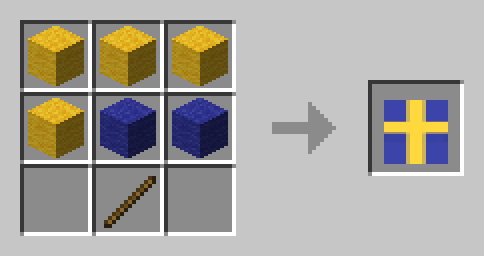
### Switzerland 🇨🇭
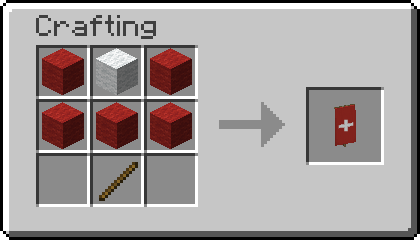
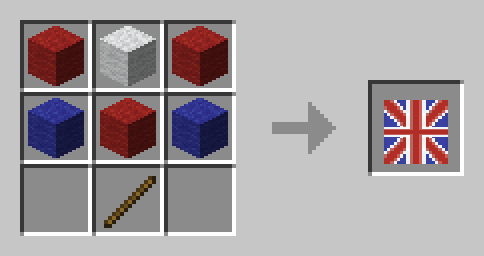
### United Kingdom 🇬🇧
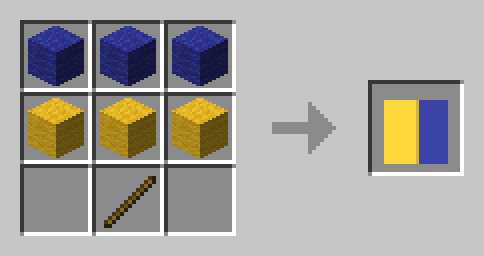
### Ukraine 🇺🇦
North America
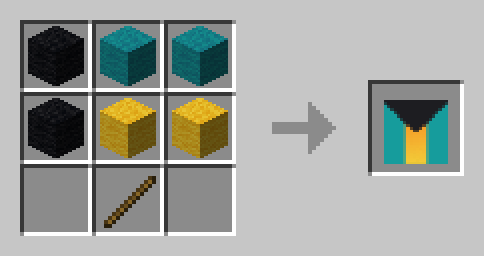
### Bahamas 🇧🇸
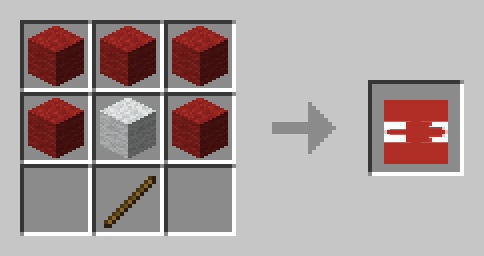
### Canada 🇨🇦
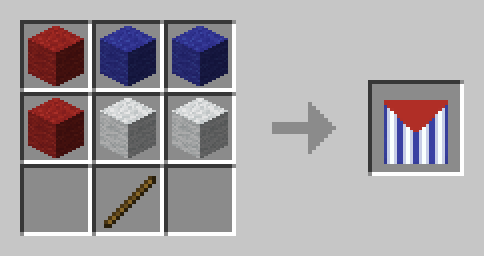
### Cuba 🇨🇺
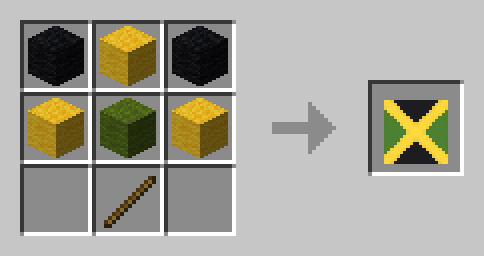
### Jamaica 🇯🇲
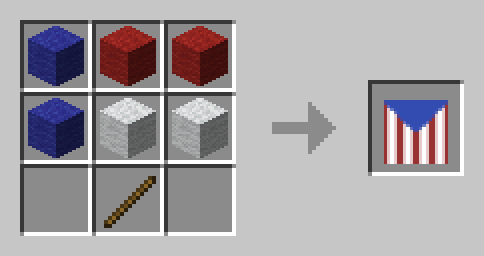
### Puerto Rico 🇵🇷
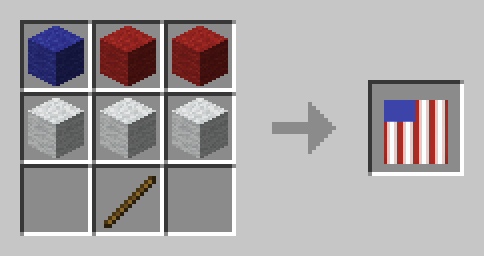
### United States 🇺🇸
South America
### Argentina 🇦🇷
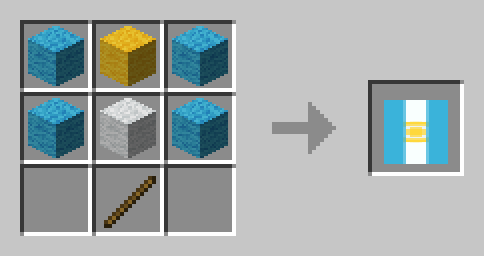
### Brazil 🇧🇷
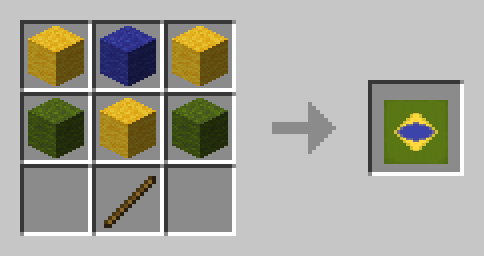
### Chile 🇨🇱
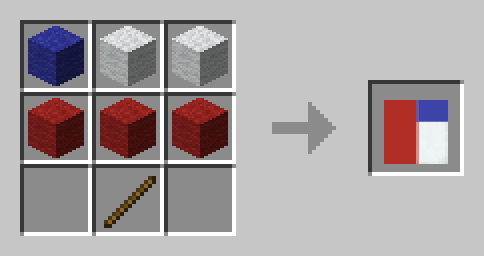
### Peru
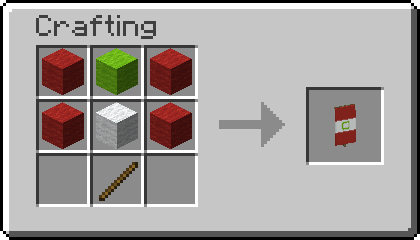
Asia
### Azerbaijan 🇦🇿
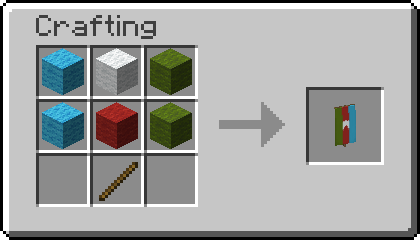
### Bangladesh 🇧🇩
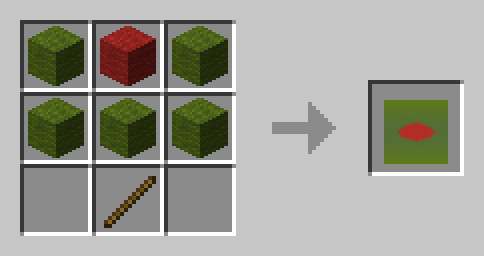
### Bahrain 🇧🇭
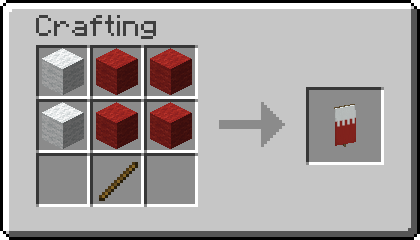
### Bhutan 🇧🇹
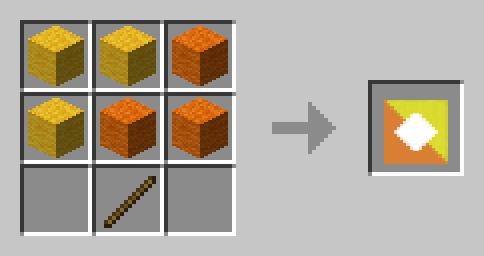
### India 🇮🇳
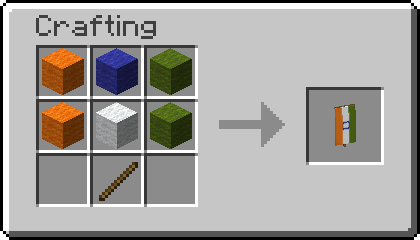
### Indonesia 🇮🇩
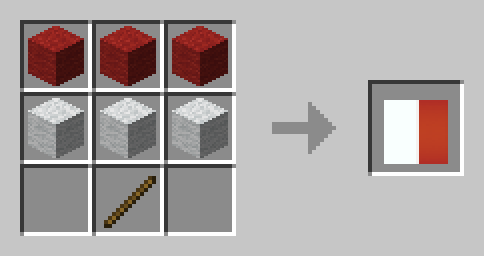
### Iran 🇮🇷
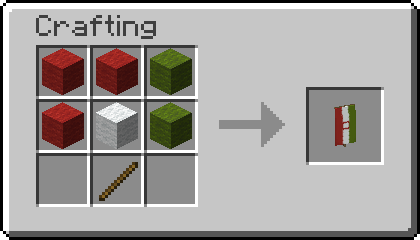
### Iraq 🇮🇶
It is currently mirrored even though not protocol, might be changed eventually.
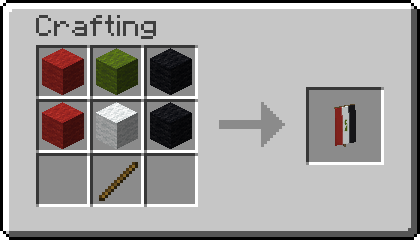
### Japan 🇯🇵
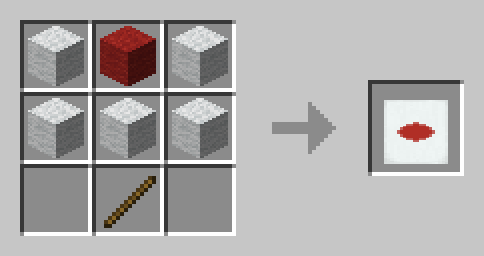
### Pakistan 🇵🇰
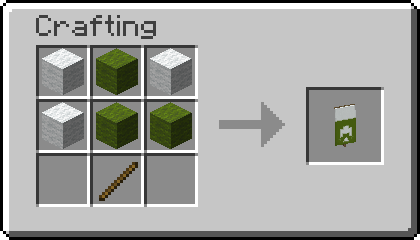
### Philippines 🇵🇭
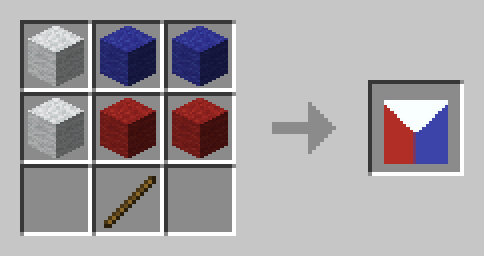
### Russia 🇷🇺

### Syria 🇸🇾
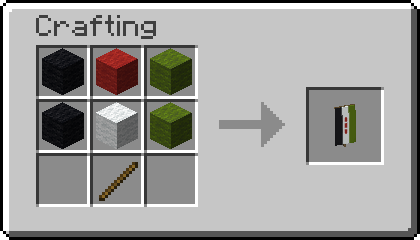
### Yemen 🇾🇪
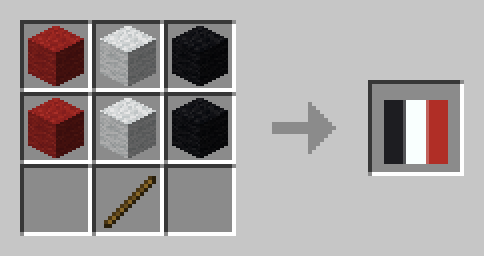
Africa
### Algeria 🇩🇿
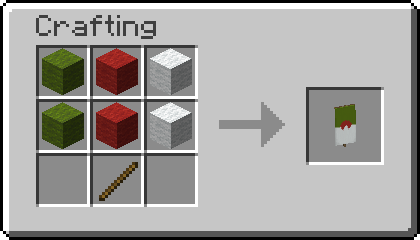
### Benin 🇧🇯
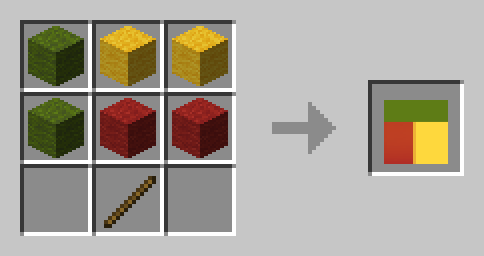
### Burundi 🇧🇮
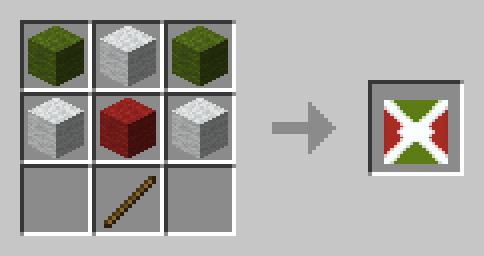
### Djibouti 🇩🇯
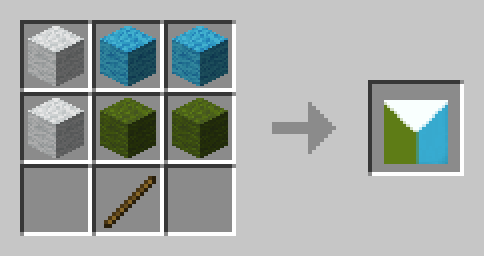
### Egypt 🇪🇬
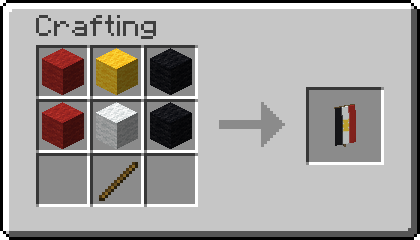
### Gabon 🇬🇦
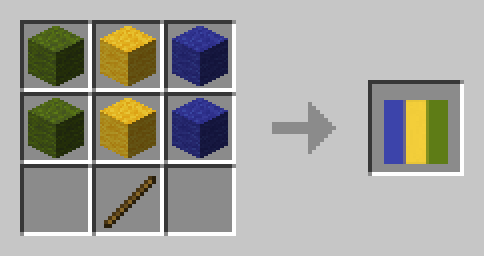
### Guinea-Bissau 🇬🇼
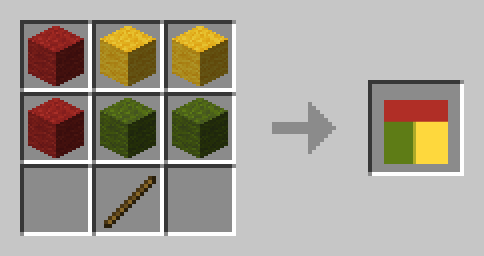
### Madagascar 🇲🇬
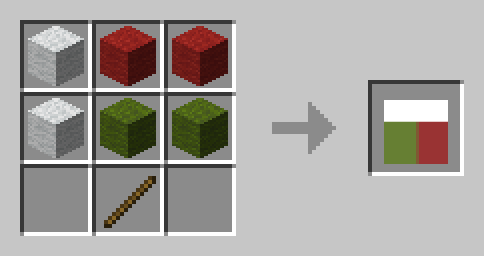
### Niger 🇳🇪
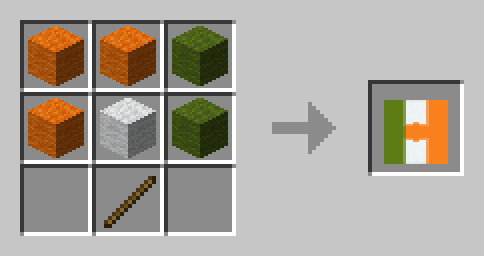
### Nigeria 🇳🇬
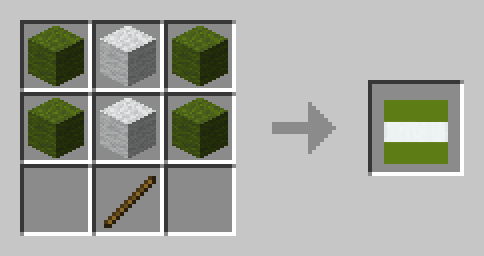
### Sierra Leone 🇸🇱
Oceania
### Palau 🇵🇼
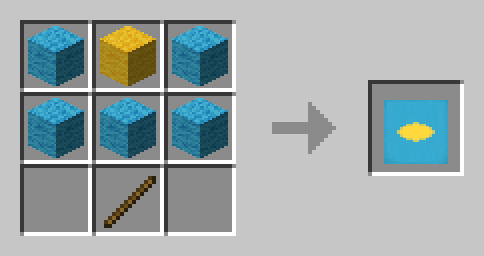
## 📗 How to add all Recipes to the Recipe Book?
### Without Commands
Craft the **World Flags Knowledge Book**. Right click it to consume it and gain all the recipes without a command.
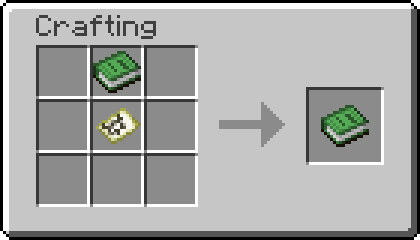
To craft Knowledge Books, you will need “[Craftable Knowledge Book](https://modrinth.com/datapack/craftable-knowledge-book)”.
### With Commands
You can add all recipes to the Recipe Book by using the command `/function world_flags:unlock_all_recipes`. If you want to give all players all Recipes, use `/execute as @a run function world_flags:unlock_all_recipes` instead.
## 🤝 Special Thanks & Attributions
Thanks to all the Members of Planet Minecraft who inspired many of the more complex Banner Designs!
## 🛠️ Installation
### Datapack Installation Guide
Copy the .zip archive into the “.minecraft/saves/__yourworldname__/datapacks” folder, where __yourworldname__ is the name of your world.
### Mod installation Guide
Copy the .jar archive into the folder your Mod Loader of choice provides.
## ❗Issues and Suggestions
Please report issues on [My Discord](https://discord.gg/R2G6EMW42H).
## 🔁 Optional Dependencies
– [Craftable Knowledge Book](https://modrinth.com/datapack/craftable-knowledge-book) (recommended)
World Editor






## 📖 Description
This datapack adds commands to make building way easier!
Explore the seamless functionality in both single-player and multiplayer modes.
## Commands
Operator permission is **required** to use this datapack/mod.
**V2.4.0+**
“`
/function we:tools/cut
/function we:tools/set {block:stone}
/function we:tools/outline {block:dirt}
/function we:tools/replace {old:dirt, new:stone}
/function we:tools/copy
/function we:tools/paste
/function we:tools/move
/function we:tools/rotate {degrees:90}
/function we:tools/undo
/function we:tools/redo
/function we:movement/up {amount:1}
/function we:movement/down {amount:1}
/function we:give/wand
/function we:give/brush
/function we:misc/outline
/function we:misc/deselect_area
/function we:misc/phasing
“`
## How to use:
Use “`/function we:give/wand“` to get the selector item.
When you have selected two positions named **#1** and **#2**, you can start using the tools.
Use “`/function we:give/brush“` to get the brush item.
Instructions are on the item description.
Use “`/function we:misc/outline“` to enable/disable the outline particles that appear when you select two positions.
Use “`/function we:misc/phasing“` to enable/disable the player being able to phase through blocks when flying.
## Copy-Paste info
You must have an area already copied to use the **paste** function.
Pasted areas will be pasted facing up and south-east. You can also use F3. Make sure that the X, Y, and Z axis lines are all facing away from you. The build is also facing that way.
World Edit Mini
You can run the command `/function editor:get_items` to get an “Open Editor” tool which, when used, will select the block you are looking at, and enter Selection Mode. (You will also get a “Teleport” tool; this is unrelated and just for utility.)
In Selection Mode (where any number of block positions can be selected), these tools are available:
1. Toggle (gold): Select the block position you are looking at, or de-select it if it is already selected.
2. Exit (wooden): De-select all selected blocks and exit the editor.
3. Convert to Cube (diamond): Find the smallest cuboid containing all selected positions. Select this cuboid (deselecting all positions), and switch to Cube Mode.
4. Set Blocks (stone): Set each selected block to the block you are currently looking at.
5. Move (iron): Move all selected positions by one block in the direction you are looking.
In Cube Mode (where a cube(oid) is selected), these tools are available:
1. Exit (wooden): De-select the cube and exit the editor.
2. Generate Structure Block (netherite): Create a structure block configured to contain the selected cube.
3. Fill (stone): Fill the cube with the block you are looking at.
4. Convert to Positions (diamond): Select one position at each corner of the selected cube. De-select the cube and switch to Selection Mode.
5. Move (iron): Move the cube _by its size_ in the direction you are looking. (For example, if the cube is 2 blocks high and you are looking up, it will move 2 blocks up. If you want to move by 1 block, convert to positions first.)
6. Copy (copper): Copy the selected region to the clipboard. You will get a new “clipboard item” representing the copied structure. Holding the clipboard item, you can right-click to paste, or left-click to discard. (Do not destroy the clipboard item through any other means, or you may experience bugs!)
Have fun! 🙂
A few notes:
– As the “fill cube” method is relatively inefficent due to command limitations, `/gamerule max_command_sequence_length` (by default set to 65536) determines (approximately) the maximum number of blocks that may be filled. You may wish to set this to a larger value (for example, `/gamerule max_command_sequence_length 16777216`).
– Similarily, `/gamerule max_block_modifications` (by default set to 32768) determines the number of blocks that may be copied or pasted. You can set this to a larger value (for example, `/gamerule max_block_modifications 2147483647`), however the server may slow down or crash if lots of blocks are being copied or pasted.
– If you find any bugs, let me know! (I’m on Discord!)
_(**Disclaimer**: I haven’t used WorldEdit and have no idea how it works, but I wasn’t really sure what else to name this datapack. I just made this because I wanted to be able to use /fill easier, and use copy-paste.)_
World Edit as a Datapack
# WORLD EDIT Datapack
As the Title suggests this is my attempt to re-create World Edit as a Datapack. It only has the basic function of selecting two points and filling the space between them with a certain block(the one held in offhand).
To initiate the datapack you need to rename a wooden axe to “WE”. This item will be needed to use the datapack. Then you should be able to select two corner blocks with left and then right click.
After this you need to place the item you want to fill the area with in your offhand.
Last you need to shift and right click the axe with the block in offhand to fill the selected area.
### Links:
[Youtube](https://www.youtube.com/@qn0ss)
[Planet Minecraft](https://www.planetminecraft.com/member/qnoss/)
Decay
A horror mod.
Random blocks will disappear… but only if you’re not looking at them.
In containers such as chests and barrels, items will be randomly shuffled around, large stacks will be split, and some items might disappear. Mobs can disappear at any time. Creepy sounds will be played occasionally. And more features to come.
Enjoy.
World Colors
ENG
To add to the server you need: 1.Download zip archive 2.Open the server folder /world/datapacks 3. Drop the downloaded zip archive into the open folder and restart the server or write `/reload` to the console, if you do not have a paper or spigot server core, then write `/reload confirm`
To start using it, just turn it on and it will configure itself, 3 scoreboards will be automatically created, 1 for each world and they will tune in themselves, if you want, for example, in the ordinary world, write `scoreboard modifity overworld` and write what you want to change
Changes the color of your nickname in the tab depending on the world. For example, if one of the players is in the general world, then the nickname in the tab will be green, if it is in the lower world, then red, and if in the end, then purple. This can be seen in the screenshot: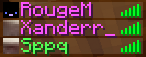
It shows that the first 2 people are in the end and the third in the ordinary world.
РУС
Что бы добавить на сервер нужно:
1.Скачать zip архив
2.Открыть папку сервера /world/datapacks
3.Перекиньте скачанный zip архив в открытую папку и перезапустите сервер или напишите в консоль `/reload` если у вас не ядро сервера paper или spigot то пишите `/reload confirm`
Что бы начать его использовать просто включите его и он сам настроится, автоматически создастся 3 таблицы счёта (scoreboard) по 1 на каждый мир и сами настроятся если вы хотите что бы например в обычном мире напишите `scoreboard modifity overworld` и пишите что вхотите изменить
Изменяет цвет вашего ника во вкладке в зависимости от мира. Например если кто-то из игроков будет в обычном мире то го никнейм в табе будет зелёным цветом , если будет в нижнем мире то красным а если в энде то пурпурным. Это видно на скриншоте:
На нём видно что первые 2 человека находятся в эндер мире а третий в обычном мире
World Color TAB
# WorldColor Teams
Overview
WorldColor Teams is a lightweight and vanilla-friendly datapack that automatically changes a player’s name color based on the dimension they are currently in. Perfect for RPG servers, SMPs, or just adding a touch of immersion to your world!
## Features
Automatic Synchronization: Your name color updates instantly as you pass through portals.
## Unique Colors for Each Dimension:
Overworld: Vibrant Green
The Nether: Fiery Red
The End: Mystical Purple
No Commands Needed: Once installed, everything works automatically in the background.
Vanilla System: Uses the native Minecraft /team system, ensuring compatibility with the Tab list and nameplates above heads.
# How it Works
The datapack creates three teams (overworld, nether, and end) and continuously checks the player’s location. As soon as you switch dimensions, the pack seamlessly moves you to the corresponding team.
## Installation
Download the datapack.
Place the .zip file (or folder) into your world’s datapacks folder.
Use /reload in-game or restart your server.
Enjoy your new dynamic identity!
World Balance
Minecraft is currently pretty poorly balanced, I made these changes to try improve it somewhat. There’s many more changes I want to make, but here’s an early version of the pack!
# Features:
## 💎Wandering Trader tweaks
– added trade to convert them to a villager
– will not spawn with trader llamas anymore
_Now killing him truly does not give you anything, and he is happy to convert to a villager for some cake!_
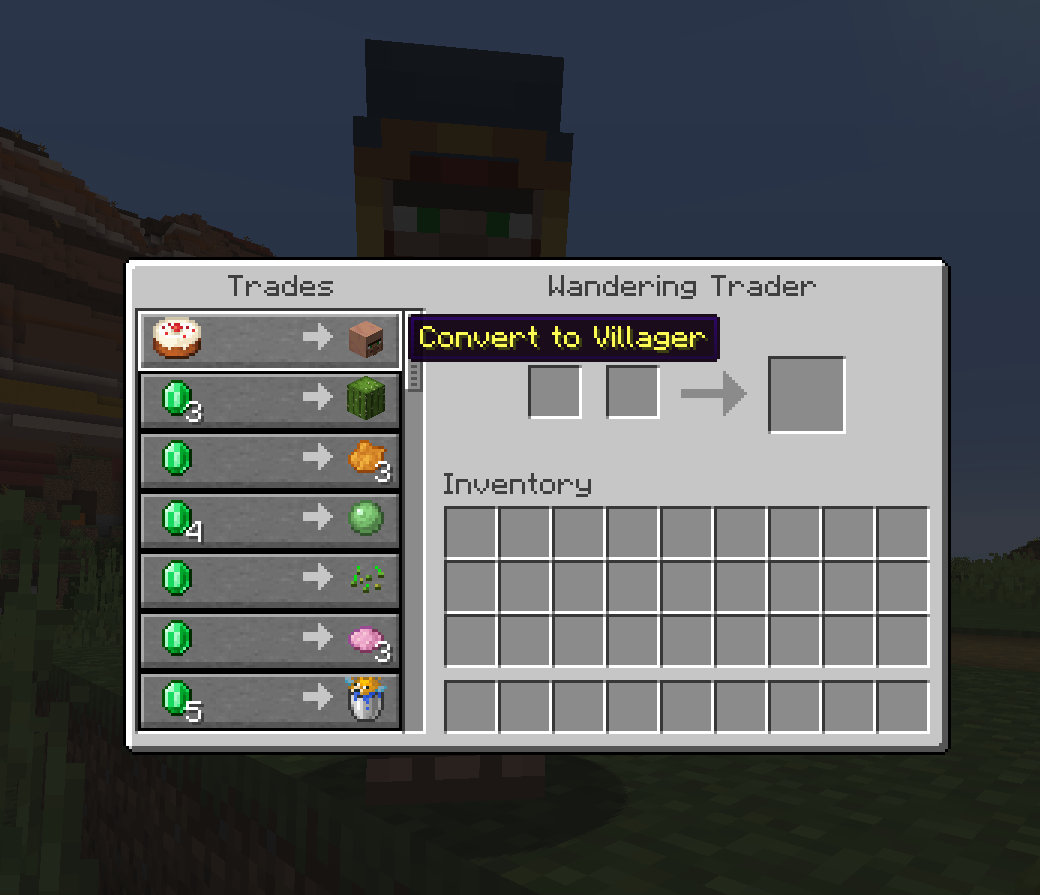
I suggest also using a datapack to change the Wandering Trader’s trades to be more useful.
## 🏘️Village tweaks
– all generated villages are abandoned, only spawning zombie villagers
– villages are way rarer, ~2k blocks between them
– removed hay bales, animals and crops from villages
– adjusted village chest loot, removing tools, armor, obsidian, diamonds, changing ingots to nuggets and reducing amounts of other items
_Villages give players way too much free stuff for being a peaceful structure. My solution is to make them abandoned, rarer and removing most of the loot. This way if you do find one its special and you have to use other ways to get villagers (curing or wandering trader)._
I also suggest using these two datapacks to balance villagers:
– [Villager Restock Balance](https://modrinth.com/datapack/villager-restock-balance)
– [Librarian’s Balance](https://modrinth.com/datapack/librarians-balance)
## 🐪Other tweaks
– camels will now spawn naturally in deserts
– cave spiders spawn in deserts at night instead of normal spiders (due to them being similar to scorpions)
– made ruined portals generate more rarely
– made rabbit jump height a bit higher so they dont get stuck on edges of blocks as often