XP Crystals
# XP Crystals
Ever wished you could bank your hardearned **XP** without the risk of dying and losing it all? With **XP Crystals**, you can **store** and **retrieve** your experience safely, using items that are fully compatible with **survival** gameplay.
_Available as **mod** or **datapack**._

## Features
– Store XP in craftable crystals
– Crystals come in multiple tiers, each with a different capacity:
– Tier I: 3 levels
– Tier II: 10 levels
– Tier III: 30 levels
– Tier IV: 50 levels
– Tier V: Infinite XP storage
– Survival oriented, with balanced crafting recipes.
– Multiple Advancements
– Easy to use: right click to deposit or withdraw XP
– Settings menu for both admins and normal players
– Serverside (resource pack required for clients)
### Settings
admins may use /trigger xp_crystals.globalsettings
players may use /trigger xp_crystals.settings
Player Settings
Sound Effects [Turns on or off soundeffects per player]
Global Settings
– Strict Mode: Enables accurate XP point calculation instead of using XP levels only (Enabled by default)
– Toggle global sound effects on or off.
– Hardcore Mode: Automatically awards an achievement that can only be obtained by dying.
– Uninstall Function: Removes all data left over from the datapack/mod~~~~.
### installation
**Mod Version:**
– Singleplayer: Add the mod into the mods folder. Done
– Multiplayer: Server requires mod, Clients only need resource pack
**Datapack Version:**
– Singleplayer: add datapack into the worlds datapack folder, add the resource pack to your resource pack folder.
– Multiplayer: Server requires datapack, Clients only need resource pack
## Need Help? Want to offer feedback?
join the [Discord](https://discord.gg/PjaKmhWEFT)
Xp Bottles
**Unlock the ability to safely store and share your hard-earned XP with the **XP Bottles Datapack**. Never lose your experience points upon death, and easily share XP with your friends by storing it in customizable XP containers!**
## Store Your XP
With this datapack, you can store your XP in special containers like capsules, vials, and canisters. No more worrying about losing all your progress when things go wrong—store your XP and keep it safe for later use or share it with your friends.
**How It Works:**
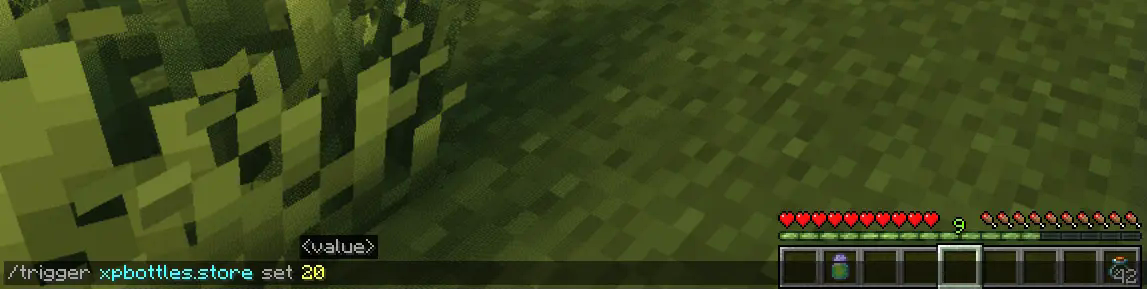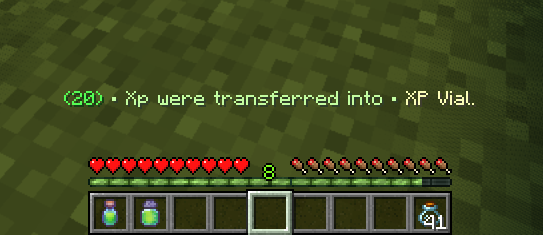
– To store your XP, simply use the command:
`/trigger xpbottles.store set `
– Make sure you have empty **Glass Bottles** in your inventory.
Depending on how much XP you’re storing, the number of glass bottles needed will vary:
– **1 Glass Bottle** for less than **40 XP**
– **2 Glass Bottles** for XP between **40** and **100 XP**
– **3 Glass Bottles** for **more than 100 XP**
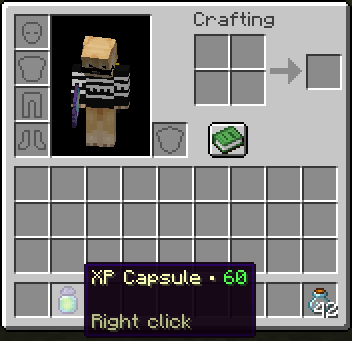
The XP will automatically be stored in the appropriate item (XP Capsule, XP Vial, or XP Canister) based on the amount.
## Retrieve Your XP
Getting your XP back is as easy as right-clicking with the XP item in your hand. Instantly reclaim the XP stored in the container and get back the glass bottles you used. No complicated commands—just a simple action to retrieve what you saved.
### Key Features:
– **XP Storage & Safety:** Protect your XP from being lost when you die by storing it in reusable containers.
– **Flexible Storage Options:** Store different amounts of XP in different-sized containers based on your needs.
– **Easy Sharing:** Share XP with other players by giving them the XP items you’ve stored.
– **Simple Commands & Actions:** No complicated setup—just easy-to-use commands and in-game mechanics.
Whether you’re stocking up for later use or looking for a way to share XP with your friends, the **XP Bottles Datapack** is a must-have addition to your Minecraft experience! Download now and take control of your XP like never before.
## Uninstalling
Ready to say goodbye to the Datapack? No problem! Simply follow these **simple steps**:
1. Access the Chat Window.
2. Enter the Uninstall Command and press Enter:
“`
/function xpbottles:uninstall
“`
3. You can now remove it safely from the Datapacks folder, every trace of the datapack has been removed.
### Additional Notes
– Compatible with all other datapacks, following the standard conventions.
– This datapack was coded using JMC
Xp Bottler
### XP Bottler
Turn your hard-earned experience levels into storable and reusable XP bottles!
## Key Features
– 🎯 Level-to-Bottle Conversion
Use /trigger store_xp set to convert a specific number of levels into an XP bottle.
**Example:** /trigger store_xp set 10 creates a bottle containing exactly 10 levels.
– 💥 Convert All Your XP at Once
Use /trigger Store_All_LVL to instantly convert all your XP into a single, high-capacity bottle.
Perfect for quick storage before dangerous adventures!
## 🔄 XP Recovery System
Consuming a bottle instantly restores the exact levels it contains, making XP transfer simple and precise.
## 🌍 100% Vanilla & Multiplayer-Friendly
– Works in pure vanilla Minecraft, no mods required.
– Fully compatible with multiplayer servers.
## 💡 Use Cases
– Safely store XP before risky battles
– Transport experience between bases or dimensions
– Share XP easily with other players
XP Boost Enchantment
# XP Boost Enchantment
[](https://discord.gg/5UdcDa5xNC)
[](https://modrinth.com/datapack/xp-boost-enchantment)
[](https://github.com/lullaby6/data-packs/blob/main/LICENSE)
## 📖 Description
New enchantment with three levels for get extra xp on using tools and weapons!
The enchantment can be obtained from the enchantment table, loot chests or trading with villagers.
## ⌨️ Commands
Give:
“`mcfunction
/loot give @s loot xp_boost_enchantment:xp_boost/
“`
Enchant:
“`mcfunction
/enchant @s xp_boost_enchantment:xp_boost
“`
## 🪪 License
[AGPL-3.0-or-later](https://github.com/lullaby6/data-packs/blob/main/LICENSE)
## 👾 Bugs/Issues
Please report any problem/bug/issues in the [Discord Server](https://discord.gg/5UdcDa5xNC).
## 💌 Donate
– [Donate on Ko-Fi](https://ko-fi.com/lullaby45743)
– [Donate on PayPal](https://www.paypal.com/paypalme/lucianobrumer)
## 🎁 Server Hosting
Creating your own server can be a very lengthy, tedious and costly process.
But with BisectHosting, you get your own server in just a couple of clicks! With their 24/7 support and fast-response time, no issues shall stand in your way!
Interested? Then we’ve got a deal for you!
https://bisecthosting.com/lullaby

XP-Book
# 📗 XP-Vault: The Professional XP Ledger
**XP-Vault** (v1.21.11) is a high-performance, survival-integrated utility designed to bridge the gap between risk and reward. By providing a balanced “Banking” system for your experience levels, it adds a layer of strategy to your survival world while protecting your time investment from accidental deaths.
—
## ✨ Primary Features
* 🔒 **Persistent Storage:** Stored levels are linked to the player via scoreboards, meaning they persist through death and even if the book is lost or destroyed.
* 📈 **Precision increments:** Full control with buttons for **1, 3, 10, or 30** levels.
* ⚡ **Bulk Operations:** Rapidly clear your XP bar or withdraw your entire bank with **[STORE ALL]** and **[TAKE ALL]** buttons.
* 🔊 **Dynamic Feedback:** Includes high-fidelity vanilla sound effects and color-coded chat messages to confirm every transaction.
* 🛠️ **Universal Access:** Designed with the `/trigger` system, allowing **Survival players without OP/Cheats** to use the interface seamlessly.
> 
—
## 🔨 Survival Crafting & Initialization
We believe in “Vanilla+” balance. The recipe is expensive enough to feel earned, requiring 8 Bottles o’ Enchanting.
**The Recipe Pattern:**
* **Outer Ring:** 8x Experience Bottles
* **Center:** 1x Regular Book
* **Output:** 1x Knowledge Book (Auto-converts to XP-Vault upon holding)
> 
—
## 💻 Technical Documentation (For Server Admins)
XP-Vault is built for stability and zero TPS impact. It avoids “Every-Tick” heavy NBT scanning, favoring a lightweight trigger-based architecture.
### 📊 Scoreboard Management
The pack uses the following internal objectives:
* `exp_stored`: The master objective. Stores the player’s banked level count.
* `exp_current`: A temporary calculation buffer for XP bar data.
* `exp_takeX` / `exp_storeX`: Individual trigger objectives.
### 🛠️ Admin Utility Commands
* **Check a Player’s Bank:** `/scoreboard players get exp_stored`
* **Manually Set a Balance:** `/scoreboard players set exp_stored 50`
* **Add/Reward Levels:** `/scoreboard players add exp_stored 10`
* **Spawn a Vault Book:** `/function exp_book:give_book`
### 🧪 Testing Procedures
To verify the pack is working correctly after installation:
1. Run `/reload` and look for the “[Book of Experience] Datapack loaded” message.
2. Grant yourself 30 levels: `/experience add @s 30 levels`.
3. Craft or give yourself the book and click **[STORE ALL]**.
4. Run `/scoreboard players get @s exp_stored`. If it returns **30**, the system is 100% operational.
—
## 📝 Changelog v1.0.0 (v1.21.11)
* **1.21.x Component Migration:** Fully updated to the new `written_book_content` and `item_component` syntax (1.20.5+).
* **Recursion Optimization:** Rewrote the `take_all_loop` to handle massive level counts (1000+) without causing server hanging.
* **Syntax Hardening:** Replaced deprecated `clickEvent` keys with modern `click_event` formatting for 1.21.11 compatibility.
* **Auto-Conversion:** Improved the knowledge book detection logic to be more responsive.
—
## ⚖️ License & Permissions
**License:** MIT License
* ✅ **You may:** Use this in modpacks, featured on servers, and modify the code for personal use.
* ❌ **You may not:** Re-upload this to other platforms (9Minecraft, etc.) or claim it as your own creation.
* 💎 **Credit:** Mentioning “Sentrax” or linking to this Modrinth page is appreciated but only required if you redistribute modified versions.
—
## 📥 How to Install
1. Download the `XP-Vault.zip`.
2. Open your Minecraft world folder -> `datapacks`.
3. Drop the `.zip` inside.
4. Join the world and type `/reload`.
—
**Author:** Sentrax
**Compatibility:** 1.20.5, 1.20.6, 1.21, 1.21.11
**Checkout my other datapacks from [OPSIBA007](https://modrinth.com/user/OPSIBA007)**
xokz’s Glowing Toggle
**To use, run `/trigger glowing` to toggle the glowing effect!**
This simple datapack allows players to toggle a permenant glowing effect for easy tracking in multiplayer.
This pack was created with compatibility and performance in mind. It is fully compatible with other sources of glowing. Toggling off glowing will not remove sources of glowing not from xokz’s glowing toggle.
Admin Commands
– To lock a players ability to toggle glowing, run `/execute as run function glowing:admin/lock_trigger`
– To unlock a players ability to toggle glowing, run `/execute as run function glowing:admin/unlock_trigger`
– To make a player glow, run `/execute as run function glowing:admin/make_glow`
– To make a player stop glowing, run `/execute as run function glowing:admin/stop_glow`
### Sponsor: Sparkedhost
Want a great server for a cheap price? Click the banner below, with code `xokz25` for a 25% discount!
[](https://billing.sparkedhost.com/aff.php?aff=3077)
xokz’s Particle Effects
A collection of novel visual effects for datapack creation.
### Lightning Effect
To make a bolt of lightning, execute the function `xze:effects/lightning/spawn` **at** the location the bolt should start, and **as** the entity the bolt should target. For example, the command block in the gif is running:
`execute positioned ~ ~ ~ as @p run function xze:effects/lightning/spawn`
– To change the lightning segment length and angles, you can change the ranges in the `generate_pitch_yaw_len.mcfunction` function.
– To change the chance of a branch being made, change the value in the `lightning_branch_chance.json` predicate.
This effect uses no entities and only @s selectors, resulting in great performance.
### Block Outline Effect
To do the block outline, simply run `function xze:effects/block_outline/spawn` at the block you want. It will automatically snap to the block grid, so don’t worry about positioning it perfectly!
X-Mountains

## X-Mountains
**”Extreme Mountains” datapack for Minecraft**
*This datapack removes the 256 height limit to the new mountains (and world) generation of the overworld.*
With 1.18 “Caves & Cliffs” update, mountains can go very high, in some cases above 250+ blocks!
If you love build very high towers on top of the mountains, and they are too high, there may be not enough space to build (the max build limit is 319).
To make things easier, avoiding terraforming before building, the actual world generation height is limited to 256 blocks, even if a mountain “wants go higher”.
This is a good solution, but, for a bunch of blocks, there is an evident side effect: mountains higher that 256 are cutted off (like with a katana!) generating a flat unnatural area.
This is even more noticeable in a mountain range, in which all mountains are cutted at the same height, resulting in this:

Anyway, even without this limit, mountains rarely go beyond 290+ height, and there is still enough space to build (maybe not that 50-blocks height tower…).
After removing the top limit you can see the real majesty of this beautiful new mountain generation!
You will find more higher mountains without that unnatural flat area on top! Only peaks!

## How to install
### Step 1
Download the datapack zip file for your Minecraft version.
### Step 2
Open Minecraft and click to create a new world.
### Step 3
Before start generating the world click the “Data Packs” button from the “More” tab: it will open a new window.
### Step 4
Drag and drop the downloaded zip file to that window, then activate the datapack by moving it on the right side.
(Make sure it is over the default datapack)
### Step 5
Click “Done”, create the world, and enjoy!
## License
Copyright (C) 2021-2023 devpelux (Salvatore Peluso)
Licensed under MIT license.
XK’s Lazy Crafting
Skipping multi-step crafting:
Such as [logs→planks→sticks→ladders] now [logs→ladders]
The number of crafting has been accurately calculated
跳过多步骤合成,一步到位,数量经过精确计算
Replace unstackable materials to stackable materials to Increaseing crafting speed
Such as dispenser and chest minecart
用可堆叠的原料代替不可堆叠的原料让合成速度更高
Xhaelan’s Turtles
# Xhaelan’s Turtles
You shall move turtles (referring to turtle graphics) around with the use of functions and playlists.
* Access all functionality through `/function xhaelan:turtles/…`
* Use playlists to automate path creation and run other commands
* Change blocks, positions and edit playlists mid-run
* Move turtles with:
* `xhaelan:turtles/controls/forward`
* `xhaelan:turtles/controls/backward`
* `xhaelan:turtles/controls/teleport`
## Accessing Functionality
* Turtles are accessible through the `/function` command, with the following categories (the last of which is for advanced users):
* `controls`
* `paint` – functions under here must be ran as `/function with storage xhaelan:turtles `
* `manage`
* `playlists`
* Each turtle is fully independent and identified by its ID. Create a turtle with `/function xhaelan:turtles/manage/create {id: }`. Note that these IDs are not namespaced (e.g. use `my_turtle` instead of `mypack:my_turtle`).
## Using Playlists
* Playlists store commands in a list per turtle.
They can be run with `/function xhaelan:turtles/playlists/play {id: }`. They can be loaded with many `movement` and `command`s as well as `jumping` and `resetting` the turtle’s position. Commands may be removed if desired.
* Here are all of the playlist functions (mode refers to the method for inserting the command into the playlist):
* `/function xhaelan:turtles/playlists/add_command {command: ‘‘, mode: [append|prepend], id: }`
* `/function xhaelan:turtles/playlists/add_movement {direction: [forward|backward], mode: [append|prepend], id: }`
* `/function xhaelan:turtles/playlists/add_teleport {x: , y: , z: , mode: [append|prepend], id: }`
* `/function xhaelan:turtles/playlists/end {report_completion: [1b|0b], id: }`
* `/function xhaelan:turtles/playlists/play {id: }`
* `/function xhaelan:turtles/playlists/remove_command {index: , id: }`
## Changing Blocks and Positions
* Blocks can be changed with `/function xhaelan:turtles/manage/set_block {id: , block: ““}`
* Turtle positions can be changed with `/function xhaelan:turtles/manage/set_xyz {x: , y: , z: , id: }`. For painting, this represents the first vertex of the `cuboid`.
* Second-selection positions can be changed with `/function xhaelan:turtles/manage/set_next_xyz {x: , y: , z: , id: }`. As expected, this is the other vertex of the `cuboid`.
## Moving Turtles
* This is the most important but least noticeable part of turtles. Use either of these functions to move the turtle backward or forward in the specified axis:
* `/function xhaelan:turtles/controls/forward {axis: , id: }`
* `/function xhaelan:turtles/controls/backward {axis: , id: }`
* `/function xhaelan:turtles/controls/teleport {x: , y: , z: , id: }`
* The `teleport` function does not draw anything, even when `pen_down` is set to `1b`.
## Turtle Management
* Other than creating turtles, there are a few other functions that can modify turtles:
* `/function xhaelan:turtles/manage/remove {id: }` – removes the turtle scoreboards and storage data
* `/function xhaelan:turtles/manage/reset {id: }` – completely refreshes all data and scoreboards of the turtle while keeping the ID
* `/function xhaelan:turtles/manage/set_block {block: ““, id: }` – does not set a block at the turtles position like the `/setblock` command. Instead, it changes the block it is currently using
* [`set_xyz` and `set_next_xyz` from earlier]
## Videos
* For version 1.0: https://youtu.be/aFknzl9HlTU
## Optimisations!
* Unlike some turtle implementations, this pack does not use entities
* It avoids tick-based functions entirely
* These optimisations make the pack suitable for large-scale turtle projects, which is the purpose of this data pack.