XP Level = World Border
## Description
This datapack makes the world border grow with your experience level, resulting in a unique and challenging experience.
You can configure how large the border will be at the start and how much it grows with gained levels. When used in multiplayer, the experience of all online players gets added up.
## Configuration
### Menu
Use “`/trigger levelborder“` to open the configuration menu.
### Start Size
To configure how large the border should be at the start, use “`/trigger borderStartSize set “` (replace value with the size is blocks).
### Multiplier
Change how much the border will grow for each level gained, by using “`/trigger borderMultiplier set “` (replace value with the growth in blocks/level).
Xmas meowl Totem of Undying
– ENG: **Meowl** (in Russian, “Myaowl” or “Myaul”) is a creature with a cat’s head and an owl’s body, sitting on a branch. Initially, it was a fun photoshop creation.
The first images of the cat owl appeared in 2013 on the Chinese platform Weibo. However, it gained popularity only in October 2025 on TikTok
– RU: **Meowl** (в рунете — «Мяовл» или «Мяул») — существо с кошачьей головой и телом совы, сидящее на ветке. Изначально — это весёлое творение фотошопа.
Первые изображения с котосовой появились в 2013 году на китайской платформе Weibo. Но популярность они обрели только в октябре 2025 года в TikTok
[Meowl Totem](https://modrinth.com/resourcepack/meowl-totem-of-undying/versions)
[ALL RESOURCEPACKS COLLECTION: MEMES + STREAMERS](https://modrinth.com/collection/sfDcDGAi)
XGamemode

### “*You’re not switching modes, you’re switching dimensions.*”
~~*2000 Downloads?! Thanks!*~~
# 1 Feature
## 1.1 Offline Player
You can change the gamemode of a player, **even he (or she) was offline**.
## 1.2 Permissions
Allow permission group plugins (_like Luckperms_) to manage **which gamemodes can be switched to** and **which gamemodes cannot be switched to**.
_e.g. Allow to switch to survival mode but not to any other mode._
## 1.3 Alias
**/gamemode** is simplified to **/gm** and **/g**.
_(of course you can still use /gamemode)_
## 1.4 Cross-Server Storage
Support **MySQL** and **SQLite** storage backends. Player gamemodes are saved and synchronized across multiple servers in a network.
## 1.5 Folia Support
**Fully compatible with Folia servers** — using region-based scheduling for optimal performance.
## 1.6 Lightweight
The Plugin size is only **~25 KB** and has **almost no impact** on server performance!
# 2 Caution
## 2.1 Shortcut Keys
If you need to use shortcut keys such as **F3+F4**, please install another plugin **F3NPerm**.
## 2.2 Versions
**1.8.X +**
**All Bukkit based server** (Paper, Spigot, Purpur, Folia, etc.)
# 3 Commands
“`markdown
– /xgamemode
– /xgamemode reload
– /gm
– /gm
– /gm -all
– /gm -online
– /gm -offline
/g = /gm = /gamemode
/xg = /xgm = /xgamemode
“`
# 4 Permission Node
“`markdown
– xgamemode.survival
– xgamemode.creative
– xgamemode.adventure
– xgamemode.spectator
– xgamemode.others.survival
– xgamemode.others.creative
– xgamemode.others.adventure
– xgamemode.others.spectator
– xgamemode.reload
– xgamemode.admin
“`
# 5 Custom Config
## 5.1 Basic Settings
“`yaml
lang: en-US
“`
**Language** setting
“`yaml
default_gamemode: survival
“`
If a **new player joined your server**, **which gamemode should he (she) be**?
**survival**, **creative**, **adventure**, **spectator**
“`yaml
show_logo: true
“`
Show logo or not when plugin enabled.
**true**, **false**
“`yaml
debug: false
“`
Enable debug logging for troubleshooting.
**true**, **false**
## 5.2 Storage Configuration
“`yaml
storage:
type: yaml
“`
**Storage backend type**: **yaml**, **sqlite**, **mysql**
### SQLite Example
“`yaml
storage:
type: sqlite
# No additional config needed — data.db will be created automatically
“`
### MySQL Example
“`yaml
storage:
type: mysql
mysql:
host: localhost
port: 3306
database: minecraft
username: root
password: your_password
“`
## 5.3 Custom Messages
“`yaml
messages:
en-US: # Original en-US Language by Wind_Blood
reloaded: “&aXGamemode Reloaded!”
# ……
custom_lang: # Add Your Custom Language!
reloaded: “Thank you for using XGamemode!”
# ……
“`
**Customizable Messages**. You can add **your own new language** here!
## 5.4 An Example config.yml
“`yaml
lang: msgForMyServer
default_gamemode: survival
show_logo: false
debug: false
storage:
type: yaml
messages:
msgForMyServer:
reloaded: “很明显作者是中国人 会说中文很正常 然后我也不知道为什么我要在一堆英文里写一段中文 挺好笑的 哈哈哈 对了 看到我就是缘分 XGamemode 官方 QQ 反馈交流群:点击链接加入群聊【XGamemode 反馈群】:https://qm.qq.com/q/rpTk5LK7w4 欢迎加”
usage: “&cUsage: /gm [player/-all/-online/-offline]”
console_usage: “&cUsage: /gm ”
invalid_gamemode: “&cInvalid Gamemode!”
invalid_player: “&cInvalid Player!”
gamemode_self: “&aYour Gamemode Changed to {mode}!”
gamemode_all: “&aChanged All Player’s Gamemode to {mode}!”
gamemode_online: “&aAll Online Player’s Gamemode Changed to {mode}!”
gamemode_offline: “&aAll Offline Player’s Gamemode Changed to {mode}!”
no_permission: “&cYOU ARE NOT ALLOWED TO DO THAT!”
gamemode_other: “&a{player}’s Gamemode Changed to {mode}!”
gamemode_other_offline: “&a{player} (Offline)’s Gamemode Changed to {mode}!”
“`
# 6 Developer API (Async)
## Get Instance
“`java
Main plugin = Main.getInstance();
“`
## Get Player Gamemode
“`java
plugin.getPlayerMode(playerUUID).thenAccept(mode -> {
if (mode != null) {
// mode is GameMode.SURVIVAL, CREATIVE, ADVENTURE, or SPECTATOR
// Player is online or has saved data
} else {
// Player not found or no saved gamemode yet
}
});
“`
## Set Player Gamemode
“`java
plugin.setPlayerMode(playerUUID, GameMode.SURVIVAL).thenAccept(success -> {
if (success) {
// Gamemode changed and saved successfully
// Works for both online and offline players
} else {
// Failed to save (database error, etc.)
}
});
“`
## Listen to Gamemode Changes
“`java
@EventHandler
public void onGamemodeChange(GamemodeChangeEvent event) {
Player player = event.getPlayer(); // Online player only
GameMode oldMode = event.getOldMode();
GameMode newMode = event.getNewMode();
}
“`
> **Note:** All APIs are **fully async** and thread-safe. The `GamemodeChangeEvent` is only fired for **online players** when their mode is actually changed. The `getPlayerMode()` method returns `null` if the player has no saved gamemode data.
# 7 Reprint Post
www.minebbs.com/resources/xgamemode.11041
hangar.papermc.io/Wind_Blood/XGamemode
modrinth.com/plugin/xgamemode
# 8 Feedback
Just e-mail me with **[email protected]**. Thanks!
Xatrix’s Unfair Nether
In reality, water evaporating in the Nether would mean the temperature of this infernal dimension would be high enough to burn anything inside, so with that small idea I decided to add that into the game, alongside a few other small features.
This was mostly made as a fun experiment and for a video to run on my YouTube channel, so I hope you get at least a little fun out of it as well!
The whole aim of this mod is to add a whole slew of new challenges to Minecraft’s Nether and it’s progression, whilst adding a few new smaller extensions to said progression.
TRAILER
SHOWCASE
**A list of a few features:**
– Nether’s Flames: Players actually need to prepare before venturing into the Nether, lest they be charred by the Nether’s Flames, find Fireshrooms near bedrock level to make Fireshroom stew for restistance against this .
– New Mob: The “Servant” is a semi-uncommonly spawning mob in the Nether Wastes, which can deal immense damage and knockback, meaning the player can’t just run into the Nether without the proper gear.
– Trap plants: Plants such as Mycorrhiza roots and sprouts hide amongst crimson and warped nylium, spiking up and shredding any unknowing players, alongside the Poison Glass Fungus which poisons whoever breaks it, which would be easily avoidable if they didn’t shatter on touch.
– And more to come later!**
This mod requires “Geckolib” and “Kotlin for Forge” to work!
xah0b Twitch Totem
– **Xah0b** (XAHOB) is a famous twitch streamer on Twitch/Kick Platforms playing Minecraft and just chatting. Use this and you get totem of undying with xah0b and unqie sound when you die in game
– **Xah0b** (XAHOB) известный стример на платформах Twitch/Kick, играющий в Minecraft и просто общающийся в чате. Используйте его, и вы получите тотем бессмертия с Xah0b и уникальный звук при смерти в игре.
[Check collection with all memes + streamers Totems ](https://modrinth.com/collection/sfDcDGAi)
X Ray (no cheats)
## X Ray
Mod/Datapack that removes stone and other blocks to keep ores visible. Also works in the nether.
X-Ray is a powerful mod that radically changes the way you explore the world of Minecraft. It allows you to see through ordinary blocks, highlighting valuable resources, structures, and objects.
To use it, you need to take a filled map in any hand.

## Usage
The mod is activated automatically and requires no additional settings. However, if you want to temporarily disable the mod, use the command “`/trigger bizcub.x_ray.t“`. Information about the mod’s current status will then appear in the chat.
## Dependencies
– Fabric loader requires [Fabric API](https://modrinth.com/mod/fabric-api)
X-Ray World Generation
# X-Ray World Datapack
Have you ever used an X-Ray Resource Pack? Have you wondered “Man, I wonder what it would be like if the entire world was *actually* like this.”
…What do you mean no?
Well, I made a Datapack that does that anyways. The world looks completely normal except for the fact that most of it is missing… Only ores and the shell of structures are left in the world… You’ll most likely spawn on a coal ore vein at y=0 in the middle of no where, stuck floating above the void. But hey! At least Diamonds are easy to find, right?
## This is not an x-ray mod / How to use:
1. This is NOT an X-Ray Mod / Resource Pack. This is a World Generation datapack. It overrides the default world generation to remove terrain.
2. To use, install the datapack / mod and create a new world.
– If you are having issues with this, it may be because some issue with porting the datapack as a mod. File a bug report either on my discord or the github page. Include info like mods used, mod loader used, error, version used, etc.
3. Custom world options are not supported (superflat, amplified, etc. I may add support in the future).
4. This is incompatible with biome mods, and might be incompatible with some terrain mods.
## Sponsor: Sparked Host
[](https://billing.sparkedhost.com/aff.php?aff=2956)
## Check out this pack as well!
[Terrainless World Generation!](https://modrinth.com/datapack/terrainless-worlds)
**Shout out to [Apollo](https://modrinth.com/user/Apollo) for discovering the technique to make this datapack possible!**
Xray (Spectator)
If you want to suggest anything, report a bug, or vote on future packs, then [join my discord](https://discord.gg/gymTft2GbV)
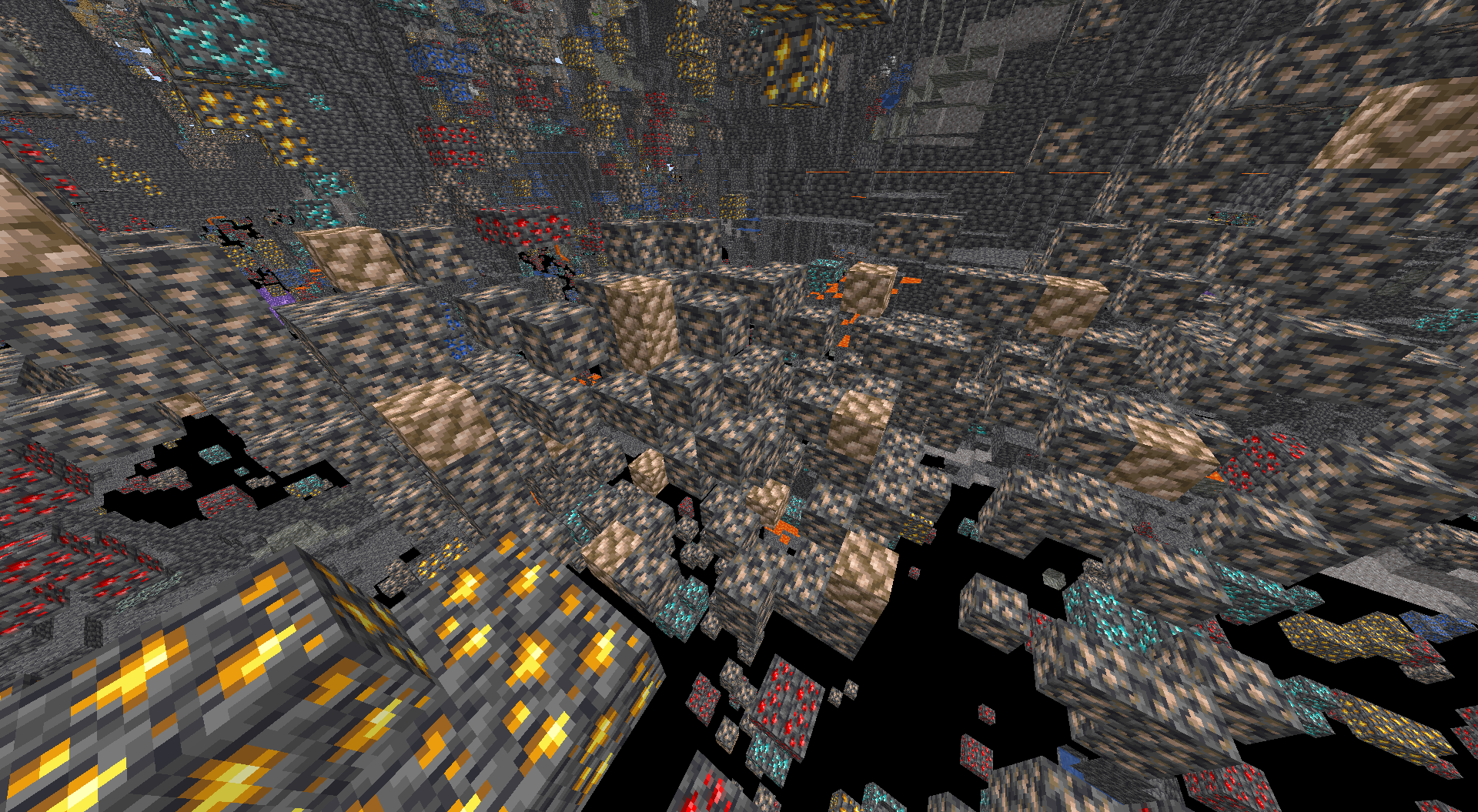
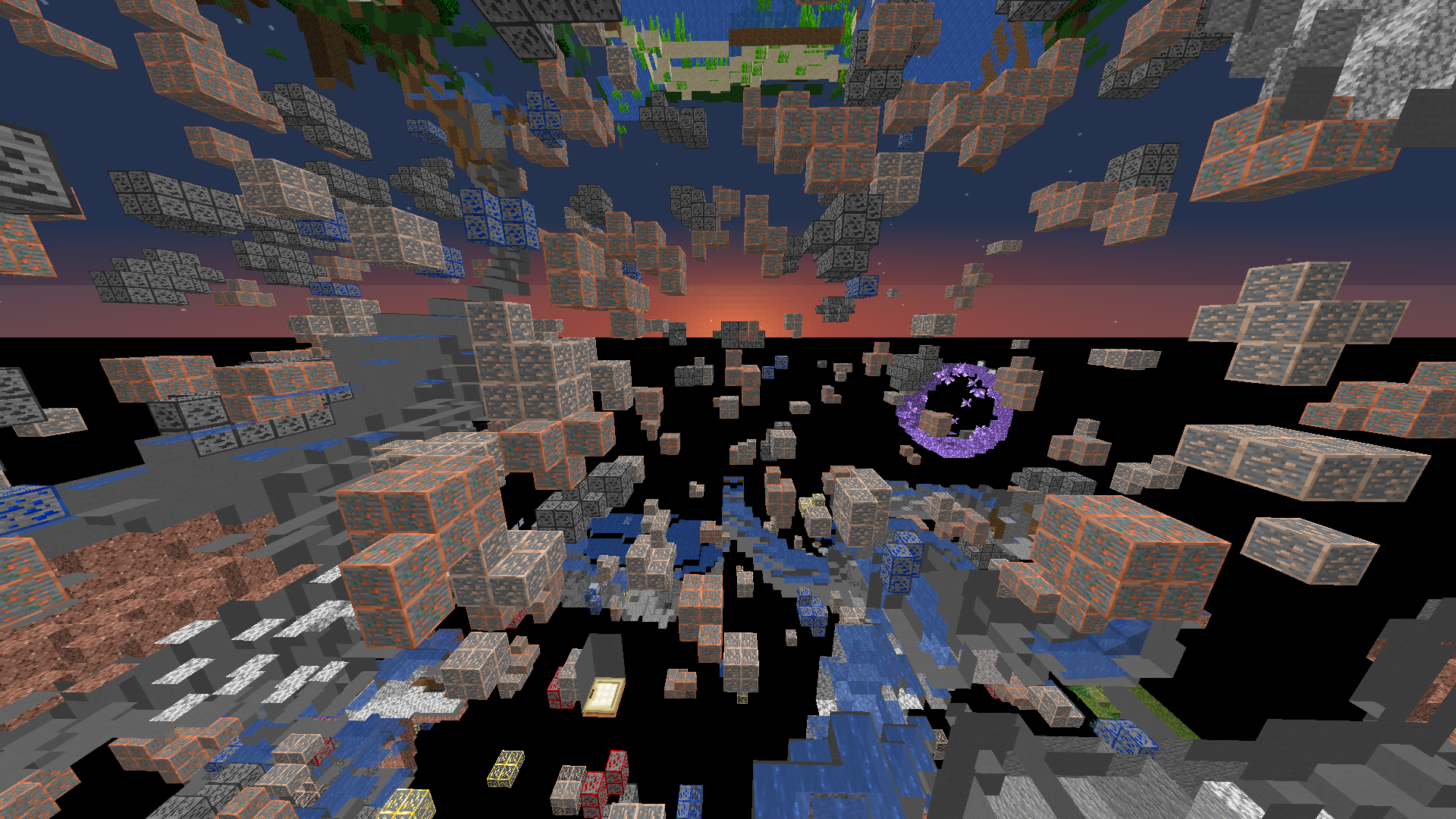
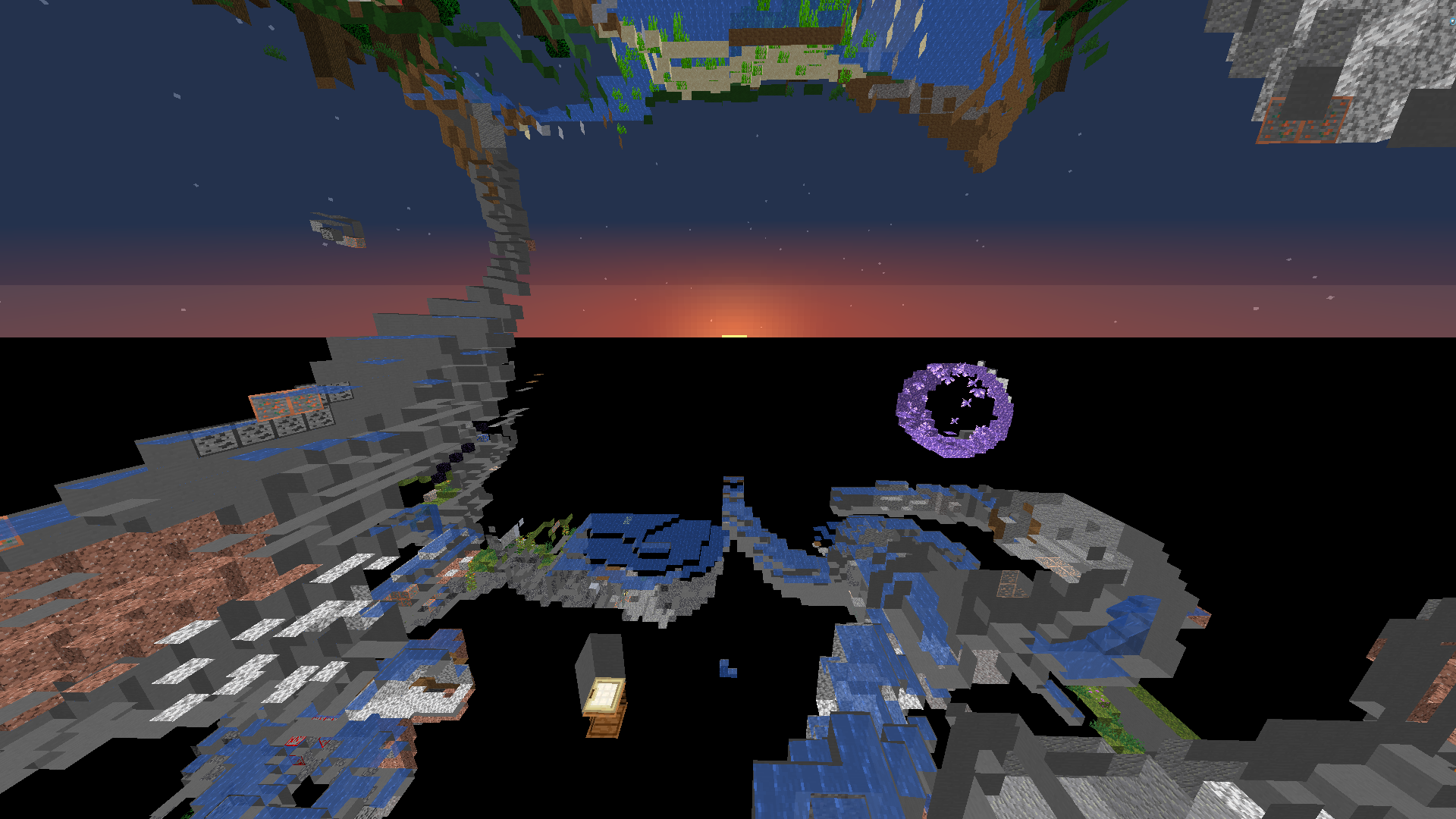
Hello there! Have you ever wanted to see ores when you’re in spectator mode? Well now you can! With this texture pack, you can see ores after you died in a game or just if you’re a spectator.
This isn’t a cheat, it doesn’t give any unfair advantage. Rather, it’s more of a thing to help you find cheaters on your server or have a better experience spectating in gamemodes like UHC. Specator mode gives you the ability to see caves through walls, I don’t see why you shouldn’t be allowed to see ores too!
### Pack Enabled:
### Pack Disabled:
Issues
Hey, if you find an issue or want to suggest something, please contact me with my discord. I will usually respond fairly quickly if you need help
Discord: AlphaLeoli#6338 Discord Server!
YouTube: AlphaLeoli
https://www.alphaleo.li/resourcepacks
X-Hearts
# X-Hearts
Start on one heart, gain a heart every time you die. If you die at 10 hearts you are permanently dead.
Use `/scoreboard players set @s deaths 0` to reset back to 1 heart
Inspired by the X-Life series

## FAQ
**Does this work on a server?**
Yes. Go into your servers folders and go to `world -> datapacks` and put the datapack there. This datapack works multiplayer so play with however many people you would like!
**Is there anyway to change the max amount of hearts?**
Here are all the settings you can change:
– `/function xlife:settings/toggle_hardcore` for toggling whether to go into spectator after running out of hearts or not. By default it is on hardcore mode
– `/function xlife:settings/max_hearts/increase` to increase the max amount of hearts. Default is 10
– `/function xlife:settings/max_hearts/decrease` to decrease the max amount of hearts
## Support us!
Join my Minecraft server **Zonerush.minekeep.gg** for a unique PvP gamemode!
—
**Try my other datapacks! Here are some that you might like.**
[](https://modrinth.com/project/uUdrS8s7) [](https://modrinth.com/project/aik3GVdo)
—
**Join the discord to get updates, support me, and report issues**
[](https://discord.gg/C2WymfUqJx)
## Milestones
– 100 downloads – Dec. 8th | 2025
– 300 downloads – Jan. 13th | 2026
– 1,000 downloads – ???
X-Enchantment
# X-Enchantment
Add some enchantments. I’m a noob, so it’s appeared when i want to be “stronger”…Especially in modpack.
Fabric config – mod menu mod
Forge config – press key “Z”
More info you can use info mod like “EnchantmentDesc” or other…
—
Normal[Gold/White/Red]: Like other enchantment
Halo[Gold/White]: Correct part in slot, works on collect a set
Special[Purple]: Mostly only for enchanted books
—
### Figthing:
#### Night Break
#### More Loot
#### Rebirth
#### Magic Immune
…
### Other:
#### Broken Dawn
#### Auto Fishing
#### Climber
#### Blessing
#### Curse Killer
…
### Curse:
#### Regicide
#### Thin
#### Insanity
#### Decayed Blade/Armor
All config on menu when you want to tweak something. If it not exists…maybe you can tell me.