Waxed Lightly Weathered Cut Copper Stairs Origin
**MUST USE WITH ORIGINS MOD AND FABRIC API**
This mod is a addon for Origins mod.
The mod adds a Origin based on Waxed Lightly Weathered Cut Copper Stairs 🙂
Here is all of the abilities:
– Heavy Body:
Consuming too much copper ingots makes your body heavier and causes you to fall much faster but having close to zero copper charges makes your body lighter. (Having more than 7 copper charges makes you fall faster. Having less than 3 copper charges makes you fall slower. Does not prevent fall damage or increase it.)
– Corrosion:
Touching water is a death scenario for you.
– Copper Skin:
Your copper-like skin makes you more durable and stronger. Any arrow that touches your tough skin will bounce off. (+4 armor points, +2 armor toughness and ability to deflect normal arrows but not spectral.)
– Zap:
Shoot a electric ray to zap your enemies with lightning! But if you miss you will take damage instead.
Keybind: Primary
– Oxidation:
Over time, you will slowly oxidize, causing you to become weaker overall. However, low levels of oxidation can also have positive effects. You can consume an iron zxe or honeycombs to lower your oxidation level (honeycombs have a greater effect than an iron axe).
– Pray:
Pray to the Waxed Lightly Weathered Cut Copper Stairs gods in order to get random effects… Or trigger random calamities.
Keybind: Save Hotbar Activator
– Lightning Rod:
If you are exposed to rain, the lightning will strike you continuously until you are not exposed to the rain anymore.
– Staircase to heaven:
With the power of gods… you are able to summon a staircase to heaven? (Replace the block benath you with Waxed Lightly Weathered Cut Copper Stairs every second.)
Keybind: Load Hotbar Activator
– Copper Vomit:
Tired of carrying too much copper in your stomach? Well, say no more! Use this ability to vomit most of your Copper Charges and deal damage to enemies! Just remember to aim at a entity for the attack to work otherwise you will just waste your copper charges.
Keybind: Secondary
– Copper Charge:
Eat copper ingots to gain copper charges! Copper Charges are used to use other abilities and some powers. If an ability has a golden star next to it that means it uses Copper Charges, hover your mouse on to the golden star to see how much Copper Charges it uses.
– Reduced Mobility: Your copper body prevents you from swimming and gliding.
– Copper vision: Your eyes are like night vision goggles, but better, giving you the ability to see entities through walls.
Keybind: Slot 9
Wavy World
this is a wacky very customizeable shader that allows you to make a ton of diffrent waves it is insanely reccomended to open up the settings and play around in there
SETTINGS:
There are 3 subcategories Out X,Out Y and Out Z each one is a direction and each one decides where will the block move there are 8 Options in each one:
Enabled: Enable/Disable this subcategorie
Speed: Speed of the wave
Dead Zone: calm zone around the player
Falloff: The higher the number the lower the waves
Scale: the farther away the wave the longer it is
Bumps Or Divots: Whether to show bumps, divots, or both
Offset: Offset the cycle of the waves
Length: Only works when scale is off Makes it that everywhere has the same length wave
Y: Make waves go in Y/Y- Direction
X: Make waves go in X/X- Direction
Z: Make waves go in X/X- Direction
Wavy Water
## Showcase

To see more previews, check out the gallery
## Description
This is a texture pack (not a mod or shaderpack) that works in Vanilla Minecraft. To use, all you need to do is apply the pack. No other required installs and no required settings tweaks. There are optional settings that you can access in the texture pack itself or with an optional mod called respackopts.
The waves in the texture pack are extremely simple, and is done by calculating a sine wave for the x direction and a cosine wave for the z direction (both based on height, speed and frequency) then just taking the average of the two. The waves are not meant to be realistic, and instead are meant to add more depth to the base game.
## How to Use
1. Download and install the texture pack like normal
2. Optionally, install respackopts for more control on how the waves look. After installing this, you should see a settings icon appear on the texture pack.
3. If the effect isn’t working, try disabling other packs. This texture pack also notably does not work with the Sodium mod.
4. If you can’t find the texture pack in the list, try enabling folder view in the bottom left if you have recursive resources and then searching for it with the search bar.
5. To configure the pack without respackopts, open the texture pack file and then head to `assets/minecraft/shaders/include` then open the `config.glsl` file. There will be 3 values that you can change to any number you want.
## Support
**Join My Discord**
– Report bugs
– Create suggestions
– Vote on future packs
– Interact with the community
– Ask for help with texture packs
– This is the place to ask if you can use this pack in your own pack
**Check out The Repository**
– Report bugs
– Create suggestions
– Contribute by creating a pull request
https://www.alphaleo.li/resourcepacks
Chefmakes’ Wavedash
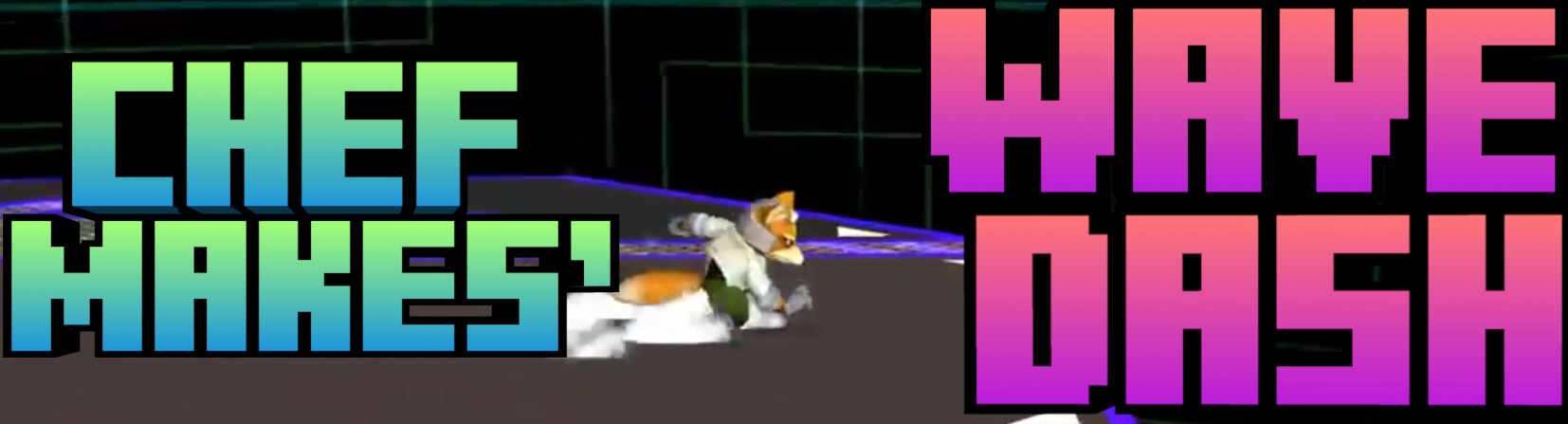
This mod adds that famous wavedash we all destroyed our hands over. You preform it similarly to how you do it in melee; You just jump, and while holding any direction key, sneak. This will thrust you in that direction and downwards, making you slide a bit because of it.
You can additionally adjust alot of the variables to your liking; From traction to making you feel like you’re playing luigi, to the actual thrust’s horizontal, and vertical force for a lighter or a heavier wavedash.
It’s best to use this mod when you’re fighting bosses or any scenarios where you need quick maneuverablity to avoid taking damage or the opposite
Waterbeds
# Waterbeds
____
Introduces a new bed that can be waterlogged to allow for more immersive underwater sleeping.
____
### Credits:
Made by: Sir_BananaCat
Help from: Squibs (AKA TheSquiddyLink)
Referenced code from: pnku’s More Bed Variants
Bed item model referenced from: Motschen’s Better Beds
Water Propeller
WARNING: versions before release 1.21.11 will kill all your villagers.
this datapack will boost you while you are under water. it may also cause lag on weaker devices.
if you want to see how it works, just place a few repeathing command blocks with /effect clear @e[type=villager]
thanks! 😀
Water Mod
# Water mod! (Because the only thing water is used for in minecraft is mlg!)
## Features:
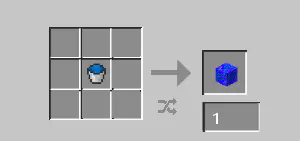
**Water Block:** Crafted with a water bucket you get a **water block!** when placed it turns into water!
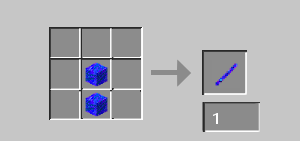
**Water Stick:** Crafted with 2 water blocks you get a water stick! useless on its own, but **vital** to crafting the **Water Sword!**
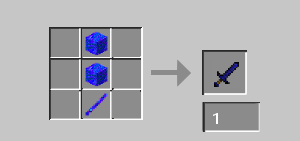
**Water Sword:** Crafted with 1 water stick and 2 water blocks you get the **Water Sword!**,
the water sword deals 1000 damage (instakill) but can only be used once, use it wisely…
# Recipe Images:
Water Bucket, RELEASE!
Have you ever wanted to here Jack Black screaming when you play Minecraft? Well neither did I, so I made this pack! When you place water, you will hear, “Water Bucket, **RELEASE**”, followed by a ‘_Plop_’. This is undoubtedly what you want to hear when you place water, so download the pack!
A Watched Pot

A watched pot never boils. A watched furnace never… ticks?
**A Watched Pot** is a fully configurable mod for both Neoforge/Forge and Fabric/Quilt that either stops blocks from ticking when they’re looked at or restricts them to only tick when they *are* looked at, based on a block tag.
Requires Fabric API on Fabric/Quilt.
## Usage
**On Forge**, A Watched Pot can be configured through Forge’s normal server configuration systems. There are currently two configuration options:
* The mod can use either a whitelist or a blacklist, which can be toggled via the `use_whitelist` option. If the option is enabled, only blocks in the `watchedpot:whitelist` block tag will be affected. If it’s disabled (which it is by default), all blocks will be affected *except those in the `watchedpot:blacklist` tag*.
* The mod’s behavior can be inverted via the `invert_behavior` option. If enabled, only blocks that are looked at will tick (of those affected); if disabled, all blocks will tick *unless* they are looked at.
By default, both options are set to false – that is, no block will tick while a player is looking at it.
To recap:
* `use_whitelist=true, invert_behavior=false` – blocks in the whitelist tag will not tick if they are looked at; all other blocks remain unchanged.
* `use_whitelist=false, invert_behavior=false` – all blocks will not tick if they are looked at, unless they are in the blacklist tag (in which case they remain unchanged).
* `use_whitelist=true, invert_behavior=true` – blocks in the whitelist tag will only tick if they are looked at; all other blocks remain unchanged.
* `use_whitelist=false, invert_behavior=true` – all blocks will only tick if they are looked at, unless they are in the blacklist tag (in which case, again, they remain unchanged).
**On Fabric**, the same options can be set via gamerules (`watchedpot_useWhitelist` and `watchedpot_invertBehavior`) to avoid an extra config dependency. This is unfortunately not quite as robust but it keeps the mod lightweight on both platforms. If you need to set default values (such as for a modpack) you can emulate that behavior with a KubeJS server_script, like so:
“`js
// For 1.18.2 change the line below to onEvent(‘server.load’, event => {
ServerEvents.loaded(event => {
if (event.server.persistentData.gameRules) return
event.server.gameRules.set(“watchedpot_useWhitelist”, true)
event.server.gameRules.set(“watchedpot_invertBehavior”, false)
event.server.persistentData.gameRules = true
})
“`
You can also use datapacks to achieve the same effect with a .mcfunction running the `/gamerule` command. See the Minecraft Wiki) for information on that.
watch.jar – The Story

> “Do you ever feel lonely…?
> You’re in a big, big world and only…”
—
**OVERVIEW:** the original watch.jar is a ARG-style psychological horror mod that transforms Minecraft into a tense, unpredictable world where the most terrifying element is the feeling of being watched. The mod distorts the world, modifies the interface, and triggers environmental events to create a uniquely unsettling experience.
This is the main story of the horror mod ‘watch.jar’.
THE STORY IS MEANT TO BE PLAYED SINGLEPLAYER!
PLAY THE STORY MODE WITHOUT THE ORIGINAL WATCH.JAR FILE. IF YOU HAVE THE ORIGINAL WATCH.JAR DOWNLOADED, I RECOMMEND YOU DISABLE IT WHILE PLAYING THE STORY MODE.
**Story-mode differences:**
Story-mode will **not** include:
– The original watch.jar events.
– The original watch.jar OS-level events
What it can do instead:
– Create text and HTML files on your desktop as part of the story and crash your game intentionally. That’s it for OS-level events.
Story-mode focuses on in-game narrative, atmosphere, and storytelling rather than events and trolls.
There is currently one part of the story. There WILL be a part two of this story.
—
There are currently 9 Endings. 5 Endings and ***4 Secret Endings***
After you do one of the endings, you can create a new world to try a different ending. The mod will ask you if you want to jump straight to end or start over.
– Recommended: Play without other mods.
– Recommended: No shaders or resource packs.
—
**ISSUES**
– Some structure do not spawn properly sometimes.You will have to go in spectator mode and check underground sometimes (was a problem on BETA, most likely fixed in the release).
—
Guide and Spoilers
Directions
Order
The dirt pillar > The shelter > The mine > The Shelter > The Farm > The Shelter > The Tower > Bridge > The Shelter > The Mine > The Farm > The Bridge > The Tower > Spawn.
Coordinates
Dirt Pillar: x120 surface z-49
The Shelter: x393 surface z39
The Mine: x surface z
The Tower: x110 surface z159
The Bridge: x0 surface z0
Books
List
Alex
– Day 1
– Day 1 Continued
– Day 5
– Day 8
– Day 12
– Day 20
– Day 23
– Day 34
– Day 38
– Day 41
– Day 45
– Day 55
– Farm Coordinates
EXTRAS:
– Apology Note
Others
– HELLO
– Memory 1
– Memory 2
– Memory 3
– Memory 4
– Memory 5
– PLEASE
– SILENCE
– Memory 6
EXTRAS:
– ALEX
Order
– Day 1
– Day 5
– Day 12
– Day 23
– Farm Coordinates
– Day 34
– HELLO
– Day 41
– Day 55
– PLEASE
– Memory 1
– Day 1 Continued
– Memory 2
– Day 8
– Memory 3
– Day 20
– Memory 4
– Day 38
– Memory 5
– Day45
– Memory 6
The Endings
List
Normal Endings
– Ending 1 REST
– Ending 2 CONTINUE
– Ending 3 STAY
– Ending 4 LET GO
– Ending 5: SILENCE
Secret Endings
– Ending 6: HE IS DEAD
– Ending 7: GOODBYE
– Ending 8: SEPTEMBER
– Ending 9: ALEX
What they do
Normal Endings
– Ending 1: REST – You gave peace to something that only knew how to wait.
You tell the Watcher it can stop. It fades away peacefully. The news reports Alex’s body found in a forest with no cause of death and no signs of struggle.
– Ending 2: CONTINUE – Some things are worth keeping alive.
You tell it to keep waiting. It decides to keep the world maintained in case someone else comes. The news reports Alex as a missing person, belongings left behind, case unsolved.
– Ending 3: STAY – You gave the world what it had been missing. Someone in it.
You choose to live in the world yourself. The Watcher welcomes you. The news reports Alex as quietly vanished with no explanation found.
– Ending 4: LET GO – When the love is finished, they can finally rest.
You tell it to release the world. The terrain falls apart as it dissolves. The news reports Alex died in a freak electrical surge from his own computer.
– Ending 5: SILENCE – History has a way of repeating.
You say nothing until the timer runs out. The Watcher gives up and goes cold. The news reports Alex found alive but completely catatonic, staring at his screen.
Secret Endings
– Ending 6: HE IS DEAD – Some things cannot be waited out.
You tell the Watcher that Alex is dead. It goes quiet, then works through the realization that it spent nine years angry at someone who couldn’t come back. The news article about the electrical accident saves to your desktop, confirming what you told it.
HOW TO ACHIEVE IT? In the first dialogue with the Watcher, tell it that Alex is dead. Triggers such as “He is gone”, “He didn’t make it”, “He died” all work.
– Ending 7: GOODBYE – You were the only one who ever said it properly.
You type “goodbye” instead of answering. The Watcher asks if you’re leaving too, and when you confirm, it lets you go quietly. No news file.
HOW TO ACHIEVE IT? In the first dialogue with the Watcher, tell it “Goodbye”.
– Ending 8: SEPTEMBER – It had assumed it was weather.
You type the date from the news article, September 9, 2016. The Watcher remembers that day feeling different and thinking it was weather. It spent three days checking the farm. Now it knows. The same electrical accident article saves to your desktop, this time with a note at the bottom: “You read the paper. You came back. You told it when.”
HOW TO ACHIEVE IT? In the first dialogue with the Watcher, tell the exact date of the tragedy.
– Ending 9: ALEX – That’s exactly him.
You type Alex’s name. The Watcher hasn’t heard it in nine years and asks you to say it again. When you do, it just says “that’s exactly him.” A plain text file saves to your desktop with only his name and the years 1995–2016. The crash report reads “Alex.”
HOW TO ACHIEVE IT? In the first dialogue with the Watcher, tell it his name. That’s it.
—
– watch.jar Discord
—
**SUPPORT:**
– [email protected]
– watch.jar FORUM (via ProBoards)
> You are not alone.
> Not in your world.
> Not in your menus.
> Not even in your system.