Troty Energy Research Facility Resource Pack
A resource pack containing models, shaders, sound, music, textures that are essential for the proper look of the [T.E.R.F](https://modrinth.com/project/troty-energy-research-facility) datapack.
The resource pack is not integrated into the datapack itself as it is VERY heavy and would waste a lot of serverside disk space.
I do not own the music in this resource pack. You can find a list of credits [Here](https://trotywiki.miraheze.org/wiki/Music_and_credits)
# How to install on a server:
### Step 1:
Upload the resourcepack you’ve downloaded onto a file sharing website that offers **direct links**, like [dropbox](https://www.dropbox.com/)
### Step 2:
Paste the download link of the resourcepack into your server.properties:

_!!! Note: If you’re using dropbox change your link so it ends with “dl=1” and not “dl=0” so it’s a direct link !!!_
### Step 3:
Generate a SHA1 checksum of the resourcepack, this can be done [here.](https://emn178.github.io/online-tools/sha1_checksum.html)
This will give you an output that looks something like:

_This string is responsible for validating if the resourcepack didnt get corrupted while downloading._
### Step 4:
Copy paste the checksum into your server.properties’s “resource-pack-sha1” field:

### Step 5:
Make sure “require-resource-pack=” is true so people don’t accidentally cancel the resourcepack.

Then restart your server to apply changes and join.
Transparent Scoreboard by Akis
❗[Notice] Google will lock-down Android and your ability to install applications❗
Starting in September 2026, Android will require all apps to be registered by verified developers in order to be installed on certified Android devices, and Google gets to decide who ‘verified developers’ are.
– Your right to freely develop and **install** whatever apps (`.apk` files) you want may cease.
– App developers will be forced to hand over govt. ids to Google and tie their apps to their real life identities.
– Google gets to decide who gets approved. Being rejected means nobody can install your apps.
– Developers Google arbirarily chooses it doesn’t like, as well as users who reside in sanctioned regions like Russia, may face difficulties or be cut-off entirely from having their apps installable.
Please visit the following resources for more infromation:
– [Official Google announcement and article](https://developer.android.com/developer-verification)
– [Keep Android Open (.org)](https://keepandroidopen.org/)
– [Consumer Rights Wiki article](https://consumerrights.wiki/w/Android_Developer_Verification)
# Transparent Scoreboard Background
## Overview
This simple yet effective texture pack removes the background of the scoreboard in Minecraft, providing a cleaner and more immersive HUD experience. Perfect for players who prefer a minimalist interface or want to reduce on-screen clutter.
## Installation
1. Download the texture pack.
2. Place the pack in your `resourcepacks` folder.
3. Enable the pack in Minecraft’s Resource Packs menu.
4. Enjoy a cleaner scoreboard display!
## Notes
– This pack is designed for vanilla Minecraft and may not work with Mods or some Shaders
– The Lunar Client mod “Scoreboard” overrides how this works, meaning this won’t work for players using it.
Transparency Fix
# Transparency Fix
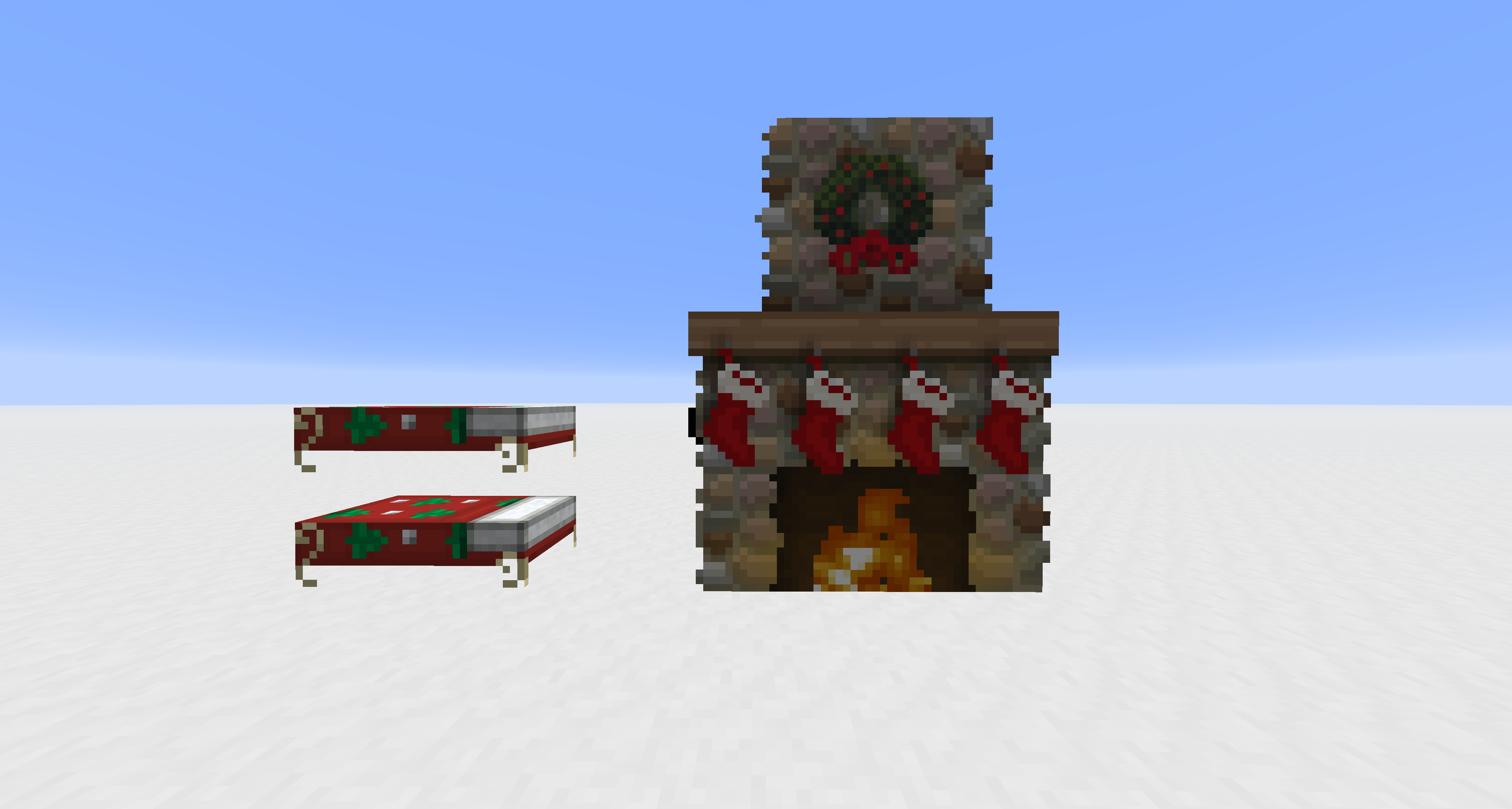
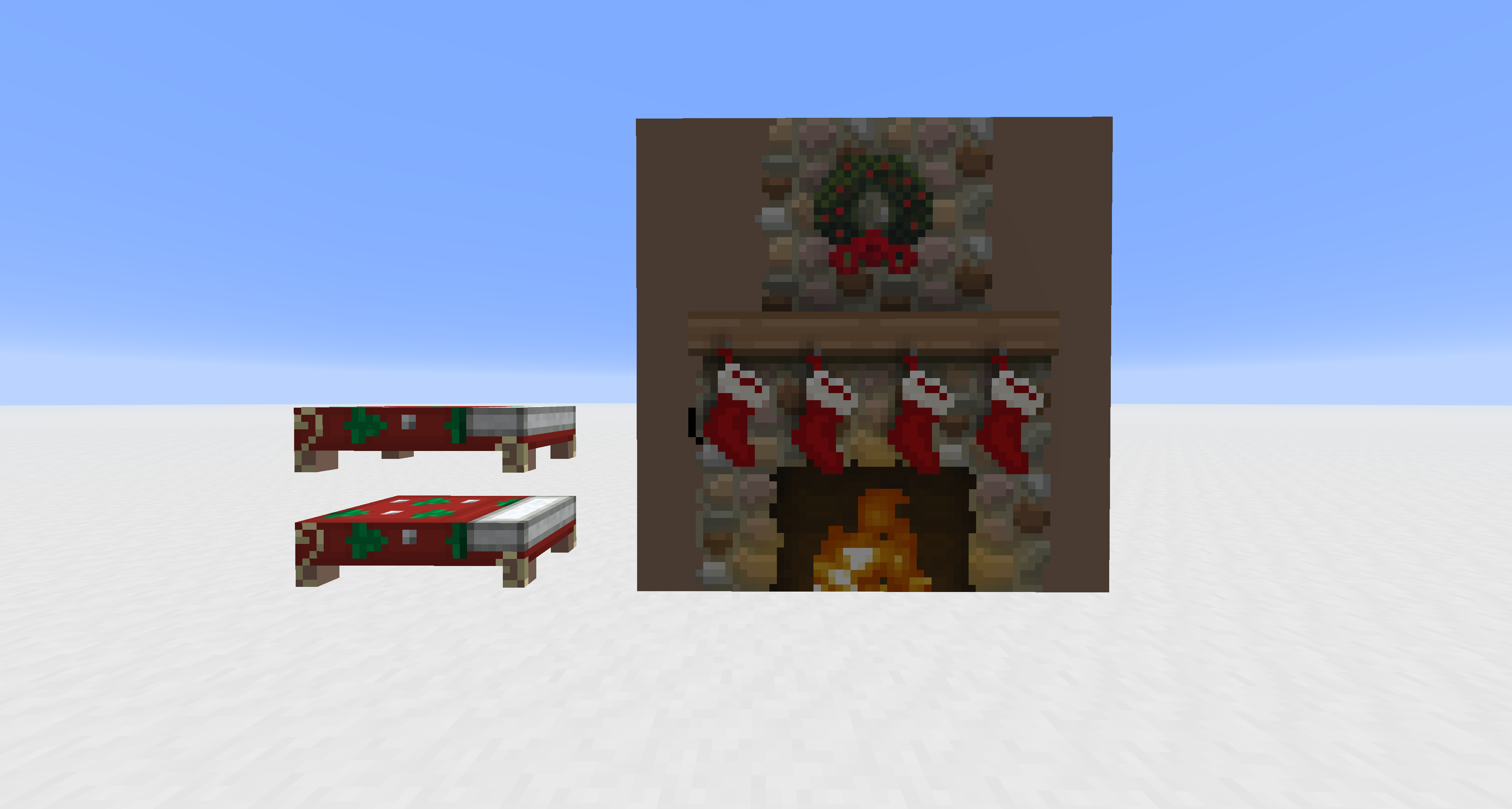
This pack modifies vanilla core shaders to unlock alpha channel rendering for entities that are normally hard-coded to be opaque. It is designed to work alongside other resource packs; you must apply textures with transparency to see the effect.
Supported Entities: Beds, Paintings, Shields, Tridents, Books (Lectern/Enchanting), and Banners.
Torta’s Enchantment Glint
## About
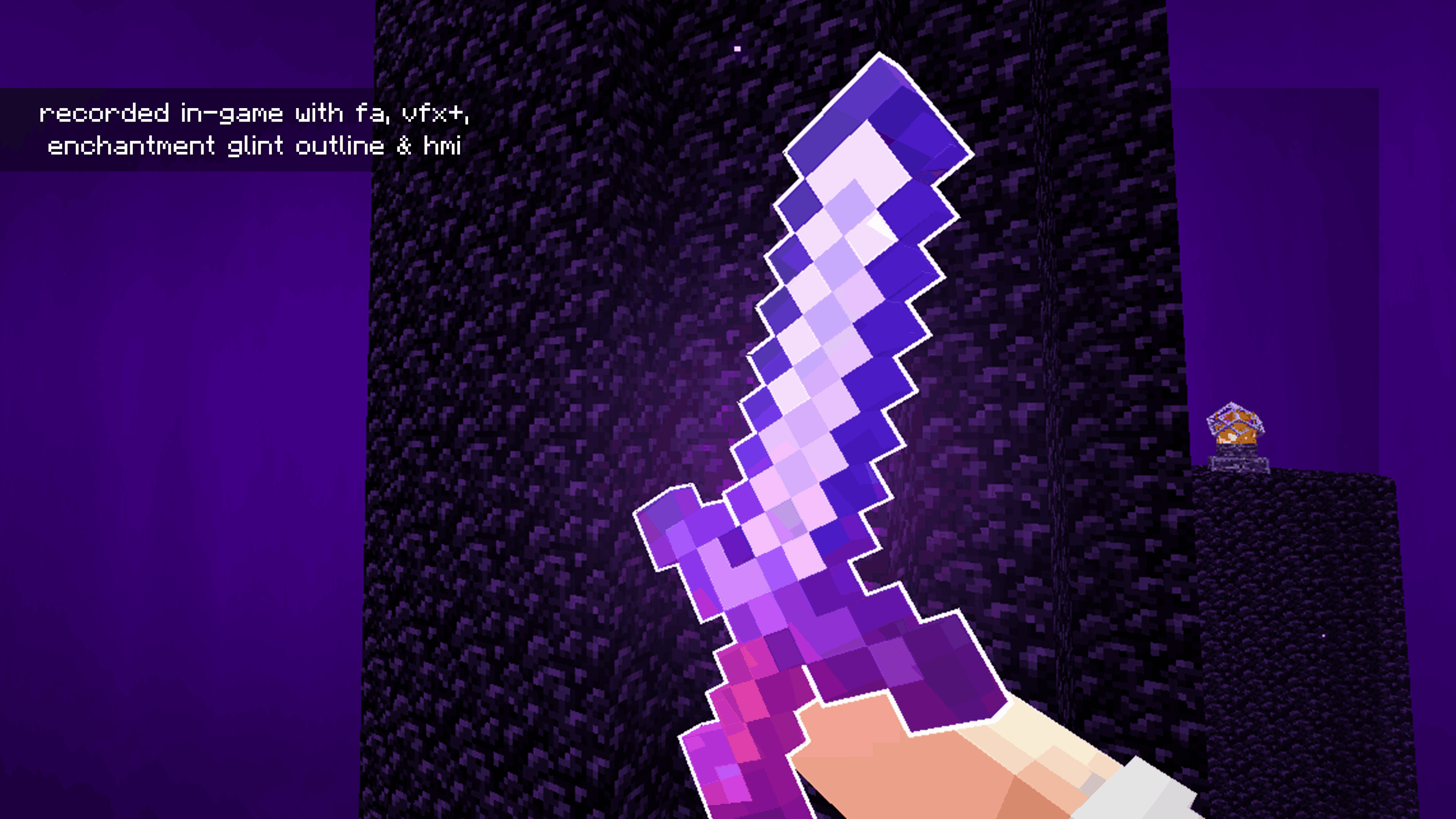
This is a glint/glow enchantment for your tools or armor inspired by the texture in Actions & Stuff‼️
## Compatibility
This pack is compatible with Minecraft 1.21.5 and above, and works well alongside most other visual resource packs.
## Dependencies
– [Hold My Items](https://modrinth.com/mod/hold-my-items) (Obligatory)
– [Enchantment Outline](https://modrinth.com/mod/enchantment-glint-outline) (Optional)
– [VFX+](https://modrinth.com/resourcepack/visual-effects-plus) (Optional)
Torch’s Dark Aesthetics
# Torch’s Dark Aesthetics
Makes Minecraft’s interface fit a darker aesthetic while also making it more squared off and visible. All textures were handmade by me. The idea for this pack was to make a simple GUI pack that I could work off of for a mod based resource pack that wouldn’t be complicated to work with. With my pack, due to me simplifying the shapes of the GUI’s by squaring them off, it not only makes it have a bit more visibility, it also for allows easier edits to a mod’s textures to match this simplicity. In the future, there will be “[Color] Aesthetic” versions of this pack as well, changing small things like the player background or progress bars to match a certain color.
Mod Support can be found here:
[](https://modrinth.com/resourcepack/torchsdarkaesthesticsmodded)
## Important Information
The translucent textures in this resource pack on MC Version 1.21.1 will not work without a mod like [Neo TranslucencyFix](https://modrinth.com/mod/neo-translucencyfix).
## Recommended Mods
– **[Neo TranslucencyFix](https://modrinth.com/mod/neo-translucencyfix)**: Makes translucent textures ACTUALLY translucent. (not needed if on version 1.21.2 or above)
– **[TranslucencyFix](https://modrinth.com/mod/translucencyfix)**: Makes translucent textures ACTUALLY translucent. (needed if on version 1.20.1 or below)
– **[Raised](https://modrinth.com/mod/raised) Mod**: Moves the hotbar so it doesn’t crop the texture.
Tooniverse Texture Pack 64x
## [32x](https://modrinth.com/resourcepack/tooniverse-32x) – 64x – [128x](https://modrinth.com/resourcepack/tooniverse-128x) – [256x](https://modrinth.com/resourcepack/tooniverse)
### Tooniverse is a **complete** texture replacement for Minecraft Java Edition!
It’s designed to look clean, but with crisp HD textures and a unique colour palette that makes default Minecraft look dull! The cartoon style is consistent throughout the pack to get you truly immersed in a cartoon world
Also, expect much attention to detail with many 3D models and lots of random texture variations!
**Use with [Optifine](https://optifine.net/) for even more features like custom colours and skyboxes**
**Also compatible with [Sodium](https://modrinth.com/mod/sodium)**
(Using with Sodium may give an error message since Sodium’s renderer does not support built-in shaders. Tooniverse Texture Pack will still run fine without the built-in shaders, or you could try [Iris shaders](https://www.irisshaders.dev/) instead)
### Features
– 3,000+ textures!
– Mobs, Items, Armour, Particles, GUIs… everything is textured!
– Regular updates
– 3D models
– Built-in shaders
– 64x resolution
### License
You may:
– Use this resource pack for personal use
– Share videos of this resource pack with attribution to Crafty Fox Digital and a link to this page in the description
– Put the Modrinth download link in your server.properties file to include Tooniverse with your Minecraft server
You MAY NOT:
– Share or redistribute this resource pack, or any part of it
– Use any part of this resource pack in other projects (except for personal use only)
© Crafty Fox Digital 2025 – All Rights Reserved
# Coming soon to Bedrock edition!
### [Customise with optional Add-ons](https://tooniverse.gg/addons)
### [Join our Discord](https://discord.gg/gdzqxGShDg)
Tooniverse Texture Pack 32x

## 32x – [64x](https://modrinth.com/resourcepack/tooniverse-64x) – [128x](https://modrinth.com/resourcepack/tooniverse-128x) – [256x](https://modrinth.com/resourcepack/tooniverse)
### Tooniverse is a **complete** texture replacement for Minecraft Java Edition!
It’s designed to look clean, but with crisp HD textures and a unique colour palette that makes default Minecraft look dull! The cartoon style is consistent throughout the pack to get you truly immersed in a cartoon world
Also, expect much attention to detail with many 3D models and lots of random texture variations!
**Use with [Optifine](https://optifine.net/) for even more features like custom colours and skyboxes**
**Also compatible with [Sodium](https://modrinth.com/mod/sodium)**
(Using with Sodium may give an error message since Sodium’s renderer does not support built-in shaders. Tooniverse Texture Pack will still run fine without the built-in shaders, or you could try [Iris shaders](https://www.irisshaders.dev/) instead)
### Features
– 3,000+ textures!
– Mobs, Items, Armour, Particles, GUIs… everything is textured!
– Regular updates
– 3D models
– Built-in shaders
– 32x resolution
### License
You may:
– Use this resource pack for personal use
– Share videos of this resource pack with attribution to Crafty Fox Digital and a link to this page in the description
– Put the Modrinth download link in your server.properties file to include Tooniverse with your Minecraft server
You MAY NOT:
– Share or redistribute this resource pack, or any part of it
– Use any part of this resource pack in other projects (except for personal use only)
© Crafty Fox Digital 2025 – All Rights Reserved
# Coming soon to Bedrock edition!
### [Customise with optional Add-ons](https://tooniverse.gg/addons)
### [Join our Discord](https://discord.gg/gdzqxGShDg)
Tooniverse Texture Pack 128x

## [32x](https://modrinth.com/resourcepack/tooniverse-32x) – [64x](https://modrinth.com/resourcepack/tooniverse-64x) – 128x – [256x](https://modrinth.com/resourcepack/tooniverse)
### Tooniverse is a **complete** texture replacement for Minecraft Java Edition!
It’s designed to look clean, but with crisp HD textures and a unique colour palette that makes default Minecraft look dull! The cartoon style is consistent throughout the pack to get you truly immersed in a cartoon world
Also, expect much attention to detail with many 3D models and lots of random texture variations!
**Use with [Optifine](https://optifine.net/) for even more features like custom colours and skyboxes**
**Also compatible with [Sodium](https://modrinth.com/mod/sodium)**
(Using with Sodium may give an error message since Sodium’s renderer does not support built-in shaders. Tooniverse Texture Pack will still run fine without the built-in shaders, or you could try [Iris shaders](https://www.irisshaders.dev/) instead)
### Features
– 3,000+ textures!
– Mobs, Items, Armour, Particles, GUIs… everything is textured!
– Regular updates
– 3D models
– Built-in shaders
– 128x resolution
### License
You may:
– Use this resource pack for personal use
– Share videos of this resource pack with attribution to Crafty Fox Digital and a link to this page in the description
– Put the Modrinth download link in your server.properties file to include Tooniverse with your Minecraft server
You MAY NOT:
– Share or redistribute this resource pack, or any part of it
– Use any part of this resource pack in other projects (except for personal use only)
© Crafty Fox Digital 2025 – All Rights Reserved
# Coming soon to Bedrock edition!
### [Customise with optional Add-ons](https://tooniverse.gg/addons)
### [Join our Discord](https://discord.gg/gdzqxGShDg)
Tooniverse Texture Pack 256x

## [32x](https://modrinth.com/resourcepack/tooniverse-32x) – [64x](https://modrinth.com/resourcepack/tooniverse-64x) – [128x](https://modrinth.com/resourcepack/tooniverse-128x) – 256x
### Tooniverse is a **complete** texture replacement for Minecraft Java Edition!
It’s designed to look clean, but with crisp HD textures and a unique colour palette that makes default Minecraft look dull! The cartoon style is consistent throughout the pack to get you truly immersed in a cartoon world
Also, expect much attention to detail with many 3D models and lots of random texture variations!
**Use with [Optifine](https://optifine.net/) for even more features like custom colours and skyboxes**
**Also compatible with [Sodium](https://modrinth.com/mod/sodium)**
(Using with Sodium may give an error message since Sodium’s renderer does not support built-in shaders. Tooniverse Texture Pack will still run fine without the built-in shaders, or you could try [Iris shaders](https://www.irisshaders.dev/) instead)
### Features
– 3,000+ textures!
– Mobs, Items, Armour, Particles, GUIs… everything is textured!
– Regular updates
– 3D models
– Built-in shaders
– 256x resolution
### License
You may:
– Use this resource pack for personal use
– Share videos of this resource pack with attribution to Crafty Fox Digital and a link to this page in the description
– Put the Modrinth download link in your server.properties file to include Tooniverse with your Minecraft server
You MAY NOT:
– Share or redistribute this resource pack, or any part of it
– Use any part of this resource pack in other projects (except for personal use only)
© Crafty Fox Digital 2025 – All Rights Reserved
# Coming soon to Bedrock edition!
### [Customise with optional Add-ons](https://tooniverse.gg/addons)
### [Join our Discord](https://discord.gg/gdzqxGShDg)
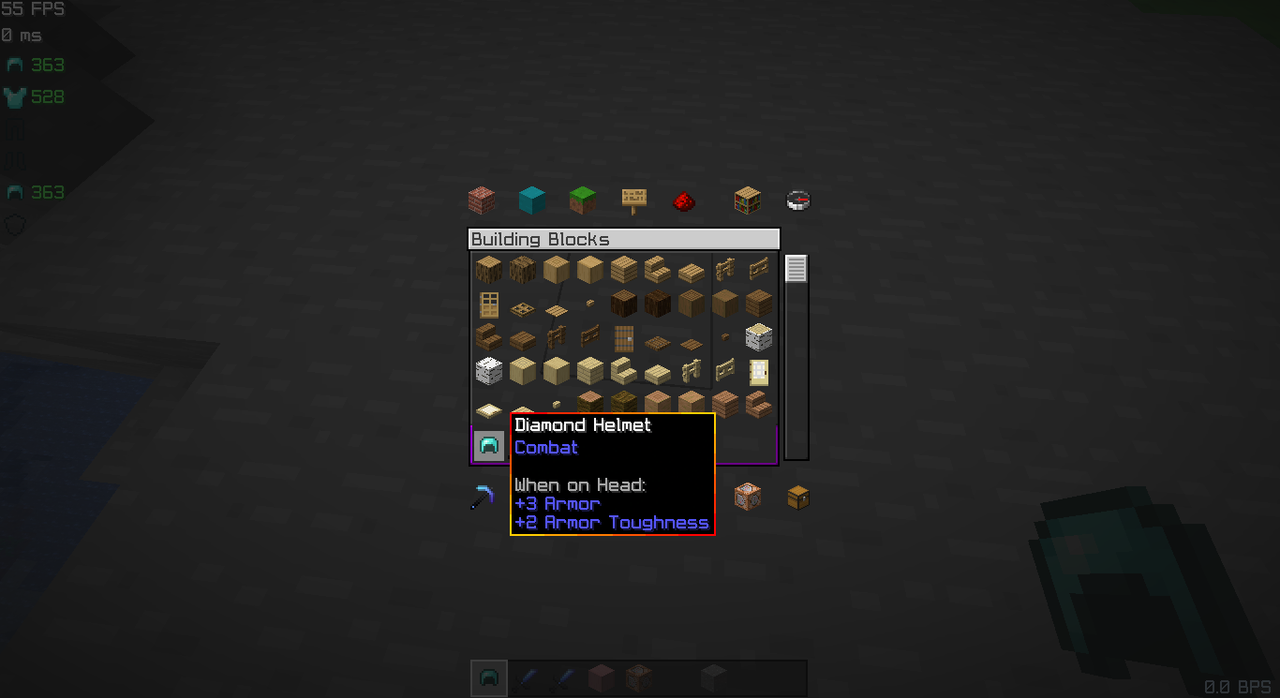
Gradient Tooltip

“Adds a smooth, soothing color gradient to your item tooltips, giving them a clean and modern look. The border gently fades between shades of cool blue, creating a calm and elegant feel. The classic Minecraft font is refined for smoother edges and better readability, making every tooltip look crisp and polished.”
—
Color and Custom Tooltips Available:
1. [ Red Gradient Tooltip.](https://modrinth.com/resourcepack/tooltip-gradient/version/gaFqCI6v)
2. [Green Gradient Tooltip.](https://modrinth.com/resourcepack/tooltip-gradient/version/WDgzfaJo)
3. [Blue Gradient Tooltip.](https://modrinth.com/resourcepack/tooltip-gradient/version/0.1)
4. [Pink Gradient Tooltip.](https://modrinth.com/resourcepack/tooltip-gradient/version/XNz3jJTh)
5. [White Gradient Tooltip.](https://modrinth.com/resourcepack/tooltip-gradient/version/zSIJWFvV)
6. [Golden Crown Tooltip.](https://modrinth.com/resourcepack/tooltip-gradient/version/zmprUGBx)
7. [White Skull Tooltip.](https://modrinth.com/resourcepack/tooltip-gradient/version/zSIJWFvV)
8. [Solid black Tooltip](https://modrinth.com/resourcepack/tooltip-gradient/version/5MuvkApP)
9. [Shadow Black Tooltip](https://modrinth.com/resourcepack/tooltip-gradient/version/BlRoJp99)
Pack Modify:
– Smooth gradient tooltips for a calm, modern look.
– Enhanced tooltips with easier-to-read font.
– Want a personalized touch or have a cool idea? DM me on [Planet Minecraft ↗](https://www.planetminecraft.com/member/bibekthelegend/)