# Night Sky Shaders
A beautiful Minecraft Night Skybox, but without OptiFine
Using Minecraft’s Vanilla Shaders implementation
## Credits
This pack was originally created by Selicre
And the original resourcepack was uploaded on this Reddit post
He gave me the authorization to update and upload it on platforms like Modrinth and GitHub
A huge thanks to him
## Compatibility
Every Minecraft versions starting from Minecraft 1.17
(expect for 1.21.5 because Mojang broke the `ScreenSize` uniform)
Night Mode (Blue light filter)
### Description
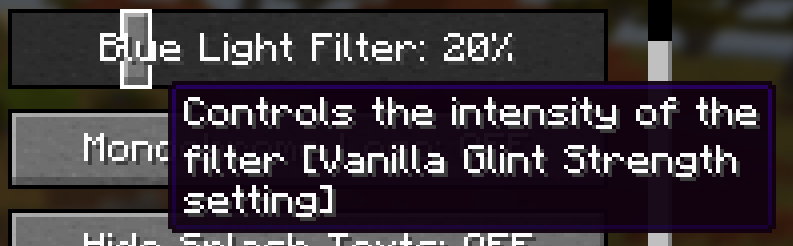
Adds a customizable orange filter to the game environment (not the GUI or items, only things in the world like blocks and mobs). This setting can be changed using a slider found in **Accessibility Settings**.
The filter is only active when graphics are set to **Fabulous!** and the slider is **above 0%**.
The slider replaces the Enchantment Glint strength, and the value will stay when disabling or enabling the pack. The glint strength is set to its default (75%) while the pack is active.
### Versions
Supports Minecraft **Java Edition 1.21.5**. Other versions may work.
### Compatibility
Incompatible with packs that edit the transparency post-effect shader (including to display custom shaders) or some other specific shaders and a custom one. Incompatible with any other use of the glint strength slider in accessibility settings, including modifying the name in the en_us lang file.
### Disclaimer
Blue light filters may not actually have a positive effect, according to some studies. It is advisable to do your own research if you want to know what is best. This project was mainly intended as practice making shaders. It is up to the user whether or not they feel there is a benefit to using this pack.
### Patreon
Join my new Patreon to support my projects!
Nexus Shaders
# **Nexus Shaders**
Have you ever wanted to use shaders but your PC just refuses? Even low-end shaders crashes your Game, Well this Texture Pack is just for you!
Yes, a **Texture Pack**. _Nexus Shaders_ aim to give you a direct experience of using shaders without using shaders..
Since it is a Texture Pack it has an almost 0% impact on performance. Now you might think its just some 128x Texture Pack pretending to be a shader, but no. This Texture Pack adds actual Realistic Lighting,Fog,Bloom,Sky,Nature, etc. From Realistic and Clear Water to Glowing Blocks and Items, it has everything in one single Zip File.
## **Dependencies:**
– Sodium Core Shader Support
– Nuit **and** Nuit Interop
– Polytone
– Continuity
– Natural Motion Blur (this ones optional but motionblur = game feel smooth and clean yay)
Sodium Core Shader Support: For Custom Lighting and Bloom
Nuit and Nuit Interop: For Custom Sky
Polytone: For Custom Atmosphere and Fog
Continuity: For Glowing and Blooming Blocks and stuff
### **Recommended Settings**
__Quality Tab__
Graphics: Fabulous!
Clouds: OFF
Weather: Fancy
Leaves: Fancy
Smooth Lighting: ON
Entity Shadows: ON
Distortion Effects: ON
Want to use shaders, but your PC turns into a slideshow the moment you
try?
Well, we’ve got something for you, Introducing Neoshade: a resource pack designed to give you a shader like look without killing your FPS. **No extra heat, no heavy RAM or GPU usage, No mods, Not gamemode exclusive, just smooth performance** with **better visuals**.
### FEATURES ( _no fabulous or mods required_ )
• **Bloom (impure)** 🔥
• **Custom sky** 🌌
• **Shader-like lighting** ✨
• **Realistic looking shadows** 🕳️
• **Soft clouds** ☁️
• **Shooting stars** (_will occur every ten seconds at night and won’t tank much fps_)🌠
• **Bright and twinkling stars**🌟
• **Heavy customization with respackopts support** 🔥

### Compability
This pack is compatiable with **Distant Horizons** but with limitations (_lod chunks cannot work as they are not real chunks so,we can’t do anything to resolve shading on it for now_).
Although Sodium compatibility has not been added yet, we are actively working on it. In the meantime (**compatibility update is very soon, we mean it!**), we recommend using other mods such as Lithium, Entity Culling, More Culling, Nosium, etc. as alternatives.
### Why choose us over others?
**No mods required**
**No fps loss**
**No gamemode specific**
**Vannila friendly**
**Compability with all performance mods expect sodium (coming very soon)**
**Compability with Distant horizons**
**FEATURES IN PROGRESS**
1. *GOD RAYS* 🔥
2. *CUSTOM COLOURED SKYS*
3. *POLYTOE EXCLUSIVE FEATURES* 🟣
4. *PURE BLOOM* ☀️
5. *NEW AND IMPROVED SUNSETS AND SUNRISES* 🌅
6. *END SKYS* 🌌
7. *VANNILA IMMERSIVE*
8. Water REFLECTIONS 🌅
9. Better and more realistic clouds ☁️
**Keep tuned for more** 🔥
### How does it work and doesn’t take fps?
Since Minecraft 1.17, Minecraft has given modders the ability to use vanilla core shaders to customise elements of the game such as shadows, lighting etc.and this resource pack cleverly utilises this by using smart and modern techniques to give a false shader like feeling this is also the reason why it doesn’t need mods or take
fps as it’s built into the game.
**Join the discord for sneak peeks, discussions, and support**
https://discord.gg/xpYxWecBs
~ Editor/Director & Dev.
NeoFullbright
# NeoFullbright
**NeoFullbright** is a **lightweight, 100% vanilla resource pack** that applies a **permanent fullbright effect** — no commands, no mods required, and without breaking text or the UI.
—
## ✨ Features
– Clear vision as if it’s daytime, even in caves or at night
– Interface and text remain **fully visible** (no broken fonts)
– Custom pack icon included
– **OptiFine compatible** (includes lightmaps)
– Ultra-light pack with **zero performance impact**
—
—

—
## 📥 Installation
1. Download the `.zip` file
2. Place it in your:
“`
.minecraft/resourcepacks
“`
3. Launch Minecraft → **Options → Resource Packs**
4. Enable **NeoFullbright** and move it to the top of the list
—
## 📥 Installation (via NeoFullbright Installer)
The easiest way to install the NeoFullbright resource pack is by using the **NeoFullbright Installer** — a small Java application that handles everything automatically.
1. Download has to wait 30 seconds and run the **NeoFullbright Installer** (`.jar` file)
2. Select your Minecraft version and confirm the default folder:
“`
.minecraft/resourcepacks
“`
3. Click **Install** — the latest compatible NeoFullbright version will be downloaded and activated automatically
4. Launch Minecraft → **Options → Resource Packs**
5. Confirm that **NeoFullbright** is enabled and placed at the top of the list
—
## 🔧 Compatibility
– ✅ **Minecraft 1.21.11**
– ✅ Works in **vanilla** (no mods required)
– ✅ Compatible with **OptiFine/Fabric/Iris**
– ⚠️ Not compatible with external shaders (they will override the effect)
—
## ⚠️ Note
If you use an external shader (BSL, Complementary, etc.), the NeoFullbright effect will be overridden.

Nature X


*********************************************************************************************
**Nature X Requirements:** [Click on the image below to go to the mod’s OFFICIAL download page]
**Notes:**
Make sure to set theses settings [in Sodium] to the following:
– **Quality > Leaves > Fancy**
– **Quality > Particles > All**
– **Quality > Smooth Lighting > ON**
– **If there are any options related to enabling/ disabling fog, please make sure it’s enabled.**
********************************************************************************
**Follow Nature X on:**
– Do not republish my pack and steal or use any assets from this pack without permission.
– Official downloads for my pack are on PMC, CurseForge, Modrinth, and Patreon.
This resource pack is a port of the Natural Texture Pack from Legacy Console Edition with updated textures from Bedrock Edition. Original textures by 4J Studios.
LeoTweaks Nametags
## Nametags, holograms and text appear more visible when their view is obstructed.
Useful for those that want to be able to see what text actually says when it’s normally a bit obstructed.
Mythic SMP Resource Pack
This is the official resource pack, intended to be used on the Mythic SMP Minecraft server.
It adds textures for all custom items, staffs, runes, blocks, etc.
Feel free to look into the files and create your own add-on packs if you like! You can see some official add-on packs on our Modrinth profile here
Credits are on Discord!
MxSxC1 Moon Phases
**MxSxC1 Moon**
Video Using Moon Phases In This Pack
****Pack Purpose****
This will replace the following textures in game:
– New moon phases
– Prototype of the spyglass scope used in “The Dark Is A Cold Lonely Shadow”
These moon phases are taken from real images of our Earths Moon.
This is designed to be used alongside the following two packs due to be released shortly on Modrinth and Github:
– “MxSxC1 The Time Machine – Texture Pack”
– “MxSxC1 The Time Machine – Data Pack”
They are deliberately lower quality as when speeding up time and using Time Lapse from “MxSxC1 The Time Machine – Data Pack” it can cause performance hit.
A higher resolution version is being worked on, but low priority, this does was we need for now.
**[MOON PHASES]**
The phases of the moon are (in chronological order as they appear in-game)
– Full moon
– Waning gibbous
– Last quarter
– Waning crescent
– New moon
– Waxing crescent
– First quarter
– Waxing gibbous
Spoiler
**## [SPOILER ALERT]**
No direct spoilers in this pack, other than the theme and content itself is a potential spoiler (more like a clue) for “MxSxC1 The Time Machine” and “The Dark Is A Cold Lonely Shadow Book 1 – Raz’Kul”.
Related packs and “MxSxC1 The Time Machine – Data Pack” DOES contain spoilers for “The Dark Is A Cold Lonely Shadow – Book 1 – Raz’Kul”
Using these packs before reading the books will give clues and reveal parts of the story.
It is advised to wait until after reading the first book.
Given book 1 isn’t quite finished yet and most definitely not published, only a few have read it, it gives clues to a lot that happens in both the first and later books.
**MXSXC1 – THE TIME MACHINE**
– Moon Phases
– Control time
– Stop Time
– Slow & Speed Up Time
– Time Lapse
– Pets to slow and speed up time
– Loads more
– Photography and Video Making Aid
– Boss Fight
– Win [SPOILER REMOVED] Pet
**Issues**
This is Alpha.
Issues With One Of The Splashes.
These are low quality for performance, as when you speed up time it can cause performance issues.
It may look blocky when used through the scope. High res version will be released at some point.
****Notes / What This Pack Is Not****
This Is Not The Time Machine (but advised for use with it)
This does nothing other than replace The Moon Phases & Spyglass Scope
## **Steps To Install & Update**
Drop the folder “mxsxc1_moon” in your resourcepack folder. For example:
Note: Some Shaders will completely over-ride or ignore this, or can be set to do so.
However it works in Vanilla, and with multiple popular shaders using Iris.
____
We don’t do mods, mixins, or plugins…everything we do works within Mojang framework.
Miscreat Website
GitHub
We do not create mods, we create packs and data packs within Mojang framework, which will work on Realms.
Never install any packs or mods, or anything without fully understanding what it does, and ensuring it’s legitimate and safe! If anything requires elevation (which ours do not), think twice and verify!


































