White Block Selection Outline
**Disclaimer: This texture pack takes advantage of core shaders, and it is not possible to port it to 1.18. Please do not ask me for it. If you want a different block selection outline, then update your game.**
This texture pack changes the colour of the outline that appears when you select a block.
**Disclaimer 2: The outline is not as thick as it is in the icon. It was made thicker in the outline to be more visible, refer to the gallery to check how thick it actually is.**
All Other Colours:
[Blue Block Selection Outline](https://modrinth.com/resourcepack/blue-block-outline)
[Green Block Selection Outline](https://modrinth.com/resourcepack/green-block-selection-outline)
[Purple Block Selection Outline](https://modrinth.com/resourcepack/purple-block-selection-outline)
[Rainbow Block Selection Outline](https://modrinth.com/resourcepack/rainbow-block-selection-outline)
[White Block Selection Outline](https://modrinth.com/resourcepack/white-block-selection-outline)
[Red Block Selection Outline](https://modrinth.com/resourcepack/red-block-selection-outline)
Whimscape Emissive

This project is a visual enhancement add-on based on Whimscape, the original resource pack created by Kavast. It adds carefully crafted emissive textures to existing assets, giving blocks, mobs, and entities subtle glow details that enhance atmosphere and readability, especially in dark environments. The add-on is designed to remain faithful to Whimscape’s original art style and requires the base Whimscape pack to function properly, with support for OptiFine-based emissive rendering.


WEATHER 2 REMASTERED RP ENCHANCED
### WHO ARE YOU?
I am XFATEX the person that made the 3D protomanlys weather mod blocks (I will link it down in the descritpion) and I was wondering that weather 2 remastered has alot of blocks and you can change the cloud texture so I gave it a try and it seems that it works perfectly well and the clouds look amazing in the game and the rain looks good but I will change it soon dont worry.
**https://modrinth.com/resourcepack/pmweather-resource-pack**
HERE IS THE CONFIG TO MAKE THE CLOUDS AS THE SAM AS MINE
**https://www.mediafire.com/folder/ngqqkrnyjo2l0/weather2R_config**
Wavey Pack
## 🌿 Wavey Pack – Bring Life to Your World (Java Edition)
**Wavey Pack** is a lightweight **vanilla-style** resource pack for **Minecraft Java Edition** that makes **Leaves, Flowers, Grass, and Water wave gently** — giving your world a calm and natural movement effect.
It keeps the original Minecraft textures and only adds animation, making your gameplay feel beautiful and more alive.
—
### ✨ Features
* 🌳 Wavey **Leaves** on all trees
* 🌾 Soft movement for **Grass & Tall Grass**
* 🌺 Subtle animation on **Flowers**
* 💧 Calm wave effect on **Water**
* 🎮 100% **vanilla look** preserved
* 🧊 Works without shaders
* 🔋 FPS-friendly on most systems
—
### ⚠️ Compatibility Notice
This pack **does not** work on:
| Not Supported | Reason |
| ————- | ——————————————————– |
| Sodium | Replaces block rendering / lacks wavey animation support |
| OptiFine | Conflicts with custom vertex animation method |
✅ Works best on **pure Vanilla Java** or with **clients/mod loaders that do not override block animations**.
✅ Works in both singleplayer & multiplayer (client-side only)
❌ Does not work on Bedrock / MCPE
—
### ✅ Performance
The pack is **very lightweight** as it only animates existing vanilla textures — no models or high-res files.
If your system can run vanilla, it can run this.
—
Wavy Water
## Showcase

To see more previews, check out [the gallery](https://modrinth.com/project/waves/gallery)
## Description
This is a texture pack (not a mod or shaderpack) that works in Vanilla Minecraft. To use, all you need to do is apply the pack. No other required installs and no required settings tweaks. There are optional settings that you can access in the texture pack itself or with an optional mod called respackopts.
The waves in the texture pack are extremely simple, and is done by calculating a sine wave for the x direction and a cosine wave for the z direction (both based on height, speed and frequency) then just taking the average of the two. The waves are not meant to be realistic, and instead are meant to add more depth to the base game.
## How to Use
1. Download and install the texture pack like normal
2. Optionally, install [respackopts](https://modrinth.com/mod/respackopts) for more control on how the waves look. After installing this, you should see a settings icon appear on the texture pack.
3. If the effect isn’t working, try disabling other packs. This texture pack also notably does not work with the Sodium mod.
4. If you can’t find the texture pack in the list, try enabling folder view in the bottom left if you have recursive resources and then searching for it with the search bar.
5. To configure the pack without respackopts, open the texture pack file and then head to `assets/minecraft/shaders/include` then open the `config.glsl` file. There will be 3 values that you can change to any number you want.
## Support
**Join [My Discord](https://discord.gg/gymTft2GbV)**
– Report bugs
– Create suggestions
– Vote on future packs
– Interact with the community
– Ask for help with texture packs
– This is the place to ask if you can use this pack in your own pack
**Check out [The Repository](https://github.com/AlphaLeoli/Texture-Packs)**
– Report bugs
– Create suggestions
– Contribute by creating a pull request
https://www.alphaleo.li/resourcepacks
Warm Visuals
# Warm Visuals
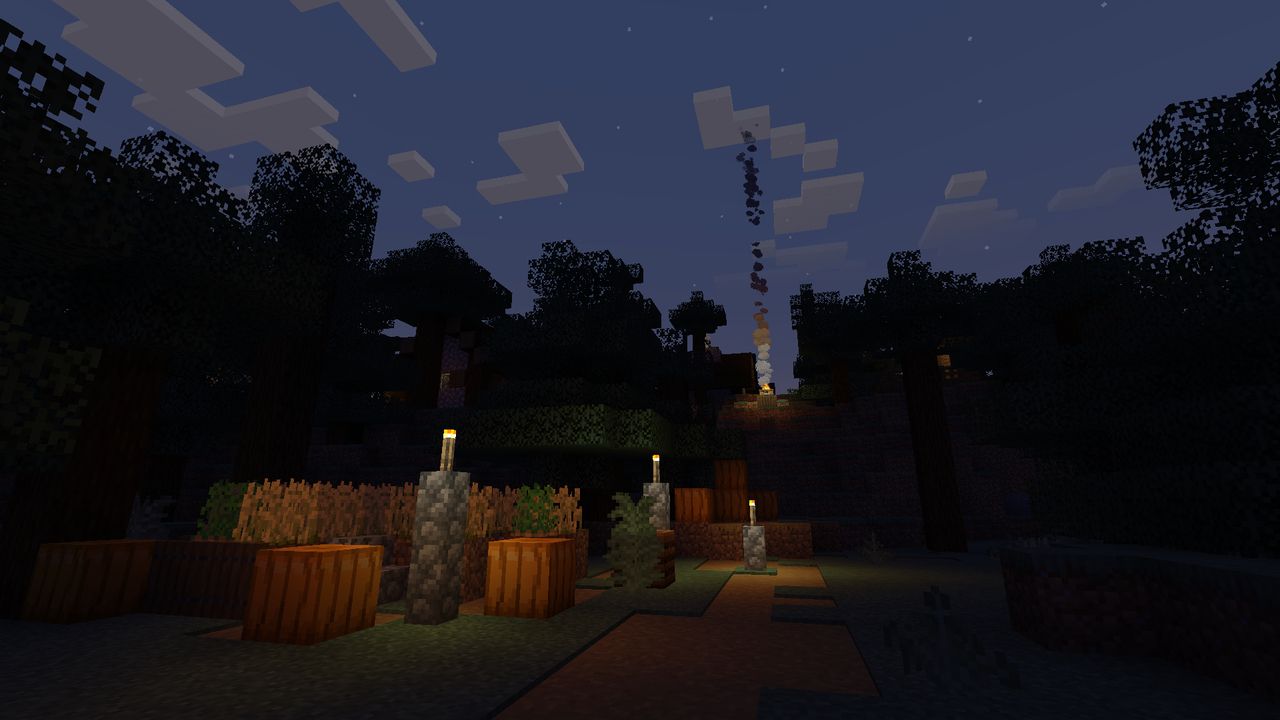
Warm visuals is a resource pack that enhances Minecraft’s lighting to be more vibrant and realistic without a significant hit in performance.
Not compatible with other shaders.
Recommended to use with 50% brightness.
Apply the resource pack before playing or change the brightness to take effect.
Vanilla Shader
## Hello everyone!
I’m excited to share my **Vanilla Shader Project** with you all. I’m still a beginner in the world of programming, but it’s been an incredible journey learning how this works and seeing the results of many hours spent in front of the screen.

I’ve just released **Version 2 (V2)**. While it was technically “ready,” I felt it needed some extra polishing (and it still does!). Please keep in mind that there are still plenty of bugs, but I’m committed to fixing them as I learn.
> **Note:** Currently, it does not support Sodium, but I’m working hard to make that happen soon!
### 🟢 What’s New in V2
* **Toon/Retro Lighting:** Light sources now feature silhouettes for a stylized, classic game aesthetic.
* **Bouncing & Indirect Light:** New mechanics for light accumulation and bounce.
* **True Darkness:** Nights are now significantly darker and more atmospheric.
—
### 1) What this shader does
* **Enhanced Lighting:** Change global illumination and light.
* **Diferrent Visuals:** Tweaks colors and contrast.
* **Performance is not bad:** Designed to run on mid-range hardware.
### 2) Why you should try it
* **New Feel:** provide a “moody” atmosphere.
* **Plug & Play:** No complex installations—it’s a standard resource pack.
### 3) Critical Info & Compatibility
* **Visual Only:** This is a purely aesthetic pack; it does not change gameplay mechanics or add any “cheats.”
*
* **Feedback Welcome:** Since I’m learning, your feedback is incredibly valuable! Feel free to report bugs or share your thoughts.
Wait n Bleed | PvP Ready!
**Wait n bleed**
## What does the pack adds?
> Small Utilities [ *Small Shield, Small Totem Item and Totem Pop, Small Potions, XP Bottles, and gaps* ]
> Shorter Sword
> Unobtrusive Tweaks [ *Small and translucent particles, Small neon fire, Quiter Enviroment* ]
> Custom blocks [Respawn Anchors, Obby, Glowstone, Grass(Small performance boost, not to much) ]
> Fancy Glint [From Here By *”archon_andromeda”* ](https://modrinth.com/resourcepack/fancy-glint) 🤙
### [Video Showcase](https://www.youtube.com/watch?v=qpYXNdy8-FU)
Volcanic Dark

As a dark mode resource pack, Volcanic Dark aims to fill the niche of those who want UI that is both pleasing to look at and is *actually* dark.
This pack also prioritizes visual clarity; You should be able to *see* what you’re doing, after all.
### Note on Feature Availability
Every feature is confirmed working starting from 1.21.4. [Respackopts](https://modrinth.com/mod/respackopts) is supported starting from 1.21
Versions prior to 1.21.2 may be missing some features present in screenshots in the gallery due to older versions of Minecraft simply missing support for later resource pack features. Additionally, colored shulker boxes require either [OptiFine](https://optifine.net/home) or an OptiFine alternative like [OptiGUI](https://modrinth.com/mod/optigui/).
Currently Supported Mods
– AppleSkin
– AuthMe
– Better Command Block UI
– Enchanted’s Sodium Options
– Entity Texture and Model Features
– Inventory Blur
– InventoryProfilesNext
– ItemSwapper
– ModMenu
– ReplayMod
– Respackopts
– RoughlyEnoughItems
– SimpleVoiceChat
Terms of Use
For the sake of transparency, while this is under All Rights Reserved, there are plenty of things you are allowed to do with this resource pack. *Note that this list is subject to change in the future. Likely if I find a license that actually has all this stuff included.*
### You are allowed to:
– Include this resource pack in any modpacks, videos, and/or showcases. While not required, linking back to this project would be *highly* appreciated!
– Make and upload your own resource packs using this style to add support for more mods provided you try not to include files from this project and clarify that it was made by someone else. “Unofficial”, if you will.
– Steal and modify non-unique assets from this project to help make your own resource packs (like the pack.mcmeta file). Ye.
### You are ***NOT*** allowed to:
– Reupload this pack to other resource pack hosting sites, *especially* not scammy ones.
– Port this resource pack to Minecraft: Bedrock Edition, or any other Minecrafts, Bedrocks, or Editions.
– Redistribute a modified version of this resource pack.
– Attempt to sell this thing. Come on now.
– Steal unique assets. Generic stuff like core shaders and “items” .json files are perfectly fine to take and reference, but don’t grab a texture from this and put it into your own pack please.
– To reiterate, my resource packs are only available on Modrinth and CurseForge (and sometimes GitHub). **If you are reading this, are not on one of those two platforms and the thief was stupid enough to leave this message in, you should probably leave, purge everything to do with the site you were just on, and run an antivirus scan.**
Voidflare Galaxy Skybox
🌌 Voidflare Galaxy PvP Skybox
Fight under a glowing nebula and distant stars with this clean, galaxy-themed skybox. Designed for PvP — no sun glare, no visual clutter, just deep space vibes and full focus.
Perfect for Bed Wars, SkyWars, and any competitive mode where clean skies matter.
⸻⸻⸻⸻⸻⸻⸻⸻⸻⸻⸻⸻⸻⸻⸻⸻⸻⸻⸻⸻⸻⸻⸻⸻⸻⸻
🔧 Requires:
[Optifine](https://optifine.net/downloads) OR [Optiboxes](https://modrinth.com/mod/optiboxes) OR [Nuit](https://modrinth.com/mod/nuit) OR Any other mod that Suports Custom Skys
**ALSO ON** **[CruseForge](https://www.curseforge.com/minecraft/texture-packs/red-voidflare-galaxy-skybox)**