Quark-less Glint

### What is Quark-Less Glint?
Quark’s Colored Glint can be a bit intrussive since you cannot see the texture beneath. That’s why I created this texture pack that reduces a bit the glint so you can see both. This does not cange anything else but the intensity of the glint, everything else is the same.
### Showcase
Note: it’s very dificult to see in a simple image, but you can appreciate the diferente. So much close to the vanilla one, but with a colored tint!

### Installation
Use Modrinth App for a one click installation or follow the steps:
– Download the fille.
– Drop it inside your resourcepacks folder.
– Enable the Quark-less Glint inside your game.
– Enjoy!
### It’s me, hi
All my social media can be found here: [Danymaddox](https://linktr.ee/Danymaddox).
And if you like to add more gold, follow me here on [Modrinth](https://modrinth.com/user/Danymaddox) and take a look, there’s more comming soon.

Quaint Atmosphere
Have you ever thought to yourself that Minecraft may benefit from some touch of life? All blocks are pretty much static, biomes may sometimes look a bit too similar to each other, there are not many animals where there should be plenty
This pack (Currently in development) aims to _enhance_ the atmosphere of Minecraft with animations and ambient effects, and while most packs like this do that using mods such as Polytone, this is an exception. This pack utilizes core shader rewriting to change how the game renders blocks, mobs and lighting, giving it more creative freedom and the ability to work in Vanilla Minecraft!
More information in the [Changelog](https://modrinth.com/resourcepack/quaint_atmosphere/changelog) and [Gallery](https://modrinth.com/resourcepack/quaint_atmosphere/gallery)
> ⚠️Warning⚠️
>
> Currently Sodium-incompatible. May cause issues on some clients
>
> If you regularly encounter FPS lag while playing, installing [It Just Works: Niche Optimization Pack](https://modrinth.com/modpack/it-just-works-niche-optimization-pack) is recommended
PvP Essentials [Overlay]
#### IGNORE “PACK IS NOT COMPATIBLE” ITS A BUG
##### everything will work perfectly fine its just mcmeta bug!
**Hey!** If you’re into Survival, SMP / PvP, this pack is made for you. It keeps everything clean, simple, and smooth and honestly, once you try PvP Essentials [Overlay], you’ll probably never want to play without it again.
It’s mainly an overlay, but you can use it alone too. Just drop it on top of any pack you like nothing gets changed except bow, crossbow, and a few more textures. This is the official PvP Essentials [Overlay], and you won’t find it anywhere else.
# Preview
#### Heads up! : The pack updates frequently depending on the newest update some visuals might be different.
## Features
– Bordered Ores
– Cleaner GUI
– Clearer Water
– Colored Bow Charge
– Colored Crossbow Charge
– Crop Growth Indicator
– Glass Bottom Boat
– Lower Shield
– Low Fire
– Less Obvious Bedrock
– No Bobber
– No Eating Particles
– No Explosion Particles
– No Fire Smoke
– No Nausea Overlay
– No Pumpkin Blur
– No Vignette
– Quieter Explosions
– Quieter Fire Tick
– Quieter Weather
– Redstone Tweaks
– Smaller Totems + Particles
– Smaller Utilities
– Seamless Glass
And More…
#
### Legal:
Textures by sz_co (1szco1). CC BY-SA. Use for personal projects only. Give credit and link to the original. Do not share without credit!
#
license
PvP Essentials [Overlay] © 2025 by sz_co is licensed under CC BY-SA 4.0


Issues?
Hit me up on Discord if something’s broken: **sz_co**
PvP Essential Utilities
A streamlined PvP and survival texture pack focused on clarity and performance. Uncluttered visuals, reduced noise, and enhanced visibility of traps, overlays, and particles. Includes transparent GUI, clear liquids, subtle sound edits, and refined environmental effects.
## **Features**
## **Textures**
Custom Crosshair
Old xp bottles
3D Smooth end crystals
Smooth respawn anchor & glowstone
## **Sounds**
No explosion sounds
No fire damage sound
No death sound
No cave ambient sounds
No ender pearl teleportation sound
Totem pop sound is a low volume firework rocket
## **Particles**
No explosion particles
No generic particles
Hollowed gust particles
All particles are transparent
## **Overlays**
Lower opacity beacon beam whilst in a beacon beam
Lower opacity powdered snow freeze overlay
Lower fire
Old enchantment glint
No vignette
No pumpkin blur
## **Opacity**
Lower nether portal opacity
No fishing bobber
Clear water
Clear lava
Clear view whilst in powdered snow
Lower opacity rain
Lower opacity snow
## **Gui**
Transparent gui
Brewing guide
## **Visibility**
No Fog
More obvious powdered snow
More obvious trapped chests
More obvious string
More obvious suspicious sand
More obvious suspicious gravel
Lower totem
Lower shield
Shorter tall grass
Side shield
Smaller hand held items
Eating animations
Bow and crossbow status
## **Credits**
Texture pack made by Shikaru
GUI – Chronicaly
Improved Brewing Guide – Moonbert0
Visible Suspicious Sand – micro
LeoTweaks 3D String – Darkleonard
PvP ClearStrike – MAK66
Smaller Totem – Reverseeh
No Fog – Hxndrik
Eating Animation Resource Pack – Bluebird
Bow Status – CapTommy
3D Crystals – CapTommy
Respawn Anchors & Glowstone – CapTommy
Smaller Handhelds – dark_phoenix_
Purple Portal and Eyes

This resource pack retextures the portal, its frame, and the eyes of ender to all be purple, to better match the end aesthetic.
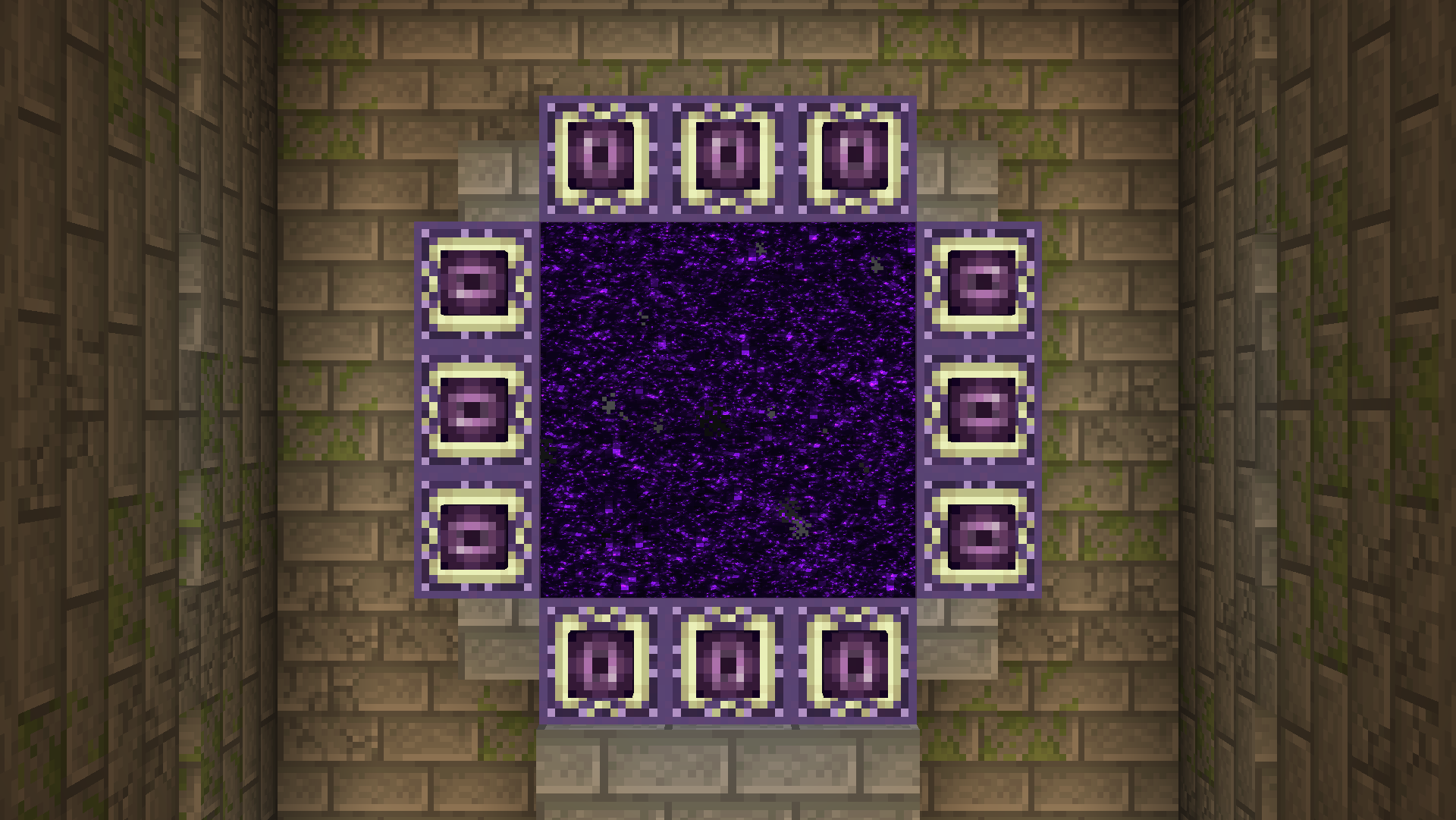
________________________________________________________________________________________________________________

This pack is inspired by the following packs, but was still done entirely by me, including texturing and changing the core shaders.
https://modrinth.com/resourcepack/better-end-portal-frame
https://modrinth.com/resourcepack/purple-end-portal
Purple Icons
# Purple Icons!
I’ve made this as an add-on for my other resource pack: [Purple GUI](https://www.modrinth.com/resourcepack/purple-gui). But it does work without it too!
## Features
– Shaded icons for the hotbar. (I was inspired of [Enhanced Hud](https://www.planetminecraft.com/texture-pack/enhanced-hud/) by [milesdemillas](https://www.planetminecraft.com/member/milesdemillas/).
– Some pretty simple circles for the hunger bar.
– Both the XP bar and the bottle of enchanting are now purple, and also the bottle looks like a splash potion.
– Core shaders to change the color of the XP level text and the XP orbs. Made with [Custom XP Colours Generator](https://enchanted.games/generator/custom-xp-colours.html) by [Enchanted Games](https://www.modrinth.com/user/enchanted-games/).
## Preview
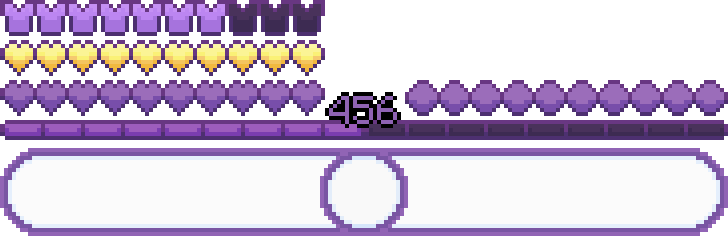
Hotbar image with a preview of the health, absorption, armor and hunger icons, along with the XP bar. Also, featuring the hotbar slots of my other resource pack: [Purple GUI](https://www.modrinth.com/resourcepack/purple-gui)
## Credits
– [Enchanted Games](https://modrinth.com/user/enchanted-games/)’s [Custom XP Colours Generator](https://enchanted.games/generator/custom-xp-colours.html).
– Huge inspiration in [Enhanced Hud](https://www.planetminecraft.com/texture-pack/miles-enhanced-hud/) by [milesdemillas](https://www.planetminecraft.com/member/milesdemillas/)
Purple Gateways Remastered
# Purple Gateways Remastered
Purple Gateways Remastered is an updated and improved version of my [Purple Gateways](https://www.planetminecraft.com/texture-pack/purple-gatewats/) pack.
I wanted to give End Portals and Gateways a more stylised look that could fit in the vanilla game.
## What this pack does
PGR changes the look of both End Portals and Gateways with a new and improved texture which includes different sized stars and a galaxy that can appear. This pack also uses shaders to improve the rendering of the stars slightly by making them use a different colour palette and making them not stretch on wider aspect ratios.
Purple End Portal


Purple End Portal is a resource pack that simply changes the color palette of the End Portal from shades of green to shades of purple.

### *If you find any type of bug or error, report it on my [discord server!](https://discord.gg/CdHqyDxMrz)*
Purple Block Selection Outline
**Disclaimer: This texture pack takes advantage of core shaders, and it is not possible to port it to 1.18. Please do not ask me for it. If you want a different block selection outline, then update your game.**
This texture pack changes the colour of the outline that appears when you select a block.
**Disclaimer 2: The outline is not as thick as it is in the icon. It was made thicker in the outline to be more visible, refer to the gallery to check how thick it actually is.**
All Other Colours:
[Blue Block Selection Outline](https://modrinth.com/resourcepack/blue-block-outline)
[Green Block Selection Outline](https://modrinth.com/resourcepack/green-block-selection-outline)
[Purple Block Selection Outline](https://modrinth.com/resourcepack/purple-block-selection-outline)
[Rainbow Block Selection Outline](https://modrinth.com/resourcepack/rainbow-block-selection-outline)
[White Block Selection Outline](https://modrinth.com/resourcepack/white-block-selection-outline)
[Red Block Selection Outline](https://modrinth.com/resourcepack/red-block-selection-outline)
Pure White LIght
Makes the light in the game completely white and not yellowish.
