Semi3D
# Add depth to blocks without cubes
_Does this by using planes in smart ways._
##
– Sugarcane each cane is it’s own cross section.
– Ladders and rails use 2 planes to add depth to each part of the block.
## Not in light version
– Several cubes use a second layer on top or inside to add depth.
##
The pack uses a shader and a special universal model for blocks to add more blocks
The shader was done with help from [Shock Micro](https://twitter.com/ShockMicro).
She does really really awesome shader stuff, that I even recommend playing with if you like this pack.
Selection Outlines Vanilla
# Selection Outlines
**Disclaimer:** This resource pack does not work when other shaders are active.
This resource pack simply changes the selection outline of the block you’re looking at to currently one of two colors; purple or turquoise. It’s very helpful for when building with dark blocks, since the vanilla outline can be really hard to see sometimes.
I would really like to see Mojang implementing this into the base game, but until then I have my own resource pack!
## Why should this be in the base game?
Customization to the selection outline would benefit all players.
Let’s start with players building with **dark blocks**. The outline is currently dark gray/black, which makes it really hard to see when building with deepslate, blackstone, netherrack, etc..
Second point I have is **personality**. Some people may like the color blue more than black (me), and getting to change the outline to whatever color you’d like would make the game feel more personal, since it’s *your* chosen color.
Third and most important is **accessibility**. People with problems to their eyes can have it hard to see the block outline. Getting to change it to a vibrant color could help with this and make it easier for them to see the block they’re looking at when they’re building, for example.
In short, players building with **dark blocks** can more easily see where they’re building, it allows for more **personality** and is also a very good **accessibility** feature.
Resource packs can already change the color of the selection outline by going to “`assetsminecraftshaderscorerendertype_lines.vsh“` and modifying a value. Though it can be hard for casual players to do since they have to read a vertex shader file and change a specific value in it, which is a bit confusing.
Therefore, adding a menu in the accessibility settings where you could modify the color and maybe choose some presets, would be a pretty good feature. It probably wouldn’t take that much time for a skilled programmer to make either, and if I knew how to, I’d definitively make a mod for it!
Screamerpack RP
**This resource pack doesn’t seem to do anything at first glance.** But when you have white dye in any form _(in your hand, in your inventory, on the screen, or in a chest)_, a frightening jumpscare appears across the entire screen. The jumpscare itself isn’t scary, but it’s creepy. You want to get rid of it as quickly as possible, but the only way to get rid of it is to stop seeing the white dye.

This resource pack is definitely a good way to scare your friend, but **don’t use it maliciously!**
**Create a jumpscare:** `/give #nick white_dye`
**Remove it:** `/clear #nick white_dye`
Saturation

Saturation For Java Edition
This pack boosts the saturation of Minecraft’s textures, making the world look more vibrant, colorful, and lively. It enhances blocks, items, and environments with richer tones while keeping the original style intact.
The saturation in the preview images was increased externally to make them look better. In-game textures will not appear that strong.
I recommend using this pack with any shader for an even better visual experience. For the preview, I used Relta Visuals(bedrock edition).
Note
This pack was originally made for the Bedrock Edition, and I have ported it to Java Edition. All preview images shown here were captured in the Bedrock version.
Saturated Grass!
# Saturated Grass!
– This resource pack has nothing except a small .png file that makes the Biome grass colors feel a little more “Happy” or Vibrant just so it doesn’t feel washed out.
I made this because some friends of mine didn’t know how to calibrate their Monitor, so i just did their request and decided to upload it :p
_This resource pack SHOULD work for all versions, but i only listed the ones that i have tried them on._
Have fun!
RuidSkin Ultimate
# RuidSkin Ultimate
### [ⓘ New website now released!](https://l301.pages.gay)
### [ⓘ Become a member on Patreon](https://www.patreon.com/LingLing1301)
### [ⓘ Subscribe me on PMC](https://www.planetminecraft.com/member/lingling1301)
**RuidSkin Ultimate** is a hyper-realistic Minecraft resource pack with incredibly detailed textures and lifelike effects. It comes in four different resolution versions: **256x**, **512x**, **1024x** and **2048x+** and is updated at least once a month. While the **256x** version is free to download, you can access the other versions by becoming a member of the creator’s Patreon community. Try out **RuidSkin Ultimate** for an immersive Minecraft experience like no other!
The **RuidSkin Ultimate** in **2048x+** resolution includes some textures that are even higher resolution at **4096x**! This resource pack delivers truly lifelike effects to your Minecraft gameplay, and testing has shown that it is surprisingly light on system resources, meaning you don’t need an ultra high-end computer to run it. Experience an even more immersive Minecraft world with **RuidSkin Ultimate**!
You can become a member of my Patreon to access **RuidSkin Ultimate** in **512x+** and even higher resolutions! This resource pack is updated at least once a week and currently contains over **1899+** realistic textures and **2000+** realistic models, to take your Minecraft gameplay to the next level. Join now to get access to the latest **RuidSkin Ultimate** updates and experience Minecraft like never before!
## Features
– **Extremely realistic realism style textures**
– **Compatible with Minecraft Java Edition 1.19.4-1.22+**
– **Includes PBR textures and supports ray tracing for stunning visuals**
– **Regular updates ensure that this resource pack is always evolving and improving**
—–
#### Minimum system requirements for 256x:
**CPU** i3-550 or A6-8550
**GPU** GT 1030 or Radeon HD 6850 X2
**MEM** 2GB DDR3 1333Mhz
**DISK** 20GB HDD
—–
**Archived Videos**
**[▶️ RuidSkin Ultimate – The BEST UITIMATE REALISTIC RESOURCEPACK IN 2025! 14900K+RTX 5090=120FPS+!!!](https://clip.place/videos/embed/4wxR9euEeLDWmo3bDfA9Xw)**
**[▶️ The Best Realistic Texture: RuidSkin Ultimate 2048X+ Make Experience Minecraft Like Never Before!](https://clip.place/videos/embed/cGUFbgb3U2qtiDjeiyaNai)**
**[▶️ Minecraft Best Realistic Texture Pack: RuidSkin Ultimate Introduction (Little Part)](https://clip.place/videos/embed/16iC3WEo4M1qq9Cm2qcSKK)**
RSRP
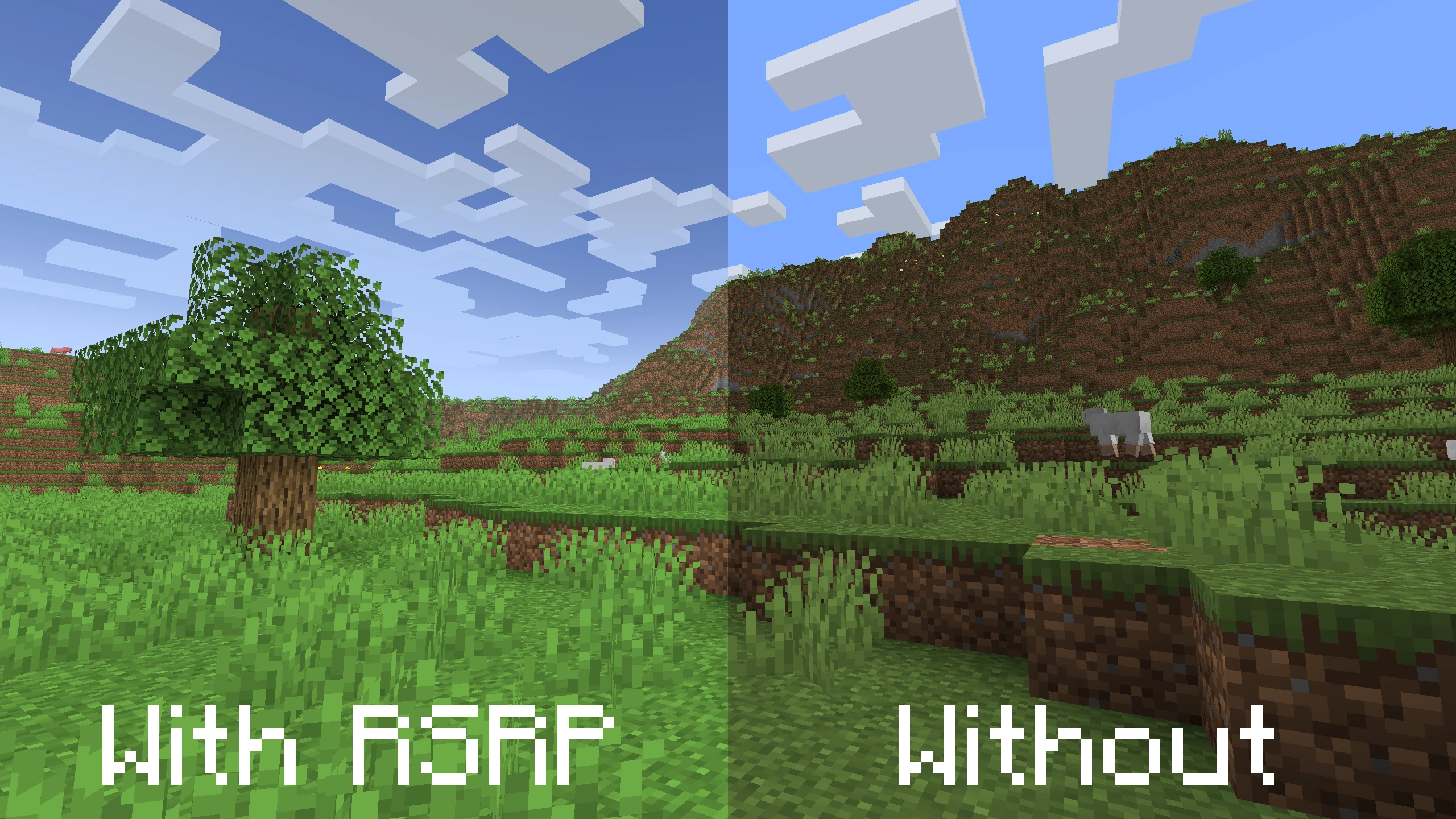
A very simple resource pack meant to make things look a bit prettier.
#
#
Uses vanilla shader methods to adjust the fog and sky, and the intensity of the shadows to give everything a softer feel. The foliage has also been changed to be closer to that of Alpha versions of the game, which looks more vibrant.
#
**Copyright © 2025, Reckobot**
#
Rotbar
Adds yaw, pitch, fog end, and fog color information to the **right side*** of the hotbar.
The topmost number is yaw in degrees and ranges from -179.99 to 180.00.
The middle number is pitch in degrees and ranges from -90.00 to 90.00.
The bottom number is fog end distance in blocks.
There is a compass beside the yaw number which can indicate cardinal directions (N E S W) and ordinal directions (NE NW SE SW). Up is north.
There is an indicator which displays whether you are looking up or down beside the pitch number.
The fog color can be found beside the fog end distance number.
***Since all information is presented on the right side, your main hand should be right for the best experience.**
No Bobber Overlay
## Showcase
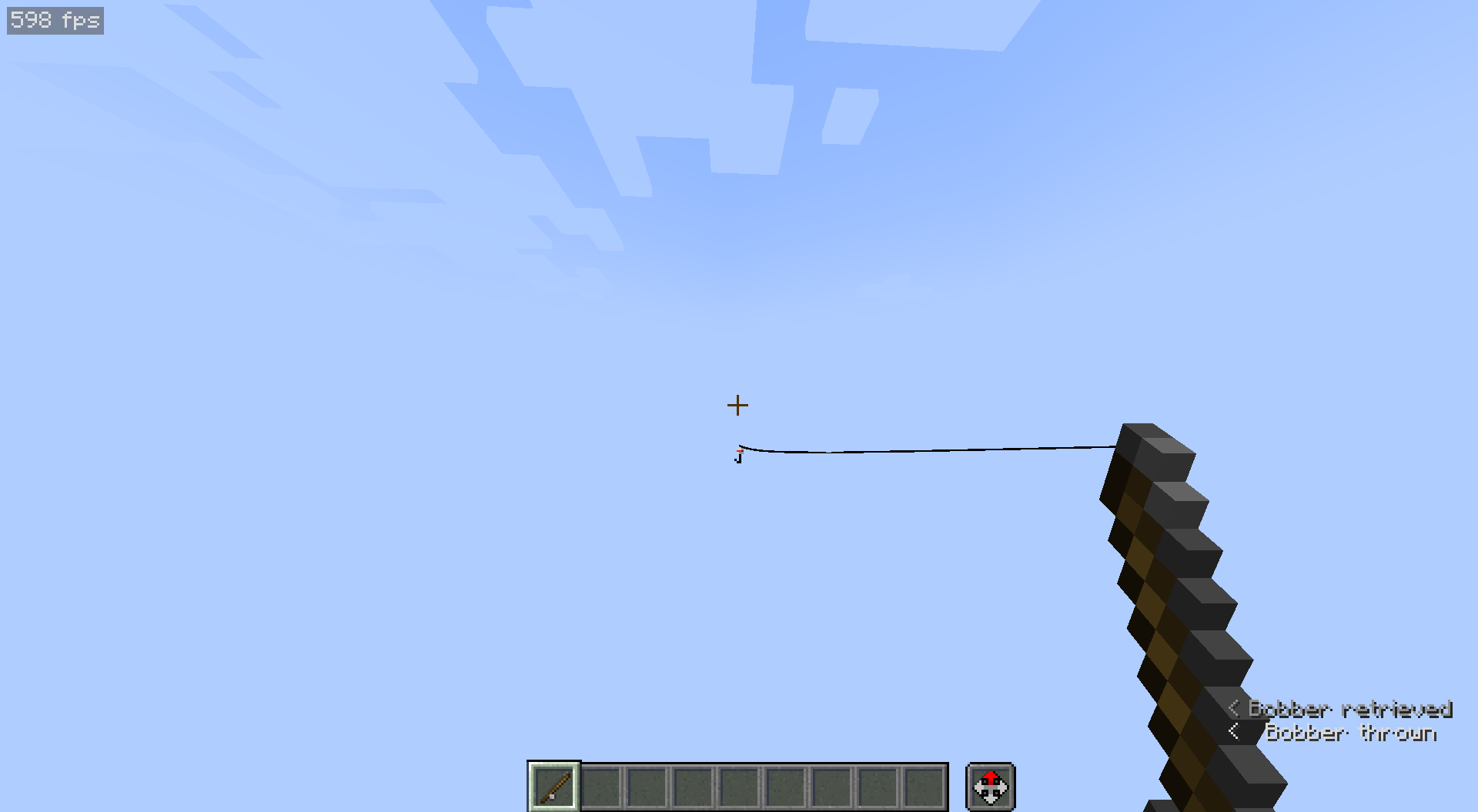
This is with the pack on and the bobber out in the world. You can still see the bobber, just as long as it’s not in your face.
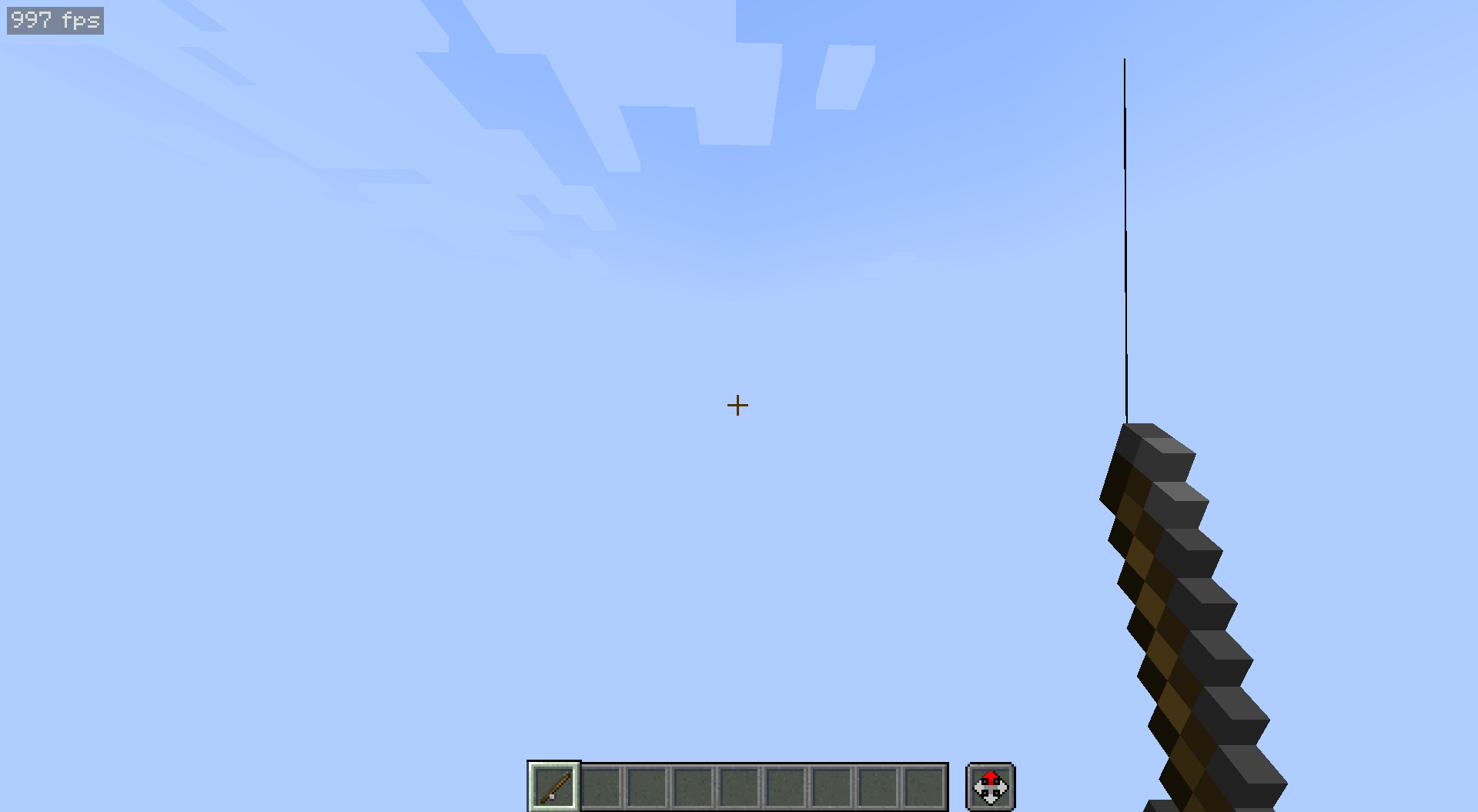
This is also with the pack on, but this time the bobber is in your face. But it’s actually hidden, meaning you can still pvp and see the rest of the world around you!
## Description
Whenever you get hooked with a fishing rod, you can see a very obtrusive overlay of a bobber on your screen. Up until now, every pack that fixed this removed the bobber texture entirely. This pack meets halfway by removing the bobber ONLY if it’s very very close to your screen (like in your face). Now, you can see the bobber while fishing but not when people hook you. This pack is very useful for pvp gamemodes.
## Support
If you would like to suggest something, report an issue, or vote on future texture packs then [join my discord](https://discord.gg/gymTft2GbV).
https://www.alphaleo.li/resourcepacks
RGB Water
## Description
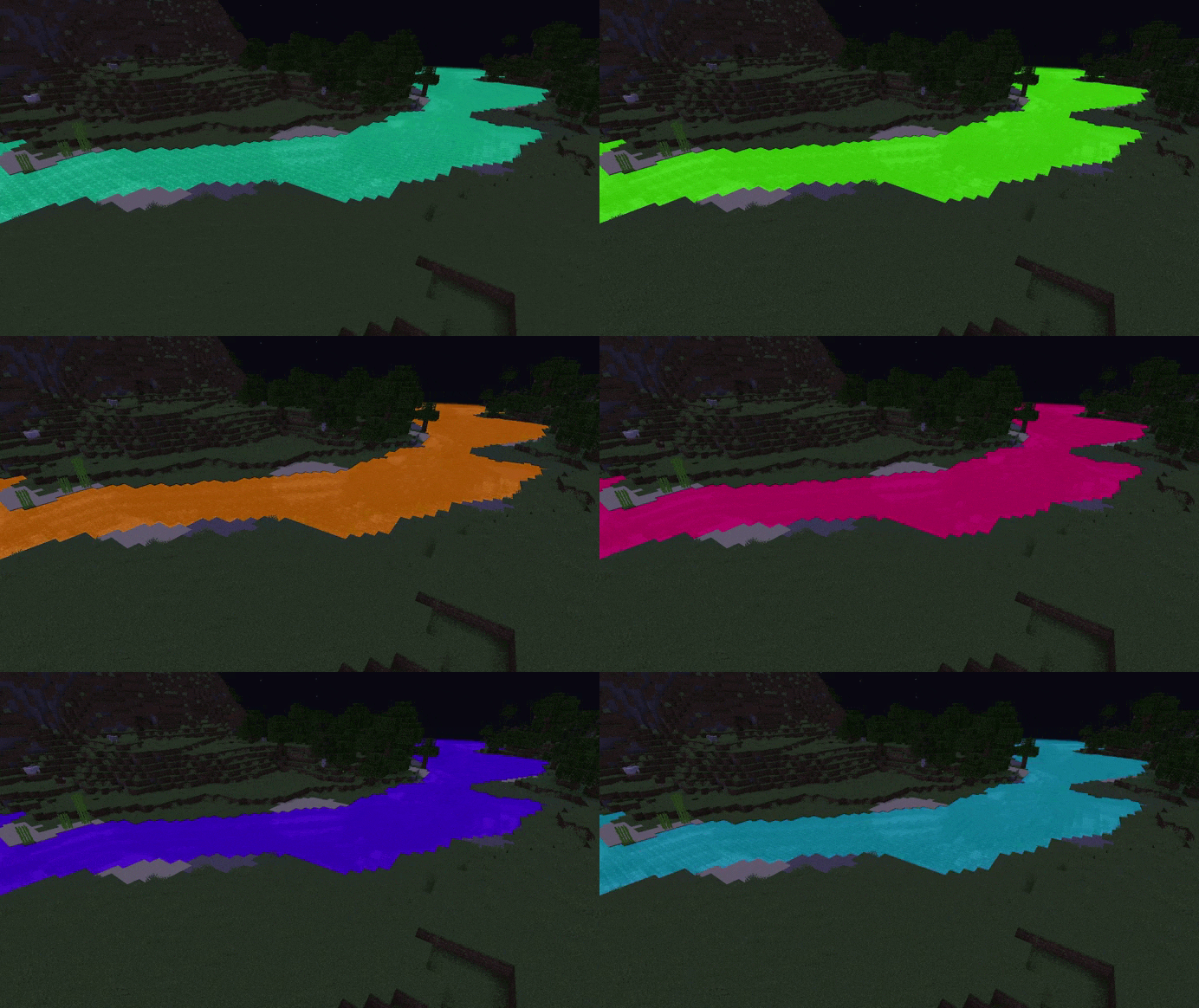
Changes the color of translucent objects to RGB. The color will change for water, nether portal, stained glass, ice and slime.