Rethinking Voxels
# Rethinking Voxels
This shader is an edit of [Complementary Reimagined](https://www.complementary.dev/reimagined) that aims to be decently fast (when compared to path tracing shaders) while having block lights cast sharp shadows.
### Notes
The lighting system is not perfect. Occasional sudden brightness changes are a side-effect of the way it works and cannot be completely removed without hurting performance or removing sharp shadows from light sources. To do the latter, disable `Per-Pixel Lighting` in the `Rethinking Voxels Settings`.
This shader is developed on Iris, using an AMD graphics card on linux, and it is also tested on an NVidia graphics card on linux. While it usually works on other platforms, bugs that appear only there are not caught by my testing and hence they take longer to fix. To use this shader pack, the Iris shader loader is required. Beta 18d and older versions also work on OptiFine.
### Contact
If you need support, please join the [shaderLabs discord server](https://discord.gg/8wT5KxF4TZ), where this shader has a channel (#rethinking-voxels-gri573).
### Partnership
I have entered a partnership with Ember, a Minecraft server hosting provider. This is because Ember hosts the complementary SMP server and has provided a better hosting experience / customer support than the previous hosting service, and because they reached out asking about it. If you need to host a Minecraft server and wish to support Rethinking Voxels’ development at the same time, do check them out! Using the promotional code `RETHINKING` in a first-time purchase will redirect 70% of the first month’s fee to me as well as give you a 10% discount.
[](https://billing.ember.host/aff.php?aff=13)
### Media
Video by youtube user iambeen that showcases rethinking voxels beta 18d (with custom settings), compared to the original reimagined:
Resident Craft
# Resident-Craft
A dark horror-inspired Minecraft shader pack built for a cold, cinematic, Resident Evil-style atmosphere.
## Overview
Resident-Craft is a custom shader project focused on tension, mood, and visibility control. It uses heavy fog, deep shadows, strong color grading, wet surface shading, and a flashlight-style lighting effect to create a tense survival-horror look.
## Features
* Heavy atmospheric fog
* Horror-style blue/teal color grading
* Strong contrast and darkness outside the light beam
* Flashlight-inspired lighting effect
* Fog-aware lighting so distant scenery fades naturally
* Wet and damp surface tinting
* Floating spores / dust-style particles
* Film grain and vignette for a cinematic look
## Best Experience
Resident-Craft is designed for:
* Dark forest environments
* Swamps, ruins, and abandoned structures
* Horror maps and adventure worlds
* Night scenes and low-light gameplay
## Recommended Settings
For the intended look, use:
* Dark or night scenes
* Low to medium render distance
* Fog enabled
* Bloom or extra post-processing kept minimal if possible
* A resource pack with muted colors if you want a stronger horror tone
## Compatibility
Compatible with:
* Iris
## Performance
The shader is designed to stay lightweight enough for lower-end systems while still producing a strong visual effect. Performance may vary depending on:
* Render distance
* Scene complexity
* Particle density
* Shader loader and GPU
## Credits
Made by Akshat Sharma.
—
If you use this shader pack in a video, mod showcase, or project submission, please credit Resident-Craft.
RenderPearl
# Modern, lightweight shaders for Iris
RenderPearl is an incredibly lightweight shader pack using the latest Iris features and optional extensions on various graphics drivers, aiming to deliver pleasant visuals with excellent performance on modern hardware.
If you want to report a bug or give feedback/suggestions, the best way to do so is by opening an issue on the [GitHub issue tracker](https://github.com/Luracasmus/renderpearl/issues). I rely heavily on user feedback in bug fixing and design.
Trivia
This project started as a continuation of “Luracasmus Shaders” (which is why you might have seen it called “LS RenderPearl”), but modern versions share little to no code with the original project. The question remains as to whether the same shader pack remains throughout, when all parts are replaced.
The name “RenderPearl” is inspired by the Bedrock Edition [RenderDragon](https://minecraft.fandom.com/wiki/RenderDragon) engine.
## Features
LabPBR 1.3 compliance & material data
“Yes” indicates support for per-texel data.
| LabPBR 1.3 required component | From resource pack | Configurable nonstandard channels | Included/procedural |
| —————————– | —————————————– | ——————————— | ———————– |
| Albedo | Yes | No | No |
| Smoothness | Yes, or as linear or perceptual roughness | Yes | Yes |
| f0/reflectance | No | | Constant |
| Normal | Yes | No | Yes |
| LabPBR 1.3 optional component | From resource pack | Included/procedural |
| —————————– | —————————— | ————————————– |
| Hardcoded metal | No | No |
| Porosity | No | No |
| Subsurface scattering | No | Constant, only on translucent geometry |
| Emmissiveness | No | Yes |
| Ambient occlusion | Binary, per-block (from model) | Yes |
| Height | No | No |
* Smooth, colored real-time shadows and volumetric light using distorted shadow mapping.
* Colored block light with physically based reflections using a light list combined with vanilla lighting and average texture color.
* Ray traced, per-hand hand light.
* A wide range of highly optimized post-processing effects, including compute shader implementations of [FidelityFX Contrast Adaptive Sharpening](https://gpuopen.com/fidelityfx-cas/), [SMAA](https://www.iryoku.com/smaa/) 1x from [SMAA-MC](https://modrinth.com/shader/smaa-mc), automatic exposure and a variety of tone mapping operators.
* Customizable waves and water opacity.
* Built-in utility features such as light level visualization and a compass overlay.
## Mod & Resource Pack Compatibility
Most built-in PBR information, including light colors, material normals and roughness, are almost entirely procedurally generated and should therefore work perfectly with most resource packs and mods.
Integration with Distant Horizons and Voxy is supported on the latest Minecraft version, but experimental and very basic. Complete support is planned for a future update.
Support for mods that modify the Iris shader pipeline, such as Chunks Fade In, is experimental and may have issues, such as the shader pack failing to compile.
## Requirements
> If you have a decently modern non-macOS device it probably supports everything you need, but you might have to update your Iris and graphics drivers.
* **Iris** with support for features:
* `BLOCK_EMISSION_ATTRIBUTE`
* `COMPUTE_SHADERS`
* `CUSTOM_IMAGES`
* `ENTITY_TRANSLUCENT`
* `PER_BUFFER_BLENDING`
* `SEPARATE_HARDWARE_SAMPLERS`
* `SSBO`
* **Graphics drivers** with support for **GLSL 4.60.8+**.
* **Minecraft** of a version that is listed as supported by the RenderPearl release. The latest supported version is usually the most stable.
Driver Support
| OS | Drivers | Support |
| ——- | —————– | ——— |
| Linux | Mesa RadeonSI | Perfect |
| Linux | Nvidia | Very Good |
| Linux | Mesa Zink/RADV | Good |
| Linux | Mesa Zink/Nvidia | Unstable |
| Windows | AMD Adrenalin | Good |
| Windows | Nvidia Game Ready | Very Good |
Only the latest stable versions are tested. All other drivers are untested. Please report any issues that occur.
## Tuning & The Compatibility Menu
The default configuration and all values selectable with profiles are intended to work on all systems that meet the shader pack’s **Requirements**, though you may be able to achieve higher performance and quality by changing some of these options. Beware that some values may cause the shader pack to not compile, in which case you simply have to reset the option. These are usually marked with a red ⚠.
Implementation-Limited Options
> The usable values and effects of these options depend on your graphics drivers.
* **Light List Capacity** is limited by the amount of Local Data Share memory usable per work group on your GPU. Depending on your GPU and graphics drivers, and the features enabled by the 16/8-Bit Types option, you may be able to set this significantly higher than the maximum value selectable with profiles (though there is no reason to do so if the light list isn’t being filled completely, usually indicated by lights flickering, as it impacts performance negatively).
* **16/8-Bit Types** uses optional OpenGL/GLSL extension-provided half- and/or quarter-sized data types to reduce register, LDS and VRAM usage. Performance impact varies depending on hardware and drivers, as conversion between types has a cost, but operations with smaller types can be significantly faster.
* **Trinary Min/Max** performs trinary minimum and maximum operations in singular function calls using the optional `AMD_shader_trinary_minmax` OpenGL/GLSL extension, which may allow generation of more optimal instruction sequences. It’s recommended to use this whenever possible.
* **32×16-Bit Multiplication** performs multiplication between 32-bit integers and integers in the 16-bit-representable range using special functions provided by the optional `INTEL_shader_integer_functions` OpenGL/GLSL extension, that may be faster than regular 32-bit multiplication operators. It’s recommended to use this whenever possible.
* **Immutable Constants** marks all shader variables that can be immutable as constant, possibly enabling better optimizations. This feature is required by the GLSL specification, but still unsupported on some graphics drivers. It’s recommended to use it whenever possible.
## Design & Modding RenderPearl
RenderPearl’s source code is intended to be modifiable and re-usable. It’s written according to best practice to the best of my ability, but prioritizing performance over readability. If you have any questions about how it works, feel free to contact me on any platform.
Technical information can be found in [the GitHub repository](https://github.com/Luracasmus/renderpearl/blob/main/DEV.md).
—
**These are the only RenderPearl project pages made by me:**
* [Modrinth](https://modrinth.com/shader/renderpearl)
* [CurseForge](https://www.curseforge.com/minecraft/shaders/renderpearl)
* [Planet Minecraft](https://www.planetminecraft.com/mod/luracasmus-s-shaders/)
* [GitHub](https://github.com/Luracasmus/renderpearl)
If you want to distribute RenderPearl, or just spread the word of it, I would greatly appreciate if you would link to at least one of them, Modrinth being the most important one.
Relumination
### Purpose
This shader aims to be a fairly lightweight alternative to vanilla lighting, adding various other impacts on light and its color to provide an interesting and colorful world!
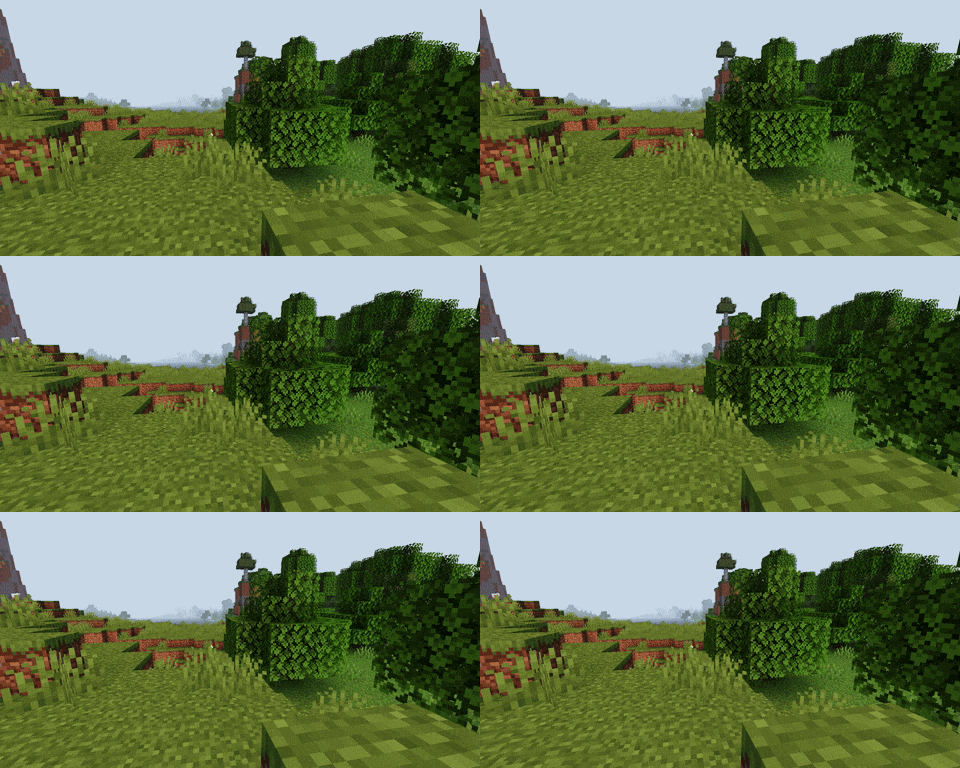
|Wind Passing by the Trees|
|————————-|
### Features
– Light intensity and color adjusts based on numerous factors including sun & moon locations, light level and more!
– Directional lighting on blocks, items, and entities
– Held item light
### Planned
– Light impacted clouds with scattering
– Light impacted fog
RedHat Shaders
– About
RedHat is a shaderpack that for Iris and Optifine.
It is an edit of an old version of Chocapic13, and has many features.
RedHat’s main features are lighting effects such as Godrays (3D, or 2D, if you have a low-end machine), Shadows, Underwater Light Absorption, and many more.
The shaderpack features reflections too, and reflects some light on all surfaces, to make everything look more similar to the Minecraft trailers style.
There are many cinematic options such as Lens Flares, Depth of Field (Chromatic Aberration included), Grain, Tilt Shift, and others.
The colors, which change depending on the time, make everything more realistic yet they keep the fantasy vibe.
There are many effects related to movement as well. All foliage or hanging things such as lanterns wave. Along those there are Waving Hand and Waving Camera options too, configurable as well.
If that wasn’t enough, RedHat supports all versions from 1.7.10 up to 1.21, and it supports custom skyboxes!
Lastly, there are many atmospherics effects such as Fog and Clouds, Round moon and sun, and other things like PBR support, Auto-Exposure, Stars, and many, many other things.
There are a lot of ways you can customize the shaderpack, and make it look like the way you want.
– Requirements
GPU: Must support OpenGL 3.2 and have at least 1GB of VRAM. AMD, NVIDIA and Intel are all supported (You’ll have to decrease some settings to play smoothly with Intel GPUs).
CPU: Must have a minimum clock speed of 1GHz
RAM: Must have located at least 1.5-2GB of RAM to your game
OS: Windows (7,8, 8.1, 10, 11), Linux (Mesa drivers might lead to issues)
Shadermod: Optifine or Iris
MC Version: 1.7.10, up to 1.21
> Light Settings Recommendation: i3/i5 3-4th Gen, 4GB DDR3 RAM, GT 1030 2GB GDDR5
> Balanced Settings Recommendation: i5/i7 8-9th Gen, 8GB DDR4 RAM, GTX 1050 Ti 4GB GDDR5
> Heavy Settings Recommendation: i5/i7/i9 10th+ Gen, 16GB DDR5 RAM, GTX 1660 Ti 6GB GDDR6
If you use RedHat without meeting these requirements, then keep in mind you’ll take a risk.
RedHat is a pretty heavy shaderpack, thus do not expect it to be FPS friendly on the default settings.
Recastional
# 🌊 Recastional Shader Pack
> **Elevate your Minecraft experience to a cinematic masterpiece.**
**Recastional** is a shader pack designed to transform your world into an exhilarating visual journey. It creates a unique atmosphere, enveloping the environment in a warm, caressing light that brings every pixel to life.
***
## ✨ Overview
As the sun rises and sets, its rays pierce through the clouds, casting a **soft golden glow** that enhances the natural beauty of the landscape. With **Recastional**, you don’t just play — you immerse yourself in a cinematic experience where every frame is a work of art.
* **Vibrant Textures:** Every rock, tree, and building feels detailed and alive.
* **Shimmering Waters:** Realistic water surfaces that sparkle as if kissed by sunlight.
* **Dynamic Shadows:** Stretching and shifting shadows that add profound depth to your surroundings.
* **Atmospheric Skies:** Volumetric clouds and glowing flora that invite exploration.
***
## 🛠 Complete Feature List
### 🎨 Advanced Rendering Systems
* **Enhanced Particle System** – Physics-based particle rendering with LOD support.
* **Volumetric Clouds** – High-precision ray-marching for realistic skyboxes.
* **Advanced Water System** – Real-time reflections, refractions, and caustics.
* **Parallax Terrain Mapping** – Height-based surface displacement with triplanar mapping.
* **Entity Glow Effects** – Dynamic rim lighting and emissive textures for special entities.
### 🔧 Post-Processing Pipeline
* **Enhanced Composite** – HDR tone mapping, professional color grading, and subtle film grain.
* **Bloom System** – Multi-pass bloom with Gaussian blur and granular intensity control.
* **Depth of Field** – Realistic camera focus with high-quality hexagonal bokeh.
* **Advanced Shadow Mapping** – PCF filtering with support for soft and colored shadows.
### 🚀 Performance & Optimization
* **GPU Optimizer** – Hardware-specific tweaks for **NVIDIA**, **AMD**, and **Intel**.
* **LOD Manager** – Automatic level-of-detail scaling based on distance.
* **Dynamic Quality Scaling** – Real-time performance adjustments to maintain stability.
### 🔄 Compatibility & Legacy
* **OpenGL Compatibility** – Stable fallback shaders for older graphics hardware.
* **Cross-Platform** – Full support for **Windows, macOS, and Linux**.
* **VR & Multi-Monitor** – Stereoscopic rendering and ultra-wide display configurations.
### 📚 Technical Foundation
* **PBR Shading Library** – Physically Based Rendering using the **Cook-Torrance BRDF**.
* **Next-Gen Lighting** – Volumetric lighting, SSAO, and Global Illumination (GI).
* **Weather Module** – Dynamic simulation of rain, snow, and atmospheric fog.
***
## 📋 Configuration & Presets
You can fine-tune your experience using our modular configuration files:
* `advanced.properties` – Toggle high-end rendering features.
* `performance.properties` – Hardware-specific optimization toggles.
* `debug.properties` – Tools for development and analysis.
### ⚠️ Important Note on Performance
To achieve the **ULTRA** and **HIGH** graphics shown in screenshots, **Iris Shaders** is highly recommended.
> **Note:** High settings are hardware-intensive. If you experience low FPS, please adjust your preset in the shader options.
***
## 🎮 Version Support
* **Compatibility:** Fully optimized for **Minecraft 1.21.11**.
* **Engine:** Works best with **Iris** or **OptiFine**.
***
_Created with passion for the Minecraft community._
Also available on CurseForge: [CurseForge](https://www.curseforge.com/minecraft/shaders/recastional)

RealisticallyOptimized
# RealisticallyOptimized Shader
## Overview
RealisticallyOptimized is a stylized, performance-focused shader preset with toon lighting, strong outlines, brighter sky highlights, deeper nights, and improved emissive handling for ores and light sources.
## Features
– Real-time shadow mapping for terrain, entities, textured geometry, and water.
– Toon ramp direct lighting with adjustable shadow darkness and step count.
– Day/night color tinting with global vibrance control.
– White world outline effect in final pass (Complementary-inspired depth-based method).
– Adjustable outline thickness and brightness.
– Brighter sky/sun/moon rendering with preserved geometry separation.
– Darker nighttime grading with optional cool blue weather/night tint.
– Enhanced blocklight contribution across terrain, entities, and textured passes.
– Stronger emissive treatment for major light sources (torch, lantern, glowstone, sea lantern, candles, campfire, etc.).
– Complementary-style glowing ores using per-ore groups and per-pixel ore-part detection:
– Iron, Gold, Copper, Lapis, Emerald, Diamond, Nether Quartz, Nether Gold, Redstone.
– Adjustable ore glow strength (`GLOWING_ORE_MULT`).
– Water shading with toon-lit base and no forced water glow overlay.
– Waving vegetation support via custom block material IDs.
## Install
1. Put `RealisticallyOptimized.zip` in `.minecraft/shaderpacks`.
2. Select `RealisticallyOptimized` in the Iris shader menu.
3. Ensure Shadows are enabled in Iris settings.
## Troubleshooting
– Set Graphics to Fancy or Fabulous.
– Set Shadow Quality to at least 1024.
– Test at noon near a wall and a mob (`/time set noon`).
Raincore
—
The rain never stopped in 1998.

[](https://github.com/myueqf/Raincore/stargazers)
#### About:
Raincore is a shader pack that captures the petrichor scent of moist earth after the rain, featuring distinct pixelated effects and grain/lo-fi.
This is my fifth shader pack, built upon my previous work, [Lantern](https://modrinth.com/shader/lantern-shader). I hope you enjoy it! (^-^)
#### Performance:
No high-end hardware is required; integrated graphics are sufficient for a smooth experience.
For the best visual balance, a render distance of 8 chunks is recommended. While you can go lower, it is best kept between 8 to 11 chunks.
#### Links:
– >[Github](https://github.com/myueqf/Raincore)
– >[Discord](https://discord.gg/9ATsdr2ms7)
– >[CurseForge](https://www.curseforge.com/minecraft/shaders/raincore)
#### FAQ:
– **Q**: Can I include this shader in my Modpack?
– **A**: Distributing this shader as part of a modpack without modifying its source code is not considered creating a derivative work. Other components of the modpack are not bound by the GPLv3 license.
Psiho shader
I do not know how **_psychos_** see the world, but I was curious. That’s how I created this shader.
Caution! If in the settings file.glsl change the shader parameter and make it greater than 100, unpleasant things can happen.
Do you want to try something new? This shader will add a sense of madness and pain to the game. It is especially suitable for those who have already gone through Minecraft many times, built many buildings and created mods and shaders. If you get bored, try to test your strength and become a real masochist!
With this shader, every stage of the game, from the tree to the dragon, will become incredibly difficult. But that’s not all! Try to build something more complicated than two blocks on the sides and three up. Feel the real pain and enjoy the game on a new level!
?
**_what I created…_**
For true connoisseurs of difficulties, open the settings file.glsl and make the following changes:
“`glsl
#define MESS_INTENSITY 250.0 // maybe… more)?
“`
PosterizationShader
## **PosterizationShader – Artistic Posterization Shader**
Transform your Minecraft into a stylized poster with this lightweight shader pack!
**What is posterization?** Posterization is an artistic effect that reduces the number of colors in an image to discrete levels, creating a unique visual style with clearly defined color bands instead of smooth gradients.
**Features:**
– Customizable posterization effect (4-32 levels)
– Maximum performance – virtually no impact on FPS
– Full compatibility with Optifine and Iris Shaders
– Supports Minecraft 1.16+
**Configuration:**
Change the POSTERIZATION_LEVELS parameter in the shaders.properties file:
– 4 – Extreme posterization (very few colors)
– 8 – Medium posterization (default, recommended)
– 16 – Light posterization
– 32 – Barely noticeable posterization
**Installation:**
1. Install Optifine or Iris + Sodium
2. Place PosterizationShader.zip in your .minecraft/shaderpacks/ folder
3. Activate the shader in video settings
**Technical Details:** The shader works by quantizing the RGB channels of each pixel at the final rendering stage, which allows for high performance while creating a unique visual effect.
Perfect for:
– Screenshots and artistic content
– Players who want a unique visual experience
– Low-end PCs (shader is very lightweight)