Pegasus Shaders
If you follow me on [YouTube](https://m.youtube.com/@timetravelbeard3588?si=gBJoIsu4O9kolu_r), or play with any of my heavy shaders, you know I like to push the limits and do things that no one has done before. But those shaders are heavy!!
The aim of this shader is to mix some of the state of the art and never done before features of my hard to run shaders ‘[Icarus](https://www.patreon.com/timetravelbeard)’ and ‘[CTMPOMFIX](https://www.curseforge.com/minecraft/shaders/ctmpomfix-shader-chocapic13-shaders-edit)’, and the performance of my very fast Vanilla+ shader ‘[Simply Upscaled](https://modrinth.com/shader/simply-upscaled)’.
–
This is Pretty Early in development.
If you would like to support development, play with my more top-tier shaders ‘Icarus’, get early access to dev builds and new features, or just say thank you, please join [my Patreon](https://www.patreon.com/timetravelbeard).
If you would like support, to share screenshots, make requests, or join the community, please join [my discord](https://discord.gg/S6F4r6K5yU).
–
** ‘Vx’ versions (0.3.3 and up) get lower fps due to voxelizing for Colored Lighting. If you use 0.3.2 you will get better fps but not have Colored Lighting**
–
Current notable features:
-distant horizons support
-physics mod support
-photonics mod support (check alpha versions)
-crashing Beach waves (with physics mod and iris on 1.20.1 or higher)
-optional texture upscaling
-pbr
-speed (on lower presets)
-vanilla, cartoon, and realistic/fantasy styles
–
–
I hope you have fun!
Let me know what you think.
–
videos of what’s new:
– alpha versions aren’t tested on all hardware yet, please tell me about bugs or errors on discord.
–
discord: https://discord.gg/S6F4r6K5yU
Patreon: https://www.patreon.com/timetravelbeard
YouTube: https://m.youtube.com/@timetravelbeard3588?si=gBJoIsu4O9kolu_r
Paranoia Shader
Paranoia is a simple shader based on [Base-Shader 2.0](https://modrinth.com/shader/base-shader) that add a few skyboxes based on games I love or references.
## Previews
Titan Eye from deltarune. All 500 of them, looking straight at you. At all time. This is why it’s called Paranoia.

*a great way to passively remain aware of your suroundings at all time.*
Omori’s HeadSpace, with the little drawing in the sky.

*a safe place that you can home, anywhere in your world !*
A red grid, inspired by Tron. Great for events taking place in a small space to give a simulation-like feeling.

The heatmap of the infamous [NoCom exploit](https://github.com/nerdsinspace/nocom-explanation) from 2b2t, in 8K.

*Can also look like Gojo’s Domain Expansion if you want.*
🖌️PaintBound
# 🖌️ **PaintBound Shader**
Transform your Minecraft world into a **living painting**! This unique stylized rendering shader brings an artistic painted aesthetic to your gameplay, featuring hand-drawn style outlines and dynamic paintwork that makes every block look like it was painted by an artist.
—
## 📺 **Trailer**
—
## ✨ **Features**
🖌️ **Paint filter** – A Kuwahara filter adds splotches of paint to the image
✏️ **Pencil-style outlines** – Give everything a hand-drawn appearance
🎨 **Color Palette** – Choose between two defaults or add your own custom color palettes
⚙️ **Extensive customization** – Tweak settings to match your artistic vision
—
## 💬 **Community & Support**

Join our Discord
Share screenshots, suggest features, or get help with the shader! Your feedback helps make **PaintBound** even better.
—
## 🙏 **Credits**
Special thanks to **XorDev** for allowing the use of block model distortion, Voronoi texture effects, and water glare techniques from the [Unsquare Shaderpack](https://github.com/XorDev/Unsquare-Shaderpack) that help bring this artistic vision to life!
Pagoda Shaders
[](https://www.youtube.com/@GlacierServicesMC)
### ABOUT
**Pagoda Shaders is a Japanese, Chinese, and Korean tradition-inspired shader pack with visuals reminiscent of old-style anime. It brings a soft, cultural aesthetic to Minecraft, offering a peaceful and nostalgic visual experience. Designed for fans of traditional East Asian themes, Pagoda Shaders blends elegance with performance-friendly visuals**
### Features
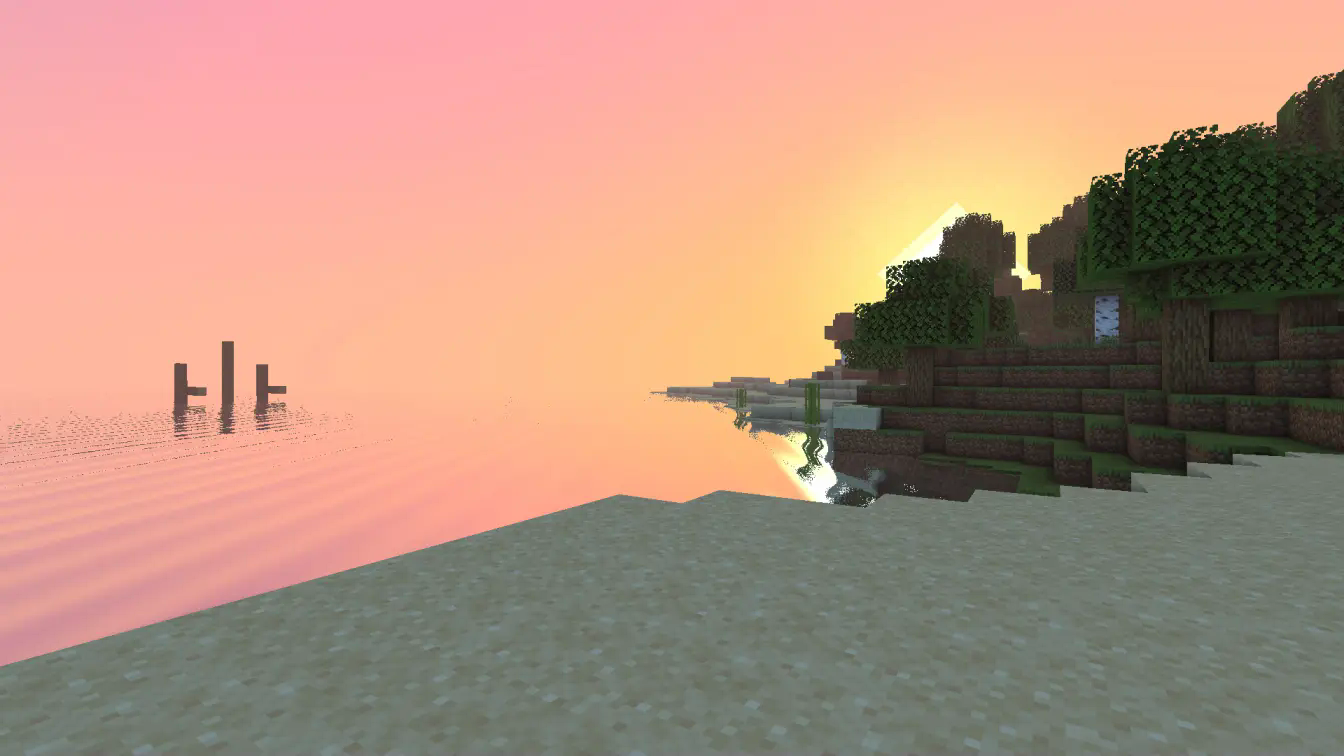
**Pagoda Shaders includes a beautiful pink-themed sunset, reflective water, and a gentle, serene atmosphere. It does not include waving foliage to ensure better performance on low-end and midrange PCs. However, it features waving water for added realism. Perfect for players who want artistic vibes with smoother FPS.**
### BUGS
**Found a bug? Report it by creating a ticket under the bug category in our Discord server. Your feedback is important and helps us improve Pagoda Shaders for everyone. Every bug report is appreciated and brings us closer to a perfect visual experience.**

Orion Shaders
**[PLEASE DISABLE CLOUNDS IN VIDEO SETTINGS FOR BEST RESULTS]**
# Orion Shaders
## About
Orion Shaders is a high quality Minecraft Shaderpack to make your world have a more cinematic look and feel. It features beautiful lighting, heavy customization, realistic shadows, wavy water, realistic sky textures, and colorful block lighting to take your playing experience to the Next level!
## FEATURES
Check out the Changelog to find the list of features.
**TESTED ON IRIS + FABRIC 1.21.11 AS OF NOW.**
Open4ES Renewed
# ABOUT
Open4ES Renewed Shader Are Simple Shaders For Minecraft: Java Edition and Pojav Launcher.
These Shaders Have Several Features, One of Which is Shadow, SSAO, Reflection, Clouds, RainBow, and More
# LINKS
– Join My Discord Sever to Discuss, Bug Reports, Etc. [Open4ES Renewed Discord](https://discord.com/invite/eVsYRwn4ey)
# INSTALL THE SHADERS
– Download Client Which Supports Installing Shaders Such as Optifine and Iris
– Download The Shaders
– Copy Shaders to /.minecraft/shaderpacks
– Launch Minecraft, Go to Options –> Video Settings –> Shaders
– Choose Open4ES Renewed Shader
ONWARD Shader
# a fork of Lethal Shaders used in my modpack, ONWARD.
**ONWARD Shader** is a fork of **[Lethal Shaders](https://modrinth.com/shader/lethal-shaders)** which adds shadows, reflections, godrays, etc. all whilst maintaining a pixelated, retro look.
## ✨ main features
* pixelated shadows inspired by Vibrant Visuals
* water reflections (SSR) with adjustable quality
* godrays and atmosphere effects to enhance your world’s look
* all can be tweaked and toggled to your liking
## ⚙️ presets
* **Ultra Performance** – optimised for much lower-end systems
* **Performance** – like Balanced, except much lower fidelity
* **Balanced** – the default experience; should run well on most mid-range systems
* **Quality** – all settings enabled for the highest fidelity experience
## 📦 usage
this shader comes bundled in my modpack **[ONWARD](https://modrinth.com/modpack/onward)**, but is also available standalone for ease of access.
## 📜 license & credits
this project is based off of **[Lethal Shaders](https://modrinth.com/shader/lethal-shaders)** created by **[doonv](https://modrinth.com/user/doonv)**, which is licensed under the
**GNU General Public License v3.0 or later (GPL-3.0-or-later)**.
as a result, you may create a fork or modify this shader and share it under the same license.
### original project:
* **[Lethal Shaders](https://modrinth.com/shader/lethal-shaders)**
## ⚠️ notes
* this shader is still a work in progress
* visual behaviour may not be perfect
* some features may be experimental in future updates
* this can be due to instability with performance and/or visuals
## 🔧 development
**ONWARD Shader** is developed alongside the ONWARD modpack, meaning shader updates will typically release alongside modpack updates.
Nwoof’s Wynn Shader

**THIS PROJECT IS CURRENTLY IN BETA. IF YOU ENCOUNTER ANY ERRORS/BUGS, I HIGHLY RECOMMEND REPORTING IT ON THE [GITHUB PAGE](https://github.com/nwoof2012/Nwoofs-Wynn-Shader/issues), ESPECIALLY IF NO ONE ELSE HAS YET.**
# About
Are you looking to play Wynncraft with shaders, but don’t want to compromise on playability or visuals? _**Nwoof’s Wynn Shader**_ is designed with a goal to fulfill that wish at its core. Designed and written based on problems encountered by Wynncraft players regarding shaders, this is the first shader designed with the Wynncraft player’s experience in mind.
# Features
– ## Shadowmapping
Virtual texture-based shadow system. Provides customization options such as adjustable resolution and culling distance.
– ## Bloom
Simulates a glow effect for added realism to the world’s lighting and illumination. The amount of total samples in this effect can be adjusted to provide the right balance of performance and visual quality.
– ## Lighting
The lighting algorithms include Scene-Aware Lighting that adjusts the color of the world’s lighting based on the original light source, toggleable Path-Traced Global Illumination which simulates the emission and reflection of light rays, and a customizable range for controlling/balancing light levels. There is also Custom Water with Screen Space Reflections and Light Refraction.
– ## Sky
The shader also comes with sky features such as Customizable Sky/Fog/Atmosphere Colors for various times of day, and Volumetric Clouds that adapt to the weather.
– ## Scene-Aware Grading
When travelling throughout the world, the tonemapping and color grading will automatically adjust to a scheme which is appropriate for your location.
– ## Mod Support
Nwoof’s Wynn Shader has integrated support for mods like [Wynncraft Dynamic Weather](https://modrinth.com/mod/wynncraft-dynamic-weather), [Distant Horizons](https://modrinth.com/mod/distanthorizons), and [Physics Mod](https://www.patreon.com/Haubna).
# Additional Links
– [Nwoof’s Site](https://nwoof2012.github.io/) – This is a portfolio site displaying information on my projects.
– [Bluesky](https://bsky.app/profile/nwoof2012.bsky.social) – This is my Bluesky account. I announce feature updates and milestones here.
### Disclaimer
Nwoof’s Wynn Shader is in no way affiliated with Wynncraft or any of the supported mods. Do not send them any bugs related to my shader, instead send them directly to me.
# Q&A
Frequently Asked Questions
> Why is the shader so dark/bright?
The optimal/preferred light levels can vary from person to person. If you feel the shader is too dark/bright, adjust the minimum/maximum light.
> Why is the fog so strong?
The default fog settings are set for my personal taste. If you’d prefer something different, you can change the fog’s settings.
Nova Reimagined
# Nova Reimagined
### REQUIRES COMPANION MODS [NOVA REIMAGINED SNOW](https://modrinth.com/mod/nova-reimagined-snow) AND [SEASON CACHE](https://modrinth.com/mod/season-cache) TO PROPERLY ENABLE FULL SNOW SHADER SYSTEM
**A modified Minecraft shader pack based on Complementary Reimagined by EminGT.**
Nova Reimagined modifies and adds to Complementary Reimagined with a shader-driven surface snow system, cell shaded lighting model, per-time-of-day weather visuals, and more with a curated set of defaults tuned for a stylised, lightly cell-shaded aesthetic.
—
—
_**NOTE:** Should be compatible with Iris 1.6+ and Distant Horizons 2.45b+ unless specific changes break compatibility in the future. Should be compatible with Minecraft 1.21.X, though primarily built for and tested on 1.21.1. The more at-risk compatibility concern would be with the companion mod Nova Reimagined Snow, but that’s also relatively well guarded._
## Features
### Surface Snow System

Nova Reimagined’s centrepiece feature. Snow is painted directly onto terrain, paths, foliage, wood, and structural blocks in snowy biomes using a noise-driven pixel-locked pattern. Coverage fades naturally under tree canopies and near light sources, creating organic melt patterns rather than hard biome boundary lines. Up to four snow texture variants are resolved automatically from your active resource pack stack, so the snow appearance adapts to whatever resource pack you have installed. **[Requires the Nova Reimagined Snow companion mod,](https://modrinth.com/mod/nova-reimagined-snow)** and **[Season Cache.](https://modrinth.com/mod/season-cache)**
### Cell Shaded Lighting

An optional cel-shaded lighting model that quantises block light into discrete bands, giving illuminated areas a stylised, hand-drawn quality. Band count, contrast, and ambient contribution are all tunable, making it possible to dial in anything from a subtle painterly warmth to a more pronounced cartoon look. Works alongside coloured lighting for fully coloured cel-shaded block light.
### Extended Dark Outline System

A configurable dark outline pass that traces the edges of geometry, reinforcing Minecraft’s natural block silhouettes. Outline weight, fade distance, and fade range are all adjustable, letting you control how aggressively outlines appear at distance. Can be combined with the cel-shaded lighting for a cohesive illustrative style.
### Per-Time-of-Day And Per-Time-of-Day Weather Visuals

Dawn/Dusk, Day, and Night all have their own lighting and atmospherics profiles. Rain and storm conditions have fully independent visual profiles for day, dusk, and night. Ambient levels, light intensity, atmospheric fog, border fog brightness, cloud brightness, light warmth, and glare desaturation are all separately tunable across all six weather and time-of-day combinations. This allows storms to feel dramatically different depending on when they hit rather than applying a single flat weather filter over everything.
### Underwater Visuals

Underwater environments have dedicated colour and brightness controls for day, dusk, and night, along with independent settings for water fog, border fog, and light shafts. Water colour, foam intensity, texture detail, and refraction are all configurable, giving full control over how water looks from both above and below the surface.
### Distant Horizons LOD Fade and Overdraw Protection

To make the transition from vanilla render space to Distant Horizons LOD terrain smoothly fade in instead of pop in, LOD fade system with overdraw protection has been implemented and is fully configurable to make it work for your specific needs. This is probably one of the more visually impactful options should you be using Distant Horizons.
### Distant Horizons LOD Custom Texture Application

Similar to the snow shader, grass, stone, sand, and a handful of other block types can have their texture paths added to the configuration file so that the shader uses them to better match distant lands to your vanilla draw distance space. Grass specifically has per-season visual options in the settings to allow you to perfectly match colors across all seasons when using Serene Seasons. Exposure and general texture use options available for all blocks included, and the entire system can be disabled if preferred.
### SMAA Anti-Aliasing

Subpixel Morphological Anti-Aliasing is available alongside TAA, providing sharp edge smoothing with less ghosting on moving geometry than temporal methods alone. SMAA and TAA can be used in combination or independently depending on your preference for sharpness versus stability.
### Alternative Tone Mappers

In addition to the native Complementary tonemapper, Nova Reimagined includes a selection of alternative tonemapping operators. Each operator changes how colour and brightness are mapped to the display, giving meaningfully different looks ranging from filmic contrast curves to flatter, more neutral presentations. The native tonemapper’s brightness, contrast, saturation, and vibrance controls remain available regardless of which operator is selected.
### General Alterations and Additions

Several other minor systems have been alterated or added as well. World Space Reflections and Advanced Color Tracing are fully independent. Depth Blur has been stabilized and modified to help sell visual planes. Atmospheric Fog is now comprised of general, and ground fogs. Cave detection and lighting has been changed. Probably more that my dad brain is forgetting lol. A lot…it’s a lot.
—
## Frequently Asked Questions
Q. Do I really need [Nova Reimagined Snow](https://modrinth.com/mod/nova-reimagined-snow) or [Season Cache](https://modrinth.com/mod/season-cache)?
Spoiler
A. Technically, no, but the snow shader will not work as intended without them. If you’re interested in all the other features and don’t care for the snow shader, you can ignore the companion mods but you’ll want to disable all the snow shader toggles and Distant Horizons texture options under the Materials section and Other section of the settings.
Q. What is the performance hit?
Spoiler
A. You can expect similar performance to Complementary Reimagined as most of what’s been added or modified doesn’t add much weight. Full winter scenes with Distant Horizons may be a bit heavier than without, but I wouldn’t expect it to cripple your framerate above not using the snow shader options.
There are several new toggles that can help get the most out of your performance, though, such as choosing where light shafts will render, which parts of the snow shader system to use, Distant Horizons overdraw protection, and more. Inherently built to look good without having to use PBR, you can also leave it and other heavy options off without losing the great visuals.
Q. Do I have to use the dark outline, cell shaded lighting, etc.? Can you toggle them?
Spoiler
A. You don’t have to at all! The outline, lighting, even individual snow shader per block category are exposed so you can make the shader pack work for your taste, your performance goals, and your resource packs. I made sure to expose as many toggles and sliders as I could within reason to put the power in your hands to do what you want and need to in order to get the most out of the shader pack.
Q. What about Voxy?
Spoiler
A. Like all of my mods, they’re born of necessity. At the time of creating this shader pack, Voxy was not compatible with multiplayer and as my mods are made for my server I run for my friends it was left out. By the time Voxy is multiplayer capable I suspect the OpenGL to Vulkan switch will have happened and there will be more than Voxy to try to sort out should forward compatibility continue haha.
Q. Does this work with Serene Seasons or other seasonal mods?
Spoiler
A. The snow shader was actually born of using Serene Seasons and wanting to figure out a way to make use of Complementary’s existing snowy world toggle in a more targeted way. That is to say, it absolutely works with Serene Seasons. It’s really meant specifically for Serene Seasons, though, so if it does work with other seasonal mods it’s an unintended win haha.
To make sure your Distant Horizons LODs change with the seasons, you’ll also want my mod that handles Serene Seasons x Distant Horizons [which you can find here](https://modrinth.com/mod/serene-seasons-x-distant-horizons).
Q. Is this Vanilla friendly?
Spoiler
A. To be honest, as I’m very new to the Minecraft modding scene, I’m still not 100% sure what the agreed upon criteria for being Vanilla Friendly is. To my knowledge it’s some amalgam of visual and functional changes that don’t mess with the vanilla experience or internals. In that sense, I would assume this is vanilla friendly. I set out wanting to make Minecraft still look like Minecraft despite using Alacrity, which is a very much detail heavy resource pack.
Q. What Texture Pack, World Generation, etc. do you use in the screenshots?
Spoiler
A. The main texture/resource pack is Alacrity and a selection of John’s Alacrity Enhanced content (had to do some modifying to get compatibility in check) and a smattering of the usual suspects for animals, animations etc. The world generation was a combination of Larion, Larion Disc World, Lithostitched, WWOO, and accompanying structure/dungeon/accessory mods to round it out.
Q. Are there specific resource packs you’d recommend?
Spoiler
A. While all the effects will work with essentially any pack, there are definitely some that handle things like the dark outline and snow shaders better than others. Alacrity is my personal choice, but Whimscape also works really well!
Q. Any settings you’d recommend that aren’t default?
Spoiler
A. Yes! If your machine can handle it, going from Real-Time Lighting High to Very High can have a meaningful impact in forest scenes especially. Ultra isn’t worth it, though.
Also, if you’re using Distant Horizons you can use its settings to slightly alter its LOD brightness and saturation to better match your vanilla render distance to make for an even more seemless experience. Similarly, in the shader options you can tweak Distant Horizon’s water color to match your vanilla render distance and all but eliminate the visible transition point which makes for great views!
Honestly, as long as you’re using the Cell Lighting, and some form of the Dark Outline, you can choose whatever you want to suit your performance needs without losing too much of the original visual intent so feel free to experiment!
Q. Why do my trees/foliage look weird with the dark outline?
Spoiler
A. Sadly, due to how the dark outline is drawn, and how some blocks are drawn, the dark outline can sometimes not look so great. It’s a combination of the style of leaf/foliage block and the realities of how the line is drawn alongside things like edge detection, and anti aliasing. I tried a few methods, but what I stuck with seemed like the best trade off.
Q. Why is the snow streaky on some of the block types?
Spoiler
A. Depending on how the block is designed, it can result in some streaking behaviour. Some settings might make this effect a bit less noticeable but until I come up with a solution (assuming there is one haha) I can’t offer more than the ability to toggle what gets snow – which is possible in the settings.
Q. Why does the snow-covered ice look dark in Distant Horizons terrain?
Spoiler
A. Unfortunately I never could figure out how to tackle that. Some investigating led to learning it’s upstream (it’s a Distant Horizons problem). I tried painting that ice red using every method I could sort out so I could modify how it looked, even in its broken state, but nothing touches it so I’m not able to do much until the underlying issue is resolved.
Q. I noticed some block types that should probably have snow on them don’t have any. Why is that and can I do anything about it?
Spoiler
A. Odds are those blocks are modded blocks, added content, etc. While I added some common modded blocks to the list, it’s obviously not exhaustive haha. That part of the shader/companion could be added to by those who know what they’re doing (it’s just using block type tags like minecraft:dirt_path etc.) but otherwise I might have to come up with a way to make adding to the list easier for you all in the future when I get some time.
Q. Will you add new Complementary features to this pack in the future should they release them?
Spoiler
A. Maybe. I’m a new dad and have mostly been slamming these mods out during my limited downtime while on the night watch haha. As mentioned elsewhere, the mods I’ve done were mostly in service of my server I run for my friends so while I will try to update and fix when posssible, I can’t promise anything since I have other priorities.
—
## Credits
Nova Reimagined is built on top of Complementary Reimagined by EminGT.
Original pack and full credits: https://www.complementary.dev
– **EminGT** – Developer of Complementary Reimagined, the base this pack is built upon
– **Capt Tatsu** – Developer of BSL Shaders, whose generosity made Complementary possible
– **ItsThatNova** – Nova Reimagined modifications and the companion Nova Reimagined Snow mod
—
## Requirements
– Minecraft 1.21.x (Java Edition)
– [Iris Shaders](https://modrinth.com/mod/iris) 1.6+
– [Nova Reimagined Snow](https://modrinth.com/mod/nova-reimagined-snow)
– [Season Cache](https://modrinth.com/mod/season-cache)
– [Distant Horizons](https://modrinth.com/mod/distanthorizons) (optional, fully supported)
– [Serene Seasons X Distant Horizons](https://modrinth.com/mod/serene-seasons-x-distant-horizons) (optional, but recommoended if using both SS and DH)
—
## Installation
1. Install Iris Shaders
2. Install the Nova Reimagined Snow companion mod
3. Install the Season Cache mod
4. Place the Nova Reimagined shader pack zip in your shaderpacks folder
5. Select it in Iris settings
6. After running the game with Nova Reimagined Snow installed, go to your Minecraft folder > Config folder, and update the compsnow config file with your snow, grass, and block texture paths.
—
## Surface Snow Settings
Snow coverage settings are found under **Shader Settings > Other > Surface Snow**:
– **Pixel Size** – Controls the cell size and coverage step count of the snow noise pattern
– **Accent Max Snow Coverage** – Sets the maximum snow opacity on path and accent blocks
– **Accent Melt Patch Scale** – Controls the scale of melt patches on accent blocks
—
## License
This pack is distributed under the Complementary License Agreement 1.6.
See `License.txt` for full terms.
Nova Reimagined credits Complementary Reimagined as its Original Pack per section 1.3 of that agreement.
Mode 13h: MS-DOSify!
[](https://github.com/Hand-Lock/mode-13h/blob/main/LICENSE)
# Mode 13h: MS-DOSify!
*An **Iris** shader pack for Minecraft that recreates the look of late-90s **MS-DOS** 3D graphics with deliberate retro accuracy.*

**Mode 13h: MS-DOSify!** is not just a generic “pixelation” shader. It aims to reproduce the actual visual limitations and quirks that gave old DOS-era 3D games their unmistakable look: low resolution, affine texture warping, limited color depth, stepped lighting, billboarded sprites, and carefully tuned fog.
It has currently only been **tested on Minecraft `1.20.1`**, but it **should also work on other versions**.
> **Recommended render resolution: `1280 x 800`**
> The shader pack is designed to **downscale by 4x** to an internal **`320 x 200`** image, matching classic **Mode 13h** output.
> For the most authentic look, stretch the final image to **`4:3`** to reproduce the era’s **non-square pixels**.
## 🧾 Why This Exists
A lot of “retro” shaders stop at chunky pixels and call it a day.
**Mode 13h** goes further. It tries to recreate the specific rendering artifacts that defined old DOS-era 3D, including the quirks modern graphics usually try to hide or eliminate. The goal is not just to look old — it is to feel like an actual late-90s PC pushing textured 3D slightly beyond its comfort zone.

## ✨ Features
### 📺 Authentic low-resolution output
– The image is downscaled to a **Mode 13h-style `320 x 200`** internal resolution.
– This gives the shader pack the crunchy image structure typical of classic DOS graphics.
### 🧱 Affine texture mapping
– Textures use **affine mapping** instead of perspective-correct mapping.
– This recreates the classic **texture wobble and warping** seen in older software-rendered 3D games.
### 🎨 Retro palette reduction
– Colors are quantized to a **256-color** style output.
– An optional **`6 x 6 x 6`** palette provides a more limited **216-color** look.
### 💡 Stepped lighting
– Lighting is **quantized** into configurable brightness steps.
– Setting it to **16** steps gives something closer to vanilla Minecraft’s light progression while keeping the retro feel.
### 🌫️ Tuned fog
– Fog is adjusted to better match the mood and readability of old-school 3D visuals.
– It helps sell distance the way older games often did.
### 🪧 Billboarded sprites
– Many blocks and decorations render as **2D billboards** that always face the player.
– This mimics the sprite-based tricks commonly used in older 3D games.
## ⚙️ Configuration
The shader includes a **configuration menu** with several options so you can fine-tune the effect to your taste.
You can adjust things such as:
– **Fog tuning parameters**
– **Affine mapping parameters**
– **Color reduction mode**, including switching between **256-color** and **216-color**
– **Add-on compatibility toggles**, which can be enabled or disabled individually
– **Resolution reduction**
– And other settings for dialing in the exact retro look you want
## 🔧 Technical Notes
– Built for **Iris** and compatible with **Oculus**
– Currently only **tested with Minecraft `1.20.1`**, though it should work on other versions as well
– Targets **OpenGL `4.1`**, so it can also run on **macOS**
## 🧩 Add-ons
**Mode 13h** also has optional companion add-ons that expand the billboarding system.
> **Important:** Add-ons are **not included** with the shader pack. They must be **downloaded separately**.
### 🪧 Flatter Signs
[**Flatter Signs**](https://modrinth.com/mod/flatter-signs) is a mod that changes signs into **cross/hatch models**, allowing Mode 13h to billboard them like flowers or grass.
Without the shader pack, those signs simply render as flat cross/hatch objects. With **Mode 13h** enabled, they become proper DOS-style billboarded signs.
### 🧱 Billy-Boarding *(WIP)*
**Billy-Boarding** is a resource pack that changes the **`.json` block models** of selected blocks so they become **cross/hatch-based** and therefore compatible with the shader’s billboarding system.
If you install these add-ons, you can enable or disable their dedicated support from the **shader configuration screen**.
## 🌌 Recommended with a Stylized Sky
For the best overall presentation, it is recommended to pair **Mode 13h** with a **stylized skybox**.
At the moment, the recommended choice is [**Anime Sky**](https://modrinth.com/resourcepack/anime-sky).
A bespoke skybox made specifically for **Mode 13h** may come in the future.
## ❌ What It Is Not
– Not just a simple “pixelation” filter
– Not a generic CRT-style retro effect
– Not a clean or modernized take on retro visuals
**Mode 13h** intentionally embraces visual instability, harsh quantization, and awkward old rendering tricks — because that is the whole point.
## 🖇️ Credits
– **Shader pack & idea:** *HandLock_*
> *“If the textures don’t wobble, it’s not old enough.”*