ServerShout
# ServerShout 2
ServerShout is a Cross-Server Shout and Invite plugin for Bukkit/BungeeCord/Velocity. It features high performance and a high degree of customization, and it is compatible with PlaceholderAPI and LuckPerms.
## Screenshots
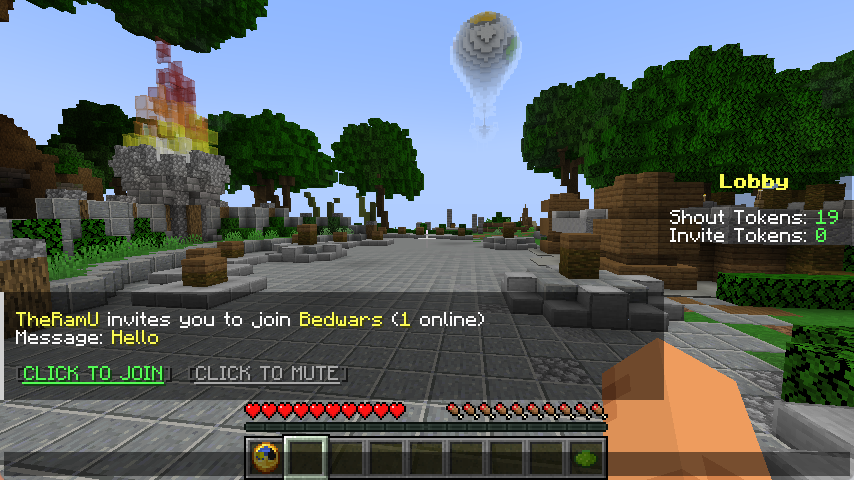
Cross-Server Shout

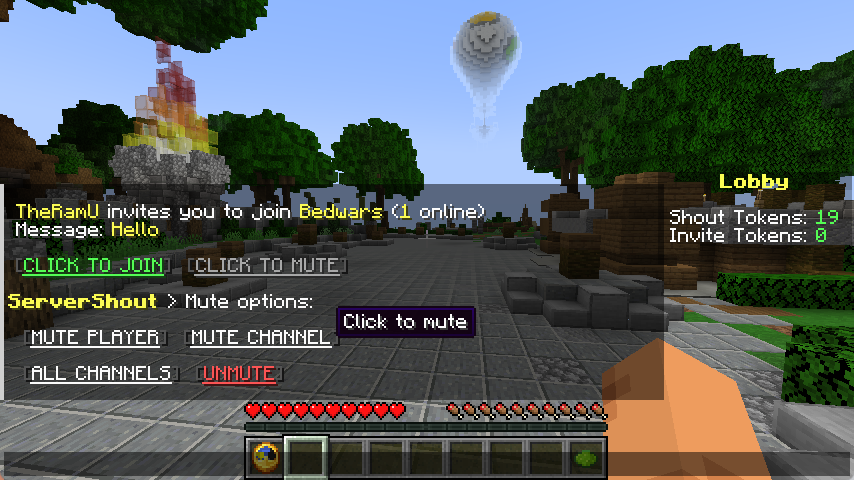
Cross-Server Invite
Message Mute
## Commands & Permissions
`/ss help` – Get help
`/ss reload` – Reload configuration
`/ss token list` – List all tokens
`/ss token create ` – Create new token
`/ss token delete ` – Delete token
`/ss balance get ` – Check player token balance
`/ss balance set ` – Set player token balance
`/ss balance give ` – Give tokens to player
`/ss balance take ` – Take tokens from player
`servershout.help` – Allows use of /ss help
`servershout.reload` – Allows use of /ss reload
`servershout.token.list` – Allows use of /ss token list
`servershout.token.create` – Allows use of /ss token create
`servershout.token.delete` – Allows use of /ss token delete
`servershout.balance.get` – Allows use of /ss balance get
`servershout.balance.set` – Allows use of /ss balance set
`servershout.balance.give` – Allows use of /ss balance give
`servershout.balance.take` – Allows use of /ss balance take
`servershout.update.notify` – Allows receiving update notifications
BungeeCord Command: `/ssb` | Velocity Command: `/ssv`
**⭐ Default Shout format:** `!`
**⭐ Default Invite format:** `/invite` or `/invite `
## PlaceholderAPI Placeholders
`%servershout_balance_%` the player’s token amount
## LuckPerms Meta Placeholders
In shout.yml, you can configure the show of a player’s LuckPerms Meta value in messages.
**For example:**
`{luckperms_meta_prefix}` displays the prefix Meta value, i.e., the player’s prefix.
Other Meta values can be managed via `/lp user meta`
## Usage
1. Download the jar file and place it in the plugins directory of the proxy (BungeeCord/Velocity) **(required)**
2. Place the jar file in the plugins directory of Bukkit as the management end of ServerShout (optional).
3. Restart the server.
4. Edit config.yml to configure the database and reload the plugin (optional). If the database is not configured, player tokens will not be deducted, and players can send messages without restrictions.
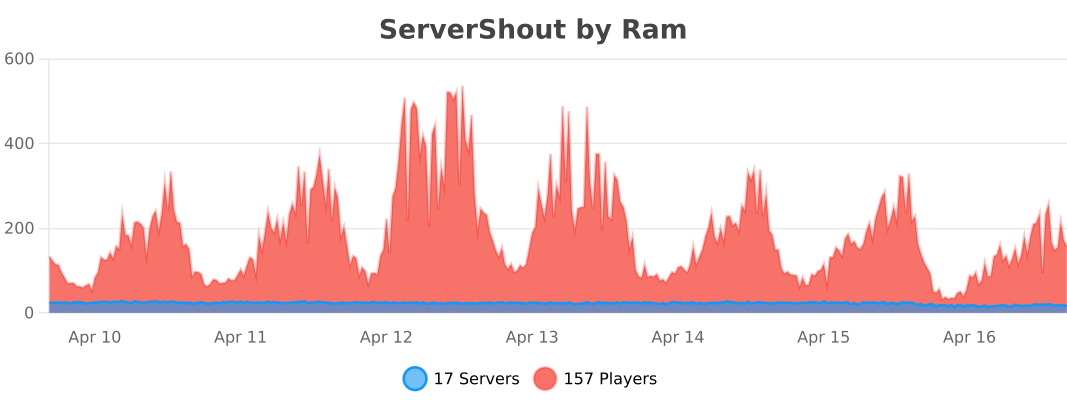
## Stats
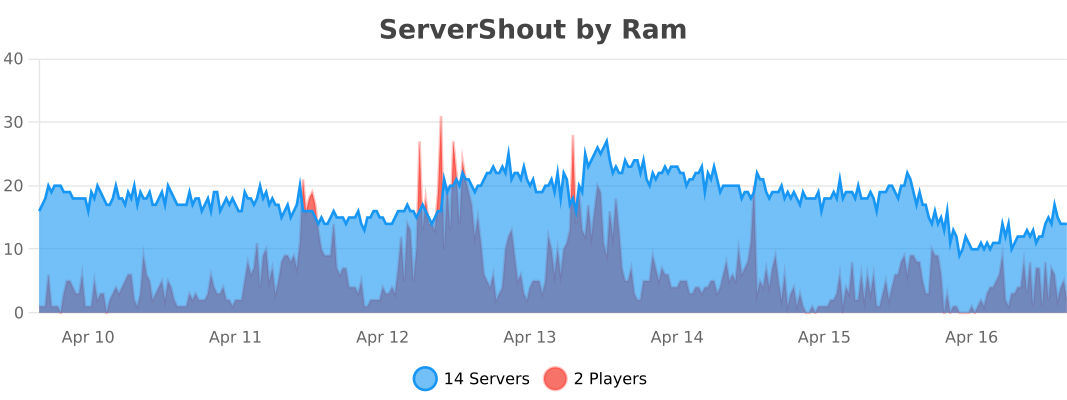
BungeeCord
Velocity
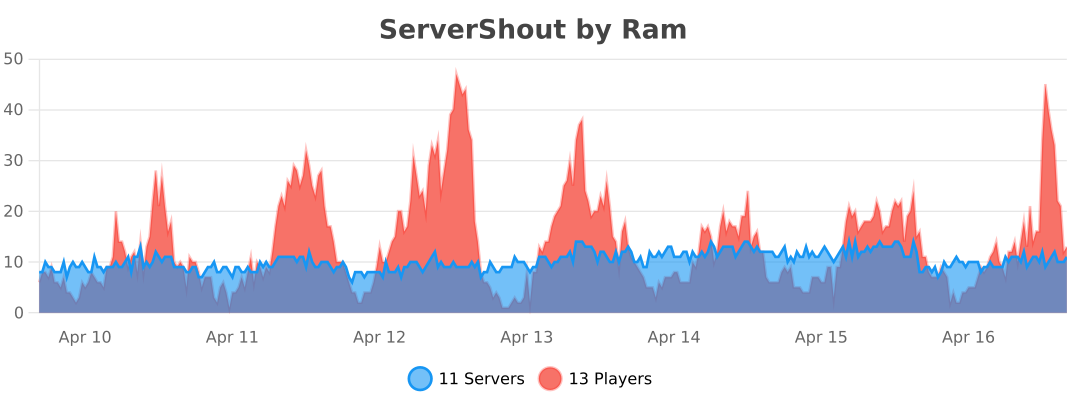
Bukkit
ServerPulse

ServerPulse is your **all-in-one** server **monitoring** solution that combines **powerful** metrics collection, beautiful **visualizations**, real-time **alerting**, and **effortless** setup. Monitor **TPS, memory, entities, and more** through professional Grafana **dashboards** – all up and **running in minutes** with Docker!
Tired of guessing why your server is **lagging**? Frustrated with complex monitoring setups? **ServerPulse** is what you are looking for!
If you need support, or you have any question, join our [Discord server](https://discord.gg/jZUqcemc4G)
## Why ServerPulse?
– **Zero-Configuration Monitoring:** Get started in minutes with our Docker Compose setup – InfluxDB, Grafana, and pre-built dashboards, all ready to go!
– **Universal Platform Support:** Works with any **Bukkit-based, Velocity, BungeeCord** and **Fabric** server while taking advantage of Paper-specific optimizations when available
– **Complete Solution:** Not just a metrics exporter – includes the entire monitoring stack optimized for time-series data
– **Per-World Performance Tracking:** Uniquely monitor metrics separately for each world – find problem areas fast!
– **Advanced Tagging System:** Group and filter metrics by server, network, region, or any custom dimension
– **Production-Ready Infrastructure:** Built-in health checks, automatic reconnection, and proper error handling
## Real-Time Metrics Include:
– TPS (1m, 5m, 15m)
– MSPT (last, min, max, 1m, 5m, 15m)
– CPU Usage (System, JVM, Available Processors)
– Online Players
– Player Ping Statistics (min, max, avg)
– JVM Memory (Used, Committed, Max Heap)
– Disk Usage (Usable Bytes & Percent)
– Per-World Stats:
– Loaded Chunks
– Total Entities
## Alert Notification System:
– **Multi-Platform Support:** Choose between Discord or Telegram for notifications
– **Instant Notifications:** Get alerted when TPS drops, memory spikes, or other
critical events occur
– **Customizable Thresholds:** Set your own alert conditions for any metric
– **Intelligent Alert Grouping:** Prevents notification spam during ongoing issues
– **Easy Integration:** Simple webhook setup for Discord or bot configuration for
Telegram
## Technical Features:
– **Efficient & Safe**: Asynchronous tasks and batch writing minimize performance
impact
– **Platform Detection**: Automatically detects your server type and uses the optimal implementation
– **Flexible Configuration**: Customize metrics collection intervals, alerts, and
tagging
– **Professional Dashboards**: Start monitoring immediately with pre-designed Grafana
dashboards
– **Open Source**: Full transparency and community-driven development
## Requirements:
– **Server**: Any Bukkit-based, Velocity, BungeeCord or Fabric server (Bukkit, Spigot, Paper, or forks like Purpur, Pufferfish)
– **System**: Docker and Docker Compose for the monitoring stack
– Optional: Discord server or Telegram bot for alert notifications
## Quick Start:
Clone, compose up, and you’re monitoring! Full setup guide at [https://github.com/renvins/serverpulse](https://github.com/renvins/serverpulse)
Screenshots:
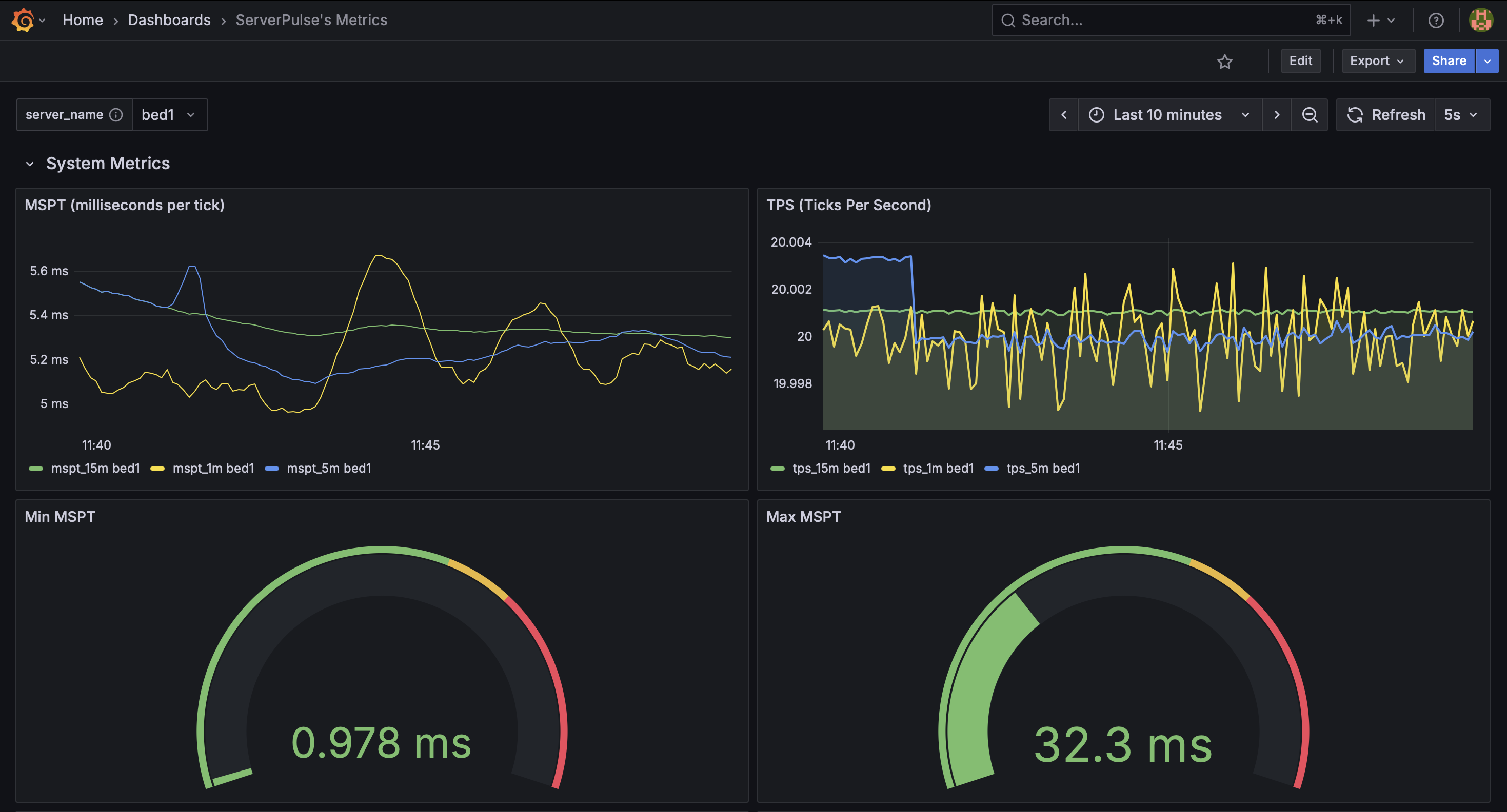
_Example dashboard view 1: System Metrics_
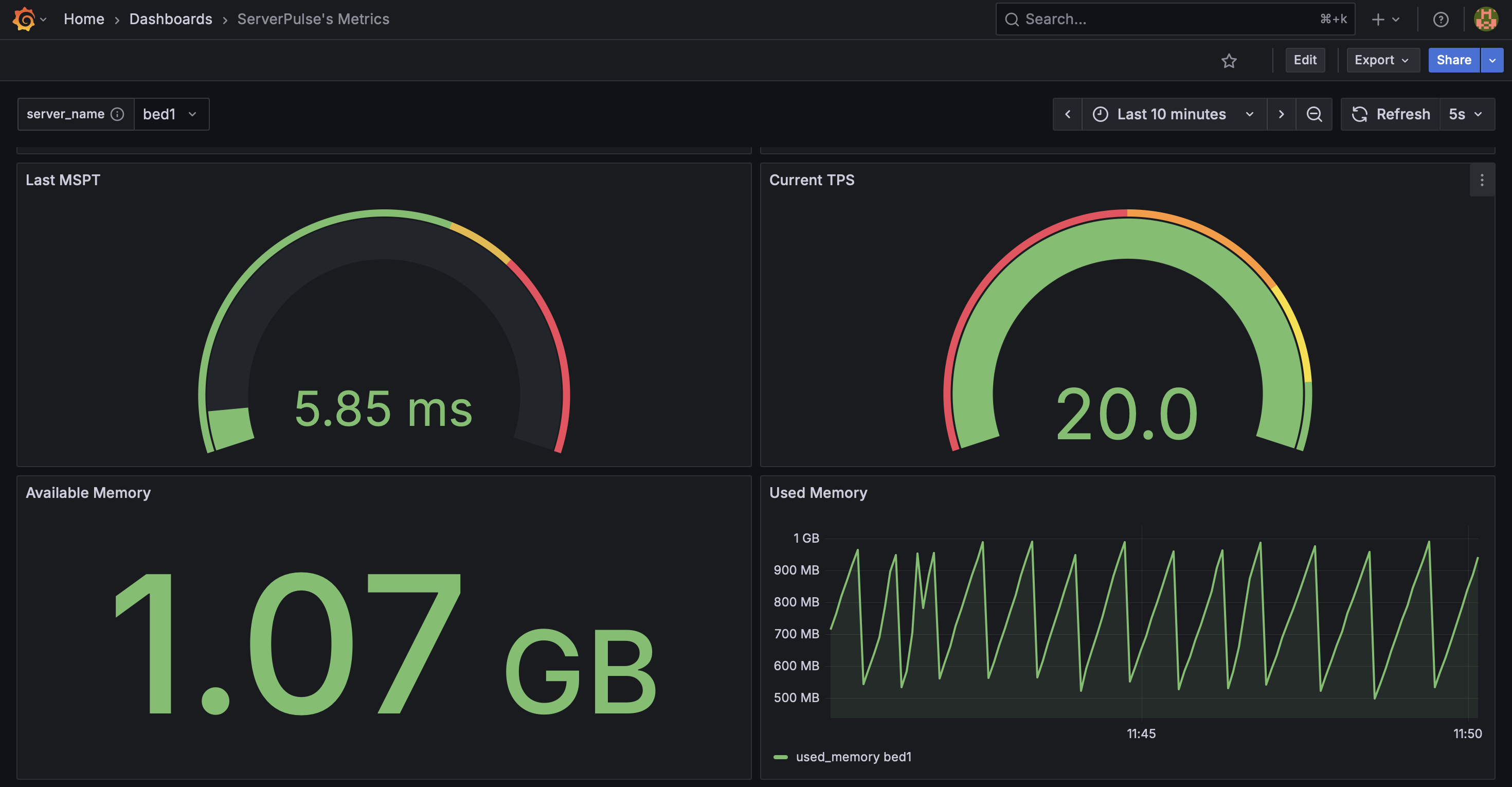
_Example dashboard view 2: System Metrics 2_
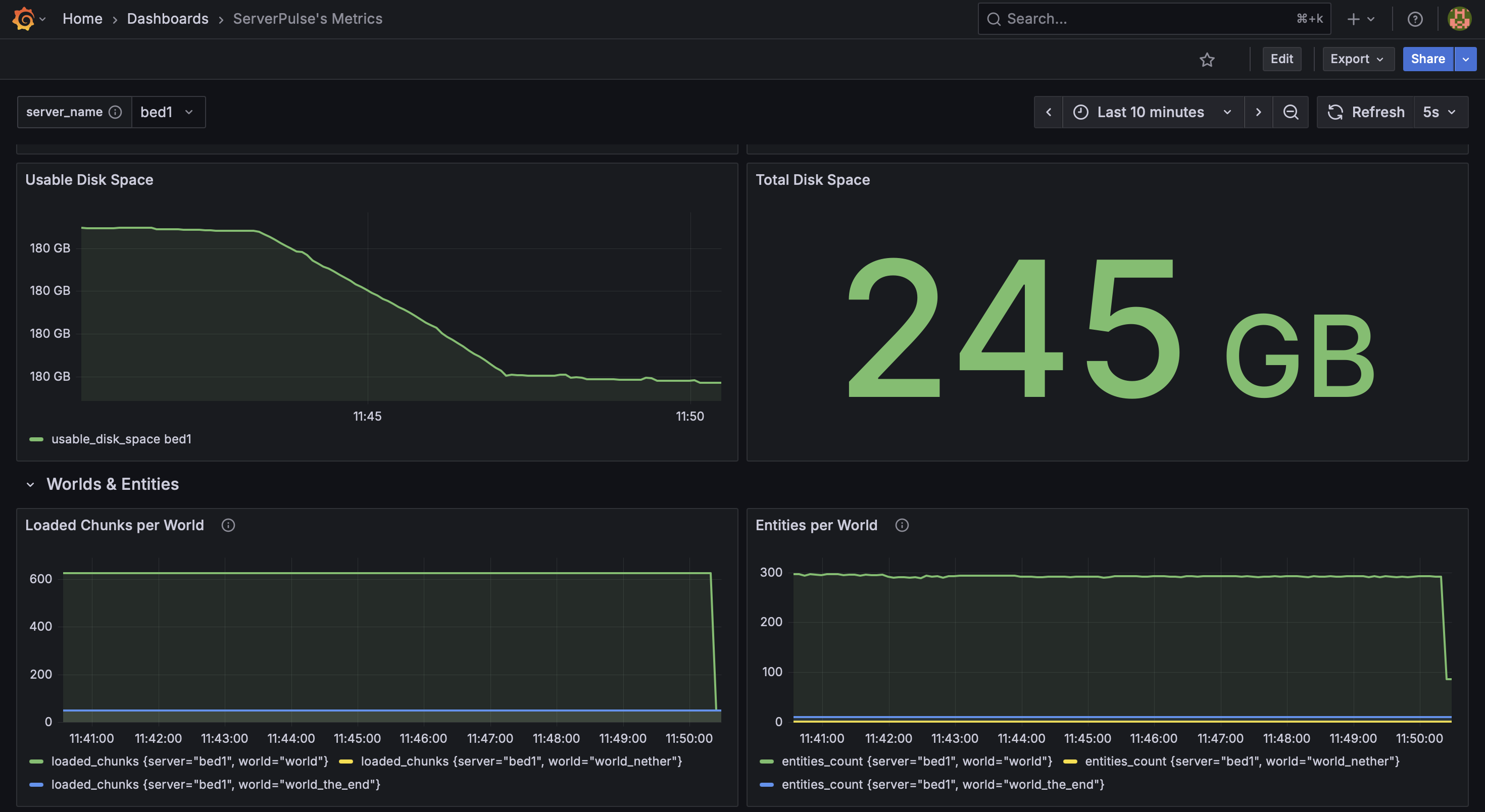
_Example dashboard view 3: System & World Metrics_
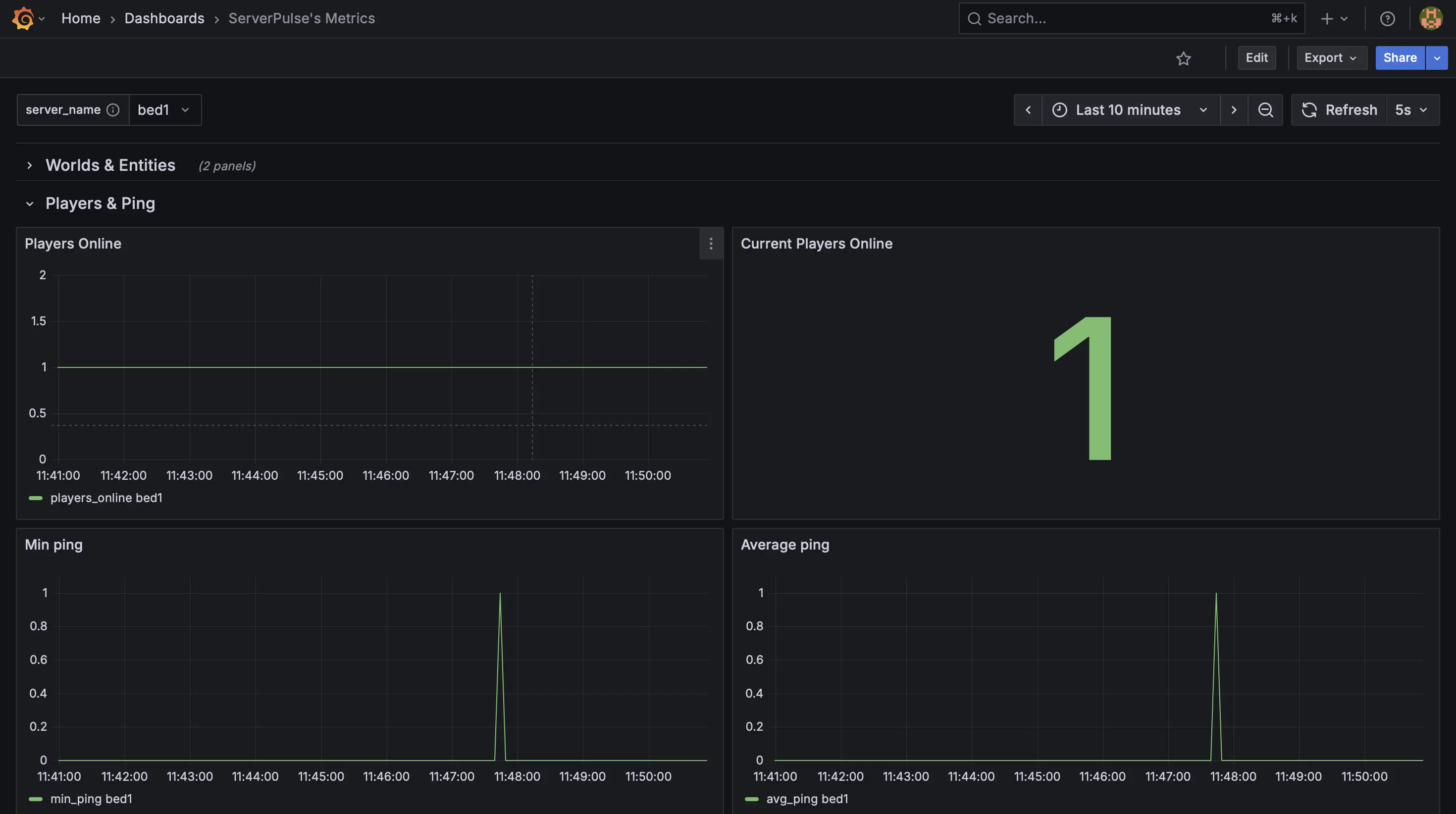
_Example dashboard view 4: Player Metrics_
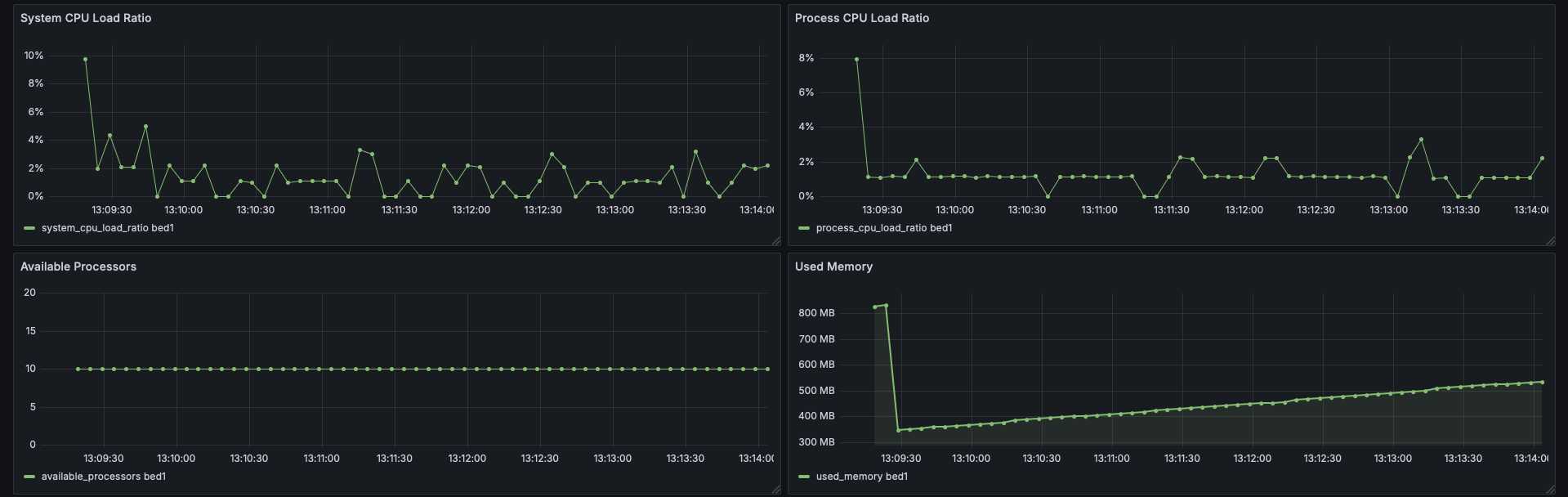
_Example dashboard view 5: CPU Stats_
## Support & Contributions:
– Issues & Features [https://github.com/renvins/serverpulse/issues](https://github.com/renvins/serverpulse/issues)
– Contributing [https://github.com/renvins/serverpulse/blob/master/CONTRIBUTING.md](https://github.com/renvins/serverpulse/blob/master/CONTRIBUTING.md)
– Discord [https://discord.gg/jZUqcemc4G](https://discord.gg/jZUqcemc4G)
**Ready to take control of your server’s performance with a professional monitoring solution? Download ServerPulse today!**
ServerJoinBlocker
# ServerJoinBlocker
Plugin that will allow or not allow players connect to BungeeCord
## Features
* Customizable messages
* List of players that can join during block
* Commands for easy enable/disable block
* Colored messages support
## Commands
* `/bon` – enable block (aliases: `/blockjoinenable`, `/benable`)
* `/boff` – disable block (aliases: `/blockjoindisable`, `/bdisable`)
* `/greload` – will reload BungeeCord, but plugin configuration will be reloaded too
## Permissions
* `serverjoinblocker.enable` – will allow to enable block
* `serverjoinblocker.disable` – will allow to disable block
## config.yml
“`yaml
enableMsg: ‘&cJoins blocked!’
enableMsgAlready: Joins already &cblocked
disableMsg: ‘&aJoins allowed!’
disableMsgAlready: Joins already &aallowed
kickMsg: ‘&cSorry, you can`t join now’
reloadMsg: ‘&aConfiguration reloaded!’
allowJoinTo:
– playername
blockEnabled: true
#dont touch blockEnabled option, commands changing it
“`
Server Stats Sender
# Steps on how to use
Make a bot on the disocord dev portal,
https://discordapi.com/permissions.html#8 use this <-- And put in the bots client id. Paste the link you get in the web to a discord channel. link should look like this ==>

Paste your plugin into your server
go to config yml put in the channel id, and bot token and restart vuala.
should look something like this:

If server doesn’t support measurements, mtps will not work, the rest of the servers stats will appear, Most servers support it!
Default time is set to 10 mins for repeat function.
REMASTER:
Now with more config then ever to enhance the user experience
– Embed ✔️
– Img ✔️
– discordCustomCmd ✔️
– time ✔️
– customChannel ✔️
– Repeat ✔️
and More!

# Permissions:
– “sss.access” this permission allows the user to have the onjoin notifier if the config of the plugin doesnt have channel id or a token in it. As well as the /sssreload command.
– “sss.token” This permission allows the user to do the command /sssactivate token chanid
ps does need spark plugin installed.
Server Shader Gate & Enforcer
## Description
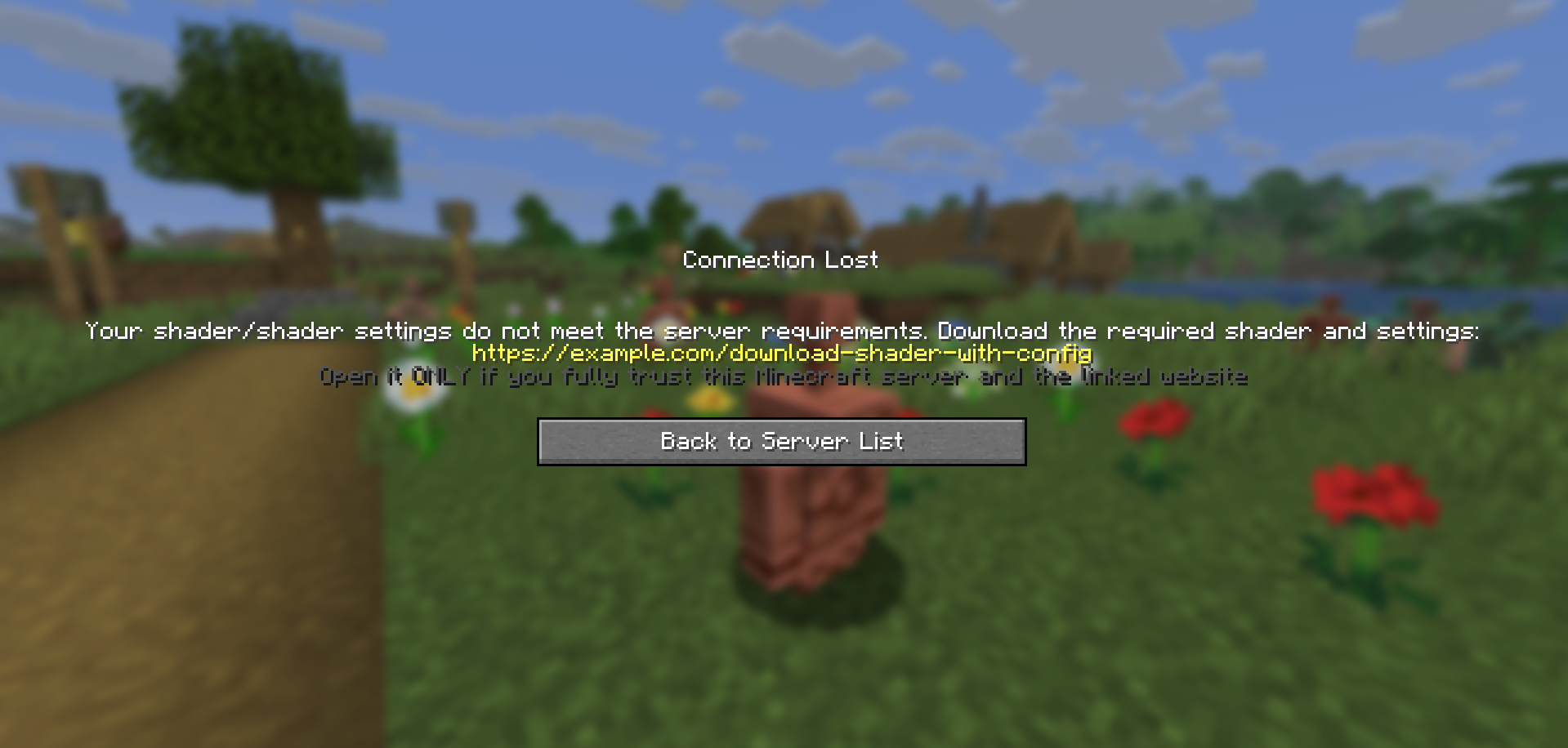
**Server Shader Gate & Enforcer (SSGE)** – a client-side mod and server-side plugin that requires players to install a shader and use specific shader options to play on the server.
Upon connecting to the server, the SSGE client mod automatically sends its configuration data about the current shader and its settings to the server plugin. The server plugin compares the received data with its own configuration. If the data matches, the player is allowed onto the server. Otherwise, the connection is refused.
The mod requires [Iris](https://modrinth.com/mod/iris) and [Fabric API](https://modrinth.com/mod/fabric-api) to work.
## Сonfiguration
The configuration file of the mod – `ssge_mod.json`;
the configuration file of the plugin for the server – `ssge.yml`
ssge_mod.json
“`
{
“shaderFile”: “”,
“shaderOptions”: “”,
“sizeShader”: 0,
“sizeOptions”: 0,
“shaderHash”: “”,
“enableShaders”: false
}
“`
This configuration is generated automatically when connected to the server and depends on the Iris settings: the switch on/off shader, selected shader file and selected shader settings
`shaderFile` – shaderpack file
`shaderOptions` – shader settings file. If the shader uses default settings, this string will be `empty` because the file does not exist.
`sizeShader` – shaderpack size in bytes.
`sizeOptions` – shader settings size in bytes. If the shader uses default settings, this value is `0`.
`shaderHash` – SHA-256 hash of the shader file.
`enableShaders` – shaders enabled/disabled switch
ssge.yml
“`
require_enabled: true
shader_file: ”
shader_options: ”
size_shader: 0
size_options: 0
shader_hash: “”
require_shader: true
require_options: true
link: https://example.com/download-shader-with-config
exempt_players: []
“`
Generated automatically and must be configured manually to work properly.
`require_enabled` – shaders enabled/disabled switch.
`shader_file` – shaderpack file.
`shader_options` – shader settings file. If the shader uses default settings, this string will be `empty` because the file will not exist.
`size_shader` – shaderpack size in bytes.
`size_options` – shader settings size in bytes. If the shader uses default settings, this value is `0`.
`shader_hash` – SHA-256 hash of the shader file.
`require_shader` – requires a specific shaderpack.
`require_options` – requires specific shader settings.
`link` – your link to download the shader and specific settings.
`exempt_players` – list of exempt players can play on the server without installing the SSGE client mod or using any shaders (e.g., admins or moderators).
Use `/ssge reload` to reload the plugin configuration.
## Sending and receiving a link
If a player has the client mod installed but their configuration does not match the server’s, the plugin sends them a download link before kicking the player.
The client mod receives the link, saves it to the file `ssge_link.txt` in the *`.minecraft/config`* directory, and automatically opens the file for the user.
ssge_link.txt
“`
You received this file because you tried to join a Minecraft server that requires
a specific shader (or shader settings) that you may not have installed.
Download the shader from the link provided by the server administrator and follow
these instructions unless otherwise noted:
1. Download the shader archive (.zip) and the shader settings (.txt) from the link below.
2. Put both files into your game directory’s “shaderpacks” folder.
3. Go to the Iris menu, select and enable this shader from the list, and try logging into the server again.
If the server provides a checksum (SHA-256), verify it against the downloaded shader file.
If you still have any difficulties joining the server, please contact the server administration for help.
!!! WARNING: External link below may be dangerous !!!
Open it ONLY if you fully trust this Minecraft server and the linked website.
Possible risks include:
– malicious installers, viruses, or trojans that can harm your system
– phishing pages designed to steal Minecraft, Discord, email or other credentials
– web scripts that can collect personal or sensitive information
– stealers that silently extract passwords, tokens, or browser data
– drive-by or automated downloads that execute without clear consent
– spoofed or tampered downloads (files different from what they claim)
If unsure — do NOT open the link.
https://example.com/download-shader-with-config
“`
#### Be careful: the server administrator may provide a malicious link to harm your system or steal your data. Always check the link using online scanners and do not open it if it looks suspicious. If you detect a threat, report the server on the hosting platform or listing website.
When placing a link in the plugin configuration, follow these guidelines:
– The link should not be excessively short or long.
– The link should be readable and not contain random strings.
– Avoid shortened URLs or redirects to third-party resources.
– The link must not lead to websites containing malware, scripts, or suspicious content.
– If the link leads to a file-sharing service, it should point directly to a `.zip` file or a `folder` containing the shader and settings.
– If your Minecraft server has its own website, it’s better to create a dedicated download page.
– The link should not point to any installer files (`.exe`, `.msi`, `.jar`, etc.).
– The website should not require registration, phone numbers, email, or other personal data.
## For example
Let’s say we want all players on our server to play using [thejinxedartist’s MC VHS](https://modrinth.com/shader/mc-vhs) shader.
Then the plugin configuration can be like this:
“`
require_enabled: true <––
shader_file: 'MCVHSV2.zip' <–– Required
shader_options: 'MCVHSV2.zip.txt' <–– values
size_shader: 275232 <––
size_options: 79 <––
shader_hash: "e59a3d139..." <––
require_shader: true
require_options: true
link: https://modrinth.com/shader/mc-vhs
exempt_players: ["Admin", "You"]
```
The mod configuration must match the plugin configuration and be like this:
```
{
"shaderFile": "MCVHSV2.zip",
"shaderOptions": "MCVHSV2.zip.txt",
"sizeShader": 275232,
"sizeOptions": 79,
"shaderHash": "e59a3d139...",
"enableShaders": true
}
```
If the player has a different configuration, the server will kick him.
Server Registration Plugin
# Server Registration Plugin
![Banner][banner]
[![Modrinth][badge-modrinth]][modrinth]
[![Discord][badge-discord]][social-discord]
[![Follow @simplecloudapp][badge-x]][social-x]
[![Follow @simplecloudapp][badge-bluesky]][social-bluesky]
[![Follow @simplecloudapp][badge-youtube]][social-youtube]
[Report a Bug][issue-bug-report]
·
[Request a Feature][issue-feature-request]
🌟 Give us a star — your support means the world to us!
> All information about this project can be found in our detailed [documentation][docs-thisproject].
A proxy plugin that registers SimpleCloud v3 Minecraft servers on a proxy server.
## Features
– [x] **Velocity**
– [x] **BungeeCord**
– [x] **Server name**: Specify how the server name of servers is assigned
– [x] **Additional servers**: Add non network servers
– [ ] **Advanced filters**: Use advanced filters for filtering which servers can get registered
## Contributing
Contributions to SimpleCloud are welcome and highly appreciated. However, before you jump right into it, we would like you to read our [Contribution Guide][docs-contribute].
## License
This repository is licensed under [Apache 2.0][license].
[banner]: https://raw.githubusercontent.com/simplecloudapp/branding/refs/heads/main/readme/banner/plugin/server-registration.png
[issue-bug-report]: https://github.com/theSimpleCloud/server-registration-plugin/issues/new?labels=bug&projects=template=01_BUG-REPORT.yml&title=%5BBUG%5D+%3Ctitle%3E
[issue-feature-request]: https://github.com/theSimpleCloud/server-registration-plugin/discussions/new?category=ideas
[docs-thisproject]: https://docs.simplecloud.app/plugin/server-registration
[docs-contribute]: https://docs.simplecloud.app/contribute
[modrinth]: https://modrinth.com/plugin/server-registration-plugin
[license]: https://opensource.org/licenses/Apache-2.0
[snapshots]: https://repo.simplecloud.app/#/snapshots
[social-x]: https://x.com/simplecloudapp
[social-bluesky]: https://bsky.app/profile/simplecloud.app
[social-youtube]: https://www.youtube.com/@thesimplecloud9075
[social-discord]: https://discord.simplecloud.app
[badge-modrinth]: https://img.shields.io/badge/modrinth-18181b.svg?style=flat-square&logo=modrinth
[badge-license]: https://img.shields.io/badge/apache%202.0-blue.svg?style=flat-square&label=license&labelColor=18181b&style=flat-square&color=e11d48
[badge-discord]: https://img.shields.io/badge/Community_Discord-d95652.svg?style=flat-square&logo=discord&color=27272a
[badge-x]: https://img.shields.io/badge/[email protected]?style=flat-square&logo=x&color=27272a
[badge-bluesky]: https://img.shields.io/badge/[email protected]?style=flat-square&logo=bluesky&color=27272a
[badge-youtube]: https://img.shields.io/badge/youtube-d95652.svg?style=flat-square&logo=youtube&color=27272a
Server Redirect
## **Server Redirect**
This mod provides a lightweight way for servers to transfer players to another server address, without the use of a proxy server.
Server Redirect supports Forge, Fabric, Bukkit/Spigot, SpongeVanilla/SpongeForge, Bungeecord/Waterfall and Velocity.
With Server Redirect, server admins can avoid mod incompatibility issues caused by proxy servers (Bungeecord, Waterfall, and Velocity).
In particular, this mod can be used in combination with **Waterfall and Forge 1.13+** servers and clients to provide a way to transfer players between servers (currently, the 1.13+ Forge server needs to be “online” as they haven’t included IP forwarding yet…).
This mod is optional, so it can be added to modpacks and players can still join servers without this mod. Likewise, servers with this mod can be joined by clients without this mod.
## **Commands**
– **/redirect <Target> <Server Address>**: redirects the specified target player(s) to the specified address
– **/fallback <Target> <Server Address>**: sets the fallback server address for the specified target player(s)
– **/ifplayercanredirect <Target> <Command…>**: runs the specified command for each of the target player(s) that have Server Redirect
– **/ifplayercannotredirect <Target> <Command…>**: runs the specified command for each of the target player(s) that have not Server Redirect
The command source can be anything that can run a command, like a command block, a player, or console.
Replace **/redirect** with **/fallback** to have the specified target players connect to the specified server address when they get forcefully disconnected from the server.
##### **The <Target> argument can be one of the following:**
– **Player Name/UUID**: the specified player on the server
– **Target Selector**: a [target selector](https://minecraft.fandom.com/wiki/Target_selectors). Target selectors are not available on Bungeecord and Velocity.
– **r=N**: all players within N blocks from the command sender, or from the overworld spawn if run by console. Plugin version only.
– **s=<ServerName>**: all players in the specified ServerName. Bungeecord and Velocity only.
– *: all players on the server.
##### **The <Command…> argument can contain the following placeholders:**
– **%PlayerName**: this placeholder will be replaced with the player’s name
– **%PlayerId**: this placeholder will be replaced with the player’s UUID
**NOTICE**: **/ifplayercanredirect** and **/ifplayercannotredirect** will likely not work as expected if run when the target player just joined the server. These commands rely on the client sending a packet to the server telling them they have this mod installed. This packet requires some time to be sent by the client and processed by the server. It is recommended to delay this command execution by at least 20 ticks after the player has joined the server!
#### **Examples:**
– **/redirect KaiNoMood myawesomemcserver.net:25667**: the player named KaiNoMood will connect to myawesomemcserver.net:25667
– **/redirect a54a7884-9ea4-4d54-ac35-1623d70ffbe1 myawesomemcserver.net:25667**: the player with the specified UUID will connect to myawesomemcserver.net:25667
– **/redirect * myawesomemcserver.net:25667**: all players on the server will connect to myawesomemcserver.net:25667.
– **/redirect @a[m=creative] myawesomemcserver.net:25667**: all players in creative mode will connect to myawesomemcserver.net:25667.
– **/redirect r=10 myawesomemcserver.net:25667**: all players within 6 blocks from the command sender will connect to myawesomemcserver.net:25667. This works on Bukkit and Sponge based servers only.
– **/redirect s=lobby myawesomemcserver.net:25667**: all players in the “lobby” server will connect to myawesomemcserver.net:25667. This works on Bungeecord and Velocity proxy servers only.
– **/ifplayercanredirect * say %PlayerName is online and using Server Redirect! Yay!**: the specified command will run for each player on the server that has Server Redirect.
– **/ifplayercannotredirect @a[distance=..5] tell %PlayerName It does not seem you have Server Redirect installed! Make sure to install it!**: the specified command will run for all players without Server Redirect within 5 blocks of the command source.
Replace **/redirect** with **/fallback** for setting a fallback address for the target players. For more info about the fallback command, read below.
## **FAQ**
### **How this mod redirects players**
– By running the /redirect command, the server will send a “transfer” packet containing the specified server address to the specified players.
– All players receiving the packet that have the ServerRedirect mod installed will disconnect from the server, and automatically direct connect to the specified server address.
Any server address that is reachable by the players with the “Direct Connect” button can be used.
The “transfer” packet will not affect players without the mod installed: they will simply stay connected on the current server.
This behaves like the transfer packet present in “Minecraft: Bedrock Edition”, feature included by Mojang by default on that client. Regrettably, “Minecraft: Java Edition” is missing this feature entirely.
Both the redirect and fallback commands are not supposed to be run by players. They are intended for being run by the console, command blocks and other plugins. Command aliases and “server selector” GUIs are recommended (see BossShop or VirtualChest).
### **What the fallback command is for**
The fallback command tells the clients which server address they should connect to in case they get forcefully disconnected from the server (e.g. the server crashes).
Server admins want to use this by running the fallback command automatically by the server for every player that joins the server. If the server shuts down for any reason, the players will automatically direct connect to the fallback server address specified in the fallback command.
Another use of the fallback feature is when you want to redirect a player to a server, but they might get rejected for some reason (e.g. the server is offline). First, set the fallback address for the player to a server address you can be sure they can reach, then use the redirect command to redirect the player to the server address they might get rejected from. If the player cannot join the server they were redirected to, they’ll automatically join the fallback server.
### **Reasons for using this mod instead of a proxy like Bungeecord, Waterfall or Velocity**
Forge mods don’t always expect that the player is being moved from one server to another, and when a proxy transfers a player to a different server, it can cause glitches or crashes. Forge mods commonly expect to be disconnected from the server before connecting to another one. Additionally, Forge 1.13+ does not support proxies server switching. This mod solves the issue by properly disconnecting players from the server, and then connecting them to another server. This way, mods can properly handle players switching from a server to another.
Server admins can also use a combination of a proxy and Server Redirect if they want to use all the other features proxies can provide (except on Forge 1.13+ servers currently). Still, it is suggested to look into replacing the proxy with cross-server plugins and mods.
### **Players with this mod can join servers without this mod**
Any combination of presence/absence of this mod will let players connect to servers. Players with this mod can connect to Vanilla servers as well, and players with vanilla Minecraft can also connect to servers with this mod.
### **This mod can be added in modpacks**
Feel free to add this modpack in public and private modpacks. Asking for permission is not required. If you add Server Redirect to your public modpack, feel free to let everyone know in the comments below! Although this mod shouldn’t have any conflict with any other mod, feel free to [report conflicts here](https://github.com/KaiKikuchi/ServerRedirect/issues).
### **License and improvements to the project**
This project is MIT licensed. Feel free to fork this project and/or suggest new features on [the Issues page](https://github.com/KaiKikuchi/ServerRedirect/issues)! If you cannot find the right version of Server Redirect for your Minecraft version, feel free to ask there!
If you wish to buy me a pizza, [click here](https://paypal.me/kainomood “PayPal Me”)! I appreciate it very much! 🙂
Server-Plugin
### **Server Plugin: Ultimate Minecraft Map Generator & Zombie Invasion**
**Version:** 0.8-SNAPSHOT
**Minecraft version:** 1.21+
**Author:** Kajakfrosch
#### **Are you ready to take your Minecraft server to the next level?
With this versatile plugin you don’t just get a tool, but a complete package that opens up new possibilities!
### **Features that will inspire you:**
**1. automatic map generation**
– Create an overview map of your entire world as **`map.png`**.
– Optionally generate a website with statistics and the map as **`index.html`** – perfect for sharing your map with friends.
– Supports active rendering on events: player join, server status or manually via commands!
**2. start epic zombie invasions**
– Want to fight hordes of zombies with your friends? No problem!
Start your own **Zombie Invasion** on your server and customise the distance and difficulty (1-20) to your liking.
– Rewards for victory! You get rare items such as diamonds, gold and more (all configurable).
– But beware: Failure costs you experience and prestige!
**3rd performance monitor for your world**
– Monitor your server in real time:
– **TPS (Ticks per Second):** Is your server running at optimal speed?
– **Memory utilisation:** Is there enough RAM available?
– Chunk situation:** Is your server loading too many chunks?
– The `/serverstatus` command gives you all the information at a glance!
**4. simple HTML integration for the server map**
– Automatically generated web pages make it easier to view your world map – ideal for private friends or public servers.
– Optional Apache support** to host the map publicly.
**5. customisable server status**
– Greet players with a personalised **MOTD** (message of the day)!
– Display important information such as the server node, instance data or a link to the live map.
– Designed for RPG and Survival fans who want their servers to be dynamic and informative.
### **Why this plugin?
– **For server admins:**
Stay in control – from performance checks to world documentation.
– **For Minecraft players:**
Dive into new adventures – from customised maps to thrilling zombie invasions.
– For creators & streamers:**
Easily share the beauty of your map or exciting game modes via the generated HTML data or interactive experiences like the invasion feature.
### **Available commands**
| **Command** | **Description** |
| — | — |
| `/dynmap` | Generates a map of the world. |
| `/invasion start X Y` | Starts a zombie invasion (_X_: distance, _Y_: difficulty). |
| `/invasion stop` | Stops all active invasions. |
| `/server status` | Shows the current status of the server. |
### **It’s that simple!
1. **Install the plugin**:
Load the `.jar` into your `plugins` folder and restart the server.
2 **Execute the command `/dynmap`**:
Admire the map of your world in the `plugins/server/work/` folder.
3 **Explore new challenges**:
Start a zombie invasion with `/invasion` or check your server status with `/serverstatus`.
### Deutsche Beschreibung
### **Server Plugin: Ultimativer Minecraft Karten-Generator & Zombie-Invasion**
**Version:** 0.8-SNAPSHOT
**Minecraft-Version:** 1.21+
**Autor:** Kajakfrosch
#### **Bist du bereit, deinen Minecraft-Server auf die nächste Stufe zu bringen?**
Mit diesem vielseitigen Plugin bekommst du nicht einfach nur ein Tool, sondern ein Komplettpaket, das dir neue Möglichkeiten eröffnet!
### **Features, die dich begeistern werden:**
**1. Automatische Karten-Generierung**
– Erstelle eine Übersichtskarte deiner gesamten Welt als **`map.png`**.
– Optional wird eine Website mit Statistiken und der Karte als **`index.html`** generiert – perfekt, um deine Karte mit Freunden zu teilen.
– Unterstützt das aktive Rendern bei Events: Spielerbeitritt, Serverstatus oder manuell über Befehle!
**2. Epische Zombie-Invasionen starten**
– Möchtest du mit deinen Freunden gegen Horden von Zombies kämpfen? Kein Problem!
Starte eine eigene **Zombie-Invasion** auf deinem Server und passe Abstände sowie den Schwierigkeitsgrad (1-20) nach deinen Vorstellungen an.
– Belohnungen für den Sieg! Du bekommst seltene Items wie Diamanten, Gold und mehr (alles konfigurierbar).
– Aber Achtung: Scheitern kostet dich Erfahrung und Prestige!
**3. Performance-Monitor für deine Welt**
– Überwache deinen Server in Echtzeit:
– **TPS (Ticks per Second):** Hält dein Server die optimale Geschwindigkeit?
– **Speicher-Auslastung:** Genügend RAM verfügbar?
– **Chunk-Situation:** Lädt dein Server zu viele Chunks?
– Mit dem `/serverstatus`-Befehl erhältst du alle Infos auf einen Blick!
**4. Einfache HTML-Integration für die Serverkarte**
– Automatisch generierte Webseiten erleichtern die Ansicht deiner Welt-Karte – ideal für private Freunde oder Public-Server.
– **Optionale Apache-Unterstützung**, um die Karte öffentlich zu hosten.
**5. Individualisierbarer Server-Status**
– Begrüße Spieler mit einer personalisierten **MOTD** (Nachricht des Tages)!
– Zeige wichtige Informationen an, z. B. den Serverknoten, Instanzdaten oder einen Link zur Live-Karte.
– Entwickelt für RPG- und Survival-Fans, die ihre Server dynamisch und informativ gestalten möchten.
### **Warum dieses Plugin?**
– **Für Server-Admins:**
Behalte die Kontrolle – von Performance-Checks bis hin zur Welt-Dokumentation.
– **Für Minecraft-Spieler:**
Tauche ein in neue Abenteuer – von benutzerdefinierten Karten bis zu packenden Zombie-Invasionen.
– **Für Kreative & Streamer:**
Teile die Schönheit deiner Karte oder spannende Spielmodi einfach über die generierten HTML-Daten oder interaktive Erlebnisse wie die Invasions-Feature.
### **Verfügbare Befehle**
| **Befehl** | **Beschreibung** |
| — | — |
| `/dynmap` | Generiert eine Karte der Welt. |
| `/invasion start X Y` | Startet eine Zombie-Invasion (_X_: Abstand, _Y_: Schwierigkeit). |
| `/invasion stop` | Stoppt alle aktiven Invasionen. |
| `/serverstatus` | Zeigt den aktuellen Zustand des Servers an. |
### **So einfach funktioniert’s!**
1. **Installiere das Plugin**:
Lade die `.jar` in deinen `plugins`-Ordner und starte den Server neu.
2. **Führe den Befehl `/dynmap` aus**:
Bewundere die Karte deiner Welt im Ordner `plugins/server/work/`.
3. **Erkunde neue Herausforderungen**:
Starte eine Zombie-Invasion mit `/invasion` oder überprüfe deinen Serverstatus mit `/serverstatus`.
Server Connection Plugin
# Server Connection Plugin
![Banner][banner]
[![Modrinth][badge-modrinth]][modrinth]
[![Discord][badge-discord]][social-discord]
[![Follow @simplecloudapp][badge-x]][social-x]
[![Follow @simplecloudapp][badge-bluesky]][social-bluesky]
[![Follow @simplecloudapp][badge-youtube]][social-youtube]
[Report a Bug][issue-bug-report]
·
[Request a Feature][issue-feature-request]
🌟 Give us a star — your support means the world to us!
> All information about this project can be found in our detailed [documentation][docs-thisproject].
The Server Connection Plugin provides comprehensive player connection management for your network, including network join handling, fallback servers, and navigation commands.
## Features
– [x] **Velocity**
– [x] **BungeeCord**
– [ ] **Gate**
– [x] **Connection targets**: Connection targets define server groups that players can connect to
– [x] **Matcher Operations**: Match Server names by Operations
## Contributing
Contributions to SimpleCloud are welcome and highly appreciated. However, before you jump right into it, we would like
you to read our [Contribution Guide][docs-contribute].
## License
This repository is licensed under [Apache 2.0][license].
[banner]: https://github.com/simplecloudapp/branding/blob/main/readme/banner/plugin/server-connection.png?raw=true
[issue-bug-report]: https://github.com/theSimpleCloud/server-connection-plugin/issues/new?labels=bug&projects=template=01_BUG-REPORT.yml&title=%5BBUG%5D+%3Ctitle%3E
[issue-feature-request]: https://github.com/theSimpleCloud/server-connection-plugin/discussions/new?category=ideas
[docs-thisproject]: https://docs.simplecloud.app/plugin/server-connection
[docs-contribute]: https://docs.simplecloud.app/contribute
[modrinth]: https://modrinth.com/plugin/server-connection-plugin
[license]: https://opensource.org/licenses/Apache-2.0
[snapshots]: https://repo.simplecloud.app/#/snapshots
[social-x]: https://x.com/simplecloudapp
[social-bluesky]: https://bsky.app/profile/simplecloud.app
[social-youtube]: https://www.youtube.com/@thesimplecloud9075
[social-discord]: https://discord.simplecloud.app
[badge-modrinth]: https://img.shields.io/badge/modrinth-18181b.svg?style=flat-square&logo=modrinth
[badge-license]: https://img.shields.io/badge/apache%202.0-blue.svg?style=flat-square&label=license&labelColor=18181b&style=flat-square&color=e11d48
[badge-discord]: https://img.shields.io/badge/Community_Discord-d95652.svg?style=flat-square&logo=discord&color=27272a
[badge-x]: https://img.shields.io/badge/[email protected]?style=flat-square&logo=x&color=27272a
[badge-bluesky]: https://img.shields.io/badge/[email protected]?style=flat-square&logo=bluesky&color=27272a
[badge-youtube]: https://img.shields.io/badge/youtube-d95652.svg?style=flat-square&logo=youtube&color=27272a
SendHub
SendHub: Central Lobby Management for Minecraft Servers
SendHub is a robust and efficient plugin designed to enhance the player experience on Minecraft servers by ensuring seamless transitions between game servers and the central lobby. When individual game servers shut down or restart, SendHub automatically redirects players to the designated main lobby, maintaining server continuity and minimizing disruption.
Key Features:
– Automatic Redirection: When a game server stops or restarts, players are immediately sent to the main lobby, ensuring they are never left in limbo.
– Configurable Lobby Settings: Easily configure which server acts as the central lobby and customize redirection messages to keep players informed.
– Lightweight and Efficient: Built to handle high player volumes with minimal performance overhead.
– Compatibility: Designed to work with various server types and configurations, making it versatile for different server setups.
– User-Friendly: Simple installation and configuration process, perfect for server administrators of all experience levels.
Why Use SendHub?
Running a network of Minecraft servers can be complex, especially when managing multiple game modes and ensuring players have a smooth experience. SendHub simplifies this by providing a reliable fallback solution, making sure that players are always redirected to a safe and stable environment in the lobby whenever a server goes offline.
Installation and Configuration:
– Download and Install: Add the SendHub plugin to your server’s plugins directory.
– Configuration: Edit the config.yml file to specify your main lobby server and customize messages.
– Deploy: Restart your server to apply the changes and start using SendHub.
Conclusion:
SendHub is the ideal solution for Minecraft server networks looking to maintain high uptime and seamless player experience. By automatically redirecting players to a central lobby, it helps keep your community engaged and happy, even during server maintenance or unexpected shutdowns.