UltimateAntiBot
[](https://discord.com/invite/EXFGgdTVKp)
# INFORMATION
This is a plugin that works on both bungeecord and spigot!
Remember that being just a plugin it can’t work wonders!
If you have a server with underpowered hardware or with a free host, don’t expect great performances!
Also, although spigot support has been introduced, remember that bungeecord is a better choice for handling large attacks and that on spigot it could cause slowdowns!
When installing the plugin remember that if you have a bungeecord server you will have to put the plugin ONLY in the bungeecord plugin folder! If you use only spigot instead you have to put it in the spigot plugins folder then just reboot and the server!
# GEYSER INFORMATION
The plugin supports the entry of players via geyser however there are some changes you need to make in the config to ensure that there are no problems!
First you have to deactivate the packet check, then you have to modify the legalname check by making it allow players with names containing the charater that geyser adds to the minecraft base name to enter, if the charater is the dot (“.”) then you don’t have to do anything, otherwise you have to change the regex (you can ask for help in my discord server for this by opening a ticket).
# PROTECTS FROM
– **FAST JOIN**
– **SLOW JOIN (BYPASSABLE USE A CAPTCHA PLUGIN ON THE LOBBY SERVER INSTEAD)**
– **PING ATTACK**
– **COMBINED**
– **BAD PACKET (ONLY ON BUNGEECORD / WATERFALL / VELOCITY)**
# FEATURES
– Fully customizable (config & messages)
– VPN system for detecting slow attacks.
– Hook to IPSet & IPTables for handling large attacks.
– A great variety of checks to detect as many bots as possible.
– An intelligent filter that activates only during attacks to avoid filtering important server errors.
– An easy verification system for non-bot players during attacks.
– An ID based blacklist system that will allow you to manage your blacklist more easily!
– Automatic notifications when there is an attack.
– Automatic attack logging system!
– An autopurger for blacklist, whitelist and attack logs.
# COMMANDS
– /uab help – displays help message
– /uab toggle actionbar/title/bossbar – toggle notification
– /uab stats – displays antibot stats
– /uab clear blacklist/whitelist – will clean up one of the two
– /uab whitelist add/remove – manage whitelist
– /uab blacklist add/remove – manage blacklist
– /uab logs list/info – manage attack logs
– /uab cache status/clear – manage uab cache
– /uab firewall – displays firewall stats
– /uab check – checks for a blacklisted player
– /uab reload – reload messages
– /uab dump – used for support assistance
# PERMISSIONS
– /uab help – uab.command.help
– /uab toggle actionbar/title/bossbar – uab.command.toggle
– /uab stats – uab.command.stats
– /uab clear blacklist/whitelist – uab.command.clear
– /uab whitelist add/remove – uab.command.whitelist
– /uab blacklist add/remove – uab.command.blacklist
– /uab firewall – uab.command.firewall
– /uab logs list/info – uab.command.logs
– /uab cache status/clear – uab.command.cache
– /uab firewall – uab.command.firewall
– /uab check – uab.command.check
– /uab reload – uab.command.reload
– /uab dump – uab.command.dump
– Automatic notification – uab.notification.automatic
– ANTI-VPN bypass permission – uab.bypass.vpn
# SOME VIDEOS
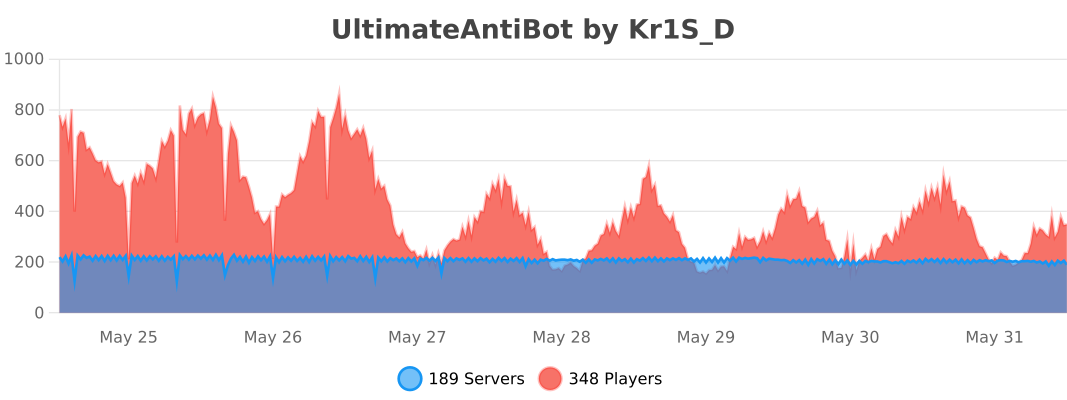
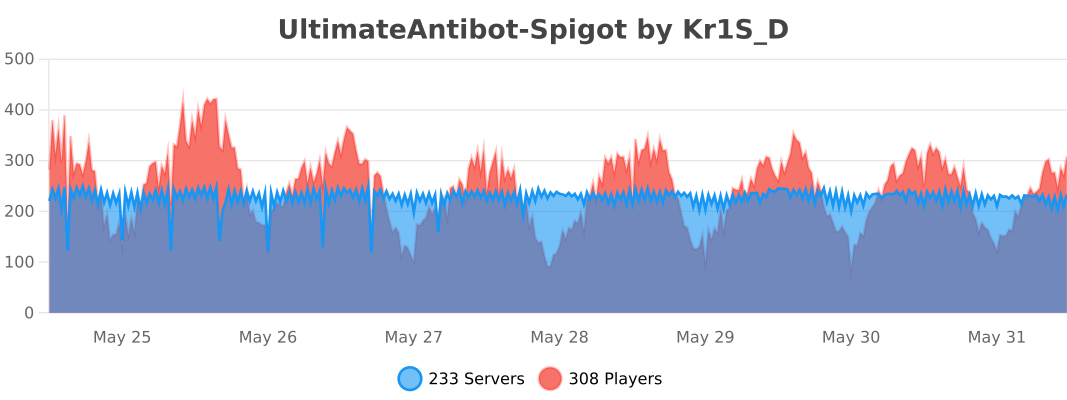
# PLUGIN STATS
ulib
# uLib
 
ulib is a general purpose library.
Copyright (c) 2022 [fluse1367](https://gitlab.com/fluse1367)
See “Included Software” (at the bottom) for copyright and license notice of included software.
Please also refer to the [documentation](https://gitlab.com/fluse1367/ulib/-/blob/main/docs/Readme.md).
## Features
Brief overview of ulib’s features.
### Core
– Code Injection Framework
– Dynamic Library Injection
– Maven Resolver
– Reflection Utilities
– JsonRPC v2 API
– Yaml/Json API
– SQL API
– Misc
### Minecraft
– Mojang Launchermeta API
– Mojang/Bukkit Mappings API
– Proxy-Server Bridge
– User Cache
– Misc
### Spigot
– GUI/Inventory Menus API
– Custom Enchantments
– Item API
– Misc
## Things to Know
– The minecraft variants of library depend on recent spigot/bungeecord/velocity versions. That means it may not work as
expected or may not work at all on older server versions. You will not receive any support, when using another server
version than the one this library is built for.
If you want to use older server versions, consider a cross-version compatibility tool, like
[ViaBackwards](https://www.spigotmc.org/resources/viabackwards.27448),
[ViaRewind](https://www.spigotmc.org/resources/viarewind.52109) or
[ProtocolSupport](https://www.spigotmc.org/resources/protocolsupport.7201).
– Minimum Java version is 17.
– When launching uLib for the first time (or if the respective caching folder was removed), it will download a few of
dependencies/libraries.
## Disclaimer
Note the copyright and [license of this project](https://gitlab.com/fluse1367/ulib/-/blob/main/LICENSE). Use this library at your own risk! The contributors of this
project do not take any responsibility/liability in any way.
# Included Software
The following 3rd-party software is included within this project:
– NBTEditor
([click](https://github.com/BananaPuncher714/NBTEditor/blob/ff303d06e16eed119079bae92b8ef5700ec35d87/src/main/java/io/github/bananapuncher714/nbteditor/NBTEditor.java))
Copyright (c) 2018 [BananaPuncher714](https://github.com/BananaPuncher714), licensed under
the [MIT license](https://github.com/BananaPuncher714/NBTEditor/blob/ff303d06e16eed119079bae92b8ef5700ec35d87/LICENSE)
– Apache Commons Lang v3 (Copyright (c) 2022 [The Apache Software Foundation](https://www.apache.org/), licensed under
the [Apache License 2.0](https://github.com/apache/commons-lang/blob/9f1ac974e1b52c58b1950acdaaf3e0d5881409df/LICENSE.txt)):
– SystemUtils
Class ([click](https://github.com/apache/commons-lang/blob/9f1ac974e1b52c58b1950acdaaf3e0d5881409df/src/main/java/org/apache/commons/lang3/SystemUtils.java))
– JavaVersion
Class ([click](https://github.com/apache/commons-lang/blob/9f1ac974e1b52c58b1950acdaaf3e0d5881409df/src/main/java/org/apache/commons/lang3/JavaVersion.java))
—
tuffvote
## tuffvote
runs all commands in its config file whenever votifier recieves a vote from a server list. you can configure what server lists you want to have trigger the commands, and what commands run.
a usecase for this might be wanting users who vote to get a rank, so you could have a command be “/lpb %username% parent add voter“.
“/tuffvotereload“ to reload its config
TheNewEconomy
**Note: This resource is no longer maintained/supported.**
# The New Economy
[](https://app.codacy.com/gh/TheNewEconomy/EconomyCore/dashboard?utm_source=gh&utm_medium=referral&utm_content=&utm_campaign=Badge_grade)
[](https://ci.codemc.io/job/creatorfromhell/job/TNE/)
[](https://github.com/TheNewEconomy/VaultUnlockedAPI)
The New Economy, TNE, is the ultimate economy plugin for your Minecraft server, no matter what platform you’re on. While
TNE is pushed as being “feature-packed,” but it’s not feature-packed in the normal sense of jamming a bunch of useless features
into the core plugin, but rather using modules.

The economy plugin for server owners that want more out of their economy.
# About TNE
TNE was originally created for hey0’s hMod long before Bukkit/Spigot/Paper was a thing. Since then, it has taken on many
forms and this is the future form of the plugin. This core is designed to be robust and carry TNE into the future with or
without Minecraft by not being platform-dependent.
# Requirements
TNE has some minimum requirements that should be followed.
– MySQL 8.0+ (if using MySQL for storage)
– MariaDB 10.7.0+
– Java 17+
# Switched?
– Converter Coming Soon! Take the poll: [here](https://strawpoll.com/4xw9gxag)
# Support
To get an actual response use a support method below, not the reviews.
– [Developer API Docs](https://github.com/TheNewEconomy/EconomyCore/wiki/API)
– [Discord](https://discord.gg/WNdwzpy)
– [Github](https://github.com/TheNewEconomy/EconomyCore/issues)
# Features
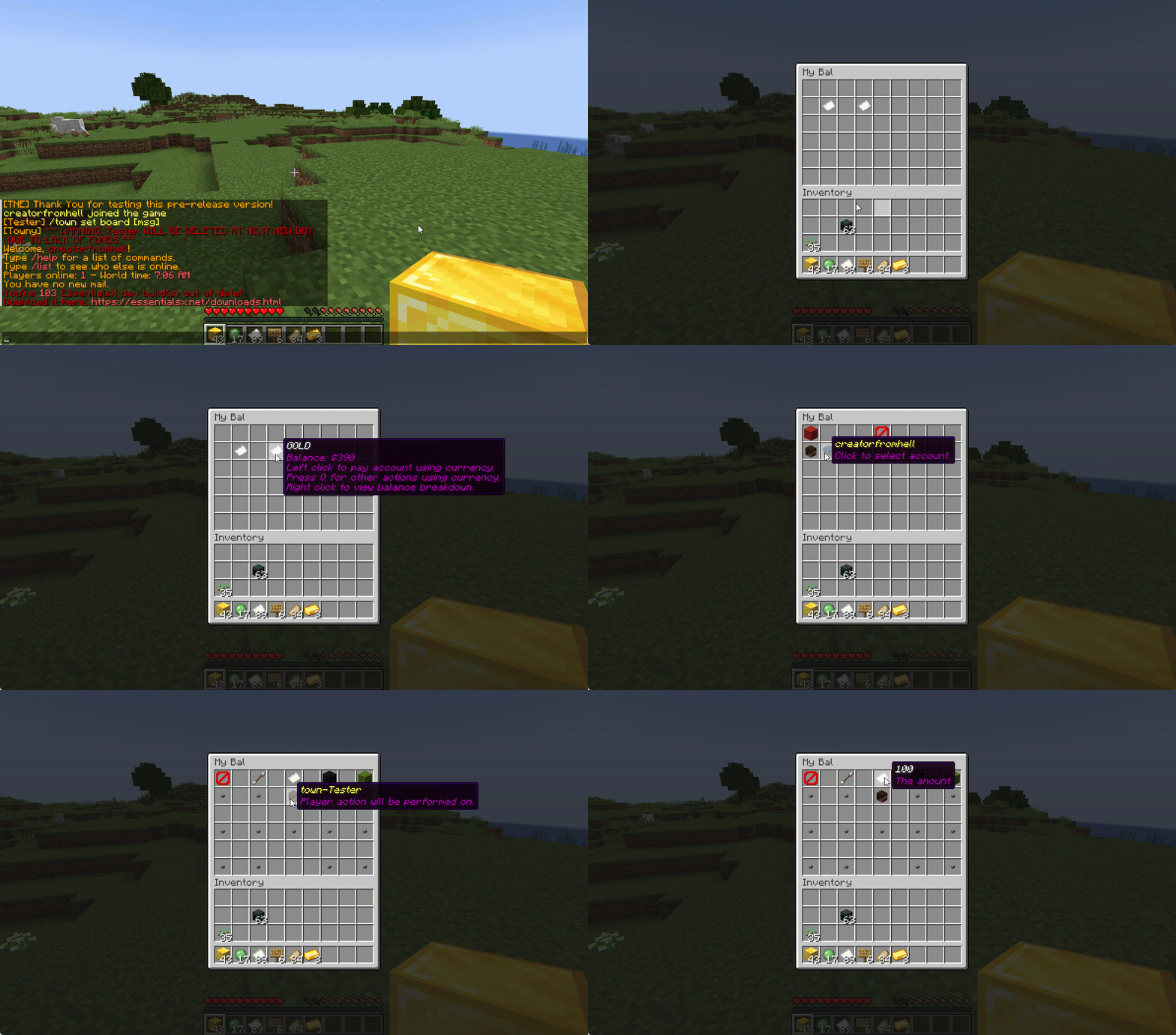
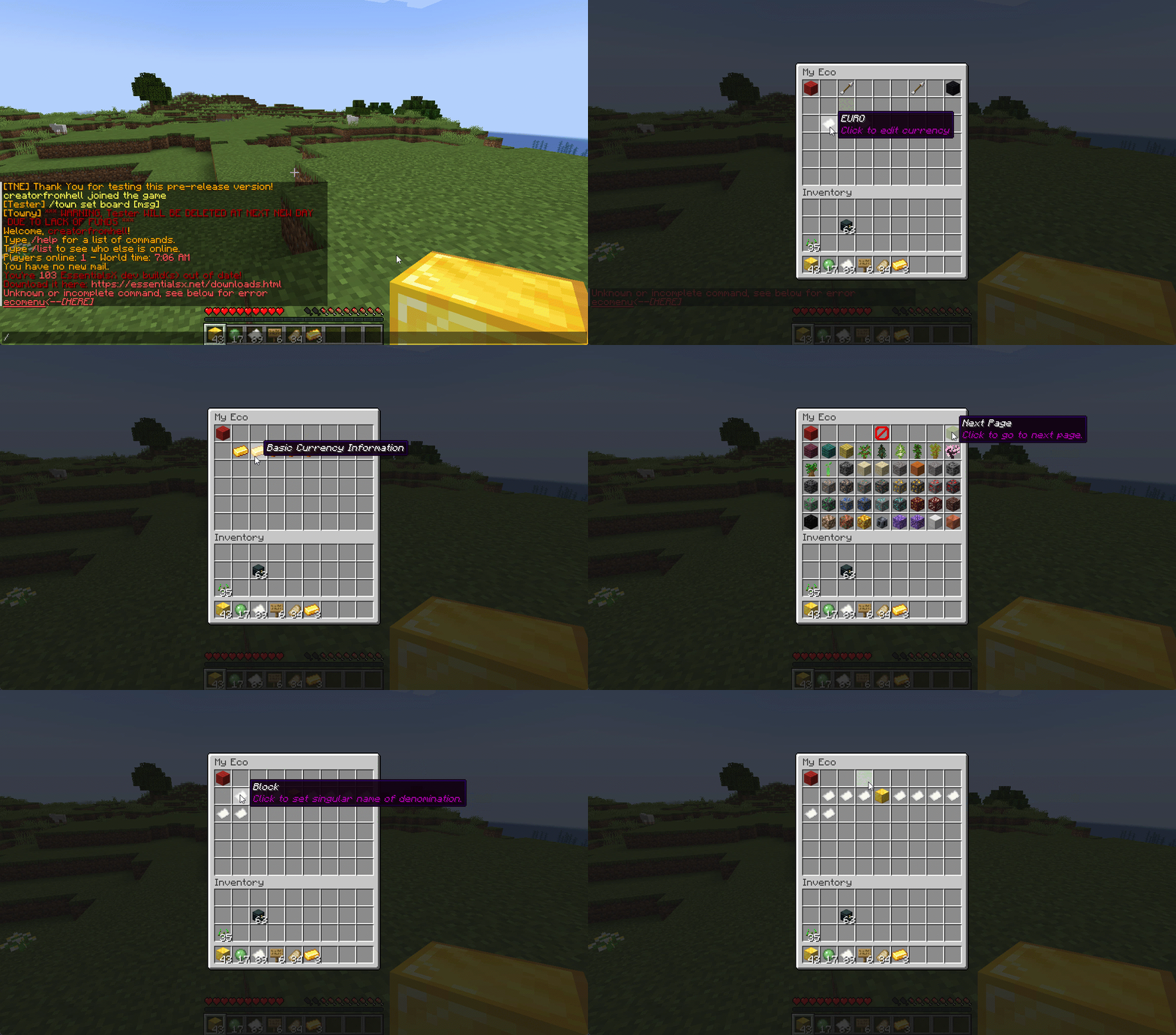
## Menu System
Want to use menus for currency creation and player actions? We got you!
### MyBal for Players
### MyEco for Admins
## Support your favorite plugins
We provide support for all your favorite plugins from Towny to Factions. Anything that supports Vault, supports TNE!
## Cross-Server
We support cross-server balance syncing through our velocity and bungee plugins, as well as Redis!
### Bungee
Download: [here](https://cdn.modrinth.com/data/bZ4eSWf0/versions/OTwQFFn1/TNE-BungeeCore-0.1.2.8-Release-1.jar)
### Velocity
Download: [here](https://cdn.modrinth.com/data/bZ4eSWf0/versions/prNGjbjv/TNE-VelocityCore-0.1.2.8-Release-1.jar)
## Updates
We continue to develop updates for TNE for free, and fix bugs as they’re reported.
## All the currencies – Unlimited
TNE Allows you to create unlimited currencies with ease through the currency creation GUI.
### Types
TNE Supports different types of currencies!
#### Virtual: Simple currency that exists in thin air
#### Item: Use minecraft items as currency.
– Shulker Box Support
– Bundle Support
### Fine Tune your Currency
Lots of per-currency configuration options.
– Create a custom balance format for each currency
– Set a starting amount for each currency
– Set custom conversion rates for each currency
– Create custom crafting recipes for item currencies
– Block Mob drops for each currency
– Set the max balance for each currency
– Set enderchest balance inclusion per currency
– Set item currencies to use MiniMessage inputs for display name and lores!
– Set custom note items for each currency, used to have a currency voucher for each currency.
– Allows for use of model data items as currency items
### Fine Tune Who Can Access What Currency
TNE allows you to fine tune who can run commands with each currency. You’re able to block players from using
/pay for certain currencies, and even checking their balance for others!
#### Mixed: This type uses both virtual and item balances, and allows players to switch their balance between items and virtual whenever!
#### Experience: Use experience as currency.
#### Experience-level: Use experience levels as currency.
## Money Notes
Convert your virtual currency into a physical money note using the /money note command.
## Multi-platform
Use Sponge? Sure. Paper? Why not? Both? Over Velocity? Definitely! Switch between, your TNE data works
for you no matter your platform. More platforms soon!
### Supported:
– Paper/Spigot/Purpur
– Sponge8
### Coming:
– Fabric
– Sponge7
## Discord Server
We have a discord server available to those users that have questions or need support!
## Configurability
TNE strives to allow you to configure things as much as possible. From the messages to starting money, to max holdings!
## MISC Features
– Adventure Chat support for translations to allow for awesome colorful messages!
– Support for Placeholders, include top 10
– Easy commands for easy administration
– Transaction Logging
– Easy-to-use menu system for currency creation and balance actions!
– Multiple data types
– SQL, YAML, and Maria DB
– Tab completion for commands!
– baltop command
## Open Source
Contribute on the [github](https://github.com/TheNewEconomy/EconomyCore)!
## Placeholders
| Name | Description |
|——————————————————-|—————————————————————-|
| tne_balance | Returns player’s balance. |
| tne_balance_formatted | Returns formatted player’s balance. |
| tne_world_worldname | returns player’s balance for specific world. |
| tne_world_worldname_formatted | returns the formatted player’s balance for specific world. |
| tne_currency_currencyname | returns player’s balance for specific currency. |
| tne_currency_currencyname_formatted | returns player’s balance for specific currency. |
| tne_wcur_worldname_currencyname | returns player’s balance for specific world and currency. |
| tne_wcur_worldname_currencyname_formatted | returns player’s balance for specific world and currency. |
| tne_toppos | returns player’s position on baltop |
| tne_toppos_world name or all | returns player’s balance for specific currency. |
| tne_toppos_world name or all_currency name or all | returns player’s balance for specific world and currency. |
| tne_toppos__position_ | returns the value for the position based on the value of Messages.Money.PlaceholderTopEntry in messages.yml |
## Permissions & Commands
## /tne
**About:** All commands that are designated as being for administrative purposes.
**Shortcuts:** /tne menu(/ecomenu), /tne(/ecomin, /ecoadmin, /ecomanage, /tneneweconomy)
**Base node:** tne.admin (default: ops)
**Wildcard node:** tne.admin.*
| Command | Permission | Description | Default |
|———————————–|——————-|———————————————————————————————————–|—————|
| tne backup | tne.admin.backup | Creates a backup of all server data. | ops |
| tne create [balance] | tne.admin.create | Creates a new economy account. Player ~ The account owner. Balance ~ The starting balance of the account. | ops |
| tne debug [level] | tne.admin.debug | Toggles console debug mode to the specified level. | ops |
| tne delete | tne.admin.delete | Deletes a player account. Player ~ The account owner. | ops |
| tne extract | tne.admin.extract | Extracts all player balances with their username attached for database related debugging. | ops |
| tne menu | tne.admin.menu | Opens up the tne economy admin menu | ops |
| tne purge | tne.admin.purge | Deletes all player accounts that have the default balance | ops |
| tne reload [configs] | tne.admin.reload | Used to reload configurations. | ops |
| tne reset | tne.admin.reset | Deletes all economy-related data from the database. | ops |
| tne restore | tne.admin.restore | Restores all balances that are located in extracted.yml after performing the extract command. | ops |
| tne save | tne.admin.save | Force saves all TNE data. | ops |
| tne status [status] | tne.admin.status | Displays, or sets, the current account status of an account. Player ~ The account owner. | ops |
| tne version | tne.admin.version | Displays the version of TNE currently running. | ops |
## /money
**About:** All commands that are used to interact with the server’s money system.
**Shortcuts:** /money balance(/bal, /balance), /money pay(/pay), /money top(/baltop), /money menu(/mybal)
**Base node:** tne.money (default: everyone)
**Wildcard node:** tne.money.*
| Command | Permission | Description | Default |
|————————————————————|———————–|—————————————————————————————-|—————|
| money balmenu | tne.money.mybal | Opens up the mybal menu. | everyone |
| money balance [world] [currency] | tne.money.balance | Displays your current holdings. | everyone |
| money convert [from currency] | tne.money.convert | Convert some of your holdings to another currency. | everyone |
| money deposit [currency] | tne.money.deposit | Deposits money from an item form into a virtual bank for mixed currencies. | everyone |
| money give [world] [currency] | tne.money.give | Adds money into your economy, and gives it to a player. | ops |
| money givenote [currency] | tne.money.givenote | Gives the specified player a currency note for the specified amount. | ops |
| money note [currency] | tne.money.note | Makes your virtual currency physical, for storage/trading purposes. | everyone |
| money other [world] [currency] | tne.money.other | Retrieves the balance of a player. | everyone |
| money pay [currency] | tne.money.pay | Use some of your holdings to pay another player. | everyone |
| money request [currency] | tne.money.request | Request money from a player. |
| money set [world] [currency] | tne.money.set | Set the holdings of a player. | ops |
| money setall [world] [currency] | tne.money.setall | Set the holdings of all players. | ops |
| money take [world] [currency] | tne.money.take | Removes money from your economy, specifically from a player’s balance. | ops |
| money top [page] | tne.money.top | A list of players with the highest balances. | ops |
| money top [page] [refresh(true/false)] | tne.money.top.refresh | This permission allows the user to include the refresh argument to refresh the baltop. | ops |
| money withdraw [currency] | tne.money.withdraw | Withdraws money from your virtual balance into its item form. | ops |
## /transaction
**About:** All commands that are used to interact with the transaction system.
**Shortcuts:** /trans
**Base node:** tne.transaction (default: everyone)
**Wildcard node:** tne.transaction.*
| Command | Permission | Description | Default |
|——————————————————————–|———————————————————|—————————————————————————————|—————|
| transaction away [page #] | tne.transaction.away | Displays transactions that you missed since the last time you were on. | everyone |
| transaction history [player:name] [page:#] [world:name/all] | tne.transaction.history / tne.transaction.history.other | See a detailed break down of your transaction history. Page ~ The page number you wish to view. World ~ The world name you wish to filter, or all for every world. Defaults to current world. | everyone |
| transaction info | tne.transaction.info | Displays information about a transaction. UUID ~ The id of the transaction. | everyone |
| transaction void | tne.transaction.void | Undoes a previously completed transaction. UUID ~ The id of the transaction. | ops |
TMOTD

# TMOTD
Simple optimized motd plugin
# Features
– MOTD
– Multiple motds
– Customizable change interval time
– Reload command
– MOTD set comand
# Commands
– /motd set (line 1) (line2)
– /motd reload
– /motd version
# Permissions
– tmotd.reload
– tmotd.set
– tmotd.version
# Dependencies
– None
TLobbyCommand
# TLobbyCommand
Simple hub & lobby command
# Features
– Hub & lobby command
– Multiple lobbys
# Commands
– /tlc version
# Permissions
– tlc.version
# Dependencies
– None
Tip4serv Donation Webstore
[Tip4serv.com](https://tip4serv.com/?ads=modrinth) provides gaming communities with a platform to effortlessly set up their virtual store and facilitate the sale of digital goods, including donations.
Managing a community and creating content can be demanding tasks. We aim to streamline the process, enabling managers to efficiently handle donations and automatically reward players.
Our mission is to deliver a user-friendly platform that simplifies the experience for both creators and buyers.
Here are examples of stores that you can customize: [https://murga.tip4serv.com](https://murga.tip4serv.com), [https://neon.tip4serv.com](https://neon.tip4serv.com) and [https://steelcraft.tip4serv.com](https://steelcraft.tip4serv.com)
## Features for starter plan (only 5% fee)
– Unlimited game servers & commands
– Create subscriptions plan
– Commands status tracking
– Stock management
– Deliver roles & messages on Discord
– Create discount coupon
– Add managers for your store
– Purchase email and invoice
– Sales statistics
– Private flow for subscribers
– Custom sub-domain
– Resend commands
– No ads
## Features for PRO members (subscription required)
– Dynamic Dark/Light theme
– Account linking with avatars
– Product page with gallery & video
– GUI colors editor & additional CSS
– Top customers & related products
## Store available in 15 languages
English, Danish, Dutch, English, French, German, Hungarian, Italian, Norwegian, Polish, Portuguese, Romanian, Russian, Spanish, Swedish and Turkish.
## Payment method
Here are the payment methods you can offer your players: Visa, Paypal, Cash App, Google Pay, Apple Pay, Ideal, GiroPay, BanContact, Sofort, Sepa, EPS, BACS, Amazon Pay, Revolut Pay, Mobile Pay, MultiBanco, BECS, Przelewy24, Boleto, Oxxo, Afterpay, Link.
## How does this work?
Tip4Serv checks if a player has made a donation on your Tip4Serv store and delivers the order in a minute (e.g., group, money, etc.) by executing commands in the server console.
Create your store and connect your Minecraft server in **5 minutes** on [Tip4Serv](https://tip4serv.com) in 4 simple steps:
1. **Store Settings:**
Enter your store name and set the desired URL.
2. **Payment Methods:**
Select your preferred payment options.
3. **Connect Server:**
Link your Minecraft server to Tip4Serv using your API key.
4. **Add Products:**
Create and configure products with executable commands on your server.
## Commands
**tip4serv connect** – Link your server to Tip4Serv (Ensure the API key is correctly set in tip4serv/tip4serv.key).
**tip4serv reload** – Deliver pending orders if there are any.
**/storelink** – Show a link to the store in the server chat.
## Proxy commands (Velocity & Bungeecord)
**tip4proxy connect** – Link your server to Tip4Serv.
**tip4proxy reload** – Deliver pending orders if there are any.
## Need help?
– [Documentation](https://docs.tip4serv.com/games/minecraft)
– [Contact us](https://tip4serv.com/contact)
tiAuth
# tiAuth
Authorization plugin for BungeeCord
—
### Features:
– Dialog window support `(1.21.6+)`
– Interactive window with a password input field
– Premium mode
– Allows licensed players to skip password entry by activating local `online-mode true`
– Session support
– Allows players to skip password entry for a certain period after successful authentication
– Multiple database types support
– Supports `SQLite`, `H2`, `MySQL`, `PostgreSQL`
– Virtual server
– Virtual server for auth server powered by [NanoLimbo](https://github.com/1050TIt0p/NanoLimbo)
—
### Commands:
#### For players:
– `/register ` – Register an account
– `/login ` – Log in
– `/logout` – Destory session
– `/changepassword ` – Change password
– `/premium` – Enable premium mode
– `/unregister` – Delete account
#### For administrators:
– `/tiauth reload` – Reload config
– Permission: `tiauth.admin.commands.reload`
– `/tiauth unregister ` – Delete player account
– Permission: `tiauth.admin.commands.unregister`
– `/tiauth changepassword ` – Change player password
– Permission: `tiauth.admin.commands.changepassword`
– `/tiauth forcelogin ` – Force login player
– Permission: `tiauth.admin.commands.forcelogin`
– `/tiauth migrate[file] [user] [password] [host] [port] [name]` – Migrate database from other plugins/database type
– Permission: `tiauth.admin.commands.migrate`
—
### Migration
#### Supported Plugins
– **tiAuth** (for changing the database type)
– **MCAuth**
– **LimboAuth**
– **AuthMe**
#### Migration Commands
Below are the commands for the default database types used by these plugins.
If you are using a **file-based database** (SQLite or H2):
– Place the database file into the plugin folder.
– For **H2**, **do not include** the `.mv.db` extension in the filename.
– If there is no username or password, set both `user` and `password` to `empty`.
#### MCAuth SQLite
“`
/tiauth migrate mcauth sqlite auth.db
“`
#### LimboAuth H2
“`
/tiauth migrate limboauth h2 limboauth-v2 empty empty
“`
#### AuthMe SQLite
“`
/tiauth migrate authme sqlite authme.db
“`
#### Important — LimboAuth H2 Migration
Before migrating from **LimboAuth H2** (which uses H2 as its default database):
1. Open your `config.yml`.
2. Change the `version` value under `libraries.h-2` to **2.1.214**.
3. Delete the **tiAuth** database file (if you are using H2 — it’s the default).
4. Restart your server.
This is required because **LimboAuth** uses an **outdated version of H2** that is incompatible with the newer version used by **tiAuth** by default.
If you skip these steps, the plugin will throw an error during migration.
—
### Virtual server configuration
After setting `servers.use-virtual-server` to `true` and restarting the server,
you need to configure **NanoLimbo** — its configuration is located in:
“`
/plugins/tiAuth/limbo
“`
#### Configure `infoForwarding`
– Set `type` to **MODERN** if you are using **VELOCITY_MODERN**,
then specify your **key** under `secret`.
– If you are using **BungeeGuard**, set `type` to **BUNGEE_GUARD**,
then specify your **tokens** under `tokens`.
– **LEGACY** mode is **not recommended** as it is insecure.
#### Optional Settings
You may optionally:
– Change the **port**
– Disable **BossBar**, **Join Message**, etc.
After editing `/plugins/tiAuth/limbo/settings.yml`,
**restart your proxy** to apply the changes.
—
### Support
[Discord Server](https://discord.matvey.tatar/)
[Telegram](https://t.me/x1050ti_top)
TheAPI

## Our purpose
Are you tired of looking for different APIs on the internet to create in your projects? Neither do we! And this is why TheAPI is here.
We bring the most useful and most wanted features directly for developers. From custom configurations with comments feature to Object parsers to String and back. Also, TheAPI offers an extensive Sockets API that will make working with sockets a million times easier! And we have much more, check out the sample code in the Examples section.
## Looking for source-code?
Our project is located on github:
https://github.com/TheDevTec/TheAPI
# How to include the API with Maven:
“`
jitpack.io
https://jitpack.io
com.github.TheDevTec
TheAPI
13.8
provided
“`
# How to include the API with Gradle:
“`
repositories {
maven { url ‘https://jitpack.io’ }
}
dependencies {
compileOnly “com.github.TheDevTec:TheAPI:13.8”
}
“`
## Our community
Join our Discord community for help and advice!
https://discord.gg/APwYKQRxby
TG-MOTD
# If you want to help us please [Donate](https://kamaucha.me/prabin9) us.
### ✨ Key Features
**🎨 Advanced Text Formatting**
– Full MiniMessage support with gradients and advanced formatting
– Legacy color codes with hex color support (&#RRGGBB)
– Create stunning MOTDs with unlimited color combinations
– Support for bold, italic, underline, strikethrough, and more
**🔧 Highly Customizable**
– Multi-line MOTD with dynamic placeholders
– Custom hover information for player list
– Custom server icons (favicons)
– Fake player count manipulation (add fixed or percentage)
– Protocol-specific MOTDs for different Minecraft versions
– Configurable update intervals
**🛠️ Professional Maintenance Mode**
– Toggle maintenance with a simple command
– Custom maintenance MOTD and kick messages
– Whitelist system for admins and staff
– Override player counts during maintenance
– Separate maintenance hover information
**👥 Powerful Whitelist System**
– Dedicated `players.yml` for whitelisted players
– Whitelisted players automatically get admin permissions
– Easy management with intuitive commands
– Bypass maintenance mode restrictions
**⚡ Performance Optimized**
– Lightweight and efficient
– Cached favicon loading
– Configurable update intervals
– Minimal resource usage
—
**🎥 Tutorials**
– Techinpoint Gamerz
—
### 📋 Requirements
– **Velocity:** 3.3.0 or higher
– **Java:** 21 or higher
—
### 🚀 Quick Start
1. Download the plugin
2. Place in your Velocity `plugins` folder
3. Restart your proxy
4. Edit `config.yml` in `plugins/tgmotd/`
5. Run `/tgmotd reload`
—
### 📝 Commands
| Command | Description |
|———|————-|
| `/tgmotd reload` | Reload configuration |
| `/whitelist add ` | Add player to whitelist |
| `/whitelist remove ` | Remove player from whitelist |
| `/whitelist list` | List whitelisted players |
| `/maintenance ` | Toggle maintenance mode |
**Permission:** `tgmotd.admin` or be whitelisted
—
### 🎨 Example MOTDs
**Gradient MOTD:**
“`yaml
motd:
lines:
– “MY SERVER | [1.21+]”
– “⚡ Join Today!”
“`
**Legacy with Hex Colors:**
“`yaml
formatter: LEGACY
motd:
lines:
– “&#FF0000&lM&#FF3333&lY &#FF6666&lS&#FF9999&lE&#FFCCCC&lR&#FFFFFF&lV&#CCCCFF&lE✏FF&lR”
– “&7Welcome to our network!”
“`
—
### 🎯 Perfect For
– ✅ Network servers wanting professional appearance
– ✅ Servers needing maintenance mode
– ✅ Communities wanting custom branding
– ✅ Admins who value easy configuration
– ✅ Servers requiring whitelist functionality
—
### 🔑 Placeholders
– `{online}` – Current online players
– `{max}` – Maximum players
– Use in MOTD lines, hover text, and kick messages
—
### 🛡️ Support
Need help? We’ve got you covered:
– 💬 [Discord Support](https://discord.com/invite/y5UKjK3Zxp)
—
### 📊 Statistics
– ⚡ Lightweight: < 1MB
- 🚀 Fast: Optimized performance
- 🔧 Configurable: 20+ options
- 📝 Commands: 5 useful commands
---
### 👨💻 Developer
Created by **TG ([Techinpoint Gamerz](https://www.youtube.com/@TechinpointGamerz))**
---
### 📄 License
MIT License - Free to use
---
**Download now and give your server the professional look it deserves!** ⭐