VerifyMC-Proxy is a companion plugin for VerifyMC that runs on your BungeeCord/Waterfall or Velocity proxy server. It intercepts player logins and verifies whitelist status via the VerifyMC backend API before allowing players to connect to your backend servers.
Features:
– Support for both BungeeCord/Waterfall and Velocity
– Real-time whitelist verification via HTTP API
– Customizable kick messages
– Multi-language support (English/Chinese)
– Auto-update configuration from remote
VelocitySlots
# VelocitySlots
VelocitySlots is a simple Velocity (and BungeeCord) plugin that **fakes the maximum player slots** in your server’s MOTD.
* Supports dynamic slot adjustment based on online players with an offset.
* Can also be set to a static number or an “unlimited” mode.
* Lightweight and requires **no other plugin dependencies**.
—
## Features
* **DYNAMIC mode**: Show `online players + offset` as max slots.
* **STATIC mode**: Always show a fixed maximum slot number.
* Configurable via `config.yml`.
—
## Installation
1. Place the `VelocitySlots.jar` in your `plugins/` folder.
2. Start Velocity — a default `config.yml` will be generated automatically.
3. Stop Velocity and edit `plugins/VelocitySlots/config.yml` as needed.
4. Restart Velocity to apply changes.
—
## Configuration (`config.yml`)
“`yaml
# ———————————————————-
# VelocitySlots Configuration File
# ———————————————————-
# This file allows you to control the “max slots” displayed
# in your server list (the MOTD), without affecting the real
# number of online players.
#
# You can configure static numbers and dynamic slots.
# All settings here only affect the max players shown
# to clients.
#
# Keep in mind, this is fake max slots, meaning if for
# example the max slots of your server is at 200 players,
# the limit will still work.
# ———————————————————-
# ————————
# MAX SLOTS MODE
# ————————
# Choose how the max slots should be displayed.
# Options:
# DYNAMIC -> max slots = online players + offset
# STATIC -> max slots = static-slots value
max-slots-mode: DYNAMIC
# ————————
# DYNAMIC MODE SETTINGS
# ————————
# Only used if max-slots-mode is set to DYNAMIC.
# The plugin will take the real online player count and
# add the offset. This makes the server appear fuller.
# Example: 50 players online + offset 10 => 50/60 shown
offset: 0
# ————————
# STATIC MODE SETTINGS
# ————————
# Only used if max-slots-mode is set to STATIC.
# This number will always be shown as the max slots in the
# server ping, regardless of the actual player count.
# Example: static-slots: 1 will show 20/1 if 20 are online
static-slots: 100
# ————————
# NOTES
# ————————
# 1. Only the max slots value is changed; online players
# always display the real count.
# 2. Offset is ignored in STATIC modes.
# 3. Setting max-slots-mode: DYNAMIC with offset: 0
# simply mirrors the current online count as max slots.
# 4. You can adjust these values at any time; the changes
# will take effect immediately for the next server ping.
“`
—
## Example
If you have **50 players online** and `offset: 10` in FAKE mode:
“`
MOTD: 50/60
“`
Vault 2.0 economy plugins
What is Vault2.0?
Vault2.0 is an economy plugin that registers a Bukkit Economy service compatible with the Vault API, allowing other plugins (shops, ranks, etc.) to use money without depending on the original Vault.jar. It includes menus, pay/charge flows, loans, and safe configuration and message reloads
## ━━━━━━━━━━IMPORTANT━━━━━━━━━━
– Do NOT run this plugin alongside the original Vault.jar (same plugin name). Remove Vault.jar before starting
## ━━━━━━━━━━Features━━━━━━━━━━
– Internal economy with persistence (file storage; optional MySQL).
– /pay with GUI and per-player submenu (pay, charge, view balance, loans).
– Loans with GUI wizard (amounts via chat only).
– Defaulted effects configurable (slowness/fatigue, etc.) when a loan defaults.
– /vault main menu (Pay / Loan / Settings / Reload / Update).
– Safe reload: /vault reload updates config.yml and messages_*.yml without overwriting your values.
– Multi-language: en, es, fr, de, nl, pt, ru, zh_TW, hi.
## ━━━━━━━━━━ Installation ━━━━━━━━━━
Copy the .jar file to the plugins folder on your server. Start the server to generate the configuration.
– MySQL compatibility: compatibility with MySQL, allowing users to integrate and manage databases more efficiently.
## ━━━━━━━interactive menu━━━━━━━━
### 📃Submenu:
1:💲pay send money to a player
2:💲balance shows the player’s money
3:💲Charge sends an interactive message to the player with the designated amount (clicking on the message automatically sends the money without using commands).
## ━━━━━━━━Loan System━━━━━━━━
The loan system helps manage the game’s finances. Players can apply for loans, manage payments, and view their financial status.
### Request a Loan
To request a loan, open the menu with `/loan` or `/prestamo` and select **Request**. Specify the amount and, if there are installments, also the amount of each one.
### Money Delivery
Upon confirmation, the money is instantly deposited, and the loan is recorded as “active.”
### Automatic Collection
The system attempts to collect installments automatically. If there’s enough balance, it deducts from the balance.
### View Status
In the menu, the **Status** option shows the outstanding balance and the next payment date.
### Pay Manually
You can use the **Pay** option to pay part or all of the loan at any time.
### debt
If there’s not enough balance to collect, the loan goes into debt. This can cause negative effects until the debt is settled.
This system simplifies financial management in the game, offering control and dynamism.
Spoiler
“`
📜 Commands List:
| /vault -> open main menu
| /vault reload -> reload config + messages and add missing sections
| /vault update -> check updates
| /pay -> open player list GUI
| /loan | /prestamo -> open loan GUI
| /balance -> show your balance
| /eco give/take -> admin (OP)
### ✨ Features
– Vanish mode (on / off)
– Fly enabled while vanished
– Hidden from other players and TAB list
– Silent join & quit while vanished
– Vanish state saved between restarts
– PlaceholderAPI support (soft-depend, no hard dependency)
Today, many servers have zero protection against fraud, VPNs, proxies, and peer-to-peer networks. v4Guard has come to the Minecraft communities to change this and offer a quality solution at an affordable price.
# Features
– We’re a **cloud based** solution, meaning near zero impact on your infrastructure resources
– Update all settings in **real time**, with **no restarts** and **no configuration** files. All customization is done via a **web dashboard**.
– You’re able to **whitelist** usernames and IP addresses completely if you want to allow anonymization services to certain users, or if you think there’s an error.
– Fast and **efficient support** team, if you have any questions, issue or feedback, just reach out through your **dedicated support channel** or via a ticket.
– You can **search** for **user profiles**, or **IP address profiles** to get historical information, VPN usage statistics, version and game information, etc…
– Do you have a big team? We support **sub users**, just invite them to your team and give them access to all or certain features by using our **permission system**.
– We have an addon called **Account Shield** that will help you prevent account theft and allow you to restrict access to certain accounts within specific IP address, subnet or even 2FA!
– Easily manage **automated accounts** powered by **AFK console clients** (such as MinecraftAFK) thanks to our partnerships and incorporated settings + contextual information.
– Use our own **API** implementation to be able to create **your own implementations**: discord bots for whitelisting players, extracting information, custom 2FA workflows…
– Allow connections from trusted game boosters such as ExitLag, NoPing, etc…
## Mobile Providers
Unlike similar services, v4Guard has an enhanced mobile hotspot detection and integrated 100+ mobile carriers. This feature helps you tailor your protection: choose specific providers to block, ensuring uninterrupted access for larger player bases and easily customize your experience.
## Local Blacklist
You can also manage your in-game moderation with our Local Blacklist feature, which gives your team a new seamless and centralised management possibilities for your local blockages.
## Manage all information unified in a single service.
It has never been so easy to see so much information about your community summarized in just a click.
– **Detailed Information** Access a user’s profile to see all his detailed information in one click.
– **Custom Rules** Control the flow of your traffic as you wish in a very innovative way.
– **Residential Detection** Say goodbye to bad actors who use P2P networks to bypass with residential IPs.
– **Machine Learning** Automated algorithms and processes for effective and pioneering protection.
# Installation
1. Download the latest version here, or in our [GitHub](https://github.com/v4guard/connector/releases/latest) respository
2. Drop the plugin on your proxy’s plugins folder, and restart the server
3. Click on the dashboard link printed in the console
4. On the website, click on your company name
5. Voilà, we’ll be processing your players right away.
# Large clients who trust us
We are proud to say that small to large communities trust our service and use it every day to enhance their protection. Compared to other services, v4Guard offers the best service customized to your needs.

and many more…
UserLoginProxy
Autologin feature for [UserLogin](https://www.spigotmc.org/resources/userlogin.80669/) 2.12.1+ and [NukeLogin](https://codeberg.org/BratishkaErik/NukeLogin) 0.0.4+.
Here, the “main plugin” refers to the UserLogin or NukeLogin.
Suppose you have a proxy and three servers: `lobby`, `survival` and `mini-games`. The `lobby` server has the “main plugin” installed, and here (and only here!) players log in (or register) and teleport through portals to other servers.
Let’s imagine that some player, BratishkaErik, joined the server, authorized on `lobby`, and went to the `survival` portal. Then, he decided to go to the `mini-games` server, but he needed to go via the `lobby` server:
* Without autologin support: BratishkaErik must log in manually as if he were offline on `lobby` the whole time he was on the `survival` server. This can be annoying for some players.
* With autologin support: BratishkaErik logged in automatically as if he were online on the `lobby` the whole time he was on the `survival` server. Player don’t need to do anything and he can go straight to the `mini-games` portal.
Note that in the second scenario `ipCache` setting from “main plugin” config is not respected.
# How to install
## Jar-files
* Download “main plugin” and put it into plugins folder of your auth server.
* Download UserLoginProxy and put it into plugins folder of your Velocity 3 or BungeeCord proxy (**not auth server!**).
## Configuration
* For “main plugin”: enable `autologin` setting in `config.yml`:
“`yaml
bungeeCord:
# …
autoLogin: true
“`
* For this plugin: add backend server(s) (where “main plugin” is installed) to the `auth-servers` list in `config.yml`:
Finally, restart servers. Now players will be logged in automatically when changing server to `lobby` or `another_lobby`.
# Permissions and Commands
There are no permissions. There is only one command, `/userloginproxy` (alias `/ulp`), that re-reads config.
# License
This plugin is licensed under “GNU GPL v3 or later” license. Release jars includes relocated [DazzleConf 1.2.1](https://github.com/A248/DazzleConf/tree/1.2.1), which is licensed under “GNU LGPL v3 or later” license.
UniversalPluginUpdater
UniversalPluginUpdater
[](https://github.com/DreamVoid/UniversalPluginUpdater/releases/latest)

[简体中文](https://github.com/DreamVoid/UniversalPluginUpdater/blob/main/README.md) | English
—
## Introduction
UniversalPluginUpdater (UPU) is a Minecraft server plugin that allows you to quickly update existing server plugins, while also providing APIs to help developers easily implement automatic update functionality for their plugins.
The development of UniversalPluginUpdater was inspired by [APT](https://wiki.debian.org/zh_CN/Apt).
## Documents and tutorials
For first-time UPU users, reading the [UPU Help Manual](https://docs.upu.dreamvoid.me/en/) can help them get started quickly. Many questions can be answered by consulting the documentation, which also includes how UPU checks for updates to other plugins.
This is just a list of some commonly used commands. For a complete list of commands, please refer to the [documentation](https://docs.upu.dreamvoid.me/en/core/commands).
| Command | Description |
| — | — |
| /universalpluginupdater (/upu) | UniversalPluginUpdater main command |
| /upu update | update list of available plugins. |
| /upu list | list all available plugins |
| /upu download | download existing plugins’ newer version by downloading. |
| /upu upgrade | upgrade existing plugins by downloading/installing newer version. |
| /upu repo | configuration file repository sub-command |
## License
[GNU General Public License v3.0](https://github.com/DreamVoid/UniversalPluginUpdater/blob/main/LICENSE)
—
[DreamVoid](https://github.com/DreamVoid), Made with ❤.
UnifiedMetrics is a fully-featured free and open-source metrics collection plugin for Minecraft servers. This project is
licensed under [GNU LGPLv3](COPYING.LESSER).
[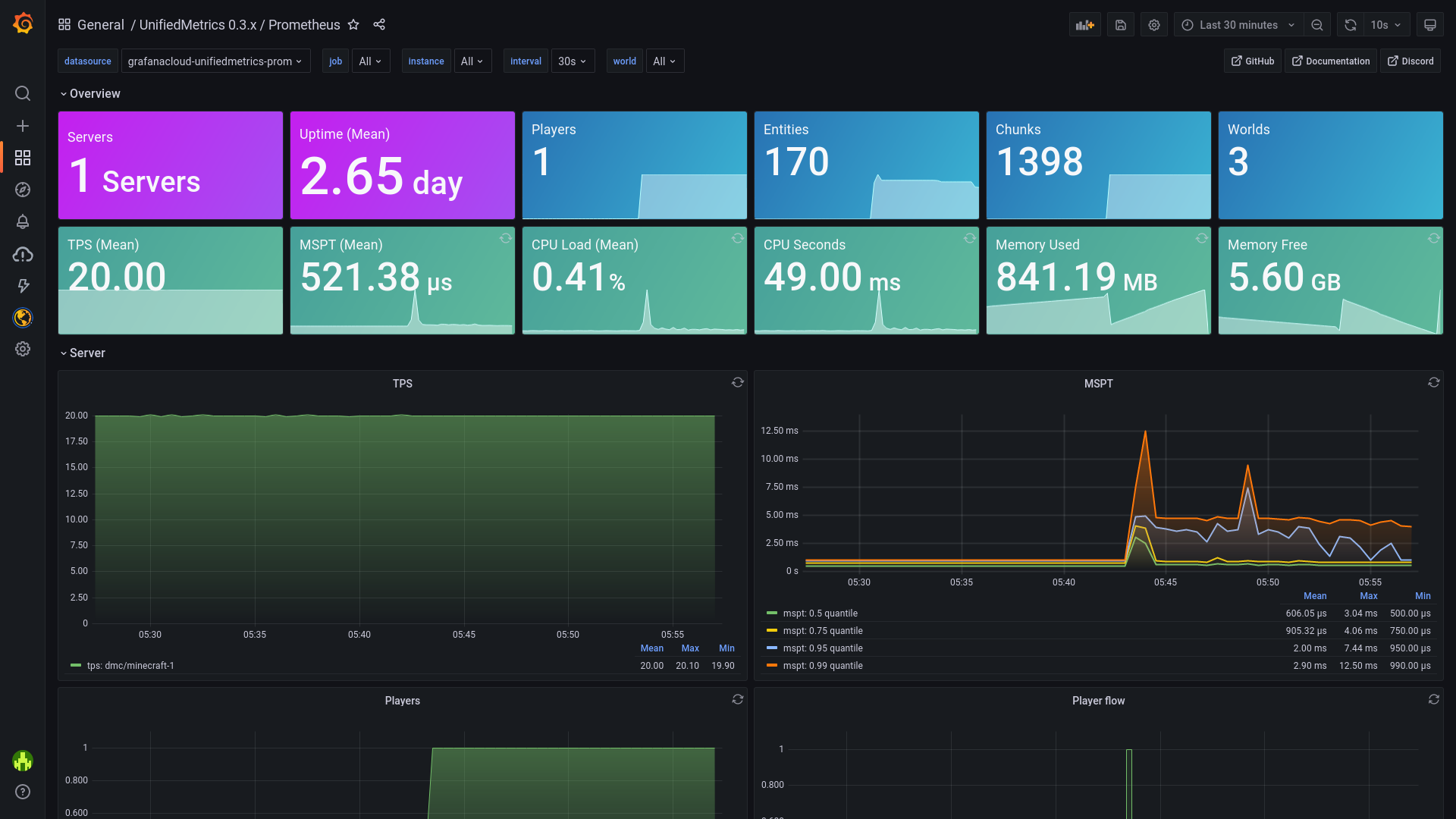](https://dedimc.link/unifiedmetrics)
*Dashboard [included](https://github.com/Cubxity/UnifiedMetrics/wiki/Grafana) out-of-box!*
Click [here](https://unifiedmetrics-demo.cubxity.dev/) for live preview!
## Features
– **Platform-agnostic & compatible with popular platforms**. Get the same metrics and features on any supported
platform.
– **Monitor your server in real-time** with Prometheus/InfluxDB and provided Grafana dashboards.
– **High performance** metric collection. Low to none performance impact on the server’s performance.
– **Free and open-source**. The code is free and open for anyone to audit and contribute to.
Read the [wiki](https://github.com/Cubxity/UnifiedMetrics/wiki) for instructions on how to get started.
## Metrics
Table of metrics (click to show)
| Collector | Description | Platform | Default |
| ————- | ———————————————– | ——————- | ——- |
| systemGc | Garbage collection duration and freed bytes | All | true |
| systemMemory | Memory used, committed, max and init | All | true |
| systemProcess | CPU load, seconds, and process start time | All | true |
| systemThread | Current, daemon, started, and peak thread count | All | true |
| events | Login, join, quit, chat, and ping event counter | All | true |
| server | Plugins count and player counts | All | true |
| tick | Tick duration histogram | Bukkit, Minestom | true |
| world | World entities, players, and chunks count | Bukkit, Minestom | true |
## Special Thanks
[Bloom Host](https://billing.bloom.host/aff.php?aff=9) has kindly provided UnifiedMetrics with development servers.
Bloom has server splitting built-in, which makes it extremely easy to build your monitoring stack. Get high performance
servers at Bloom by using [this link](https://billing.bloom.host/aff.php?aff=9).
YourKit supports open source projects with innovative and intelligent tools for monitoring and profiling Java and .NET
applications. YourKit is the creator of [YourKit Java Profiler](https://www.yourkit.com/java/profiler/),
[YourKit .NET Profiler](https://www.yourkit.com/.net/profiler/),
and [YourKit YouMonitor](https://www.yourkit.com/youmonitor/).
## UltraStaffChat BungeeCord
[Wiki](https://wiki.hypera.dev/ultrastaffchat/) – [Support](https://support.hypera.dev/) – [Source Code](https://github.com/HyperaDev/UltraStaffChat/) – [License](https://github.com/HyperaOfficial/UltraStaffChat/tree/main/LICENSE)
A fully customisable staff communication plugin for BungeeCord!
### Key features
[*View on Wiki*](https://wiki.hypera.dev/ultrastaffchat/introduction/features)
– Customisable – Almost everything is completely customisable
– Discord Integration – Display staff-chat messages in a Discord channel
– Cross-server – All staffchat messages are visible from all servers
– Helpful support – Our helpful support team is ready to help
All features
– **Message configuration**
– Change any message to your liking
– Feature toggles
– Disable any unused or unwanted features
– **Staff communication system**
– Use a message prefix to send messages (e.g. `# Hello`)
– Toggle sending messages (`/sctoggle`)
– Toggle receiving messages (`/scmute`)
– Stop everyone without a bypass permission from sending messages (`/mutesc`)
– AFK broadcasts
– **Basic staff list command** (`/sclist`)
– **Discord integration**
– Single-way communication through the use of webhooks
– Event notifications
– **RGB support** (`&#aabbcc`)
– **Helpful support** (https://support.hypera.dev/)
### Why UltraStaffChat?
The goal of **UltraStaffChat** is to provide a feature-packed and highly customisable staff communication plugin for Minecraft networks big and small. Whether you have two staff members, or hundreds, communication is always a big part of having a healthy and well-moderated server.
### Need help?
If you ever don’t understand something, or just need some help, we have a support team ready to answer your questions and attempt to resolve any issues you might have with our plugins.
Join our [Support Discord server](http://discord.hypera.dev/) for help!
### Installation
[*View on Wiki*](https://wiki.hypera.dev/ultrastaffchat/introduction/installation)
### Comparison
We offer a premium version of this plugin, [**UltraStaffChatPro**](https://ultrastaffchatpro.com/), which has many more features.
Here’s a comparison between UltraStaffChat and [**UltraStaffChatPro**](https://ultrastaffchatpro.com/):
UltraStaffChat
– BungeeCord only
– Highly customisable
– Togglable features
– Minecraft -> Discord
– Message prefix
– AFK system
– Global mute
– Join messages
– Switch messages
– Leave messages
– Helpful support
UltraStaffChatPro [Premium]
[**Resource page**](https://ultrastaffchatpro.com/)
– All features of UltraStaffChat
– Velocity and Spigot support
– Two-way Discord integration
– Multiple channels (configure as many as you want!)
– Staff list command
– Configurable aliases
– Staff playtime tracking
– RedisBungee integration¹
– PremiumVanish integration²
– LuckPerms placeholders
– Ultra Permissions placeholders
– Better configuration files
– More features coming soon!
*¹ RedisBungee allows UltraStaffChatPro to send messages across multiple proxies*
*² PremiumVanish allows UltraStaffChatPro to have a vanish placeholder, and hide vanished players from the staff list*
### Videos
Videos showcasing UltraStaffChat.
*If you create a video showcasing UltraStaffChat, please [contact us](https://support.hypera.dev/) to have it included here!*
### License
UltraStaffChat is licensed under the [GNU General Public License v3](https://github.com/HyperaOfficial/UltraStaffChat/tree/main/LICENSE).
Check the [LICENSE](https://github.com/HyperaOfficial/UltraStaffChat/tree/main/LICENSE) file for more information.
### Contributors
Thank you to all of the amazing people that contribute to the creation of this resource.
– [Joshua Sing (@joshuasing)](https://github.com/joshuasing)
– [LooFifteen (@LooFifteen)](https://github.com/LooFifteen)
– [Christian F (@christianf7)](https://github.com/christianf7)
– Auto-freeze triggered by anti-cheat
– Evidence system (automatic screenshots)
– Progressive punishment system
– AFK detection while frozen
– Silent freeze mode (no messages sent)
– Player freeze history (`/freezehistory`)
—
# 🚀 Summary
This plugin provides a highly advanced staff freeze system including:
– Full player control restrictions
– Modern staff GUI
– Temporary freeze system
– JSON logging system
– Discord webhook integration
– Anti-disconnect punishment system
– Staff spectator tools





