Prism Perms
Prism Perms is a lightweight, cross‑platform permissions plugin for Minecraft servers. It provides simple, consistent group and user permission management across Bukkit/Spigot/Paper, BungeeCord, and Velocity without needing a database. Data is stored in readable YAML with built‑in backup/restore and live reload/watch.
– Uniform commands across all platforms for adding/removing groups and permissions
– Per‑user overrides (allow/deny) and group membership management
– Rich stats tools to inspect groups and users, including ungrouped/missing/list
– Pagination and safe chat chunking to prevent message overflows
– Online/offline player name resolution via a cached names store (timestamps persisted)
– Designed for small to medium servers that want a fast, file‑based solution
## Quick Commands
– Version: `/pp version`
– Groups: `/pp group add `, `/pp group remove `, `/pp group list`
– Group perms: `/pp group perm add `, `/pp group perm remove `, `/pp group perms list `
– User groups: `/pp user setgroup `, `/pp user removegroup `
– User perms: `/pp user perm add `, `/pp user perm remove `
– User info: `/pp user list `, `/pp user overrides `
– Stats: `/pp stats users …`, `/pp stats groups [members [limit]]`, `/pp stats verbose [group]`
– Backup/Restore: `/pp backup`, `/pp restore`
## Permissions
– Admin: `prismperms.admin`
PrefiX
[Discord Server]: https://discord.gg/2RHYvNy “Join the Discord Server”
[Discord Logo]: https://icons.iconarchive.com/icons/papirus-team/papirus-apps/256/discord-icon.png “Join the Discord Server”
[LuckPerms]: https://luckperms.net “LuckPerms Homepage”
[DeluxeMenus]: https://www.spigotmc.org/resources/deluxemenus.11734/ “DeluxeMenus”
[bStats]: https://bstats.org/plugin/bukkit/PrefiX/10920 “bStats PrefiX”
[bStats-picture]: https://bstats.org/signatures/bukkit/PrefiX.svg “bStats PrefiX”
[SpigotMC]: https://www.spigotmc.org/resources/prefix.70359/ “SpigotMC PrefiX”
[plugin-downloads]: https://img.shields.io/spiget/downloads/70359?label=Downloads
[plugin-version]: https://img.shields.io/spiget/version/70359?label=Version
[plugin-rating]: https://img.shields.io/spiget/stars/70359?label=Rating
[plugin-supported]: https://img.shields.io/spiget/tested-versions/70359?label=Supported%20Versions
[bStats-players]: https://img.shields.io/bstats/players/10920?label=Online-players
[bStats-servers]: https://img.shields.io/bstats/servers/10920?label=Online-servers
[discord-online]: https://img.shields.io/discord/755734170709524557?logo=discord&logoColor=235865F2
# PrefiX
Commands –
Permissions –
Config –
Languages –
Placeholders
[![plugin-downloads]][SpigotMC] [![plugin-version]][SpigotMC] [![plugin-rating]][spigotMC] [![plugin-supported]][SpigotMC] [![bStats-players]][bStats] [![bStats-servers]][bStats] [![discord-online]][Discord Server]
—
## **Description**
PrefiX is an easy and clean plugin to support in editing the Prefixes and Suffixes on your server.
Players can adapt their Prefix and/or Suffix based on their given permissions. Easy to configure and even easier to use!
PrefiX is build against [LuckPerms].
For quick support ask your questions in our [Discord server]!

## Wiki
This plugin is very well documented on our own wiki: PrefiX Wiki
## **Features**
– Uses ***only*** LuckPerms for handling and saving
– Colors of the ***prefix***, ***name***, ***bracket*** and ***suffix*** are separated
– ***Blacklist*** specific words
– ***Whitelist*** character groups and custom characters
– Fully ***customizable*** colors and formatting
– Different permission for each color
– Formatting toggles
– All colors available
– All formatting available
– ***Hexadecimal*** support
– Hexadecimal names support
– Custom hexadecimal format
– Gradient support
– ***Moderating*** for staff
– You can change others prefix/colors/suffix
– ***Configurable*** characters before and after the prefix
– ***Auto-checker*** for new updates
– ***Overviewlist*** with all available colors for the player
– ***Interactive*** color list
– ***Suffix*** support
– ***BungeeCord*** support
– Define your own **custom messages** *(Or other **languages**)*
– Ability to respect **context** from LuckPerms
– Support for ***spaces*** in the Prefix/Suffix by adding “”
– ***Placeholder*** support via ***PAPI***
– ***DeluxeMenus*** support
*Prefix has [DeluxeMenus] support, this means that it’s possible to let players choose from a Deluxe Menu a presetted prefix. This will ensure you as admin that only predefined prefixes are chosen. For more information about DeluxeMenus support visit out [Discord Server].*
* Clickable overview of available colors:

## **Setup Spigot/Paper/Folia & BungeeCord**
Please be aware it requires [LuckPerms v5][LuckPerms] to work.
This plugin works out of the box by simply downloading and dropping in your plugins folder.
## **Statics**
This Plugin uses bStats! This submits anonymous stats about your server (player count, plugin/server version, etc.) to the public statistic website [bStats] which will provide developers with usage statistics of this plugin. If you don’t want this feature and wish to opt-out, you can add *’bstats: false’* to the config.
It would mean a lot to me though if you could leave it enabled, its part of what keeps me motivated 🙂
## **Trusted by many people**
PrefiX in stable, easy to use and simple to setup. Therefore it’s used and trusted in many servers with great success.
[![bStats-picture]][bStats]
## ***Want to display custom prefixes…***
*…in your chat? You need a chat formatting plugin.*
*…in the tab list? You need a tab plugin.*
*…somewhere else? You need a specific plugin for that.*
## **Looking for support?**
> Visit our [Discord server] for quick support for all your questions!
> [![Discord Logo]][Discord Server]
**Thanks.**
polocloud-proxy
# PoloCloud Proxy Addon
The **PoloCloud Proxy Addon** is a user-friendly extension for PoloCloud that helps you manage your network! It includes the `/cloud` command, which allows you to start and stop services or activate maintenance work via command.
It is designed for all supported proxies, including Velocity and BungeeCord, and helps employees and players enjoy the best possible gaming experience.
## 💫 Features
– **Works on all supported proxies** – No need to install it on every backend server.
– **Service management via command** – Start or stop services via `/cloud` command
– **Permission-based commands** – Only players with the configured permission are able zu perform the commands.
– **Fully configurable** – Customize messages through `proxy-config.json`.
– **Lightweight & dependency-free** – Minimal performance impact.
## 🎟️ Permission
This permission is needed to perform commands or bypass the maintenance mode:
“`polocloud.addons.proxy.command.cloud“`
“`polocloud.addons.proxy.command.cloud.info“`
“`polocloud.addons.proxy.command.cloud.list“`
“`polocloud.addons.proxy.command.cloud.maintenance“`
“`polocloud.addons.proxy.command.cloud.players“`
“`polocloud.addons.proxy.command.cloud.start“`
“`polocloud.addons.proxy.command.cloud.stop“`
“`polocloud.addons.proxy.maintenance.bypass“`
📂 Installation
Download the latest release of the PoloCloud Proxy Addon.
Place the .jar file into your plugins folder.
Restart the proxy instance.
Edit the generated proxy-config.json to customize messages.
Reload or restart the proxy to apply the changes.
💡 Use Cases
Offer players the best possible gaming experience with a configurable MOTD and tab list.
Inform your players about maintenance work via a configurable MOTD and only allow authorized team members to access the network during maintenance work.
—
With the PoloCloud Proxy Addon, you can ensure that players get the best possible gaming experience – simple, configurable, and reliable.
polocloud-notify
# PoloCloud Notify Addon
The **PoloCloud Notify Addon** is a lightweight and easy-to-use extension for PoloCloud that sends notifications to players with specific permissions when services start, stop, or are starting.
It is designed to work on all supported proxies, including **Velocity** and **BungeeCord**, helping staff and players stay informed about the status of network services in real time.
## ✨ Features
– **Works on all supported proxies** – No need to install it on every backend server.
– **Real-time service notifications** – Alerts players when services are starting, started, or stopped.
– **Permission-based notifications** – Only players with the configured permission will receive messages.
– **Fully configurable** – Customize messages and permissions through `notify-config.json`.
– **Lightweight & dependency-free** – Minimal performance impact.
## 🎟️ Permission
This permission is needed to receive notifications:
“`
polocloud.addons.notify.receive.starting
“`
“`
polocloud.addons.notify.receive.online
“`
“`
polocloud.addons.notify.receive.shutdown
“`
## 📂 Installation
1. Download the latest release of the **PoloCloud Notify Addon**.
2. Place the `.jar` file into your plugins folder.
3. Restart the proxy instance.
4. Edit the generated `notify-config.json` to customize messages and permissions.
5. Reload or restart the proxy to apply the changes.
## 💡 Use Cases
– Keep staff informed about service status changes across the network.
– Notify players with specific roles or permissions about server availability.
– Customize notifications to fit your community’s style and needs.
—
With the PoloCloud Notify Addon, you ensure that the right players stay up to date with real-time information about your network’s services — simple, configurable, and reliable.
polocloud-hub
# PoloCloud Hub Addon
The **PoloCloud Hub Addon** is a lightweight and easy-to-use extension for PoloCloud that adds a `/hub` command to your network.
It is designed to work on all supported proxies, including **Velocity** and **BungeeCord**, allowing players to quickly return to the hub or lobby server from anywhere.
## ✨ Features
– **Works on all supported proxies** – No need to install it on every backend server.
– **`/hub` command** – Instantly send players back to the fallback server.
– **Fully configurable** – Customize everything through `config.json`:
– **Messages** – The text players see when they run the command.
– **Command aliases** – Add shortcuts like `/l` or `/lobby`.
– **Custom prefix** – Match the look and feel of your server.
– **Lightweight & dependency-free** – Minimal performance impact.
## 🎟️ Permission
This permission is needed to execute the command:
“`
polocloud.addons.hub.command
“`
## 📂 Installation
1. Download the latest release of the **PoloCloud Hub Addon**.
2. Place the `.jar` file into your plugins folder.
3. Restart the proxy instance.
4. Edit the generated `hub-config.json` to customize the message, aliases, and prefix.
5. Reload or restart the proxy to apply the changes.
## 💡 Use Cases
– Provide players with a simple and intuitive way to return to the fallback server.
– Add multiple aliases for better accessibility (e.g., `/hub`, `/l`, `/lobby`).
– Brand your hub command with your own prefix and style.
—
With the PoloCloud Hub Addon, your players will always have a quick, easy, and customizable way back to your hub.
Project: Maintenance Universal

## 🎉 Project: Maintenance Universal
### ✅ Core Features
– Basic maintenance mode (enable/disable/toggle)
– Whitelist system with add/remove/list/clear
– Permission system with bypass support
– Database support (SQLite, MySQL, PostgreSQL)
– Statistics tracking (sessions, kicks, blocked connections)
– Configuration system with reload command
### 📦 Platform Support
**Paper/Spigot/Purpur:** 1.14 – 1.21.1
**Velocity:** 3.0.0 – 3.4.0
**BungeeCord/Waterfall:** All versions
**Folia:** 1.19.4+ (thread-safe operations)
### 🎮 Commands Available
– `/maintenance enable [reason]` – Enable maintenance mode
– `/maintenance disable` – Disable maintenance mode
– `/maintenance toggle` – Quick toggle
– `/maintenance status` – View current status
– `/maintenance whitelist ` – Manage whitelist
– `/maintenance stats` – View statistics
– `/maintenance reload` – Reload configuration
### 🔐 Permissions
– `maintenance.admin` – Full access
– `maintenance.bypass` – Bypass maintenance mode
– `maintenance.command` – Use basic commands
– `maintenance.toggle` – Enable/disable maintenance
– `maintenance.whitelist` – Manage whitelist
– `maintenance.stats` – View statistics
– `maintenance.reload` – Reload config
### 🗄️ Database Options
– SQLite (default, zero config)
– MySQL with HikariCP connection pooling
– PostgreSQL support
### 🎨 Customization
– Custom kick messages
– Configurable MOTD during maintenance
– Message customization in config.yml
### 📝 Notes
– Redis sync: Planned for future release
– Timer scheduling: Planned for future release
– PlaceholderAPI: Planned for future release
– Fabric/Forge versions: Planned for future release
**Download the correct JAR for your platform:**
– **Paper/Spigot/Purpur/Folia** → Use Paper JAR
– **Velocity** → Use Velocity JAR
– **BungeeCord/Waterfall** → Use BungeeCord JAR
PlumBot
English
# PlumBot–a plugin can connect your server to QQ/Kook
QQ’s group:825894832





Applicable Minecraft Java versions: All versions
(For low version, please check config.yml first if you get database error)
### Capabilities
1. message interoperability
2. Whitelisting
3. Death message forwarding
4. query online population
5. query tps
6. Send commands to server in group
7. custom replies
8. custom commands
### Commands
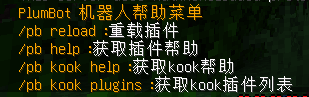
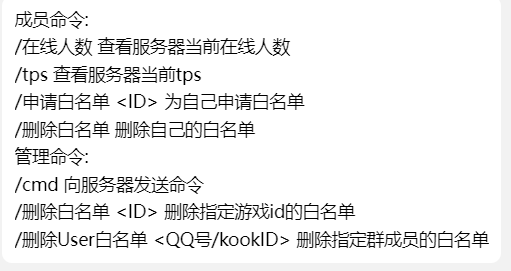
### Configs
Configs
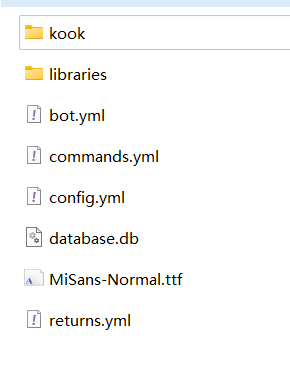
go-cqhttp’s config:
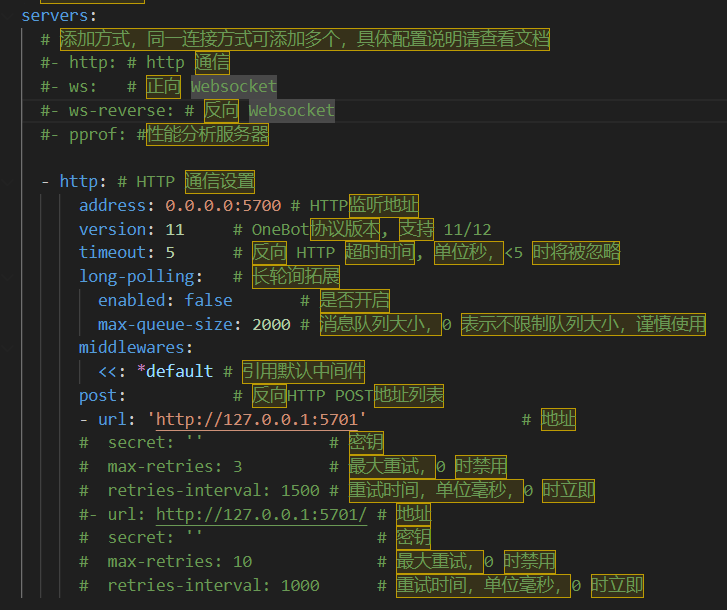
bot.yml’s config:
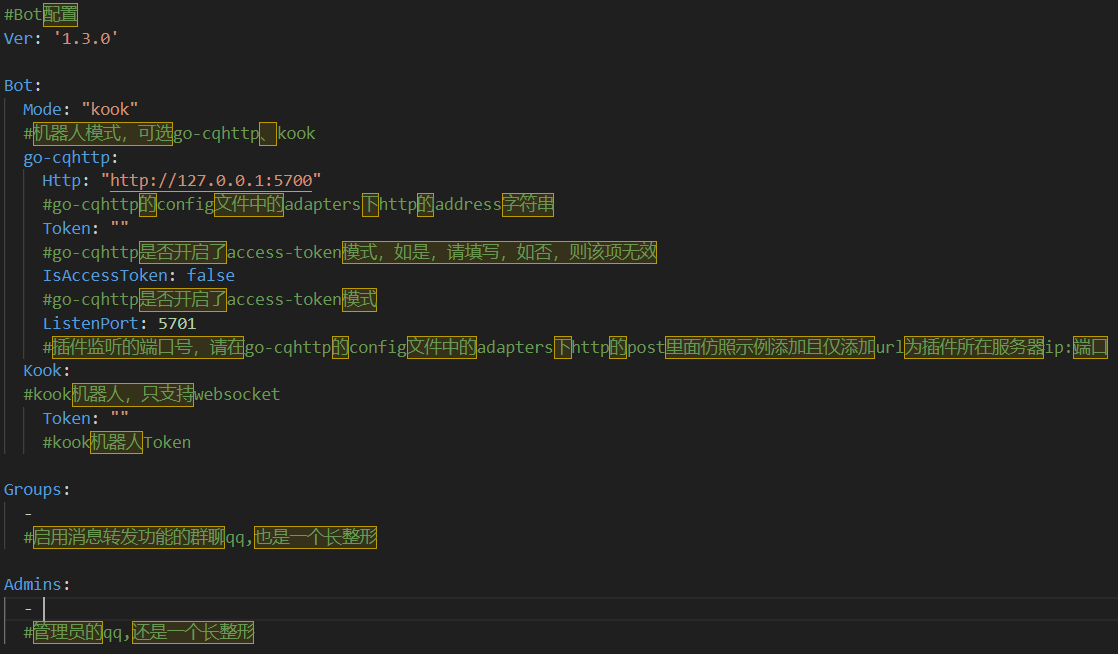
### Pictures

### Update Log
Update Log
v1.3.2(2024.7.12):
1. supported BungeeCord
2. fixed some bugs
v1.3.1(2024.2.20):
1. fix the bug that custom commands don’t work
2. adapted to bukkit versions 1.7.10~1.20.X
(tested versions: 1.7.10, 1.8.8, 1.12, 1.13, 1.20.2, 1.20.4)
v1.3.0(2024.2.9):
1. Add support for Kook bot
2. Add whitelist for deleting group members
3. Fixed the bug that whitelist can’t kick out players.
4. fixed the bug that /cmd can’t return normally.
5. fix in-game /reload command.
### Tips
When upgrading the version, please backup the configuration file in advance to prevent data loss.
QQ’s group:825894832
github:https://github.com/RegadPoleCN/PlumBot
Download release:https://github.com/RegadPoleCN/PlumBot/releases
Download development version:https://github.com/RegadPoleCN/PlumBot/actions/workflows/maven.yml
This project uses the GNU AGPL3.0 protocol, the use of please comply with the open source agreement
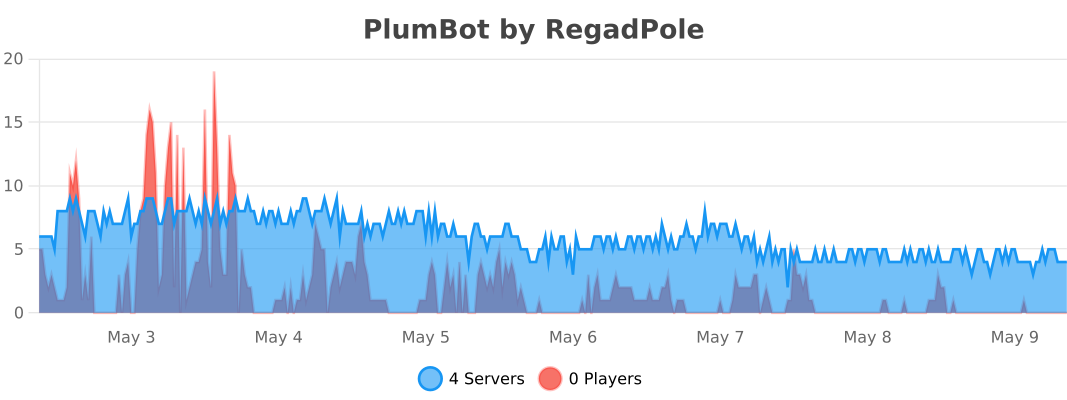
# PlumBot 多功能qq/kook互通机器人插件
本插件可以安装在Bukkit等服务端上,它能将你的mc服务器与QQ群或kook频道联通,支持消息转发,死亡转发等功能
插件交流群:825894832
本插件适用于go-cqhttp中的http通信模式 和 kook的websocket模式
测试环境:go-cqhttp1.1.0 / kook机器人+paper1.20+zulujdk17





适用Minecraft Java版本:全版本
(低版本如果出现数据库报错请先检查config.yml)
### 插件功能
1. 服务器消息互通
2. 白名单
3. 死亡信息转发
4. 查询在线人数
5. 查询tps
6. 在群内将命令发送至服务器
7. 自定义回复
8. 自定义命令
### 插件命令


### 配置文件
配置文件

go-cqhttp端配置:

bot.yml配置:

其余配置文件可依据文件内示例进行配置
### 使用图片

### 更新日志
更新日志
v1.3.2(2024.7.12):
1. 更新对BungeeCord的支持
2. 修复部分bug
v1.3.1(2024.2.20):
1. 修复自定义命令无法使用的bug
2. 适配bukkit版本1.7.10~1.20.X
(已测试版本:1.7.10, 1.8.8, 1.12, 1.13, 1.20.2, 1.20.4)
v1.3.0(2024.2.9):
1. 新增对Kook客户端的支持
2. 新增删除群成员白名单
3. 修复白名单无法踢出玩家
4. 修复/cmd无法正常返回的bug
5. 修复游戏内/reload命令
### 作者的话
升级版本时请提前备份配置文件,以防数据丢失
插件交流群:825894832
如果有使用上的问题或者bug,欢迎进群讨论
关于mod+插件形式的服务端,本插件暂时提供支持,在未来可能会取消对其用户的维护
github地址:https://github.com/RegadPoleCN/PlumBot
下载地址:https://github.com/RegadPoleCN/PlumBot/releases
开发版:https://github.com/RegadPoleCN/PlumBot/actions/workflows/maven.yml
本项目使用GNU AGPL3.0协议,使用时请遵守开源协议

制作不易,给个评分再走吧
PlugManX
# PlugManX
PlugManX is a simple, easy to use plugin that lets server admins manage plugins from either in-game or console without the need to restart the server.
## Features
* Enable, disable, restart, load, reload, and unload plugins from in-game or console.
* List plugins alphabetically, with version if specified.
* Get useful information on plugins such as commands, version, author(s), etc.
* Easily manage plugins without having to constantly restart your server.
* List commands a plugin has registered.
* Find the plugin a command is registered to.
* Tab completion for command names and plugin names.
* Dump plugin list with versions to a file.
* Check if a plugin is up-to-date with dev.bukkit.org
* Permissions Support – All commands default to OP.
## Commands
| Command | Description |
|—————————————|——————————————————————-|
| /plugman help | Show help information. |
| /plugman list [-v] | List plugins in alphabetical order. Use “-v” to include versions. |
| /plugman info [plugin] | Displays information about a plugin. |
| /plugman dump | Dump plugin names and version to a file. |
| /plugman usage [plugin] | List commands that a plugin has registered. |
| /plugman lookup [command] | Find the plugin a command is registered to. |
| /plugman enable [plugin|all] | Enable a plugin. |
| /plugman disable [plugin|all] | Disable a plugin. |
| /plugman restart [plugin|all] | Restart (disable/enable) a plugin. |
| /plugman load [plugin] | Load a plugin. |
| /plugman reload [plugin|all] | Reload (unload/load) a plugin. |
| /plugman unload [plugin] | Unload a plugin. |
| /plugman check [plugin|all] [-f] | Check if a plugin is up-to-date. |
## Permissions
| Permission Node | Default | Description |
|———————|———|—————————————|
| plugman.admin | OP | Allows use of all PlugMan commands. |
| plugman.update | OP | Allows user to see update messages. |
| plugman.help | OP | Allow use of the help command. |
| plugman.list | OP | Allow use of the list command. |
| plugman.info | OP | Allow use of the info command. |
| plugman.dump | OP | Allow use of the dump command. |
| plugman.usage | OP | Allow use of the usage command. |
| plugman.lookup | OP | Allow use of the lookup command. |
| plugman.enable | OP | Allow use of the enable command. |
| plugman.enable.all | OP | Allow use of the enable all command. |
| plugman.disable | OP | Allow use of the disable command. |
| plugman.disable.all | OP | Allow use of the disable all command. |
| plugman.restart | OP | Allow use of the restart command. |
| plugman.restart.all | OP | Allow use of the restart all command. |
| plugman.load | OP | Allow use of the load command. |
| plugman.reload | OP | Allow use of the reload command. |
| plugman.reload.all | OP | Allow use of the reload all command. |
| plugman.unload | OP | Allow use of the unload command. |
| plugman.check | OP | Allow use of the check command. |
| plugman.check.all | OP | Allow use of the check command. |
## Configuration
| File | URL |
|————|—————————————————————————————————-|
| config.yml | https://github.com/Test-Account666/PlugManX/blob/master/plugman-core/src/main/resources/config.yml |
## License
This project is a fork of PlugMan (Link no longer works) and is distributed under
the same license: LICENSE.
PlayerServers
PlayerServer Panel
PlayerServers Panel is an AddOn plugin for PlayerServers! It cannot be used without PlayerServers!
PlayerServers AddOn » PSPanel
PSPanel is a proxy plugin that enables users to manage the files of their server without having to rely on a file manager type plugin to change and modify files and configs.
Commands » /link » Used to link your minecraft account to the panel account.
Permissions »
playerservers.link
playerservers.admin
PSPanel is an AddOn plugin for PlayerServers! It cannot be used without PlayerServers!