SeleneChat
# SeleneChat
[](https://github.com/BlueSheep2804/SeleneChat/blob/main/LICENSE)
[](https://github.com/BlueSheep2804/SeleneChat/releases/latest)
([Click here for Japanese documentation. / 日本語ドキュメントはこちら](https://github.com/BlueSheep2804/SeleneChat/blob/v0.2.0/README_ja.md))
SeleneChat is a chat plugin for Minecraft inspired by LunaChat.
Available at Bukkit, BungeeCord, and Velocity.
Tested minecraft versions: 1.12.2-1.20.1
## Feature
– MiniMessage formatted chat
– Converts romaji sent in chat to Japanese
– Private message
## Customize
You can find detailed instructions on the [Wiki](https://github.com/BlueSheep2804/SeleneChat/wiki).
## Support
Bug reports and requests for new features are welcome on [Issues](https://github.com/BlueSheep2804/SeleneChat/issues).
[Pull requests](https://github.com/BlueSheep2804/SeleneChat/pulls) are also accepted.
## Links
– [Source code](https://github.com/BlueSheep2804/SeleneChat)
– [SpigotMC project page](https://www.spigotmc.org/resources/selenechat.111119/)
– [CurseForge project page](https://curseforge.com/minecraft/bukkit-plugins/selenechat)
– [Hangar project page](https://hangar.papermc.io/BlueSheep/SeleneChat)
– [Twitter](https://twitter.com/BlueSheep2804)
[](https://ko-fi.com/I3I2F9ODT)
SeedShield
# SeedShield
**Cryptographic structure seed protection for Paper/Spigot servers.**
SeedShield prevents seed cracking tools (chunkbase, SeedCrackerX, Structurecracker) from determining structure locations by replacing each structure type’s placement salt with an irreversible SHA-256 derived value.
**This is the first Paper/Spigot plugin to provide cryptographic structure seed protection.** Previously, this level of protection was only available through Fabric mods or custom server forks.
## How It Works
Minecraft determines structure positions using this formula:
“`
position = f(worldSeed, regionCoords, salt)
“`
The `salt` is a hardcoded integer per structure type. Tools like chunkbase know these default salts, so knowing the world seed = knowing all structure locations.
SeedShield replaces each salt with:
“`
salt = SHA-256(secretKey + “:” + worldSeed + “:” + structureType)[0..4]
“`
– **Per-structure isolation**: Each structure type gets a unique cryptographic salt. Cracking one type’s salt reveals nothing about others.
– **Secret key protection**: Without the 256-bit key (stored in `config.yml`), salts cannot be reversed.
– **Stronghold protection**: Also modifies `concentricRingsSeed` and recalculates ring positions.
## Installation
1. Download `SeedShield-1.0.0.jar`
2. Place it in your server’s `plugins/` folder
3. **Delete the region files** of worlds you want to protect (structures must regenerate)
4. Restart the server
5. Edit `plugins/SeedShield/config.yml` to configure which worlds to protect
> **Important**: SeedShield only affects newly generated chunks. Existing structures in already-generated chunks will not change positions.
## Configuration
“`yaml
# Auto-generated 256-bit secret key. DO NOT SHARE.
secret-key: “a1b2c3d4…”
# Worlds to protect
enabled-worlds:
– world
– survival
“`
SayanVanish

# Introduction
Welcome to the introduction for **SayanVanish**, a versatile vanish system that allows you to disappear and reappear on your server network at will, along with many other features.
### Supported Platforms
SayanVanish is compatible with the following platforms:
* **Minecraft**
* **Bukkit**
– Spigot
– Paper
– Folia
* **Proxy**
* **Velocity**
* **Bungeecord**
### Key Features
#### Modularity
SayanVanish is designed as a modular system. Each module serves a specific purpose, which simplifies the maintenance and extension of the plugin.
#### Extensive API
SayanVanish includes a comprehensive API, allowing other plugins to interact with it and utilize its features.
#### Integration with Other Plugins
The API provided by SayanVanish enables deep integration with other plugins, facilitating the development of additional server management tools.
Anti VPN

# Installation
You can install it by placing the plugin in your plugins folder, then visiting our website to get the server access token and start using it. 🙂 For more details, check out the installation guide: [Getting Started](https://docs.antivpn.io/getting-started/installation).
# Features
1. **Free tier** includes 5k Monthly requests.
2. **Cloud-based** checker optimized for the highest performance.
3. **Analytics** for your account, see where the users come from and more.
4. **Cloud Configuration** change your AntiVPN config through the panel and get instantly updated.
5. **Search** through the users tab and see who is blocked and who is allowed.
6. **Whitelist** ~ If you think any check is false, you can allow the player by searching it at the [panel](https://dash.antivpn.io).
7. **Sub Accounts (BETA)**
8. **Cloud Configurations** ~ Change settings for your server through the panel, configure the kick message, and more..
9. **Rest-API** ~ Implement our Rest-API in your Services, prevent VPN usage as desired. [Documentation](https://docs.antivpn.io/developers/rest-api)
# Support
We are providing support in our [Discord](https://discord.antivpn.io). If you feel more comfortable using email, you can contact us via [[email protected]](mailto:[email protected]).
ServerAlarmClock
# ServerAlarmClock
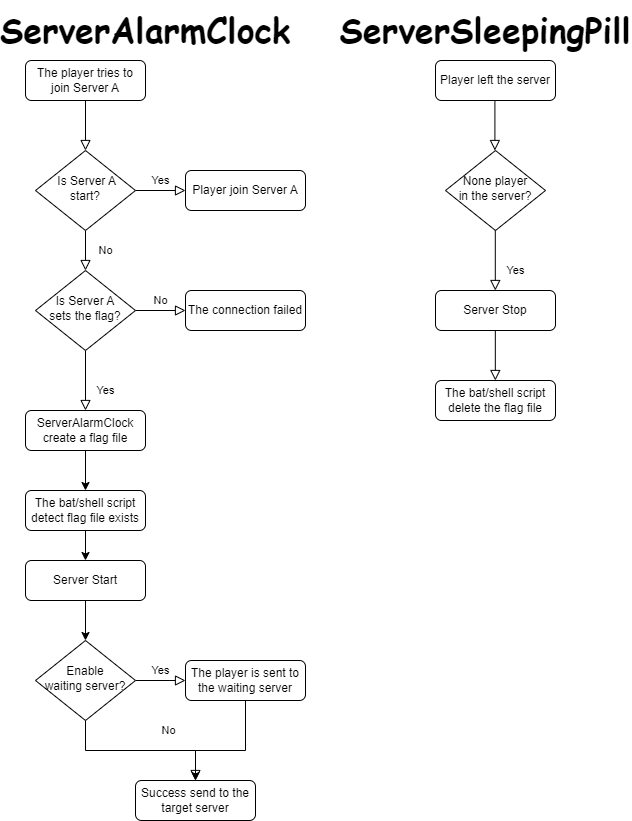
**ServerAlarmClock** is the perfect wake-up call for your Minecraft server! Ever tried to join a server that’s still fast asleep? With ServerAlarmClock, your server will automatically start up when someone attempts to join, ensuring no one has to wait too long for the fun to begin.
### Features
– 🚀 **Automatic Server Start:** Your server will automatically boot up when a player attempts to join a stopped or sleeping server.
– 💬 **Custom Messages:** Send players fun and customizable messages while they wait for the server to start.
– 🔧 **Easy Configuration:** Simple setup with a lightweight, no-hassle config.
Principle
### Command
“`
# reload your plugin config(serveralarmclock.reload)
/sac reload
“`
## How to Use
1. **Install the Plugin:**
– Download the `ServerAlarmClock.jar` file and place it in your BungeeCord plugins folder.
2. **Configure the Flags:**
– Open the `config.yml` file located in the `ServerAlarmClock` folder.
– Under the `flags` section, specify the paths to the flag files for each of your servers. These flags will be used to trigger the server startup.
3. **Setup the Server Startup Script:**
– You need to create or modify your server startup script to include the logic for checking the flag file. The example of a Linux shell script is provided at the end of this passage.
4. **Start the Server:**
– Once everything is configured, reload the plugin using /sac reload. The plugin will now monitor server connections and start the target server when a player attempts to join a server that is currently stopped.
5. **Enjoy!**
Example of a Linux shell script
“`
#!/bin/bash
# Server directory
SERVER_DIR=”your/server/path”
# Path to the flag file
FLAG_FILE=”your/flag/file/path/example.flag”
# Change to the server directory
cd “$SERVER_DIR” || { echo “Failed to change directory to $SERVER_DIR”; exit 1; }
while true
do
# Check if the flag file exists
if [ -f “$FLAG_FILE” ]; then
echo “Minecraft Server is Starting”
# Start the server
java -jar server.jar
# Remove the flag file
rm -f “$FLAG_FILE”
echo “Minecraft Server has Stopped”
else
sleep 1
fi
done
“`
Example of a Windows bat script(generate by gpt)
“`
@echo off
REM Server directory
set SERVER_DIR=yourserverpath
REM Path to the flag file
set FLAG_FILE=yourflagfilepathexample.flag
REM Change to the server directory
cd /d “%SERVER_DIR%”
if %errorlevel% neq 0 (
echo Failed to change directory to %SERVER_DIR%
exit /b 1
)
:loop
REM Check if the flag file exists
if exist “%FLAG_FILE%” (
echo Minecraft Server is Starting
REM Start the server
java -jar server.jar
REM Remove the flag file
del /f “%FLAG_FILE%”
echo Minecraft Server has Stopped
) else (
timeout /t 1 /nobreak >nul
)
goto loop
“`
Keep your players happy and your server ready with ServerAlarmClock—no more unexpected downtime!
RPlay
# RPlay Plugin
**Description:**
RPlay is a versatile and customizable Minecraft plugin designed to enhance roleplaying on your server. With features such as local and global chat commands, random rolls, and action attempts, RPlay adds depth and immersion to your gameplay. Easily configurable through the `config.yml` file, you can tailor message formats, colors, and language to suit your community’s needs.
**Features:**
– **Local and Global Chat:** Differentiate between local and global roleplay messages with `/me` and `/gme` commands.
– **Customizable Messages:** Configure message formats, colors, and language (Russian or English) via the `config.yml` file.
– **Random Rolls:** Use the `/roll` command to generate random numbers, perfect for in-game decisions.
– **Action Attempts:** Add a layer of chance to your actions with the `/try` command, which determines success or failure.
**Commands:**
– `/me [message]` – Send a local roleplay message (visible within 200 blocks).
– `/gme [message]` – Send a global roleplay message (visible to all players).
– `/do [message]` – Send a descriptive roleplay message.
– `/roll` – Roll a random number between 1 and 100.
– `/try [message]` – Attempt an action with a chance of success or failure.
– `/rplay reload` – Reload the plugin configuration.
RocketJoin

RocketJoin is an OpenSource plugin that allows you to create custom join messages with groups, commands on join, sounds and more.

Installing RocketJoin is very easy.
1. Install RocketJoin
2. **Optional:** Install PlaceholderAPI
3. Done!
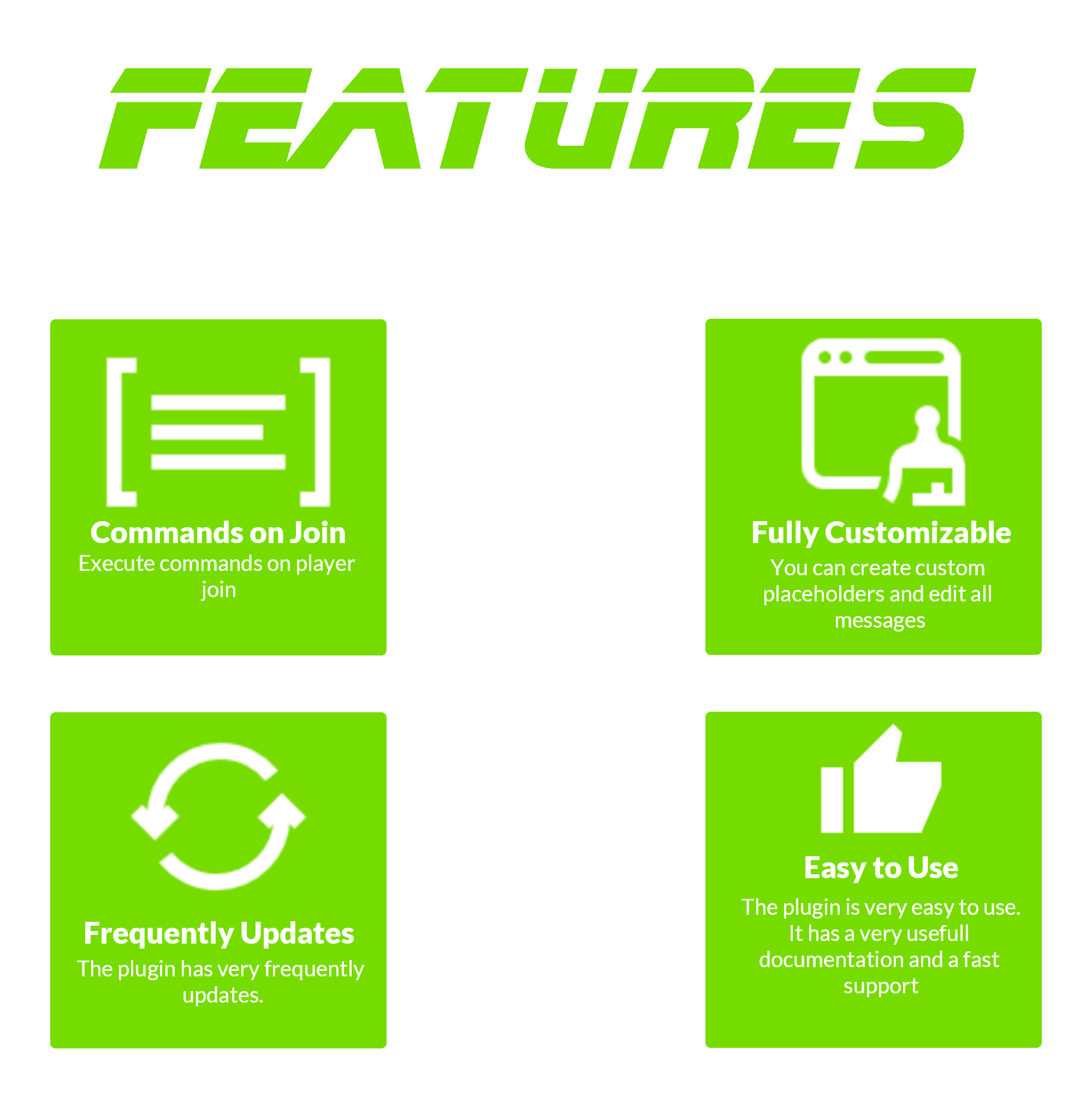

– Fully Customizable
– Fast support
– PlaceholderAPI support
– Custom conditions like first join and permissions
– Fireworks sounds and more
– Bungeecord support
– Hex support
Outdated Tutorial
RMotd
# 🎲 RMotd
A small Minecraft server plugin to serve rotating MOTDs (Message of the Day) and let server operators manage MOTDs at runtime.
# 🤑 Features
– Rotating MOTDs from `config.yml` (round-robin).
– `/randommotd` command: toggle random-rotation on/off.
– `/motd create ` command: add a new MOTD to `config.yml` at runtime.
– `/motd reload` command: reloads the `config.yml`.
# 🖌️ Configuration
“`yaml
random_motd_enabled: true
motds:
– “Welcome to our server!”
– “Explore the world of Minecraft with us!”
– “Join us and have fun!”
messages:
invalid_input: “Invalid input, Please use ‘true’ or ‘false’”
setting_updated: “Random MOTD feature updated to ”
“`
# 🕹️ Commands
– `/randommotd` — Toggle random MOTD rotation (reads/writes `random_motd_enabled` in `config.yml`).
– Permission: `rmod.randommotd` (declared in `plugin.yml`).
– `/motd create ` — Add a MOTD entry to `motds` in `config.yml` and save it. The `` is used only in the confirmation message currently. Provide the MOTD content as remaining args.
– Example: `/motd create welcome Welcome to our server!`
– Operator-only by default (only ops or console can run it). If you prefer permission-based control, see Permissions below.
– `/motd reload` — Reloads `config.yml` from disk. Operator-only.
# 🎭 Permissions
– `rmod.randommotd` — used for the `randommotd` command.
– `rmod.motd` — reserved for `/motd` (plugin.yml documents it). Currently the plugin enforces operator-only usage for `/motd`; if you prefer permissions, change the check to `sender.hasPermission(“rmod.motd”)` in `MotdCommand`.
Ride Operate
# Ride Operate 2.1.0
Transform your server into a thrilling theme park adventure!
Features
• Create interactive control panels for your rides and attractions
• Add custom commands to panel buttons
• Integrate with live camera views (Coming in next update!)
• Control your rides remotely using the Windows application
• Sign integration for easy panel access
• Multi-server support through Windows app
Commands
Main Commands
• /rp – Main command (alias: /rideoperate)
• /rphelp – View all available commands
• /rpinfo – Display plugin information
• /rpreload – Reload the plugin configuration
• /genapikey – Generate API key for Windows app
Panel Management
• /createpanel – Create a new control panel
• /deletepanel – Delete an existing panel
• /panel – Open a specific panel
• /panels – View all available panels
• /rpaddbutton – Add a button
• /rpdeletebutton – Delete a button
• /rpaddcommand – Add command to button
• /rpchangeitem - – Change button item
• /rpsetlore – Set button description
Camera System (Coming Soon)
• /rpcreatecam – Set up camera view
• /rpdeletecam – Delete camera view
Permissions
Permissions
General Permissions:
• rideoperate.* – All permissions
• rideoperate.main – Access to /rp (default: true)
• rideoperate.help – Access help (default: true)
• rideoperate.info – View info (default: true)
• rideoperate.panels – View panels (default: true)
• rideoperate.openpanel – Open panels (default: true)
Administrative Permissions:
• rideoperate.createpanel – Create panels (default: op)
• rideoperate.deletepanel – Delete panels (default: op)
• rideoperate.reload – Reload plugin (default: op)
️ Windows Application
Control your rides from anywhere using our dedicated Windows application!
Features:
• Connect to multiple Minecraft servers
• Real-time ride monitoring
• Remote control functionality
• Operation statistics and logs
• User-friendly interface
Setup Instructions:
1. Generate an API key using /genapikey in-game
2. Configure the API port in config.yml (default: 5555)
3. Download the Windows app from http://wiki-rideoperate.ndg-webdesign.net
4. Connect using your server details and API key
Sign Integration
You can add panels to signs for easy access:
“`
Line 1: [rppanel]
Line 2:
“`
⚙️ Requirements
• Minecraft Server 1.20+ (Tested on 1.15 – 1.21)
• Java 17 or higher
• Basic understanding of command blocks (for advanced setups)
Made with ❤️ by FriendsparkMC & NDG-Webdesign
RiceMotd