Void Totems
# Void Totem Plugin
This plugin adds a crafting recipe for a special kind of totem of undying that saves you from losing all your items when falling into the void! When a player falls into the void, they will be teleported back to the sky in the main world.
## Setup
The only step to make sure the plugin works correctly is to make sure the player is teleported to the overworld when they fall into the void. This can be done by using the command /totem setworld worldname where worldname is the name of the overworld. By default this is simply set to “world”. Capital letters do matter here. x y and z are optional coordinates to spawn the player at, rather than at their current x and z coordinates.
## Usage
To use this plugin, all the player needs to do is craft the Void Totem and keep it in their inventory. They will automatically be teleported to the appropriate world when they take damage in the void and the totem in in their inventory. The crafting recipe for the totem can be seen below.

Server operators and players with the permission totem.give can use the command /totem givetotem to get a void totem added to their inventory.
Note: this is my first released project, so I would greatly appreciate any and all feedback from those who use it! <3
VoiceServer
🎙️ VoiceServer – Powerful Group Management for Simple Voice Chat
VoiceServer is a lightweight yet advanced plugin that makes managing
Simple Voice Chat groups effortless.
With intuitive commands offering full tab completion, you can organize, secure,
and monitor voice chat groups in real time — perfect for servers hosting events,
teams, or dynamic player structures.
Fully compatible with Folia, Paper,
Spigot and Bukkit, supporting Minecraft versions from
1.8.8 up to 1.21.x.
Open Source:
https://github.com/Jakomi1/VoiceServer
🚀 Key Features
-
📋 List all voice chat groups
View all active Simple Voice Chat groups, including those with password protection.
Groups with passwords show [locked] instead of revealing the password.
-
🆕 Create new groups with optional persistence or password protection
Groups can be created as persistent or non-persistent.
Persistent groups may optionally be secured with a password.
-
🧑🤝🧑 Join players to existing groups
The join command supports selectors like
@a, @s, @r, and @p.
The internal playerGroupMap ensures group state consistency.
-
❌ Remove players from groups
Players can be removed from their current group using selectors.
The kick subcommand no longer requires an explicit group argument.
-
🗑️ Safely delete groups
Non-persistent groups are automatically deleted when empty.
Persistent groups remain until manually removed.
-
🛡️ Access control via permissions
All group management commands are protected by
voicechat.group.manage.
-
⚡ Full tab completion support
Commands, players, selectors, group names, and quoted arguments support
Folia-safe tab completion.
-
📌 Persistent groups
Persistent groups remain available even after all members leave,
making them ideal for staff, admin, or permanent team channels.
-
🔁 Persistent groups across restarts (optional)
A new configuration option
persistent-groups-should-survive-restart
allows persistent groups to survive restarts or reloads
(default: false).
-
➖ Create empty groups
Using @null with
/vcgroup create
allows creating a group without any players initially.
-
🐞 Debug logging and safe error handling
Clear messages and robust error handling ensure high stability.
-
ℹ️
/vcgroup info command
Displays the group type, persistence, lock status, and current members.
-
⚙️ Automatic handling of empty non-persistent groups
Non-persistent groups are removed automatically when the last player leaves.
-
🔧 Per-player VoiceChat permission system (
/vcpermission)
Fully custom per-player permission management for Simple Voice Chat:
listen — listen in voice chatspeak — speak in voice chatgroup — create or join voice groups
Permissions support give, remove,
default, and reset,
are stored in config.yml,
survive restarts, and are applied live.
-
✅ Fixed
/vcpermission command
The permission system is now fully functional and reliably enforced.
-
🔌 Broad platform compatibility
Fully compatible with Bukkit, Spigot, Paper, and Folia
from Minecraft 1.8.8 up to 1.21.x.
🧭 Commands
/vcgroup list
Lists all voice chat groups and marks password-protected groups with [locked].
/vcgroup create <player|@a|@s|@r|@p|@null> <type> "<group_name>" [persistent|not-persistent] ["password"]
Creates a new group. Using @null creates an empty group.
/vcgroup join <player|@a|@s|@r|@p> "<group_name>"
Moves players into an existing group.
/vcgroup kick <player|@a|@s|@r|@p>
Removes players from their current group.
/vcgroup remove "<group_name>"
Deletes a voice group and removes all members.
/vcgroup info "<group_name>"
Shows detailed information about a group.
🔐 /vcpermission — Voice permission management
/vcpermission give <player> <listen|speak|group>
Grants a voice permission and applies it live.
/vcpermission remove <player> <listen|speak|group>
Revokes a voice permission and updates the player instantly.
/vcpermission default <listen|speak|group> <true|false>
Sets global default values (defaults are true).
/vcpermission reset
Resets the entire permission system to factory defaults.
⚙️ Configuration
No setup required. Install VoiceServer alongside
Simple Voice Chat and start using it immediately.
All permission data and persistent group settings are stored in config.yml.
The plugin automatically migrates old keys and ensures a stable config structure.
⚠ Requirements
- Minecraft: 1.8.8 – 1.21.x
- Server: Folia, Paper, Spigot, Bukkit
- Dependency: Simple Voice Chat (Mod + API)
- The plugin must load after Simple Voice Chat.
💡 Example Use Cases
- Create dynamic voice groups for events, PvP, or minigames.
- Maintain permanent staff or admin voice channels.
- Use password-protected private groups without exposing passwords.
- Control who may listen, speak, or join groups on a per-player basis.
🧑💻 Developer Notes
- Developed by Jakomi1.
- Fully open source and community-friendly.
- Direct integration with
VoicechatServerApi.
- Single PermissionAttachment per player (no duplication or leaks).
- Live permission updates without reloads.
- Folia-safe scheduling, selectors, and tab completion.
- Automatic creation of a minimal
config.yml if missing.
Voice Messages
# Voice messages
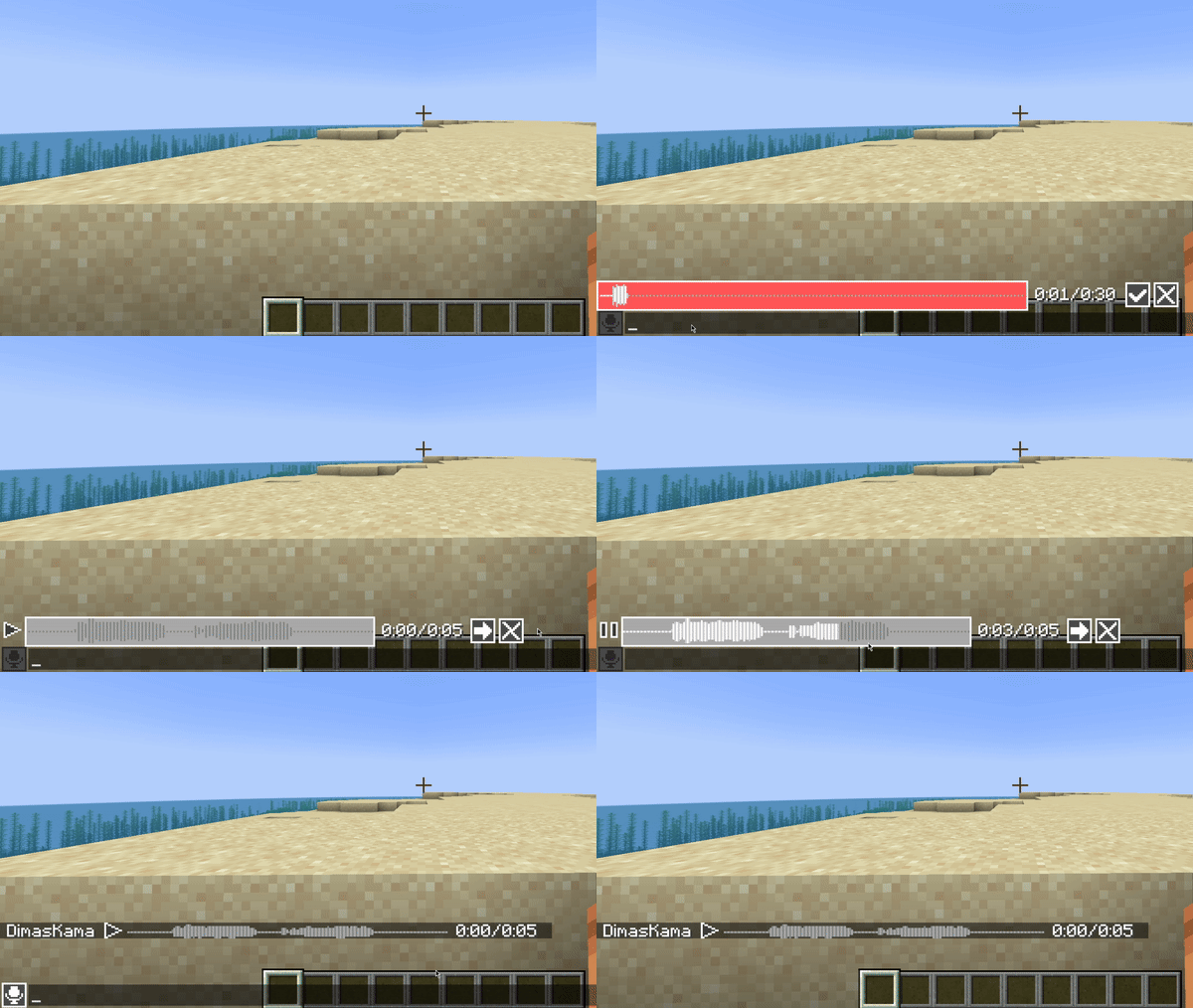
Mod and plugin that adds voice messages to the Minecraft.
Requires Simple Voice Chat installed.
## Good to know
This mod must be installed both on server and client to work. If a player does not have this mod installed, he will not see voice messages.
This mod uses the microphone configured in Simple Voice Chat with all its settings. So make sure that `Voice Amplification` in Simple Voice Chat settings is not set to `-100%`.
Also, if voicechat sounds are disabled, you will not hear voice messages.
## Private voice messages
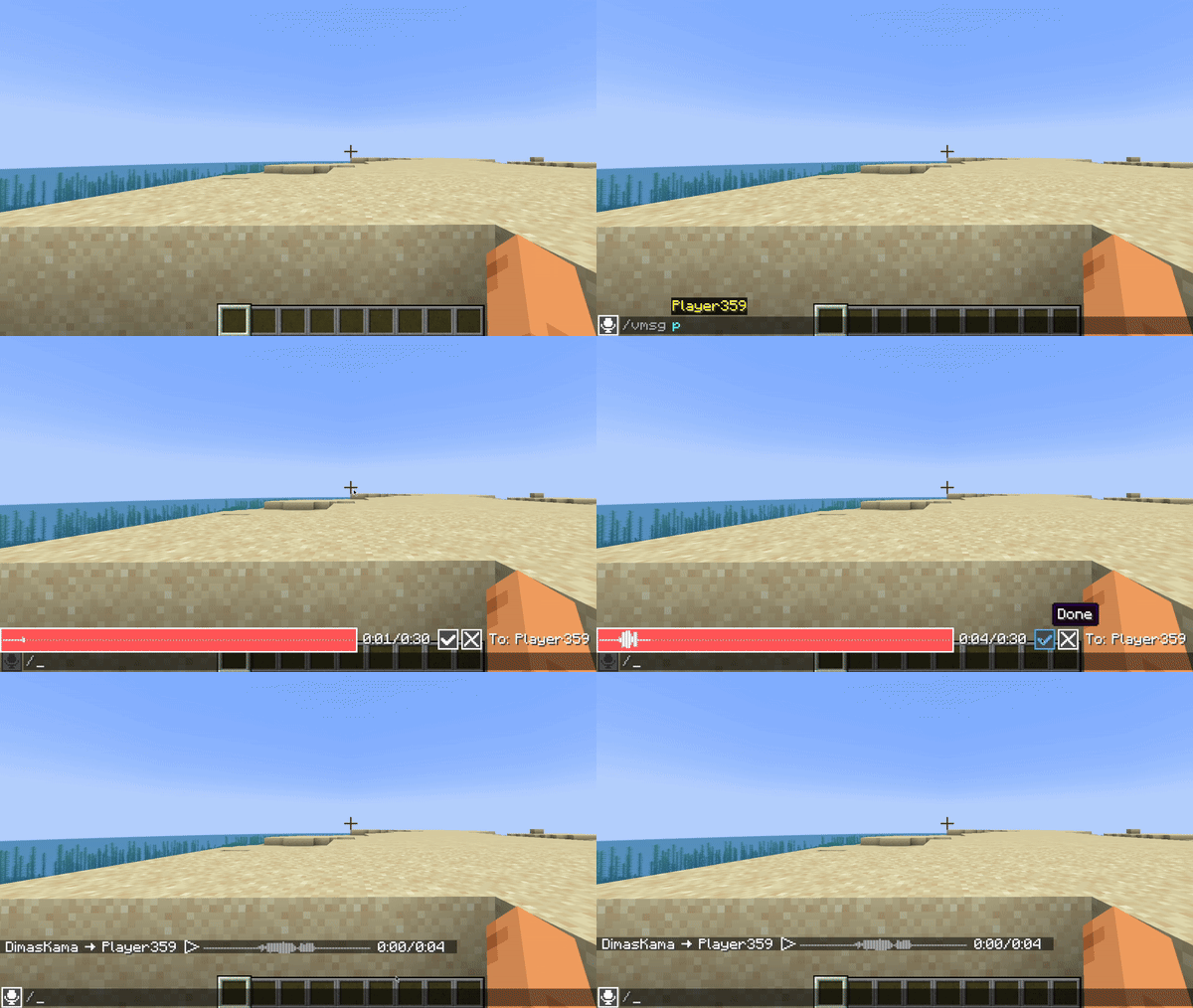
You can send private voice messages to players or to your team with `/voicemsg ` or `/vmsg ` commands.
Note that server can restrict you from sending them by permissions
## Setup on server
### Config
Server config is located in `config/voicemessages_server.json`
Here are the default values with their descriptions:
“`
{
“max_voice_message_duration_ms”: 90000, // The maximum voice message length in milliseconds in range [3_000;300_000]
“voice_message_spam_punishment”: “none”, // The punishment for sending a voice message longer than the time elapsed since the sending previous one. Possible values: “none”, “prevent”, “kick”
“voice_message_invalid_punishment”: “prevent”, // The punishment for sending an invalid voice message (longer than maximum configured) or sending a voice message without permission for it. Possible values: “none”, “prevent”, “kick”
“mod_required”: false, // If true, joining players will be kicked if they don’t have this mod installed
“mod_not_installed_text”: “VoiceMessages is not installed or is of an old version” // The kick message for players that don’t have this mod installed
}
“`
### Permissions
– `voicemessages.send` – permission to send voice messages. Default: `true`
– `voicemessages.send.all` – permission to send voice messages to global chat. Default: `true`
– `voicemessages.send.team` – permission to send private voice messages to player’s team. Default: `true`
– `voicemessages.send.players` – permission to send private voice messages to players. Default: `true`
## API
This mod has its own API.
Setup in `build.gradle`:
“`
repositories {
// Other repositories
maven {
name “dimaskama”
url “https://maven.dimaskama.net/releases”
}
}
dependencies {
// Other dependencies
// Voice Messages API
compileOnly “ru.dimaskama.voicemessages:voicemessages-api:${voicemessages_api_version}”
}
“`
VoiceChatZ
**VoiceChatZ – Bringing Real Voice to Minecraft Worlds**
Step into a new era of immersion with VoiceChatZ, the ultimate Minecraft plugin that fuses your server’s gameplay with the dynamic and lifelike power of Discord-based proximity voice chat. Crafted with precision and packed with modern features, VoiceChatZ takes multiplayer interaction to a whole new level—because text chat is so last century.
Built for Minecraft version 1.20 and beyond, VoiceChatZ introduces seamless, real-time voice communication that respects in-game proximity. That means if a player is close, you’ll hear them clearly; if they walk away, their voice fades, just like in real life. Whether you’re plotting a sneaky heist, building a castle, or just hanging out with friends, communication becomes more natural and more thrilling.
What makes VoiceChatZ stand out is its deep Discord integration. Players can link their Discord accounts directly through Minecraft with the **/linkdiscord **command. Once linked, your voice chat session gets anchored through Discord’s crystal-clear infrastructure—bypassing the need for bulky voice server setups or dodgy mod installs.
Admins aren’t left behind either. The **/voicechattest** command provides built-in diagnostics, offering subcommands like **check, solo, and fix** to keep things running smoothly. From permission handling to quick tests, VoiceChatZ empowers server owners to maintain total control with ease.
Whether you’re running a survival SMP, a creative roleplay server, or a hardcore PvP arena, VoiceChatZ will change the way your community communicates—making every shout, whisper, and laugh feel truly alive in the game world.
**Setting up VoiceChatZ
**
**Discord Bot Setup:**
You need to create a Discord bot at the Discord Developer Portal
Create a new application, go to the “Bot” tab, and reset token
Copy the bot token and replace “YOUR_TOKEN_HERE” in the config file
Enable necessary intents (at minimum: Server Members Intent, Message Content Intent) – recommended: **ADMINISTRATOR** perms!
Use the OAuth2 URL Generator to invite the bot to your server with appropriate permissions ( administrator perms )
**
Server ID:**
Replace “YOUR_GUILD_ID_HERE” with your Discord server ID
To get your server ID, enable Developer Mode in Discord (Settings > Advanced), then right-click your server icon and select “Copy ID”
**Install the Plugin:**
Download VoiceChatZ
Place the VoiceChatZ plugin JAR file in your Minecraft server’s plugins folder
Restart your server to generate the config file in which you will put the server id and discord bot thing
**Auto-Configuration:**
The category_id and lobby_channel_id will be automatically created and filled on the first run
The plugin will create a category and lobby channel in your Discord server
**Proximity Settings:**
The proximity_distance value (50.0) determines how close players need to be for voice chat to activate
You can adjust this value based on your preference, but the we recommend keeping it **above 20** blocks as it works in all axis y x and z
**Player Links:**
The system will automatically store player Minecraft UUID to Discord ID mappings in the config
Players will need to link their accounts (likely through an in-game command)
Key Features:
** 🎙️ Proximity-based voice chat through Discord – no mods required.**
** 🔗 Easy account linking with /linkdiscord .**
**
🛠️ Built-in test tools for admins via /voicechattest.**
**
✅ Simple permission structure for both players and admins.**
** 🌐 Clean, lightweight integration with Minecraft 1.20+.**
Created with passion by Mateitaa1, VoiceChatZ is here to give your Minecraft world a real voice.
Advertisement:

VoiceChatMute
# Dependencies
Download Simple Voice Chat
# VoiceChatMute
이 플러그인은 명령어를 이용해 특정 플레이어의 마이크를 강제로 음소거시킬 수 있습니다.
This plugin allows you to forcibly mute a specific player’s microphone using commands.
## COMMAND
**/vcmute **
**/vcunmute **
해당 명령어로 플레이어의 음소거를 활성화하고 해제할 수 있습니다.
This command allows you to mute and unmute players.
Voice Chat – Global Spectator Chat
# Global Spectator Voice Chat

A small addon for Simple Voice Chat that adds a global spectator chat.
This server-sided mod provides a dedicated communication channel for players in spectator mode. When you switch to spectator mode, you can freely communicate with all other spectators on the server, regardless of your distance, dimension, or location. The voice chat is non-positional, similar to the group functionality of Simple Voice Chat.
## Configuration
This mod provides commands to control its functionality. You need to be OP or have access to command blocks to be able to run these commands. If you are using any permission plugin, you require the `global_spectator_vc.permission.command` permission to be able to execute these commands.
### Commands
* `/spectatorchat enable`
* Enables the global spectator voice chat functionality. (Enabled by default)
* `/spectatorchat disable`
* Disables the global spectator voice chat functionality.
* `/spectatorchat groupmode `
* Changes how spectators interact with voice chat groups.
* Replace `` with one of the following options:
* `group_only`: Spectators can only hear and speak with other spectator members of their Simple Voice Chat group. Non-spectator group members will **not** hear the spectators in their own group. (Default)
* `group_plus_spectators`: Spectators can communicate with their group normally, but also hear and speak with all other spectators regardless of group.
* `spectator_only`: Spectators ignore all group functionality. They can only hear and speak with other spectators. Group functionality is effectively disabled while spectating.
## License
This project is licensed under the MIT License – see the [LICENSE](LICENSE) file for details.
Voice Bridge
# Voice Bridge
A server-side Paper plugin that bridges proximity voice chat
between Simple Voice Chat
and Plasmo Voice, allowing players using different voice mods to hear each
other.
## How it works
Both Simple Voice Chat (SVC) and Plasmo Voice (PV) encode audio with Opus at 48 kHz, mono, 20 ms frames. Voice Bridge
intercepts audio packets from each mod’s API and relays them to the other — no transcoding required. The result is
low-latency, cross-mod proximity voice chat with minimal CPU overhead.
“`
SVC Player ──► SVC API ──► Voice Bridge ──► PV API ──► PV Player
PV Player ──► PV API ──► Voice Bridge ──► SVC API ──► SVC Player
“`
## Requirements
– Paper 1.21.4+ (or Folia)
– Java 21+
– Simple Voice Chat (server-side plugin)
– Plasmo Voice (server-side plugin)
## Installation
1. Install both Simple Voice Chat and Plasmo Voice on your Paper server
2. Download `voice-bridge-.jar`
3. Place it in your server’s `plugins/` directory
4. Restart the server
## Building from source
“`shell
./gradlew build
“`
The plugin jar will be in `build/libs/`.
### Running a dev server
“`shell
# With Mojang mappings (for debugging)
./gradlew runDevBundleServer
# With obfuscation (production-like)
./gradlew runServer
“`
## Configuration
A `config.yml` is generated on first run in `plugins/voice-bridge/`:
“`yaml
bridge:
enabled: true # Enable/disable the bridge
debug: false # Enable debug logging
proximity:
default-distance: 48.0 # Default voice range in blocks
whisper-multiplier: 0.33 # Whisper range = distance * multiplier
max-distance: 128.0 # Maximum allowed voice distance
audio:
passthrough: true # Opus passthrough (recommended)
force-transcode: false # Force transcoding (not yet implemented)
“`
### Per-world distance overrides
You can override the default voice distance for specific worlds:
“`yaml
proximity:
world-overrides:
world_nether: 24.0
world_the_end: 64.0
“`
## Commands
| Command | Description |
|——————————–|—————————————–|
| `/voicebridge status` | Show bridge status, metrics, and config |
| `/voicebridge players` | List active bridged sessions |
| `/voicebridge reload` | Reload configuration |
| `/voicebridge debug [on|off]` | Toggle debug logging |
Alias: `/vb`
Permission: `voicebridge.admin` (default: op)
## Architecture
“`
┌────────────────────────────────────────────────┐
│ VoiceBridgePlugin │
├───────────┬───────────┬────────────┬───────────┤
│ SvcAdapter│ PvAdapter │ AudioRelay │ Session │
│ │ │ │ Manager │
├───────────┴───────────┴────────────┴───────────┤
│ SpatialMapper │ BridgeConfig │ BridgeMetrics │
└────────────────────────────────────────────────┘
“`
– **SvcAdapter** — integrates with Simple Voice Chat via `VoicechatPlugin`
– **PvAdapter** — integrates with Plasmo Voice via `@Addon` / `AddonInitializer`
– **AudioRelay** — central router that forwards audio frames between adapters
– **SessionManager** — tracks which mod each player is using
– **SpatialMapper** — converts between SVC float distances and PV short distances
## Known limitations
– Group/channel bridging is not supported (proximity chat only)
– Transcoding mode is not yet implemented (passthrough only)
– SVC-only players may not receive audio from PV players in some edge cases
Voice Announce
**VoiceAnnounce – Voice Chat Server Announcements**
VoiceAnnounce is a lightweight Minecraft plugin that allows server announcements through voice using the Simple Voice Chat mod.
Instead of relying only on chat messages, this plugin enhances server communication by broadcasting announcements directly through voice, making alerts more immersive and noticeable for players.
**⚠️ Requirements:**
– Requires Simple Voice Chat mod to function properly
– Simple Voice Plugin
– Packetevents Plugin – Making the Simple Voice Chat work properly
**✨ Features:**
– Voice-based server announcements
– Easy toggle system using commands
– Lightweight and performance-friendly
– Simple setup and configuration
– Works seamlessly with Simple Voice Chat
**🎙️ Command:**
– `”/voiceannounce”` – Toggle voice announcements on or off
**💡 Why use VoiceAnnounce?**
Text announcements can be missed or ignored by players. With VoiceAnnounce, important messages are heard instantly, improving communication during events, emergencies, or server updates.
**📌 Perfect for:**
– SMP servers
– Event servers
– Roleplay servers
– Community servers
# Make your server announcements more immersive with real-time voice broadcasting!
Version Numbering Converter
# VNC (Version Numbering Converter)
Version Numbering Converter (VNC) is a Java library for working with Minecraft versions across both numbering families:
– Classic Java-style versions such as `1.20.6` and `1.21.11`
– Year-based drop versions such as `24.1`, `25.4`, and `26.1.1`
It covers two use cases:
– Pure version modeling and conversion through `MinecraftVersion`, `VersionScheme`, and `MappingTable`
– Bukkit/Paper runtime detection through `VNC`, including server constants, player version resolution, protocol lookup, and version comparisons
## Highlights
– Exact historic mappings from `1.0.0` through `1.21.11`
– Drop support for current lines such as `25.4`, `26.1`, and `26.1.1`
– Protocol lookup for exact releases and published snapshots
– A runtime bridge for Bukkit/Paper with legacy-compatible constants like `SERVER_VERSION`
– String-based comparisons that correctly handle patch-sensitive boundaries like `1.20.5`
## Core API
### 1. Parse and inspect versions
“`java
MinecraftVersion classic = MinecraftVersion.parse(“1.21.11”);
MinecraftVersion drop = MinecraftVersion.parse(“26.1”);
classic.isClassic(); // true
classic.getVersion(); // “1.21.11”
classic.getProtocol(); // 774
classic.supportsHex(); // true
drop.isClassic(); // false
drop.getVersion(); // “26.1”
drop.getProtocol(); // 775
“`
### 2. Convert between numbering schemes
“`java
String dropName = VersionScheme.MOJANG.toDrop(“1.20.3”); // “23.2”
String classicName = VersionScheme.MOJANG.toClassic(“25.2.2”); // “1.21.8”
String customClassic = VersionScheme.CROA_CUSTOM.toClassic(“25.4”); // “1.22”
String customDrop = VersionScheme.CROA_CUSTOM.toDrop(“1.22.1”); // “25.4.1”
“`
### 3. Create your own mapping scheme
“`java
MappingTable table = new MappingTable()
.registerLine(30, 1, “1.50”, “1.50.1”)
.registerMapping(“1.51”, “30.2”);
VersionScheme scheme = VersionScheme.mapped(table);
scheme.toDrop(“1.50.1”); // “30.1.1”
scheme.toClassic(“30.2”); // “1.51”
“`
### 4. Resolve protocols
“`java
Integer protocol = MinecraftVersion.protocolForIdentifier(“1.20.6”); // 766
Integer snapshot = MinecraftVersion.protocolForIdentifier(“26.2-snapshot-3”);
MinecraftVersion newest = MinecraftVersion.fromProtocol(754); // 1.16.5
List all = MinecraftVersion.versionsForProtocol(767); // 1.21, 1.21.1
“`
## Bukkit / Paper runtime API
`VNC` exposes a runtime snapshot of the current server:
“`java
MinecraftVersion server = VNC.SERVER_MINECRAFT_VERSION;
String classic = VNC.SERVER_CLASSIC_VERSION;
String drop = VNC.SERVER_DROP_VERSION;
int protocol = VNC.SERVER_PROTOCOL;
double legacy = VNC.SERVER_VERSION;
boolean modernRegistry = VNC.isAtLeast(“1.20.5”);
boolean legacyCommands = VNC.isBefore(“1.13”);
boolean inRange = VNC.isBetween(“1.19”, “1.21.11”);
“`
Player version resolution uses ViaVersion when present and falls back to the server version otherwise:
“`java
MinecraftVersion playerVersion = VNC.player(player);
if (playerVersion.supportsHex()) {
// Safe to send RGB formatting to this player
}
“`
## Why use the string helpers?
`SERVER_VERSION` is still available for compatibility with older plugins, but patch-sensitive checks should prefer:
“`java
VNC.isAtLeast(“1.20.5”);
VNC.isBefore(“1.21.9”);
VNC.compare(VNC.SERVER_MINECRAFT_VERSION, “26.1”);
“`
That avoids the common limitations of comparing versions only as `double`.
## Requirements
– Java 8+
– For the Bukkit runtime helpers: a Bukkit/Paper-compatible runtime on the classpath
– Optional: ViaVersion, if you want `VNC.player(…)` to resolve the effective client version instead of the server version
VMU (VeinMinerUltimate)
## Overview
**VeinMinerUltimate** is the perfect plugin to give players the ability to _mine all ores in one vein, with only having to break one block_, while still feeling like **vanilla** Minecraft!
## Features
– Requires **shift to vein mine**. This **can be changed** in the config.
– Has a default max of **64 blocks to prevent mass lag**.
– Hardcoded forbidden blocks include: **Stone variants, plank variants, and log variants**. This is a feature **to prevent user builds from being destroyed**.
– Config file to choose **max amount of blocks**, **allowed blocks**, **and if it should be required to sneak to vein mine**.
– Main command: /vmu | /veinminerultimate.
– Command arguments: /vmu | /veinminerultimate on | off | reload | usage | info | version | toggle.
## Up-coming Features
– **No new features planned for now! :D**
– _**Taking plugin feature requests. Won’t do any that are too unvanilla.**_
## Known Issues
– **No known issues as of now! :D**
## Compatibility
**Tested versions**: _1.16.5, 1.21.11_. This leads me to assume **all versions in between work**.
_**This plugin will continue to receive support. I plan on adding support for older versions, but I don’t know if I will do that yet.**_
## Installation Process
To install **VMU**, first download the **latest version, or which ever version suits your server**. Then shutdown your server, put the plugin into the **plugins** folder, and restart your server. In the logs you should see, “**VeinMinerUltimate enabled!**” If you see that, the plugin is working fine. **Refer to the above headers to learn more about how to use and configure the plugin.**
## Miscellaneous
**VMU by default requires players to run /vmu | /veinminerultimate on | toggle to enable it.**
**Check gallery for enchant showcases.**