VoteBan
## Introduction
With VoteBan, servers can be kept clean of griefers or other unwanted players.
Players can start votes for a ban against another players. This is particularly useful for small servers.
Various settings can be made regarding the conditions under which vote bans may be started and when votes are successful.
The plugin uses bStats.
## Atttention!
The current releases are preview versions. Major bugs may occur and not all planned features have been implemented.
Please report bugs and suggestions on my Discord server.
The following ToDos are planned for the next updates:
– MySQL and/or SQLite implementation
– improved messages
– ~~make the last not changeable messages changeable~~
– ~~add start voteban cooldown for vote initiator~~
## Features
– players can start vote bans
– various setting options
– adjustable messages
## Wiki & Support
Which permissions are available? What does _insert feature_ actually do? All these questions are answered in the VoteBan Wiki.
If you still don’t know what to do or have found a bug, feel free to contact me.
Quicklinks: Discord | Wiki | Installation & Setup | Commands & Permissions
## Impressions


## My other resources

Vote2Sleep
# 🌙 Vote2Sleep — The Ultimate Sleep Voting Plugin for Minecraft
Tired of waiting for everyone to sleep?
With **Vote2Sleep**, your players can **vote to skip the night or clear storms** — all with smooth animations, sound effects, and real-time feedback that make the experience satisfying for the whole server.
Perfect for **survival** and **multiplayer** worlds that value collaboration and immersion.
—
## ✨ Main Features
🛏️ **Smart Voting System**
Players can start a vote just by entering a bed or using `/sleep`.
You decide how many players are needed, how long votes last, and what happens when they succeed.
🌤️ **Skip Nights and Storms**
Vote to skip long nights or rainy days.
You can enable or disable each feature individually for full control.
🎨 **Beautiful Visuals**
* Boss bars, titles, and action bars that update in real time
* Configurable sounds and particle effects
* Optional dawn animation that transitions smoothly into daylight
* Support for multiple colors and styles
⚙️ **Complete Customization**
Every aspect can be tuned from the config file — percentages, timeouts, effects, animations, and even per-world settings.
You can create a calm, immersive experience or something flashy and dynamic.
💾 **Statistics & Database**
Track vote data and activity with **SQLite** or **MySQL**.
Perfect for large servers that want detailed insights or cross-server stats.
🧭 **Advanced Options**
* Exempt specific gamemodes (like creative or spectator)
* Use permission-based exemptions (`vote2sleep.exempt`)
* Automatic config updates — keeps your settings intact during upgrades
* Built-in update checker and metrics support
—
## 🌍 Multi-Platform Compatibility
✅ Works perfectly on:
* **Bukkit**
* **Spigot**
* **Paper**
* **Purpur**
* **Folia**
It’s designed to be lightweight, lag-free, and 100% compatible across major platforms.
—
## 🧩 Commands Overview
| Command | Description |
| ———————————- | ———————————————— |
| `/sleep` | Start or join a vote to skip the night or storm |
| `/sleep status` | View current vote progress |
| `/sleep enable` / `/sleep disable` | Enable or disable the plugin in a specific world |
| `/sleep reload` | Reload configuration files |
| `/sleep stats` | Show voting statistics |
| `/sleep cancel` | Cancel the active vote |
| `/sleep force` | Instantly skip night or storm |
Aliases: `/v2s`, `/sleepvote`, `/vote2sleep`
—
## 💡 Configuration Highlights
“`yaml
settings:
vote-percentage: 0.5 # 50% of players required
skip-delay-seconds: 3 # Delay before skipping
allow-night-skip: true # Enable night skipping
allow-storm-skip: true # Enable storm skipping
bed-interaction: true # Allow starting votes by using beds
reset-statistics: true # Reset player phantom statistics when night is skipped
heal-players: false # Heal players when night is skipped
feed-players: false # Feed players when night is skipped
display:
boss-bar:
enabled: true
color: “BLUE”
effects:
lightning-on-skip: false
particle-effects: true
animation:
dawn:
enabled: false
duration-seconds: 3
advanced:
database:
enabled: false
“`
Each category is neatly organized — from visuals to advanced behavior — so even beginners can tweak it easily.
See the full config.yml
for advanced customization, animations, and more.
—
## 🚀 Quick Setup
1. Download `Vote2Sleep.jar`
2. Drop it into your `/plugins/` folder
3. Start the server
4. Run `/sleep enable` and let your players vote!
That’s it — no complex setup needed. It works perfectly right out of the box.
—
## 💫 Why Servers Love Vote2Sleep
* Makes sleeping **fair and democratic**
* Adds **immersive visuals and atmosphere**
* Requires **no dependencies** to work
* Keeps configs safe through updates
* Designed for **performance and simplicity**
—
📦 **Requirements:**
* Minecraft **1.21.4+**
* Java **21+**
🔗 **Source & Docs:** GitHub – Vote2Sleep
⭐ *Make the night disappear — together.*
Vote Protect
Vote Protect – is a Minecraft server plugin that allows players to initiate a democratic vote to transfer another player to adventure mode. Perfect for protecting your server from griefers, cheaters, or suspicious behavior without the need for server admins.
⚙️ Key Features:
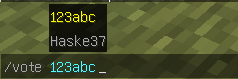
✅ Voting via /vote
Any player can start a vote to transfer another player to adventure mode.
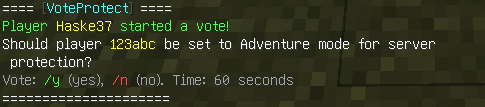
️ Voting for “Yes” or “No”
Players vote via the /y and /n commands for 60 seconds.
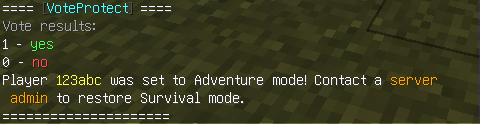
Automatic restriction of rights
If the majority votes (more than 50%) “Yes”, the player is transferred to GameMode.ADVENTURE.
Cooldown 15 minutes
Players without OP rights have a cooldown between votes.

OP players are not limited
Players with OP rights can use commands without waiting.
Dual language support
Easily switchable languages via config.yml:
language: en
language: ru
️ Message configuration
All texts are stored in messages_en.yml and messages_ru.yml — you can edit them for yourself.
To prevent players from starting voting, simply add their nicknames to the voteprotect_whitelist.yml file. The system will automatically check the list and will not allow you to start voting against the specified players.
⚠️ To return the player to survival mode, the server operator must use the standard vanilla Minecraft command – /gamemode survival
✅ Compatibility:
Servers 1.21+ (including 1.21.8)
Spigot / Paper
NEW VERSION 1.3
Now you can set for yourself how long the voting will last. Just specify the required number of seconds in the config. The system will pick up the new value on its own.
How to set up:
Open config.yml.
Find the vote_duration parameter.
Set the desired time in seconds.
Restart the plugin.
Everything is ready! Now all voting will take place at the time you set.
VCT – Voiid Countdown Timer

# Voiid Countdown Timer
As simple as the name implies. A customizable timer datapack & plugin.


## ❓ What is VCT?
Voiid Countdown Timer (VCT) is a fully customizable timer for Minecraft.
It works in two different versions:
– 📦 **Datapack** → The Lite version of VCT, ideal for single-player worlds or realms.
– 🔌 **Plugin** → The full version of VCT, perfect for multiplayer servers with Spigot/Paper.
With both versions, you can:
– 🎨 Create visual timers with a progress bar.
– 🖌️ Customize color styles.
– 🛠️ Run custom events when the timer starts or ends.
## ✨ Features
Voiid Countdown Timer includes:
– 🎨 Custom Colors Styles
– ⚙️ Quick and easy setup
– ⏳ Progressive Time Bar
– 🎈 Custom Events
– 👥 SinglePlayer and Multiplayer Compatible
– 💻 Open Source and constantly updated
## 📋 Requirements
### 📦 Datapack
– Version: `1.15+`
### 🔌 Plugin
– Version: `1.13+`
– Server: Spigot, Paper, or Purpur (not CraftBukkit)
## 🚀 Installation
### 📦 Datapack
1. Download the latest version here
2. Place the downloaded `.zip` file in the `datapacks` folder of your world.
3. Enter the world and you will receive a message confirming the installation! 🎉
### 🔌 Plugin
1. Download the latest version here
2. Place the downloaded `.jar` file in the `plugins` folder of your server.
3. Restart the server and the plugin will be ready. ⚡
## 📖 How to use it
### 📦 Datapack
– Execute the command `/function vct:book` to receive the configuration book.
– From the book you will be able to:
– ⏰ Set time
– 🎛️ Timer controls
– 🌈 Customize style of colors
– 🗣️ Change language
– ❌ Uninstall
### 🔌 Plugin
– Configuration using commands and configuration files (`config.yml`)
– To see all available commands, use `/vct help`.
– In `config.yml`, you can customize various timer options; all of them are detailed in the official documentation.
## 📚 Plugin Documentation
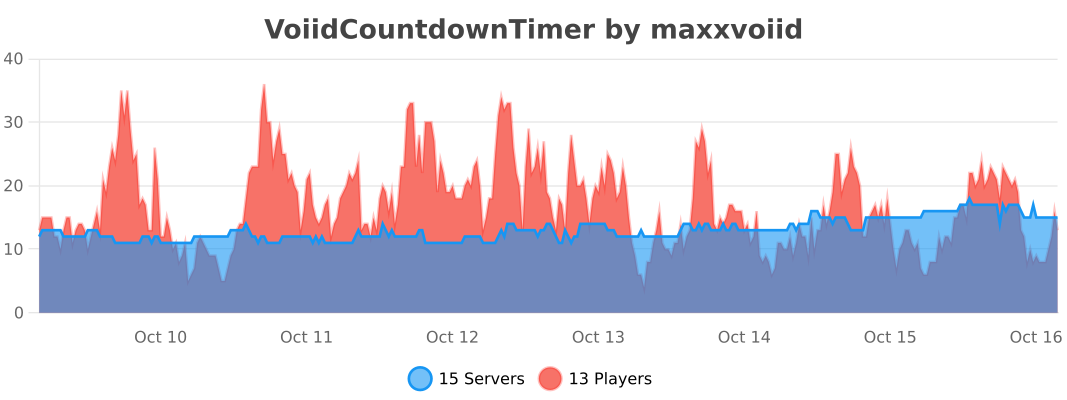
## 🔥 bStats


VoidWorldPlugin
# **VoidWorldPlugin**
**VoidWorldPlugin** creates a completely empty world of the **NETHER** type, which is perfectly suited for building projects, mini-games, or creative hubs. The plugin provides complete fall protection and disables mob spawning, making the Void a safe place to play.
## ✨ Key Features
* **🛡️ Complete Fall Protection:** Players falling below Y=0 are **automatically teleported** to the set spawn point (`/sv`) instead of dying.
* **🚫 Disabled Mob Spawning:** Natural mob spawning is completely disabled in the Void world (except, potentially, for mobs whose spawning is forcefully triggered by other plugins or commands).
* **🌎 Convenient Travel:** Easy-to-use commands for quickly switching to the Void and back.
* **🔧 Simple Configuration:** You can easily configure messages, permissions, and the world name via `config.yml`.
## 🚀 Commands and Permissions
| Command | Description | Default Permission |
| :— | :— | :— |
| **`/void`** | Teleports you to the Void world. | `voidworld.use` |
| **`/world`** | Returns you to the exact spot where you entered the Void world. | `voidworld.return` |
| **`/sv`** (`/spawnvoid`) | Sets a new spawn point in the Void world (the teleportation point when using `/void` and upon falling). | `voidworld.setspawn` (op) |
### Permissions
| Permission | Description | Default |
| :— | :— | :— |
| `voidworld.use` | Allows the use of the `/void` command. | `true` |
| `voidworld.return` | Allows the use of the `/world` command. | `true` |
| `voidworld.setspawn` | Allows setting the spawn point with the `/sv` command. | `op` |
## ⚙️ Installation and Configuration
### Installation
1. Download the `VoidWorldPlugin-1.0.jar` file.
2. Move it to your server’s `/plugins` folder.
3. Restart or reload the server. The plugin will automatically create the `void_world` world and the configuration file.
### Configuration (`config.yml`)
The plugin generates a complete `config.yml` file. After the first run, you can configure:
1. **`void-world-name`**: Change the world name if `void_world` is unsuitable for you.
2. **`spawn.fallback-y-on-fall`**: The Y coordinate where the player is teleported if the `/sv` point has not yet been set (default is 0.0).
3. **`messages`**: Change all plugin messages. Color codes (`&`) are supported.
> ⚠️ **Important:** If you change the world name (`void-world-name`), you will need to delete the old world folder (if it was created) and restart the server.
## 🐞 Support and Bug Reports
If you find any bugs or have suggestions, please let me know on Discord – lipton_sad.
VoidWorldGenerator
[download]: https://img.shields.io/github/downloads/HydrolienF/VoidWorldGenerator/total
[downloadLink]: https://hangar.papermc.io/Hydrolien/VoidWorldGenerator
[discord-shield]: https://img.shields.io/discord/728592434577014825?label=discord
[discord-invite]: https://discord.gg/RPNbtRSFqG
[ ![download][] ][downloadLink]
[ ![discord-shield][] ][discord-invite]
**Discord** | **Hangar** | **Spigot** | **GitHub**
# VoidWorldGenerator
A simple minecraft plugin to generate a void world.
Compatible with `Paper`, `Spigot` & `Folia` in all version since `1.20`.
1.1.2 is the last Java 17 compatible version. Update to Java 21 or use 1.1.2.
It can be used to prevent world generation outside of the world border.
To prevent that fully generate your world with a plugin as Chunky then add this plugin & configure your bukkit.yml.
# Installation
Download latest .jar on releases tab.
Place the .jar in `plugins/`.
Add next lines at the begining of bukkit.yml:
“`yml
worlds:
world:
generator: VoidWorldGenerator
“`
If your world is not called `world`, replace `world` by your world name. You can set VoidWorldGenerator as generator for more than 1 world.
“`yml
worlds:
myCustomWorld1:
generator: VoidWorldGenerator
a2ndCustomWorld:
generator: VoidWorldGenerator
“`
Biome to use for empty chunks & the default spawn coordinates can be edit in the plugin config in `plugins/VoidWorldGenerator/config.yml`.
## Statistics

## Build
Build with `./gradlew assemble`. Plugin file will be in `build/libs/`.
# Assemble, publish, sign & zip.
“`sh
./gradlew clean publish
./gradlew jreleaserDeploy
“`
The published lib will be available there.
Push tag to git for github action release to Modrinth & Hangar.
VoidUtils
# 🛠️ VoidUtils
VoidUtils is a lightweight utility plugin designed for Minecraft Beta 1.7.3 servers running Bukkit 1060. It includes essential patches for common exploits, dupe bugs, and performance threats — ideal for anarchy or vanilla servers.
# ✅ Features
Spoiler
🛑 Anti Coord Logger
Prevents hacked clients from logging coordinates when disconnecting.
🚫 Bedrock & Illegal Placement Protection
Blocks bedrock, portal blocks, and other illegal items from being placed.
💣 Piston Dupe Patch
Prevents duplication glitches involving pistons and chests.
🛶 Boat Placement Only on Water
Stops land boat placement used for chunk crashes.
🎒 Negative Stack Patch
Blocks items with invalid stack sizes (e.g. -1 dirt).
📦 Freecam Dupe Patch
Detects and blocks Freecam-based chest duplication.
💀 /kill Command
Adds /kill command for players to respawn voluntarily.
🕳️ Void Fall Teleport
If a player falls below Y=-64, teleports them to safe ground above.
🧩 Optional xAuth integration
Supports xAuth session tracking for AntiCoordLogger.
# ⚙️ Configuration
A config.yml is generated on first run with toggle options for each patch.
# 🧱 Compatibility
Minecraft: Beta 1.7.3
Server: Bukkit 1060
Not compatible with modern versions.
# 📁 Installation
Drop VoidUtils.jar into your server’s plugins/ folder.
Start your server.
Edit plugins/VoidUtils/config.yml if needed.
VoidTp-Flubel
VoidTp is a lightweight and secure Minecraft plugin designed to prevent players from falling into the void. By implementing this plugin, server owners can ensure a smoother gameplay experience by safeguarding against accidental void falls that could result in player frustration or loss of items.
VoidSpawn+

—
# 📝 Overview
VoidSpawn is a high-performance Paper/Spigot plugin designed to automatically teleport players to safety when they fall into the void. The plugin monitors each player’s Y-coordinate and instantly teleports them to a designated spawn point when they fall below a configurable threshold.
### How It Works
1. Players fall below the configured Y-level threshold for their world
2. The plugin instantly detects the void fall
3. Players are teleported to a custom spawn point (set via `/vs setspawn`)
4. If no custom spawn exists, players are sent to the world’s default spawn
5. A smooth fade animation and sound effect enhance the experience
—
## ✨ Key Features
### 🎯 Core Functionality
– **Multi-World Support** – Configure unique Y-levels for each world
– **Custom Spawn Points** – Set specific teleport locations with exact orientation
– **Default Spawn Fallback** – Automatic fallback to world spawn if custom spawn not set
– **Optimized Detection** – Lag-free performance even with many players
### 🎨 Player Experience
– **Smooth Fade Effect** – 2-second fade-in/fade-out screen transition
– **Customizable Messages** – Full color code support with `&` formatting
– **Sound Effects** – Configurable teleport sounds
– **Cooldown System** – Prevents teleport spam and exploitation
### 🛡️ Administration
– **Permission-Based Access** – Granular control over commands and bypass
– **Hot Reload** – Update configuration without server restart
– **Per-World Configuration** – Enable/disable void protection per world
– **Minecraft 1.20+** – Full compatibility with latest versions
—
## 🚀 Installation
### Requirements
– Minecraft Server: Paper/Spigot/folia 1.20 or newer
– Java: 17 or higher
### Setup Steps
1. Download `VoidSpawn-1.0.0.jar`
2. Place the file in your server’s `plugins/` folder
3. Restart your server
4. Configure the plugin (files created automatically):
– `plugins/VoidSpawn/config.yml`
– `plugins/VoidSpawn/spawns.yml`
—
## 🎮 Commands
### Administrator Commands
| Command | Description | Permission Required |
|———|————-|———————|
| `/vs setspawn` | Sets the void spawn point for current world at your location and facing direction | `voidspawn.admin` |
| `/vs reload` | Reloads the configuration from disk | `voidspawn.admin` |
**Alias:** `/voidspawn` works identically to `/vs`
—
## 🔐 Permissions
| Permission Node | Description | Default |
|—————-|————-|———|
| `voidspawn.admin` | Access to all `/vs` commands | OP only |
| `voidspawn.bypass` | Exempts player from void detection (useful for testing) | OP only |
—
## ⚙️ Configuration
### config.yml Structure
“`yaml
# Fade Effect Settings
fade-effect-enabled: true # Enable/disable screen fade animation
# Sound Settings
teleport-sound: ENTITY_ENDERMAN_TELEPORT # Sound played on teleport (use ‘none’ to disable)
# Cooldown Settings
teleport-cooldown: 3 # Seconds before player can be teleported again
# Messages (supports & color codes)
teleport-message: “&aYou have been teleported to safety!”
spawn-not-set-message: “&eNo custom spawn set. Teleporting to world spawn…”
cooldown-message: “&cPlease wait before being teleported again.”
# World-Specific Settings
worlds:
world:
y-level: -64 # Players below this Y-level are teleported
enabled: true # Enable/disable void protection for this world
world_nether:
y-level: -64
enabled: true
world_the_end:
y-level: -64
enabled: true
“`
### Configuration Options
#### Visual Effects
– **fade-effect-enabled**: `true/false`
– Enables smooth screen fade during teleportation
– Duration: 2 seconds total (1s fade out, 1s fade in)
#### Audio Settings
– **teleport-sound**: Sound name or `none`
– Default: `ENTITY_ENDERMAN_TELEPORT`
– Must be valid Bukkit Sound enum name
– Set to `none` to disable sound
#### Anti-Spam Protection
– **teleport-cooldown**: Integer (seconds)
– Prevents repeated rapid teleportations
– Default: 3 seconds
– Helpful for preventing abuse
#### World Configuration
For each world, configure:
– **y-level**: Y-coordinate threshold (players below this are teleported)
– **enabled**: `true/false` to toggle void protection
—
## 🗺️ Setting Up Spawn Points
### Initial Setup (Required)
1. Ensure you have OP status or `voidspawn.admin` permission
2. Enter the world you want to configure
3. Stand at the exact location where players should spawn
4. Face the direction players should be facing
5. Execute: `/vs setspawn`
6. Confirmation message will appear
### What Gets Saved?
– World name
– X, Y, Z coordinates
– Yaw (horizontal rotation)
– Pitch (vertical rotation)
### Without Custom Spawn
If no custom spawn is set via `/vs setspawn`, players will:
1. Receive the `spawn-not-set-message`
2. Be teleported to the world’s default spawn point
3. Still benefit from void protection
—
## 🔧 Advanced Usage
### Multiple Worlds
Configure different Y-levels for each world type:
“`yaml
worlds:
survival_world:
y-level: -64
enabled: true
creative_world:
y-level: -128
enabled: false # Disable in creative
mining_world:
y-level: -64
enabled: true
“`
### Custom Messages
Use Minecraft color codes with `&`:
“`yaml
teleport-message: “&b&lVOID RESCUE &r&7» &aYou’ve been saved!”
spawn-not-set-message: “&e&l⚠ &7Using default spawn point…”
cooldown-message: “&c&l✖ &7Wait {cooldown}s before next teleport”
“`
### Performance Tuning
The plugin is optimized by default, but you can:
– Disable fade effects for minimal overhead
– Adjust cooldowns to reduce event frequency
– Disable in creative/spectator worlds
—
## 📊 Performance Information
VoidSpawn is built with performance as a priority:
– **Optimized Event Handling**: Only processes relevant player movement events
– **Memory Efficient**: Automatic cleanup on player disconnect
– **No Tick Lag**: Asynchronous processing where possible
– **Minimal Overhead**: Typically <1% CPU usage even with 100+ players
### Best Practices
- Set appropriate Y-levels (don't set too high)
- Use reasonable cooldowns (3-5 seconds recommended)
- Disable in worlds where void protection isn't needed
---
## ❓ Troubleshooting
### Players aren't being teleported
- Check if void protection is enabled for that world in config.yml
- Verify the Y-level is set correctly
- Ensure players don't have `voidspawn.bypass` permission
- Check server console for errors
### Spawn point not working
- Confirm spawn was set with `/vs setspawn`
- Check `spawns.yml` for the world entry
- Try setting the spawn again
- Verify world name matches exactly
### Performance issues
- Disable fade effects if experiencing lag
- Increase cooldown duration
- Check for conflicting plugins
- Review server TPS with `/tps` command
---
## 📞 Support
For bug reports, feature requests, or general support, please contact the development team.
VoidSky
**VoidSky** is a very simple plugin that changes how the void works from falling to your death to teleporting you high in the sky to a world of your choice. There’s customization through the config or commands that make setup easy.
This plugin was inspired by how you fall in the Aether mod.
