WardenEssentials
***PLUGIN DEVELOPMENT MAY START IN SOME TIME AGAIN***
**CHANGE —> THIS PLUGIN MUST REQUIRE WARDENLIB TO RUN**
**PLEASE REPORT ISSUES IN THIS PLUGINS SOURCE CODE REPO**
_**WardenEssentials is designed to make Minecraft server administration and building faster, easier, and more enjoyable.**_
## Features:
/wegive - – Give any player any item with a custom quantity.
/weup [height] – Instantly teleport upwards and place a block beneath you.
**All others cmds you can see in ‘/wessentials help’.**
**Fully permission-based system for secure command usage.**
**Lightweight & lag-free — optimized for all server sizes.**
Simple, beginner-friendly command syntax.
## Permissions:
**wardenessentials.give – Access to /wegive.**
**wardenessentials.up – Access to /weup.**
**And also for other cmds.**
War Tower
### 🏰 War Tower
**Strategic country warfare with tower capture mechanics**
**Core Features:**
– **Create & manage countries** with territories and citizens
– **Build & defend towers** – key strategic points
– **Declare wars & capture** enemy towers while protecting yours
**Main Commands:**
– `/war add country ` – Create country (1 per player)
– `/war list` – List all countries
– `/war invite ` – Invite player to your country
– `/war accept` – Accept country invitation
– `/war decline` – Decline invitation
– `/war leave` – Leave your country
– `/war members ` – Show country members
– `/war color ` – Change country color
– `/war info ` – Country information
– `/war tower ` – Create tower (admin)
– `/war deletetower` – Remove nearest tower (admin)
– `/war start` – Start war (admin)
– `/war stop` – Stop war (admin)
—
### 🏰 War Tower
**Стратегические войны стран с механикой захвата башен**
**Основные возможности:**
– **Создание и управление странами** с территориями и гражданами
– **Строительство и защита башен** – ключевых стратегических точек
– **Объявление войн и захват** вражеских башен и защита своих
**Основные команды:**
– `/war add country ` – Создать страну (1 страна на игрока)
– `/war list` – Список стран
– `/war invite ` – Пригласить игрока в страну
– `/war accept` – Принять приглашение в страну
– `/war decline` – Отклонить приглашение
– `/war leave` – Покинуть страну
– `/war remove ` – Удалить игрока из страны
– `/war delete ` – Удалить страну
– `/war members ` – Участники страны
– `/war color <цвет>` – Изменить цвет страны
– `/war info ` – Информация о стране
– `/war tower ` – Создать башню (админ)
– `/war deletetower` – Удалить ближайшую башню (админ)
– `/war start` – Начать войну (админ)
– `/war stop` – Остановить войну (админ)
Wand of Replication
# ✨ Wand of Replication: Build Faster, Build Smarter
The **Wand of Replication** is a powerful plugin designed for builders and server admins who want to accelerate construction and terraforming without resorting to creative mode or complex external tools. This magical wand allows you to duplicate blocks and even small areas instantly, using resources directly from your inventory.
## ✨ Features
* **Custom Wand Item:** Obtain the **Wand of Replication** (based on a Blaze Rod) with unique name and lore.
* **Single Block Duplication:** Right-click a block while holding the wand to instantly place an exact duplicate next to it.
* **Area Replication (Coming Soon):** Future updates will enable selecting two points to duplicate entire small structures (e.g., a 3x3x3 area).
* **Resource Consumption:** Each replication consumes the necessary blocks from your inventory, ensuring fair gameplay.
* **Configurable Cooldowns:** Prevent spamming with customizable cooldowns on the wand’s abilities.
* **Efficient Building:** Perfect for creating repetitive patterns, extending walls, or quickly filling in large areas.
## ⚙️ How to Use
1. **Obtain the Wand:** A server administrator will typically use a command to give you the **Wand of Replication**.
* **Command:** `/givewand`
2. **Single Block Replication:**
* Hold the **Wand of Replication**.
* Right-click the block you wish to duplicate.
* A duplicate will appear adjacent to the clicked block in the direction you are facing, consuming one item from your inventory.
3. **Area Replication (Future Update):**
* *Details will be provided with the update for multi-block duplication functionality.*
## 🚀 Get Building!
Say goodbye to tedious manual placement! The **Wand of Replication** is your new best friend for constructing magnificent creations with speed and precision.
***
**📺 check the IND PLAYZ Youtube channel!**
**YouTube Channel: IND PLAYZ**
Walls
# Walls



**A strict enforcement plugin that creates truly impassable invisible walls.**
*No exploits. No bypasses. No exceptions.*
**Created by Nevmind. All rights reserved to him.**
—
## Overview
**Walls** is a Minecraft Java plugin that allows server operators to create **named invisible barrier regions** that players **cannot cross in any possible way**.
Unlike barrier blocks or simple region checks, Walls is designed as a **hard enforcement system**.
It prevents not only walking through walls, but also **all known bypass techniques**, and continuously corrects the player’s position if they somehow end up past an active wall.
Walls is ideal for:
– Spawn and hub protection
– Event arenas and stages
– Map boundaries
– Minigames and competitions
– Any scenario where crossing a boundary must be impossible
—
## Core Concept
– Walls are defined between **two selected positions**
– Walls can be:
– Solid regions
– Hollow enclosures
– Thin planes (including diagonal walls)
– Walls can extend **infinitely** (vertical and/or horizontal)
– If a player attempts to cross an active wall, the action is blocked
– If a player somehow appears past a wall, they are **automatically teleported back**
The goal is simple:
> **If a wall is active, crossing it is impossible.**
—
## Features
### Wall Enforcement
Walls prevent crossing via:
– Walking, sprinting, swimming
– Elytra glide momentum
– Boats, minecarts, pigs, striders, and all mountable vehicles
– Ender pearls
– Chorus fruit teleports
– Any form of teleport that would cross a wall
– Projectiles (arrows, tridents, snowballs, etc.)
– Throwing or dropping items across walls
If an unexpected edge case occurs, Walls detects the violation and **rolls the player back** to their last safe position.
—
### Interaction Blocking
Players cannot:
– Place blocks across or inside an active wall
– Break blocks across or inside an active wall
– Interact with blocks or entities across a wall
– Attack players or entities across a wall
– Affect anything “on the other side” of an active wall
This guarantees that walls are not only movement barriers, but **interaction barriers** as well.
—
### Infinite Walls
Walls can be configured to be truly infinite:
– **Infinite Y**: not limited by build height
– **Infinite X / Z**: extend endlessly horizontally
– **Infinite horizontal planes**: block an entire world with a single wall
“Infinite” in Walls means **mathematically infinite**, not capped by world limits.
—
### Wall Geometry
Supported wall types:
– **Cuboid walls** (classic regions)
– **Hollow walls** (players may be inside but cannot escape)
– **Plane (sheet) walls** for thin barriers
– **Diagonal walls** using plane mode
– Configurable wall thickness (greater than one block)
—
### Visuals (Optional)
– Optional particle visuals for active walls
– Visible to all players, including operators
– Configurable particle type, distance, and density
– Purely cosmetic — enforcement does not rely on visuals
—
### Scheduling and Announcements
Walls can be toggled:
– Immediately
– After a delay
– With an optional public countdown
Optional features include:
– Countdown messages
– Countdown tick sound
– Final sound when the wall toggles
– Titles and chat announcements
—
### Teams and Permissions
Walls supports controlled bypass access via:
– Vanilla Minecraft scoreboard teams
– Optional LuckPerms group integration
Only **one system is active at a time** to avoid conflicts.
Permissions are strict by default:
– Non-OP players cannot use wall commands
– Admin actions are permission-gated
– OPs do not bypass walls unless explicitly allowed
—
## Commands
Main command: `/wall`
Alias: `/walls`
### Core Commands
| Command | Description |
|——|———–|
| `/wall help` | Show help page |
| `/wall creator` | Show plugin attribution |
| `/wall list` | List all walls |
| `/wall pos1` | Set first position |
| `/wall pos2` | Set second position |
| `/wall create ` | Create a wall |
| `/wall delete ` | Delete a wall |
| `/wall toggle` | Enable or disable walls |
| `/wall reload` | Reload configuration |
| `/wall tool - ` | Change selection tool |
| `/wall debug` | Debug information |
### Team Commands
| Command | Description |
|——|———–|
| `/wall team add ` | Allow a team/group to bypass walls |
| `/wall team remove ` | Remove bypass |
| `/wall team list` | List bypass teams |
| `/wall team toggle` | Enable or disable team bypass |
—
## Configuration
The configuration file is generated automatically and heavily documented.
Key options include:
– Global wall enable/disable
– Infinite wall behavior
– Rollback teleport enforcement
– Visual effects
– Scheduling and countdown behavior
– Team and permission handling
Changes can be applied via:
– Editing `config.yml` and running `/wall reload`
—
## Compatibility
### Minecraft Versions
– **Minecraft Java Edition 1.16.x → latest**
### Platforms
– Bukkit
– Spigot
– Paper
– Most Paper/Spigot-based forks
—
## Attribution
**Created by Nevmind. All rights reserved to him.**
Wallrun
WallRun introduces smooth, momentum-based wall-running to Minecraft.
Players can run along walls, extend jumps, and chain movements for fast, fluid parkour.
Perfect for Parkour maps, Minigames, and PvP, while staying lightweight, responsive, and performance-friendly.
Walk Tracker
WalkTracker is a plugin that turns exploration into a friendly server-wide competition. By leveraging Minecraft’s accurate, built-in statistics, the plugin tracks every block a player travels on foot and displays this data on a scoreboard visible to everyone. This board features a “Top 10 Travelers” ranking that updates periodically, ensuring it doesn’t impact server performance.
In addition to the public ranking, the plugin includes the /distance command for players to check their personal records and provides admin tools to set or add distance to any user’s stats, making it perfect for events or manual adjustments. It’s an ideal addition for survival, RPG, or exploration-focused servers, adding a new layer of engagement that rewards the most dedicated adventurers.
🕑Waiting Screen🕒
# 🕒 Waiting Screen Plugin – BossBar & Titles! 🏆
Give your server a professional touch with a waiting screen system that is fully customizable! This plugin manages player waiting before a game or event, featuring an attractive and configurable visual interface.
—
## ✨ Features
– **📊 Custom BossBar** – Personalize the BossBar with colors, styles, and custom messages.
– **🏆 Titles & Subtitles** – Display customizable messages with adjustable timing.
– **⬆️ Dynamic BossBar** – The BossBar updates as players join (only counts non-OP players).
– **💫 Effects** – Apply potion effects to players while they wait, configurable in `config.yml`.
– **🔊 Sounds** – Play sound effects when players join or leave the waiting list.
– **🚷 Movement Restriction** – Enable or disable player movement while in the waiting screen.
—
## ⚙️ Configuration
The plugin includes a `config.yml` file where you can customize:
– 🎨 **BossBar colors and styles**
– 🏆 **Title and Subtitle messages**
– ⏳ **Potion effects and duration**
– 🔊 **Entry and exit sounds**
– 🚷 **Allow or block player movement**
—
## 🛠️ Commands
This plugin includes the following commands to help you manage the waiting screen system:
—
### **/waitingscreen**
– **Description**: Shows the list of available commands.
– **Usage**:
– `/waitingscreen` – Displays all the available commands for managing the waiting screen.
—
### **/toggleWaitScreen**
– **Description**: Toggles the waiting screen on or off.
– **Usage**:
– `/toggleWaitScreen` – Activates or deactivates the waiting screen manually.
—
## 🎃 Carved Pumpkin Feature
You can customize the carved pumpkin by adding a custom image. Supported resolutions: 16×16, 32×32, 64×64, 128×128, and 256×256.
We recommend using 64×64, 128×128, or 256×256 for better quality. 🖼️
## 🛠️ How to Use the Texture Pack?
Go to the misc folder inside your texture pack.
Replace the default image with your own custom image.
Rename your image to: pumpkinblur.png 🏷️
You can send the texture pack to your friends so they can install it manually, or set it up directly on your server. 🌍
📥 Texture Pack Download: https://www.mediafire.com/file/82pmkh8mxtncif5/Custom_Pumpkin_Overlay.zip/file
Waila
# Waila plugin
](https://discord.gg/vvnRgJMXvV)
Do you want your players to play better? Thanks to this plugin, they will find out without unnecessary difficulties whether they can destroy this block, what falls out of it and how long it will take to extract such a block.
# Functions
– Displaying the name of the block we are looking at
– Display of information whether we can destroy a given block
– Display of the current block strength depending on the item in hand
– Display change when block cannot be destroyed
– Ability to change configuration
– Show block drop by clicking shift
– Block drop depends on the item you are holding
– Ability to change icons, icon color, bossbar color and style and more
– The range of the targeted block can be changed
– Ability to change how often the bossbar changes
– Notifications about updates
– system recipe-search (Just Enough Items (JEI) / Roughly Enough Items (REI))
– The block recipe appears when you right-click on it, without holding anything in your hand, crouching.
– Possibility to rename the gui of the recipe shown
– Possibility to change the message about no recipe found
– very good possibility of interfering with the appearance of the gui
– the ability to view the burn-through recipe
– Displaying the name of the entity along with its health
– Show percentage of plant growth
# Screenshots


# Commands & Permissions
## /Waila
● Permission: *waila.toggle*
● Description: Hide/Show waila bossbar
`*LINK*`
## Supporting
*@oskarq_yt#7155* – **50 PLN**
# Sponsors
**null**
# bStats

# Other plugins


Ignore this [search tag]
Waila
Waila plugin
smp plugin
best smp plugin
Waliat
Here’s What You’re Looking At
What am i looking at?
Hwyla
WTHIT
What The Hell Is That?
cAn i MiNe this bLOCk?
Cimtb
Waila Harvestability
Cimtb Waila Plugin
Just Enough Items
Roughly Enough Items
(JEI)
(REI)
JEI
REI
free
darmowe
crop checker
plant growth
I used the translator to write this text so some things may be confusing.
VynnChat
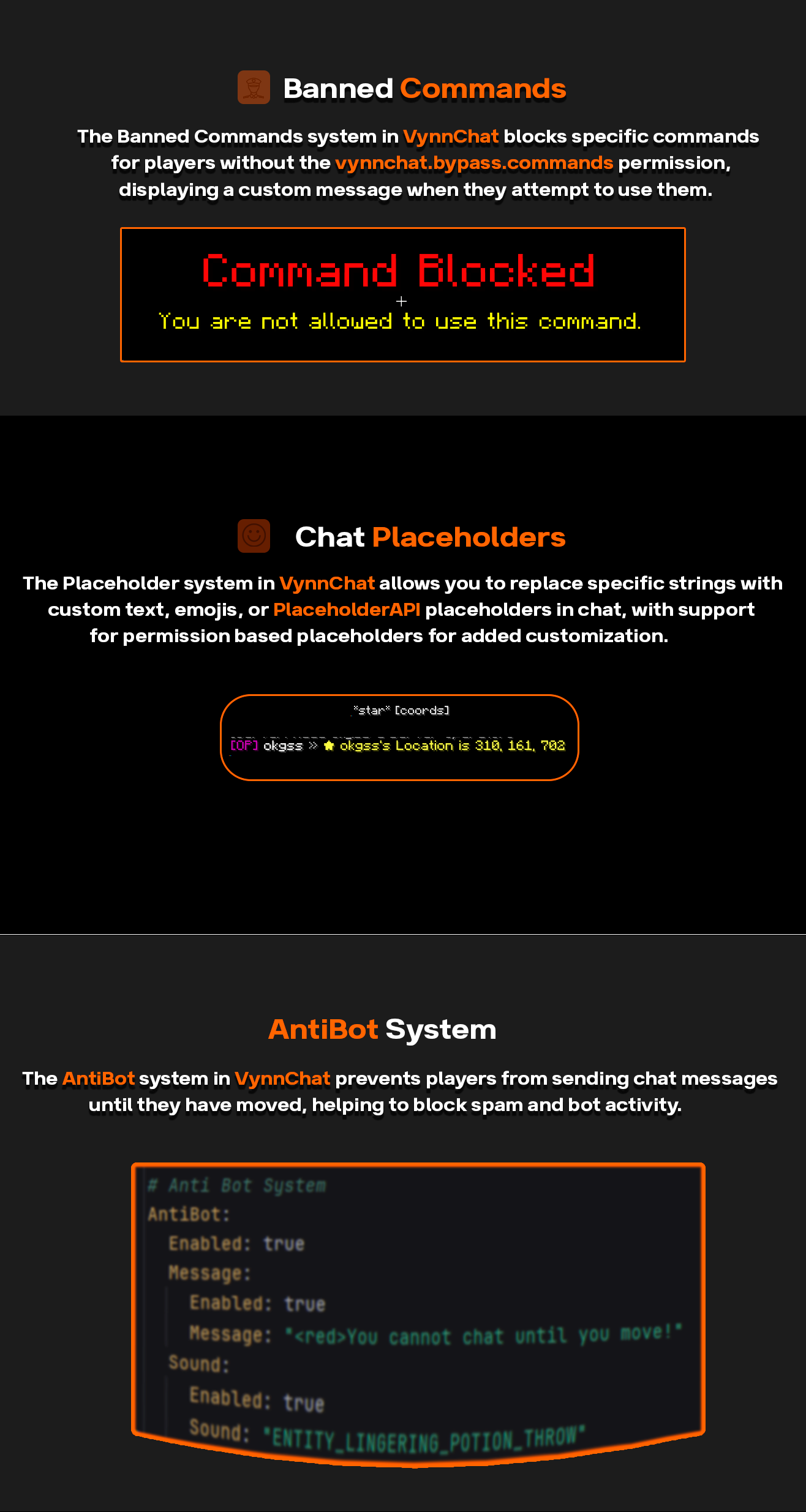
**VynnChat** is a comprehensive chat management plugin designed to enhance the chat experience on Minecraft servers. It offers extensive features for customization, control, and moderation, ensuring smooth and enjoyable communication for players.
### Features:
– **Customizable Chat Formatting**: Personalize chat appearances using group-based prefixes, suffixes, and hover text.
– **Word Filtering**: Automatically detects and replaces or blocks specified words or phrases in chat messages.
– **Anti-Bot Mechanism**: Prevents players from chatting until they move, with customizable messages and sounds for violations.
– **Command Blocking**: Restricts the use of specific commands and provides customizable feedback for blocked commands.
– **Tab Completion Control**: Manages tab completions for blocked commands to streamline player interactions.
– **Replacer System**: Replaces specific words or phrases with predefined alternatives in chat messages.
– **Welcome Messages**: Greets new players with customizable welcome messages and notifications.
### Commands:
– `/vynnchat reload` – Reload the plugin’s configuration files.
– `/vynnchat help` – Display a list of available commands and their descriptions.
### Permissions:
– `vynnchat.reload` – Allows the user to execute the `/vynnchat reload` command.
– `vynnchat.bypass.words` – Bypass word filtering restrictions.
– `vynnchat.bypass.commands` – Bypass blocked command restrictions.
– `vynnchat.bypass.tab` – Bypass tab completion restrictions.
– `vynnchat.admin` – Admin permissions for overriding various restrictions and settings.
– `vynnchat.mutechat` – Allows the user to execute the `/mutechat` command.
– `vynnchat.bypass.mutechat` – Bypass mute chat restrictions.
### Dependencies:
– **Vault**: Required for permissions management.
– **PlaceholderAPI**: For advanced placeholder support in chat formatting.
Join our Discord server for support, updates, and community engagement!
VyHub
VyHub, the comprehensive solution to build, manage and monetize Minecraft stores and communities. Easy integration of your Minecraft server and store. It’s the all-in-one management platform designed for your gaming community. VyHub offers a webshop, website, a donation store and bans and warnings.
Design and manage your Minecraft community through VyHub. We acknowledge that community management is hard work and takes a lot of time. With VyHub we automate your donation webstore fully. Furthermore, you can also save time on banning and warning players.
Create a professional community website and webstore in 5 minutes!
And there is more: VyHub provides you with an all-in-one solution to manage your community and gain valuable insights. Communicate, warn and ban players while maintaining good oversight of your community and its rules. With this resource you can make the best out of your community and server monetization.
The all-in-one system includes many features:
Ban and Warnings system (quick community management)
Sync groups/ranks (assign ranks through LuckPerms)
Ticketing system
Forums system
Shop system (unlimited categories, servers and packets)
Buy for a friend
Over 20 payment options (through: PayPal, Paysafecard, Stripe)
Multi language support
Discord roles and notifications
Quick support
Full API
And much more…
For more information and direct contact to the developers and the VyHub community visit our Discord (https://discord.gg/QZxQHtZnSB)
Pricing: VyHub can be used for free.
We take a small commission of 3 to 5% on purchases made through your VyHub store.
So you only pay when you make money.
Not yet convinced?
Check out the free VyHub Demo here: https://demo.vyhub.net/
Try out the different views, dashboards and customization options with VyHubs unique look and fell.
Lets go!
Create your account for FREE on https://vyhub.net, create your VyHub instance and add a Minecraft server.
Download addon for FREE and drag and drop the latest VyHub Plugin folder into your Gmod serveraddonsdirectory.
Restart your server and set your api-key through a simple command displayed in the setup process.
Congratulations your server is now connected! You can start selling products on your server!
For guides and further information visit: https://docs.vyhub.net