Send a command to your Minecraft or Hytale server via DrawWEB or similar web scripts.
– Send command with PHP your Bungee, Velocity or Bukkit server!
– BungeeCord/Velocity and Spigot support!
– %100 Customizable config!
– Fast socket system!
– Multiple server support!
– /websender command. Perm: websender.admin
– Important: When you install the plugin, make sure to change the password, otherwise the plugin will not work. Also, if you change the websender port, enter a port that is not used elsewhere on your server.
**Important:** When you install the plugin, make sure to change the password, otherwise the plugin will not work. Also, if you change the websender port, enter a port that is not used elsewhere on your server.
**PHP EXAMPLE:**
If you downloaded version 1.0.1 or lower, the contents of the folder named “ExamplePHP” in the zip are incorrect, you can download version 1.0.2 or 1.2 to get the correct examples.
**Configuration for Plugin v1.5+ (Important)**
If you have installed version 1.5 or higher, you must configure your
“`
WebsenderAPI.php
“`
file according to your server’s Java version. Please follow the steps below.
**Step 1: Update the WebsenderAPI.php File**
1. Open the **.zip** archive you downloaded for the plugin.
1. Find the **WebsenderAPI.php** file located inside the ExamplePHP folder.
1. Replace the existing **WebsenderAPI.php** file on your website with this new one.
Supports Paper / Folia / Spigot / Bukkit / Purpur on `1.20+`. The web UI works on both desktop and mobile browsers.
The free edition focuses on the core web player market, inventory viewing, pending claims, trade logs, account flows, and economy features.
—
## Included Features
– Core player market
Players can list, buy, and delist items. The free edition is hard-limited to `100` concurrent player-market listings at runtime.
– Offline operations
Players can still view inventory / ender chest data and handle pending claims through the web UI while offline.
– Full item detail rendering
Durability, enchants, lore, custom names, potion effects, shulker-box contents, bundle contents, and other NBT data are preserved and displayed.
– Trade logs
Supports player trade log queries and material-based trade log queries.
– Account system
Supports web registration, in-game registration, account binding, password change, and API-key-based login.
– Built-in economy and Vault economy
Supports money trading, transfers, balance lookup, wealth leaderboard, and transaction history.
– Icon and asset fallback
Supports vanilla assets, partial custom-item resources, and generated web icon caching.
—
## Not Included in Free
– In-game GUI
– Buy request system
– Auction house
– Official shop sell / buyback
– Buff shop
– Special item / perk area
– Cross-server features
– Remote inventory operations
– Points currency trading
– Per-player permission-group overrides
—
## Installation
1. Put the free-edition jar into the server `plugins` directory.
2. Start the server once to generate the config files.
3. Edit `config.yml` or `config.en_us.yml` as needed.
4. Restart the server.
—
## Main Commands
All commands support the `/wm` prefix. Some also have short aliases.
| Command | Description |
|—|—|
| `/wm help` | Show available help |
| `/wm bind ` | Bind the web account to the Minecraft account |
| `/wm register [username]` | Register a web account in game |
| `/wm claim` | Claim pending items |
| `/wm sj ` | Quick-list the held item to the player market |
| `/wm marketlogs me` | Query your own trade logs |
| `/wm marketlogs [page] [filters]` | Admin query for a player's trade logs |
| `/wm marketlogs-material [page] [filters]` | Query logs for a material |
| `/wm restrict` | Manage basic player-market listing restrictions |
| `/wm blockitem` | Manage blocked NBT items |
| `/wm money` | Check balance |
| `/wm money pay [reason]` | Transfer money |
| `/wm money top [page]` | Wealth leaderboard |
| `/wm money history [player] [page]` | Query transaction history |
| `/wm economy [process]` | View or process economy status |
| `/wm resetpassword ` | Admin reset for web password |
---
## Permission Nodes
| Node | Purpose |
|---|---|
| `webmarket.use` | Base command access |
| `webmarket.resetpassword` | Reset web password |
| `webmarket.economy.view` | View economy status |
| `webmarket.economy.process` | Process offline economy records |
| `webmarket.restrict` | Manage market restrictions |
| `webmarket.marketlogs` | Query player/material trade logs |
| `webmarket.marketlogs.self` | Query your own trade logs |
| `webmarket.iconcache` | Manage web icon cache |
| `webmarket.blockitem` | Manage blocked listing items |
| `webmarket.money.balance` | View own balance |
| `webmarket.money.others` | View other players' balances |
| `webmarket.money.pay` | Transfer money |
| `webmarket.money.top` | View wealth leaderboard |
| `webmarket.money.history` | View own transaction history |
| `webmarket.money.history.others` | View other players' transaction history |
| `webmarket.money.admin` | Admin economy commands |
# 🌐 WebLinker – Connect your Minecraft account to the web!
**WebLinker** is a lightweight and powerful plugin that allows players to link their Minecraft accounts with external web services through secure and unique URLs. Ideal for servers that use **Discord verification**, **web panels**, or **custom APIs**.
—
## 🚀 Key Features:
– 🔗 Generate unique codes for each player to verify their account.
– 🛡️ Secure and customizable verification system.
– 🧩 Optional integration with LuckPerms to assign ranks automatically.
– 🔌 Supports database interactions.
– ⚙️ Easy to configure and developer-friendly.
—
## 🛠️ Use cases:
– Link Minecraft accounts to Discord, forums, or website profiles.
– Automatically assign ranks after successful verification.
– Build your own account linking system using WebLinker as a backend.
—
## 📦 Requirements:
– Spigot or Paper server **1.21+**
– *(Optional)* LuckPerms for permission management
—
## ⌨️ Commands:
– `/link` – Generates a unique link for the player
– `/weblinker reload` – Reloads the config
WebLink
**WebLink** (previously BAPI Connection/BAPICON) allows you to send commands to your minecraft server through a web url. This plugin can also be used to get your servers stats such as the amount of online players, max players and RAM used.
To use, make sure you set the port and **CHANGE THE PASSWORD** in the config.yml file at yourserverfile/plugins/BAPICON/config.yml.
Please report bugs and request features using the linked Bug Tracker Google Form. (if making a feature request, please put “How to reproduce the bug” as N/A.
Currently you cannot get command feedback (get the result of commands)
You can:
GET http://yourserver.com:12345/stats.
Returns JSON with “onlinePlayers”, “maxPlayers”, “uptimeSeconds”,
,”memoryMaxMB”,”memoryAllocatedMB”,”memoryUsedMB”,”memoryFreeMB”.
POST http://yourserver.com:12345/command
The request body should look like:
## Need help?
**Read the official guide [here](docs/guide.md)**
## Features
Currently, WebhookIntegrations offers the following capabilities:
1. Sending customizable messages in response to various player actions:
– Joining the server
– Being kicked
– Leaving the server
– Sending a message
– Receiving an advancement
– Being killed by another player
– Dying from an NPC
2. Multi webhook support – you choose what events are sent where
3. Sending a configurable message upon server startup and shutdown.
4. Configurable censoring system.
5. Force ping prevention.
6. Dynamic loading and saving config presets with commands.
7. Multi-language support.
8. Support for vanish and permissions.
## Placeholders
WebhookIntegrations uses a special placeholder system to convert dynamic variables like `$player$` into the name of the player who triggered the event. You can view all placeholders in the plugin’s config. The plugin also supports `PlaceholderAPI` for additional placeholders you can use in your messages!
## bStats
This plugin uses the bStats plugin metrics for providing statistics for me and the community. You can view all collected data [here](https://bstats.org/plugin/bukkit/WebhookIntegrations/18509). All information sent is anonymous. You can opt-out at any time in the bStats configuration.
### Disclaimer: this plugin has an auto update feature that can be disabled in the config by setting `auto-update` to `false`, it is enabled by default.
#### Like the plugin? Consider leaving a review on [Spigot](https://www.spigotmc.org/resources/1-17-webhookintegrations-simplifying-discord-integrations.107688/)!
Webhook Logs – Embed Logger
INFORMATION:
Log anything you want in your own Discord server! This can be useful for logging Coin Shop transactions, menu click actions, and much more. PlaceholderAPI is supported.
FEATURES:
PlaceholderAPI support.
1.17+ support.
Java 17+ support.
Markdown support (Chat formatting such as bold, italic, underline and more).
Configurable options.
Simple config file with examples.
OVERVIEW:
ADDITIONAL INFORMATION:
If you would like to request a feature or need assistance with our plugin, we would be happy to support you here.
**[PlayerCONSOLE](https://www.spigotmc.org/resources/%E2%9C%A8%E3%80%90%E2%98%85-player%E2%9C%A6console-%E2%98%85%E3%80%91%E2%9C%A8-%E2%8E%AE-remote-panel-50-off-%E2%8E%AE-auto-restart-velocity-file-db-managing-api.126241/) is REQUIRED!**
Text Version
WebCMD is a lightweight PlayerCONSOLE module that runs a persistent web panel on your machine.
When Minecraft goes offline the panel stays up – so you can fire a start command from any browser and bring it back.
Server went down? Open a browser on your phone or laptop, hit Run, it’s back. No one needs to be at the machine.
Controlled via PlayerCONSOLE
Turn the panel on or off from inside the game using webcmd enable and webcmd disable. No files to edit, no restarts needed.
Webcam
# Webcam
Mod and plugin that allows players to broadcast their webcams
## ⚠️ Warning
This plugin requires special setup on server to work.
If you are a server administrator, please read the section `Setup on server` first
## Features
– High-quality webcam broadcasting
– H.264 video codec
– Video transmission via UDP using custom protocol
– AES encryption
– Bitrate control
– Video resolution control
– Different display shapes
– Display size and position configuration
– Display on player model face
– Display distance limit
– Webcam broadcast and view permissions
– Advanced client configuration ([Mod Menu](https://modrinth.com/mod/modmenu) & [Cloth Config API](https://modrinth.com/mod/cloth-config) required)
– Ability to hide selected players’ webcams
– Velocity proxy support
– Compatibility with [ReplayMod](https://modrinth.com/mod/replaymod) & [Flashback](https://modrinth.com/mod/flashback)
| Icon | Description |
|:——————————————————–:|——————————–|
|  | Your webcam is enabled |
|  | Your webcam is disabled |
|  | Connecting to Webcam server |
|  | Not connected to Webcam server |
## Encryption
Webcam connection is encrypted, but we don’t guarantee the security of it. Use at your own risk!
## Setup on server
Webcam plugin uses UDP socket to transfer video packets.
So you need to open a UDP port in your server’s firewall and panel (if present) to make Webcam server work. This is port `25454/udp` by default. You can change the port in server config
If you are using Velocity, see `Setup on proxy`
Here are the default values with their descriptions:
“`
{
“port”: 25454, // Webcam UDP server port. This must not clash with any other used UDP port (like Simple Voice Chat port)
“bind_address”: “”, // Address to bind the Webcam server to. Leave blank to use the wildcard (0.0.0.0) address. F.e. use “127.0.0.1” to accept only local connections
“host”: “”, // The hostname that clients should use to connect to the Webcam server. Leave blank to use the address, that player is connected to Minecraft with. Can be a simple address or an address with port. This will be ignored, if the server is proxied
“keep_alive_period”: 1000, // Period of sending keep alive packets is milliseconds
“permission_check_period”: 60, // Period of checking webcam.broadcast and webcam.view permissions in ticks
“max_display_distance”: 100.0, // The distance in blocks from player, in which other players can see his webcam
“display_on_face”: false, // Whether to display webcam on player model face or above his head
“display_shape”: “round”, // Shape of webcams displayed above players’ head. Possible values: “round”, “square”
“display_offset_y”: 1.3, // Y offset of webcams displayed above players’ head
“display_size”: 1.2, // Size of webcams displayed above players’ head
“hide_nicknames”: true, // Whether to hide player’s nickname if his webcam is enabled
“display_self_webcam”: true, // Whether to show the player’s webcam to himself
“synced”: { // These settings are synchronized with clients
“image_dimension”: 360, // Side dimension of square webcam images
“mtu”: 1100, // Maximum Transmission Unit of packets. You can lower this, if image on webcam starts look glitchy or not arrives at all
“bitrate”: 500 // Target video bitrate (kbps)
},
“messages”: { // Custom transtalions for messages, that are sent to players in different situations. May contain placeholders – %s
“incompatible_mod_version”: “Incompatible Webcam version. Your – %s, server’s – %s” // The message that will be sent to player if he has incompatible Webcam mod version. You can set this to empty to disable sending this message
}
}
“`
### Commands
– `/webcamconfig [new_value]` – command to read/update config values. Requires `webcam.command.config` permission or OP.
### Permissions
– `webcam.command.config` – permission to modify Webcam server config (default: OP Level)
– `webcam.broadcast` – permission to broadcast webcam (default: true)
– `webcam.view` – permission to view webcams (default: true)
## Setup on proxy
Webcam has Velocity plugin that proxies Webcam servers on the backend MC servers and allows to connect to different Webcam servers through the single port.
So it acts like a UDP proxy.
If you running proxy and backend servers on the same machine, you need to configure different ports for them. See `Setup on server/Server config` and `Setup on proxy/Proxy config`
### Proxy config
Server config is located in `plugins/webcam/config.properties`
Here are the default values with their descriptions:
“`
#Webcam proxy config
# Webcam UDP server port. This must not clash with any other used UDP port (like Simple Voice Chat port)
port=25454
# Address to bind the Webcam server to. Leave blank to use the wildcard (0.0.0.0) address. F.e. use “127.0.0.1” to accept only local connections
bind_address=
# The hostname that clients should use to connect to the Webcam server. Leave blank to use the address, that player is connected to Minecraft with. Can be a simple address or an address with port. This will override configured values on backend server’s
host=
“`
## License
This mod is licensed under **No Unauthorized Distribution License**, which full text can be found at https://github.com/DimasKama/Webcam/blob/master/LICENSE.md
### Summary
– **Modpacks:** You can use this mod in modpacks, but you must not include its files directly. Instead, list it as a dependency (mod reference) that points to an official download source.
– **For Devs:** You’re allowed to create addons or integrate support for the mod, but you must not copy any of its code. Instead, make it an external dependency that gets downloaded from an official source.
– **Redistribution Limits:** You cannot re-upload or share the mod’s code or compiled files publicly without the author’s explicit permission. Forking for personal use is okay, but distributing a compiled fork is not allowed.
– **Personal Use:** You may use and modify the mod for personal use, but any changes must remain private and not be shared publicly.
– **Official Download Requirement:** Any dependency or modpack reference must point to the official download sources provided by the author.
WebCam Bubbles
# WebCam Bubbles Mod
Minecraft mod that shows webcam
## Features
Adds a customizable pop-up (aka bubble) that displays a live image from your webcam! Works on LAN and servers
This is a server/client mod, so it needs to be installed on both.
**You need to install a [server plugin](https://modrinth.com/plugin/webcam/versions?l=bukkit&l=paper&l=purpur&l=spigot) to make webcams work on your server. If you have a Fabric server – install the [fabric mod](https://modrinth.com/plugin/webcam/versions?l=fabric) on your server**
### WARNING! If the server plugin does not work, use Fabric mod instead
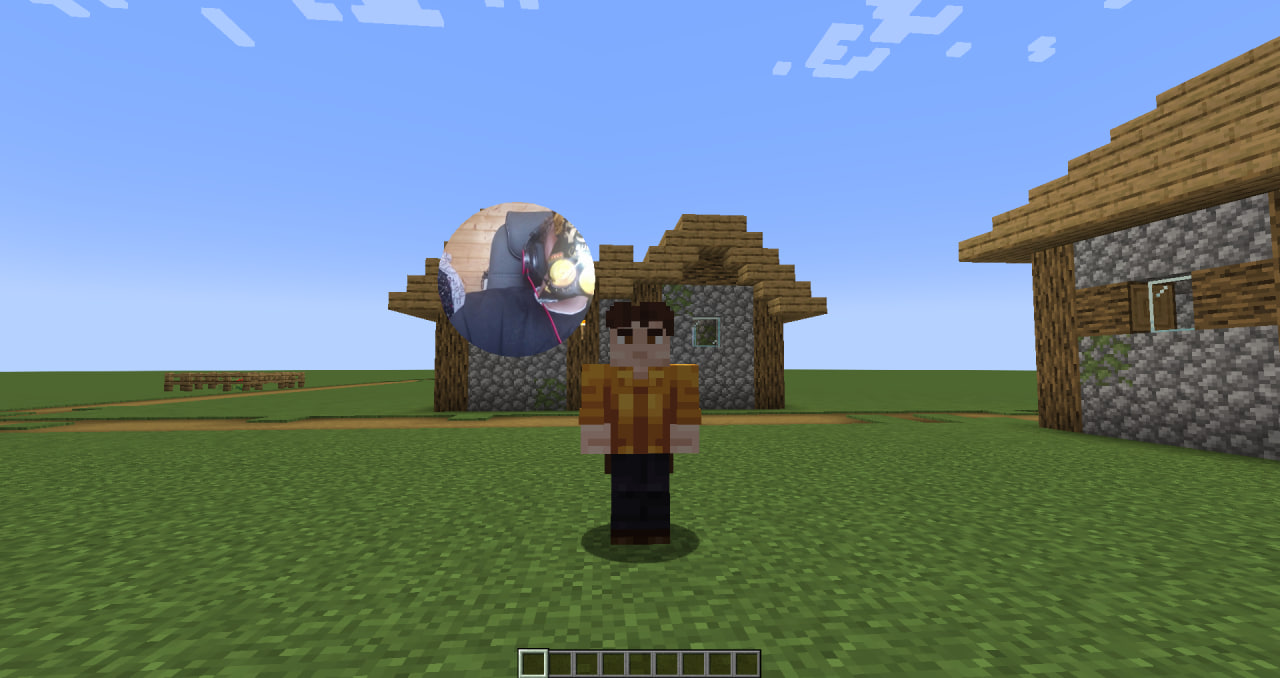
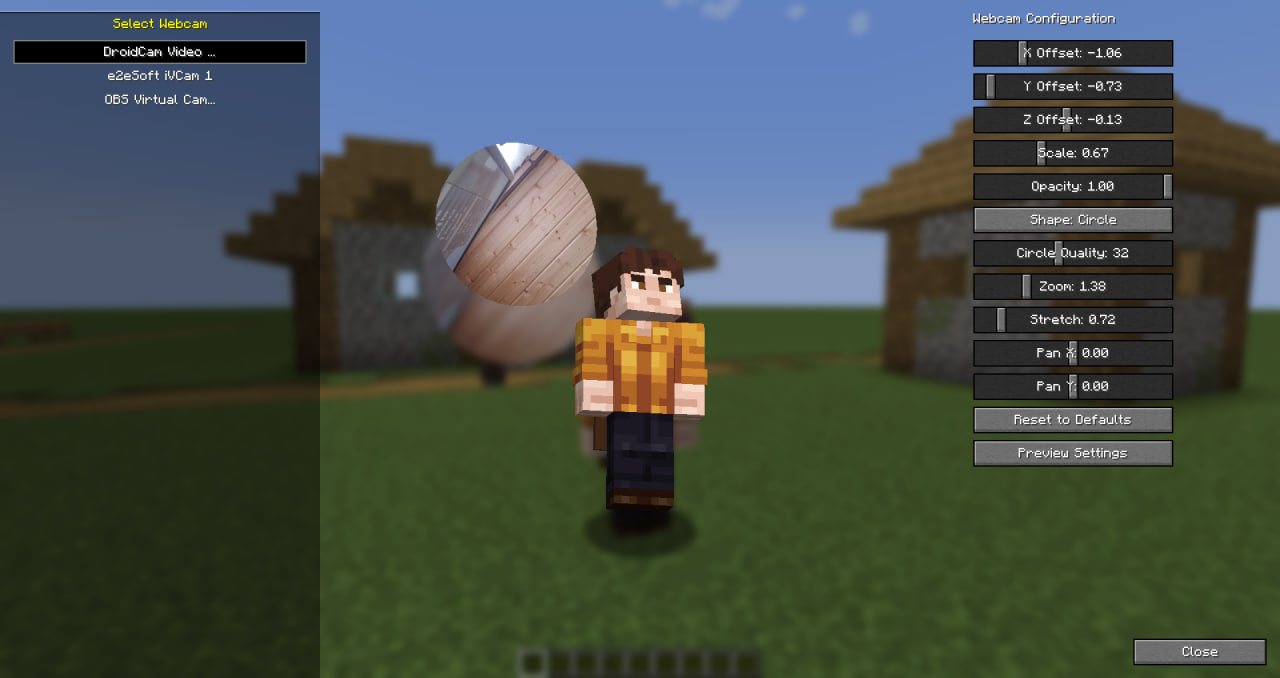
You can use the command `/webcam-settings` or press `(default) K` to open a menu where you can choose the device you want to use and customize bubbles:
WeatherVote
This server side mod adds some commands to your server that allow online players to vote for the current weather on the server.
The command that becomes available is: `/weathervote [rain|clear|thunder]`.
By default when 50% of the online players vote for the same type of weather, the weather is automatically changed. This percentage can be changed in the config aswell as the messages being sent to the chat.
