why he disconnected
# Disconnect Reason Plugin
## Overview
The Disconnect Reason Plugin is a simple Bukkit/Spigot/Paper plugin designed for Minecraft servers. It notifies server operators whenever a player disconnects or is kicked from the server, providing insight into the reasons for their departure.
## Features
– **Player Logout Notification**: Sends a message to all operators when a player logs out of the game along with the reason for the logout.
–
## Installation
1. Download the plugin JAR file.
2. Place the JAR file into the `plugins` folder of your Paper server.
3. Restart the server to enable the plugin.
## Usage
Once installed, the plugin will automatically start tracking player logouts and kicks. Operators will receive messages in their chat whenever these events occur.
### Example Messages
– When a player logs out:
`PlayerName logged out: LogoutReason`
– When a player is kicked:
`PlayerName was kicked: KickReason`
## Suggestions
If you have ideas for improving the plugin or new features you’d like to see, please feel free to share your suggestions on GitHub by opening an issue.
## Compatibility
This plugin is compatible with Paper version 1.21.1 and may work with other Bukkit/Spigot versions as well.
## License
This plugin is open-source. Feel free to modify and distribute it as per your needs.
Why Are You Obese
## 🚀 Plugin Description: Why Are You Obese
### **Short Description:**
Tired of slow eating animations interrupting your flow? **Why Are You Obese** drastically speeds up food consumption, reducing the standard eating time for most items to a mere **0.5 seconds**, while preserving crucial balance for powerful consumables.
—
### **Detailed Description:**
**Why Are You Obese** is a must-have plugin for any fast-paced Minecraft server (PvP, Survival, Factions) where quick action is key. It intelligently overrides the default slow eating mechanics, allowing players to heal and regain hunger almost instantly during combat or intense exploration.
#### **Key Features & Mechanics:**
1. **Lightning-Fast Consumption (0.5 Seconds):**
* Most standard food items (Steak, Bread, Carrots, etc.) are consumed in just **0.5 seconds** (10 ticks) upon right-click.
* This eliminates the long, interruptible vanilla eating animation, making gameplay significantly smoother and more responsive.
2. **Balanced Special Items (1.5 Seconds):**
* To maintain server balance, highly impactful items retain their standard consumption time of **1.5 seconds (30 ticks)**.
* This applies to:
* **Golden Apples** (`GOLDEN_APPLE`)
* **Enchanted Golden Apples** (`ENCHANTED_GOLDEN_APPLE`)
* **Potions** (All types of drinkable potions)
* *You will still need to hold and wait to consume these powerful items, ensuring fair play.*
3. **Seamless Integration:**
* The plugin works directly with the item in the player’s main hand, requiring no extra commands or complicated setup.
* It respects all default food effects and hunger restoration values.
#### **Why You Need Why Are You Obese:**
* **Better PvP:** Never be caught lagging behind because of a slow eating animation. Get a quick health boost and return to the fight!
* **Smoother Survival:** Less time standing still eating, more time exploring, building, or mining.
* **Optimal Balance:** Get the speed you want without breaking the core balance of your server’s most powerful consumables.
Whitelister
🎮 Whitelister – Discord Whitelist Management
Manage your Minecraft whitelist directly through Discord – simple, fast, and clean!
✨ Features
– 💬 Intuitive Usage: Just write player names in a Discord channel – done!
– ✅ Emoji Feedback: Clean emoji reactions (✅/⛔) instead of cluttering text messages
– 👥 Multi-User Support: Each Discord user can whitelist multiple players (configurable)
– 📊 Clear Overview: List all your whitelisted players with !list
– 🗑️ Easy Removal: Remove players from whitelist with !remove PlayerName
– 💾 Persistent Storage: All data remains saved after server restarts
– 🔒 Channel-Based: Bot only responds in a designated Discord channel
🚀 Quick Start
1. Create Discord Bot at https://discord.com/developers/applications
2. Enable MESSAGE_CONTENT Intent (important!)
3. Enter bot token and channel ID in config.yml
4. Load plugin onto server and start
5. Done! Write player names in Discord channel to whitelist them
WhitelistByTime
[](https://discord.gg/4XUPywnEyE)
## About
This is a plugin for a minecraft server. It allows you to add players for a certain time or permanently.
**The plugin is developed and tested for Paper and Folia 1.20.x-1.21.x. It also supports forks of Paper and Folia.**
## Features
– Fully **customizable**.
– Supports [**MiniMessage**](https://docs.advntr.dev/minimessage/format.html).
– Compatible with **any SQL database**.
– **Case-sensitive** nickname support.
– Player **freezing** feature.
– PlaceholderAPI (**PAPI**) support.
– **Lightweight**: minimal load on the **main thread**.
– **Multi-server** support: utilizes **SQL transactions**.
– **Safe**: the code is extensively covered by **automated tests**.
– **UUID support**: stores UUIDs in online/floodgate (GeyserMC) modes to handle nickname changes.
## Feedback
**Please report any bugs, errors, or feature suggestions on Discord:** [https://discord.gg/4XUPywnEyE](https://discord.gg/4XUPywnEyE)
## Stats
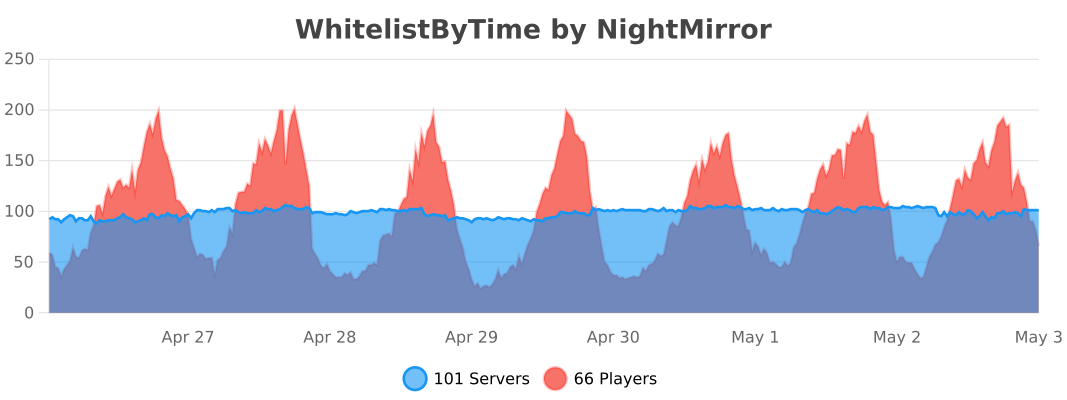
*Statistics are obtained through bstats metrics.*
wHit – PvP Combo System
# ⚔️ wHit – PvP Combo System
**Lightweight. Optimized. Satisfying.**




—
## 🚀 Overview
**wHit** is a highly optimized PvP enhancement plugin designed for Practice and Survival servers. It provides satisfying audio feedback and visual indicators when players perform combos.
Unlike other heavy plugins, **wHit** is designed with performance in mind, ensuring 0% lag impact on your server tick rate.
## ✨ Features
* **⚡ Optimized Performance:** Uses `O(1)` HashMap lookups and efficient memory management.
* **🔊 Satisfying Sounds:** Different sounds for normal combos and critical hits.
* **🎯 Smart Detection:** Combo streak starts after the 2nd hit to prevent spam noise.
* **🎨 Hex Color Support:** Full RGB support (e.g., `&#FFA500`) for Action Bar messages.
* **⏱️ Auto-Reset:** Streak resets automatically if no hit occurs within 1 second.
* **🌍 Localization:** Fully configurable messages via `messages.yml`.
## 📥 Installation
1. Download the latest `.jar` from the [**Releases**](https://github.com/wrusie/wHit/releases) tab.
2. Drop the file into your server’s `plugins` folder.
3. Restart your server.
4. Edit `config.yml` and `messages.yml` to your liking.
5. Run `/whit reload` to apply changes.
## ⚙️ Configuration
📄 config.yml (Click to view)
“`yaml
sounds:
combo-hit:
sound: “ENTITY_EXPERIENCE_ORB_PICKUP”
volume: 1.0
pitch: 1.5
crit-hit:
sound: “ENTITY_ARROW_HIT_PLAYER”
volume: 1.0
pitch: 0.5
“`
💬 messages.yml (Click to view)
“`yaml
reload-success: “�FF00&lwHit &8» &fConfiguration files have been �FF00&nsuccessfully&f reloaded.”
no-permission: “&c&lwHit &8» &cYou do not have permission to use this command!”
command-usage: “&e&lwHit &8» &7Usage: &f/whit reload”
actionbar-format: “&#FFA500&lCOMBO: &e&l%combo%”
“`
WhereMyFrame
Create invisible item frames in the simplest way by clicking with shears. Just press SHIFT and right-click on the item frame with shears. Everything is ready!
#### The plugin is perfect for vanilla servers!

### Configuration:
“`yaml
# Will the durability of the scissors be wasted when creating an invisible item frame
# Default: true
damagingShears: true
# Is it possible to leave an empty invisible item frame
# Default: false
allowEmptyItemFrame: false
“`
### Commands:
・**/wheremyframe reload** – plugin reload.
・**/wheremyframe info** – plugin information.
#### ❤️ Icon by [cheharka](https://purcat.monster/)
where is my loot

Where Is My Loot? (WML)
Never lose your items in the dark again!
## 📦 About the Plugin
Are your players tired of losing their hard-earned gear because they couldn’t find the exact spot where they died?
**Where Is My Loot (WML)** is a lightweight, efficient utility that makes dropped items **GLOW** upon death.
Unlike complex grave plugins that use blocks or GUIs, WML keeps the vanilla feel of items dropping on the ground but adds a high-contrast glowing outline visible through walls. Perfect for finding loot in caves, underwater, or dense forests.
## 📸 Showcase
See the plugin in action!


## ✨ Key Features
* **High Visibility:** Items glow and can be seen through blocks (Spectral effect).
* **Safe Loot:** Option to make dropped items invulnerable to fire, lava, and explosions.
* **Custom Colors:** Change the glow color in the config to match your server’s theme (Gold, Aqua, Red, etc.).
* **Toggleable:** Players can enable or disable the effect individually using commands.
* **Lightweight:** No heavy databases. Uses vanilla packets and scoreboard teams.
* **VIP Friendly:** Restrict usage with permissions (great for donor perks!).
* **Multi-Version Support:** Works flawlessly from **1.16.5 up to 1.21+**.
## 💻 Commands
* `/wml enable` – Enables the glowing effect for your loot.
* `/wml disable` – Disables the glowing effect.
* `/wml reload` – Reloads the configuration file (Admin only).
## 🛡️ Permissions
* `wml.use` – Allows the player’s loot to glow on death (Default: OP).
* `wml.command` – Allows access to /wml enable & disable commands.
* `wml.admin` – Allows reloading the plugin.
## ⚙️ Configuration
Simple and easy to understand.
Click to view Default config.yml
“`yaml
# ==========================================
# Where Is My Loot (WML) Config
# ==========================================
settings:
# Available Colors: BLACK, DARK_BLUE, DARK_GREEN, DARK_AQUA, DARK_RED, DARK_PURPLE, GOLD, GRAY,
# DARK_GRAY, BLUE, GREEN, AQUA, RED, LIGHT_PURPLE, YELLOW, WHITE
glow-color: “GOLD”
# Should the items be invulnerable to fire, lava, and explosions?
# Useful if you die in lava and want your items to survive and float up.
invulnerable: true
messages:
prefix: “&8[&6WML&8] ”
enabled: “&aYou have enabled the loot glowing effect.”
disabled: “&cYou have disabled the loot glowing effect.”
already-enabled: “&eThe effect is already enabled for you.”
already-disabled: “&eThe effect is already disabled for you.”
reload: “&aConfiguration reloaded successfully!”
no-permission: “&cYou do not have permission to do this.”
unknown-command: “&cUnknown command. Usage: /wml “
What’s the Nickname?
## ENG
This plugin is hiding nicknames of players. To change language of plugin to English: `/setlanguage en`(or in the `config.yml`) To turn on the nicknames back: `/togglevisibility`. If you wanna make it only for one player: `/togglevisibility ` To show the nickname on action bar press RMB on the player. You can change the look of nickname in the actionbar in `config.yml`.
## РУС
Этот плагин прячет никнеймы игроков. Чтобы поменять язык плагина на английский/русский пропишите: `/setlangage en`/`/setlanguage ru`(или поменяйте в `config.yml`) Чтобы обратно включить показ никнеймов: `/togglevisibility`. Если вы хотите добавить какого-то игрока в список тех, у кого никнейм будет отображаться пропишите: `/togglevisibility <игрок>` Чтобы показать никнейм над хотбаром нажмите ПКМ по игроку. Вы можете поменять внешний вид никнейма над хотбаром в `config.yml`.
WGRegionCount
# WGRegionCount
Adds a placeholder for number of players in a WorldGuard region.
[](https://modrinth.com/plugin/wgregioncount)
Requires [WorldGuard](https://enginehub.org/worldguard) and [PlaceholderAPI](https://www.spigotmc.org/resources/placeholderapi.6245/).
## Placeholders
– `%wgrc_players_%` – Number of players in the specified region.
WETS (WorldEdit Tick Spreader)
## WorldEdit Tick Spreader
Spread WorldEdit operations across multiple ticks.
That’s all.
Semi-configurable, single command `/wets` (`/worldedit-tick-spreader`), one permission (`wets`), two possible arguments:
* `/wets (sorted | not-sorted)` – whether blocks will be placed in a sorted arrangement or not. Sorted is default.
* `/wets ` – Changes the amount of blocks that will be placed per tick.
Negative numbers result in a lot of blocks per tick (9223372036854775807). Default is 1.
Sorted placing and block count per tick, affected by commands, are per-player.