World Reset
# WorldReset Plugin
A lightweight Minecraft (Paper/Spigot) plugin that allows you to reset a world via command or automatically after a configurable timer.
The world can be regenerated with:
– the **same seed** (default)
– or a **random new seed**
A reset always requires a **server restart**.
—
## Features
– Reset world via command
– Same seed or random seed (configurable via command)
– Automatic reset timer (minutes)
– Timer persists across restarts (`timer.yml`)
– Enable/disable timer via command
– Tab completion
– Permission-based access
—
## Commands
### Reset world manually
/worldreset now
### Change seed mode
/worldreset seed same
/worldreset seed random
### Timer control
/worldreset timer set
/worldreset timer enable
/worldreset timer disable
—
## Permissions
worldreset.use
(Default: OP)
—
## How it works
1. Players are teleported out of the world
2. World is unloaded
3. World folder is deleted
4. Server shuts down
5. On restart, the world is regenerated
World Permissions
This plugin provide to set perms to change world
USAGE
First, add your world’s name to config (plugin also can do it automatically but if it don’t, add manually).
Second, set value of world as true (if you set as false, all players can spawn that world because plugin will not check that world).
Then, reload plugin (/reloadworldperms)
Finally, give permission “worldperms.world.%WORLDNAME%” to player who you want to enter that world
WorldManager
# WorldManager
WorldManager is a simple plugin allowing worlds to be automatically reset on demand.
**NOTE:** The plugin is currently in beta, so please check out [here](https://github.com/Zffu/WorldManager) to suggest features you’d like!
## Commands
### /worldmanager
This is the main command of the plugin, allows to have a list of the commands.
### /worlds
This command allows you to have information on worlds handled by WorldManager.
### /loadworld
This command allows you to load a world handled by WorldManager.
### /unloadworld
This command allows you to unload a world handled by WorldManager.
### /createworld
This command allows you to create a world reset option for the specified world.
## Permissions & Messages
WorldManager allows its users to modify the required permissions and messages to whatever they’d like. In order to do so, please head to the config
## API
WorldManager comes with an API allows you to use its features without the plugin.
World Download
# DownloadPlugin for Minecraft
DownloadPlugin is a Minecraft server plugin that allows players to download the world they are currently in as a ZIP file. This is especially useful for large building servers or personal worlds.
## Features
– Download any world with `/download ` command.
– Only allows downloads from worlds that are not blocked.
– Generates ZIP files named as `...zip`.
– Provides clickable download links in chat.
– Logs all downloads if enabled.
– Automatically deletes old downloads based on expiration time.
– Deletes all ZIPs on server start to prevent storage issues.
– Supports internal HTTP port and public port via tunnels (like Playit.gg).
## Commands
/download
– ``: A numeric code chosen by the player to make the ZIP filename unique. Example: `/download 12345`
– Blocked worlds cannot be downloaded.
## Configuration (`config.yml`)
“`yaml
blocked-worlds:
– world_nether
– world_the_end
log-downloads: true
log-file: downloads.log
http-port: 8100 # Internal port where the HTTP server runs
public-port: 27429 # Public port that players use to access downloads
download-expiration: 3600 # Expiration time in seconds for automatic deletion
public-ip: “147.185.221.23” # Server’s public IP address or domain
World Color

### What is this?:
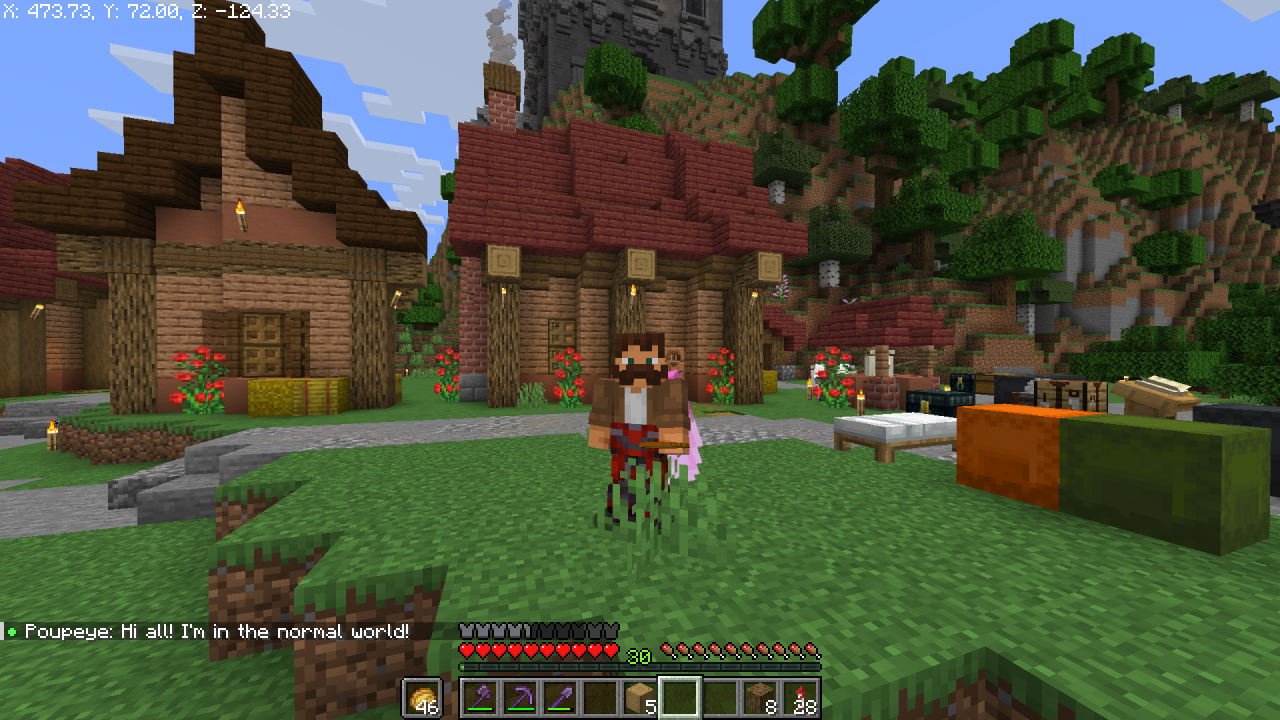
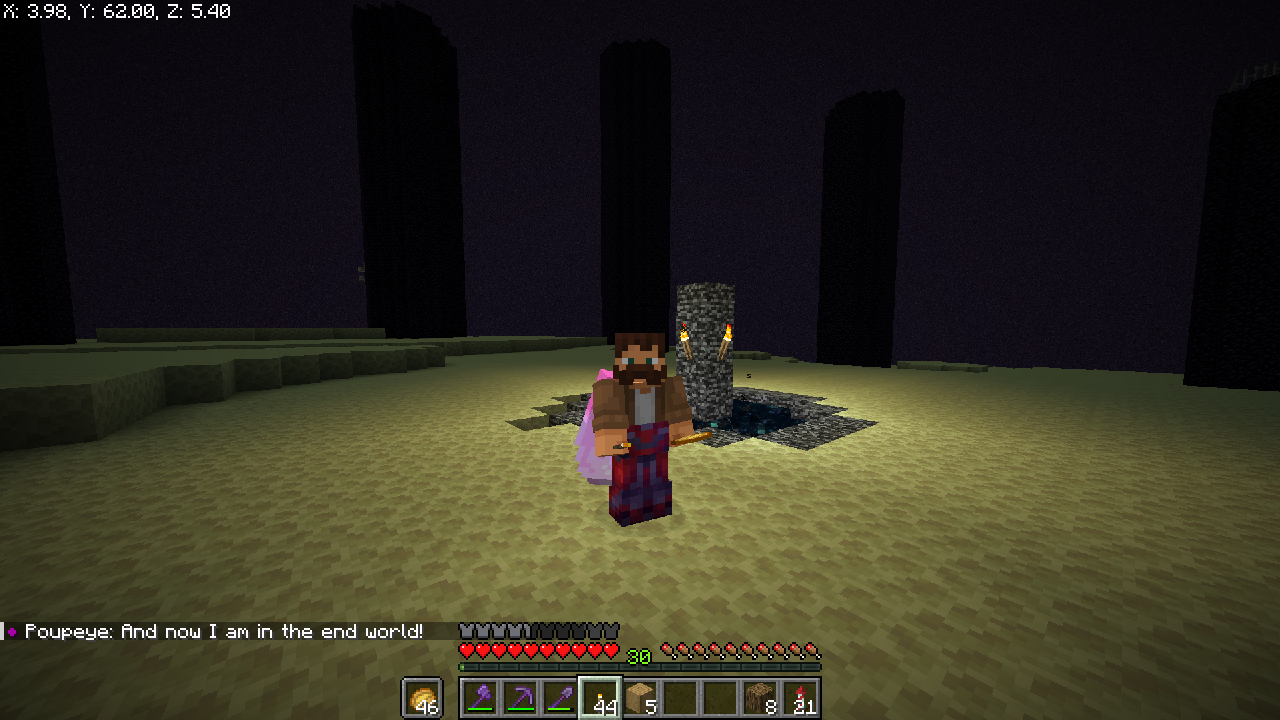
If you’ve been looking for a toilet, you’ve come to the wrong place. World Color is a simple plugin that will help you find out what world your friend is currently in. All it does is add a small indicator in the game chat next to the player’s name. Depending on what world he is in, the indicator changes its color.
# Demonstration:
### Normal world:

### Nether:


### The End:

World Border Alert
# Features
– Alerts you whenever you go near World Border
– Helpful in border shrinking situations
– Enhances your experience while playing
### Supports all 1.21+ servers
World Altitude Control
# WAC World Altitude Control 世界高度控制
> 这个mod不能解决高度不能超过mc数据结构限制的问题,因为这会摧毁兼容性!
> This mod doesn’t solve the problem that the height can’t exceed the mc data structure limit because it would destroy compatibility
这个Mod用于控制Minecraft维度高度,可在配置文件或在HutoolCore的Web编辑器中进行配置。
This mod is used to control the height of Minecraft dimensions and can be configured in the configuration file or in HutoolCore’s web editor.
它的原理是Minecraft在创建ServerLevel(ServerWorld)时修改ServerLevel(ServerWorld)的高度配置。
It works by Minecraft modifying the height configuration of the ServerLevel (ServerWorld) when it is created.
以下为对参数的解释:
The following is an explanation of the parameters (note in Chinese):
|参数|注释|
|——-|——-|
|id|世界ID|
|logical_height|玩家使用紫颂果或下界传送门可以到达的总高度。不会影响超过该限制高度的既有传送门。取值为0到4064的闭区间,且不能大于 height。|
|min_y|该维度中可以存在方块的最低高度。数值必须在-2032至2031之间且为16的整数倍(也就是说,-2032是最小有效值,2016是最大有效值)。|
|height|该维度中可以存在方块的总高度。数值必须在16至4064之间且为16的整数倍。维度中可以存在方块的最大高度值为min_y与height值之和减去1,不能超过2031。|
原版与使用HutoolCoreWebConfig的配置文件样式:
The original and the profile style using HutoolCoreWebConfig:
“`json
{
“worldConfigs”: {
“minecraft:overworld”: {
“id”: “minecraft:overworld”,
“height”: 1024,
“min_y”: -64,
“logical_height”: 256
},
“minecraft:the_nether”: {
“id”: “minecraft:the_nether”,
“height”: 1024,
“min_y”: -64,
“logical_height”: 256
},
“minecraft:the_end”: {
“id”: “minecraft:the_end”,
“height”: 1024,
“min_y”: -64,
“logical_height”: 256
}
}
}
“`

Workstations
# A lightweight plugin to open workstations through commands
Commands
“`/craft“` – Opens a workbench | Aliases: “`/workbench“`, “`/wb“`
“`/enchanting“` – Opens an enchanting table
“`/enderchest [player]“` – Opens an enderchest (enderchest’s of other players can only be opened with the “`workstations.open_other_enderchests“` permission | Aliases: “`/ec“`
Permissions
“`workstations.craft“` – Use the /craft command
“`workstations.enchant“` – Use the /enchanting command
“`workstations.enderchest“` – Use the /enderchest command
“`workstations.open_other_enderchests“` – Open other player’s enderchests
WooStoreLink
# WooStoreLink

_WooStoreLink is a powerful plugin that bridges your Minecraft server with your WooCommerce store. It automatically delivers in-game items, ranks, or commands to players after a purchase is completed—fully synced via a secure REST API._
Whether you’re selling VIP ranks, crate keys, or cosmetic items, WooStoreLink makes the process seamless, secure, and automatic.
**✔ Compatible with Minecraft 1.20.1+**
> ### **⚠ THIS IS A BETA RELEASE. BUGS MAY OCCUR.**

[Download StoreLinkforMC WordPress Plugin HERE](https://wordpress.org/plugins/storelinkformc/)

https://discord.gg/ddyfucfZpy
“`
WooStoreLink lets you link your WooCommerce store to your Minecraft server.
Automatically deliver in-game items, run commands, or grant ranks as soon as a player completes a purchase.
“`
## **✨ Features**
Seamless integration between WordPress (WooCommerce) and Minecraft.
Automatically delivers items, runs commands, or assigns ranks after purchase.
Secure REST API with token-based authentication.
✅ Compatible with Spigot, Paper, Purpur, and forks.
Admin interface in WordPress to manage deliveries.
⏳ Periodic auto-check for online players (/wsl check).
Duplicate prevention, cleanup, and logging.
Flexible delivery rules (items + commands).
Multi-language support (EN, ES included).
## **⚙ How It Works**
Install the WooStoreLink WordPress Plugin from: [https://mrdino.es/woostorelink-plugin](https://mrdino.es/woostorelink-plugin)
Configure your products to deliver Minecraft items or run commands.
Install this Spigot plugin and set the API token + domain in config.yml.
You’re done! Players will receive purchases automatically.
## **Commands**
“`
/wsl check — Manually check your pending purchases.
/wsl reload — Reload plugin config and language.
/wsl checkplayer — Admin-only manual check for another player.
/wsl status — Show API configuration and connection status.
/wsl wp-link — link Minecraft account to a WordPress email.
/wsl wp-verify — verify a linking code sent via email.
```
## **Permissions**
```
DEFAULT
woostorelink.check
woostorelink.status
woostorelink.help
woostorelink.wp-link
woostorelink.wp-verify
OP
woostorelink.admin
woostorelink.reload
woostorelink.check.others
```
## **config.yml Example**
```
products:
test:
items:
- "minecraft:stick 1"
commands:
- "say Thanks {player} for your order!"
- "title {player} title {"text":"Thank you!","color":"green"}"
vip_rank:
commands:
- "lp user {player} parent add vip"
- "say {player} is now VIP!"
```
## **Documentation & Help**
Full documentation and setup guides:
[https://mrdino.es/woostorelink-plugin](https://mrdino.es/woostorelink-plugin)
## **Requirements**
✅ WordPress with WooCommerce
✅ WooStoreLink WordPress Plugin (required)
✅ Minecraft server with Spigot, Paper, or fork
✅ PHP 7.4+ and WordPress 5.8+
## **Support & Feedback**
For support, feature requests, or help:
[https://discord.gg/ddyfucfZpy](https://discord.gg/ddyfucfZpy)
_The documentation site is still in development. Please be patient while we prepare a complete, stable release and tools._
Wool Burner
# Wool Burner
**Allows you to delete (burn) all wool in contact like a chain reaction by using a blaze powder item. (Like in bedwars)**
**Usage**
Right click a wool block (of any colour) with a blaze rod item to burn all of the wool in contact with it.
Each world should be first toggled on. Worlds are not enabled by default.
The speed of the burning of wool can be changed. Go to
.//plugins/WoolBurner/config.yml and change the value in _blocks-per-tick_ to any integer. It is the number of blocks deleted each tick. Defaults to 5 if there is no integer present there. DO NOT KEEP THE VALUE VERY HIGH, IT CAN CAUSE LAG.
**Commands**
/wb (alias: /woolburner): Get the plugin’s information
/woolburnertoggle [world] (alias: /wbtoggle [world]): Toggle woolburner in a specific world.
**Permissions**
– [woolburner.info](https://modrinth.com/plugin/woolburner) : Use the /wb command
– woolburner.toggle: Use /wbtoggle command
**Issues and potential new features**:
You can reach out to me in my [discord server](https://discord.gg/aEc7yqecYn). [Discord ID – armyfury]
**Other Projects:**
– [Summon Friendly Mobs](https://modrinth.com/plugin/summonfriendlymobs)
– [WildLife](https://modrinth.com/plugin/wildlife)