Worldguard Auto Replant
## 🌾 WorldGuard Farming Flags
A WorldGuard extension plugin that adds two powerful farming flags to make survival and Skyblock servers more fun and user-friendly.
—
## ✨ Features
– 🌱 **`auto-replant` flag** – When enabled, crops (wheat, carrots, potatoes, beetroot) will **automatically replant** after being harvested. No more replanting by hand!
– 🚜 **`break-crops` flag** – Allows players to **harvest crops** in regions where block-breaking is normally denied. Perfect for community farms.
– 🔒 **Region-Specific Control** – Both flags can be toggled on/off per WorldGuard region.
– ⚡ **Seamless Integration** – Works alongside all standard WorldGuard flags.
– 🧩 **Lightweight & Simple** – Single-purpose plugin built just for farming mechanics.
—
## ⚡ Usage
1. Select or create a WorldGuard region.
2. Apply the flags:
“`bash
/rg flag auto-replant allow
/rg flag break-crops allow
WorldGuard

**Protect your server!**
WorldGuard lets you and players guard areas of land against griefers and undesirables as well as tweak and disable various gameplay features of Minecraft.

🛑 Make sure that you are using the Java version of Minecraft.
1. Set up a Bukkit server such as Spigot or Paper (Paper is recommended over Spigot).
2. Download WorldEdit from the WorldEdit page.
3. Download WorldGuard from this page (see the Files tab above for all versions).
4. Put the WorldEdit and WorldGuard plugin files into your plugins folder.
Check YouTube for tutorials, or read the official documentation.


[Join our Discord server](https://discord.gg/enginehub) if you need help with installing or using WorldGuard.
**Make sure to [check the docs](https://worldguard.enginehub.org/en/latest/) first!**

- Create zones in your world that only permit mods or certain players from building within
- Set additional game rules on your server (deny wither block damage, falling damage, etc.)
- Set game rules on specific areas (food regen, health regen, disable PvP, TNT, control mob damage) in your world
- Blacklist certain items and blocks so they can’t be used
- Dump useful statistics and information about your server (/wg report -p)
- CPU profile your server (/wg profile -p)
- Add useful commands like an immediate “STOP ALL FIRE SPREAD” command.
- Works, more or less, with mods (other Bukkit plugins and FTB mods)
- Protects against many types of grief (fire spread, tree growth, TNT cannons, piston machines, crop trampling, paintings and item frames, etc.), and certain interactions can also be allowed (door open, lever usage, etc.)
- Well documented, and one of the oldest Minecraft projects (older than Bukkit!)
- Open source
- Enable only features you want! Everything is off by default. You can just install WorldGuard and configure it later.

**Can anyone use it?**
Only opped users or users with permissions supplied with a permissions plugin can use WorldGuard.
**How do you use WorldGuard?**
To learn how to use WorldGuard, read the docs. Check YouTube for tutorials too!
**I need help!!**
You may visit our documentation or Discord Guild.
**I have some feature requests…**
Visit our issue tracker. However, if you just have a question, please try one of the methods above.
**Can I edit the source code?**
Visit our GitHub repository. WorldGuard is licensed under LGPLv3 and you can compile it with Gradle.
🎉 Support us on GitHub Sponsors!
Need a host? We recommend Apex Hosting

WorldEdit

**A Minecraft Map Editor… that runs in-game!**
With selections, schematics, copy and paste, brushes, and scripting.
Use it in creative, or use it temporarily in survival.
Java Edition required.
Compatible with NeoForge, Fabric, and Bukkit-based platforms (Spigot and Paper).

🛑 Make sure that you are using the Java version of Minecraft. **WorldEdit does not support Bedrock!**
Mod version:
1. Install NeoForge or Fabric.
2. Download WorldEdit from this page (make sure you grab the mod version, not the plugin).
3. Put the WorldEdit mod file into your mods folder.
Plugin version:
1. Set up a Bukkit server such as [Spigot](https://spigotmc.org) or [Paper](https://papermc.io/) (Paper is [recommended](https://madelin
emiller.dev/blog/paper-vs-spigot/) over Spigot).
2. Download WorldEdit from this page (make sure you grab the plugin version, not the mod).
3. Put the WorldEdit plugin file into your plugins folder.
Check YouTube for tutorials, or read the official [documentation](https://worldedit.enginehub.org/)

**The most complete source of WorldEdit information is [our documentation, check them out here](https://worldedit.enginehub.org/en/latest/)!**
If you need further help than what the documentation can provide, you can join our Discord server.
[](https://discord.gg/enginehub)




**Do I need cheats on?**
If you’re playing on single player: Yes, cheats must be enabled for the world to use WorldEdit, but you can change this in the configuration. If you’re running a server: Only opped users can use WorldEdit, though this can be changed too.
**Can anyone use it?**
On servers, only opped users or users with permissions supplied with a permissions plugin can use WorldEdit. On LAN, anyone can use it if cheats are enabled.
**How do you use WorldEdit?**
To learn how to use WorldEdit, read the docs. Check YouTube for tutorials too!
**I need help!!**
You may visit our documentation or Discord Guild.
**I have some feature requests…**
Visit our issue tracker. However, if you just have a question, please try one of the methods above.
**Can I include WorldEdit in my modpack?**
You are free to include WorldEdit, without having to asking for explicit permission.
A link back to this page or our GitHub Sponsors would be appreciated, however.
**Can I edit the source code?**
Visit our GitHub repository. WorldEdit is licensed under GPLv3 and you can compile it with Gradle.
🎉 Support us on GitHub Sponsors!
Need a host? We recommend Apex Hosting
WorldDynamics Engine

[](https://app.travis-ci.com/thatguycy/WorldDynamics-Engine) [](https://www.gnu.org/licenses/gpl-3.0) 

## Description
More than just a Towny Addon, it’s a **Towny Essential Upgrade**!
WorldDynamics Engine is a sophisticated roleplay plugin designed for geopolitical servers. It allows players to immerse themselves in dynamic political landscapes, manage resources, engage in diplomacy, and shape the world with their decisions.
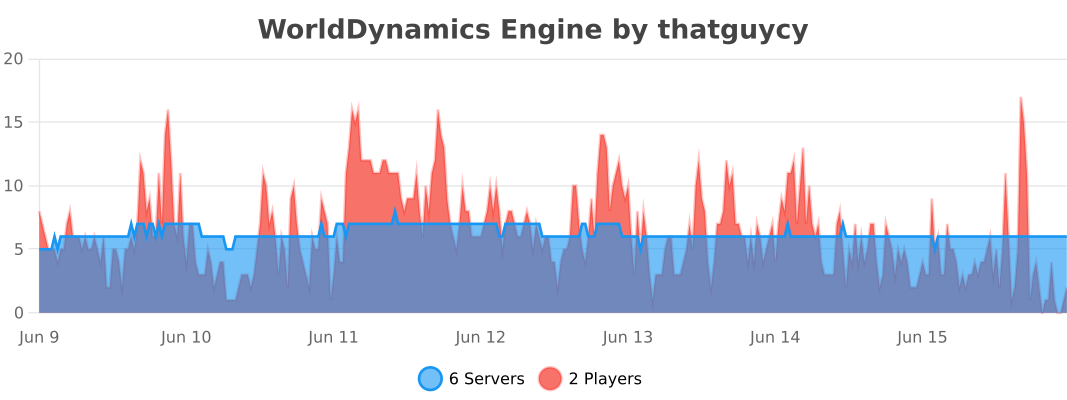
## Usage Statistics
## Current Features
– **Custom Government Structures**: Choose from a variety of government forms to shape the political structure of your nations.
– **Dynamic Organization Management**: Create, manage, and dissolve various types of organizations, including both business entities and governmental bodies.
– **Financial Management for Organizations**: Execute financial transactions within organizations, facilitating deposits and withdrawals to manage funds effectively.
– **Robust Member Management**: Empower organization leaders with the ability to add or remove members, offering significant control over their internal structure.
– **Detailed Information Display**: Access comprehensive information about nations and organizations, enhancing transparency and strategic planning.
– **Flexible Command System**: Engage with an intuitive and adaptable command system, tailored to facilitate user interaction with the plugin’s diverse functionalities.
– **International Organizations**: Participate in global alliances and international bodies, extending influence beyond national borders.
## Future Features
– **Dynamic Political Borders**: Strategically create and adjust nation borders, reflecting the evolving geopolitical landscape.
– **Advanced Resource Management**: Control and trade unique resources, introducing an element of economic strategy and resource conservation.
– **Diplomatic Engagement Systems**: Engage in complex treaties, form alliances, and conduct high-stakes negotiations to influence international relations.
– **Sophisticated Economic System**: Develop and manage a multi-faceted economy, encompassing trade networks, market dynamics, and financial policies.
– **Military Strategy and Defense**: Build formidable armies, strategize defensive tactics, and engage in warfare to protect and expand your nation.
– **Cultural Expansion and Influence**: Spread your nation’s cultural influence, shaping global cultural trends and interactions.
– **Environmental and Technological Dynamics**: Address challenges posed by climate change and technological advancements, adding a layer of environmental strategy.
– **Espionage Mechanics**: Implement espionage and counterintelligence operations, introducing a stealthy aspect of information warfare and intrigue.
– **Global Impact of International Organizations**: Influence world affairs by participating in or establishing international organizations, shaping global policy and diplomacy.
## Installation
Instructions on how to install the WorldDynamics Engine plugin.
– **1)** Place WorldDynamicsEngine-X.X.jar in the “plugins” folder.
– **2)** Install [TownyAdvanced](https://www.spigotmc.org/resources/towny-advanced.72694/) and [Vault](https://www.spigotmc.org/resources/vault.34315/), these are both **essential**.
## License
This project is licensed under the [](https://www.gnu.org/licenses/gpl-3.0) – see the [LICENSE](https://github.com/thatguycy/WorldDynamics-Engine/blob/main/LICENSE) file for details.
WorldColor
## WorldColor – A lightweight Minecraft server plugin that adds a colorful world indicator via the %color% placeholder.
> ## 🌟 Key Features:
Displays a customizable symbol (default: ☁) in different colors based on player’s world:
Overworld: Green (#8FBC8F)
Nether: Red (#F08080)
End: Purple (#9370DB)
Full configuration via config.yml:
Change the display symbol
Customize colors for each world
PlaceholderAPI support
/worldcolor-reload command to apply config changes without restart
> ## 📦 Installation:
Install [PlaceholerAPI](https://www.spigotmc.org/resources/placeholderapi.6245/)
Drop WorldColor.jar into your plugins folder
Configure colors and symbol in plugins/WorldColor/config.yml
Use the %color% placeholder anywhere!
Perfect for TAB plugins, chat formats, and scoreboards. Lightweight with no unnecessary dependencies.
WorldCleaner
# WorldCleaner
Required Plugin: https://modrinth.com/plugin/kotlinplugins
– Cleans up worlds from items every 10 minutes.
– You can access the removed items by command: “`/dustman “`
– Lightweight and efficient solution for cleaning all the worlds.
Required permission to execute the command: “` worldcleaner.dustman “`
– Players who have op ( ./op ) have access to it by default.
– Check out other plugins: https://modrinth.com/user/Winlyps
WorldChatter

# Security Features
### Anti-Swear
This helps to prevent any sensitive or inappropriate words from your chat to help keep it clean.
It has the ability to customize words (BlackList / WhiteList).
### Anti-Repeat
This prevents players from repeating the same words or letters over and over again.
### Anti-ADs
It will block any type of IPs or URLs from the player.
### Anti-Caps
This helps to prevent the player from sending large uppercased messages in the chat!
# Configurations!
### Detection Messages!
If anyone triggers one of the security settings, you will be alerted, and they will be alerted as well.
“`yaml
DetectedMessage: “&c%player_name%’s message got detected by the following flags &e[%flags%] n———-> &6%message%” # Change how the detection message is sent
DetectedPlayerMessage: “&cYou have been detected by the following flags &e[%flags%]” # Changes how the message is sent to the player (set it to “” if you don’t want to send it)
“`
### Switch Messages (For Proxies)
This will notify everyone in the server or the previous and current server when a player switches from one server to another!
“`yaml
# This switch message is only available for both BungeeCord & Velocity
SwitchSettings:
enabled: true
global: true # false is just the current server & previous server / true all the servers
premessage: “&a%player_name% &ehas switched from &6%previous_server% &eto &f%current_server%”
comessage: “&a%player_name% &ehas arrived from &6%previous_server%”
“`
### Others
“`yaml
SpamMessage: “&cYour message is blocked by the &eAnti-Spamn&7Remaining time: %duration% seconds” # Changes how the anti-spam message is sent (set it to “” if you don’t want to send it)
ChatClearMessage: “&eThe Chat has been cleared by &a%sender%” # Changes how the cleared chat message gets sent
NoPermissionMessage: “&eYou’re not allowed to use this command!”
“`
# Utilities Features!
### Aliases
This feature enhances WorldChatter’s placeholders by allowing customization of player and place names using two new placeholders: `{player_name}` and `{player_place}`.
“`yaml
aliases:
enabled: true
place:
world: “&aOverworld&r”
player:
OmarOmar93: “OmarOmar93 &o&eTest Omar Yes”
“`
### Chat Locking
This allows staff or console to lock or unlock the chat using `wc lock`!
“`yaml
ChatLockMessage:
enabled: true
public: true # TRUE | Shows the message to everyone or FALSE | just the sender
locked: “&eThe Chat is now &cLOCKED &eby &a%sender%”
unlocked: “&eThe Chat is now &aUNLOCKED &eby &a%sender%”
currently: “&eThe Chat is Currently &clocked”
“`
### Clear Chat!
Clear the chat with `wc clear`!
### Custom Join and Quit Messages!
Customize join and quit messages with special permissions for certain players.
“`yaml
Join:
enabled: true
level: 1 # 1 is just current place / 2 the whole server
place: “world” # place to send the message
message: “&a%player_name% &fhas joined the game!”
permmode: true # Checks to use the permissions mode to send messages / disabled will use default message
permissions:
“admin”:
permissions: [ “worldchatter.control”, “*” ]
message: “&a%player_name% &fhas joined the gamen&e[Teleport to %player_name%]”
Quit:
enabled: true
level: 1 # 1 is just current place / 2 the whole server
place: “world” # place to send the message – type %place% to make it the last player’s place
message: “&a%player_name% &fhas left the game!”
permmode: false # Checks to use the permissions below to show a different message or no!
permissions:
“admin”:
permissions: [ “worldchatter.control”, “*” ]
message: “&a%player_name% &fhas left the game &8You have nothing to do to that player :P”
“`
### Notifications
Customize notification sounds for detections.
“`yaml
notification:
enabled: true
staff: # notification detection for staff
sound: “BLOCK_NOTE_BLOCK_PLING” # the sound to play as the notification you can find it here by https://helpch.at/docs/SERVER_VERSION_GOES_HERE/index.html?org/bukkit/Sound.html
volume: 1 # volume of the sound
pitch: 1 # pitch of the sound
player: # notification detection to the player
sound: “BLOCK_NOTE_BLOCK_PLING”
volume: 1
pitch: 1
“`
### Channels
Introducing the new **Channels** Feature!
Add Places or Players **or both if you would like!** Into each other and priortize them from top to bottom according to the importance of each channel!
“`yml
GlobalSending: true
channels:
admin:
players:
– “OmarOmar93”
– “HoneySalted”
– “Notch”
places:
– “World”
– “Lobby”
main:
places:
– “world”
– “world_nether”
– “world_the_end”
“`
### Debug Mode – (Implemented in Channels only Currently)
The New Debug mode is what prints out more information about WorldChatter! like, Warnings, Errors and infos for each action happening inside the plugin!
“`yml
debug:
enabled: true
info: “&7[&9WorldChatter Debugger &r| Info&7]&r ”
warning: “&7[&9WorldChatter Debugger &r| &eWarning&7]&e ”
error: “&7[&9WorldChatter Debugger &r| &4Error&7]&4 ”
“`

# WorldChatterAPI
Learn more about the API and its capabilities by [Clicking here!](https://github.com/OmarOmar93/WorldChatterAddonChecker)
# Donate!
If you’d like to support the development of WorldChatter and other projects, consider donating!
[Buy me a Coffee!](https://www.paypal.com/paypalme/omaomar93)
# Other Projects!
[WorldCaster](https://modrinth.com/plugin/worldcaster)
Standalone Broadcast Add-on
# Supported Plugins!
– PlaceholderAPI
– Multiverse-Core
– ItemsAdder (With PlaceholderAPI)
– Luckperms
– And other plug-ins that have PlaceholderAPI’s placeholder!
# Massive thank you to:
– **Abdelaziz189356** – For the help with 2.0, 2.1, and 3.0 being possible, 3.0 Tester!
– **yousife_7aloly** – The tester for 2.0!
– **FastEverlast** – The Tester for 2.4!
– **Fabrizio Santana, 4zy** – 3.0 Testers
There are lots of additional features to explore!
Thank you for taking the time to read this and use the plugin!
WorldAccessBlocker
# 🌍 WorldAccessBlocker
[](https://bstats.org/plugin/bukkit/WorldAccessBlocker/26810)
[](https://bstats.org/plugin/bukkit/WorldAccessBlocker/26810)
**WorldAccessBlocker** is a lightweight and highly configurable Minecraft plugin for **Bukkit**, **Spigot**, **Paper**, and **Folia** servers that lets you **restrict access to the Nether, the End, and elytra usage** until specific dates.
Perfect for managing **progression-based survival**, **seasonal events**, or **timed unlocks** — with multi-language support, date-based control, and live reloads.
—
## ✨ Features
– 🔥 **Restrict Nether Access**
Prevent players from entering the Nether until a specified date.
– 🚫 **Block End Portal Activation**
Disallow activation of End portals before a configured time.
– 🛑 **Disable Elytra Usage**
Cancels gliding and disables elytra flight until allowed.
– 🌍 **Multi-Language Support**
Includes `English` and `Russian` by default — customizable via `.yml`.
– 📅 **Date-Based Restrictions**
Set unlock dates using `YYYY-MM-DD HH:MM:SS` (UTC).
– ♻️ **Live Reload**
Instantly reload configs and language files with `/wabreload`.
– ⚠️ **Folia Compatibility Notices**
Alerts admins about partial feature support on Folia servers.
—
## 📦 Installation
1. Download `WorldAccessBlocker.jar`.
2. Place it in your server’s `/plugins` folder.
3. Start or reload the server.
4. Configure `config.yml` and language files in:
`plugins/WorldAccessBlocker/lang/`
—
## ⚙️ Configuration Example
“`yaml
# ===================================================================
# WorldAccessBlocker v0.7
# ===================================================================
# Message language: “ru” or “en”
language: “ru”
# Server time zone (important for recurring!)
# List: https://en.wikipedia.org/wiki/List_of_tz_database_time_zones
time-zone: “Europe/Moscow”
# ===================================================================
# Nether
# ===================================================================
nether:
disable: true
# If recurring is NO, this date is used (until when it is blocked)
restriction-date: “2025-03-10 00:00:00”
disable-portal-creation: true
disable-teleportation: true
# NEW: schedule by day and time
# If this block is present, restriction-date is IGNORED
recurring:
periods:
# Example 1: only on Sundays from 3:00 p.m. to 5:00 p.m.
– days: [SUNDAY]
start-time: “3:00 p.m.”
end-time: “5:00 p.m.”
# Example 2: all day on weekends
– days: [SATURDAY, SUNDAY]
# Example 3: every Monday from 6:00 p.m. to 11:59 p.m.
– days: [MONDAY]
start-time: “6:00 p.m.”
end-time: “11:59 p.m.”
“`
World Randomizer
# World Randomizer
## Description:
This server plugin randomizes the blocks of new chunks when they are generated.

## Replacement Rules
– each block type is always replaced with the same random block type for the same seed.
– no unsupported blocks (like floating torches)
– air is not replaced
– solid blocks are only replaced with solid blocks
– non-occluding blocks are only replaced with non-occluding blocks
– gravity blocks are only replaced by gravity blocks
– fluids are only replaced by fluids
Excluded Blocks
Change: The block is replaced by a other random block
Place: The block is used to replace other blocks
|Block Type |change|place| Reason |
|—————————-|:-:|:-:|——————–|
| Air | x |✓| Gameplay |
| Banners | x | x |Lag |
| (Calibrated-) Sculk Sensor | x | x |Lag |
| End Portal Frame | x |✓| Gameplay |
| Heads & Skulls | x | x |Lag |
| Interactable Blocks | x | x |Lag, Loot Chest |
| Nether Portal | x | x |Lag, Gameplay |
| Observer | x | x |Lag |
| (Trial-) Spawner | x | x |Lag, Nether Fortress|
## Goal
The goal of this challenge is to kill the Ender Dragon, but players are not limited to this.
## Mapping Command
### Description: Displays how a block is shuffled
Usage: “`/mapping []“` / “`/map []“`
### Parameter:
– “`“` – Enter block type you want to check
– None – Uses the item held by executor
### Example:
“` /mapping minecraft:diamond_ore “` =>
“`
Mapping for diamond ore:
diamond ore is replaced with end stone
dirt is replaced with diamond ore
“`
## FAQ:
**Q:** My client / server is lagging
**A:** This plugin significantly slows down the world generation progress.
Additionaly some unfortunate shuffles can cause a lot of lag.
## Credits:
I wasn’t inspired by any particular source, but this has been done multiple times before
World TP Plus
—
**🌍 World TP Plus**
**A simple cross-dimension teleport plugin for Paper 1.21+**
**By RetroSapien**
—
**✨ Features**
* Extends `/tp [dimension]` with an optional 4th argument:
* `overworld` *(default)*
* `nether`
* `end`
* Fully preserves vanilla `/tp` behavior and permissions when no dimension is specified
* Tab completion for dimensions
* Friendly error message for unknown dimensions
* Works from both console and in-game
—
**📋 Usage Examples**
* `/tp 0 80 0`
→ Vanilla teleport in current world
* `/tp 0 80 0 nether`
→ Teleport to same coords in the Nether
* `/tp Steve 10 70 10 end`
→ Teleport player “Steve” to coords in the End
—
**🔐 Permissions**
* `minecraft.command.tp` *(same as vanilla)*
Requires permission level 2
—
**⚙️ Requirements**
* **Java 21+**
* **Paper 1.21+**
Works on forks that support the Paper API
—
**📦 Installation**
1. Drop the JAR into your `plugins/` folder
2. Restart or reload your server
—
**🔗 Links**
* Discord for support : [https://discord.gg/tHeFGB7Et4](https://discord.gg/tHeFGB7Et4)
—
*Crafted with ❤️ by RetroSapien*