xHubBlocks
# 🧱 xHubBlocks V2
### The Ultimate Lobby Practice Plugin
**Infinite blocks. Auto-despawn. Database support.**
  
__UPDATE COMING SOON!__
—
## 👋 Overview
**xHubBlocks** is a lightweight but powerful plugin designed for Hubs and Lobbies. It gives your players an infinite stack of blocks to practice bridging, clutching, or building while waiting in the lobby.
The best part? **The blocks disappear automatically** after a configurable time, keeping your lobby clean and lag-free.
### 🔥 What’s New in V2?
We have completely rewritten the core to include professional features:
* **Persistent Data:** Blocks placed statistics are now saved forever.
* **Database Support:** Built-in support for **H2** (local, no setup) and **MySQL** (for networks).
* **Developer API:** Hook your own plugins into xHubBlocks.
* **High Performance:** Powered by HikariCP for database connections.
—
## ✨ Features
* **♾️ Infinite Items:** Players get a stack of blocks that never runs out.
* **✨ Auto-Despawn:** Blocks vanish after X seconds with a satisfying particle effect.
* **🔒 Secure:** Prevents players from dropping the block or moving it in their inventory.
* **🎨 Fully Configurable:** Customize the material, name, lore, slot, and messages.
* **📊 PlaceholderAPI:** Display stats on scoreboards or holograms.
* **⚡ Legacy Support:** Works flawlessly from **1.8.8** up to the latest versions.
—
## 💾 Database & Storage
xHubBlocks V2 supports two storage types defined in `config.yml`:
1. **H2 (Default):** Zero configuration required. Stores data in a local file. Perfect for single servers.
2. **MySQL:** Connect to an external database. Ideal for networks or if you want to display stats on a website.
“`yaml
storage:
type: H2 # Or MYSQL
mysql:
host: “localhost”
port: 3306
database: “xhubblocks”
# …
“`
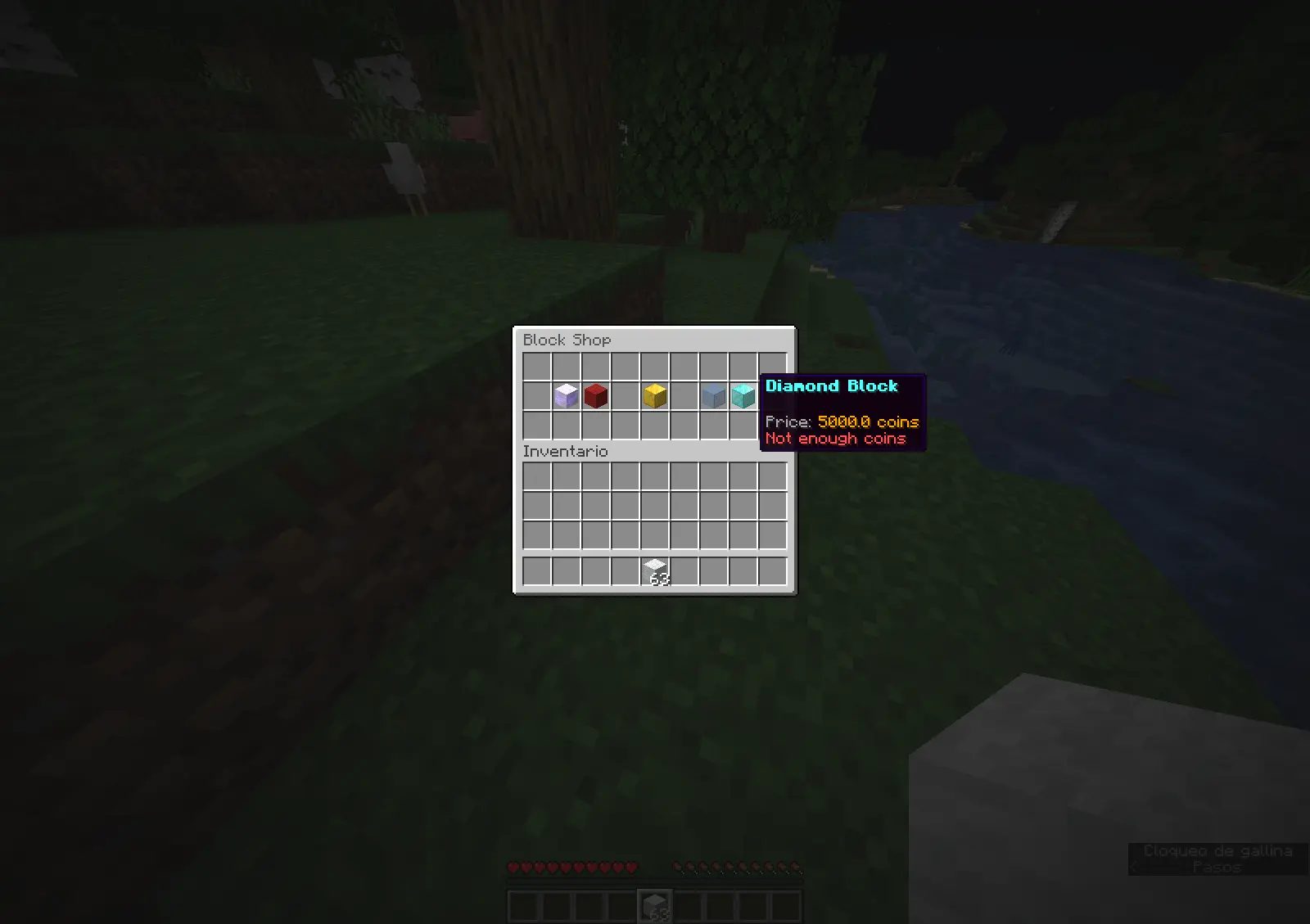
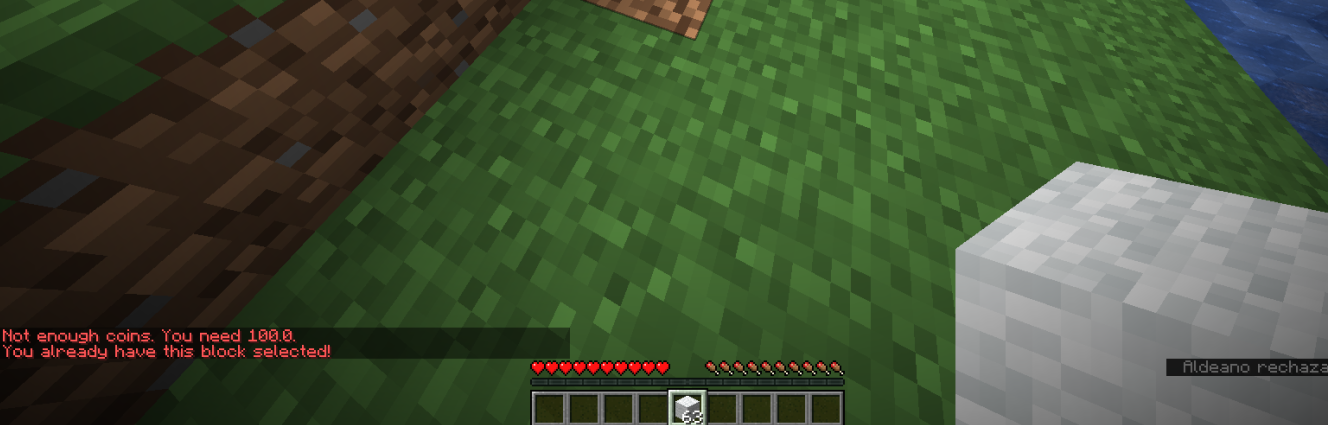
## 🏀Images

—
## 🚀 Commands & Permissions
*The commands are editable.*
| Command | Permission | Description |
| :— | :— | :— |
| `/xhubblocks` | `xhubblocks.admin` | View plugin info and help. |
| `/xhubblocks reload` | `xhubblocks.reload` | Reload the configuration file. |
| `/blocks shop` | `editable` | Block store. |
—
## 📊 Placeholders
Requires **PlaceholderAPI**.
* `%xhubblocks_placed_player%` – Total blocks placed by the player (Saved in DB).
* `%xhubblocks_placed_session%` – Blocks placed in the current session.
* `%xhubblocks_placed_total%` – Total blocks placed by everyone on the server.
—
## 👨💻 Developer API
Want to use xHubBlocks stats in your own plugin? It’s easy.
**1. Get the instance:**
“`java
if (Bukkit.getPluginManager().getPlugin(“xHubBlocks”) != null) {
xHubBlocksAPI api = xHubBlocksAPI.getApi();
// Get stats
int total = api.getPlayerTotalPlaced(player.getUniqueId());
}
“`
**2. Maven/Gradle:**
You can add the plugin as a dependency to your project.
—
## 📥 Installation
1. Download `xHubBlocks.jar`.
2. Drop it into your server’s `plugins` folder.
3. Restart your server.
4. (Optional) Edit `config.yml` to change the block style or database settings.
5. Enjoy!

Created with ❤️ by xPlugins
xHub
# 🛡️ xHub Core (Beta)
### The Ultimate All-in-One Lobby Solution | 1.20+




**xHub** is a high-performance, premium core designed to replace multiple lobby plugins.
It now includes advanced features like Parkour, Cosmetics, Developer API, and dynamic permissions.
[Discord Support](https://discord.gg/xplugins) • [Website](https://xplugins.es)

—
## ✨ Key Features (v1.0.1)
* **🏃 Parkour System:** Automatic checkpoints, rewards, void detection, and Double Jump.
* **🎩 Cosmetics:** Particle trails and hats with a GUI menu.
* **💻 Developer API:** `xHubAPI` class for easy integration with other plugins.
* **🎨 Full RGB/Hex Support:** Use `&#RRGGBB` colors anywhere.
* **📂 Modular Menu System:** Create unlimited GUI menus using YAML files.
* **📊 Animated Boards:** Flicker-free Scoreboard and Tablist (PAPI supported).
* **🎒 Hotbar Manager:** Custom items on join (Compass, PvP Sword, Cosmetics).
* **📢 Chat Manager:** Formatting with Rank support (`[Admin] Player: Hello`).
* **🤖 Discord Logs:** Built-in Webhooks for Join/Quit events.
—
## 🚀 Installation
1. Download `xHub-1.0.0.jar`.
2. Place it in your server’s `plugins` folder.
3. **(Required)** Install [PlaceholderAPI](https://papi.extendedclip.com/) for variables.
4. **(Optional)** Install [Vault](https://www.spigotmc.org/resources/vault.34315/) for economy rewards.
5. Restart the server.
—
## 📂 Directory Structure
“`text
plugins/xHub/
├── config.yml <-- Main settings
└── menus/ <-- Drop your menu files here
├── principal.yml <-- Main Menu
├── selector.yml <-- Server Selector
├── socials.yml <-- Social Media
└── cosmetics.yml <-- Cosmetics Menu
```
---
## 📜 Commands & Permissions
| Command | Permission | Description |
| :--- | :--- | :--- |
| `/xhub setlobby` | `xhub.admin` | Sets the spawn point. |
| `/xhub spawn` | `xhub.spawn` | Teleports you to the lobby spawn. |
| `/xhub reload` | `xhub.admin` | Reloads all configs and menus. |
| `/xhub menu ` | `xhub.menu` | Opens a specific menu. |
| `/xhub cosmetic` | `xhub.cosmetic` | Manage cosmetic effects. |
> **Note:** Permissions can be disabled in `config.yml` by setting them to `false`.
—
## 👨💻 Developer API
xHub exports a static API class for developers to hook into the core:
“`java
// Teleport a player to the Hub
xHubAPI.teleportToSpawn(player);
// Check if player is doing parkour
if (xHubAPI.isInParkour(player)) {
// do something
}
// Activate a cosmetic trail
xHubAPI.setTrail(player, “FLAME”);
“`
—
## 🛠️ Default Configuration
Below is the full generated `config.yml` file explaining every feature.
“`yaml
# _
# __ __ / /_ _| |__
# / // /_/ / | | | ‘_
# > Developed with ❤️ by **xPlugins.
Copyright** © 2026 xPlugins. All rights reserved.
Xhomes
### Xhomes – Your Personal Home Management Plugin for Minecraft
**Xhomes** is an essential plugin designed to enhance your Minecraft experience by allowing players to seamlessly set, manage, and teleport to personal homes. With its user-friendly GUI and intuitive functionality, Xhomes simplifies home management and provides an engaging way to navigate the game world.
## Key Features:
– **Set Home**: Easily set your home location using the command `/sethome [homename]`, enabling quick travel back to your favorite spots.
– **Home GUI**: Access a visually appealing GUI to view and select homes, featuring slots filled with blue beds for a straightforward teleportation interface.
– **Teleportation Countdown**: Enjoy a 5-second countdown before teleportation, accompanied by the message: “Teleporting in 5 seconds, don’t move!” to build anticipation.
– **Movement Cancellation**: Teleportation is canceled if the player moves during the countdown, ensuring safe and accurate arrival at the desired location.
– **Delete Home**: Remove homes easily with the command `/delhome [homename]`.
– **Configurable Limits and Tiers**: Server owners can configure the maximum number of homes players can set based on their permission tier:
– **Tier 1 (xhomes.hometier1)**: 2 homes
– **Tier 2 (xhomes.hometier2)**: 4 homes
– **Tier 3 (xhomes.hometier3)**: 6 homes
– **Tier 4 (xhomes.hometier4)**: 8 homes
These limits are fully configurable in the `config.yml` file.
– **Admin-Friendly Management**: Xhomes provides robust tools for server owners to oversee home settings and permissions, offering fine-grained controls for authorized players.
### LuckPerms Permissions:
– `/sethome`: `xhomes.sethome`
– `/delhome`: `xhomes.delhome`
– `/home`: `xhomes.home`
– Tier 1: `xhomes.hometier1` (2 homes)
– Tier 2: `xhomes.hometier2` (4 homes)
– Tier 3: `xhomes.hometier3` (6 homes)
– Tier 4: `xhomes.hometier4` (8 homes)
Elevate your Minecraft gameplay with **Xhomes**—your all-in-one home management solution!
### Source Code
Check out the source code on GitHub: [Xhomes Repository](https://github.com/Akar1881/Xhomes)
xHeadTurns
# 💀 xHeadTurns
### Advanced Floating Heads, Holograms & Animations

[](https://discord.gg/mNdxNVx6cU)
[](https://modrinth.com/plugin/xheadturns)
[]()
—
## 📝 Overview
**xHeadTurns** is the ultimate solution for decorating your server lobbies, hubs, and spawn areas. Bring your server to life with fully interactive **Floating Heads** that support custom textures, real-time rotation, scaling, and dynamic holographic displays.
Now with a **Full In-Game Editor**, you can modify every property of your heads without ever touching a configuration file.
## ✨ Key Features
* **🎮 Full In-Game Editor:** Modify scale, speed, textures, and hologram lines in real-time with `/xhte`.
* **🎨 Custom Textures:** Support for **Base64** values (Minecraft-Heads) and **Player Names**.
* **🔄 Dynamic Rotation:** Fully customizable rotation speed and manual angle (Yaw/Pitch) control.
* **💬 Advanced Holograms:**
* Multi-line support with **HEX Colors** (e.g., `&#a7c7e7`).
* **PlaceholderAPI** support (updates based on the nearest player).
* Customizable backgrounds (RGB + Opacity), billboards, and shadows.
* **✨ Particle Animations:** Styles like `HELIX` and `SPHERE` with custom particle types.
* **⚡ Interactivity:** Execute **Console** or **Player** commands on click with per-head cooldowns.
* **🌍 Multi-Language:** 100% translatable (English and Spanish included).
—
## 🛠️ Commands & Permissions
| Command | Description | Permission |
| :— | :— | :— |
| `/xht help` | Shows the help menu with all commands. | `xheadturns.help` |
| `/xht list` | Opens a GUI with all active floating heads. | `xheadturns.list` |
| `/xhtc ` | Spawns a head at your target location. | `xheadturns.create` |
| `/xhtd ` | Deletes a specific floating head. | `xheadturns.delete` |
| `/xhtm ` | Moves a head to your current target location. | `xheadturns.move` |
| `/xhte ` | **Advanced Editor:** Edit any property in-game. | `xheadturns.edit` |
| `/xht reload` | Reloads configurations and head data. | `xheadturns.reload` |
—
## ⚙️ Advanced Editing Examples
Using the new **Editor System**, you can customize your heads on the fly:
“`bash
# Change the scale of a head
/xhte MyHead head scale 2.0
# Add a new line to a hologram
/xhte MyHead hologram add &fVisit our &b/store
# Change hologram background to a semi-transparent blue
/xhte MyHead hologram background 0,0,255 100
# Update head texture to a player’s skin
/xhte MyHead head texture Dream
“`
> ## 🚀 Installation
1. Download the xHeadTurns .jar.
2. Upload it to your /plugins/ folder.
3. Requirement: Ensure you have PlaceholderAPI installed for dynamic names.
– Restart the server.
> Use /xhtc to start creating your first floating heads!
> ## 🤝 Support & Community
Need help? Found a bug? Join our Discord server!
Plugin developed with ❤️ by xPlugins x WillfryDev
Copyright © 2026 xPlugins. All rights reserved.
XGamemode

### “*You’re not switching modes, you’re switching dimensions.*”
~~*2000 Downloads?! Thanks!*~~
# 1 Feature
## 1.1 Offline Player
You can change the gamemode of a player, **even he (or she) was offline**.
## 1.2 Permissions
Allow permission group plugins (_like Luckperms_) to manage **which gamemodes can be switched to** and **which gamemodes cannot be switched to**.
_e.g. Allow to switch to survival mode but not to any other mode._
## 1.3 Alias
**/gamemode** is simplified to **/gm** and **/g**.
_(of course you can still use /gamemode)_
## 1.4 Cross-Server Storage
Support **MySQL** and **SQLite** storage backends. Player gamemodes are saved and synchronized across multiple servers in a network.
## 1.5 Folia Support
**Fully compatible with Folia servers** — using region-based scheduling for optimal performance.
## 1.6 Lightweight
The Plugin size is only **~25 KB** and has **almost no impact** on server performance!
# 2 Caution
## 2.1 Shortcut Keys
If you need to use shortcut keys such as **F3+F4**, please install another plugin **F3NPerm**.
## 2.2 Versions
**1.8.X +**
**All Bukkit based server** (Paper, Spigot, Purpur, Folia, etc.)
# 3 Commands
“`markdown
– /xgamemode
– /xgamemode reload
– /gm
– /gm
– /gm -all
– /gm -online
– /gm -offline
/g = /gm = /gamemode
/xg = /xgm = /xgamemode
“`
# 4 Permission Node
“`markdown
– xgamemode.survival
– xgamemode.creative
– xgamemode.adventure
– xgamemode.spectator
– xgamemode.others.survival
– xgamemode.others.creative
– xgamemode.others.adventure
– xgamemode.others.spectator
– xgamemode.reload
– xgamemode.admin
“`
# 5 Custom Config
## 5.1 Basic Settings
“`yaml
lang: en-US
“`
**Language** setting
“`yaml
default_gamemode: survival
“`
If a **new player joined your server**, **which gamemode should he (she) be**?
**survival**, **creative**, **adventure**, **spectator**
“`yaml
show_logo: true
“`
Show logo or not when plugin enabled.
**true**, **false**
“`yaml
debug: false
“`
Enable debug logging for troubleshooting.
**true**, **false**
## 5.2 Storage Configuration
“`yaml
storage:
type: yaml
“`
**Storage backend type**: **yaml**, **sqlite**, **mysql**
### SQLite Example
“`yaml
storage:
type: sqlite
# No additional config needed — data.db will be created automatically
“`
### MySQL Example
“`yaml
storage:
type: mysql
mysql:
host: localhost
port: 3306
database: minecraft
username: root
password: your_password
“`
## 5.3 Custom Messages
“`yaml
messages:
en-US: # Original en-US Language by Wind_Blood
reloaded: “&aXGamemode Reloaded!”
# ……
custom_lang: # Add Your Custom Language!
reloaded: “Thank you for using XGamemode!”
# ……
“`
**Customizable Messages**. You can add **your own new language** here!
## 5.4 An Example config.yml
“`yaml
lang: msgForMyServer
default_gamemode: survival
show_logo: false
debug: false
storage:
type: yaml
messages:
msgForMyServer:
reloaded: “很明显作者是中国人 会说中文很正常 然后我也不知道为什么我要在一堆英文里写一段中文 挺好笑的 哈哈哈 对了 看到我就是缘分 XGamemode 官方 QQ 反馈交流群:点击链接加入群聊【XGamemode 反馈群】:https://qm.qq.com/q/rpTk5LK7w4 欢迎加”
usage: “&cUsage: /gm [player/-all/-online/-offline]”
console_usage: “&cUsage: /gm ”
invalid_gamemode: “&cInvalid Gamemode!”
invalid_player: “&cInvalid Player!”
gamemode_self: “&aYour Gamemode Changed to {mode}!”
gamemode_all: “&aChanged All Player’s Gamemode to {mode}!”
gamemode_online: “&aAll Online Player’s Gamemode Changed to {mode}!”
gamemode_offline: “&aAll Offline Player’s Gamemode Changed to {mode}!”
no_permission: “&cYOU ARE NOT ALLOWED TO DO THAT!”
gamemode_other: “&a{player}’s Gamemode Changed to {mode}!”
gamemode_other_offline: “&a{player} (Offline)’s Gamemode Changed to {mode}!”
“`
# 6 Developer API (Async)
## Get Instance
“`java
Main plugin = Main.getInstance();
“`
## Get Player Gamemode
“`java
plugin.getPlayerMode(playerUUID).thenAccept(mode -> {
if (mode != null) {
// mode is GameMode.SURVIVAL, CREATIVE, ADVENTURE, or SPECTATOR
// Player is online or has saved data
} else {
// Player not found or no saved gamemode yet
}
});
“`
## Set Player Gamemode
“`java
plugin.setPlayerMode(playerUUID, GameMode.SURVIVAL).thenAccept(success -> {
if (success) {
// Gamemode changed and saved successfully
// Works for both online and offline players
} else {
// Failed to save (database error, etc.)
}
});
“`
## Listen to Gamemode Changes
“`java
@EventHandler
public void onGamemodeChange(GamemodeChangeEvent event) {
Player player = event.getPlayer(); // Online player only
GameMode oldMode = event.getOldMode();
GameMode newMode = event.getNewMode();
}
“`
> **Note:** All APIs are **fully async** and thread-safe. The `GamemodeChangeEvent` is only fired for **online players** when their mode is actually changed. The `getPlayerMode()` method returns `null` if the player has no saved gamemode data.
# 7 Reprint Post
www.minebbs.com/resources/xgamemode.11041
hangar.papermc.io/Wind_Blood/XGamemode
modrinth.com/plugin/xgamemode
# 8 Feedback
Just e-mail me with **[email protected]**. Thanks!
XGlow
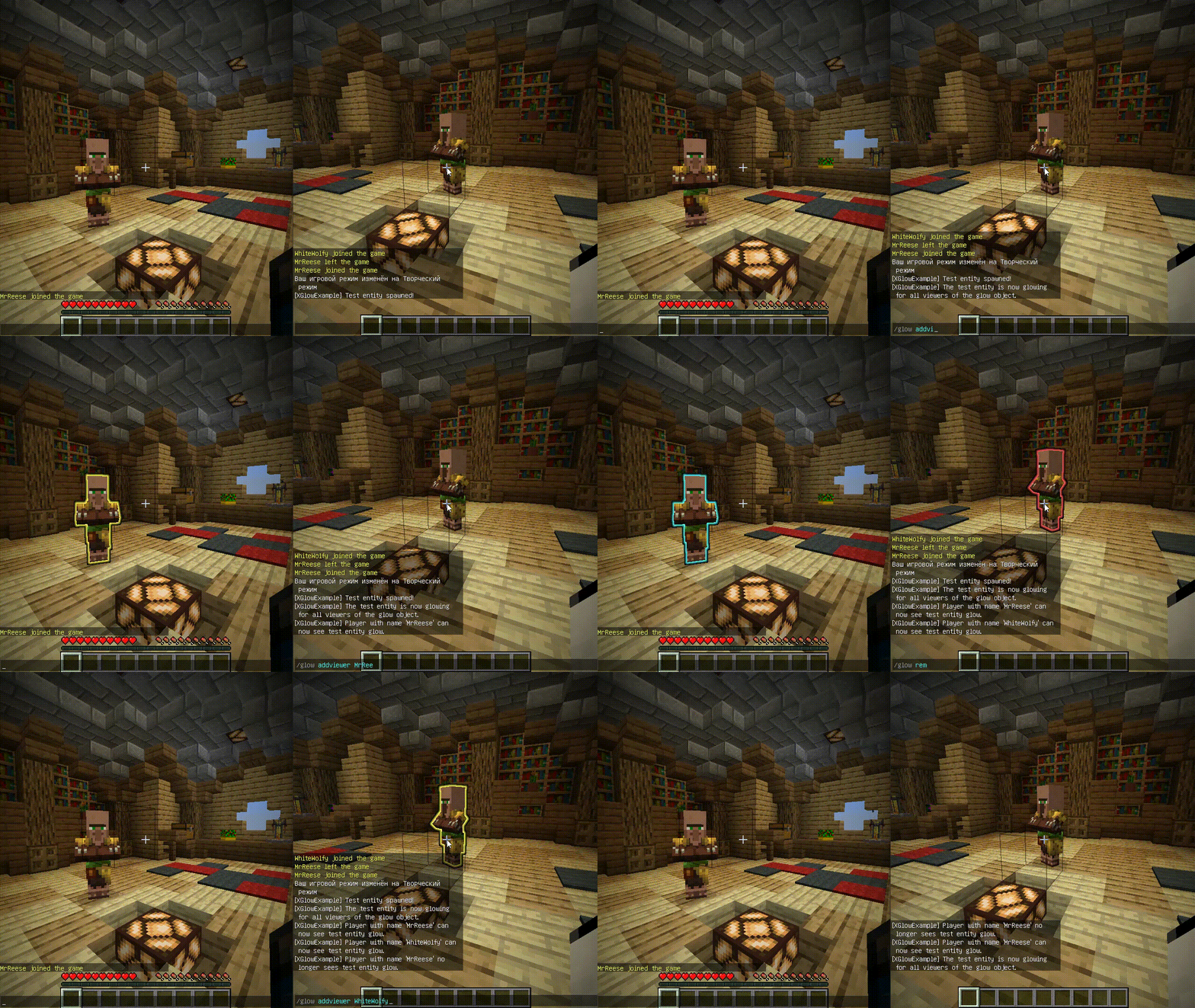
**Works with Java 8 and above.**
(I noticed that the **GlowAPI** from the **inventivetalent** has been abandoned, has not been updated for a long time, has bad reviews and bugs, as well as a rather low-quality code – so I decided to make and publish my own version of the api for the glow)
**XGlow** – is a simple, easy-to-use API to create glow on your entities. The plugin requires [ProtocolLib](https://github.com/dmulloy2/ProtocolLib) to work.
### Usage
First you need to create a Glow object:
(You can use a builder for this)
“`java
Glow glow = Glow.builder()
.сolor(ChatColor.GREEN)
.name(“test”)
.build();
“`
You can add entity to glow object holders,
to make this entity glow with glow object colors.
The glow of the entity will be seen by all viewers
which the glow object contains:
`glow.addHolders(entity);`
To remove the glow of an entity,
you can remove it from the glow object holders.
The entity’s glow will disappear for all viewers of the glow object:
`glow.removeHolders(entity);`
You can add a viewer to the glow object so that he immediately sees the glow of all holders of the glow object:
`glow.display(player);`
When the viewer is removed from the glow object,
all holders of the glow object will
no longer glow for removed viewer:
`glow.hideFrom(player);`
For more features check out XGlow wiki page on github: https://github.com/Xezard/XGlow/wiki
XG7Lobby
# I’ll record it again…
# This plugin depends on a core! Download it below:
https://modrinth.com/plugin/xg7plugins
—
# XG7Lobby – Complete Lobby/Hub System
## 📖 What is XG7Lobby?
**XG7Lobby** is a powerful lobby/hub management plugin designed to revolutionize the server join experience. With a wide range of configurable options, the plugin offers **more than 20 customizable features**, including: **Global PVP**, **interactive menus**, **animated scoreboard/tablist**, **custom forms for Geyser**, and much more!
—
## ⚡ Main Features
### 🏰 Multi-Lobby System
Configure **as many lobbies as you want**, including cross-server locations with SQL database support! Players can easily teleport using the `/lobby` command, with a configurable cooldown system and the option to teleport to a specific lobby ID.
### 🎨 Advanced Menu System
Improve your lobby experience with XG7Lobby’s menu system. You can use custom Geyser forms, personalized GUIs, and configurable hotbars — all adjustable to your liking!
### 📊 Scoreboard, Tablist, Bossbar & More
Bring your server to life with **fully animated** scoreboards, tablists, and bossbars. Display useful information such as player statistics, server status, or events in a visually appealing and dynamic way.
### 🎉 Join, Quit & First Join Events
Customize what happens when players join or leave the server, and make a great first impression on new players with a special welcome. Add messages, sounds, effects, or even rewards to make joining and leaving more memorable.
### ⚔️ Global PVP System
Does the lobby sometimes feel boring? With the global PVP system, that won’t be a problem anymore! Let players fight each other in the lobby with the powerful system provided by XG7Lobby, including full statistics for kills, deaths, and KDR.
### 🦘 Multi-Jump System
Go beyond the classic double jump! Configure triple jumps, infinite jumps, or unique jump effects to add fun mechanics to your server.
### 🚀 LaunchPad
Add excitement with customizable launchpads that throw players into the air. Perfect for hubs, lobbies, or minigame arenas with a fun and interactive touch.
### 🛡️ Complete Moderation System
Keep your server safe with robust moderation tools, including warning systems, mute, kick, ban, IP-ban, and automatic punishments based on configurable infraction levels.
### 💬 Advanced Chat Protection
A complete protection system including anti-swearing, anti-spam, and blocking unwanted commands. Keep your chat clean and organized automatically.
### 🔧 Build System
Control who can build in the lobby using the `/build` command, with full protection against block breaking and placing.
### 👻 Vanish System
Allows staff members to become invisible to other players using the `/vanish` command.
### ⚙️ Custom Commands
Add your own commands to fit your server’s style. Customize shortcuts, actions, and utilities without needing extra plugins.
### 👤 NPC & Hologram System
Create user interaction by taking advantage of the new NPC and hologram creation features!

—
## 📋 Full Feature List
* Fully configurable
* Multiple lobbies
* Global PVP system
* Custom menus (GUI, forms, and hotbar)
* Animated scoreboard, tablist, and bossbar
* Multi-jump system
* Launchpad
* Moderation system
* World-based lobby
* Join and quit events
* First join events
* Repeating events
* Auto broadcast
* Customizable MOTD
* Build system
* Custom commands
* Vanish system
* Anti-swearing
* Anti-spam
* NPCs and holograms
* Action queue system
* Preferences menu
* Hide chat
XFWorldLocker

# XFWorldLocker (XFWL) v1.0.0
## Overview
XFWorldLocker is a professional Minecraft plugin for Paper, Spigot and Bukkit 1.21.1+ that provides advanced world protection and management features.
## Features
### 🌍 World Area Protection
– Define rectangular areas in worlds using X1,Z1 and X2,Z2 coordinates
– Automatic teleportation when players leave defined areas
– Y-coordinate independent (full height protection)
### 🔒 World Restrictions
– **Block Protection**: Control block breaking and placing
– **Interaction Control**: Manage player interactions with blocks/entities
– **Mob Management**: Control mob spawning and cleanup
– **Damage Control**: Enable/disable player damage
– **Explosion Protection**: Prevent explosions (except in creative mode)
### ✨ Player Effects
– Apply custom potion effects to players in specific worlds
– Automatic effect removal when leaving the world
– Configurable effect amplifiers
### 🚀 Dynamic Commands
– Create custom teleportation commands for each world
– Support for command aliases
– Optional permission requirements
– Automatic command registration
### 📝 Multi-language Support
– Fully customizable messages via `language.yml`
– Support for actionbar and chat messages
– Color code support with `&` symbol
## Installation
1. Download the XFWorldLocker.jar file
2. Place it in your server’s `plugins` folder
3. Restart your server
4. Configure worlds in `config.yml`
5. Customize messages in `language.yml`
## Configuration
### config.yml Example
“`yaml
settings:
prefix: “&a[XFWL]”
debug: false
worlds:
world:
enabled: true
spawnWorld: “world”
area:
x1: -100
z1: -100
x2: 100
z2: 100
spawnMobs: false
canBreakBlocks: false
canPlaceBlocks: false
canInteract: false
canTakeDamage: false
effects:
SPEED:
amplifier: 1
JUMP:
amplifier: 0
commands:
command: “/world”
aliases:
– “/worldtp”
– “/w”
permission: “”
“`
### language.yml
All messages can be customized in the `language.yml` file. Use `&` for color codes and `{placeholder}` for dynamic values.
## Commands
### Admin Commands
– `/xfwl reload` – Reload plugin configuration
– `/xfwl help` – Show help message
– `/xfwl version` – Show plugin version
– `/lock ` – Instantly apply default restrictions to a world
### Dynamic World Commands
Custom commands are automatically registered based on your world configurations.
## Permissions
– `xfwl.admin` – Access to all admin commands (default: op)
– `xfwl.lock` – Permission to use the lock command (default: op)
– `xfwl.bypass` – Bypass all world restrictions (default: false)
## Special Features
### Smart Entity Management
– Villagers and NPCs are always protected
– Armor stands and item frames are preserved
– FancyNPCs plugin integration
– Automatic mob cleanup in restricted worlds
### Creative Mode Support
– Creative players can bypass block restrictions
– Explosions work near creative players
– Enhanced building capabilities for admins
### Performance Optimized
– Efficient area checking algorithms
– Minimal server impact
– Asynchronous update checking
## Compatibility
– **Minecraft Version**: 1.21.1+
– **Optimal Minecraft Version**: 1.21.5+
– **Server Software**: Paper, Spigot, Bukkit
– **Java Version**: 17 or higher
## Support
For support, updates, or to report bugs, contact me.
## License
This plugin was created by xfinity. All rights reserved.
XFPoolManager

# 🎣 XFPoolManager (XFPM)
**XFPoolManager** is a **custom loot pool manager**.
It is designed primarily for **CosmicSMP** and servers with **advanced fishing systems**, but it can also be used as a general-purpose loot pool manager.
## 💡 Soft Dependencies:
– **NBT API**
– **Vault**
– **PlaceholderAPI**
> These plugins are **optional**. XFPM will integrate with them if present, but will function normally without them.
## 📜 General Description
XFPM allows you to define **main pools**, with **mini pools** inside them, and finally **items** inside those mini pools.
It also introduces **custom fishing enchantments** (stored as lore on fishing rods, not real enchantments) that affect loot behavior when rolling with `/xfpm loot`.
✅ If no fishing rod with the required lore is present → normal loot rules apply.
✅ If a fishing rod contains specific enchantments in its lore → the plugin modifies loot generation accordingly.
✅ Enchantments marked with `[X]` in the list below are **ignored** by XFPM.
## ✨ Features
– 🎲 **Configurable loot pools** with:
– Main pools → mini pools → items.
– Item rarities: `common, uncommon, rare, epic, mythic, legendary` (and anything rarer).
– Drop chances per item.
– Fixed or ranged amounts with optional **weighted probability**.
– Full **NBT tag** support (complex JSON supported).
– Custom messages (`%nl%` = line break).
– Console commands executed per reward.
– 🪝 **Custom Fishing Enchantments (for CosmicSMP)**:
– Work only if the player holds a fishing rod with the correct lore.
– Levels are expressed in Roman numerals (`I–VI` or `MAX`).
– No need for additional enchantment plugins.
– Modify loot roll logic dynamically:
– Rarer fish.
– More treasure.
– Increased amounts of fish or trash.
– Bonus XP.
– 🔄 Reload config on the fly: `/xfpm reload`.
– 📦 Works out-of-the-box with **CosmicSMP setups** and similar systems.
—
## 🧩 Custom Enchantments
### 🎲 Chance Boosts
– **Rare Catch** → Boosts chance of catching rarer items.
– **Treasure Finder** → Unlocks or increases chance for rolls in the `treasure` mini pool.
– **Bountiful Haul** → Increases amount of fish (+20% per level). Not compatible with *Wasteful Haul*.
– **Wasteful Haul** → Increases amount of trash (+15% per level). Not compatible with *Bountiful Haul*.
– **Angler’s Fortune** → Grants extra XP per successful catch.
### ⚡ Utility & Other (ignored by XFPM)
– Gambler’s Worth [X]
– Swift Bite [X]
– Endless Line [X]
📌 If the enchantment is **not present in lore** → no effect.
📌 If it is **present but marked [X]** → ignored safely.
—
## ⚙️ Commands
| Command | Description |
|———|————-|
| `/xfpm loot ` | Rolls loot for a player, applying enchantment modifiers if their fishing rod lore qualifies. |
| `/xfpm reload` / `/xfpmreload` | Reloads the plugin configuration without restarting the server. |
—
## 🛠️ Example `config.yml`
“`yaml
pool_main:
fish:
salmon_common:
item: salmon
rarity: common
nbt:
– ‘custom_name=[{“text”:”Common Salmon”,”italic”:false,”color”:”white”}]’
message: “You caught a common salmon!”
amount: “1-2”
amount_weighted: false
chance: 0.5
commands:
– “say %player% caught a salmon!”
treasure:
golden_pearl:
item: ender_pearl
rarity: legendary
nbt:
– ‘custom_name=[{“text”:”Golden Pearl”,”italic”:false,”color”:”gold”}]’
message: “§6You fished up a Golden Pearl!%nl%§7Unbelievable luck!”
amount: “1”
amount_weighted: false
chance: 0.05
commands:
– “give %player% diamond 1”
Xfilter
**Xfilter** is a powerful Minecraft plugin designed to maintain clean and safe communication within your server by filtering out unwanted words from player messages. Server administrators can easily manage the list of filtered words using commands, and the plugin supports an unlimited number of filtered words. When a player attempts to send a message containing any filtered word, the message is blocked, and a notification is sent to the player. Xfilter provides full flexibility to customize and update the filtered word list in real-time, ensuring smooth moderation without disrupting gameplay.
## Key Features:
Unlimited filtered words.
Real-time filtering of chat messages.
Easy-to-use commands for managing filtered words.
Only operators (OPs) can add or remove words from the filtered list.
# How to Use Xfilter:
– 1. Adding a Filtered Word:
Command: /xfilterword add or /xfw add
Example: /xfw add badword
This adds the specified word to the filtered word list. If the word is already filtered, you will receive a message saying it’s already in the list.
– 2. Removing a Filtered Word:
Command: /xfilterword remove or /xfw remove
Example: /xfw remove badword
This removes the word from the filtered list. If the word is not found, you will be notified.
– 3. What Happens When a Player Uses a Filtered Word:
If a player sends a message containing a filtered word, the message will not be sent, and the player will receive a message: “Sorry, you can’t send this message because you used a filtered word.”
# Permissions:
Only OPs can use the commands to add or remove words from the filtered list.
Filtered words are stored in filteredwords.yml, and the plugin allows you to add unlimited words for filtering.