Quanta Shader
# Quanta Shader
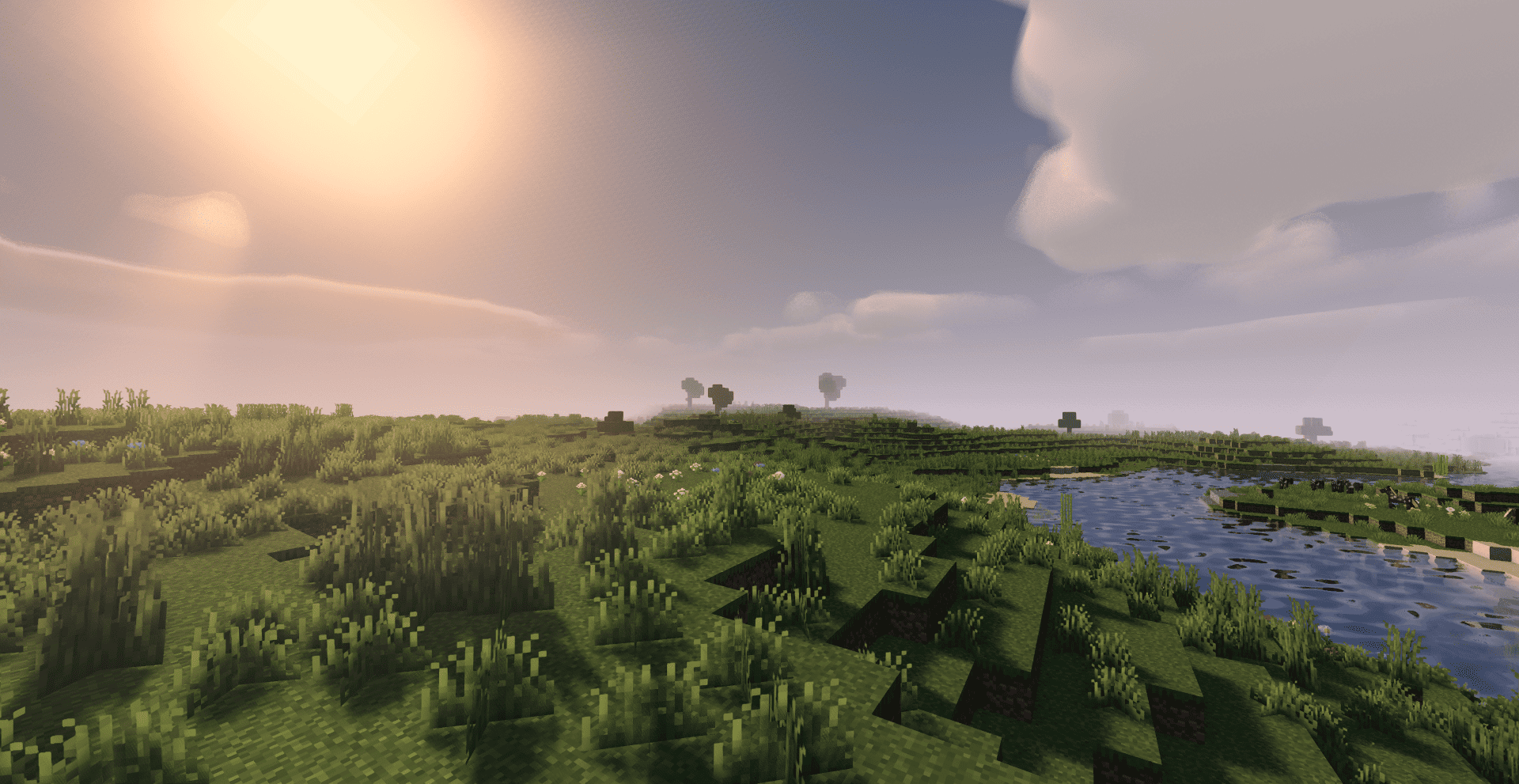
> A simple, fast and beautiful Minecraft shader for Iris/OptiFine.
> Soft sunlight, gentle bloom, real shadows, dynamic clouds and lively
> water — tuned to look great while staying smooth on modest hardware.
—
A huge thank you 🙏
Quanta Shader exists only thanks to **Javier G. Cimarras (`javiergcim`)**
and his amazing project **[MakeUp Ultra Fast]**.
All the heavy lifting — the lighting model, the shadows, the water,
the sky, the clouds, every clever optimization that makes this shader
fast — is his work. This project is just a small, respectful fork:
renamed, cleaned up, and slightly tweaked.
If you like Quanta Shader, please go and support the original author
first. He deserves all the credit. ❤️
* Original project:
* Original author: **javiergcim or KDXavier**
Pyvtron VX
## [Pyvtron VX](https://pyvton.pages.dev/minecraft-shaders/pyvtron-vx)
### Details
Features: Volumetric Fog, Water Caustics, Cumulus Clouds, Cirrus Clouds, High Resolution Graphics, ultra realistic rain and very much features that you will see in the game!
Performance Impact: High / Medium (Medium: If you have a good computer).
You can find older versions and the official release(s) of Pyvtron VX [here](https://pyvton.pages.dev/minecraft-shaders/pyvtron-vx) ([My Website](https://pyvton.pages.dev/))
### Requirements
AMD CPU (Recommended)
Nvidia GPU (Recommended)
A graphics card that supports OpenGL 4.6 or OpenGL 4
Note: I currently only have access to Nvidia GPUs for testing. I cannot make sure if Pyvtron VX works on Intel CPUs and AMD GPUs.
### Installation
Install it like other Minecraft Shaders or read this here if you don’t know how to install minecraft shaders:
1. First download the Iris Shaders Installer / Mod
2. Run the .jar and click on Install.
3. Download the latest version of Pyvtron VX
4. Open the Minecraft Launcher. You’ll see the Iris Shaders profile – select it and start Minecraft.
5. Go to Options → Video Settings → Shaders → Shaderpacks Folder.
6. Drag the downloaded shaderpack into the shaderpacks folder.
7. Select the shaderpack ingame.
8. Enjoy.
### Other Stuff
Before you modify or do something with this shaderpack, you must read the [license](https://pyvton.pages.dev/licenses/pccl)
Pyvtron VX is not path traced etc. VX means Version X
If you want to know, how to add support for modded dimensions (for new dimension mods) read this here on my [docs](https://pyvton.pages.dev/docs/minecraft-shaders/modding/how-to-add-mod-support-for-modded-dimensions)
Pyvtron Shaders
## [Pyvtron Shaders](https://pyvton.pages.dev/minecraft-shaders/pyvtron)
Pyvtron shader is a shader that tries to look realistic.
This shader has a extreme realistic 8k resolution sky and and a beautiful water color
Stuff: Light-Rays, Dirty Lens, Ambient Occlusion, Much Settings, Fog and More!
If you want to support me please make videos on youtube, tiktok or other platforms (so that Pyvtron Shaders becomes better known)
And don´t forget to download the newest version!
### Requirements
– AMD CPU. Intel is not compatible with this shader!
– Nvidia GPU Or AMD GPU.
– A graphics card that supports OpenGL 4.6 or OpenGL 4
– Iris Shaders Mod. Other Shaders Mods are **NOT SUPPORTED OR TESTED**
Installation
1. First download [Iris Shaders](https://www.irisshaders.dev/) (This is only the Installer or download [the mod](https://modrinth.com/mod/iris))
2. Run the .jar and click on Install.
3. Download the latest version of Pyvtron.
4. Open the Minecraft Launcher. You’ll see the Iris Shaders profile sellect you profile and Start Minecraft.
5. Go to Options → Video Settings → Shaders → Shaderpacks Folder.
6. Drag the downloaded shaderpack into the shaderpacks folder.
7. Select the shaderpack ingame.
8. Enjoy.
## Please Check Also My Other Shaders Out:
### [Pyvtron VX](https://pyvton.pages.dev/minecraft-shaders/pyvtron-vx) (Version X)
Pyvtron VX (Version X) Is realistic and has much much more detail and has much more realism than Pyvtron Shaders!
### Blacklist:
– KLauncher
– Xenolith
– Minecraftzw
– FoxyCraft
### Whitelist:
– 9Minecraft
– Zonacraft
– Feed The Mods
– Minecraft-France
## 1. Allowed Actions
You can upload it to a site but the download link must be one of CurseForge, Modrinth, Github or [My Website](https://pyvton.pages.dev/minecraft-shaders/pyvtron)
“Modify the project for personal use only, without sharing or publishing it.
Record and upload videos, screenshots, and streams showcasing Pyvton Shaders on platforms like YouTube, Twitch, TikTok, etc., including monetization, under these conditions:
## 2. Prohibited Actions
Uploading, rehosting, or distributing any version of Pyvton Shaders using your own links.
Using any ad-based or monetized link services (e.g., AdFly, Linkvertise, Boosters).
Bundling or embedding Pyvton Shaders into:
Modpacks, resource packs, launcher tools, or shader collections.
Minecraft servers or launchers, in any form—pre-installed, downloadable, or bundled.
Any third-party software or shader management tools.
Sharing modified versions unless:
You received explicit written permission from Pyvton.
The modified version contains significant original work.
It is licensed under the same license.
No monetization is involved unless approved by Pyvton.
Using parts of the project (e.g., code or textures) in other projects without permission.
Add a download link in the description
Purpliness
## Purpliness
As the name suggests, these are purple shaders, they change a lot of stuff to be purple. Nothing too fancy, just a lot of purple and some cool shadows.
Features:
– Purple sky
– Purple clouds
– Purple shadows
– Purple water
– Purple fog

PSX-Core Shader

A Minecraft shader that recreates PS1 visuals. Features:
– Ordered dithering
– 5-bit per-channel color quantization
– Gouraud shading with banded light levels
– Vertex snapping
– Affine texture mapping
– Fog (scary)
Most of these are configurable via the shader settings! Only thoroughly tested with Iris on 1.21.11 (works on older versions too, please report bugs).
# Preview
> See more on the Gallery page!
With fog (default):

Without fog:

In a cave:

> Modpacks are welcome to use this shader, only via adding it as a dependency to your modpack. Do not reupload or repack this shader.
Prismarine Shader
**ABOUT**
+ Prismarine is a BSL Shaders edit. It aims to provide beautiful visuals at moderate performance cost.
**KEY FEATURES**
+ Fancy volumetrics (clouds, fog, Nether & The End smoke)
+ Custom sky effects (nebulae, auroras, planar clouds, stars, moon smoke)
+ Integrated PBR resourcepack
+ Cinematic blur effects (depth of field, motion & distant blur, bloom)
+ Fancy water effects (refraction, caustics, light absorption & scattering and underwater light shafts)
PosterizationShader
## **PosterizationShader – Artistic Posterization Shader**
Transform your Minecraft into a stylized poster with this lightweight shader pack!
**What is posterization?** Posterization is an artistic effect that reduces the number of colors in an image to discrete levels, creating a unique visual style with clearly defined color bands instead of smooth gradients.
**Features:**
– Customizable posterization effect (4-32 levels)
– Maximum performance – virtually no impact on FPS
– Full compatibility with Optifine and Iris Shaders
– Supports Minecraft 1.16+
**Configuration:**
Change the POSTERIZATION_LEVELS parameter in the shaders.properties file:
– 4 – Extreme posterization (very few colors)
– 8 – Medium posterization (default, recommended)
– 16 – Light posterization
– 32 – Barely noticeable posterization
**Installation:**
1. Install Optifine or Iris + Sodium
2. Place PosterizationShader.zip in your .minecraft/shaderpacks/ folder
3. Activate the shader in video settings
**Technical Details:** The shader works by quantizing the RGB channels of each pixel at the final rendering stage, which allows for high performance while creating a unique visual effect.
Perfect for:
– Screenshots and artistic content
– Players who want a unique visual experience
– Low-end PCs (shader is very lightweight)
Polaroid90s
**English version:**
Polaroid 90s Shader — Play Minecraft Like an Old 90s Photo 📸
Transform your Minecraft into a cold, faded, nostalgic experience — exactly like finding an old Polaroid photo from the 90s. Cool cyan shadows, desaturated colors, film halation, grain, and a heavy lens vignette. No performance cost.
**Features:**
– Cold cyan-blue tint like old film stock
– Faded colors — lifted blacks, compressed whites
– Film halation — blue-white glow around bright areas
– Authentic film grain with two layers
– Heavy oval vignette like a camera lens
– Subtle horizontal scan bands like old photo scans
– No performance impact
Compatible with Minecraft 1.17–1.21.x via OptiFine or Iris.
Subscribe so you don’t miss any updates! If you have questions or need support, join our Discord.
**Русская версия:**
Polaroid 90s Shader — Играй в Майнкрафт как на старом фото из 90х 📸
Превращает твой Майнкрафт в холодную, выцветшую, ностальгическую картинку — точь-в-точь как старый полароидный снимок из 90х. Холодные циановые тени, приглушённые цвета, засветка плёнки, зерно и тяжёлая виньетка объектива.
**Возможности:**
– Холодный сине-циановый тинт как старая плёнка
– Выцветшие цвета — поднятые чёрные, сжатые белые
– Засветка плёнки — синевато-белое свечение вокруг ярких объектов
– Настоящее плёночное зерно в два слоя
– Тяжёлая овальная виньетка как объектив камеры
– Горизонтальные полосы как артефакт старого скана
– Никаких потерь производительности
Совместимо с Minecraft 1.17–1.21.x через OptiFine или Iris.
Подписывайтесь, чтобы не пропустить обновления! Если есть вопросы — заходите в Discord за поддержкой.
PixelCraft Shaders
##  A Complementary Shaders Edit
PixelCraft Shaders is a [Complementary Shaders](https://modrinth.com/shader/complementary-reimagined) edit, developed by [SpacEagle17](https://linktr.ee/SpacEagle17), aiming to replicate pixel art. Every screenshot is a new piece of art brought to life!
**Important notice: Please don’t report any bugs to Emin, contact information is below.**

## 🔗 Links
* **Support SpacEagle17 on [Patreon](https://www.euphoriapatches.com/support/) and get access to Preview Versions!**
* **[Website](https://euphoriapatches.com)** of Euphoria Patches – the main project of SpacEagle17!
* **Contact: https://euphoriapatches.com/contact**
## Sponsored by Ember Host
Looking for an affordable and reliable Minecraft server host? Check out [**Ember Host**](https://www.euphoriapatches.com/ember-referral)! I personally love working with them – they offer incredible value for the price, are highly underrated, and have an amazing support team.
By clicking the banner below, you’ll get a **10% discount on your first purchase** and support the development of Euphoria Patches, with 50% of your first purchase going directly to its creator. Alternatively, use the code **EUPHORIA** at checkout to claim your discount!
Special thanks to Emin the developer of [Complementary Shaders](https://www.complementary.dev/) and all testers on Discord! This project would have been impossible without you!
Pixel Rework
Pixel Rework is a polished shaderpack that keeps Minecraft’s vanilla identity intact while improving visual clarity, lighting balance, and overall atmosphere. It focuses on clean, stable rendering with natural-looking daylight, smoother shadow transitions, clearer skies, and carefully tuned water behavior that avoids extreme distortion. The pack is designed to feel familiar, not over-stylized: colors stay true to vanilla, performance remains practical, and visual upgrades are applied with restraint so the world still feels authentically Minecraft.


