FadedClouds
This is an incredibly light weight shaderpack. Inspired by the NoShader.zip shader, but made it so that the clouds actually fade away into the fog.
The shaderpack makes the game run trough the native Oculus/Iris render pipeline, only altering how clouds render. This makes the overall look of the game a lot softer.
If your computer runs vanilla minecraft, this should run just fine.
Do note that due to the very simple nature of the shaderpack, it may cause incompatibility with other pojects.
Enjoy! 🙂
Extraterrestrial Expanse
Extraterrestrial Expanse is a minecraft shader primarily for iris.
It adds things such as:
– Custom clouds
– Random events
– reflections
– Ambiance (plants waving in the wind, water waves)
Do note that this project is currently in BETA! so expect a lot of bugs and (most likely performance) issues, and if you come across many, feel free to report them in the discord.
Exposa Shaders
Cinematic Showcase
(PSST, you should use this shaderpack while listening to this upcoming song, presave it its awesome and its also mine! Yes I am promoting my song… Yes I am desperate.) Awesome Song To Listen 2 While using Exposa
# Description
Hello! This is Exposa! Used to be known as Exposa Unique Shaders. This project is a shaderpack that aims for both a natural and a fantasy style.
# Compatibility
It is compatible with Optifine and Iris, unknown about other mods and clients. It is also recommended to be used for versions 1.17x and above. It works well with AMD and NVIDIA and INTEL .
**Nether and End support are full ATM. For custom dimensions support, please let me know what dimensions you would like to see supported.**
# License
For the most, I use the all rights reserved license, but I really wouldn’t recommend using my code (I did not intend it for the use of being edited). If you’d like to edit anyway, you can ask me here!
# Features
* rough reflections
* water reflections
* shadows
* motion blur
* depth of field
* puddles
* temporal anti aliasing
* HDR
* bloom
* tonemapping
* lightshafts
* volumetric clouds
* Seasonal Colors (Autumn, Winter, Spring, Summer)
* Shooting Stars
* Proper weather & translucent support
* Nether & End support
* Ambient SSS
* SSAO
* Directional Lightmaps
* VL Mist / Smokey Fog!
* Nether VL Swirly Fog
* Better TAA
* Better Puddles
# Some Credits
RRe36 (https://www.curseforge.com/members/rre36) – Lots of help with clouds, volumetric fog, bloom and etc. Capt Tatsu (https://www.curseforge.com/members/capttatsu) – Gave me permission to use the reflections functions and even helped me apply them, let me use and modify bloom, motion blur, dof, volumetric fog and etc.
Unicorn Blood (https://www.curseforge.com/members/dakotah2468) – Letting me use and modify fog.
Xenith – Help with shadows method.
Jesse/L – In my older versions, he gave me a tonemap to use.
Belmu – Has helped me set up some things like rough reflections, you can support him here! (https://www.curseforge.com/minecraft/customization/noblert-shaders))
HardTop for the french translation: https://hardtopnet.ovh
Espen for many things (I only remember providing me with the minimum & maximum depth functions): https://modrinth.com/shader/bloop-shaders/versions
Xonk for many things (I only remember SSAO & SSS tricks and reflections LOD trick atm ;_;): https://github.com/X0nk/Bliss-Shader
Zombye for cool TAA tricks: https://github.com/zombye/spectrum/tree/master/shaders/program
Eldeston & Chocapic13 for previous coordinates transformation: https://modrinth.com/user/Eldeston, https://www.curseforge.com/minecraft/shaders/chocapic13-shaders
Random Noise website: https://www.pcg-random.org/
sRGB & Linear color space conversions: https://www.shadertoy.com/view/4tXcWr
Event Horizon
# Realistic black hole in End

**Shader has some issues in rendering the sky in other dimensions**


Escheridia
Esheridia is a semi-realistic shaderpack that aims to add a touch of natural realism to the vanilla visual style. **IRIS REQUIRED & MAC NOT SUPPORTED**
It provides:
* Realtime shadow maps
* Custom sky
* Atmospheric border fog
* Custom Weather effects
* LabPBR Resourcepack support
* Advanced Volumetric Lighting
* Screenspace Reflections
* Custom water lighting
* Bloom
* Volumetric clouds
If you encounter any bugs, want development updates, or just want to chat, join the discord here
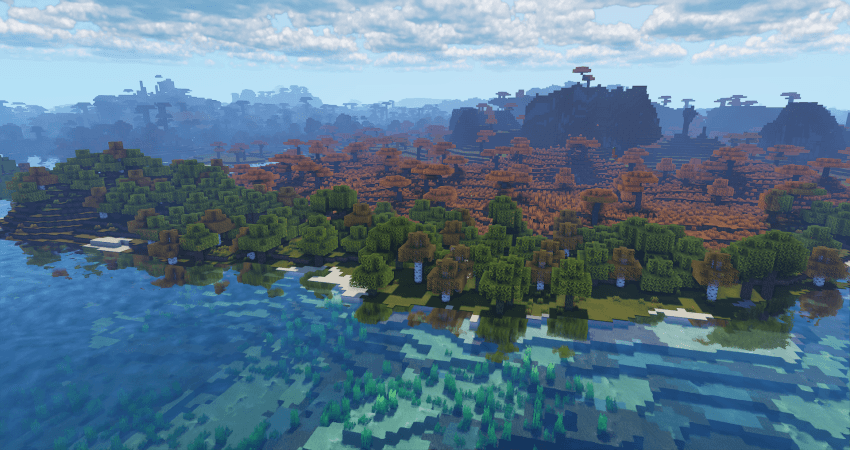
**NOTE** Majority of images are taken using the Patrix resource pack.
# IMAGES BELOW


Enhanced Vision
#Enhanced Vision Shader

## Features:
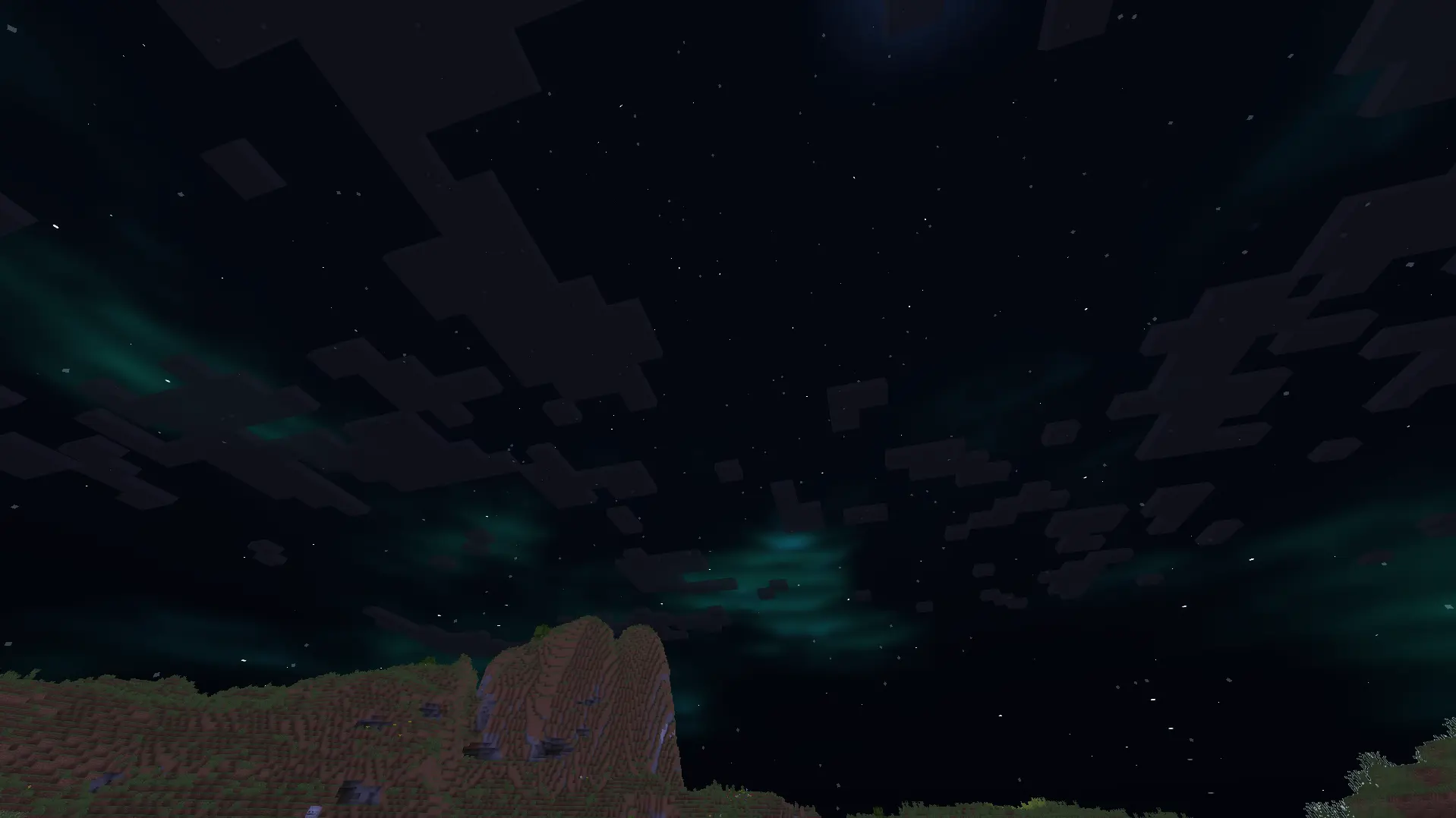
1.It shows outlines of mobs and walls around the centre screen, with outline brightness increasing as darkness increases.
2.It adds a shimmering effect above lava and other heat sources to mimic real-life shimmering over fire sources.
3.It blurs objects which are on the side of the screen, with the strength of the blur effect increasing with increasing distance of the object from the centre of the screen.
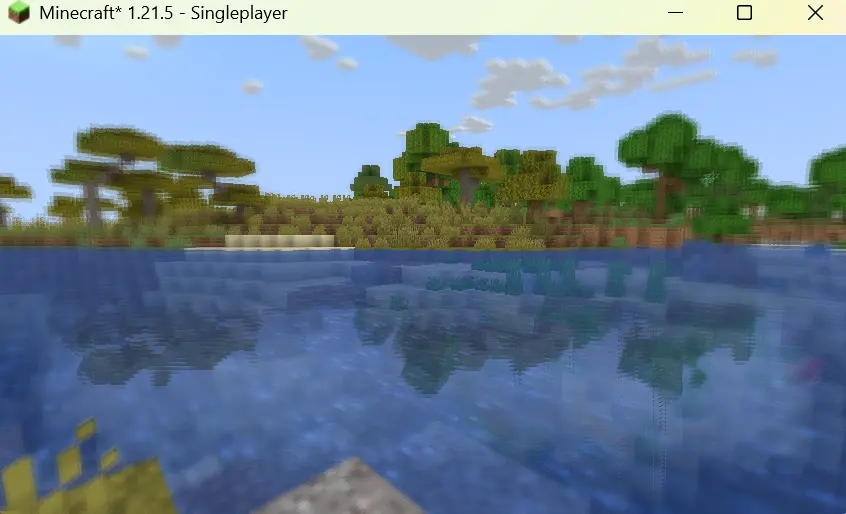
4.It creates reflections on the surface of the water.
5.It adds auroras and stars to the night sky.
6.It improves the sky colour by making it brighter.
7.It adds basic foliage swaying.
Energy Shaders Java
# Energy Shaders [Java]


Energy Shaders is a shaderpack/resourcepack that provides a more colorful vanilla expierience. Without requiring
any mods or a frame rate drop.
If you like this pack consider supporting the development by buying me a coffee:

### Features
It is best to take a look at the gallery or to
try the shaderpack out. Here is a list of some features:
– Custom lightning (different for day, night and in caves)
– Custom fog (different for day, night and in caves)
– Custom Nether
– Custom End
– Custom torch light (different for day, night and in caves)
– Vignette effect
### Enabling the resourcepack
You can simply enable it as resourcepack (Copy the `.zip` into the `resourcepack` directory).
If you are using Sodium, the Sodium Core Shader Support mod is required.
The pack does not work with Optifine!
### Video
### Customization
Energy Shaders also offers a lot of customization. Since this is a vanilla shader-pack, these settings have to be
manually edited.
#### Getting started with customizing energy shaders
First download the settings template.
Then copy the downloaded zip file to your resourcepacks directory. You can find it by pressing `Open Pack Folder` in
Minecraft’s Resourcepack selection screen. Next extract the zip file and delete it, so that only the extracted
directory `ES Settings Java` remains. You can rename the directory to your liking.
Now edit `ES Settings Java/pack.mcmeta` with a text editor of your choosing and change `YOUR_NAME` to your name or your alias.
Next you should test if everything works. Activate `Energy Shaders [Java]` and the ES Settings Java pack you just created. Make
sure the `ES Settings Java` pack is above `Energy Shaders [Java]`. Open a world and Minecraft should not crash. Keep the
Now you can start to actually change some settings. Open `ES Settings Java/assets/minecraft/shaders/include/es-settings.glsl`
in your favorite text editor.
In there you will find a lot of lines starting with `// #define`. These are the settings, which can be changed. All Settings
must be enabled first (**by removing the `//`**) before its value can be changed. Some settings do not have a value. These simply enable or disable
a feature.
After changing a setting go back in game and press `F3 + T`, which will reload all resourcepacks. Thus, applying your changes.
##### Example 1
The line
“`glsl
// #define DISABLE_SHADOW
“`
can be changed to
“`glsl
#define DISABLE_SHADOW
“`
which will disable shadows cast by blocks, trees, etc.
NOTE: The `//` must be removed as seen above!
##### Example 2
The line
“`glsl
// #define SATURATION 1.2
“`
can be changed to
“`glsl
#define SATURATION 0.0
“`
which will make the game look grayscale.
NOTE: The `//` must be removed as seen above!
If you want to switch back to the default value simple add the `//` again:
“`glsl
//#define SATURATION 0.0
“`
##### How do I know which setting does what?
Some settings are explained in the `es-settings.glsl`. Some may be hard to explain, and you just have to try around
and find out. Generally, if a setting contains a `VEC3(…)`, it is a setting with three values (red, green, blue).
Of course, you can always ask for help in my discord server: https://discord.gg/shVe3cR
##### Why are the settings in a different pack and not just contained in Energy Shaders directly
Actually, the settings are contained in Energy Shaders too! But it is much more convenient if the settings are in an
additional pack, because you can update Energy Shaders without losing your settings!
### Feedback
Feel free to leave any feedback on my Discord server. Please respect,
that vanilla Minecraft is very limited.
Eerie Craft
This minecraft shader is inspired by horror games like silent hill and this mod has multiple features that accomplishes that feat of making the player feel uncomfortable-
1. The clouds are made dark and realistic unlike vanilla minecraft clouds that don’t seem intimidating. The clouds have movement added to them too.
2. Added a new water texture apart from the vanilla minecraft water texture to make it interesting.
3. Added realistic lighting and shadows along with the light spreading through fog particles.
4. Added fog to the game to make any attack from a mob unpredictable, even normal light sources won’t save you from the atmosphere of this mod because they won’t work.
5. Vegetation movement is in the mod that makes the forest environment dynamic.
6. Sun and moon have their own glow and unique texture apart from vanilla minecraft!
EclipseLite

### ABOUT
**Eclipse Lite is a super lightweight Minecraft shader made for the absolute lowest-end PCs, laptops, and toasters that can’t handle even Sildur’s or Mellow shaders. It keeps the classic vanilla Minecraft look but adds subtle improvements — like glowing transparent water and cleaner, whiter clouds — all while running buttery-smooth on any system.**

### Features
**Eclipse Lite is made for ultra-low-end devices. It has no waving effects and avoids all heavy features like bloom, motion blur, and depth of field to ensure high FPS. The water uses the default Minecraft style but is transparent for a cleaner, more aesthetic look. This shader is in BETA, so minor bugs may be present. It’s perfect for players who can’t run shaders like Sildur’s Lite or Mellow but still want a subtle visual boost.
**
### BUGS
**Found a bug? You can report it by creating a ticket under the bug category in our Discord server. Your feedback helps us improve Eclipse Lite and fix issues faster. Every report means a lot to us and truly makes our day better!**

Ebin Resurrected


Shader development is hard and takes a lot of time. If you enjoy my shaders, please consider supporting my work!
# Ebin Resurrected
Ebin Resurrected is a vibrant and performant Minecraft shaderpack.
Ebin began with the goal of being fast, beautiful, configurable, feature-rich, and having a base of well-written code. It was developed by BruceKnowsHow from 2016-2020. jbritain resumed development of the shader in 2024 under the name ‘Ebin Resurrected’. This is a fork of Ebin which brings compatibility with modern versions of Minecraft, and significantly improves upon aspects of the shader, such as PBR.
## Community
If you would like to discuss Ebin Resurrected, or other Minecraft shaderpacks, join my Discord server. Alternatively, in the shaderLABS discord, you can head over to `#ebin-resurrected-jbritain`.
## Features
– Multicoloured Blocklight
– Sunlight Shadows / Shading
– PCSS ‘Variable Penumbra’ Shadows with transparency.
– Bloom / Glow
– Procedural 2D/3D Clouds
– Procedural Water Waves
– Deferred Shading Pipeline – Everything is correctly shaded, even behind semi-transparent blocks
– Terrain Deformation – “Animal Crossing” and “Acid” deformations
### LabPBR Compliant
– Rough Screen Space Reflections – accurate specular reflections on all blocks.
– Normal Mapped Lighting.
– Terrain Parallax (POM).
– Material Ambient Occlusion.
– Hardcoded Metal Support.
– Porosity – materials look ‘wet’ in the rain.
## Planned Features
– Distant Horizons support
– End skybox
## Compatibility
### Minecraft
– Optifine and Iris are both supported, however some features only work on Iris. Older Optifine or Iris versions may have issues, as the shader is developed on the latest versions of either.
– Minecraft 1.17.1 is the earliest tested version. The shader may work on older versions but this is not guaranteed.
### Hardware
– OpenGL 4 compatible hardware is required. This boils down to Nvidia GeForce 400, AMD Radeon HD 5000, Intel HD 3rd gen **or later**. Any modern device should work fine.
– The Raspberry Pi is not supported as it does not support OpenGL 4.
– Intel GPUs are untested and you may encounter issues. If you do encounter issues, please report them, as Intel is intended to be supported.
### Operating System
– MacOS is **NOT SUPPORTED**.
## If you run into problems
Having problems? Join my Discord Server and create a thread in `#support`. Alternatively, if you are experiencing a problem with Ebin you consider to be a bug, create a new issue. Please read the issue guidelines before creating one and make sure somebody else hasn’t raised the same issue already. **You are likely to get a faster response on Discord**.
## Team
– jbritain: Maintainer
– BruceKnowsHow: Original Developer (no longer involved in the shader)
## Contributors
– dotModded, DethRaid, zombye
## Thanks
– The shaderLABS Discord members, for answering the many questions I’ve had in my time developing shaders, some of which were even constructive. Particularly:
– Balint
– Jessie
– Null
– TimeTravelBeard
– Quadro
– BuilderB0y
– NinjaMike
– CyanEmber
– Capt Tatsu, whose shader, BSL I ported the multicoloured blocklight and FXAA code from.
– Sonic Ether, creator of SEUS and inspiration for Ebin
– daxnitro, original creator of the Shaders Mod
– karyonix, longtime maintainer of the Shaders Mod
– sp614x, Ebin would not be possible without #include.
– IMS, for maintaining Iris and Sodium, which are really cool mods.
– chocapic13 & Sildur, various code references and help over the years
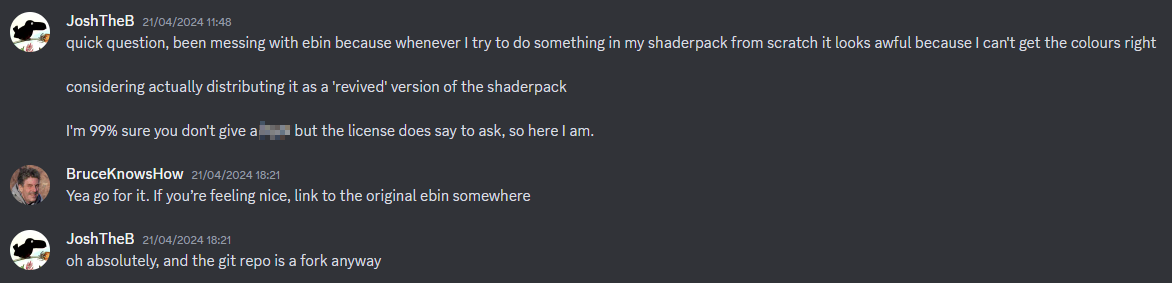
## Evidence of written permission from BruceKnowsHow to distribute this shaderpack