Galaxy shader
This is a simple shader designed to replace all block rendering with a continuous galaxy scene with orange and cyan highlights, while also replacing all entity rendering to feature a golden overlay. This shader was designed for a video by @joostjoe on youtube.
Full Invert Shader
**CREATE Cm_ReNano ©**
**This shader completely inverts the colors in Minecraft. Everything looks like you’re looking at a negative photo. Supports daylight, night, water, blocks, mobs, and interface. Suitable for those who want a strange, surreal, or psychedelic experience in the game.**

Found Footage

**Found Footage** turns Minecraft into something it was never meant to be.
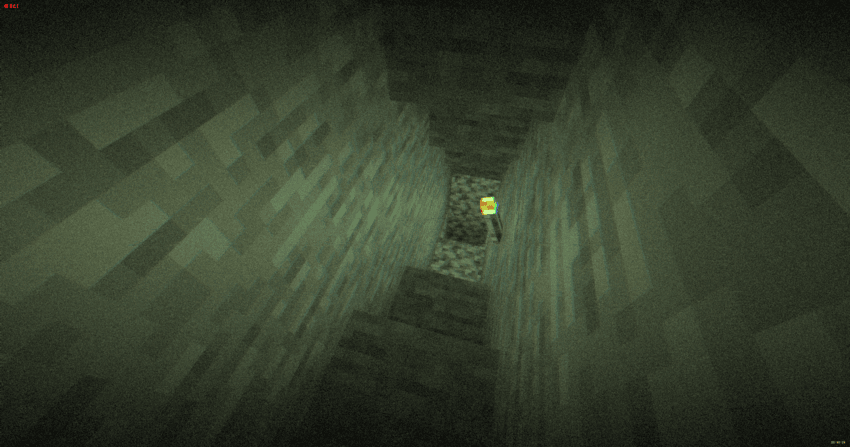
Inspired by old VHS tapes and analog horror, this shader adds subtle film grain, light distortion, soft camera shake and atmospheric noise that reacts to darkness. Nights feel heavier. Caves feel deeper. Empty spaces feel… wrong.
It doesn’t change the gameplay.
It changes how it *feels*.
Torches flicker through the grain. Distant terrain fades into haze. The world looks like it was recorded on a damaged tape you weren’t supposed to find.
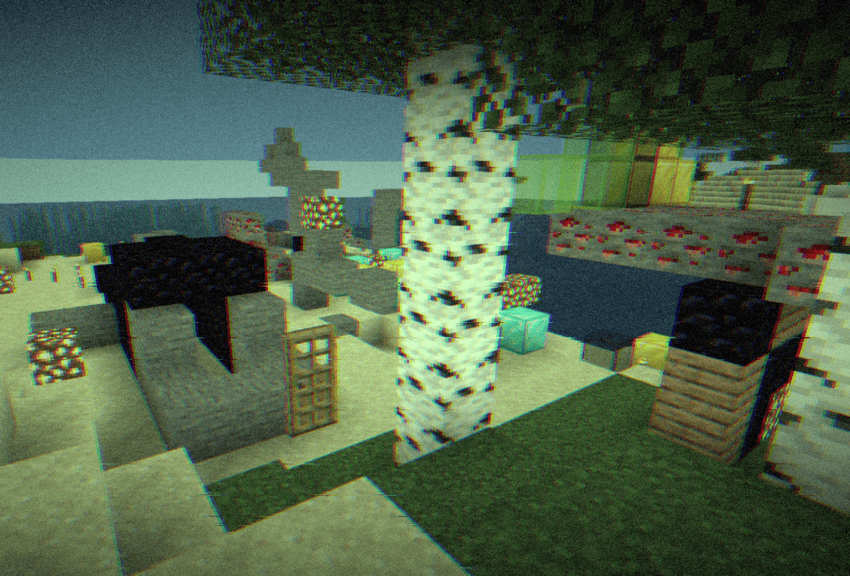
Perfect for horror maps, survival playthroughs, liminal builds or anyone who wants a more immersive, uneasy atmosphere — without destroying performance.
– **Press record. You probably shouldn’t.**
Forget-Me-Not Shaders
Important! This, along with the GitHub page for this project, is the only official place to find Forget-me-not. Any other site you find this project, including unethical mod rehosting sites like 9minecraft, are untrusted sources. Never download files from untrusted sites.
# Forget-me-not Shaders
**Forget-me-not** is a semi-realistic pipeline shader for the Canvas mod. It’s designed to give the most authentic and immersive experience while sticking to “traditional” rendering methods to keep up good performance.
**Canvas** is a client-side renderer mod that uses shaders for advanced rendering with the goal of having a modern and very flexible design for high performance and better readability. The shader system is entirely different from Optifine and Iris & Sodium and as such, Forget-me-not won’t work with any of these mods! See the `how to use` section for installation instructions.
## notice
If you’re a developer or mod hoster, Forget-me-not is licensed under the LGPL v3.0, so please make sure to read over the terms of the LGPL if you use any of Forget-me-not’s original code or distribute it.
## how to use third-party shaders with canvas
1. Be sure you’re on 1.19.4 or above. Support is not guaranteed for versions that Canvas doesn’t actively support.
2. Install Fabric.
3. Get Canvas Renderer mod through Modrinth. **Keep in mind that Canvas does not work with Sodium, Iris, OptiFine, or OptiFabric.**
4. Download your preferred pipeline shaderpack. If you’re looking for alternatives to Forget-me-not, try out Lumi Lights, Lomo (not for gameplay as of this writing), or Aerie (vanilla-plus, wip).
5. Launch your game, put your downloaded `.zip` file into your `resourcepacks` folder and activate the resource pack. (Don’t extract it!)
6. Navigate to `Options / Video Settings / Canvas / Pipeline Options / Pipelines` and select the pipeline that you want to play with.
## troubleshooting
– Experiencing bad shadow outcomes? In `Options / Video Settings / Canvas / Debug`, set `Shadow Priming Strategy` to `TIERED` and `Disable Shadow Self-Occlusion` to true.
– Does Canvas say in chat that some shaders are broken? Please grab your log in `.minecraft/logs/latest.log` and all contents of the `.minecraft/canvas_shader_debug/` folder and either make an issue on GitHub or let me know about it on Discord.
– Does every Canvas pipeline break other than Canvas Basic? If so, your device is probably incompatible with Fabulous graphics, which most Canvas pipelines use. Unfortunately, there’s no fix for this.
## feature highlights
– seasons! be immersed in your world as the seasons change over time
– HDR, bloom, and tone mapping
– dramatic skies with atmospheric scattering and custom realistic clouds
– water waves and reflections
– support for PBR, with hundreds of built-in default materials
– contact-hardening variable penumbra shadows
– advanced anti-aliasing (TAA)
## credits
Forget-me-not wouldn’t be nearly as polished as it is if it weren’t for the help of people like fewizz, spiralhalo, Grondag, and many others from the Canvas community for contributing and testing. Many thanks to:
– The shaderLABS discord channel #snippets for many useful code snippets
– Lumi Lights by spiralhalo for lots of different inspiration & help, and also references for a working TAA implementation
– lomo by fewizz for inspiration for many different things, as well as the raytracer and lots of invaluable contributions
FlowestShaders
This shader is very good. It can make Minecraft look much more beautiful than before. The sky will be brighter and more realistic, the water will look clearer and nicer, and the lighting in the game will become softer and more natural. You can really feel the difference when you walk around in your world.
This shader works with both OptiFine and Iris, so no matter which mod loader you use, you can install it easily. It runs well on almost any computer, even if your device is not very powerful. You don’t have to worry about lag or slow performance while using it.
If you are tired of the normal Minecraft graphics and want to make your game look better, this shader is perfect for you. It is simple, clean, and works great for survival, building, or just exploring. Try it and you will see how good your Minecraft can look with this shader.
Flashlight Shader
# Flashlight Shader
This shader makes the dark more intense in Minecraft, and gives you a tool to explore it.
### Flashlight
Torches or any light-emitting objects will act as a flashlight if held in your hand or offhand.
You can customize it’s strength and color in the shader pack settings.
### Increased Darkness
If you are in a decently well lit area, you can see normally.
If there is a small amount of light (like on the surface at night), you can see a small area around you in black and white. The size of this area depends on the phase of the moon.
If there is no light at all, well, you won’t be able to see anything.
***
## Español
Con éste shader, cualquier objeto que emita luz te servirá como linterna.
Puedes configurar el color y la distancia de su luz en las opciones.
También, el shader hace que la oscuridad sea más oscura, y que veas con menos color si hay poca luz.
Durante la noche en la superficie, puedes ver alrededor de ti más o menos bien dependiente a la fase de la luna.
***
## Français
Avec ce shader, tout objet qui émet de la lumière te servira comme lampe-torche.
Tu peux configurer la couleur et la distance de sa lumière dans les paramètres.
Le shader aussi fait que la oscurité soit plus oscure, et que tu vois en noir et blanc si il y a peu de lumière.
Durant la nuit, sur la surface, tu peux voir autour de toi plus ou moins bien dépendant de la phase de la lune.
FeathC2
### Details
Feath Shader is a lightweight yet visually powerful shader pack designed to enhance your Minecraft experience with balanced realism and high performance. Whether you’re exploring vast landscapes or building detailed structures, Feath Shader adds an immersive layer of beauty without compromising on FPS.
✨ Features:
Realistic Reflections → Smooth and accurate reflections on water, glass, and reflective blocks.
Rain Puddles → Dynamic wet surfaces that bring rainy weather to life with puddles forming naturally.
Lighting Enhancements → Soft, natural light with realistic shadows, bloom, and improved torchlight effects.
Atmosphere & Sky → Improved atmosphere rendering with more depth, fog, and vibrant skies.
Color Adjustments & Grading → Balanced tones and cinematic color grading for a polished, professional look.
Feath Shader is made to be lightweight, stable, and visually consistent, perfect for players who want beautiful graphics without sacrificing smooth gameplay.
FastPBR
## **What is the FastPBR Shader?**
This is a fast shaderpack that still offers high-quality visuals and uses PBR atmospherics, hence its name.
**PBR does not mean specular support, so do not confuse these terms despite this being a common misconception in the shaderpacks community.**
## **Where can I download it?**
Either here or via my website (link below).
## **What features does it offer?**
* Dynamic soft shadows
* Optional screen-space indirect lighting using HBIL
* Temporal Anti-Aliasing and Upscaling (TAAU)
* Procedural realistic skybox including volumetric clouds
* Volumetric fog
* Various optional lens effects such as depth of field, lens flares and vignette
* **Compatibility with Distant Horizons since v2.0**
## **Any Requirements?**
* **Iris 1.6.0 or newer**
* **OptiFine is NOT supported and will not be unless it catches up with Iris’ more advanced featureset**
* A graphics card that supports OpenGL 4.3 or newer
* Windows/Linux
## **External Links:**
* My Website: Link
* My Discord Server: Link

Fantasy.VT
Features:
Distant Horizons, Voxy, Colorwheel and other mods easily integrate with this shader!
The package includes several color schemes, the best one is VT Color, which is not available anywhere!
The fog system can be customized according to your preferences!
There are many cloud styles available!
Shadows can be created based on a light map or a shadow map!
An extensive color palette is available with the ability to adjust saturation, exposure, and balance!
Very easy to set up!
Compatibility:
At the moment, the software has been tested only for versions 1.17 and higher. Earlier versions may or may not work.
Modern Nvidia, AMD, and Intel GPUs are supported on both Windows and Linux. Macs may or may not work.
Please use the latest version of Iris. It should work with any version that supports custom uniforms. There are some bugs in Optifine, but in general it should also work.
FancyWind and Waves
**English version:**
FancyShader — Lightweight Wind & Waves
Adds satisfying animated wind to grass, flowers, and leaves, plus gentle water surface waves. Zero visual changes — completely vanilla colors, lighting, and fog. Just pure movement.
**Features:**
Grass & flowers sway in the wind
Leaves rustle with a natural flutter
Water surface gently ripples
Underwater fog
No color grading, no bloom, no performance cost
Compatible with Minecraft 1.17–1.21.x via OptiFine or Iris.
Subscribe so you don’t miss any updates! If you have questions or need support, join our Discord.
**Русская версия:**
FancyShader — Лёгкий ветер и волны
Добавляет приятную анимацию ветра на траве, цветах и листьях, а также лёгкое покачивание поверхности воды. Никаких изменений картинки — полностью ванильные цвета, освещение и туман. Только чистое движение.
**Возможности:**
Трава и цветы качаются на ветру
Листья шелестят с естественным трепетом
Поверхность воды плавно колышется
Никакой цветокоррекции, блума и потерь производительности
Совместимо с Minecraft 1.17–1.21.x через OptiFine или Iris.
Подписывайтесь, чтобы не пропустить обновления! Если есть вопросы или нужна помощь — заходите в наш Discord за поддержкой.