No Blindness Shader
**English version:**
No Blindness Shader — Never Go Blind Again 👁️
Removes the blindness effect completely. No more dark screen from Elder Guardian attacks or blindness potions. See everything clearly even when you’re supposed to be blind.
**Features:**
– Removes blindness effect completely
– Works with Elder Guardian blindness
– Works with blindness potions
– Zero visual changes without blindness
– No performance cost
Compatible with Minecraft 1.17–1.21.x via OptiFine or Iris.
Subscribe so you don’t miss any updates! If you have questions or need support, join our Discord.
—
**Русская версия:**
No Blindness Shader — Больше никакой слепоты 👁️
Полностью убирает эффект слепоты. Никакого тёмного экрана от атаки Elder Guardian или зелий слепоты. Видишь всё чётко даже когда должен быть слепым.
**Возможности:**
– Полностью убирает эффект слепоты
– Работает со слепотой от Elder Guardian
– Работает с зельями слепоты
– Ноль изменений без слепоты
– Никаких потерь производительности
Совместимо с Minecraft 1.17–1.21.x через OptiFine или Iris.
Подписывайтесь, чтобы не пропустить обновления! Если есть вопросы — заходите в Discord за поддержкой.
NightBloom
[Prismarine shader](https://github.com/Septonious/Prismarine-Shader) edit with extra toggleable effects and a more vanilla look and feel
the added effects include:
– health based effects
– rainbow selected block outline
– RTX style water
– custom end sky
– nether heat waves
a lot of changed default settings but those can be changed back (other than the water settings)
i also removed a few settings i deem not vanilla-like such as the aforementioned water settings as they didnt do anything after my changes
credits: [Complementary v4 ](https://github.com/ComplementaryDevelopment/ComplementaryShadersV4/tree/main) for the inspiration of the water
version 0.3 and up will include the Complementary Agreement 1.3 to respect their redistribution conditions
Neon Skylines Shader
# Neon Skylines 2.2
This shader is inspired by the night vision effects from the game HALO ODST, using edge detection to outline the terrain and entities. Now you too can feel like you’ve just dropped from orbit into a blocky, unfamiliar world. The sensitivity of the edge detector and the outline colors are fully customizable. Try it with low brightness settings!
## Key Features
– Vanilla-like foundation
– Edges drawn over a similar scene to normal minecraft
– Custom outline colors for different categories
– Terrain
– Enemies
– Friendlies
– Players
– Pickups
– Misc Entities
– Edge detector settings
– Light
– Choose between drawing outlines in the dark, in the light, or both
– Color difference
– Depth
– Normals
– Two pre-set themes to build off of
– ODST
– NEON
– Supports Distant Horizons.
## Performance Reference
With all shader features on, this increased my laptop’s 4070 GPU usage from 43% to 56% (+13%).
– 140 FPS v-sync
– 12 chunk render distance in single player
– Iris + sodium
## TODO
– depth fall off setting so edges fade out the further they are
– seperate per detection type (color, depth, norm)?
– reverse fall off toggle
– Better weather edge handling
– Entity and DH sensitivity multipliers for light and normals
Muuf A.G.I Shaders
# MUUF A.G.I REBUILD
## ABOUT
Muuf A.G.I Shaders is a semi-realistic shaderpack for Minecraft that strikes a balance between visual fidelity and wide compatibility. Whether you’re on a high-end gaming rig or running Minecraft through PojavLauncher on your phone, Muuf A.G.I delivers a beautiful experience without sacrificing performance.
this shader is based on [MakeUp ultra fast](https://www.curseforge.com/minecraft/shaders/makeup-ultra-fast-shader)
## Crafted with attention to lighting, materials, and atmosphere, this shader brings Minecraft to life with:
-Volumetric clouds that respond naturally to lighting and time of day
-PBR (Physically Based Rendering) for realistic materials
-Parallax Occlusion Mapping (POM) for added depth and surface detail
-Real-time reflections using screen-space techniques
Muuf A.G.I is designed to be flexible—beautiful enough for cinematic screenshots, but optimized enough for survival gameplay. Whether you’re building in creative or exploring vast survival worlds, this shader adds a subtle but powerful upgrade to your visuals.
Join the community and stay updated: [Discord Server](https://discord.gg/8T3aqSA3)
Musk Rose Shaders
About
Musk Rose Shaders is a shader pack for Minecraft Java edition, works on OptiFine and Iris. It is designed for natural beauty without unnecessary effects.
- Latest version: 4.1
- Recommended game version: 1.17+
Donation
This project is free, but if you support me through your donations, I would be very pleased and would like to make them motivation in the future.
Donate
Monophonic Shaderpack
# Description
Welcome to Monophonic! It is a shaderpack that aims for good performance and compatibility for gameplay!
(PSST, you should use this shaderpack while listening to this upcoming song, presave it its awesome and its also mine! Yes I am promoting my song… Yes I am desperate.) [Awesome Song To Listen 2 While using Monophonic](http://tunelink.to/Jub5v)
# Compatibility
It is compatible with Iris only (Optifine won’t work!!) and works well with AMD and NVIDIA GPUs, Intel iGPUs should theoretically work fine, but no intel user has tested this shaderpack yet.
**Nether and End support are limited at the moment, so don’t expect full compatibility.**
# License
For the most, I use the all rights reserved license, but I really wouldn’t recommend using my code (I did not intend it for the use of being edited). If you’d like to edit anyway, you can ask me here! https://discord.gg/6nyR6CKHbg
# Features
* Screen Space Shadows
* Saturation, Contrast & Vibrance Sliders
* Waving Foliage
* Vanilla Clouds Support
* Resource Pack Water Normals Support
* Custom Fog
(More Coming Soon)
Mode 13h: MS-DOSify!
[](https://github.com/Hand-Lock/mode-13h/blob/main/LICENSE)
# Mode 13h: MS-DOSify!
*An **Iris** shader pack for Minecraft that recreates the look of late-90s **MS-DOS** 3D graphics with deliberate retro accuracy.*

**Mode 13h: MS-DOSify!** is not just a generic “pixelation” shader. It aims to reproduce the actual visual limitations and quirks that gave old DOS-era 3D games their unmistakable look: low resolution, affine texture warping, limited color depth, stepped lighting, billboarded sprites, and carefully tuned fog.
It has currently only been **tested on Minecraft `1.20.1`**, but it **should also work on other versions**.
> **Recommended render resolution: `1280 x 800`**
> The shader pack is designed to **downscale by 4x** to an internal **`320 x 200`** image, matching classic **Mode 13h** output.
> For the most authentic look, stretch the final image to **`4:3`** to reproduce the era’s **non-square pixels**.
## 🧾 Why This Exists
A lot of “retro” shaders stop at chunky pixels and call it a day.
**Mode 13h** goes further. It tries to recreate the specific rendering artifacts that defined old DOS-era 3D, including the quirks modern graphics usually try to hide or eliminate. The goal is not just to look old — it is to feel like an actual late-90s PC pushing textured 3D slightly beyond its comfort zone.

## ✨ Features
### 📺 Authentic low-resolution output
– The image is downscaled to a **Mode 13h-style `320 x 200`** internal resolution.
– This gives the shader pack the crunchy image structure typical of classic DOS graphics.
### 🧱 Affine texture mapping
– Textures use **affine mapping** instead of perspective-correct mapping.
– This recreates the classic **texture wobble and warping** seen in older software-rendered 3D games.
### 🎨 Retro palette reduction
– Colors are quantized to a **256-color** style output.
– An optional **`6 x 6 x 6`** palette provides a more limited **216-color** look.
### 💡 Stepped lighting
– Lighting is **quantized** into configurable brightness steps.
– Setting it to **16** steps gives something closer to vanilla Minecraft’s light progression while keeping the retro feel.
### 🌫️ Tuned fog
– Fog is adjusted to better match the mood and readability of old-school 3D visuals.
– It helps sell distance the way older games often did.
### 🪧 Billboarded sprites
– Many blocks and decorations render as **2D billboards** that always face the player.
– This mimics the sprite-based tricks commonly used in older 3D games.
## ⚙️ Configuration
The shader includes a **configuration menu** with several options so you can fine-tune the effect to your taste.
You can adjust things such as:
– **Fog tuning parameters**
– **Affine mapping parameters**
– **Color reduction mode**, including switching between **256-color** and **216-color**
– **Add-on compatibility toggles**, which can be enabled or disabled individually
– **Resolution reduction**
– And other settings for dialing in the exact retro look you want
## 🔧 Technical Notes
– Built for **Iris** and compatible with **Oculus**
– Currently only **tested with Minecraft `1.20.1`**, though it should work on other versions as well
– Targets **OpenGL `4.1`**, so it can also run on **macOS**
## 🧩 Add-ons
**Mode 13h** also has optional companion add-ons that expand the billboarding system.
> **Important:** Add-ons are **not included** with the shader pack. They must be **downloaded separately**.
### 🪧 Flatter Signs
[**Flatter Signs**](https://modrinth.com/mod/flatter-signs) is a mod that changes signs into **cross/hatch models**, allowing Mode 13h to billboard them like flowers or grass.
Without the shader pack, those signs simply render as flat cross/hatch objects. With **Mode 13h** enabled, they become proper DOS-style billboarded signs.
### 🧱 Billy-Boarding *(WIP)*
**Billy-Boarding** is a resource pack that changes the **`.json` block models** of selected blocks so they become **cross/hatch-based** and therefore compatible with the shader’s billboarding system.
If you install these add-ons, you can enable or disable their dedicated support from the **shader configuration screen**.
## 🌌 Recommended with a Stylized Sky
For the best overall presentation, it is recommended to pair **Mode 13h** with a **stylized skybox**.
At the moment, the recommended choice is [**Anime Sky**](https://modrinth.com/resourcepack/anime-sky).
A bespoke skybox made specifically for **Mode 13h** may come in the future.
## ❌ What It Is Not
– Not just a simple “pixelation” filter
– Not a generic CRT-style retro effect
– Not a clean or modernized take on retro visuals
**Mode 13h** intentionally embraces visual instability, harsh quantization, and awkward old rendering tricks — because that is the whole point.
## 🖇️ Credits
– **Shader pack & idea:** *HandLock_*
> *“If the textures don’t wobble, it’s not old enough.”*
missing textures
# Missing Textures shader
This shader makes every block in the game have the pink/black squares missing texture.
It also has settings to customize it:
– r g b values for the pink parts
– missing sun/moon texture
– keep terrain colors
– keep original colors
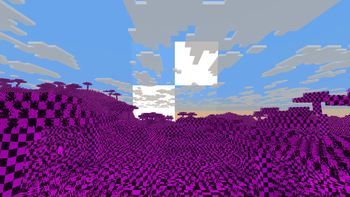
The shader should be compatible with every version of Optifine and Iris
Miniature Shader
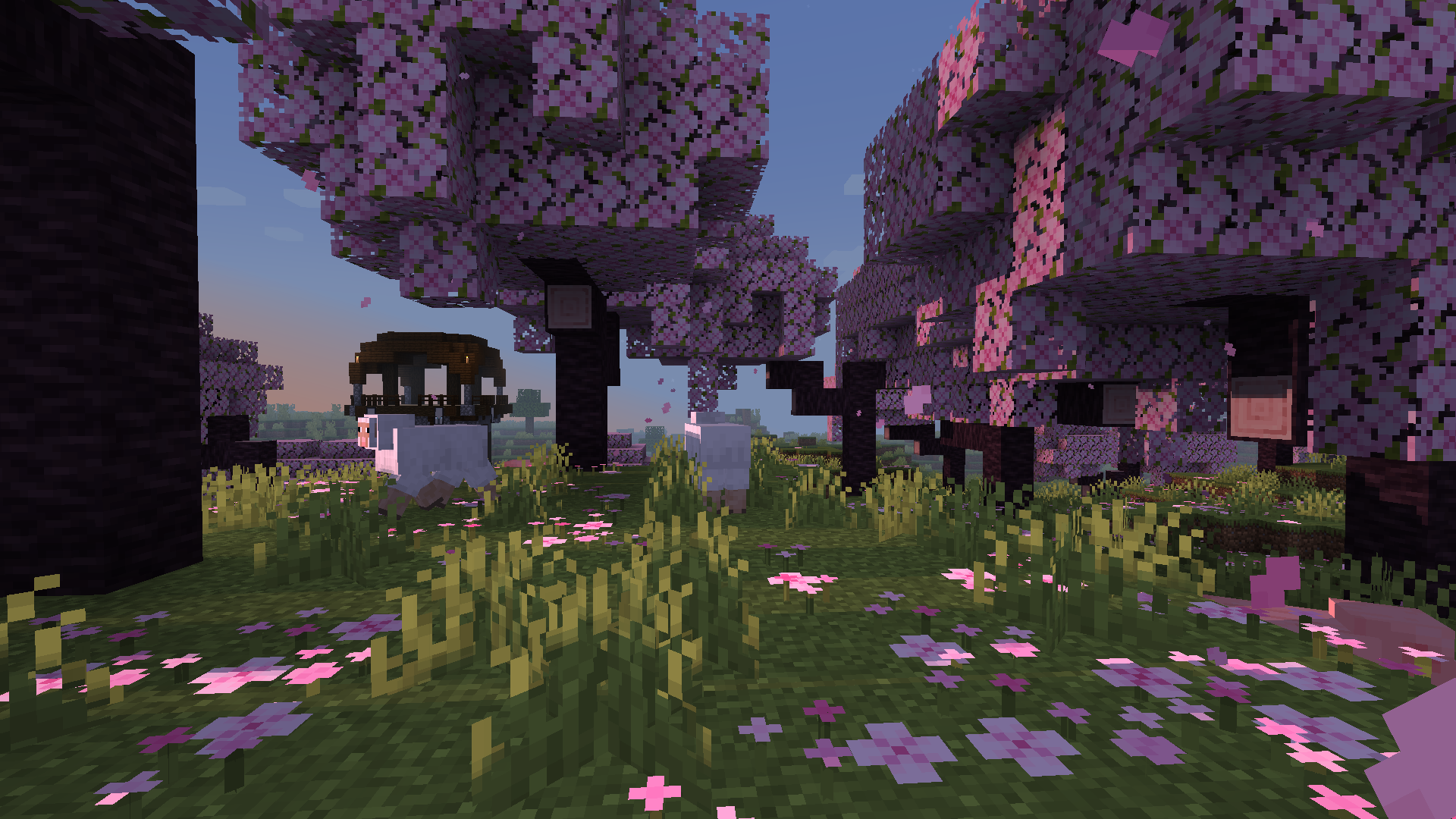
Miniature is a natural take on Minecraft shaders. It offers blocky shadows and reflections in water, ice and
other commonly reflective blocks, and a slight overhaul of emissive lighting; all in a very lightweight way. Its goal, above all else, is to keep with Minecraft’s model-like appearance without compromising performance.
Miasma


EN 🌐
# ABOUT:
**Miasma** – Cel-shading shader, familiar to many from the game **Borderlands**. In this interpretation, the shader transforms the world of Minecraft into a toxic, acidic planet that is uninhabitable but mesmerizing to look at!
– Miasma: the world breathes poison.
– Light bends through venomous air.
– Soil hums with decay.
– Step carefully—the planet remembers.
##### _Perfect for: Players looking for a unique, stylized experience, horror maps, or creating content with a bold, artistic look._
### SCREENSHOT:

## DEMO VIDEO
## LINKS:
– [Discord](https://discord.gg/Cz2sCWz5Wh) (Discuss, Bug Reports, Etc.)
– [YouTube](https://www.youtube.com/@lolip_p)
– [Telegram](https://t.me/LoLip_p_Community)
## INSTALL THE SHADERS
– Download Client Which Supports Installing Shaders Such As Optifine And Iris
– Download The Shaders
– Copy Shaders to /.minecraft/shaderpacks
– Launch Minecraft, Go To Options –> Video Settings –> Shaders
– Choose **Miasma**
RU 🐻
# О:
**Miasma** — шейдер с эффектом «цел-шейдинг», знакомый многим по игре **Borderlands**. В этой интерпретации шейдер превращает мир Minecraft в токсичную, кислую планету, непригодную для жизни, но завораживающую взгляд!
– Миазмы: мир дышит ядом.
– Свет преломляется в ядовитом воздухе.
– Почва гудит от гниения.
– Шагайте осторожно — планета помнит.
##### _Идеально подходит для: игроков, которые ищут уникальный стилизованный опыт, карты в жанре хоррор или создают контент с ярким художественным оформлением._
### СКРИНШОТ:

## ДЕМО ВИДЕО
## ССЫЛКИ:
– [Discord](https://discord.gg/Cz2sCWz5Wh) (Discuss, Bug Reports, Etc.)
– [YouTube](https://www.youtube.com/@lolip_p)
– [Telegram](https://t.me/LoLip_p_Community)
## УСТАНОВИТЕ ШЕЙДЕРЫ
– Загрузите клиент, поддерживающий установку шейдеров, таких как Optifine и Iris
– Загрузите шейдеры
– Скопируйте шейдеры в /.minecraft/shaderpacks
– Запустите Minecraft, перейдите в «Настройки» –> «Настройки видео» –> «Шейдеры»
– Выберите **Miasma**
DE 🍺
# ÜBER:
**Miasma** – Cel-Shading-Shader, vielen bekannt aus dem Spiel **Borderlands**. In dieser Interpretation verwandelt der Shader die Welt von Minecraft in einen giftigen, sauren Planeten, der unbewohnbar ist, aber faszinierend anzusehen!
– Miasma: Die Welt atmet Gift.
– Das Licht wird durch die giftige Luft gebrochen.
– Der Boden summt vor Verfall.
– Gehen Sie vorsichtig – der Planet erinnert sich.
##### _Perfekt für: Spieler, die ein einzigartiges, stilisiertes Erlebnis suchen, Horror-Karten oder die Erstellung von Inhalten mit einem kühnen, künstlerischen Look.
### SCREENSHOT:

## DEMO-VIDEO
## LINKS:
– [Discord](https://discord.gg/Cz2sCWz5Wh) (Diskussionen, Fehlerberichte usw.)
– [YouTube](https://www.youtube.com/@lolip_p)
– [Telegram](https://t.me/LoLip_p_Community)
## INSTALLIEREN DER SHADER
– Client herunterladen, der die Installation von Shadern wie Optifine und Iris unterstützt.
– Shader herunterladen.
– Shader in den Ordner „/.minecraft/shaderpacks” kopieren.
– Minecraft starten, zu „Optionen” –> „Videoeinstellungen” –> „Shader” gehen.
– **Miasma** auswählen.
CH 🐉
# 关于:
**瘴气**——一种细胞着色器,许多玩家通过游戏《无主之地》对其有所了解。在此版本中,该着色器将《我的世界》的世界转化为一片有毒的酸性星球,虽然无法居住,却令人着迷!
– 瘴气弥漫:世界呼吸着毒液。
– 光线在毒气中折射变形。
– 土壤因腐朽而低鸣。
– 步履需慎——这颗星球铭记着一切。
##### _适用场景:追求独特风格化体验的玩家、恐怖主题地图,或打造大胆艺术风格内容的创作者。_
### 截图展示:

## 演示视频
## 相关链接:
– [Discord](https://discord.gg/Cz2sCWz5Wh) (讨论区、错误报告等)
– [YouTube](https://www.youtube.com/@lolip_p)
– [Telegram](https://t.me/LoLip_p_Community)
## 安装着色器
– 下载支持安装着色器的客户端(如Optifine或Iris)
– 下载着色器文件
– 将着色器复制至 /.minecraft/shaderpacks 目录
– 启动Minecraft,进入选项 –> 视频设置 –> 着色器
– 选择 **Miasma**