ZoktayCraft

– **Embark on an adventurous journey where you build splendid structures, automate farms, and explore the vast world around you.**
– My personal modpack, which I use on the server where I play with my friends.
– **Is your ultimate goal when playing Minecraft to build magnificent structures? You’ll need tons of blocks and different block variants for that. So why not set up some factories to automate crafting? Sometimes building can get a bit repetitive, so it’s a great idea to switch things up with a bit of adventure!**
– This modpack enhances the vanilla experience by adding new features without drastically changing the core game.
Mod List
3d-Skin-Layers by tr7zw
AI-Improvements by BuiltBrokenModding
Advanced Peripherals by Srendi
Aethers Delight by zjjohn121110
Animal Feeding Trough by Slexom
Anvil Never Too Expensive by tinytransfem
AppleSkin by squeek
Architectury by shedaniel
Armor Statues by Fuzs
Astral Dimension by Mr.Sculk
Athena by ThatGravyBoat
AttributeFix by Darkhax
Auto Clicker by ErrorMikey
Autochef’s Delight by Snownee
Automobility by FoundationGames
BaguetteLib by Leclowndu93150
Balm by BlayTheNinth
Barbeque’s Delight by lcy0x1
Better Advancements by way2muchnoise
Better Archeology by Pandarix
Better Beds by TeamMidnightDust, Motschen
Better Ping Display by Quintinity
Better Third Person by Socolio
BetterF3 by TreyRuffy and cominixo
Block Runner by Fuzs
BoccHUD by TexTrue, CagayakeGirls
Bookshelf by Darkhax
BookshelfInspector by Lukasabbe
Bosses’Rises by Blockfactory, Unusual Squad
Brewin’ And Chewin’ by Probleyes, Umpaz, MerchantCalico
CC: Tweaked by Daniel Ratcliffe, Aaron Mills, SquidDev
Caelus API by Illusive Soulworks
Catalogue by MrCrayfish
Cerulean by Toni, Mephodio
Chat Heads by dzwdz, Fourmisain
Chefs Delight by Redstone Games
ChoiceTheorem’s Overhauled Village by ChoiceTheorem
Cloth Config v15 API by shedaniel
Clumps by Jared
Companion by Snownee
Configured by MrCrayfish
Continuity by PepperCode1
Controlify by isXander
Controlling by Jaredlll08
Crabber’s Delight by AlabasterLeking
Crate Delight by Axperty
Create by simibubi
Create Contraption Terminals by tom5454
Create Crafts & Additions by MRH0
Create Deco by Kayla, Talrey, Ordana, Cassian
Create Man of Many Planes by Fugimii, Baconzilla_
Create Slice & Dice by possible_triangle
Create: Bells & Whistles by lev
Create: CC Better Recipes by TheSoupMC
Create: Copycats+ by Lysine, Bennyboy1695, Redcat_XVIII
Create: Dragons Plus by DragonsPlus
Create: EMI Schematics by LiukRast
Create: Enchantment Industry by DragonsPlus
Create: Interiors by sudolev, rdh
Create: Mechanical spawner by oierbravo
Create: Oxidized by Pyzpre
Create: Power Loader by Lysine
Create: Sound of Steam by FinchyMcFinch, Deanosaur75
Cristel Lib by Cristelknight
Cubes Without Borders by Kir_Antipov
Cultural Delights by Developer: NCP Bails | Art: NCP Bails, Raspmary, Bagels, Nive
Curios API by C4
Cut Through by Fuzs
Decorative Lamps by Tobs
Deep Aether by RazorDevs
Deeper and Darker by Kyanite Team
Default Options by BlayTheNinth
Delightful Creators by Flomik
Dis-Enchanting Table by Lupin, Jason13
Display Delight by jkvin114
Do a Barrel Roll by enjarai
Dungeon’s Delight by Yirmiri & Betwixer
Durability Tooltip by SuperMartijn642
Dynamic FPS by juliand665 & LostLuma
EMI by Emi
EMI Enchanting by fzzyhmstrs
EMI Loot by fzzyhmstrs, lxly9 (art), unilock (ports)
EMI Ores by Abbie
EMI Professions (EMIP) by Mrbysco, ShyNieke
EMIffect by Flamarine
Easy Anvils by Fuzs
Easy Magic by Fuzs
Easy Shulker Boxes by Fuzs
Echo Chest by Fuzs
Effect Descriptions by Fuzs
EffectTimerPlus by NotRyken
Elytra Slot by Illusive Soulworks
Elytra Trims by KikuGie
EnchantmentDescriptions by Darkhax
End Villager Trader by Leonxkingx, MadeBySanny
Ender’s Delight by Axedgaming, Furti Two
Entity Model Features by Traben
Entity Texture Features by Traben
EntityCulling by tr7zw
Eternal Starlight by LeoLezury
Every Compat by MehVahdJukaar, Xel’Bayria, WenXin2
Expanded Delight by ianm1647
Exposure by mortuusars
Exposure Polaroid by mortuusars
Exposure: Expanded by Sparkwave, JohnRamRu
Extra Mod Integrations by Kneelawk, abbie, KirboEatsFood
Farmer’s Delight by vectorwing
Fast IP Ping by Fallen_Breath
Fast Item Frames by Fuzs
Fast Paintings by MehVahdJukaar
Ferrite Core by malte0811
FirstPerson by tr7zw
Flan by Flemmli97
Forgematica by TexTrue, CagayakeGirls
Forgified Fabric API by Sinytra, FabricMC
Framework by MrCrayfish
Freecam by hashalite,Matt Sturgeon
Fruits Delight by lcy0x1
Fzzy Config by fzzyhmstrs
GeckoLib 4 by Gecko, Eliot, AzureDoom, DerToaster, Tslat, Witixin
Gravestone Curios Compatibility by Leclowndu93150
Gravestone Mod by Max Henkel
Handcrafted by Alex Nijjar, Kekie6
Horse Expert by Fuzs
Hybrid Aquatic by Hybrid Labs
Iceberg by Grend
Illager Invasion by Dricky, Safro, Zeckemith, Fuzs
ImmediatelyFast by RK_01
Immersive Aircraft by Luke100000
Immersive Armors by Luke100000
Immersive Machinery by Luke100000
Immersive Melodies by Luke100000
Immersive Paintings by Luke100000
Incendium by Stardust Labs
InvMove by PieKing1215
InvMoveCompats by PieKing1215
Inventory Tweaks Refoxed by LobsterJonn (Current maintainer)
Iris by coderbot, IMS212
Jade by Snownee
Jade Addons by Snownee
Kiwi Library by Snownee
Konkrete by Keksuccino
Kotlin for Forge
LambDynamicLights by LambdAurora
Leaves Be Gone by Fuzs
Legendary Tooltips by Grend
Lithium by 2No2Name, JellySquid
Lithostitched by Apollo
Living Things by Buecher_wurm
Lodestone by Lodestar
Lootr by Noobanidus
MaFgLib by TexTrue, CagayakeGirls
Macaw’s Doors by Sketch Macaw & Sketch Peachy
Macaw’s Windows by Sketch Macaw & Peachy Macaw
Macro Keybinds by Thomas7520
Man of Many Planes by Luke100000, Man of Many Snails
Max Health Fix by Nerjal Nosk
Mechanicals Lib by oierbravo
Melody by Keksuccino
MidnightLib by TeamMidnightDust, Motschen
Miners Delight by Sammy;, Soytutta
MmmMmmMmmMmm by Mehvahdjukaar, Bonusboni, Gooigipunch, Plantkillable
ModernFix by embeddedt
MonoLib by Jason13
Moog’s Structure Lib by FinnDog
MoogsVoyagerStructures by FinnDog
Moonlight Lib by MehVahdJukaar
More Culling by FX – PR0CESS, 1Foxy2
More Delight by Axperty
Mouse Tweaks by Ivan Molodetskikh (YaLTeR)
MrCrayfish’s Furniture Mod: Refurbished by MrCrayfish
My Nether’s Delight by SoyTutta
Myths & Legends by oVinter
Naturally Trimmed by majo24
NetherPortalFix by BlayTheNinth
No Chat Reports by Aizistral
NotEnoughAnimations by tr7zw
NotSimpleShields by milwy
Ocean’s Delight by Scouter456
Overflowing Bars by Fuzs
PacketFixer by TonimatasDEV
Patchouli by Vazkii
Pick Up Notifier by Fuzs
Pineapple Delight by someoneice
Polymorph by Illusive Soulworks
PrickleMC by Darkhax
Prism by Grend
Puzzles Lib by Fuzs
Ramadan Delight by Eggmain
RealmRPG_SeaDwellers_REMASTER by MCreator
Rebind Narrator by quaternary
Reese’s Sodium Options by FlashyReese
Resource Pack Overrides by Fuzs
Resourceful Lib by ThatGravyBoat, Epic_Oreo
Resourcefulconfig
Resourcify by DeDiamondPro
Ribbits by Joosh, YUNGNICKYOUNG, HellionGames, Refresh Studios
RunicLib by Yirmiri
Rustic Delight by PhantomWing
ScalableLux by Spottedleaf, ishland
Scholar by mortuusars
Screenshot Viewer by LGatodu47
Searchables by Jaredlll08
SecurityCraft by Geforce132, bl4ckscor3, Redstone_Dubstep
ServerCore by Wesley1808
Sinytra Connector
Sit Anywhere! by SozoKa
Skeleton AI Fix by Fuzs
Small Ships by talhanation, metroite
Sodium by JellySquid (jellysquid3), IMS212
Sodium Extra by FlashyReese
Sodium Options API by toni
Stellarity by kohara
Storage Delight by Axperty
Structory by Botany, Starmute, catter1
SuperMartijn642’s Config Library by SuperMartijn642
TerraBlender by Adubbz
The Aether by AlphaMode, baguchi, bconlon, Blodhgarm, Burning Cactus, Drullkus, Hugo Payn, Jaryt, Katie ‘Oz’ Payn, quek, Raptor, reetam, RENREN, sunsette
The Undergarden by quek
ToastBegone by Raxdiam
Tom’s Simple Storage Mod by tom5454
ToolSwap by MelanX
Towns and Towers by Kubek and Biban_Auriu, Cristelknight999
Trade Cycling by Max Henkel
Trading Post by Fuzs
Traveler’s Backpack by Tiviacz1337
Trimmable Tools by Apollo, DawnKiro
TxniLib by Toni
Undergarden Delight by NoCube
Variants&Ventures by Faboslav
Vending Block: Restocked by Furglitch
Vista by MehVahdJukaar, Plantkillable
Visual Workbench by Fuzs
Waystones by BlayTheNinth
XP Tome by bl4ckscor3
Xaero’s Minimap by xaero96
Xaero’s World Map by xaero96
YUNG’s API by YUNGNICKYOUNG
YUNG’s Better Desert Temples by YUNGNICKYOUNG, Tera
YUNG’s Better Dungeons by YUNGNICKYOUNG, Acarii
YUNG’s Better Jungle Temples by YUNGNICKYOUNG, Tera
YUNG’s Better Mineshafts by YUNGNICKYOUNG
YUNG’s Better Nether Fortresses by YUNGNICKYOUNG, Acarii
YUNG’s Better Ocean Monuments by YUNGNICKYOUNG, Tera
YUNG’s Better Witch Huts by YUNGNICKYOUNG, Acarii
YUNG’s Cave Biomes by YUNGNICKYOUNG, HellionGames, Sully, LudoCrypt, Jasmine, K.jpg, Neko, Frenderman, Refresh Studios
Yapping Tooltips by Yirmiri
YetAnotherConfigLib by isXander
Zume by Nolij (@xdMatthewbx#1337)
oωo by glisco, Blodhgarm, BasiqueEvangelist, Noaaan
Zoglin Miniboss
# The Zoglin is usually just a novelty mob you see once for an advancement, or for an unusual farm, and leave it at that.
But as a miniboss, it can be a challenge with a powerful reward, that being the rotten tusk.
The Rotten Tusk gives potion effects for 3 minutes, those being:
– Strength 2
– Speed 2
– Absorption 4
– Hunger 2
The Zoglin can’t have a powerful reward without being buffed, so it has 100 health, some natural armor, extra damage and knockback, and increased size.
The Zoglin also drops rotten flesh, bones, and sometimes, a snout armor trim.
Zoe Isn’t Cyberpunk

### Summary:
**Zoe Isn’t Cyberpunk (Zoe)** is a Cyberpunk-influenced (*Influences include* Cyberpunk 2077, Cyberpunk RED *and* Cyberpunk: Edgerunners) mod. It takes many aspects of these universes and implements them in its own way.
# A new (https://www.youtube.com/watch?v=bDYwRxKdzEk) is now available!
## A new [wiki](https://zoeisntcyberpunk.wiki.gg/) is now available!
# The Zoe SMP is now live! Join the [discord](https://discord.com/invite/H3dTXFBPCA) for more information
**Features**: Implants, custom weapons, custom software, custom mobs, 2 bosses, building blocks and more.
The mod is recommended for multiplayer.
Stats
**Cybertechne:** Affects the quality of crafted implants, increased via crafting implants.
**Biotechne:** Represents your “humanity” – your capacity for handling implants. Increased by killing mechanical mobs (especially bosses) and having implants equipped.
**Robotechne:** Increases the power of software. Increased by having software equipped/using software.
Commands
**/zoe_techne** – Used to change a player’s Cybertechne/Biotechne/Robotechne
**/zoe_implant** – Used to generate or clear implants
**/zoe_software** – Used to equip or clear Software
Config
**zoe_config.toml** – General configurations to the Zoe experience
**zoe** (folder) – Configurable settings for each individual implant, including disabling them entirely
Compatibility & Support
### Implants:
Zoe uses JSON files for its implant attributes. If you wish to change them, you can find them in your game file directory (%appdata%) under …/config/zoe and you are free to change it as you wish.
the JSON file names must follow this format: ‘zoe_‘ or it will **not** work.
**NOTE:** If you want your implant changes to stay PERMANENT between mod updates, set their “update” value to ‘false’!
While it is possible to change implant details during runtime, I highly advise against it on servers and even in Singleplayer to avoid any issues (for example, the attribute application system breaking). You should close your world/server before making changes to the JSON files.
### Other
Zoe uses tags and similar things to try and be as friendly as possible for compatibility with other mods. Joining the discord and asking me directly is the best way to learn more about this.
Notice
This mod does not associate itself officially with any of the influences mentioned above, it is merely inspired by them.
This mod is made using **MCreator**. I hope to improve my coding so I’ll eventually be able to move to full-on coding, but MCreator will remain my main method of development until further notice.
While MCreator does get a lot of flak for understandable reasons (and also some pre-determined disinclination), I’ve tried my very best to implement proper compatibility and support where I could for server owners, other mods and the like.
For more info regarding compatibility/support, please check the ‘Compatibility & Support’ section.
Zodiac

ENGLISH
# Welcome to Zodiac: Official Mod Pack of Zodiac Servers – Terror Edition!
## Explore a World of Possibilities
Get ready to embark on an unparalleled adventure in Minecraft with Zodiac! This mod pack has been carefully designed to offer you an incredibly enriched gaming experience. With a perfect combination of exciting challenges, new biomes and creatures, visual and sound enhancements, and essential tools, every moment in this world will be unforgettable. Dive into this vast universe and discover everything that awaits you!
—
### 🌌 Immerse Yourself in a World of Mystery and Adventure
Dare to explore the darkest corners of Minecraft with a set of improvements that will make you feel true fear. From shadowy creatures to terrifying atmospheres, every night will be a challenge for your nerves.
### 🐉 Expand Your World with New Creatures and Biomes
Discover a universe full of life and variety with an incredible amount of new creatures and biomes. Travel through exotic landscapes, from lush prehistoric jungles to icy tundras, and face never-before-seen animals.
### 💀 Unprecedented Challenges with Stronger Monsters
Prepare to face more powerful and terrifying monsters. With enhanced and more aggressive enemies, every battle will be a test of your skill and bravery.
### 🏰 Exploration and Amazing Structures
Your explorations will lead you to discover majestic structures and landscapes that will leave you breathless. From mysterious temples to abandoned castles, every corner hides secrets waiting to be revealed.
### ⚔️ Epic Weapons and Tools
Equip yourself with a variety of unique weapons and tools that will help you survive in this hostile world. Upgrade your weapons, use specialized tools, and carry backpacks that will make your adventures more manageable.
### 🛡️ Fluid and Dynamic Combat
Experience a revamped combat system, with fluid movements and advanced strategies that will allow you to dominate your enemies. Dodge, roll, and fight with unparalleled precision.
### 🏡 Detailed Decoration and Customization
Bring your world to life with incredible decoration options. From detailed furniture to aesthetic upgrades, transform your home into a cozy and stylish refuge.
### 🔊 Improved Sounds and Visuals
Enjoy an unprecedented auditory and visual experience. Every step, every landscape, and every battle feel more real and immersive thanks to sound improvements and impressive visual effects.
### 🍲 Renewed Flavor and Sustenance
Enhance your culinary experience with a wide variety of new recipes and crops. From delicious dishes to automated farms, food has never been so important in your adventures.
### 🚀 Optimal Performance
Ensure your game runs smoothly and efficiently with optimization improvements. Play without interruptions and enjoy a fluid, lag-free gaming experience.
### 🛠️ Essential Tools and Functionalities
Access a set of tools that will facilitate your journey. From detailed maps to teleportation systems, each mod is designed to make your life easier and your adventure more epic.
—
Get ready for the most complete and exciting Minecraft experience you’ve ever had with Zodiac! Each mod has been carefully selected to offer you a perfect mix of challenge, exploration, and fun. Are you ready to embark on this incredible adventure? The world of Minecraft awaits you!
ESPAÑOL
# ¡Bienvenido a Zodiac: Mod Pack Oficial de Zodiac Servers Edición Terror!
## Explora un Mundo de Posibilidades
¡Prepárate para embarcarte en una aventura sin igual en Minecraft con Zodiac! Este mod pack ha sido cuidadosamente diseñado para ofrecerte una experiencia de juego increíblemente enriquecida. Con una combinación perfecta de desafíos emocionantes, nuevos biomas y criaturas, mejoras visuales y sonoras, y herramientas indispensables, cada momento en este mundo será inolvidable. ¡Adéntrate en este vasto universo y descubre todo lo que te espera!
—
### 🌌 Sumérgete en un Mundo de Misterio y Aventura
Atrévete a explorar los rincones más oscuros de Minecraft con un conjunto de mejoras que te harán sentir el verdadero pavor. Desde criaturas sombrías hasta atmósferas aterradoras, cada noche será un desafío para tus nervios.
### 🐉 Expande tu Mundo con Nuevas Criaturas y Biomas
Descubre un universo lleno de vida y variedad con una increíble cantidad de nuevas criaturas y biomas. Viaja a través de paisajes exóticos, desde exuberantes selvas prehistóricas hasta tundras heladas, y enfréntate a animales nunca antes vistos.
### 💀 Desafíos Inéditos con Monstruos Más Fuertes
Prepárate para enfrentarte a monstruos más poderosos y aterradores. Con enemigos mejorados y más agresivos, cada batalla será una prueba de tu habilidad y valentía.
### 🏰 Exploración y Estructuras Asombrosas
Tus exploraciones te llevarán a descubrir majestuosas estructuras y paisajes que te dejarán sin aliento. Desde misteriosos templos hasta castillos abandonados, cada rincón esconde secretos esperando ser revelados.
### ⚔️ Armamento y Herramientas Épicas
Equípate con una variedad de armas y herramientas únicas que te ayudarán a sobrevivir en este mundo hostil. Mejora tus armas, usa herramientas especializadas y lleva contigo mochilas que harán de tus aventuras algo más llevadero.
### 🛡️ Combate Fluido y Dinámico
Experimenta un sistema de combate renovado, con movimientos fluidos y estrategias avanzadas que te permitirán dominar a tus enemigos. Esquiva, rueda y lucha con una precisión sin igual.
### 🏡 Decoración y Personalización Detallada
Dale vida a tu mundo con opciones de decoración increíbles. Desde mobiliario detallado hasta mejoras estéticas, transforma tu hogar en un refugio acogedor y estilizado.
### 🔊 Sonidos y Visuales Mejorados
Disfruta de una experiencia auditiva y visual sin precedentes. Cada paso, cada paisaje y cada combate se sienten más reales y envolventes gracias a las mejoras de sonido y los impresionantes efectos visuales.
### 🍲 Sabor y Sustento Renovado
Mejora tu experiencia culinaria con una gran variedad de nuevas recetas y cultivos. Desde deliciosos platillos hasta granjas automatizadas, la comida nunca había sido tan importante en tus aventuras.
### 🚀 Rendimiento Óptimo
Asegúrate de que tu juego funcione de manera suave y eficiente con las mejoras de optimización. Juega sin interrupciones y disfruta de una experiencia de juego fluida y sin lag.
### 🛠️ Herramientas y Funcionalidades Esenciales
Accede a un conjunto de herramientas que facilitarán tu viaje. Desde mapas detallados hasta sistemas de teletransporte, cada mod está diseñado para hacer tu vida más fácil y tu aventura más épica.
—
¡Prepárate para la experiencia Minecraft más completa y emocionante que jamás hayas tenido con Zodiac! Cada mod ha sido seleccionado cuidadosamente para ofrecerte una mezcla perfecta de desafío, exploración y diversión. ¿Estás listo para embarcarte en esta increíble aventura? ¡El mundo de Minecraft te espera!
### Based on the work of Sfinford and UltimatChamp
– [OptimumFuse – UltimatChamp](https://modrinth.com/modpack/optimum-fuse)
– [THE DWELLERS – Sfinford](https://modrinth.com/modpack/dwellers-modpack)
### Credits to the Following Mods:
– [Vanilla Refresh created by limesplatus](https://modrinth.com/datapack/vanilla-refresh)
znodes
# znodes

Map painting – but in block game. Fork of the original minecraft-nodes project by phonon
I created this fork due to the the last commit on phonon’s repo being from two years ago. I have no intention of supporting older versions, if you are on an outdated version, update.
Other plugin modules such as the dynmap and ports plugin will be moved to seperate repos.
## What is nodes?
Nodes takes inspiration from Towny, Hearts of Iron 4, and the famous Minecraft factions experience from 2014.
* Map segmented into pre-created territories which are groups of contiguous minecraft chunks.
* Territories have different resource nodes which provide different resource yields from mining and different rates for farming, animal breeding, etc…
* Players form a town which controls territories. Initial territory claims must be connected.
* War is capturing territories from another town.
* Towns choose 1 territory to be their capital which cannot be taken until all other territories are captured.
* A captured territory is occupied and provides resource benefits to the occupier. The occupier has the option to annex a territory and add it to their town.
## Notable Changes Over Upstream
* Folia Support
* Modern version support
original author: phonon
znodes fork maintainer: tlm920
ZN Vanila (Reborn)
# EN:
Mods for a comfortable and stable game with RP elements.
The modpack is designed for a vanilla experience, both in single-player worlds and on servers.
The modpack includes the [ZN Lite](https://modrinth.com/modpack/zn-lite-reborn) sub-modpack, which significantly optimizes your Minecraft. It also features popular mods such as PlasmoVoice, Distant Horizons, Iris Shaders, and others, ensuring a smooth, enjoyable, and user-friendly gameplay experience with seamless player interactions.
You can view the full list of mods by clicking on the modpack version in the releases menu.
ZMiracle (MIRACULOUS) RABBIT MIRACULOUS
– Hi, this is the ZMiracle mod. This mod is dedicated to the cartoon series LadyBug and Cat Noir. The mod is early, but it will develop quickly! (The mod supports survival)
– Compatible with optifine
– The mod adds Kwami to the game, which make it possible to transform into a hero. Kwami come from Miraculous Jewelry that can be created thanks to a Grimoir. (it is advised to use JEI for crafting)
– Also in mod there is a full localization of the Russian language and a choice of suit and camouflage – /zmenu
> Key Bing:
1. Z – Detransformation
2. X – Transformation
3. C – Power
4. V – Hide/Show kwami
5. B – Renounce
6. N – Weapon Mode
– Rabbit update last. Mod closed. I`m sorry
ZLives

# Please read the concept of this plugin
## Concept :
– **1. Player A and Player B gets default 3 lives and 10 Hearts**
– **2. Player A killed Player B, then Player B will lose 1 live (remaining = 2) and in exchange of the live, player B will get +5 Hearts (total = 15).**
– **3. If Player A again killed Player B, then Player B will lose 1 live (remaining = 1) and in exchange of the live player B will get +5 Hearts (total = 20)**
– **4. After this if Player B killed Player A, then Player B will gain 1 live and -5 Hearts.**
– ### *NOTE : The maximum hearts obtainable are 25 and maximum lives are 3, so no one can go beyond it (untill changed from config.yml)*
## 1. Plugin Description
**ZLives** is a unique Minecraft plugin that introduces a **lives and heart system** to your server. Players start with a limited number of lives and hearts, and their actions (such as killing other players or being killed) affect their lives and hearts. Key features include:
– **Lives System**:
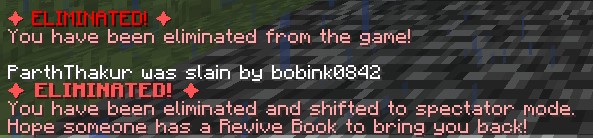
Players start with a default number of **3 lives**. When a player loses all their lives, they are eliminated and put into spectator mode.
– **Heart System**:
Players have a limited number of hearts, **default is 10** (20 Heart points). Hearts determine the player’s max health.
– **Revival System**: Eliminated players can be revived using a special **Revive Book** or by an admin using the `/revive` command.
– **Elimination Animation**: When a player is eliminated, a dramatic animation and sound effect play to signify their elimination.
– **Customizable Config**: The plugin allows server admins to configure default lives, hearts, and other settings via the `config.yml` file.
– **Commands**:
– `/lives`: Check your remaining lives and hearts.
– `/revive `: Revive an eliminated player (admin-only).
– `/elimination-animation`: Play the elimination animation on a player or at specific coordinates (admin-only).
## 2. Installation Guide
Follow these steps to install and set up the **ZLives** plugin on your Minecraft server:
#### **Step 1: Download the Plugin**
1. Download the `ZLives.jar` file from the provided source (e.g., SpigotMC, GitHub, or your custom build).
2. Place the `ZLives.jar` file in your server’s `plugins` folder.
#### **Step 2: Start the Server**
1. Start or restart your Minecraft server.
2. The plugin will generate a default `config.yml` file in the `plugins/ZLives` folder.
#### **Step 3: Configure the Plugin**
1. Open the `config.yml` file located in the `plugins/ZLives` folder.
2. Customize the settings as needed.
#### **Step 4: Test the Plugin**
1. Join your server and test the plugin’s features.
2. Use the `/lives` command to check your lives and hearts.
3. Test the elimination and revival mechanics.
—
## **3. Screenshots**
### **Elimination Animation**
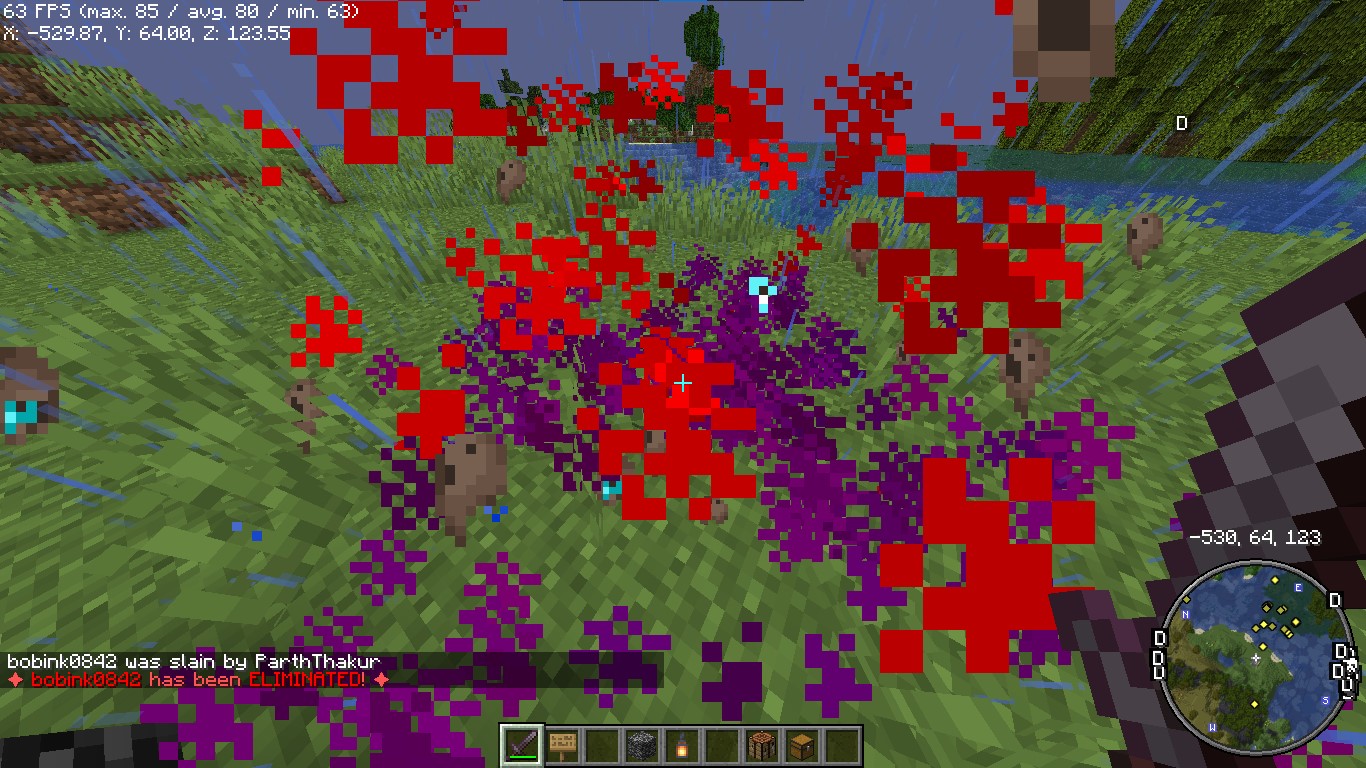
*Players see a dramatic animation when they are eliminated.*
### **Revival Animation**
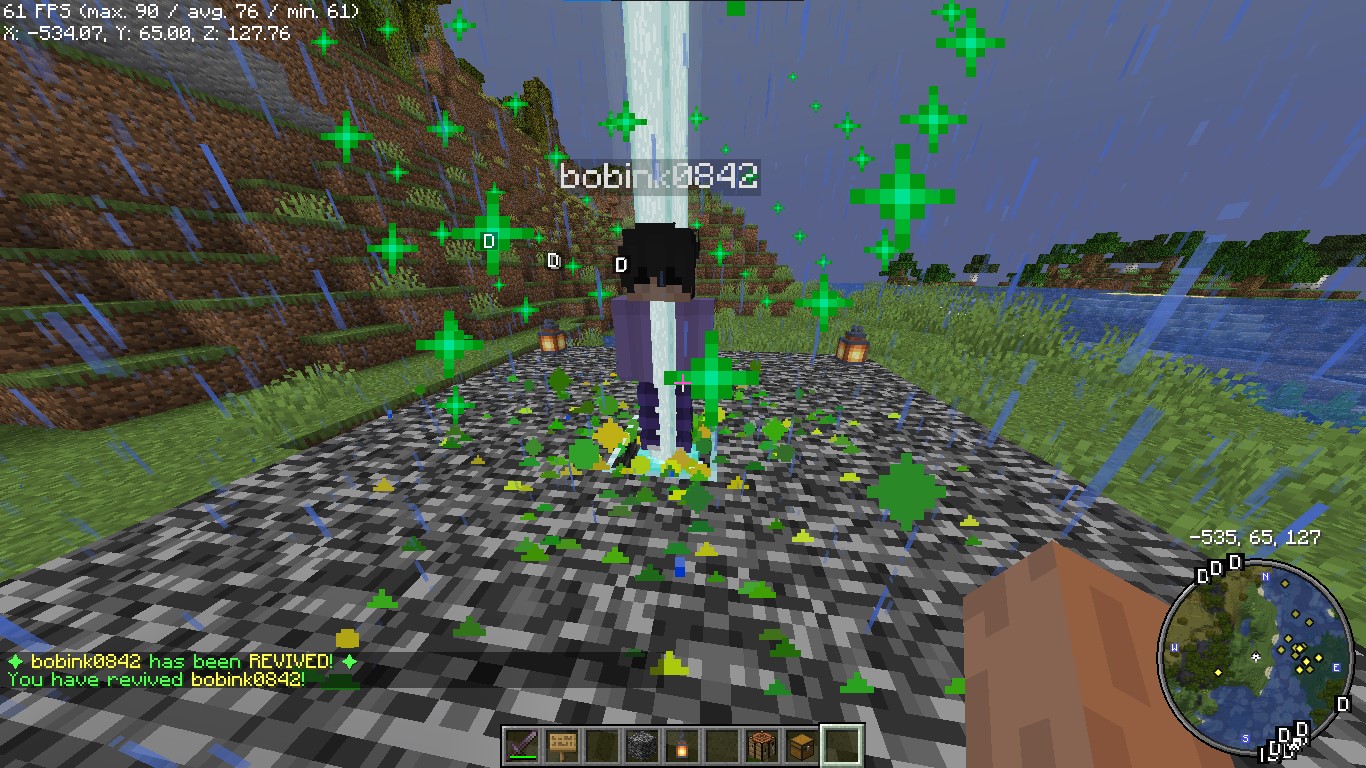
*Players see a dramatic animation when they are eliminated.*
### **Revive Book**

*The Revive Book can be crafted and used to revive eliminated players.*
### *Note: This recipe can be changed from config.yml.*
### **Remaining Lives message after killed by a player**

### **+5 Hearts on every death by a player**
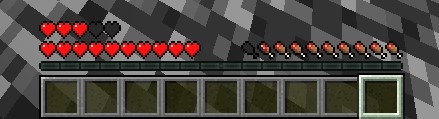
*+5 Hearts when a player is killed by other player*
### **Elimination Message**
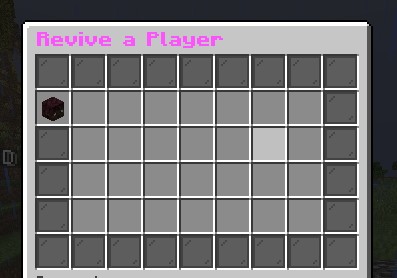
### **ReviveGUI**
## **4. Donations**
### Liked my Content? Want to support me?
– **Support me by sending money on this UPI QR Code**.

## **5. Reporting Issues**
**Need Help? Contact Us!**
Encountered a problem or have suggestions? We’re here to assist you!
### 📧 **Discord Support**: Contact me on Discord at **@iitian_69**.
#### **Step 1: Check the Logs**
1. Look for error messages in the server console or `logs/latest.log`.
2. Copy the relevant error message.
#### **Step 2: Provide Details**
When reporting an issue, include the following information:
– **Minecraft Version**: The version of Minecraft your server is running.
– **Server Software**: The server software you’re using (e.g., Spigot, Paper).
– **Plugin Version**: The version of the **ZLives** plugin you’re using.
– **Steps to Reproduce**: A detailed description of how to reproduce the issue.
– **Error Logs**: The error message or log snippet.
#### **Step 3: Submit the Issue**
**Contact me at discord username is : @iitian_69**
#### **Example Issue Report**
“`
**Minecraft Version**: 1.21.4
**Server Software**: Paper
**Plugin Version**: 1.0.0
**Issue**: Players are not losing hearts when they kill another player.
**Steps to Reproduce**:
1. Set default lives to 3 and hearts to 10 in the config.
2. Have a player with 2 lives kill another player.
3. Check the killer’s hearts after the kill.
**Error Logs**: [No errors in the logs]
“`
### **Final Notes**
The **ZLives** plugin adds a unique and engaging gameplay mechanic to your Minecraft server. If you have any questions, need further assistance, or want to suggest new features, feel free to reach out! 😊
Happy gaming! 🚀
zLife Season 1
Start with 1 heart and 7–13 lives. On death: lose 1 life, gain 1 heart. On kill: gain 1 life. Name color shows lives: Red (1–3), Yellow (4–6), Lime (7–9), Dark Green (10+). Run out of lives = elimination.
zItemStacker
[](https://minestrator.com/a/GROUPEZ)
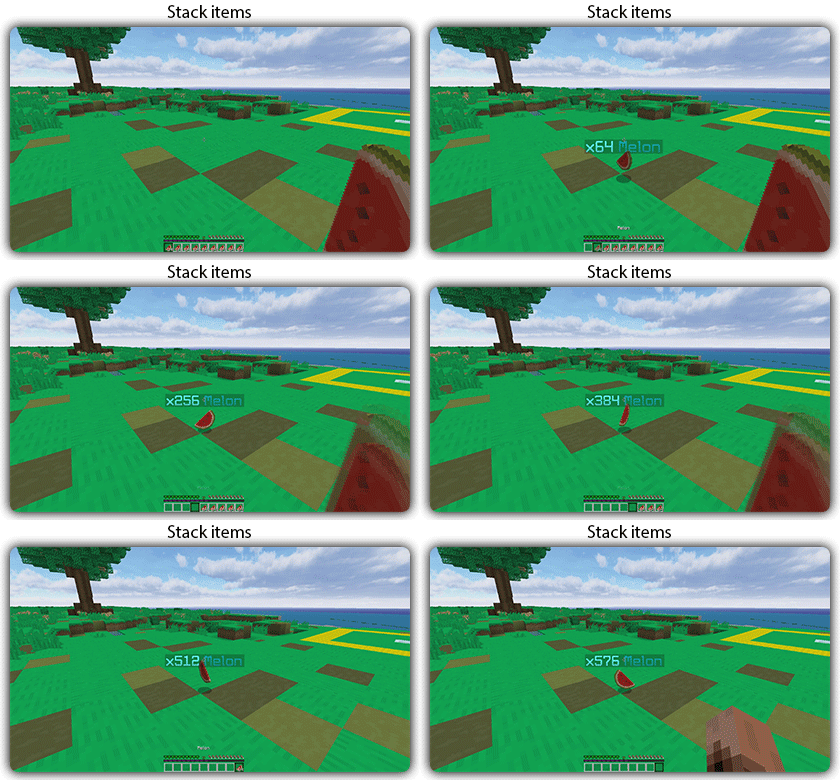
zItemStacker
Allows you to stack your items
## Features:
– You can whitelist items to be taken into account by the plugin.
– You can blacklist the items that should not be taken into account by the plugin.
## Commands:
– /zitemstacker reload – reload lang and config file
– /zitemstacker version – show plugin version
Source code: https://github.com/Maxlego08/zItemStacker
Support: http://discord.groupez.dev/