XP Storage


**NO PORT TO FORGE PLANNED!** *(but feel free to port it by yourself and link it)*
***The mod is fully configurable to enable only changes that you like***
# Description
In this mod, you can craft XP Books in order to store your experience and save it from a coming death. After storing it, you can retrieve your experience back in two different ways: same way that you stored it OR you can brew the experience of the XP Book with the brewing stand in order to create special Experience Bottles that can give you even more experience.
TO READ WHEN UPDATING TO V1.6
⚠️ **v1.6 UPDATE:** XP Book II and III were ***removed***, and there were some changes with item data! You can update the mod in your world **without losing anything**, but be sure to put your books in a crafting table to **update** them. *Old saves won’t be supported forever, this warning will be update whenever a version without the transition support is uploaded.*
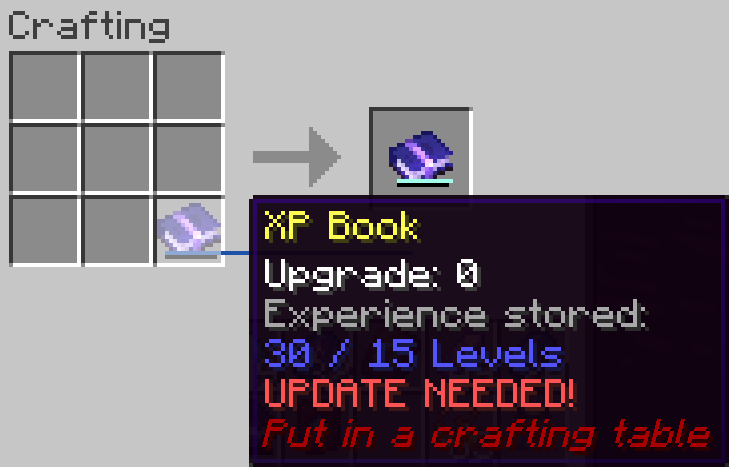
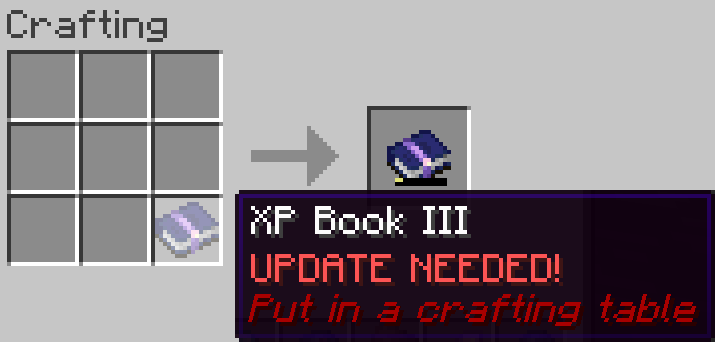
This is a short description, full description below.
# FAQ
– **Does it work on a server?** Yes, it works on a server. File needed for **both** client **and** server
– **Can I include it in my modpack?** Yes, you are free to include this mod into your modpack
– **For any other things:** Feel free to share your experience, problems, enhancement ideas in the Discord server, or directly creating issues on the GitHub
# Full description
Recipes
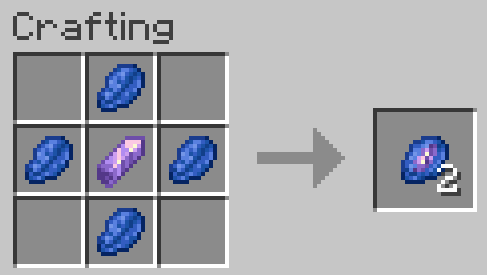
## Crystallized Lapis
– 4 Lapis Lazuli *(it stores experience so that makes senses)*
– 1 Amethyst Shard *(it’s a precious gem)*
## XP Book
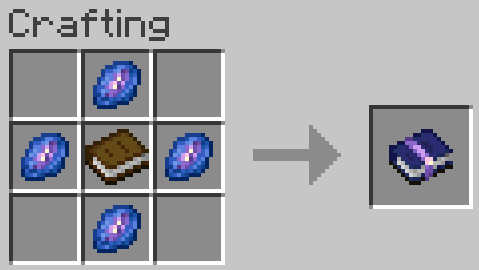
– They can store up to **15** levels without upgrades (config).
This means experience to go from 0 level to X levels! Not the same amount than experience from Y to X+Y!
– 1 Book *(of course, it’s a book)*
– 4 Crystallized Lapis
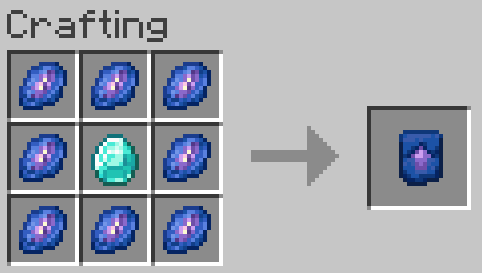
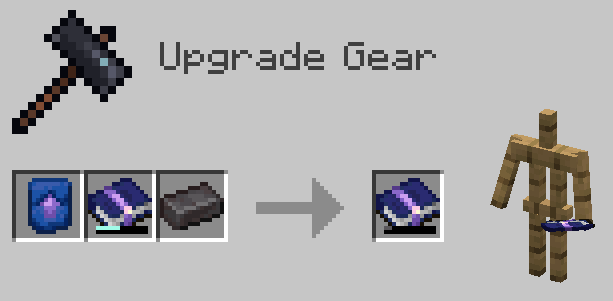
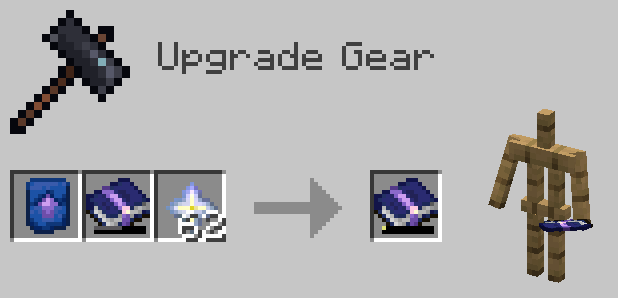
## Smithing Template
– They can be used to upgrade XP Books of any level, only the ingredient with it changes
– 1 Diamond
– 8 Crystallized Lapis
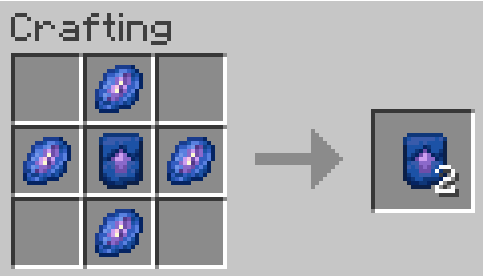
## Smithing Template Duplication
– 1 Smithing Template
– 4 Crystallized Lapis
How to use?
## XP Book
– **Store experience:** Store the maximum amount of your experience in the book by right clicking. If you have more experience than the maximum amount, you will keep the remaining experience
– **Retrieve experience:** Get 85, 90, 95 or 100% (depending on book’s level) of the experience stored in the book by right clicking while sneaking
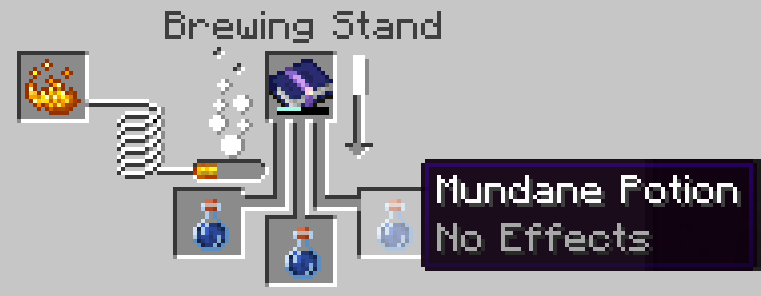
## Brewing
– Take 1, 3, 5 or 10 levels (depending on book’s level) of the experience stored in the book for each mundane potions (or Experience Bottle) placed in the brewing stand and put it in the resulting Experience Bottle (or add it to the current ones)
– Each Experience Bottle can store a maximum of 30 levels (config)
## XP Book Upgrades
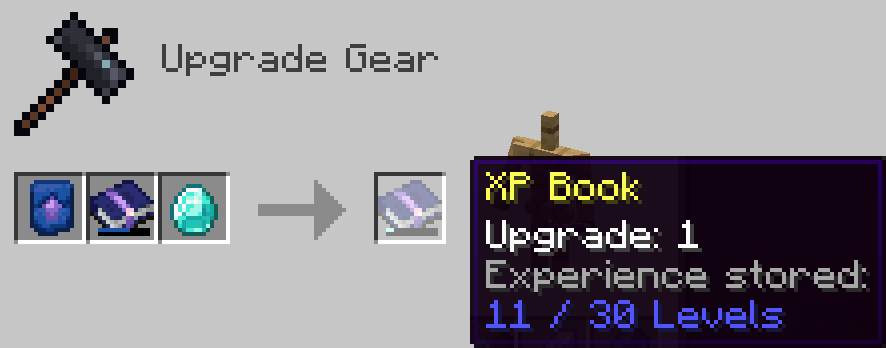
– You can upgrade the book, so that it can store more experience and retrieve it more efficiently
– You need to craft an XP Book Upgrade Smithing Template and use it with the right ingredient, depending on the XP Book level in input (Diamond, Netherite Ingot or Nether Star).
– You can update the new smithing recipes to customize the parameters of the XP Book in output, such as its new capacity or efficiency for example with your custom resource pack
– You can also add new smithing recipes in your custom resource pack to add more XP Book levels

Click Here to Support my Projects
Skelun’s XP Reward System

_It’s unfair for players who likes to chill and gather materials to not get any XP while tryharders are building a thousand mob farms getting loads of experience to enchant everything._
_This is why I created this Mod/Datapack_
## ✨ NEW WAYS TO EARN XP


—
## 📝 RULES
* To receive XP by **Mining**, **Cutting**, **Digging** or **Farming** you must be using the appropriate tool;
* You receive less XP for “**Ice Boating**” or for using the “**Rail Bug**”;
* You receive less XP for **Traveling** if you are using something that speeds you up;
* You receive less XP for certain enchantments in specific conditions (e.g.: having *Depth Strider* and walking underwater).
## 🛠️ Mod Support
It supports any _*”Right-Click Harvest”*_ mod or data pack.
It supports any mod or data pack that allows you to break multiple blocks, like _*”vein mine”*_ or _*”timber”*_.
I have not included support for any modded tool, but if you want any, just ask!
## 📖 Settings
As of `version 2.6.1` you can now change some settings in-game.
> You need to be in creative mode (and if in a server, be an OP)
Type this command in chat to give yourself a written book:
“`/function sklps:config“`
It allows you to change some settings once you open it.
—
#### 🔢 *Detailed Information on the numbers I used:* **Google Sheets File**
—
💖 Feel free to give any feedback, trash talk or ask for anything.
**You can contact me on PlanetMinecraft**
**Or create an issue on Github**

XP = LIFE
✨ SoulXP
SoulXP is a plugin that transforms your life force (XP) into a livelihood, serving as the core of the server’s economy.
💰 The Living Economy
Instead of gold or coins, Raw XP is your primary currency.
Utility: Use it for trading with players or stocking Vault-compatible shops.
The Flat Curve: After Level 40, the XP curve flattens. Leveling from 140 to 141 is just as easy as leveling from 45 to 46.
Soul Shards: Use /soul withdraw to create physical items. These can be traded, sold, or right-clicked to absorb the XP back.
⏳ Survival & The “Soul Take”
You are a living battery, and the server is constantly draining your energy.
The Drain: Every minute, the “Soul Take” consumes 200 Raw XP.
The Floor: You will never drop below Level 20 via the drain. This is also your starting and respawn level.
Death Penalty: Dying removes 100 levels. If your level is already low, you simply reset to the Level 20 floor.
🎭 Status & Power Tiers
Your current XP level directly dictates your physical strength and status:
🌑 Hollow (0 XP): Severe penalties, smoke particles, and a grayed-out name.
🏚️ Weakened (< Lv. 20): Inflicts Slowness, Weakness, and Mining Fatigue.
⚡ Ascended (> Lv. 60): Grants permanent Strength and Speed.
👑 Elite (> Lv. 150): Scaling buffs that cap at Strength III and +10 Bonus Hearts.
🛠️ Commands & Tools
Player Commands
/soul balance: Check your current XP wealth.
/soul pay : Transfer raw XP to another player.
/soul top: View the leaderboard of the strongest souls.
Admin Commands
/soul admin : Manage the economy.
/soul admin reload: Refresh the plugin configuration.
🧩 PlaceholderAPI Support
Display soul data in menus and scoreboards using:
%soul_balance%, %soul_raw_xp%, %soul_is_hollow%, and %soul_next_drain%.
XP Level = World Border
## Description
This datapack makes the world border grow with your experience level, resulting in a unique and challenging experience.
You can configure how large the border will be at the start and how much it grows with gained levels. When used in multiplayer, the experience of all online players gets added up.
## Configuration
### Menu
Use “`/trigger levelborder“` to open the configuration menu.
### Start Size
To configure how large the border should be at the start, use “`/trigger borderStartSize set “` (replace value with the size is blocks).
### Multiplier
Change how much the border will grow for each level gained, by using “`/trigger borderMultiplier set “` (replace value with the growth in blocks/level).
XP-Health
### XP-Health is a Minecraft datapack that dynamically scales a player’s maximum health based on their experience level.
As players level up, their health steadily increases, starting from 5 hearts at level 0. Each subsequent level adds half a additional heart, up to a maximum of 255 hearts at level 500. Once players reach level 500, their experience points are reset to 0 and capped at level 500, preventing any further health increases beyond this point. This datapack provides a powerful incentive for players to continue exploring, fighting, and gaining experience, as their health grows with every level.
XP Crystals
# XP Crystals
Ever wished you could bank your hardearned **XP** without the risk of dying and losing it all? With **XP Crystals**, you can **store** and **retrieve** your experience safely, using items that are fully compatible with **survival** gameplay.
_Available as **mod** or **datapack**._
## Features
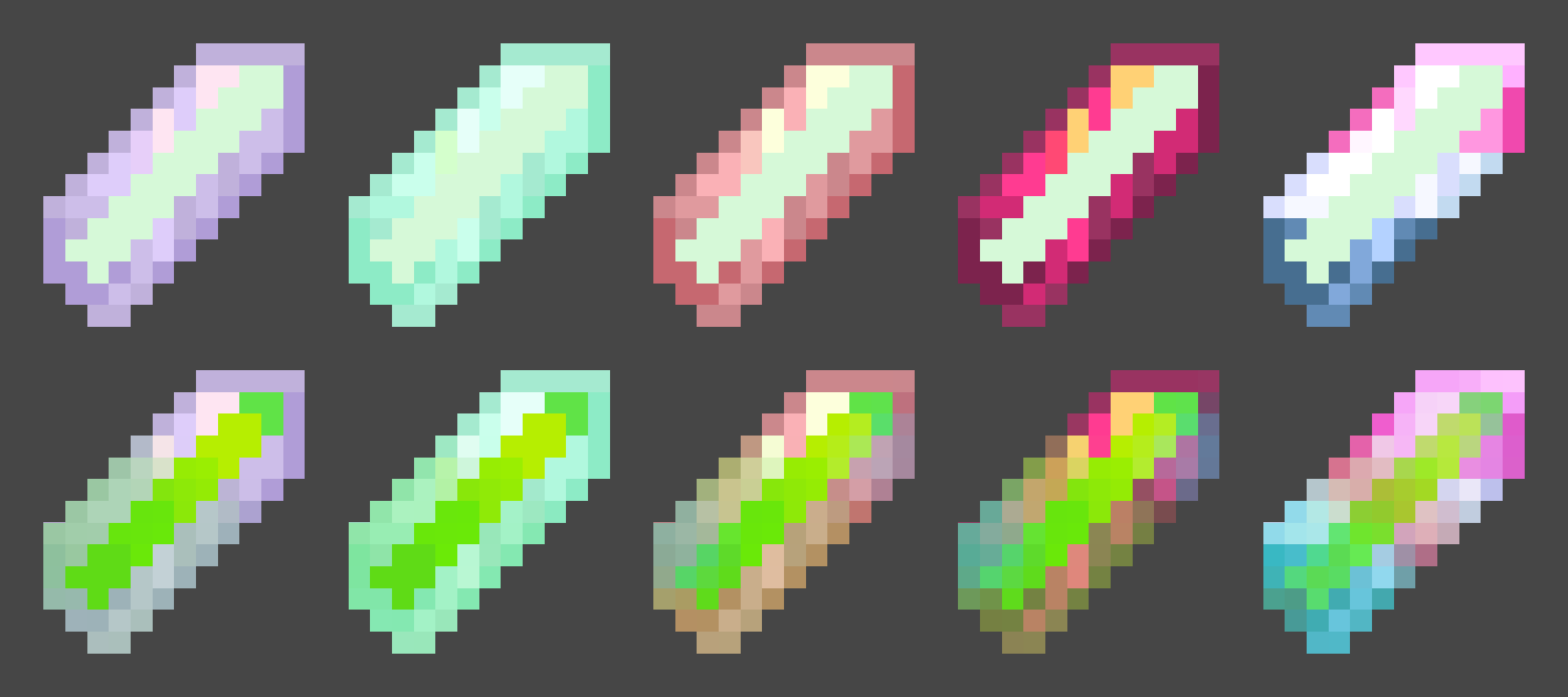
– Store XP in craftable crystals
– Crystals come in multiple tiers, each with a different capacity:
– Tier I: 3 levels
– Tier II: 10 levels
– Tier III: 30 levels
– Tier IV: 50 levels
– Tier V: Infinite XP storage
– Survival oriented, with balanced crafting recipes.
– Multiple Advancements
– Easy to use: right click to deposit or withdraw XP
– Settings menu for both admins and normal players
– Serverside (resource pack required for clients)
### Settings
admins may use /trigger xp_crystals.globalsettings
players may use /trigger xp_crystals.settings
Player Settings
Sound Effects [Turns on or off soundeffects per player]
Global Settings
– Strict Mode: Enables accurate XP point calculation instead of using XP levels only (Enabled by default)
– Toggle global sound effects on or off.
– Hardcore Mode: Automatically awards an achievement that can only be obtained by dying.
– Uninstall Function: Removes all data left over from the datapack/mod~~~~.
### installation
**Mod Version:**
– Singleplayer: Add the mod into the mods folder. Done
– Multiplayer: Server requires mod, Clients only need resource pack
**Datapack Version:**
– Singleplayer: add datapack into the worlds datapack folder, add the resource pack to your resource pack folder.
– Multiplayer: Server requires datapack, Clients only need resource pack
## Need Help? Want to offer feedback?
join the Discord
Xp Bottles
**Unlock the ability to safely store and share your hard-earned XP with the **XP Bottles Datapack**. Never lose your experience points upon death, and easily share XP with your friends by storing it in customizable XP containers!**
## Store Your XP
With this datapack, you can store your XP in special containers like capsules, vials, and canisters. No more worrying about losing all your progress when things go wrong—store your XP and keep it safe for later use or share it with your friends.
**How It Works:**
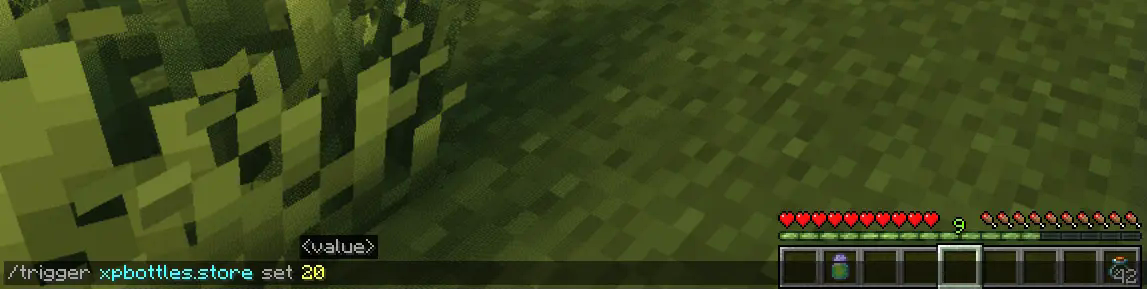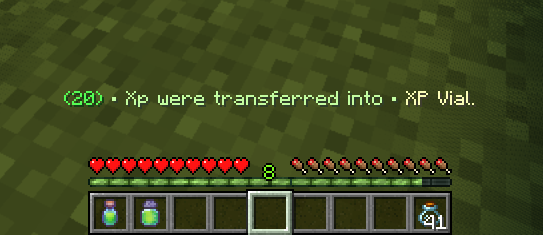
– To store your XP, simply use the command:
`/trigger xpbottles.store set `
– Make sure you have empty **Glass Bottles** in your inventory.
Depending on how much XP you’re storing, the number of glass bottles needed will vary:
– **1 Glass Bottle** for less than **40 XP**
– **2 Glass Bottles** for XP between **40** and **100 XP**
– **3 Glass Bottles** for **more than 100 XP**
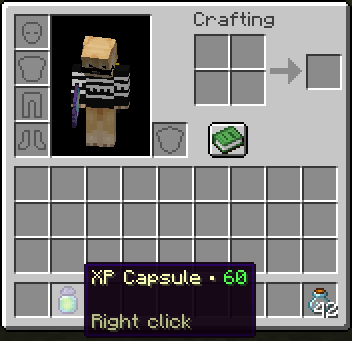
The XP will automatically be stored in the appropriate item (XP Capsule, XP Vial, or XP Canister) based on the amount.
## Retrieve Your XP
Getting your XP back is as easy as right-clicking with the XP item in your hand. Instantly reclaim the XP stored in the container and get back the glass bottles you used. No complicated commands—just a simple action to retrieve what you saved.
### Key Features:
– **XP Storage & Safety:** Protect your XP from being lost when you die by storing it in reusable containers.
– **Flexible Storage Options:** Store different amounts of XP in different-sized containers based on your needs.
– **Easy Sharing:** Share XP with other players by giving them the XP items you’ve stored.
– **Simple Commands & Actions:** No complicated setup—just easy-to-use commands and in-game mechanics.
Whether you’re stocking up for later use or looking for a way to share XP with your friends, the **XP Bottles Datapack** is a must-have addition to your Minecraft experience! Download now and take control of your XP like never before.
## Uninstalling
Ready to say goodbye to the Datapack? No problem! Simply follow these **simple steps**:
1. Access the Chat Window.
2. Enter the Uninstall Command and press Enter:
“`
/function xpbottles:uninstall
“`
3. You can now remove it safely from the Datapacks folder, every trace of the datapack has been removed.
### Additional Notes
– Compatible with all other datapacks, following the standard conventions.
– This datapack was coded using JMC
Xorkcland1
# Xorkland
**Welcome to Xorkland!** This is a simple modpack assembled for our private server, focusing on enhancing the visual experience, exciting new world generation and exploration, a vibrant ecosystem, and quality-of-life improvements without overcomplicating things. Feel free to try it out yourself.
## What’s Included?
Xorkland enhances your world with:
* **Fresh Animations by FreshLX:** Enjoy smoother and more engaging creature and player animations.
* **Motschnen’s Better Leaves by Motschen:** Making the forests look a bit more lush and detailed.
* **Expansive New Worlds:** Experience incredible and diverse landscapes with **Terralith**, and dynamic terrain generation with **Tectonic**.
* **New Structures and Dungeons:** Discover a wealth of new structures and dungeons scattered throughout the world by **Refresh Studios** and more.
* **Overhauled Nether:** Explore a completely revamped Nether dimension, significantly enhanced by **Incendium**.
* **New Creatures and Variants:** Encounter a wide array of new mobs and exciting variations of familiar creatures throughout your adventures.
* **Culinary Delights:** Expand your food options and farming with **Farmers Delight**.
* **Immersive Atmosphere:** Experience richer and more dynamic soundscapes with **Ambient Sounds**.
* **Enhanced Exploration:** Navigate your world with ease using the **JourneyMap** minimap and world map.
* **Visual Flourish:** Enjoy subtle but impactful particle effects with **Particular**.
## Why This Modpack?
This pack is designed to provide a visually appealing and dramatically different world to explore, filled with new challenges, discoveries, and a richer variety of creatures for our private server, all while retaining the core vanilla Minecraft gameplay loop. It adds beautiful visual upgrades, completely overhauls the terrain generation, introduces significant new content in the overworld and Nether (especially with Incendium’s Nether enhancements), and a host of new and varied mobs, enhances the atmosphere, provides better navigation, and adds subtle visual flair, without fundamentally altering the established Minecraft experience.
## Important Info
* **Minecraft Version:** 1.21.1
* **Loader:** Fabric
## Installation
Simply download the Xorkland modpack through the Modrinth app or website and enjoy!
## Credits
Xorkland includes mods by FreshLX, Motschen, Terralith developers, Tectonic developers, Incendium developers, Farmers Delight developers, Ambient Sounds developers, JourneyMap developers, Particular developers, and many other fantastic creators who have added new structures, dungeons, completely revamped the Nether (with significant additions from Incendium), introduced a plethora of new mobs and creature variations, expanded food and farming, enhanced the soundscape, improved exploration, and added visual effects. Thank you to the entire Minecraft modding community for their incredible contributions! For detailed license information, please consult the files within the modpack.
**Enjoy!**
xolotelx’s Expanded Vanilla
Welcome to xolotelx’s Expanded Vanilla! This is a small-ish modpack that I created with the help of a few of my friends that I feel helps expand and enhance the base Minecraft experience.
Key mods include:
– Performace mods (Sodium, Iris, and the like)
– Worldgen mods like Blooming Biosphere, Amplified Nether, and Caves and Canyons
– Scout, to assist in inventory management
– Structure mods such as Explorify
– Visual mods like Astrocraft and Falling Leaves
– Animation mods including Fresh Animations and Fresh Moves
– Many resource packs, including AL’s Creepers Revamped and Even Better Enchants
– And True Ending, to make the final battle that much more epic!
Shader compatibility is a bit iffy until Astrocraft updates to support them, just turn Astrocraft off in the config if you want to use shaders without visual bugs.
Vanilla Tweaks link (Despite it only being used in older versions): https://vanillatweaks.net/picker/resource-packs/
XMyIsland
# XMyIsland
A comprehensive island management plugin that brings robust protection, intuitive GUI management, and economy integration to your Minecraft server.
## 🌟 Key Features
### Island Management
– Create personal islands with customizable sizes
– Visual border particles for easy boundary identification
– Expandable islands with economy integration
– Intuitive GUI-based management system
### Advanced Protection Systems
– Complete grief prevention
– Protection against:
– Explosions
– Liquid flow
– Redstone manipulation
– Piston mechanics
– Tree growth exploitation
– Falling block abuse
– Wither damage
### Trust System
– Detailed permission management
– GUI-based trust controls
– Per-player permission settings
– Multiple permission types:
– Block breaking/placing
– Chest access
– PvP controls
– Entity interaction
– And more!
### Economy Integration
– Expansion costs
– Configurable pricing
– Refund system for island deletion
– Full Vault support
## 🔧 Technical Details
– **Version:** 1.17+
– **Dependencies:** Vault
– **Permissions:** Automatic handling
– **Configuration:** Fully configurable
– **Database:** YAML-based storage
– **Performance:** Optimized for minimal impact
## 💡 Perfect For
– Survival servers
– Economy-focused communities
– PvE servers
– Community-driven servers
– Skyblock-style gameplay
## 🤝 Support & Community
– Active issue tracking
– Regular updates
– Community-driven development
– Comprehensive documentation
Experience the next level of island management with XMyIsland!