Xy’s Simple Horror Pack
# **Xy’s Simple Horror Pack**
## _Quick info_
Overview:
Xy’s Simple Horror Pack is a Minecraft modpack designed to immerse players in a spine-chilling, horror-filled experience. It enhances the game’s atmosphere with creepy environmental effects, disturbing creatures, and psychological tension. Featuring a variety of mods that tweak gameplay mechanics and world generation, this modpack aims to make Minecraft more terrifying without overcomplicating things. Perfect for players who want a more unsettling adventure in the world of Minecraft.
Key Features:
– **Creepy Mobs**: Encounter terrifying new creatures, including monsters that spawn in the darkness and eerily quiet areas.
– **Atmospheric Overhaul**: Dark, mist-filled forests, unsettling sound effects, and flickering lights enhance the horror atmosphere.
– **Survival Horror Elements**: Players must manage their sanity, face horrific events, and navigate dangerous environments where even the world itself seems to be alive.
– **Minimalist Horror**: Simple but effective mods that focus on mood and tension, rather than complex mechanics.
– **Recommended for**:
Players who enjoy tense, atmospheric horror experiences without overwhelming difficulty or deep complexity. Ideal for solo play or co-op with friends who enjoy being spooked!
Xyetta
# Xyetta
Xyetta is a **Kitchen Sink**, **Vanilla+** modpack designed to enhance Minecraft in every way!
Xyetta has all your favourite mods like **Terralith**, **Replay Mod**, and more.
Create breathtaking worlds with Xyetta’s world generation mods for all dimensions while preserving the feel of Minecraft.
Xwarps
## Xwarp – A Complete Teleportation Solution for Minecraft
Xwarp is a feature-rich teleportation plugin for Minecraft that allows players to easily set and teleport to custom warp points within their world. Whether you’re managing a large server with multiple locations or just want to teleport between your favorite spots, Xwarp offers a seamless and immersive experience.
## Key Features:
Custom Warp Points: Set warp points anywhere in the world with ease using the /setwarp [warpname] command. These warp points can be accessed by any player with the appropriate permissions.
Teleport Countdown: When a player selects a warp, a 5-second countdown begins, with a clear message displayed in the center of the screen: “Teleporting in 5 seconds, don’t move!” (colored in yellow). If the player walks or moves during this time, the teleportation is canceled, adding an element of realism and control to the teleportation process.
Movement Cancellation: Prevent players from teleporting if they move while waiting. This encourages players to remain stationary for teleportation to complete successfully, preventing accidental teleports during gameplay.
GUI-Based Warp Selection:
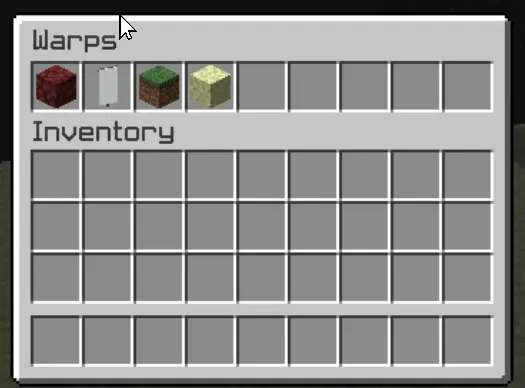
One of Xwarp’s standout features is its Graphical User Interface (GUI) for selecting warps. Instead of relying solely on commands, players can access a sleek warp selection screen where they can visually choose their desired warp point. Here’s what makes the GUI special:
Icon Customization: Each warp point can be represented by a different icon (block/item) in the GUI. Administrators can change the warp icon using the /seticonwarp [warpname] [itemname] command, allowing full customization of the look and feel of the warp menu.
Visual Warp Selection: Players simply open the warp menu and click on the desired warp icon to begin teleporting. The GUI provides an intuitive and engaging way to access teleport points, especially for large servers with multiple destinations.
## Admin-Friendly:
Warp Management: Server administrators can easily add, delete, and manage warp points, and even assign custom icons to each warp point for better organization and clarity.
Permissions Integration: Fine-grained permissions allow you to control which players can set, access, or delete warps. This ensures that only authorized users can manage or use certain warp points.
## How it Works:
1. Setting a Warp: Use /setwarp [warpname] to create a new warp at your current location. The warp is saved along with a default icon.
2. Selecting a Warp: Players can open the warp GUI and click on the icon for their desired destination. A 5-second countdown will start, and if they don’t move, they are teleported to the selected warp.
3. Customizing Warps: Use /seticonwarp [warpname] [itemname] to change the icon representing a warp in the GUI, making it easy for players to distinguish between different warp points.
## Why Xwarp?
Xwarp is designed for flexibility, ease of use, and visual appeal. It’s perfect for large servers that need efficient teleportation management or for small groups of players who want a fast and intuitive way to travel across their world. With its GUI-based approach, teleportation becomes not just a command-line task, but a visually engaging experience that fits right into Minecraft’s world.
Take your server to the next level with Xwarp—your all-in-one teleportation solution!
## LuckPerms
/warp – xwarp.warp
/setwarp – xwarp.setwarp
/delwarp – xwarp.delwarp
/seticonwarp – xwarp.seticonwarp
XVN.
# XVN.
This modpack is built for one thing: maximum FPS without sacrificing gameplay. Expect **up to 750%+ FPS improvements** depending on your setup, all while staying smooth, responsive, and PvP-ready.
> Every mod is carefully selected and configured to reduce overhead, improve rendering efficiency, and minimize input lag. No bloat. No gimmicks. Just performance.
⚠ WARNING:
Vulkanmod
> Includes **VulkanMod** (experimental & picky). There is a **high chance of crashes**, so dont believe it 100% that its gonna work first try, check out their Github for incompatibilities and other stuff
https://github.com/xCollateral/VulkanMod
## Key features
• **Massive** FPS **Boost**.
Details
> Advanced rendering, memory tweaks, and engine-level improvements for dramatically higher frame rates.
• **Less** input **latency**.
Details
> Optimized for mouse & keyboard responsiveness — ideal for PvP.
• **Smoother** experience.
Details
> Faster chunk loading, reduced stuttering, and consistent frame pacing.
• Mods for **other daily tasks**.
Details
> Quality-of-life improvements for competitive play without adding bloat.
• Not making the game **look worse for performance**.
Details
> Clean, sharp look without heavy graphical overhead.
## Rare/Intersting picks ive made.
> This pack also includes some uncommon but powerful mods you don’t see everywhere:
• **VulkanMod** – experimental Vulkan renderer (FPS monster, but crash-prone)
• **Bad Optimizations.** – like its description says, aton of micro-optimizations that end up doing a bigger change.
## Kind of people i made this for.
– PvP & competitive players wanting max performance without drops that sodium or other packs might have.
– Low-end PCs needing serious optimization ( ⚠ must be new enough to support it. ⚠ )
– High-end PCs looking for new peaks while enjoying their experience.
– Anyone who wants Minecraft to max out.
# Big notes!
– Gains vary by hardware, previous mods, and settings.
– Allocate RAM reasonably; avoid over-allocation.
– Use updated GPU drivers.
– Additional heavy mods may reduce stability.
> – ### 
> Not just another FPS boost pack — a carefully tuned performance build focusing on competitive play, responsiveness, and extreme optimization. Load it up and feel the difference immediately.
## Incase you are not in the wanting of troubleshooting.
– **You should try Alternatives to Vulkan modpacks or modpacks like Fabulously Optimized.**
– **BUT BEWARE OF A POSSIBLE DECREASE OF PERFORMANCE OF WHAT YOU COULD ACHIEVE WITH THIS.**
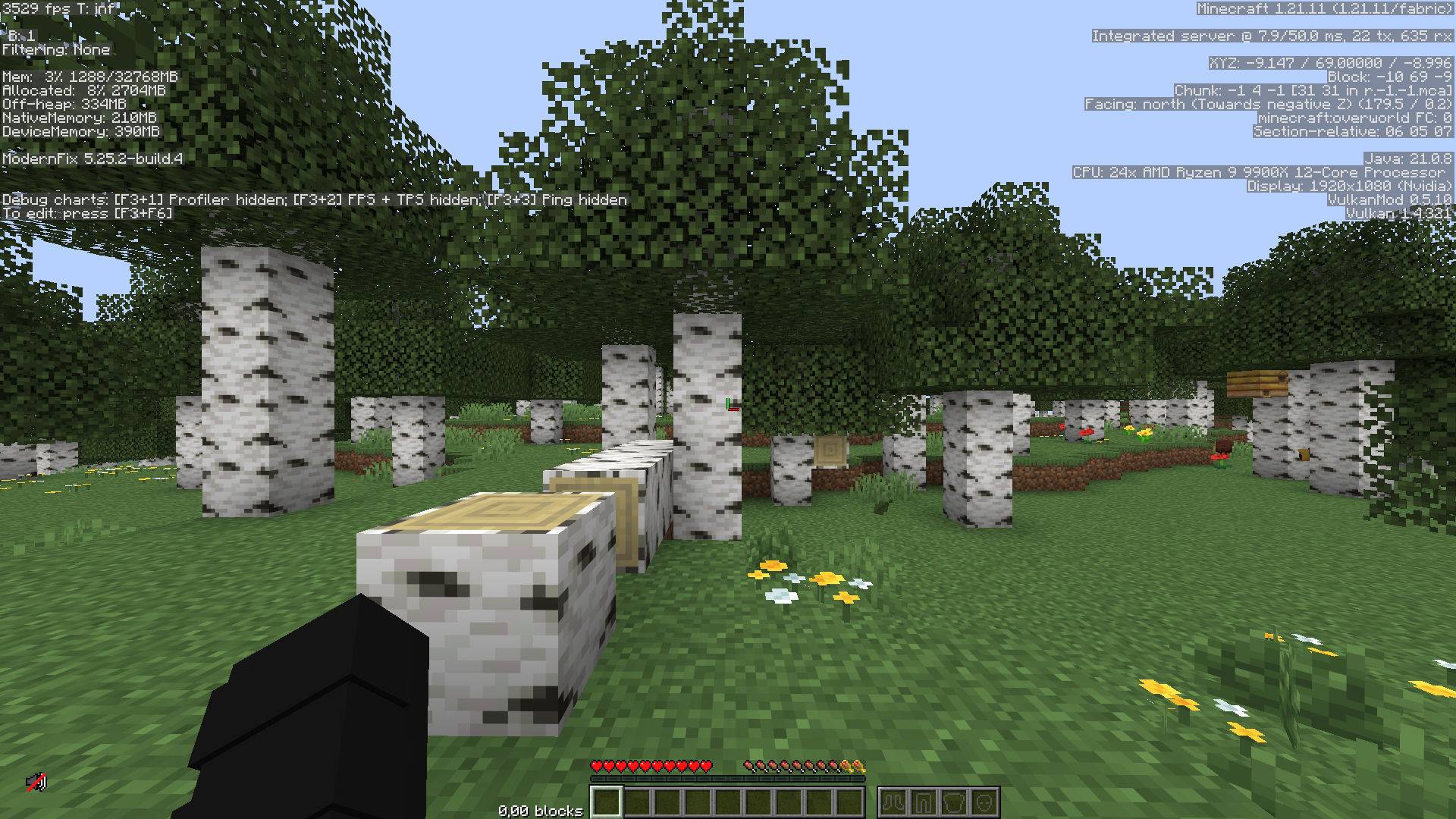
> I have only tested this on my own hardware, which you can see some of it in the given screenshots.
Unofficial ULTRAKILL Modpack
This mod depicts overexaggerated, cartoony pixel blood and violence; if that’s too mature for you, don’t play it.
**MANKIND IS (DEAD)**
**BLOOD IS (FUEL)**
**HELL IS FULL**
ULTRACRAFT
Mankind is Dead. Blood is Fuel. Hell is Full.
This Mod is a Tribute to the Game ULTRAKILL by Arsi “Hakita” Patala.
Contents
“UltraHUD
Blood (and a lot of it too!)
All Prologue and Limbo Enemies
13 Weapons (Revolver Variants, Shotgun Variants & Machine Sword, Attractor Nailgun, Flamethrower, Soap, and an original one)
Parry and offhand Punch Mechanic
Ultrakill movement tech (enter High Velocity mode pressing V) (even including things like Wall-Jumps, Alternate Underwater Physics and Slam Storage)
A bunch of Blocks and Items
Lots of Gamerules for Server/World configuration
Intro sequence and Custom Main Menu Backgrounds (toggleable)
Customizable Wings
Almost too Customizable Terminals“
V2.0.0 Release Trailer from the mod-creator:
The mod is fully Server compatible; for serverside config stuff gamerules are used. (they all start with an “ultra-” prefix to make them easier to find)
Some Items have hidden lore. This is usually Jokes or dev Comments. To see it, press F3+H to enable advanced tooltips.
**credits to mod-creator:Absolutelyaya on Youtube.com**
Vanilla+
# **VANILLA+** mods and resource packs
**All the server mods and resource packs you need, for the perfect vanilla** (_but better_) **minecraft experience!**

### 🌟 Experience Minecraft in a new but familiar way!
**Vanilla+** enhances your Minecraft server without changing what makes the game special. This carefully assembled collection of mods, in combination with a few resource packs, improves performance, adds quality-of-life features and more — all while maintaining the authentic Minecraft feel:
### ✨ What’s included?
– **Performance optimization** – enjoy smoother gameplay even with many players
– **Quality-of-life improvements** – small tweaks that make a big difference
– **Bug fixes** – solutions for those frustrating vanilla issues
– **Vanilla-friendly additions** – new structures, biomes and more, that all fit perfectly into the Minecraft aesthetic
### ❤️ Just Vanilla!
Everything works perfectly with vanilla Minecraft content, meaning:
– No adding any new blocks or entities into the game
– Friends can join your server without needing the mods on their client
– All vanilla gameplay mechanics remain intact, or are made even better
### 🛠️ Technical Details
Vanilla+ is lightweight and server-friendly, designed to:
– Reduce server lag and TPS drops
– Optimize chunk loading and entity handling
– Improve overall stability
> **NOTE:**
> _This modpack has been tested on several servers, and it has been confirmed that none of the mods, not even a fabric installation, is required to join a server using this modpack._
### 📋 Compatibility
– Works with Minecraft version **1.21.4**
– Compatible with most client-side mods
## ⚙️ Mod Configurations
Configurations for inside the mod config files for the best experience.
### 📟 Better Fabric Console
For the best looking console log, use this as the `log-pattern` value:
“`bash
log-pattern=”%highlight{[%d{HH:mm:ss} %level] [%t]: [%logger{1}] }{FATAL=bright_magenta, ERROR=bright_red, WARN=bright_yellow, INFO=bright_cyan, DEBUG=bright_black, TRACE=bright_blue}%highlight{%paperMinecraftFormatting{%msg}}{FATAL=magenta, ERROR=red, WARN=yellow, INFO=white, DEBUG=bright_black, TRACE=white}%n”
“`
——————————————————————————–
_Visit my GitHub to learn about other stuff I do!_
xTree
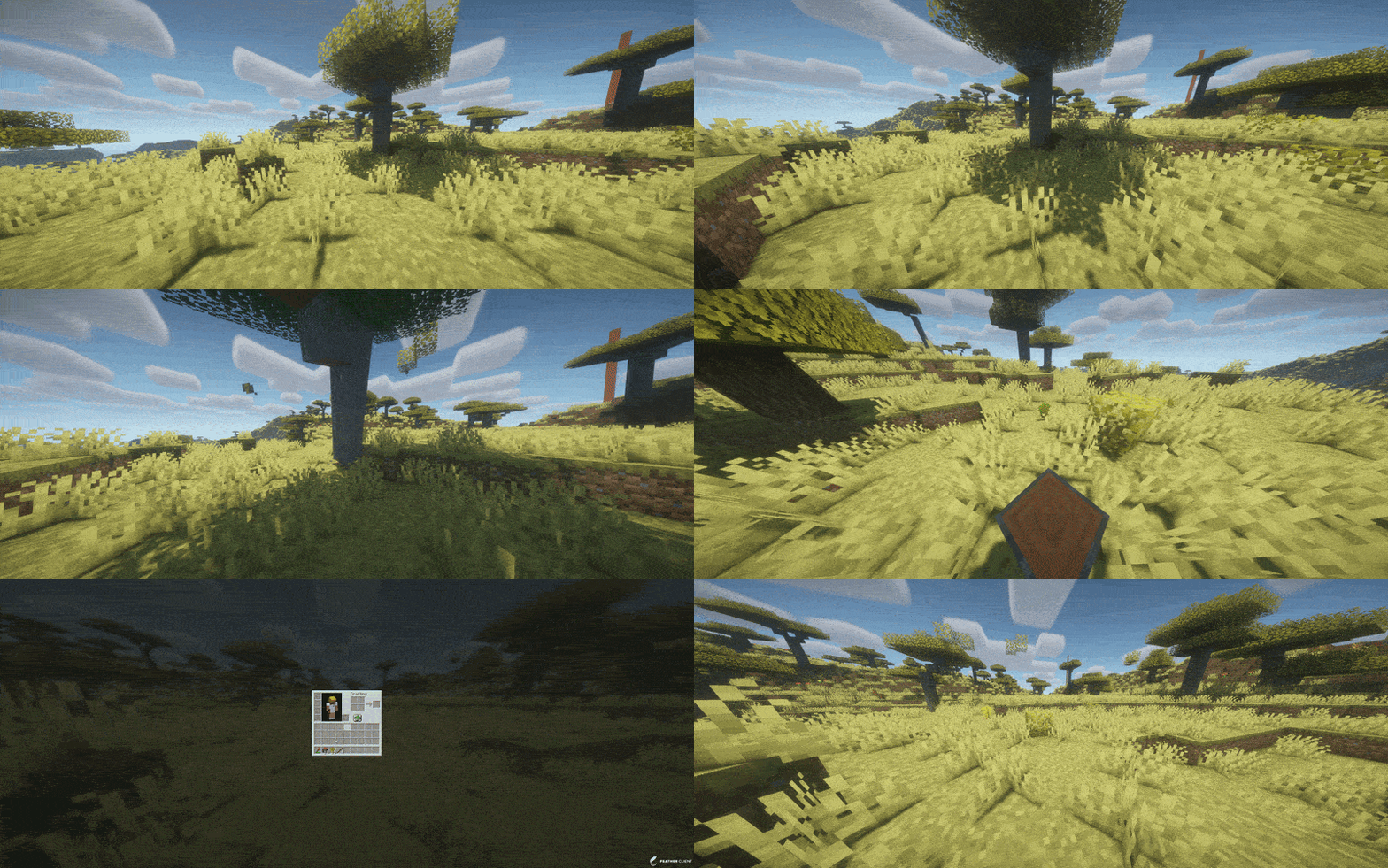
TreeFeller is a Paper plugin for Minecraft 1.21.x that makes tree cutting feel more natural and visually satisfying.
Instead of instantly removing the whole tree, the tree falls over with an animation, lands in the direction it actually falls, drops its loot near the impact point, and leaves behind a few scattered leaves for a nicer result.
The plugin is designed to feel immersive without turning tree cutting into an overpowered instant-break feature.
## Features
– Animated tree falling
– Trees fall away from the player
– Drops appear near the actual impact point
– Sounds and particles play on the correct side
– A few leaves are placed on the ground after impact
– Saplings, sticks and apples can drop naturally
– Sneaking lets players bypass the system and break blocks normally
– Axe-only support
– Improved detection to reduce false positives on player-built wooden structures
– Better separation of connected leaves between nearby trees
– Simple language/message system
## Supported server software
– Paper 1.21.x
Tested on:
– Paper 1.21.11
## Supported tree types
– Oak
– Birch
– Spruce
– Jungle
– Acacia
– Dark Oak
– Cherry
– Mangrove
## How it works
When a player breaks a log with an axe, TreeFeller checks whether the structure looks like a natural tree.
If it is detected as a valid tree:
– the tree is collected
– the blocks are replaced with animated displays
– the tree falls over
– sounds, particles and drops are spawned on the same side as the visual fall
– logs and natural loot are dropped near the landing point
– a few leaves are left on the ground for a more natural look
Sneaking while breaking a log bypasses the plugin and keeps normal block breaking behavior.
## Tree detection
TreeFeller includes extra checks to avoid treating random wooden builds as natural trees.
It also tries to separate leaves from nearby trees more carefully, so if two tree crowns touch, the plugin does not simply take every connected leaf block.
No automatic tree detection is perfect in every edge case, but the current system is built to be much safer than a simple “connected logs and leaves” approach.
## Installation
1. Download the latest release
2. Put the jar into your server’s `plugins` folder
3. Start or restart the server
## Requirements
– Java 21
– Paper 1.21.x
## Configuration
### `config.yml`
“`yaml
language: en
Xtra stuf
This mod has many new features, some may seem hard to figure out. here are some instructions for hard features.
Mars dimension. in order to go to mars, you need to make a portal out of mars block. you craft it with red sand in the middle and corners of the crafting grid, the rest filled in with iron ingots. you make it like a nether portal, but ignite it with the mars portal igniter made with red sand and flint and steel. in mars, you will find iron oxide, volcanic basalt, and mars bases. the iron oxide can be crafted with iron nugget + bottle of water (not water bottle) the bottle of water is crafted with 2 glass on top of each other. iron oxide can be converted to iron nuggets with sandpaper + iron oxide. sandpaper is made with paper and sand on top of the paper. volcanic basalt can be made into slabs, stairs and walls.
2. Biomes. The biomes naturaly generate around the world. the pine forest is the most commen. it is like a tall tree spruce biome, but the trees are a new tree type, pine, they can be crafted into planks, slabs, stairs, door, trapdoor, and fence. i forgot to make wooden tool and stick craftable with it. Biome 2: Orange tree feilds. this biome generates with orange trees and grass. the oranges drop from the leaves. the oranges can be eaten or crafted into with orange + bottle of water. Biome 3: Glowing plains. this biome is less serious, the ground is glow block, and dirt is glowstone. In mars, there is mars biome and mars basalt plains. in the garbage dimension there is landfill.
3. Garbage dimension. garbage is crafted with paper, stick, dirt. 4 garbage makes a garbage block, used to make a garbage portal. be careful to not break the garbage block be cause it drops junk. to ignite the portal use the garbage portal igniter crafted with flint and steel and garbage. the garbage dimension is garbage block and trash water. it is just like water but flows slower.
4. Ores and materials there are 2 new ores and 5 new materials. first uranium its a bit rare and the armour gives you blast protection and the pickact mines a 3×3 area. the sword gives poison 1 for 60 ticks. next, tin. tin is another ore. it can be used to craft bronze with 1 copper and one tin ingot. bronze can be used to craft a sword, pickaxe, and trumpet. the bronze tools are almost as good as diamond. next, stone armour is now a thing. it is crafted with stone, andisite, diorite, and granite, not cobblestone. Next, great material. the tools and armour are overpowered. you craft it with netherite, diamond and iron. it has a sword, axe, pickaxe, and armour.
5. Plants. Many new plants generate all over the world. some plants, like corn, raspberrys, and tomatos can be eaten. corn when you eat it drops a corn husk, which can be crafted into bonemeal. other plants are decorative. the mushroom piles drop mushrooms.
6. mobs. at the time of writing this, the only new mob is a duck. they are a bit buggy.
7. this may change. new things are always being added.
Xtra Arrows
## The Arrows
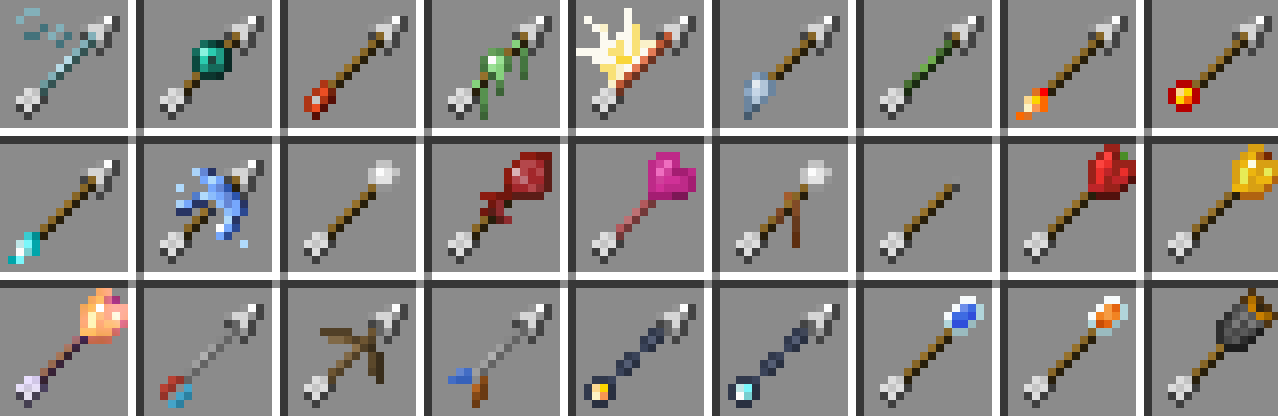
**There are currently 95 new arrows. These arrows come in 27 new types and 5 tiers.**
## Server Hosting Discount
**Follow the link below and use code “JACKBUSTERS” at checkout for 25% off server hosting.**

## Media
Xtpa
Xtpa is an innovative teleportation plugin for Minecraft designed to enhance player interaction and navigation. With Xtpa, players can easily send and accept teleport requests, creating a more connected gameplay experience.
One of the standout features of Xtpa is the TPA GUI. When a player receives a teleport request, they can click on a simple button to open the GUI, which provides a clear and intuitive interface. This GUI includes:
– Accept Button:
A green wool block that allows players to accept the teleport request effortlessly.
– Warning Message:
A paper item labeled “!!warning maybe a tp trap!!”, alerting players to the risks associated with teleportation.
– Cancel Button:
A red wool block that enables players to cancel the teleport request if they choose not to accept it.
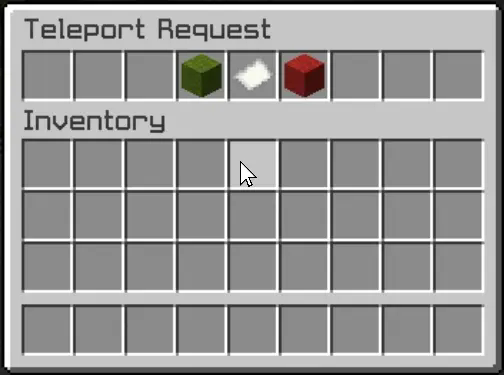
This user-friendly design not only makes the process of accepting or rejecting requests straightforward but also adds an engaging visual element to the experience. Players can quickly make decisions without cluttering their chat with commands, making teleportation seamless and efficient.
Xtpa integrates seamlessly with LuckPerms, allowing server owners to manage permissions easily. The following commands and permissions are included:
– Commands and Permissions
/tpa [playername]
Permission: xtpa.tpa
Description: Send a teleport request to another player.
/tpahere [playername]
Permission: xtpa.tpahere
Description: Request another player to teleport to your location.
/tpaccept [playername]
Permission: xtpa.tpaccept
Description: Accept a teleport request from another player.
/tpcancel [playername]
Permission: xtpa.tpcancel
Description: Cancel a teleport request.
/tpatoggle [on/off]
Permission: xtpa.tpatoggle
Description: Toggle TPA requests on or off for yourself.
/tpagui [requester]
Permission: xtpa.tpagui
Description: Open the TPA request GUI for accepting or canceling requests.
– Conclusion
Overall, Xtpa aims to enrich the Minecraft community by providing a smooth and enjoyable teleportation system that players will love to use. With its intuitive GUI and robust permission management through LuckPerms, Xtpa is the ideal solution for any Minecraft server looking to enhance player connectivity.