Tooniverse Texture Pack 64x
## [32x](https://modrinth.com/resourcepack/tooniverse-32x) – 64x – [128x](https://modrinth.com/resourcepack/tooniverse-128x) – [256x](https://modrinth.com/resourcepack/tooniverse)
### Tooniverse is a **complete** texture replacement for Minecraft Java Edition!
It’s designed to look clean, but with crisp HD textures and a unique colour palette that makes default Minecraft look dull! The cartoon style is consistent throughout the pack to get you truly immersed in a cartoon world
Also, expect much attention to detail with many 3D models and lots of random texture variations!
**Use with [Optifine](https://optifine.net/) for even more features like custom colours and skyboxes**
**Also compatible with [Sodium](https://modrinth.com/mod/sodium)**
(Using with Sodium may give an error message since Sodium’s renderer does not support built-in shaders. Tooniverse Texture Pack will still run fine without the built-in shaders, or you could try [Iris shaders](https://www.irisshaders.dev/) instead)
### Features
– 3,000+ textures!
– Mobs, Items, Armour, Particles, GUIs… everything is textured!
– Regular updates
– 3D models
– Built-in shaders
– 64x resolution
### License
You may:
– Use this resource pack for personal use
– Share videos of this resource pack with attribution to Crafty Fox Digital and a link to this page in the description
– Put the Modrinth download link in your server.properties file to include Tooniverse with your Minecraft server
You MAY NOT:
– Share or redistribute this resource pack, or any part of it
– Use any part of this resource pack in other projects (except for personal use only)
© Crafty Fox Digital 2025 – All Rights Reserved
# Coming soon to Bedrock edition!
### [Customise with optional Add-ons](https://tooniverse.gg/addons)
### [Join our Discord](https://discord.gg/gdzqxGShDg)
Tools n’stuff
### All of the main info:
I will be making more updates soon too!
All of the new renamings will be shown in the change logs.
**[CIT Resewn](https://modrinth.com/mod/cit-resewn) is REQUIRED TO MAKE RESOURCE PACK WORK ON FABRIC!!!**
**AND OPTIFINE ON FORGE!!!**
This resource pack adds item’s 3D textures that you can make shown by renaming special items!
For example: if you rename you iron sword with “katana” on the anvil you will have a model of katana instead of your common sword texture.
You also can optionaly install [RP Renames](https://modrinth.com/mod/rp-renames) to see the renamings on the anvil.
Don’t open me!
I hope you like my rp. More updates soon 🙂
【MTR3】東急1000系|Tokyu-1000
## このリソースパックは、日本の東急1000系を追加します。
Wikipediaリンク/Wikipedia Link:[東急1000系電車](https://ja.wikipedia.org/wiki/%E6%9D%B1%E6%80%A51000%E7%B3%BB%E9%9B%BB%E8%BB%8A)
## 注意
このリソースパックは東急電鉄と何ら関係がなく、東急電鉄の公式製品でもありません。
ご注意下さい。
## [インストール手順]
1. 起動設定のresourcepacksフォルダにzipを入れ、マイクラの設定から「リソースパック…」を押し、選択して適応させます。
2. ダッシュボードから車両基地の線路を選択し、「Tokyu 1000」を選択します。
3. 車両が見えたら成功です!
## This resource pack adds the Tokyu 1000 Series in Japan.
## CAUTION
This resource pack has nothing to do with Tokyu Corporation and is not an official product of Tokyu Corporation.
Please note that this is not an official product of Tokyu Corporation.
## [Installation procedure]
1. Zip the pack into the resourcepacks folder of the startup configuration, and press “Resource Packs…” from the Micra settings, select it and adapt it.
2. From the dashboard, select the tracks in the garage and select “Tokyu 1000”.
3. If you see the car, you have succeeded!
[MTR3/4] 東武30000系電車 | Tobu 30000 series
_A resource pack for Minecraft Transit Railway._
# Overview
The Tobu 30000 series is a DC EMU produced by Alna Kōki, Tokyu Car Corporation, and Fuji Heavy Industries (now Subaru). They’re constructed between 1996 and 2003 for the Tobu Isesaki Line, to allow Tobu Railway to operating through services towards Eidan (now Tokyo Metro) Hanzonmon Line and Tokyu Den-en-Toshi Line. They’re initially set into 6-car and 4-car sets (and a 6-car unit can couple to a 4-car unit), however this reduced capacity of the train, which makes this train to eventually leave Hanzonmon Line and Den-en-Toshi Line through services, and relocate to services between Isesaki, Nikko and Utsunomiya. They’re eventually being transferred to Tojo Line and being converted into 10-car fixed formation (similar to other Tojo Line trains, such as some 10030 series), and being refurbished.
This resource pack is to add the Tobu 30000 series into Minecraft with Minecraft Transit Railway mod, made by Navi_LX9702 in 2024.
# What will be in this pack?
### Tobu 30000 series:
1. First Batch (31601F~31606F?)
# Disclaimer
This resource pack is not associated with, and is not an official product of, Tobu Railway Company, Ltd.
Trinsmoton Rail Pack
# Trinsmoton Rail Pack
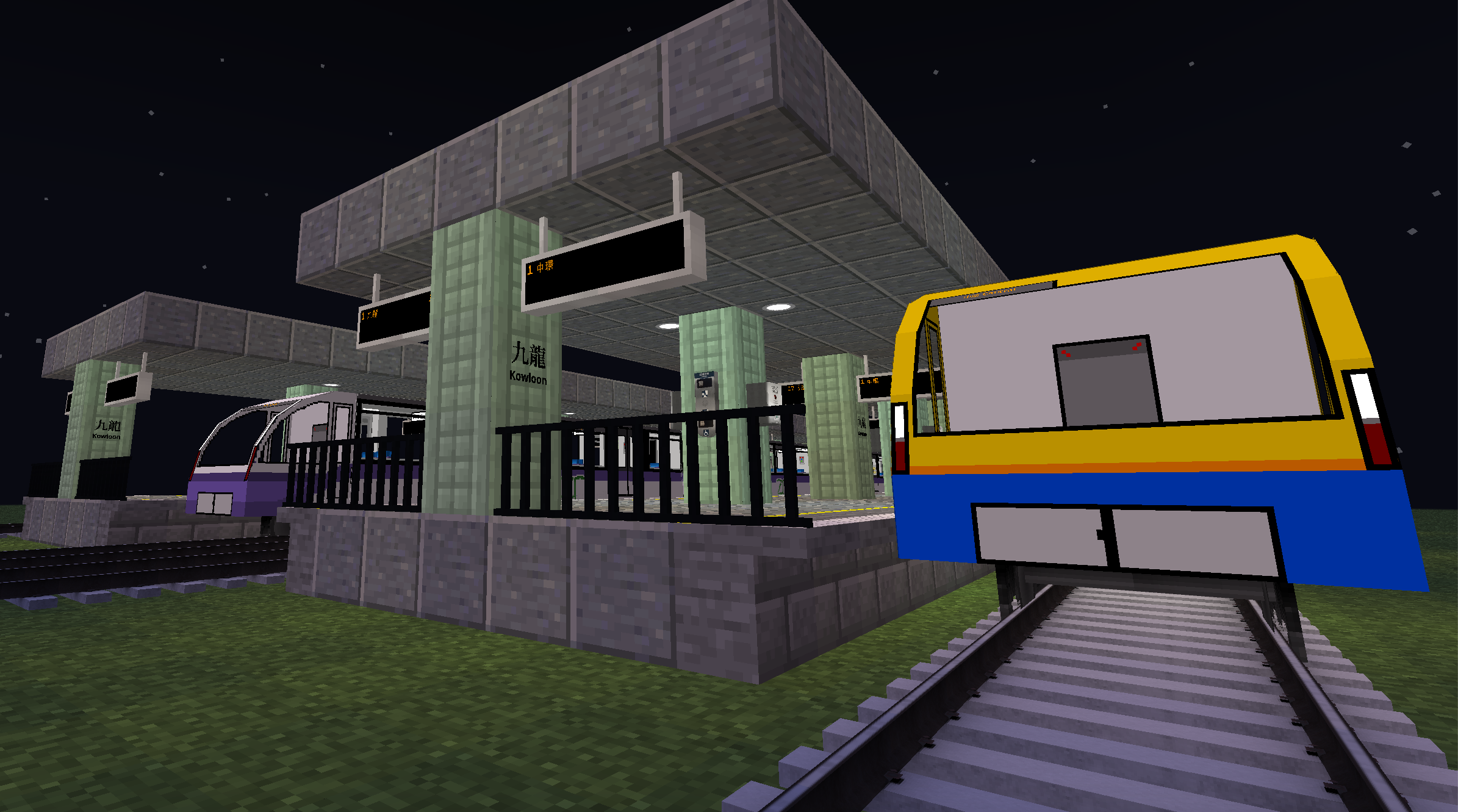
This, being the predecessor of the Ultimate Briddle Rail Pack, contains a lot of old versions of trains that will be in the UBRP.
## Trains
– Class 250
– Class 251
– Class 420
– Class 190
– Class 191
– Class 210
– Class 211
– Class 418
– Class 600
– Class 605
– Class 606
– Class 607
– Class 80
【MTR3】東京メトロ16000系|Tokyo Metro 16000 Series
## このリソースパックは、日本の東京メトロ16000系を追加します。
Wikipediaリンク/Wikipedia Link:[東京メトロ16000系電車](https://ja.wikipedia.org/wiki/%E6%9D%B1%E4%BA%AC%E3%83%A1%E3%83%88%E3%83%AD16000%E7%B3%BB%E9%9B%BB%E8%BB%8A)
## 注意
このリソースパックは東京メトロと何ら関係がなく、東京メトロの公式製品でもありません。
ご注意下さい。
objファイルを使用しているので、NTE(Nemo’s Transit Expansion)も導入してください。
リンク: https://modrinth.com/mod/mtr-nte
## [インストール手順]
1. 起動設定のresourcepacksフォルダにzipを入れ、マイクラの設定から「リソースパック…」を押し、選択して適応させます。
2. ダッシュボードから車両基地の線路を選択すると、「東京メトロ 16000系 10両/10Cars」「東京メトロ 16000系 Free Length」から好きな車両をを選択します。
3. 車両が見えたら成功です!
## This resource pack adds the Tokyo Metro 16000 series in Japan.
Wikipedia Link: [Tokyo Metro 16000 series](https://en.wikipedia.org/wiki/Tokyo_Metro_16000_series)
## Note
This resource pack is not affiliated with Tokyo Metro in any way and is not an official Tokyo Metro product.
Please note.
Since this uses obj files, please also install NTE (Nemo’s Transit Expansion).
Link: https://modrinth.com/mod/mtr-nte
## [Installation Instructions]
1. Place the zip file in the resourcepacks folder in the startup settings, then press “Resource Packs…” in Minecraft settings, select it, and apply.
2. Select the vehicle depot tracks from the dashboard, then choose your preferred vehicle from “東京メトロ 16000系 10両/10Cars” or “東京メトロ 16000系 Free Length”
3. If the vehicle appears, installation was successful!
Times Newer Roman
This resource pack changes your Minecraft font to an higher quality one across all menus. It is compatible with all languages the default font is, aka not many Asian languages. You can use this along with any other resource pack, just move it to the top in activated resource packs’ order.
The font requires 1.13 or higher, no modifications necessary.
> Times Newer Roman is a free and open source sans serif typeface made by MSCHF. It is meant to look like Times New Roman, but it is wider and open source.
I do not claim any ownership to the font and have not made any changes to it’s appearance, it is only redistributed according to the owner’s license.
[Read more about the font on its homepage.](https://timesnewerroman.com/)
Is your Minecraft <1.17 crashing with the pack? It's not my fault, see [MC-180529](https://bugs.mojang.com/browse/MC-180529) for help.
The Red Mist sword Mimicry
# The Red Mist sword Mimicry
**Replaces any swords or axes with a Red Mist sword from the Project Moon universe (Library of Ruina reference)**
### Rename weapon to Mimicry

### There is also an animated version. (outdated version, may not work)

The entire Shrek movie, but it’s a Totem of Undying
Replaces Totem of Undying with the full version of the Shrek movie.
[MTMI] The Minecraft in Memories
# English
This is a resource pack for experiencing low version resource in higher versions.
# Why use it?
Because minecraft updated many item resource on 1.14, it’s a bit difficult to accept.
Enable you to be more receptive to the new version of resource.
More resource will be added in future versions. If there are any errors, please https://github.com/cleanper/fps-plus–formc/issues Open a issues.
# Installation Guide
Please put this resource package into the resource package folder or interface in Minecraft, and then enable it. You can now check the effect.
without the awful performance hit!
Put all the files in the mods folder of the zip file into the 1.21.4 fabric mods folder to experience the complete content.
# chinese
这是一个资源包,用于在较高版本中体验低版本资源。
# 为什么要使用它?
因为我的世界在1.14上更新了许多项目资源,所以有点难以接受。
使您更容易接受资源的新版本。
未来版本中将添加更多资源。如果有任何错误,请https://github.com/cleanper/fps-plus–formc/issues 打开一个问题。
# 安装指南
请将此资源包放入Minecraft中的资源包文件夹或界面中,然后启用它。您现在可以检查效果。
没有性能下降!
将zip里面的mods文件夹里面的所有文件放入1.21.4 fabric mods文件夹就可以体验完整内容。