[MTR4] Tyne and Wear Metrocar
This pack adds the Tyne and Wear Metrocar to the MTR mod. It comes with both the original 1980’s livery and the modern-day one, as well as a secret little R-net livery as a characteristic me-thing.
Keep in mind that this train, much like the real thing, only works in even amounts of cars. There has never been a middle car, and I’m not going to make one either.
【MTR3】TX-3000系|TX-3000 Series
## このリソースパックは、日本のTX-3000系を追加します。
Wikipediaリンク/Wikipedia Link:[首都圏新都市鉄道TX-3000系電車](https://ja.wikipedia.org/wiki/%E9%A6%96%E9%83%BD%E5%9C%8F%E6%96%B0%E9%83%BD%E5%B8%82%E9%89%84%E9%81%93TX-3000%E7%B3%BB%E9%9B%BB%E8%BB%8A)
よろしければ、Pinu様製作のTX-1000系とTX-2000系も合わせてご利用ください!
https://modrinth.com/resourcepack/tsukuba-express-tx-1000-and-tx-2000-series
## 注意
このリソースパックはつくばエクスプレスと何ら関係がなく、つくばエクスプレスの公式製品でもありません。
ご注意下さい。
objファイルを使用しているので、NTE(Nemo’s Transit Expansion)も導入してください。
リンク: https://modrinth.com/mod/mtr-nte
## [インストール手順]
1. 起動設定のresourcepacksフォルダにzipを入れ、マイクラの設定から「リソースパック…」を押し、選択して適応させます。
2. ダッシュボードから車両基地の線路を選択すると、「TX-3000 10cars」「TX-3000 6cars」「TX-3000 free」から好きな車両をを選択します。
3. 車両が見えたら成功です!
## This resource pack adds the TX-3000 series in Japan.
Wikipedia Link: [Metropolitan Intercity Railway Company TX-3000 series electric train](https://ja.wikipedia.org/wiki/%E9%A6%96%E9%83%BD%E5%9C%8F%E6%96%B0%E9%83%BD%E5%B8%82%E9%89%84%E9%81%93TX-3000%E7%B3%BB%E9%9B%BB%E8%BB%8A)
Feel free to use the TX-1000 Series and TX-2000 Series created by Pinu as well, if you’d like.
https://modrinth.com/resourcepack/tsukuba-express-tx-1000-and-tx-2000-series
## Note
This resource pack is not affiliated with Tsukuba Express in any way and is not an official Tsukuba Express product.
Please note.
Since this uses obj files, please also install NTE (Nemo’s Transit Expansion).
Link: https://modrinth.com/mod/mtr-nte
## [Installation Instructions]
1. Place the zip file in the resourcepacks folder in the startup settings, then press “Resource Packs…” in Minecraft settings, select it, and apply.
2. Select the vehicle depot tracks from the dashboard, then choose your preferred vehicle from “TX-3000 10cars,” “TX-3000 6cars,” or “TX-3000 free.”
3. If the vehicle appears, installation was successful!
Twemoji Visibility
# Twemoji Visibility

–
Twemoji Visibility is a resource pack that replaces the standard Minecraft emojis with [Twemoji](https://github.com/jdecked/twemoji) emojis, the same ones that Twitter/X and Discord use.
## 📝 Notes
**If you are experiencing crashes or other weird behavior while using Twemoji Visibility 1.5 or higher, try using the latest version of 1.4.x.** When downloading the resource pack, it is listed as the Release version. (in green)
– There are multiple ways to paste in emojis.
– On Windows: you can use Windows + . to open the emoji menu.
– On MacOS: you can use Control + Command + Space to open the emoji menu.
– You can use the [Symbol Chat](https://modrinth.com/mod/symbol-chat) mod, which is officially supported by this Resource Pack.
– Sequence emojis are not supported by Minecraft, and by extension, this resource pack.
– This means that some emojis will come out as multiple parts when attempted to type in.
– Flags, skin tones, families, and some other emojis (such as 😶🌫️ and 🐦⬛) do not work properly.
– Force Unicode Font must be disabled for emojis to be visible.
– Game Menu (Escape) > Options… > Language… > Font Settings… > Force Unicode Font (set to OFF).
– If you are using the DiscordSRV plugin on a server, set `EmojiBehavior` to `show` in the config.yml file to force all emojis sent in chat to display as their emoji and not the name.
– You must be the host of the server to change this.
– The Beta version supports emojis on text that isn’t white.
– It is considered Beta because emojis may not render correctly in certain places. Please see the release notes to see what is broken.
## ⚖️ License and Credits
– The emoji images in this resource pack are used from Twitter’s [Twemoji](https://twemoji.twitter.com/) and jdecked’s forked [Twemoji](https://github.com/jdecked/twemoji), which are both licensed by [CC BY 4.0](https://creativecommons.org/licenses/by/4.0/).
– This resource pack was based on [AndrosDiscordEmojis](https://github.com/Androkai/AndrosDiscordEmojis) and both resource packs are also licensed by [CC BY 4.0](https://creativecommons.org/licenses/by/4.0/). Feel free to use and adapt in your own resource pack but give appropriate credit and provde a link to the license.
– [Androkai](https://github.com/Androkai) (the creator of [AndrosDiscordEmojis](https://github.com/Androkai/AndrosDiscordEmojis)) gave me permission to make this pack in [this GitHub issue](https://github.com/Androkai/AndrosDiscordEmojis/issues/4).
– The custom shader that allows emojis to keep their color on Signs and Books in the Beta build was created by [AlphaLeoli](https://modrinth.com/user/AlphaLeoli). You can join his discord server [here](https://discord.gg/gymTft2GbV). He also helped with Symbol Chat support.
Turn paintings into billboards
This resource pack makes it easy for you to turn paintings into road signs.
The 1×1 size includes a picture, a PC screen, etc.
2×2 size road signs are used. Useful for multiplayer, etc.
TUNG TUNG SAHUR
# TUNG TUMG SAHUR
## ENGLISH
Tung Tung Sahur replaces the classic Totem of Immortality with TUNG TUNG SAHUR 3D, inspired by the Italian Brainrots. Keep the same revival power, but with a humorous and original touch that will make anyone laugh when they see it in your hand. Protection with meme style! 🎭✨
By @d_de_diego_d
## ESPAÑOL
Tung Tung Sahur reemplaza el clásico Tótem de la Inmortalidad por TUNG TUNG SAHUR 3D, inspirado en los Italian Brainrots. Mantén el mismo poder de revivir, pero con un toque humorístico y original que hará reír a cualquiera al verlo en tu mano. ¡Protección con estilo meme! 🎭✨
By @d_de_diego_d
© TRIDEX 2025 – All Rights Reserved
TU46 Resources
About:
This adds features from PS4 Edition 1.39 which you can use in your own modpacks!
– No Pack: Default Skins PS Icon
– Crafting, Creative & How To Play Listings
– Title Screen Definitions
– Controller Icons
– TU46 Style Intro
TTRP Tamer’s Models and Fixes
[The resource pack has DynamicPack support.](https://modrinth.com/mod/dynamicpack)
The texture adds weapons, hats, and more. These Texture are generally used for a server named TTRP, a dnd inspired minecraft server. This texture pack allows users to create and show off their amazing weapons, items, or unique items. Please make sure to join my discord for requests and commission work: [Tamer’s Models and Fixes](https://discord.gg/Yv3DBmHTr3)
T’s Custom Textures
## T’s Custom Textures
The custom texture packs are made for compatibility with my [Custom Craft Datapacks](https://modrinth.com/datapack/ts-crafts/) and the We Are The Boredom Minecraft server.
### List of all named custom textures (1.21.5+)
| Minecraft Item | Name |
|———————|——————–|
| Totem Of Undying | TBackes08 |
| Totem Of Undying | DeathWolffe |
| Paper | Creeper |
| Paper | TBackes08 |
| Netherite Sword | Red Netherite Sword|
| Netherite Helmet | TBackes08 |
*All gallary images use [Complementary Shaders](https://modrinth.com/shader/complementary-unbound), [rotorBLOCKS](https://modrinth.com/resourcepack/rotrblocks), and [T’s Custom Textures](https://modrinth.com/resourcepack/ts-textures).*
Truce x64
# TRUCE
Where Grit Meets Gradient.
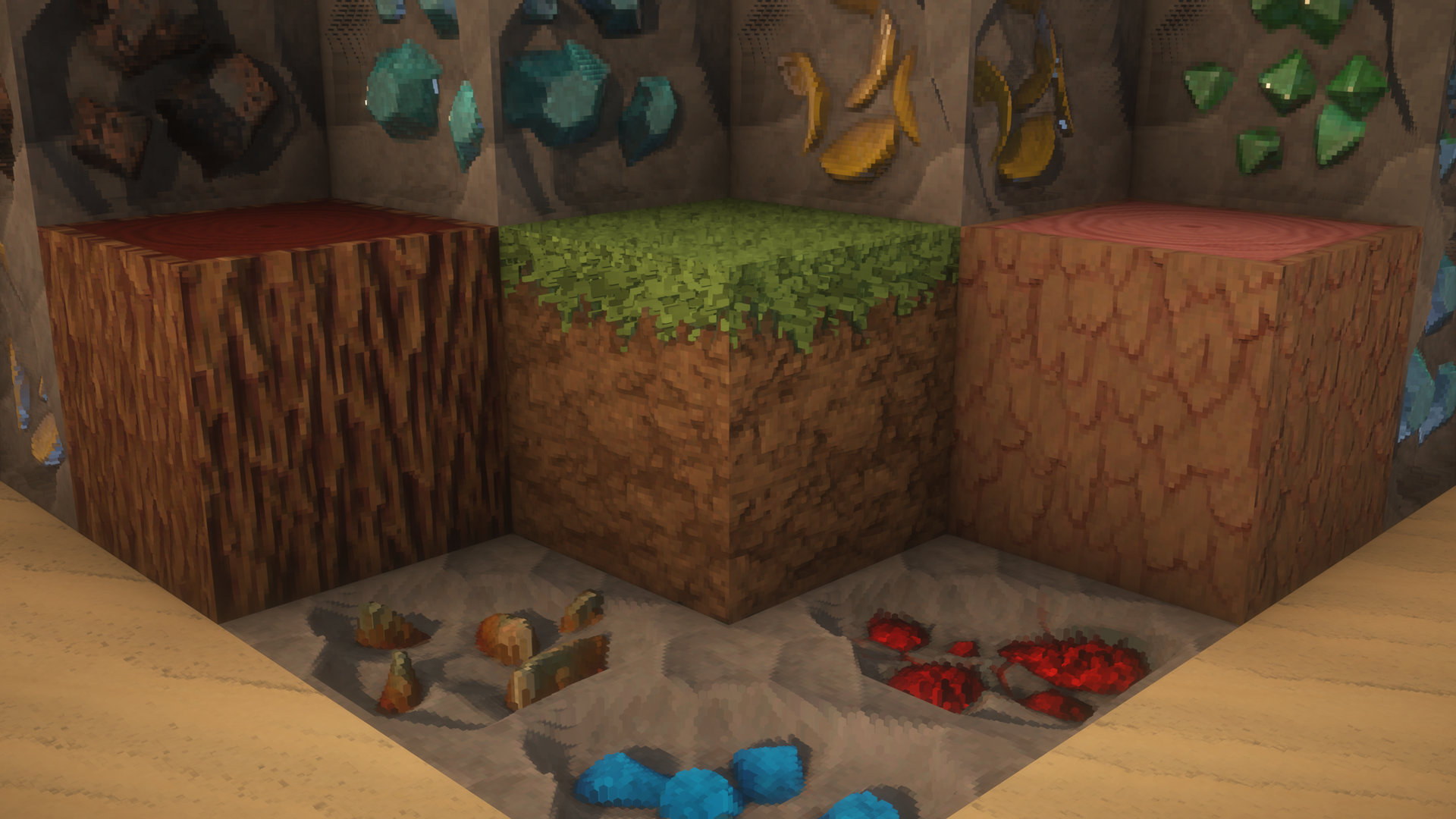
Truce is the definitive resolution to the oldest conflict in Minecraft resorcepacks: the battle between hyper-realism and stylized art. Instead of choosing a side, Truce creates a world where they coexist.
Experience a landscape where materials have the tactile weight of reality, but the vibrant soul of an illustration. This isn’t just a resource pack; it’s a balanced ecosystem of design.
Stop choosing between “Real” and “Cartoon.” Sign the treaty. Install Truce.
## TRUCE | Development & Setup
Truce is built on two core points:
Make it the best: Build the pack I’ve always wanted to play. So your feedback is important to make it the best it can be.
Performance: My goal is to deliver high-fidelity visuals through smart optimization, ensuring my creative vision doesn’t cost you your frame rate.
## Resolution Tiers
Standard (Free): x32 | x64 [Discord](https://discord.gg/DmDpUdN7JD)
Premium (Patreon Exclusive): x128 | x256 | x512 | x1024
[Patreon link](https://www.patreon.com/Legid)
## Important Configuration
To experience the 3D effect, this pack requires a shader that supports LabPBR textures. Ensure Parallax Occlusion Mapping (POM) is enabled in your shader settings.
### Quick Setup Guide:
BSL — Material > Enable Advanced Materials > Set format to LabPBR. Then, under Normals and Parallax, enable Parallax Occlusion Mapping.
Complementary — RP Support > Select LabPBR. Then go to Materials > LabPBR Materials and enable Parallax Occlusion Mapping.
Kappa — Terrain > Ensure Parallax Occlusion Mapping is enabled.
SuperDuperVanilla — PBR > Set mode to LabPBR. Then open Parallax Occlusion Settings and enable.
Using another shader? Look for “Parallax,” “PBR,” or “Advanced Materials” under the Texture or Material settings tabs to enable the 3D effect.
Translucent GUI
# Translucent GUI
This resourcepack adds translucency to the Minecraft GUI, which was previously not possible in vanilla for versions 1.21.1 and below. To add support for older versions of the game, a pixel perfect combination of black and transparent pixels was used. This results in a seemingly translucent look. Newer versions have luckily added translucency support making this approach obsolete.
The goal of this pack was to keep the vanilla look of the game but add transparency so the interfaces are less distracting when playing.
# Screenshots