Soartex Grove
Soartex Grove is a high definition 64x graphics replacement for Minecraft with an emphasis on clean artwork and minimal detail. This project is a continuation of Invictus a texture pack by Shoeboxam and goldbattle and Soartex a texture pack by Soar49. Grove adds thousands of textures.
I am a programmer, but I want to reincarnate it, that expressive artwork. So you can contact with me through email or curse forge and help me with texturing. Please be aware that many textures still W.I.P mostly mobs have not been made yet.
# Thank you for your support and enjoy!
*Am I allowed to redistribute this pack?*
Yes. Please check the license.
*Does Soartex Grove have the right to create a texture pack with Soar49’s textures and Invictus?*
Yes, Soartex is in the public domain. Shoeboxam gave me permission to update.
*Why do so many textures look similar or appear to be from the Fanver continuation?
Aside from direct contributors to Invictus, all graphics added by Invictus were created by Shoeboxam. When I wrote the Soartex Fanver license, I included the line: “The original artist of any texture may reuse their own texture elsewhere.” This permits me to reuse my own repertoire of content I created for Fanver in Invictus instead- I created many of the textures in Fanver. So because I receive permission from Shoeboxam I can use it.
*Do I need to use Optifine?*
The pack can be played without, but the pack looks better with Optifine due to the water color, better skies and light maps.
*Where I can check updates?*
https://gitlab.com/GroveGraphics/soartex-grove
SnapshotXBR
# SnapshotXBR
Automatic upscales of the latest textures using [xBRZ](https://sourceforge.net/projects/xbrz/), designed for use under [VanillaXBR](https://modrinth.com/resourcepack/vanillaxbr).
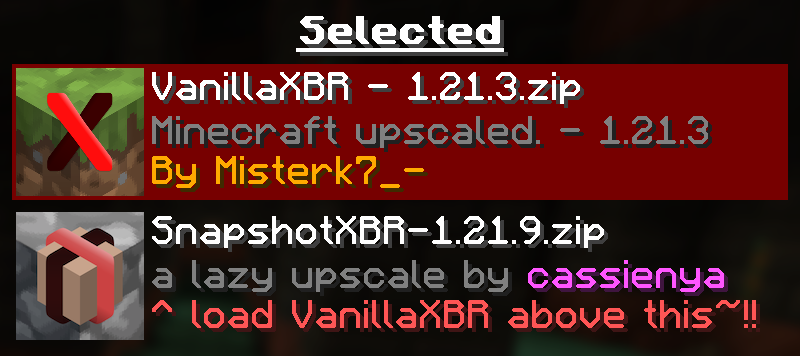
Ensure [VanillaXBR](https://modrinth.com/resourcepack/vanillaxbr) is loaded above SnapshotXBR for the best experience
## Why?
[Misterk7_-](https://modrinth.com/user/misterk7_-) is busy and [VanillaXBR](https://modrinth.com/resourcepack/vanillaxbr) doesnt get updates very quickly, so this is designed to be a sort of bleeding edge build that people can use day 1 as a fallback for textures not yet given [Misterk7_-‘s](https://modrinth.com/user/misterk7_-) touch
### You will notice…
– Gaps in-between block models (ex. missing corners of torches)
– Unnatural pixel blending (ex. the eyes of mobs may morph into the rest of the body)
– Clipped textures in the user interface (ex. the dimming is broken in the world menu)
These are issues that come with a ‘lazy upscale’ of the Minecraft textures, and so will not be fixed as a part of this pack. To fix them, read the recommended usage guidelines below.
### Recommended usage
– Use the latest version of [VanillaXBR](https://modrinth.com/resourcepack/vanillaxbr).
– Enable VanillaXBR above SnapshotXBR in the resource pack menu (as seen above).
– Create and/or improve automatically scaled versions of the textures yourself
## What if I want xBR versions of textures from [insert mod or resource pack]
[PackXBR](https://packxbr.f53.dev/) is the easiest way to make your own textures fit with VanillaXBR.
[](https://packxbr.f53.dev)
Smart Foxes
We all know that most mobs have stupid eye textures. However, I (and many others) do not like this style of eyes on foxes. I would like to see them more concentrated.
Moreover, I made this texture in a resolution of **32×32** or **64×64**, so that you can enjoy it with **Faithful 32×32** or **Faithful 64×64**
Small X Crosshair
This resourcepack changes the default crosshair into a simple and small crosshair in the form of an X.
It’s simple.
It’s practical.
It’s functional.
Compatible versions: 1.6.1 – 1.21.5
Small Totem Pops
Uses a simple model file to make the totem smaller when it’s popped/used.
Very useful for PVP, not recommended in singleplayer, since you won’t even pop much anyway…
Join the linked Discord server and ping me (relidium) if you have questions
SlippyPlays 5k
# **SLIPPY’S 5K TEXTURE PACK**
# 
# **CUSTOM ITEM**
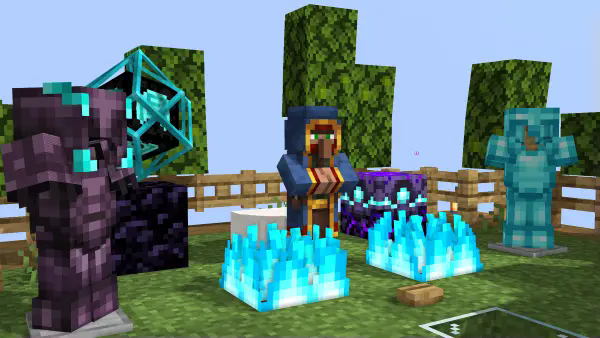
**Game Version : 1.20.1 AND UPPER**
**Pack Version : 1.0**
Features :
> – Custom Animations
> –
> – Custom Weapon Textures
> –
> – Custom Entity Models
> –
> – Secret Messages!
> –
> – Custom Banner Colours
> –
> – Custom Totem Particles
> –
> – No More Explosion Particles!
> –
> – 3D Crystal
## **Installation**
For PC Users –
Download the File from the Versions Tab
Open your resourcepacks folder in your .minecraft folder
Copy and paste the .zip / .rar file into the resourcepacks folder
Slippy’s_5k! has been installed!
If you face any more issues,REPORT ON DISCORD
## Credits
**@hardikgoyalog : For creating the Texture pack & Modrinth page**
**@slippyplays : for being awesome youtuber!!**
Slim Totem Players
This Resource Pack make so your Totem is your Player Skin, but in Slim. SkinMC already made this, but only for Wide Skins. You only need to extract the zip file, when go into the new Folder and go to the textures, when change the Alex skin to your skin AND do not forgot to change the name of your skin in the Folder to:”totem_of_undying.png” Here is the Totem maker from [SkinMC](https://skinmc.net/totem). MCTools has also a newer Generator with Slim and Bedrock Support, click [here](https://mc-tools.net/totem).
Skulls on Infested
This resource pack shows, which stone blocks have silverfish in them by adding a skull overlay (glowing effect icon).
It works with any resource pack (set this one as topmost), but you do need [Fabulously Optimized](https://modrinth.com/modpack/fabulously-optimized), [Continuity](https://modrinth.com/mod/continuity/) or OptiFine.
This pack works on
* Infested Stone
* Infested Stone Bricks
* Infested Mossy Stone Bricks
* Infested Cracked Stone Bricks
* Infested Chiseled Stone Bricks
* Infested Cobblestone
* Infested Deepslate
FAQ:
* Q: It doesn’t work at all!
* A: You need [Fabulously Optimized](https://modrinth.com/modpack/fabulously-optimized), [Continuity](https://modrinth.com/mod/continuity/) or OptiFine. Make sure it is set as the topmost resource pack. It may not work if any other resource pack changes the block/item models.
* Q: I don’t see skulls, I see something else!
* A: Your resource pack creator has decided to change it then ¯\_(ツ)_/¯
* Q: What about the ores?
* A: Check out [Items on Ores](https://modrinth.com/resourcepack/items-on-ores).
* Q: What about some other blocks?
* A: Check out [Items on Blocks](https://modrinth.com/resourcepack/items-on-blocks).
* Q: Please backport to…
* A: Nah.
* Q: Bedrock support?
* A: No, I don’t think the block models work the same there…
Skulls on Hazards
**Been away from Minecraft and are not sure what all those new blocks do? Get this pack and you’ll know exactly which ones to avoid!**
This resource pack shows, which blocks could be hazardous to you by adding a skull overlay (glowing effect icon).
It works with any resource pack (set this one as topmost), but you do need [Fabulously Optimized](https://modrinth.com/modpack/fabulously-optimized), [Continuity](https://modrinth.com/mod/continuity/) or OptiFine.
This pack works on
* TNT
* Magma Block
* Respawn Anchor (Overworld and End)
* Powder Snow
* Trapped Chest **(fixed textures)**
* Sweet Berry Bush (without berries)
* Big Dripleaf (inactive top layer)
* Pointed Dripstone (top/bottom tips)
* Wither Rose
* Cactus
* Tripwire (hooked)
* Sculk Sensor (inactive)
* Sculk Shrieker (summonable)
* (Suspicious) Sand, red sand, (suspicious) gravel without a supporting block
FAQ:
* Q: It doesn’t work at all!
* A: You need [Fabulously Optimized](https://modrinth.com/modpack/fabulously-optimized), [Continuity](https://modrinth.com/mod/continuity/) or OptiFine. Make sure it is set as the topmost resource pack. It may not work if any other resource pack changes the block/item models.
* Q: I don’t see skulls, I see something else!
* A: Your resource pack creator has decided to change it then ¯\_(ツ)_/¯
* Q: Some blocks are still not supported!
* A: Yes, I skipped some blocks to prevent making the worlds too ugly. These include: (soul) fire, lava, (soul) campfire, End Crystal, TNT minecart, beds (for Nether, End), pressure plates and buttons.
* Q: What about the ores?
* A: Check out [Items on Ores](https://modrinth.com/resourcepack/items-on-ores).
* Q: What about some other blocks?
* A: Check out [Items on Blocks](https://modrinth.com/resourcepack/items-on-blocks).
* Q: I want to know about infested blocks!
* A: Check my profile.
* Q: Please backport to…
* A: Nah.
* Q: Bedrock support?
* A: No, I don’t think the block models work the same there…
SKT’s Shorter Grass

### 
### 📖⠄Description
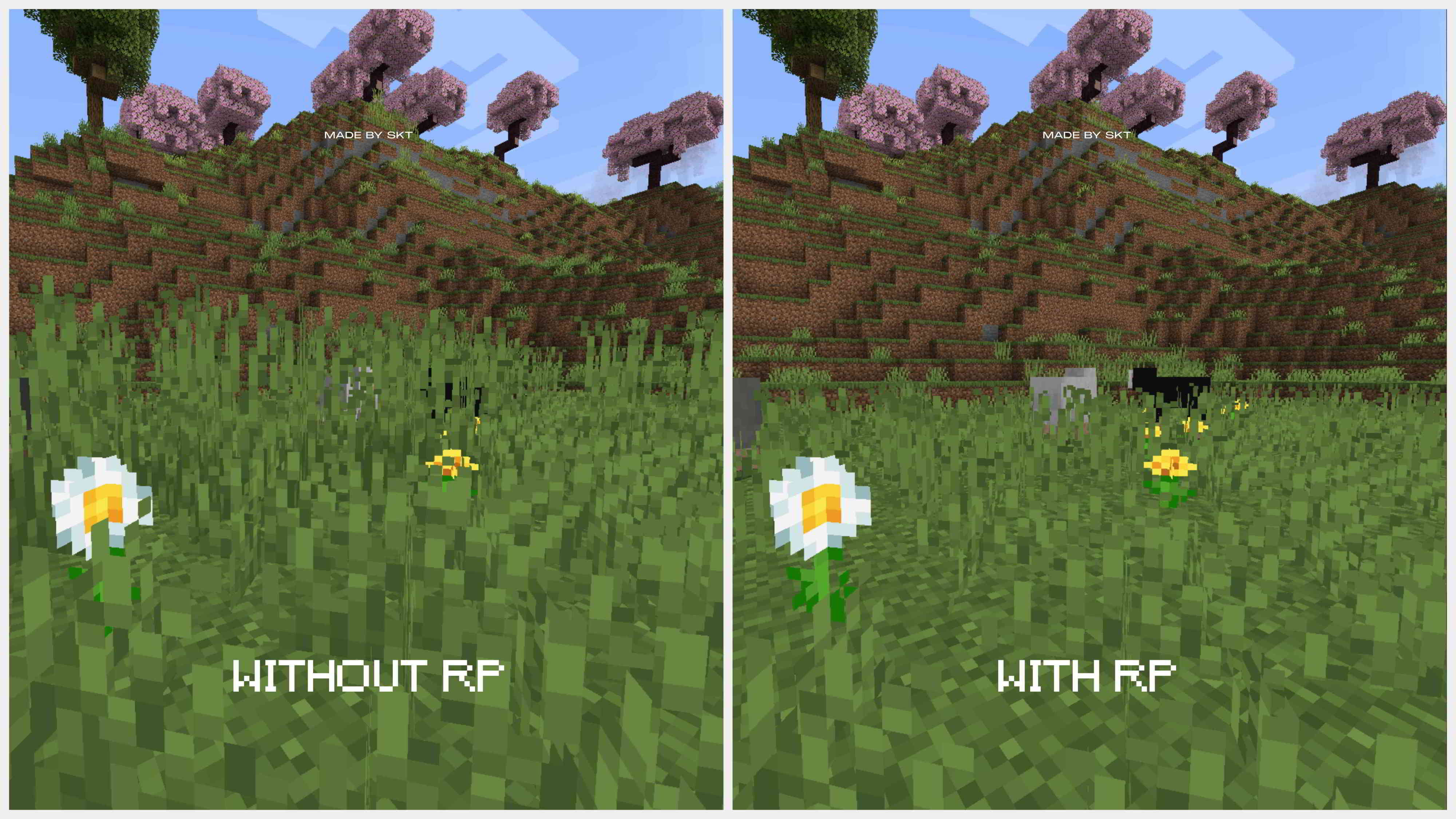
make tall grass shorter by 14 pixel and short grass shorter by 4 pixel (works with other resource pack)
### ⚠️⠄Important
make sure this resource pack is above other resource packs
### 🖼️⠄Ingame Screenshot
### 
### 
### 👋🏼⠄Follow Me