Saturn Font
# Saturn-Font
The _cursed_ font from Earthbound, now localized entirely within your Minecraft!
Uses TTF fonts, which means 1.14+ is supported.
taken from [this font package](https://earthboundcentral.com/2009/11/ultimate-earthbound-font-pack/), under CC-BY-SA.
Sans Totem
This texture pack adds sans from the rpg game what is named undertale.Have fun with it.
WARNING:THIS TEXTURE PACK İS NOT ORIGINAL BUT IT DIDNT COPYIED FROM SOMEWHERE IT MADE BY ME FROM PHOTOS ITS A COSTUM TEXTURE PACK
Rocking Boats (Optifine/CEM)
This pack makes the boats and rafts rock while in water, but will stop rocking when on land or being occupied. (there are two versions, see bellow)
### Rocking and Rolling Update
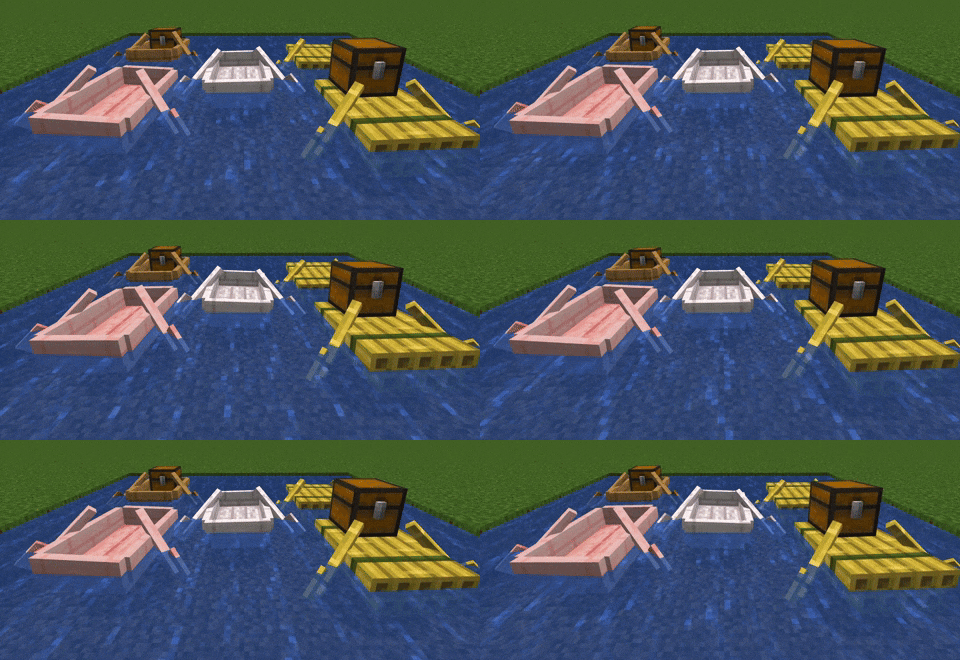
### OG Rocking Boats
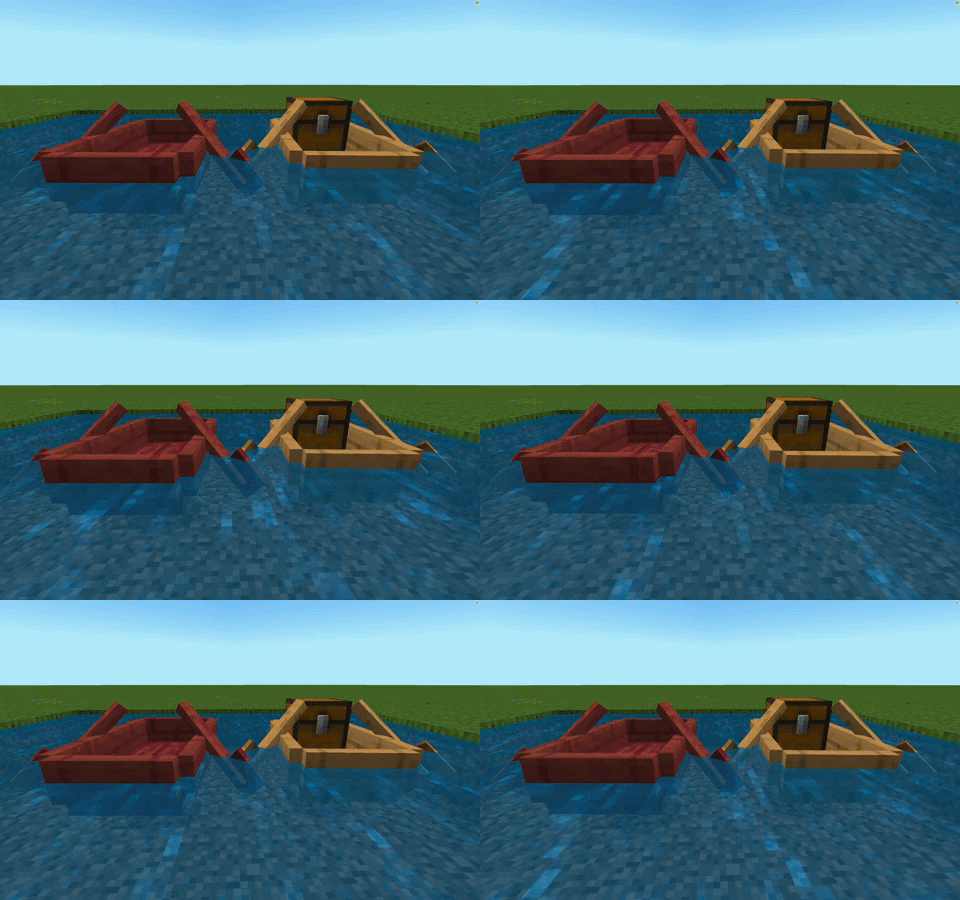
[Optifine](https://optifine.net/home) (or a cem loader mod) is required
Credit to Kreazive for making the [original pack](https://www.planetminecraft.com/texture-pack/navila-floating-boats-fboats-resource-pack-by-kreazive/). I wanted the pack updated to 1.19 for the chest boats and bamboo rafts, so I’m posting my own version of the pack to here. I added the chest boats; made the boats move less and stop rocking when being ridden.
Works with any boat texture pack (that doesn’t use a custom cem boat model)
ResourceFix
Warning
This pack is by no means a stable fix to make all 1.19.2 packs work perfectly on 1.12.2. You may experience crashes and rendering glitches with certain packs. ResourceFix will not load on vanilla 1.12.2, and requires OptiFine as the game will refuse to load the pack.
In addition, the assets from vanilla 1.19.2 are required to load this pack. Directions on doing that are given below.
ResourceFix
ResourceFix is a resource pack for 1.12.2 that makes it possible to load resource packs from 1.17 – 1.19.2.
Pack Order
The following pack order is required for ResourceFix to function correctly:
- ResourceFix
- Packs to be loaded with ResourceFix (includes Programmer Art)
- 1.19.2 assets (2nd to bottom)
- Default (bottom)
ResourceFix may override a few things, and in that case if you’re feeling adventurous you can try loading a pack on top of ResourceFix. ResourceFix handles most things correctly, and loading a pack on top of ResourceFix (especially one that messes with models or blockstates) can lead to crashes and instability.
Prerequisites
ResourceFix does NOT provide the vanilla models and textures. If you load ResourceFix with nothing below it, you will see missing models or the game will potentially crash.
Directions
To get ResourceFix working with the vanilla 1.19.2 assets:
- Locate a 1.19.2 jar file. If you are on Windows this may be in %appdata%/.minecraft/versions/1.19.2/, on macOS it may be in /Library/Application Support/minecraft/versions/1.19.2/, and on Linux it may be in ~/.minecraft/versions/1.19.2/
- Open the jar file and find the assets folder
- Open the resource pack folder for your 1.12.2 instance
- Make a new folder with any name you choose
- Copy the assets folder into the new folder you made
- Find a pack.mcmeta file from any pack and copy it into that folder
- Load the pack under ResourceFix
To get Programmer Art:
- Go back to the main folder where you have Minecraft installed (should be .minecraft or minecraft)
- Open assets/indexes/1.19.json
- Search through the file for “programmer” and find the hash. Remember the first 5 letters and numbers
- Go up one level and find the objects folder
- Enter the directory that matches the first two characters of the hash
- Locate the file that matches the hash
- Copy it into your instance’s resource packs folder and rename it to have the .zip extension
State of the project
At the moment, ResourceFix only covers block models. Item models will be supported in the future, and most packs that change things such GUI textures and fonts should work.
Entity models such as chests are bugged, and I plan to use OptiFine’s custom entity model system to fix them at some point.
While this pack should work with most packs and has worked with many of the packs I have tested, if the game crashes look at the game log and replace the blockstate file with one from vanilla.
Unresolvable Issues
Redstone, mushroom blocks and glass panes use the models from 1.12.2 but are redirected to use the modern textures, so any models from a pack loaded with ResourceFix that affect those blocks will not work.
CTM will also never work, as 1.12.2 and 1.13+ use different names and models can’t affect those names.
Since custom models can’t be defined for liquids, water and lava will use the texture from 1.12.2.
Results
As stated earlier, ResourceFix is only meant to target block models and textures at the moment. These results do not factor in any rendering glitches or bugs with items/entities.
🟢 means that the loaded pack appeared to work perfectly fine
🟡 means that there were some minor issues
🔴 means that there were major issues such as crashes or the loaded pack not functioning at all
- Bare Bones 🟢
- Stay True 🟢
- XRay Ultimate 🔴
- Patrix 32x 🔴
- Faithful 32x and 64x 🟢
- Golden Days 🟢
- UltimaCraft v1.4 🟡 (saplings use missing model)
Remove Potion Particles
Compatibility: **_1.6.1_** to **_1.21.1_**.
===========================================
Remove Potion Particles completely eliminates the visual clutter caused by potion and beacon particles.
* * *
### Additional Information:
At only 3.6KB, this is a super-lightweight resource pack that prevents the particle effect particles from being loaded into VRAM. Paired with other performance-enhancing mods, you can expect a framerate increase upwards of 15 FPS using this resource pack making it perfect for lower-end systems.
While it does a great job of removing particle effects, it does unfortunately have a single drawback: it can sometimes make it slightly harder to confirm if a Zombie Villager has been splashed with a Potion of Weakness during the curing process. If you’re actively working with Zombie Villagers it might be easier to temporarily disable this resource pack until you’ve finished curing the Zombie Villager.
* * *
### Support development:
If you enjoy this resource pack and would like to support my work, please consider making a donation. Even a donation as little as £1 or $1 is appreciated and helps keep me motivated to continue development on this resource pack.
* [Support development via Ko-fi!](https://ko-fi.com/brandontgs)
or if you’d like, through a Cryptocurrency of your choice! 😀
* Ethereum (ETH): `0x52Bb639Ce58bDa894eEbc583831158213Af9F8F3`
* Bitcoin (BTC): `bc1qvu6pa9kzlwe6te54drta7w85apanuk7m5zyv78`
* Monero (XMR): `4B5LzGGRTKz2hn1ETd7Nwo7a6k7Kkhr7nGKmos3cNgdofmhqRGAxr4ZXDcitjkavogXrzur7RJdeeaqgYzqre7qCTVxzBL8`
* Dogecoin (DOGE): `DGpyWyJtRJyikSkEUoaiwcc3C9GTGvnrfp`
Thank You! 🥰
=============
Recounted
Recounted Alpha is a very incomplete early version of the pack, with a focus on block textures. Very few mobs have been retextured, and even fewer items. Try it out, and give your feedback!

Brighten and stylize your world with Recounted, a resource pack inspired by the pixel art of the Minecraft Live Biome Votes and Mob Votes.
Recounted began as a port of the resource pack used in the official 2023 Mob Vote server on _Minecraft: Bedrock Edition_. Very soon after, I started adding new models and textures to fill in gaps left by the official pack, given it was designed for a particular hand-made Adventure Mode server. Now the pack has grown signifigantly, with cues taken from the existing designs and original Mob Vote videos.
Currently, Recounted is being developed exclusively with vanilla support in mind, and for the latest release version. The addition of modded features such as connected textures and custom entity models may come in the future.
Vanilla soundtrack tweaks (Reactive Music: OFF)
This resourcepack copies vanilla but as a songpack for Reactive Music.
This pack can be helpful as a template for other songpacks based on vanilla music or if you want to change music to vanilla without disabling the mod.
# How to install the resource pack
– Download [Reactive Music mod](https://modrinth.com/mod/reactive-music)
– Download this resource pack
– Open Reactive Music settings (use [Mod Menu](https://modrinth.com/mod/modmenu) or `/reactivemusic` command in the world)
– Choose **Reactive Music: OFF** in the list
– There are a few different special versions available that you can choose if you want
# Different versions in one file
### There are different versions of the songpack all stored inside the pack:
– Available in Reactive Music menu by default:
– latest version preset;
– Alpha 1.2.0 / Beta 1.7.3 preset;
– C418 songs only preset;
– Old main menu songs only preset;
– Creative mode exclusive songs only;
– Creative mode presets based on multiple presets:
– latest version;
– Alpha 1.2.0 / Beta 1.7.3;
– C418 songs only;
– Available only by unarchiving the songpack:
– presets for every Minecraft version where new music were added.
How to choose the version of the pack:
– Some of the main presets are already available in Reactive Music menu. Just select it if it’s there;
– If you want something more specific, unarchive the songpack;
– Copy yaml file of the version you want to use from _songpack-versions_ folder;
– Past it in songpack root folder (the folder where _README.txt_ is);
– Preferably archive the pack again;
– Select this version in Reactive Music menu.
PVP: Golden Knight

# 🛡️ [Pack Name]
> A focused resource pack designed to enhance and refine your PvP experience.

—
### 🎯 Core Features
Essential tweaks to elevate your combat:
* **Low Fire:** Reduced fire size so flames don’t fill up your screen while burning.
* **Redesigned Equipment:** Fresh, high-quality textures for all armor, tools, and swords.
* **PvP Essentials:** Custom textures for Netherite, Totems of Undying, Ender Pearls, and End Crystals.
* **Item Animations:** Fluid, custom animations applied to Netherite items and Totems.
* **Refined Colormap:** A slightly lighter colormap that makes the environment much more pleasant on the eyes.
—
### 🚧 Development Status
**Early Access.** This resource pack is currently in early development. The foundation is set, but expect massive content additions and ports to newer Minecraft versions in future updates.
Puzzled’s Custom Animals
REQUIRES FABRIC, CEM & ETF:
This resource pack changes the look of the Cows, Pigs, Sheep, Horses and Chickens. The pack stays true to the vanilla Minecraft style but just adds extra features.
Cows: Floppy ears, a snout, mouth/jaw and tail. Variant 1 (M); Horns but no udder. Variant 2 (F): No horns with udder
Pigs: Floppy ears, mouth/jaw, and tail. Variant’s: 4 stages that get progressively more muddy.
Sheep: Cuter face, floppy ears, snout and tail.
Horses: Better mane with bangs. Variant: replaced the spotty texture with one inspired by the Clydesdale (big fluffy feet)
Chickens: Larger beak. New rooster/cockerel variant with a red wattle and comb.
Individual Animal Packs (Coming VERY Soon)
Optifine Pack (Coming VERY Soon)
Created By APuzzledSlime
Twitch, Youtube, TikTok and Twitter 🙂
Purple Netherite
Have you ever thought that Netherite should be purple? No? That is a stupid idea? Well I made it anyway.
This pack makes Netherite and all associated items purple.
It dosen’t change the armor trims because there already is a purple trim, it’s intentional.